
Key Takeaways
- A fingerprint browser is useful for AI-powered account operations when it becomes a controlled account workspace.
- Browser profiles matter most when AI workers need persistent login state, task ownership, and reviewable activity.
- Profile isolation does not replace team policy, human approval, or platform-specific operating rules.
- The strongest setup maps one account to one environment, one workflow, and one recovery path.
- Start with one repeatable account workflow before scaling profiles or AI workers.
A fingerprint browser is a browser tool that lets teams run separate profiles with distinct browser, session, and workspace settings. For AI-powered account operations, its value is not only profile creation. Its value is giving AI workers a controlled place to operate logged-in accounts without mixing sessions, roles, or task history.
AI teams usually discover this need when browser tasks become real operations. A research agent may need one profile. A support workflow may need another. A publishing assistant may need a third profile with stricter review. Without separated workspaces, the team can lose track of which account was used, which task ran, and who approved the result.
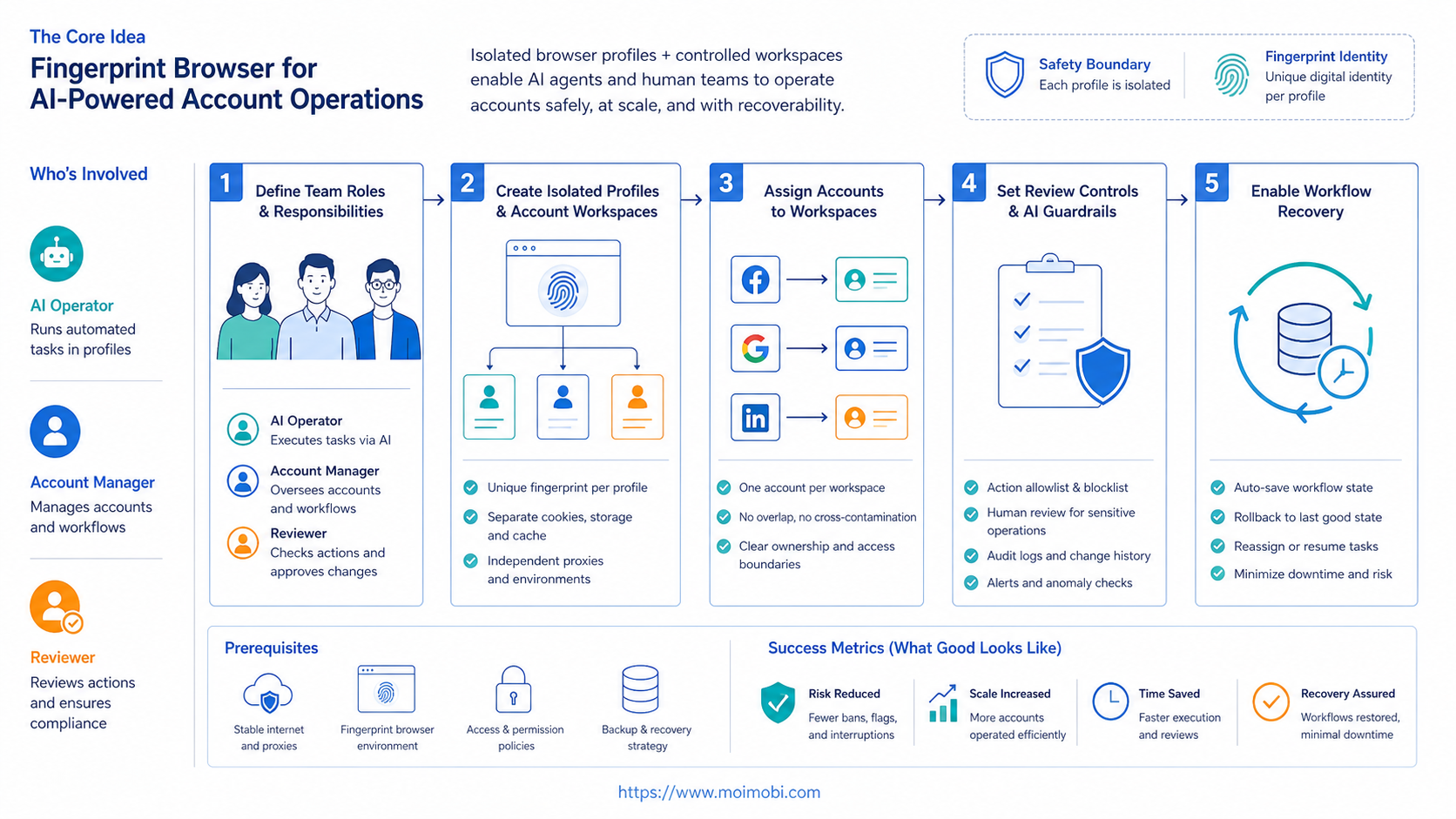
The practical model is simple: one account, one browser profile, one workflow owner, and one recovery path. That model turns the fingerprint browser from a technical profile manager into part of an account operations system.
This matters because AI account work is not a single action. A real workflow may include opening a dashboard, checking a queue, drafting a reply, waiting for review, returning to the same profile later, and recording the result. If all of that happens in a shared browser, the team cannot easily separate account state from task state. A dedicated profile gives the workflow a stable operating lane.
The Core Idea Behind Fingerprint Browser for AI-Powered Account Operations
The common misunderstanding is that a fingerprint browser is mainly a way to create many browser identities. For business teams, that framing is too narrow. The better model is profile-based account operations.
Browser fingerprinting is a real web privacy and measurement topic. The W3C fingerprinting guidance explains how different browser surfaces can contribute to identification, and Mozilla describes browser fingerprinting as a privacy concern. Those sources do not tell teams how to run accounts. They do explain why browser environment details should be handled carefully.
For AI operations, the key question is not "How many profiles can we create?" The question is "Can each AI worker use the correct account environment, perform the assigned task, and leave a clear record?"
That is why a fingerprint browser should connect to account ownership. A profile should have a name, purpose, account owner, platform, allowed task type, and review rule. If a team cannot answer those fields, adding more profiles will make operations harder to audit.
This is also where an AI browser profile becomes different from a normal browser window. It is not just a container. It is a workspace where AI-assisted actions can be prepared, reviewed, and recovered.
For example, a profile called "Client A - Instagram Review" should not also be used for marketplace admin work, competitor research, and test logins. The name should reveal the account, platform, and workflow boundary. The same rule applies to permissions. If an AI worker is allowed to summarize comments, that does not mean it should be allowed to publish posts or change account settings.
This operating model makes audits simpler. When a task fails, the team can inspect the profile, account, workflow, reviewer, and failure reason in one place. Without that model, the team only sees scattered browser sessions and unclear activity.
Why Teams Search for This Topic
Teams search for this topic when AI starts touching real accounts. Chat-style AI can draft content or summarize instructions. Account operations need more: a place to log in, run tasks, preserve context, and hand off work.
Typical search intent comes from four problems:
- too many accounts are being handled from unclear environments
- AI workers need browser access, not only text output
- teams need to separate research, support, publishing, and admin work
- managers need logs that explain what happened during a task
A social media team may use one profile for content research, another for comment review, and another for account settings. An ecommerce team may separate marketplace dashboards, customer support, and product update workflows. An agency may need one workspace per client account.
Playwright's browser context documentation describes isolated browser contexts for testing. Business account operations are not the same as software testing, but the boundary is similar: session separation has to be deliberate. If contexts or profiles are mixed, the work becomes harder to reason about.
The operational pressure grows when AI workers run in parallel. One worker might prepare a reply while another collects lead data. A third might monitor a dashboard. Each worker needs a clear account lane, not shared browser state.
Parallel work also changes the supervision model. A manager cannot review every mouse movement, but they can review whether the right worker used the right account environment for the right task. That is the level where profile operations become useful. The browser profile becomes an operational unit, not just a technical setting.
Who Benefits Most and In What Situations
The best fit is a team with repeated logged-in browser workflows. The team does not need a fingerprint browser for every small research task. It needs one when account state, profile separation, and review history matter.
| Team Type | Account Operation | Profile Role | Success Metric |
|---|---|---|---|
| Social media team | Monitor comments and prepare replies | One profile per social account | Review time and accepted replies |
| Ecommerce team | Check marketplace dashboards | One profile per seller workspace | Completed checks and fewer account mix-ups |
| Agency team | Manage client account workflows | One profile per client account lane | Client separation and task traceability |
| Support team | Review customer messages | One profile for each support role | Escalation clarity and rework rate |
Good-fit teams usually have account roles, recurring tasks, and human reviewers. Weak-fit teams only want vague automation or one-off browsing. A profile system will not fix unclear operating rules.
Use a fingerprint browser when the workflow needs profile isolation, role assignment, and task history. Use a normal browser when the work is public research or temporary browsing. Use mobile environments when the workflow depends on app screens or mobile-only account state.
MoiMobi fits the broader account operations case because it connects browser profiles with multi-account management, mobile environments, and workflow execution. The browser profile is one layer inside a larger operations model.
The decision should be based on where the work actually happens. If the task lives in a web dashboard, a browser profile is usually the right environment. If the task depends on an Android app, notification state, or mobile-only screen flow, the team should evaluate a cloud phone execution environment instead of forcing the task into a desktop browser. Many account operations programs eventually need both layers, but they should not be mixed without a clear reason.
How to Evaluate or Start Using Fingerprint Browser for AI-Powered Account Operations
Start with the workflow, not the tool settings. A long list of fingerprint controls does not help if the team cannot define the account and task.
Use this rollout path:
- Choose one workflow. Pick a repeated task such as comment review, dashboard monitoring, or lead research.
- Assign the account. Map each account to one profile and one owner.
- Define allowed actions. Separate research, drafting, replying, publishing, and account changes.
- Add human review. Pause sensitive actions before they reach a live account.
- Record failures. Track login issues, page changes, profile conflicts, and rejected AI outputs.
- Review weekly. Decide whether the profile model is reducing work or adding supervision.
This path keeps the system grounded. The first goal is not to run many AI workers. The first goal is to prove that one AI worker can run one account workflow cleanly.
Evaluation should also include access control. A profile assigned to a client account should not be used casually for internal tests. A support profile should not be reused for publishing. Those boundaries are simple, but they prevent many avoidable mistakes.
Add a short profile brief before the pilot starts. The brief should name the platform, account, owner, reviewer, permitted actions, blocked actions, and normal recovery path. It should also define what the AI worker may see. For example, a monitoring worker may read dashboard status and collect public comments, but it may not export private customer data unless the team has a specific business and compliance reason.
Then write the workflow in plain steps. A usable draft might say: open the profile, confirm the correct account, check the comment queue, classify comments, draft suggested replies, send the output to review, and record the review result. This simple structure makes automation easier to evaluate because everyone knows what should happen before the AI worker runs.
Teams that also use mobile apps should add device isolation and mobile execution only where needed. Browser profiles handle web workflows. Cloud phones or Android devices handle app-based workflows.
Mistakes That Reduce Results
The first mistake is treating every profile as interchangeable. Profiles should be named and assigned. A profile with no owner becomes another unclear workspace.
The second mistake is letting AI workers execute sensitive actions without review. AI can prepare a reply, summarize account data, or draft a task plan. The team should still define which actions require human approval.
The third mistake is ignoring recovery. A task may fail because a login expired, a page layout changed, or the AI instruction was too broad. If the platform only reports "failed," the team cannot improve the workflow.
The fourth mistake is using profile volume as a success metric. More profiles do not mean better operations. Better operations mean fewer account mix-ups, clearer review, faster recovery, and more repeatable task completion.
The fifth mistake is using high-risk language and high-risk behavior. Terms like bypassing platform enforcement or mass spam should not be part of a serious operations model. Better language and better practice focus on account isolation, separated workspaces, review, and compliance with platform-specific rules.
Pilot Rollout, Measurement, and Recovery Checks
A pilot should use one account group and one repeatable task. For example, an agency might test weekly account monitoring across three client profiles. An AI worker collects updates. A human reviews the summary. The team records whether the result was useful.
Track practical metrics:
- task completion rate
- reviewer correction time
- login interruption count
- profile conflict count
- wrong-account incident count
- rejected output rate
- recovery time after failure
These metrics show whether the fingerprint browser improves control. A task that completes but creates heavy review work may not be ready to scale. A task that fails clearly may still be useful if recovery is fast.
Recovery checks should be part of each review. Ask whether the failure came from the browser profile, the account state, the page, the AI instruction, or the approval rule. Then change the workflow before adding more profiles.
Scale by account group, not by excitement. Add new profiles only after the first workflow has clear owners, repeatable steps, and explainable failures.
A good weekly review should include both operations and content. Operations review asks whether the right account environment was used, whether any profile was shared incorrectly, and whether failed tasks were easy to diagnose. Content review asks whether the AI output was useful, accurate, and on-brand. Keeping those reviews separate prevents a common mistake: blaming the browser profile for poor prompts, or blaming the AI model for messy account ownership.
Teams should also keep a small change log for each profile group. Record when a profile was created, when account access changed, when the workflow changed, and when a reviewer changed the approval rule. This does not need to be complex. A simple log helps explain why a workflow suddenly performs differently after a page update, a new account role, or a revised task policy.
The scaling decision should be conservative. Add one new account group only when the current group has stable completion rates, low wrong-account risk, and clear review ownership. If the pilot still depends on one person remembering hidden exceptions, the system is not ready for more AI workers.
Frequently Asked Questions
What is a fingerprint browser?
A fingerprint browser is a browser tool for running separate profiles with distinct environment and session settings. Teams use it to separate account workspaces.
Why does a fingerprint browser matter for AI operations?
It gives AI workers a consistent browser environment for logged-in tasks. That helps teams map accounts, workflows, and review steps more clearly.
Is a fingerprint browser the same as an AI browser?
No. A fingerprint browser manages profiles and account environments. An AI browser adds AI-driven task planning or execution. Some systems combine both.
Can a fingerprint browser prevent all account risk?
No. It can support separation and cleaner operations, but it cannot replace platform rules, careful workflow design, or human judgment.
How many profiles should a team start with?
Start with the smallest number needed for one workflow. Three to five profiles may be enough for a pilot, depending on account roles.
What should agencies check first?
Agencies should check client separation, permissions, profile ownership, task logs, and recovery steps. Those controls matter more than raw profile volume.
When should teams add cloud phones?
Add cloud phones when the workflow depends on mobile apps, Android state, or app-only actions. Browser profiles should not carry mobile-only work.
What is the biggest implementation mistake?
The biggest mistake is creating many profiles before defining ownership. Every profile should have a purpose, owner, account, and allowed workflow.
Conclusion
Fingerprint Browser for AI-Powered Account Operations is best understood as an account workspace model. The browser profile gives AI workers a controlled place to run logged-in web tasks, but the team still needs ownership, review, and recovery.
Start with one workflow. Assign one account group, one profile set, one AI worker role, and one reviewer. If the process is traceable and failures are explainable, expand. If not, fix the workflow before adding more profiles.



