
Key Takeaways
- An AI employee platform is most useful when publishing work has repeatable steps, clear account ownership, and review points.
- Publishing workflows need more than text generation. They need browser sessions, mobile environments, task logs, approvals, and recovery checks.
- Start with one workflow lane, such as draft review to scheduled publishing, before expanding to multiple accounts.
- Use isolated account environments when publishing depends on logged-in web dashboards or mobile apps.
- Judge success by completion rate, review load, error recovery, and content consistency, not only by output volume.
An AI employee platform is a system that connects AI planning with real task execution, so publishing workflows can move from instructions to reviewable action. Content teams do not need a robot editor for every decision. They need fewer repeated handoffs around drafting, formatting, publishing, replying, and reporting.
Publishing workflows break when teams treat AI as only a writing assistant. A caption is not a completed post. A content calendar is not a published campaign. Teams still need account access, approval rules, browser or mobile execution, and task records. This is where an AI execution platform becomes different from a document generator.
What Is AI Employee Platform for publishing workflows?
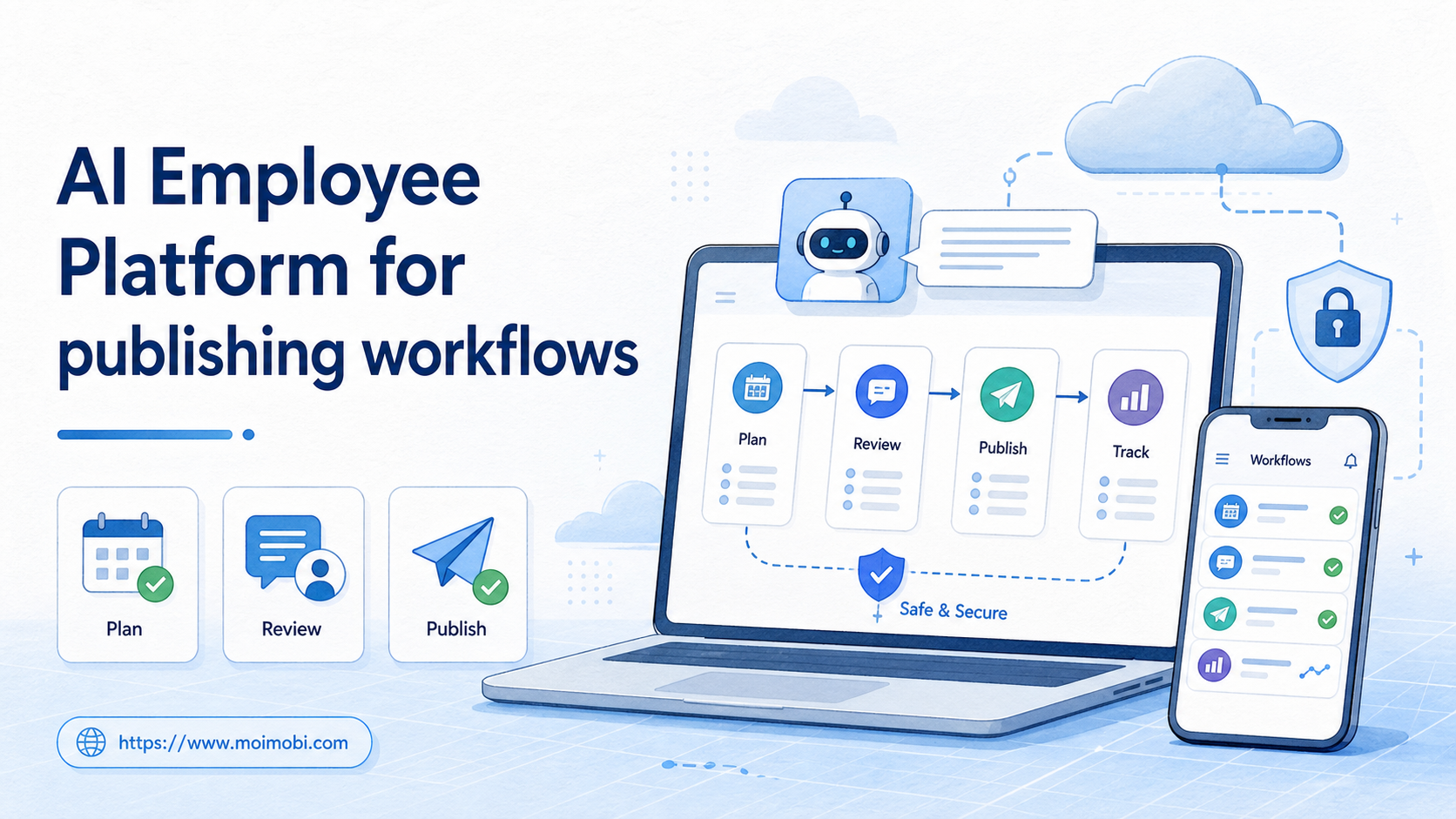
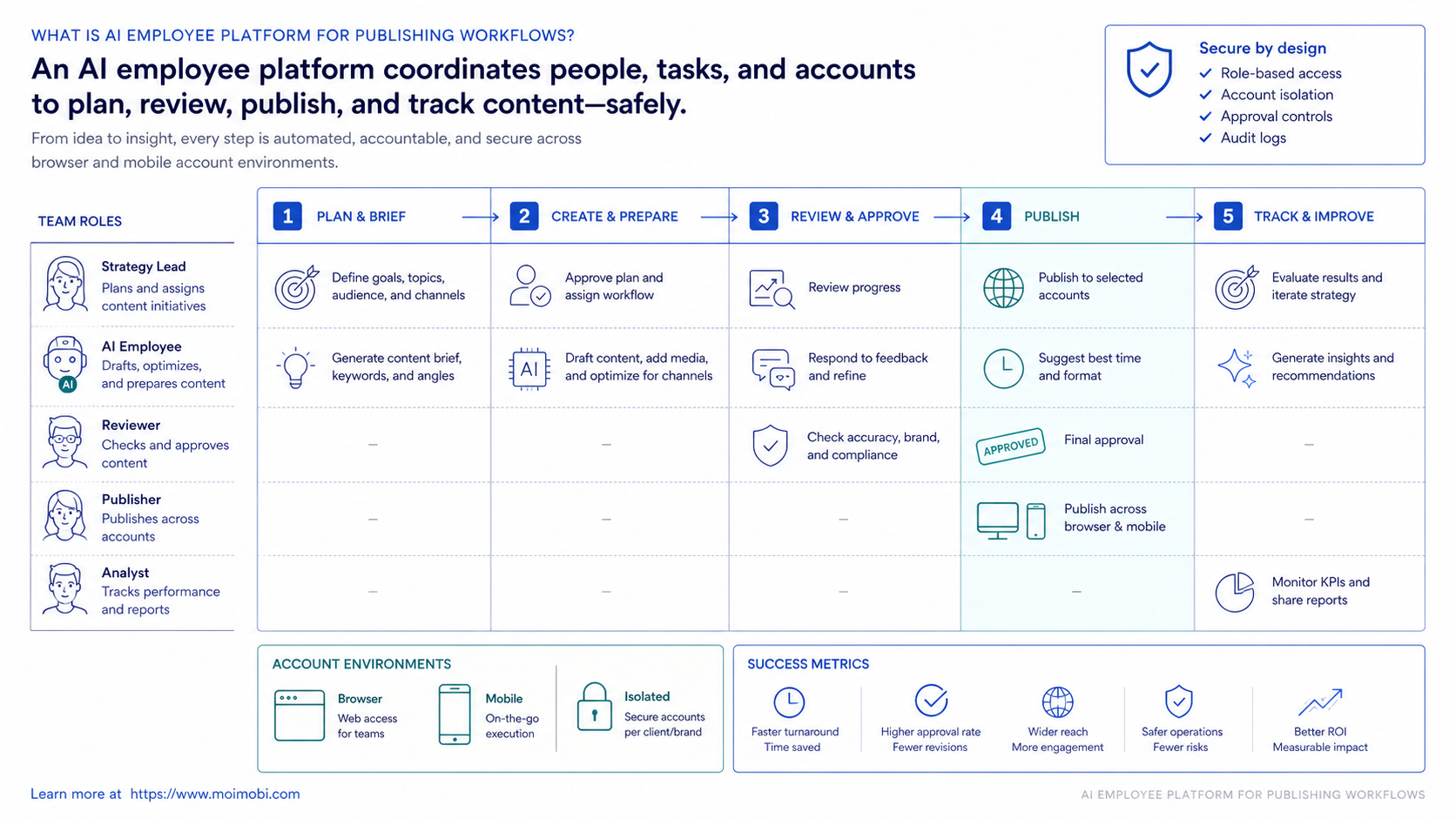
For publishing workflows, the platform turns repeatable content operations into assigned tasks that can be planned, executed, reviewed, and tracked. The operating layer usually combines AI instructions, browser or mobile execution environments, account separation, and workflow memory.
In a simple publishing lane, AI may draft a caption, select a template, prepare hashtags, open a web dashboard, fill fields, wait for human approval, and record the final status. In a mobile-first lane, the same workflow may need a cloud phone or Android device environment because the publishing step happens inside a mobile app.
Execution is the important distinction. A normal AI writing tool stops at text. An AI employee software layer should connect the text to an account workspace, a publishing checklist, and a visible result.
Browser automation standards such as the W3C WebDriver specification describe remote browser control as a formal automation model. Playwright documents actionability and auto-waiting rules for safer browser interaction. Those details matter when a publishing workflow depends on logged-in dashboards, buttons, forms, and page state.
Why AI Employee Platform for publishing workflows Matters
Publishing is rarely one task. The work becomes a chain of small actions across roles, accounts, tools, and timing rules. One person may prepare the asset. Another person checks compliance or brand tone. A third person publishes from the right account and confirms the post URL.
Coordination is the real value. The workflow gets a place to run, a status model, and a record of what happened. That matters when teams publish across social media, marketplaces, communities, and customer channels.
| Workflow area | Human role | AI worker role | Success signal |
|---|---|---|---|
| Content preparation | Approves topic and asset | Drafts copy and variants | Ready draft with owner approval |
| Account assignment | Chooses account group | Maps task to browser or mobile environment | No duplicate assignment |
| Publishing execution | Reviews sensitive steps | Completes repeatable fields and checks status | Post published or blocked with reason |
| Follow-up | Handles judgment-heavy replies | Collects comments, messages, and task results | Review queue is current |
This structure is also why multi-account management belongs inside the publishing workflow. Without account ownership, a team can publish from the wrong profile, miss a review step, or lose track of which environment completed the task.
Publishing Scenario: From Approved Draft to Account-Specific Post
A practical scenario starts after the content idea has already been approved. The team has a short video, a product update, or a campaign message. The remaining work is operational: turn the approved asset into account-specific posts, route each item for review, publish through the right environment, and record the result.
In that scenario, the AI worker does not invent the campaign strategy. It prepares variants, checks required fields, maps the task to the correct account environment, and waits when the workflow reaches an approval gate. The human reviewer still owns judgment-heavy decisions such as claims, pricing language, audience sensitivity, and campaign timing.
The workflow becomes easier to manage when each publishing item has a few fixed fields:
- Content asset or draft ID.
- Target platform and account group.
- Assigned browser profile, cloud phone, or Android device.
- Required approval owner.
- Scheduled time or publish window.
- Final result, post URL, or failure reason.
This field list prevents the workflow from becoming a loose chat thread. It also gives operations managers a clean way to compare AI-assisted work with manual publishing.
Key Benefits and Use Cases
Strong use cases are repetitive, account-based, and easy to verify. A team can begin with tasks that already have a standard operating procedure: prepare a post, check the account, fill fields, attach media, request approval, publish, and log the result.
Common publishing workflows include social post preparation, product update posting, community announcement publishing, short-form video caption preparation, and customer update distribution. Teams can also use social media marketing workflows when publishing must connect with replies, monitoring, and lead follow-up.
Operational gain is not only speed. Fewer steps go missing. Managers can see whether a task is pending review, blocked by login, waiting on media, or completed. That record becomes important when multiple operators and AI workers touch the same content pipeline.
Mature teams treat the platform as a shared operating layer. Editors work on content quality. Operators handle account readiness. Managers review task status and exceptions. AI workers carry the repetitive parts between those roles, but every lane still has an accountable owner.
A small e-commerce team may publish product updates to Instagram, TikTok, and a marketplace community. The AI worker can draft platform-specific captions, prepare asset names, open the correct account workspace, and record whether the task is ready. The final publish step may still require human approval until the process proves reliable.
Account Environments and Publishing Ownership
Fragility starts when the team does not know which account environment owns the task. Account ownership should be explicit before automation begins. A browser profile may handle web dashboards. A cloud phone may handle mobile-only posting. A reviewer may own the final approval state.
Each account environment should also hold operational context. Useful context includes login status, recent task history, proxy or routing notes, attached assets, and known recovery steps. Keeping those details close to the account reduces guesswork when a task fails.
Moimobi's product direction treats browser and mobile environments as execution lanes inside one operations system. That matters for publishing because the same campaign may start in a browser dashboard and finish inside a mobile app. Clear environment ownership keeps that handoff visible.
| Environment | Best for | Ownership rule | Review point |
|---|---|---|---|
| Browser profile | Web dashboards, CMS tools, account admin pages | One profile should map to a clear account or account group | Before publish or major field changes |
| Cloud phone | Mobile app posting, app inbox checks, mobile-only flows | One device lane should map to a controlled mobile account workflow | Before first mobile publish in a new workflow |
| Human operator | Claims, exceptions, brand judgment, sensitive replies | One owner approves or rejects the step | At every sensitive content boundary |
How to Get Started with AI Employee Platform for publishing workflows
Do not start by automating every platform. Start with one publishing lane where the process is already understood. A broad rollout creates unclear ownership and noisy failure reports.
- Choose one lane. Pick one repeatable workflow, such as approved caption to social post draft.
- Define account environments. Decide which browser profile, cloud phone, or Android device belongs to each account.
- Set review rules. Mark which fields can be filled automatically and which steps require approval.
- Create task states. Use clear states such as draft ready, waiting approval, publishing, completed, failed, and needs human.
- Log outcomes. Store the post URL, account used, time, error reason, and reviewer.
- Review weekly. Compare completion rate, failure reasons, and manual review load before expanding.
Browser-based publishing should use a controlled AI browser execution platform or isolated browser workspace. Mobile-first publishing should use a mobile execution lane. Moimobi treats browsers, cloud phones, and Android devices as execution environments, not as disconnected tools.
Stop rules should be defined early. A task should pause when login expires, media is missing, a page changes unexpectedly, or a required approval is not present. Pausing with a clear reason is better than continuing through an uncertain workflow.
Official automation documentation helps explain why state and readiness checks matter for browser tasks. A click is not just a click. The page must be ready, the target must be actionable, and the result must be observed. Publishing workflows need the same mindset.
Common Mistakes to Avoid
Calling text generation a publishing workflow is the most common mistake. Text is only one input. The workflow is not finished until the right account receives the right content, the publishing step is completed or blocked, and the result is recorded.
Another mistake is removing human review too early. Publishing often includes brand, legal, platform, or customer context. AI worker software should reduce repetitive preparation, not hide sensitive decisions.
Shared environments create another problem. Separate account workspaces reduce mixed sessions and make task history easier to audit. For mobile posting or app-based review, a mobile automation lane is usually clearer than forcing every step through a desktop browser.
API availability is not the whole answer. Some platforms provide official publishing APIs for approved use cases, while other workflows still depend on web dashboards or app interfaces. The TikTok Content Posting API documentation, for example, explains an official posting path for eligible integrations. That does not remove the need for account assignment, asset readiness, approval, and post-publish tracking.
Another avoidable failure is weak naming. If tasks are named only "publish post," nobody can inspect what happened later. Better task names include platform, account group, asset ID, date, reviewer, and workflow lane. That naming habit supports audits and recovery.
Who It Fits and When It Is a Strong Match
This model is a strong fit when publishing work has clear rules and repeated handoffs. It is weaker when every post requires original strategy, negotiation, or high-context judgment.
Good fit
- Teams publishing across several accounts
- Workflows with reviewable steps
- Browser dashboards or mobile apps with repeated fields
- Operations teams that need logs and handoff records
Weak fit
- One-off creative campaigns with no repeatable process
- Unclear account ownership
- Tasks that require judgment at every step
- Teams that do not track publishing outcomes
A narrow workflow is the best first workflow. For example, assign one AI worker to prepare and route approved posts for two accounts. Keep final approval with a human until the team understands failure patterns.
Teams that already separate content creation from publishing operations can also benefit. If one person creates the asset and another person handles platform execution, the handoff is visible. That handoff is a good candidate for AI-assisted preparation, status tracking, and exception routing.
Weak fit signals are easy to spot: no content calendar, no review owner, and no account map. Adding AI may only create faster confusion in that setup. The better first step is to document the current manual flow and decide where responsibility changes hands.
Pilot Rollout, Measurement, and Recovery Checks
Pilot work should prove control before scale. Track the number of publishing tasks started, completed, blocked, reviewed, and corrected. Separate content problems from execution problems.
Useful measurements include:
- Completion rate by account and platform.
- Average time from approved draft to published post.
- Number of human approvals requested.
- Failure reasons, such as missing media, login required, account mismatch, or app unavailable.
- Post-publish checks, including URL captured and status recorded.
Recovery checks are as important as success metrics. If a publishing task fails, the system should show what happened and where it stopped. A practical recovery record includes the task ID, account environment, last completed step, error category, and next action. Official automation tools often emphasize waiting, action readiness, and state handling because web and app interfaces are dynamic. Publishing systems need the same discipline.
Run the pilot for a fixed window. Two weeks is often enough to expose common failure classes without turning the pilot into a permanent experiment. Review results by workflow lane, not only by total output.
Use the review meeting to answer five questions:
- Which steps were completed without human help?
- Which steps repeatedly needed approval?
- Which account environments failed most often?
- Which failures were caused by missing inputs?
- Which workflow should be expanded, paused, or redesigned?
Do not expand the workflow until recovery records are readable. A team that cannot explain why five tasks failed is not ready to run fifty more tasks in parallel.
Source and Policy Checks for Publishing Workflows
Publishing workflows touch platform accounts, user-facing content, and sometimes customer conversations. Source and policy checks should be part of the workflow design, not an afterthought.
For browser execution, use official automation references such as W3C WebDriver and Playwright documentation to understand state, action readiness, and remote control concepts. For platform publishing, use first-party platform documentation where available. Meta Platform Terms and TikTok developer documentation are better sources for platform-specific boundaries than generic blog summaries.
External sources will not design the whole operating model for a team. They help set the boundaries. The internal workflow still needs owners, environment rules, review gates, and recovery logs.
Frequently Asked Questions
1. Is an AI employee platform the same as AI writing software?
No. AI writing software helps create text. An AI employee platform connects planning, account environments, task execution, review, and reporting.
2. What publishing tasks should teams automate first?
Start with repeatable preparation tasks. Good examples include caption variants, field filling, approval routing, post-status checks, and result logging.
3. Should publishing workflows use official APIs or browser execution?
Use official APIs when they fit the use case and account permissions. Use browser or mobile execution for workflows that still happen inside logged-in dashboards or apps.
4. Does every publishing workflow need a cloud phone?
No. Use a cloud phone when the task needs a persistent Android or mobile app environment. Browser dashboards may only need isolated browser profiles.
5. How much human review should remain?
Keep human review for first contact, sensitive claims, campaign changes, and anything with legal or brand risk. Reduce review only after measurement supports it.
6. Can one AI worker manage many accounts?
One AI worker can coordinate multiple tasks, but each account should still have a clear environment and task record. One shared session creates avoidable confusion.
7. What makes publishing workflows fail?
Common causes include missing assets, expired sessions, unclear approvals, wrong account assignment, and no recovery record after a failed step.
8. How should teams evaluate AI employees software?
Look for execution environments, account isolation, task logs, review controls, and recovery visibility. Text quality alone is not enough.
9. Where does Moimobi fit?
Moimobi fits teams that need browser and mobile execution for account-based publishing, replies, monitoring, and workflow tracking.
Conclusion
The right priority order is simple: define the workflow, isolate the account environment, keep review points visible, and measure completion before scaling. This platform category becomes valuable when it makes publishing work more controlled, not just faster.
For a first rollout, choose one publishing lane and one account group. Before adding more platforms, verify whether the team can see every task state, failure reason, and final result.



