

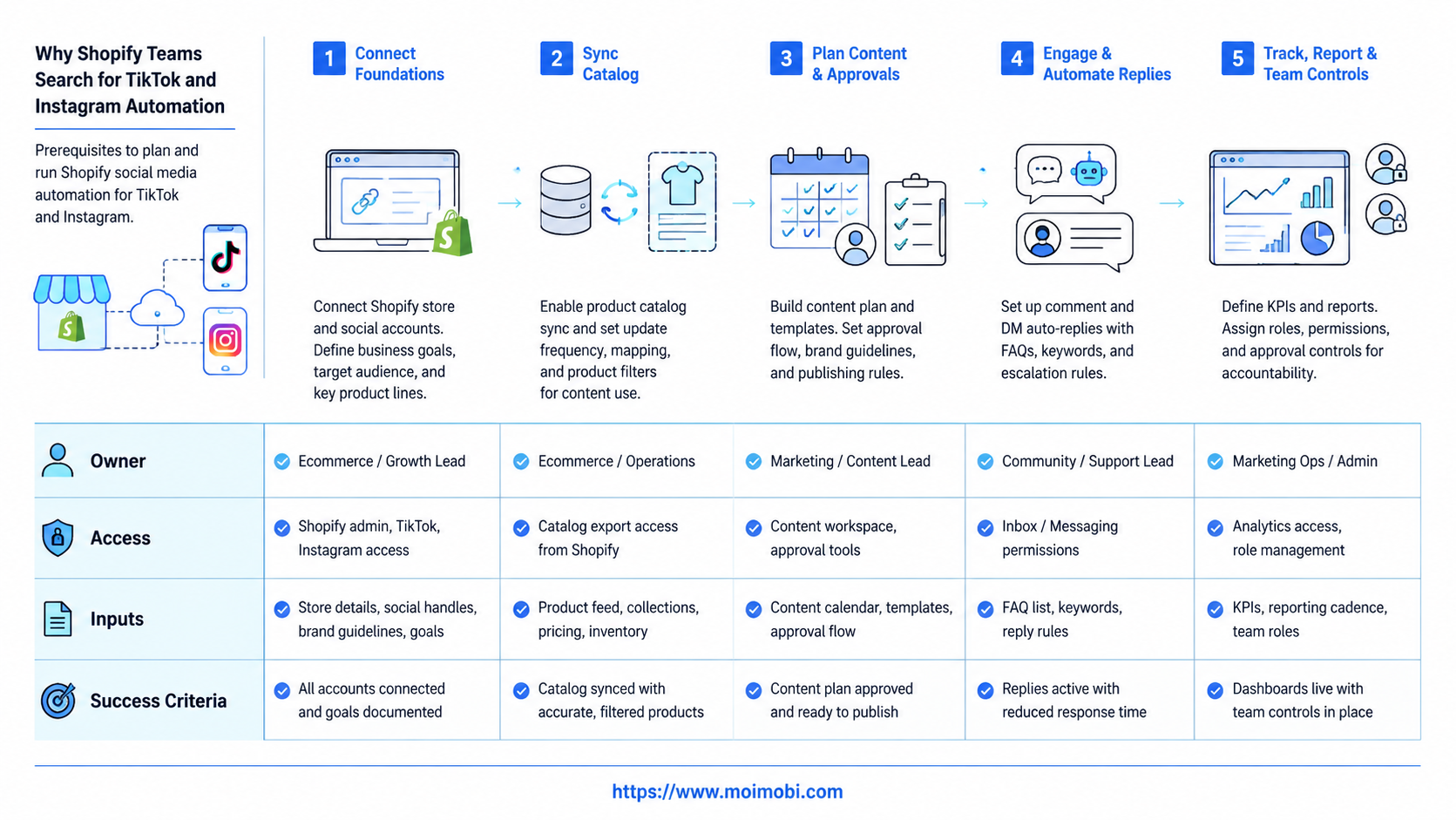
Shopify social media automation is the process of connecting product data, content tasks, social account work, customer replies, and reporting into a repeatable workflow. For TikTok and Instagram, the useful version is not a tool that posts anything everywhere. It is an operating system for catalog readiness, mobile app execution, creative review, comment handling, and follow-up.
The decision starts with where the work happens. Shopify can connect products to social commerce channels. Shopify's TikTok Shop documentation says merchants can sync products to TikTok so customers can buy on TikTok and orders can be fulfilled from Shopify admin. Shopify's Facebook and Instagram by Meta documentation says merchants can sync products to a Meta catalog for Facebook Shop and Instagram Shopping.
Daily operations remain outside a simple catalog sync. Teams still need to prepare short videos, check product availability, review messages, handle campaign tasks, and record what happened. This is where an execution layer such as cloud phone environments, browser workspaces, and task logs becomes relevant.
Key Takeaways
- Shopify social media automation should start with catalog, product, and account readiness.
- TikTok and Instagram workflows are different, even when the same Shopify store feeds both.
- Automation should support content preparation, review, publishing checks, replies, and reporting.
- Mobile execution matters when work depends on app sessions, inboxes, notifications, or live social surfaces.
- A small pilot with review gates is safer than moving every store account at once.
The Core Idea Behind Shopify Social Media Automation
The common misunderstanding is that Shopify social media automation means scheduling posts. Scheduling is only one layer. A Shopify team also needs product data, social commerce eligibility, content approval, platform account access, and response workflows.
Shopify's TikTok Shop help page describes selling through live shopping, shoppable in-feed videos, and product showcases. TikTok for Business also publishes official guidance for setting up TikTok Shop with Shopify. These sources show why the workflow must connect content, product visibility, orders, and fulfillment.
Shopify's Facebook and Instagram by Meta page describes syncing products to a catalog on Facebook and Instagram. Meta's official commerce platform documentation explains how commerce catalogs support product data for commerce surfaces. That makes the workflow more serious than "connect a shop and post more."
An operations-ready setup has four layers:
| Layer | What It Controls | Common Failure |
|---|---|---|
| Catalog | Products, variants, availability, prices, and channel eligibility | Products sync but cannot be used in the target workflow |
| Content | Videos, captions, offers, hashtags, and product references | Content goes live without product or policy review |
| Execution | App sessions, mobile checks, replies, inboxes, and account tasks | Work depends on one person's phone or unmanaged browser session |
| Feedback | Orders, comments, DMs, task results, and campaign notes | The team sees sales but cannot explain which workflow caused them |
Why Shopify Teams Search for TikTok and Instagram Automation
Shopify teams usually search this topic after manual work becomes hard to coordinate. A product launch may need TikTok videos, Instagram Reels, product tags, creator clips, comments, DMs, and order checks. One person can handle this for a small store. A team cannot scale it without a shared system.
TikTok and Instagram also create different operating demands. TikTok workflows may involve TikTok Shop setup, catalog sync, video shopping, comments, live sessions, and creator-style content. TikTok Business help content describes setup steps around Business Center, ad account, catalog, and data connection choices.
Instagram workflows often depend on Meta catalog setup, product publishing, content review, and customer conversations. Shopify's requirements and considerations for Facebook and Instagram by Meta and Meta's business help for shops are worth reading before a team treats Instagram as only a posting channel.
For a Shopify operator, the practical need is clear:
- Keep product information ready for each social channel.
- Assign content tasks to the right person.
- Run mobile app checks without sharing one physical phone.
- Pause or repair failed workflows before they affect more accounts.
- Record replies, comments, orders, and campaign outcomes.
Teams that manage several stores or brands should connect social work to multi-account management. The goal is account clarity, not uncontrolled volume.
Who Benefits Most and When It Is Not a Fit
Shopify social media automation is most useful for teams that already have repeatable social commerce work. A store that posts twice a month may need a content calendar, not a full execution stack. A store running weekly launches across TikTok and Instagram needs stronger controls.
Good-fit teams usually have one of these patterns:
- Several TikTok or Instagram accounts across brands, regions, or stores.
- Daily content publishing, comment checks, and reply workflows.
- Product launches that require catalog checks and mobile app verification.
- Agencies that handle Shopify social operations for clients.
- Customer support teams that receive questions from social posts.
Poor-fit teams have a different problem. If the catalog is incomplete, product pages are not ready, shipping rules are unclear, or commerce eligibility is unresolved, automation will only move bad inputs faster. Fix product and store readiness first.
There is also a policy boundary. Automation should not be used to spam comments, send repetitive DMs, fake engagement, or hide identity. A healthy workflow adds review, ownership, and records. It does not remove judgment.
How to Start Shopify Social Media Automation Safely
Start with guardrails before tools. The biggest mistake is connecting accounts, assigning devices, and automating tasks before the team agrees on what is allowed. A clear preflight prevents many avoidable errors.
Step-by-Step Shopify Social Media Automation Checklist
Use this checklist before the first pilot:
- Check channel readiness. Confirm TikTok Shop, Facebook, and Instagram setup requirements before assigning tasks.
- Clean the catalog. Review product titles, variants, availability, images, prices, and restricted categories.
- Map account ownership. List who controls Shopify, TikTok, Instagram, Meta Business assets, and ad accounts.
- Define review gates. Require approval for product claims, offers, comments, and customer replies.
- Separate execution environments. Assign accounts to known browser or mobile workspaces.
- Run one workflow first. Start with one store, one product group, and one social account pair.
- Record task outcomes. Track what posted, what failed, who approved it, and what response came back.
MoiMobi fits the execution layer of this model. A team can use mobile automation for repeated app-side checks, while keeping approval and policy judgment with humans.
Add one stop rule before launch. If the team cannot identify the product source, account owner, content approver, execution environment, and recovery owner, the workflow is not ready. Automation should wait until those five fields are clear.
Account Environments for TikTok and Instagram Workflows
TikTok and Instagram operations often cross web dashboards and mobile apps. Shopify admin and catalog setup may be browser-first. Social app checks, inboxes, notifications, and short-form publishing reviews may still be mobile-first.
That split is why execution environments matter. A team may need browser profiles for web admin work, cloud phones for app sessions, and controlled routing for account access. The important rule is simple: one account should have a known environment, owner, and task history.
For Shopify teams, a practical environment map can look like this:
| Workflow | Preferred Environment | Control Needed |
|---|---|---|
| Shopify admin and catalog review | Browser workspace | Permission control and change history |
| TikTok app checks and social responses | Cloud phone or managed mobile device | Account assignment and task log |
| Instagram inbox and product tag review | Mobile environment plus Meta workspace | Human approval and reply record |
| Campaign reporting | Shared operations dashboard | Result notes and next action owner |
If the team is replacing physical devices, compare a phone farm alternative by workflow control, not only device count. Device capacity is useful only when the team can assign, review, pause, and learn from tasks.
This matters for agencies and cross-border sellers. One Shopify store may have one TikTok account, one Instagram account, and several operators. Another store may have separate regional accounts, different catalogs, and different reply rules. The environment model should follow the account structure, not the other way around.
Mistakes That Reduce Results
The first mistake is automating before the catalog is clean. Social commerce workflows depend on products, variants, availability, images, and eligibility. If those inputs are weak, the downstream task will still be weak.
The second mistake is treating TikTok and Instagram as the same channel. TikTok may require more video-first testing, creator-style feedback, and app-side monitoring. Instagram may require more catalog, product-tagging, inbox, and visual consistency checks.
The third mistake is ignoring recovery. Failed tasks are not just errors. They show where the workflow lacks permissions, product data, session health, or human review. A team that logs failures can improve the system; a team that only retries repeats the problem.
Avoid these patterns:
- One operator controls every social login from a personal phone.
- Product claims are posted without a review owner.
- Catalog errors are discovered after content goes live.
- Comments and DMs are answered without a record.
- Every failed task is retried without a reason code.
For account-heavy teams, device isolation helps separate environments. It does not replace store setup, platform eligibility, or content quality review.
Pilot Rollout, Measurement, and Recovery Checks
A pilot should prove control before scale. Do not begin with every product, every account, and every region. Choose a small workflow that has enough activity to test the system, but not enough blast radius to create confusion.
Start with one product group, one TikTok account, one Instagram account, and one owner for each workflow. Run the pilot for a fixed period, such as one launch cycle or one weekly campaign. Track actions and issues in the same place.
Measure four things:
- Readiness: Were Shopify products and social channel settings prepared before tasks started?
- Execution: Did the assigned environment complete the task without manual confusion?
- Review: Did product claims, replies, and public actions pass human approval?
- Feedback: Did the team capture comments, questions, orders, and failure reasons?
Recovery checks matter after every pilot. If a task fails, classify it as catalog, permission, app session, content review, platform eligibility, or human process. Then fix the category before adding more accounts.
Teams running larger social commerce operations can use social media marketing workflows to connect publishing, replies, monitoring, and reporting. The useful outcome is a repeatable process that can be inspected.
Before the second pilot, compare the plan against the first run. Keep the parts that reduced manual work. Remove the parts that created unclear ownership. Add only one new product group or one new account type at a time, so the team can still trace cause and result.
Use the pilot notes as a simple operating record. List the product group, social account, assigned environment, reviewer, task result, and follow-up action. This keeps the automation program tied to real store operations instead of becoming a disconnected posting queue.
Review that record before each new campaign and rollout.
Frequently Asked Questions
What is Shopify social media automation?
It is a repeatable workflow for Shopify product data, TikTok and Instagram content tasks, account execution, customer replies, and reporting. It should include review controls.
Can Shopify automate TikTok product sync?
Shopify documents a TikTok sales channel that can connect to TikTok Shop and sync catalog, inventory, fulfillment, and orders. Teams still need review and operations controls.
Can Shopify connect products to Instagram?
Yes. Shopify's Facebook and Instagram by Meta channel can sync products to a Meta catalog for Facebook Shop and Instagram Shopping, subject to eligibility.
Do I need cloud phones for Shopify social media work?
You need them when daily work depends on mobile app sessions, account checks, notifications, inboxes, or multi-account execution. Browser-only teams may not need them.
Is automation safe for TikTok and Instagram?
The safer approach is review-led automation. Use it for repeatable operations, not spam, fake engagement, or unmanaged bulk actions.
What should a Shopify team automate first?
Start with product readiness checks, content task assignment, approval tracking, and social response records. Avoid automating public actions before the review process is proven.
How should agencies manage several Shopify clients?
Use separate account environments, named owners, client-specific content rules, and task logs. Do not mix credentials, devices, or approval records across clients.
What metrics matter in the pilot?
Track product readiness, task completion, approval time, failed-task reasons, response quality, and the number of issues fixed before scale.
Conclusion
Shopify social media automation works best when the team treats TikTok and Instagram as operating channels, not only posting surfaces. The priority order is catalog readiness, account ownership, mobile execution, human review, and feedback.
Before scaling, run one pilot with one product group and a small account set. If the team can explain what happened, who approved it, what failed, and what changed, the workflow is ready for careful expansion.



