
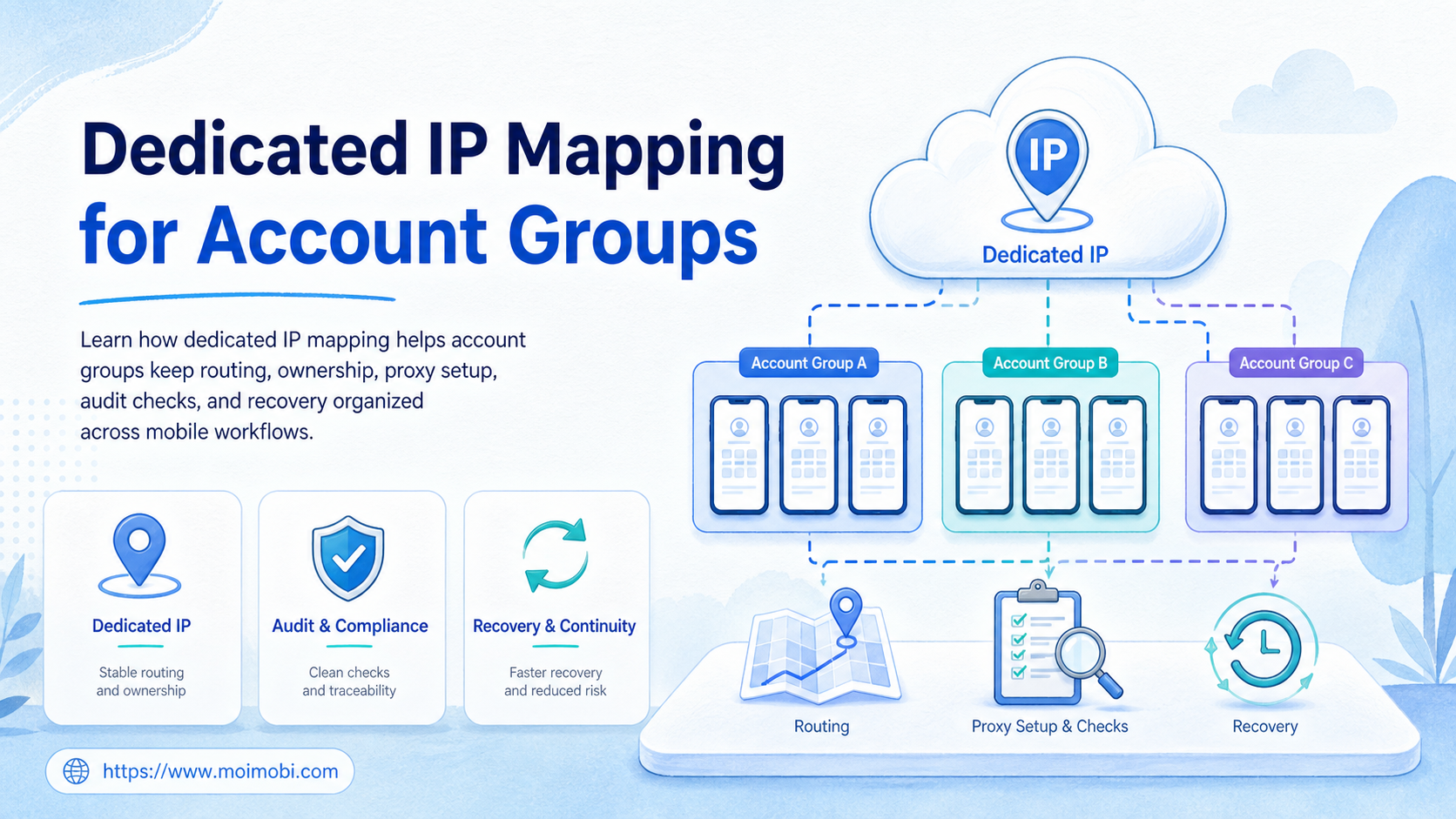
A dedicated IP is a stable outbound route that can be assigned to a defined account group, workspace, or workflow. Dedicated IP mapping is the operating practice that keeps this route tied to account ownership, environment design, and troubleshooting records.
For teams running mobile workflows, the problem usually appears after growth. One operator adds accounts. Another changes a proxy. A third person runs tasks from a different environment. Later, nobody can explain which account group used which route.
A dedicated IP plan fixes the operating record. It tells the team which accounts belong together, which execution environment they use, which route they exit through, and who owns changes.
Key Takeaways
- A dedicated IP should be mapped to an account group, not randomly attached to tasks.
- The mapping should record account owner, environment, route, region, change history, and recovery owner.
- Dedicated routing can improve operational clarity, but it does not override platform policies or account quality issues.
- Cloud phone proxy setup should include leak checks, route logs, and stop rules.
- The best pilot starts with one account group and one route before expanding.
What Is Dedicated IP Mapping for Account Groups?
A dedicated IP is a stable IP address assigned for a defined use case. AWS describes an Elastic IP address as a static public IPv4 address for cloud computing, and Cloudflare describes dedicated egress IPs as static IPs assigned exclusively to an account. Those examples are not social media instructions, but they show the core network idea: a stable egress route can be assigned, documented, and managed. See AWS Elastic IP addresses and Cloudflare dedicated egress IPs.
For account groups, the mapping should connect four objects:
| Object | What it means | Why it matters |
|---|---|---|
| Account group | Accounts with the same client, platform, region, or workflow | Keeps ownership clear |
| Execution environment | Browser profile, cloud phone, Android device, or app workspace | Shows where work runs |
| Route | Dedicated IP, proxy endpoint, region, or egress policy | Controls the outbound path |
| Record | Owner, change history, test result, and recovery path | Makes troubleshooting possible |
This is why a proxy network should be treated as infrastructure, not as a hidden shortcut. The team needs to know who changed the route and which account group was affected.
Why Dedicated IP Mapping for Account Groups Matters
The main value is traceability. A team can review route history, spot mixed environments, and separate account groups by client or workflow.
Cloudflare's egress policy documentation describes routing traffic through dedicated egress IPs and adding those IPs to third-party allowlists. That pattern is useful for operations teams because it separates policy, destination, and route. See Cloudflare egress policies.
For mobile workflows, route clarity matters because device state and network state can drift apart. A cloud phone may keep the app session. The proxy route may change. The operator may not notice until a task fails or a client asks for an explanation.
This routing plan should never be presented as a way to bypass platform rules. Meta's inauthentic behavior policy describes deceptive use of assets and coordinated activity as prohibited categories. A routing plan should support accountable operations, not deceptive identity or unmanaged account networks. See Meta's Inauthentic Behavior policy.
When broad cloud phone routing is involved, start with the basic cloud phone execution environment concept before assigning IP routes.
Key Benefits and Use Cases
The strongest use case appears when a team has multiple account groups and needs repeatable routing rules.
Common use cases include:
- separating client account groups by route,
- keeping regional account workspaces easier to audit,
- assigning a stable route to long-running mobile workflows,
- reducing accidental route mixing across teams,
- documenting changes before and after proxy updates,
- creating a recovery path when a route fails.
For multi-account management, the benefit is operational control. Managers can ask which route belongs to which group. Operators can check whether a mobile environment is using the expected route before work starts.
For cloud phone proxy setup, the benefit is consistency. A team can pair each account group with a mobile environment, proxy profile, and routing test. That record helps avoid accidental switching.
For compliance-minded teams, the benefit is evidence. The team can show when a route changed, who approved it, which devices were affected, and whether the next test passed.
How to Get Started with Dedicated IP Mapping for Account Groups
Do not begin by buying more routes. Begin by mapping the account groups that actually need stable routing.
- List account groups. Group by client, region, platform, workflow, or account owner.
- Assign environments. Link each group to a browser profile, cloud phone, or Android device pool.
- Choose route type. Decide whether the group needs a dedicated IP, regional proxy, or shared route.
- Record ownership. Name the route owner, backup owner, and approval rule for changes.
- Run leak checks. Confirm the visible route before the workflow starts.
- Log changes. Keep route, environment, account group, timestamp, and test result together.
- Define stop rules. Pause tasks when routing, login state, or environment identity is unclear.
NIST's Zero Trust Architecture guidance is broader than proxy setup, but it supports the same operational idea: access decisions should use policy and context instead of assumed trust. For account operations, that means route mapping should be explicit and reviewable. See NIST SP 800-207 Zero Trust Architecture.
If the workflow depends on installed apps or persistent mobile sessions, device isolation should be part of the design. The route is only one layer. The device, account workspace, and task record matter too.
Common Mistakes to Avoid
The first mistake is mapping one route to everything. That makes reporting easy at first, but it creates confusion when one client or group needs review.
The second mistake is changing routes without a record. A proxy change should have an owner, reason, timestamp, affected accounts, and test result.
The third mistake is treating route checks as optional. A route can be configured correctly in one layer and still fail at the execution layer. Test from the actual browser profile or cloud phone environment.
The fourth mistake is mixing account groups for convenience. If two groups have different clients, owners, regions, or policies, they should not share the same route record casually.
The fifth mistake is using risky language with clients or operators. Do not sell a dedicated IP as a magic account protection layer. Sell it as routing control, traceability, and cleaner operations.
Verification and Proxy Leak Checks
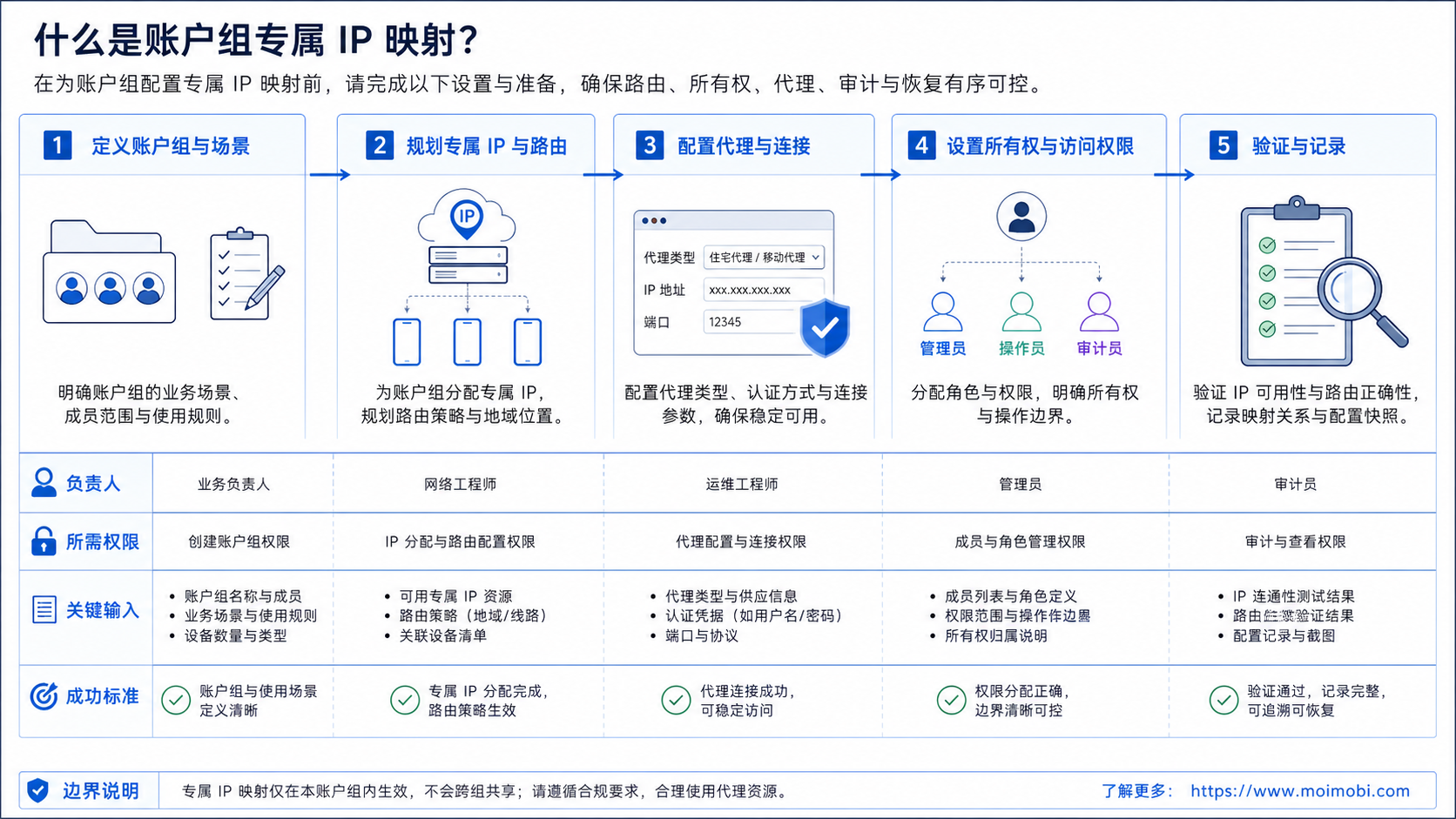
Verification should happen before the account group runs real work. The check should confirm what the outside service can see from the actual environment.
Use this pass/fail list:
- The expected IP appears from the actual cloud phone or browser profile.
- The route matches the account group record.
- The operator can see route owner and last change time.
- Failed checks create a task for recovery.
- The device shows a different route than the account record.
- Operators cannot identify who changed the route.
- Several account groups share one undocumented endpoint.
- There is no stop rule after a mismatch.
For a mobile automation workflow, the route check should be part of the run preparation step. It should not rely on memory or a separate spreadsheet that operators forget to update.
Who It Fits and When to Skip Dedicated IP
The approach fits teams that manage multiple accounts, clients, regions, or mobile workflows. It also fits teams that need cleaner routing records for support and troubleshooting.
It is a weaker fit when a team has one account, one device, and no routing complexity. In that case, a simple documented environment may be enough.
The strongest match appears when account groups have different ownership boundaries. Examples include separate clients, regional teams, social platforms, app workflows, or support queues.
The wrong match is using a dedicated IP to mask poor account operations. Routing cannot repair weak content quality, unclear ownership, spam-like behavior, or platform-policy problems.
Skip dedicated routing when the team cannot maintain the map. A dedicated route without ownership, testing, and change logs becomes another hidden dependency. In that case, build the account inventory and environment records first.
Also skip it when the workflow does not need route separation. A single internal test account, one operator, and one device may only need a simple network note. Dedicated routing becomes more valuable when multiple people, clients, apps, or regions share the same operations system.
Cost is another boundary. A dedicated route can add provider, management, and support cost. The team should compare that cost with the value of cleaner troubleshooting, better client separation, and easier operational review.
Pilot Rollout, Measurement, and Recovery Checks
Start with one account group. Assign one route, one owner, and one cloud phone or browser profile group. Then run a week of ordinary tasks and review the records.
Measure four fields:
- route mismatch events,
- failed leak checks,
- manual recovery time,
- route changes per account group.
The pilot should answer one question: does mapping reduce confusion during normal work? If operators still ask which route to use, the map is not clear enough.
Recovery should be explicit. When a mismatch appears, pause the workflow, confirm the expected route, check the environment, update the record, and document the final result.
Frequently Asked Questions
1. What is a dedicated IP?
It is a stable IP route assigned to a defined account, group, or organization. In this article, it is used as part of account-group routing.
2. Does a dedicated IP make accounts safe?
No. It can improve routing clarity, but it does not replace good account operations, platform compliance, or human review.
3. How should account groups be mapped?
Group accounts by client, region, platform, owner, or workflow. Then assign environment and route records to each group.
4. What is a proxy leak in this context?
It means the visible outbound route does not match the expected route for the account group or environment.
5. Should every account get its own dedicated IP?
Not always. Some teams map by account group. The right choice depends on ownership, workflow, region, and support needs.
6. How often should route checks run?
Run checks before important workflows, after route changes, and after environment changes. Long-running teams may add scheduled checks.
7. Where does MoiMobi fit?
MoiMobi fits when teams need cloud phones, proxy routing, device isolation, and account-group records in one execution workflow.
8. When is a shared route enough?
A shared route may be enough for low-volume internal testing or one-account workflows. Use dedicated routing when ownership, client separation, or troubleshooting needs are stronger.
9. What cost should teams expect beyond the IP itself?
Budget for route management, setup checks, operator time, monitoring, and recovery. The IP is only one line item. The operating cost comes from keeping the map accurate over time.
Conclusion
This is an operations discipline, not a shortcut. A good map gives teams a clear record of which accounts, environments, and routes belong together.
Before scaling, check three things. Does each group have an owner? Does each environment show the expected route? Does every change create a record?
If those answers are unclear, start with one account group and one route. Prove the map works in daily operations before adding more accounts, devices, or automation.
Keep the first weekly review narrow, documented, and easy to repeat.



