
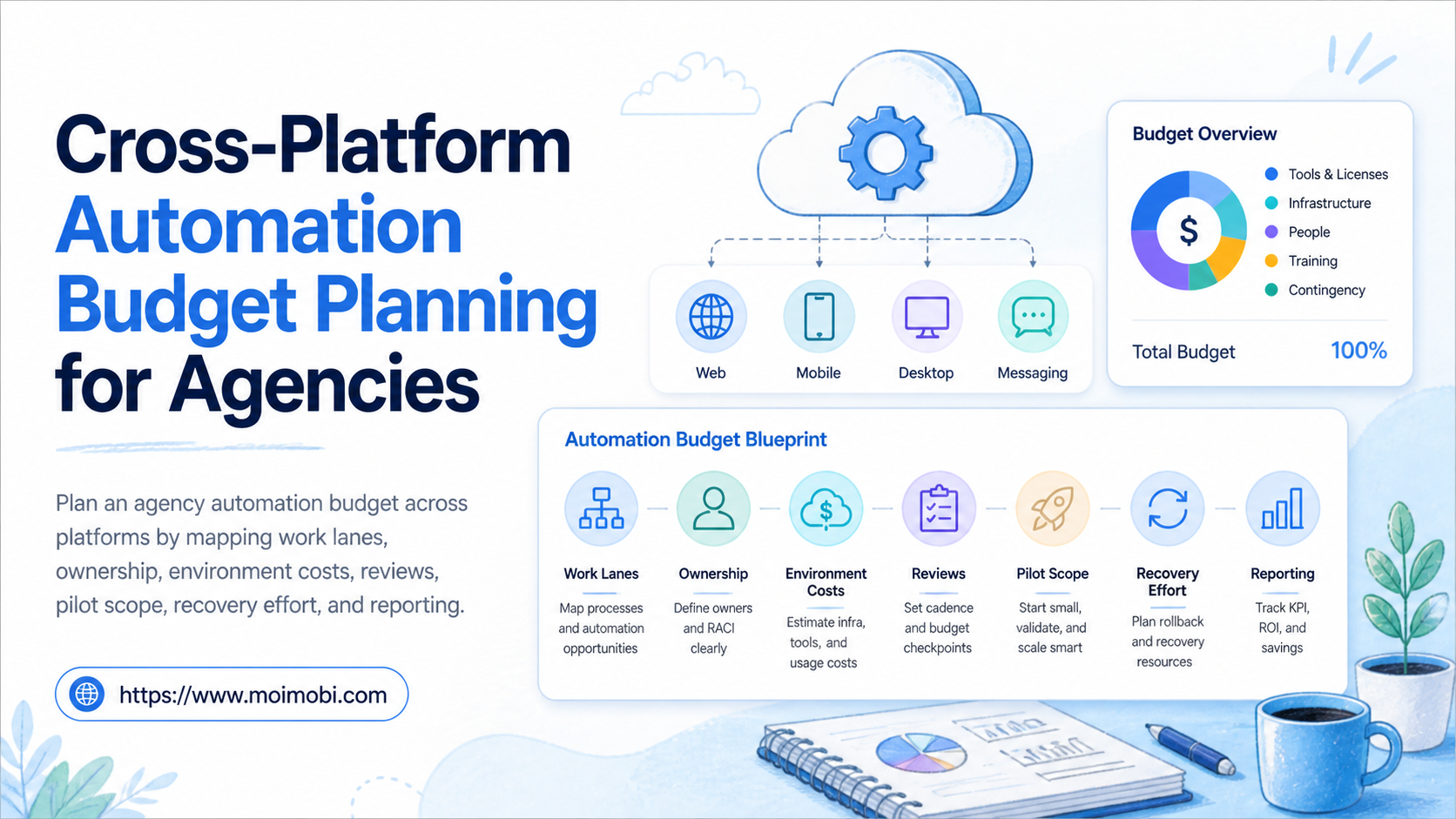
Cross-platform automation budget planning is the process of assigning a cost and ownership model to the tools, environments, review time, and recovery work that support agency operations. The right budget is not a list of subscriptions. It is a plan for how a team will execute approved work across channels without losing account context or client accountability.
Agencies often start by pricing a tool, then discover later that the larger cost is handoff time, incomplete approvals, duplicate work, or unclear access. A useful budget makes those operational costs visible before the team expands a workflow.
Where mobile execution is part of the plan, a cloud phone is one environment line, not the entire budget. Include the people who approve work, document exceptions, and review outcomes. That produces a more realistic plan than treating automation as a one-time software purchase.
Key takeaways
- Budget work lanes and review effort, not only platform subscriptions.
- Start with one client workflow and one measurable operating outcome.
- Separate recurring capacity costs from setup, migration, and exception costs.
- Use a stop rule when the team cannot explain task ownership or recovery.
The Core Idea Behind a Cross-Platform Automation Budget
A cross-platform automation budget covers the resources required to run a defined workflow across more than one channel. Those resources may include account environments, task routing, content preparation, approval time, mobile capacity, reporting, training, and incident recovery.
The budget should be tied to a business process. “Automate social media” is too broad to price well. “Prepare, approve, publish, and record weekly client content across two assigned account lanes” is narrow enough to estimate.
The FinOps Foundation describes cloud cost management as a practice that brings technology, finance, and business teams together around value-based decisions. That perspective is relevant here: operational owners need to see why a cost exists and what work it supports. See the FinOps Framework for its published operating principles.
| Budget area | What to include | Planning question |
|---|---|---|
| Execution environments | Browser, mobile, device, or workspace capacity | Which work lane needs a dedicated environment? |
| Team operations | Task preparation, approvals, handoffs, and review | Who owns the next decision when work pauses? |
| Workflow setup | SOP design, permissions, templates, and testing | What must be defined before the first run? |
| Recovery | Exception review, documentation, and corrective work | How will the team restart a failed task? |
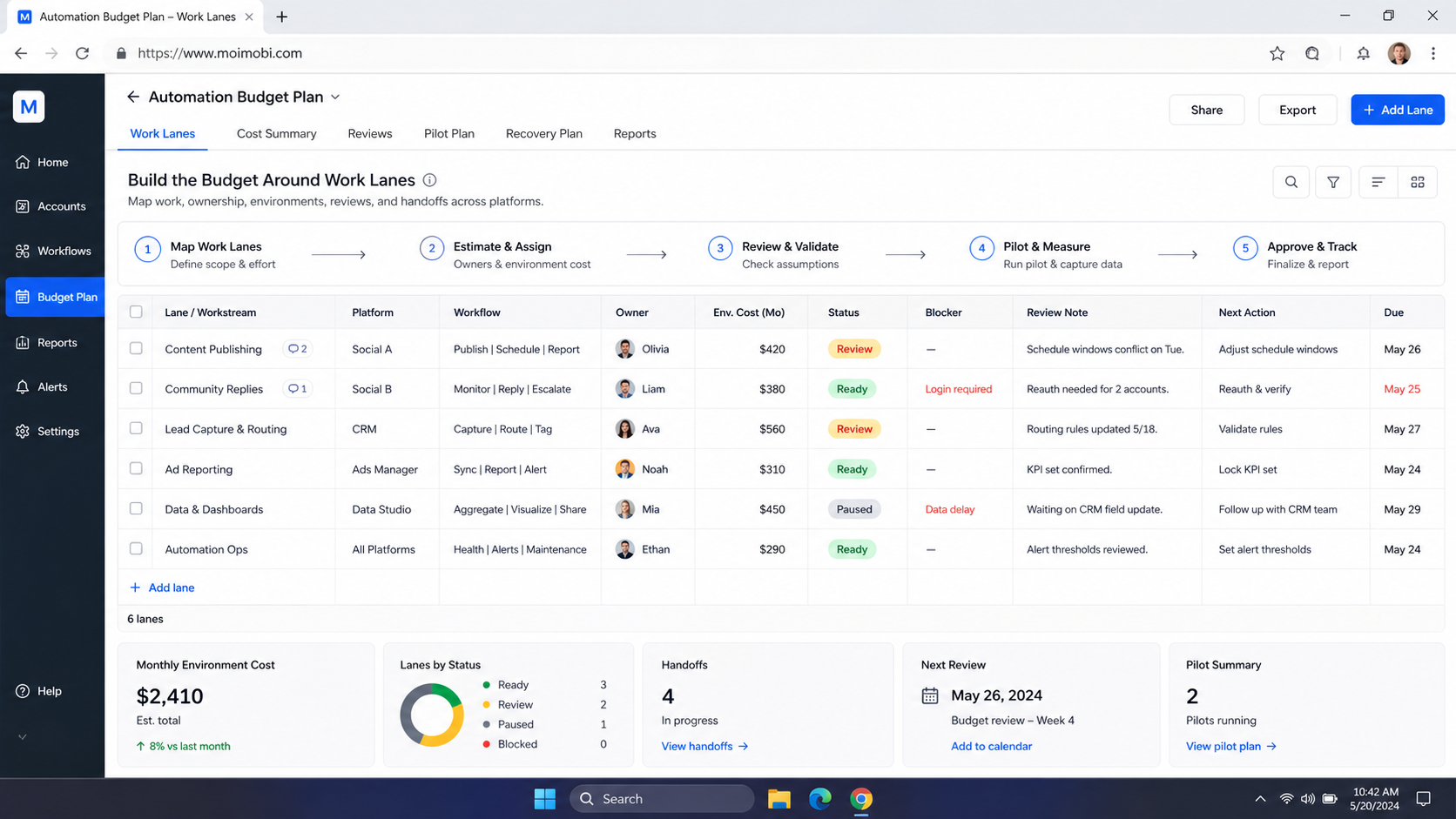
Build the Budget Around Work Lanes
Define a work lane before assigning a budget. A lane combines a client or account group, a task type, an owner, an approval rule, and an environment. For example, an agency may have a content lane, a customer-response lane, and a reporting lane. Each lane has different capacity and review requirements.
This approach prevents a common error: buying capacity that no one owns. A device or tool is not useful simply because it is available. It needs an assigned workflow and a responsible person who can decide whether the work should continue, pause, or escalate.
For multiple client accounts, use a role-based multi-account operating model to map the budget to accountable work. The same client should not receive two conflicting actions because two operators were working from separate, undocumented instructions.
Cost Categories to Track Before Committing
Separate recurring costs from one-time implementation work. Recurring costs may include active environments, operating capacity, reporting tools, and ongoing review. One-time work may include documenting an SOP, setting permissions, training operators, importing assets, or testing a new handoff process.
Then add the exception cost. Every workflow has exceptions: an incomplete brief, a client change, a missing approval, a technical issue, or a task that cannot proceed. If the budget assumes no exception work, it will understate the effort required to run the process responsibly.
Avoid fixed return-on-investment claims unless the agency has its own verified data. Instead, estimate a range of operating scenarios. Compare the current manual process, a limited pilot, and the intended steady-state workflow. Document the assumptions that change each scenario.
The NIST Cloud Computing Standards Roadmap is useful background for thinking about cloud services as a stack of roles and service responsibilities. For an agency, the equivalent question is simple: which cost belongs to the environment, which to the workflow owner, and which to the client-facing team?
A Step-by-Step Agency Budget Process
- Choose one client workflow. Select a recurring process with a clear beginning, approval point, and result.
- List the work lanes. Separate content, customer response, research, reporting, or other work that needs different ownership.
- Map required capacity. Record the environment, tool access, operator time, reviewer time, and reporting fields for each lane.
- Classify costs. Mark each item as setup, recurring, variable, or recovery-related.
- Set an approval boundary. Define which actions are routine and which need client or manager review.
- Run a contained pilot. Test the actual handoff and exception path before adding more clients or platforms.
Do not use a budget spreadsheet as a substitute for operating instructions. The numbers need an SOP behind them. A technical reference for device task integration may help a technical team understand an execution interface, while the agency still needs explicit task authorization and audit fields.
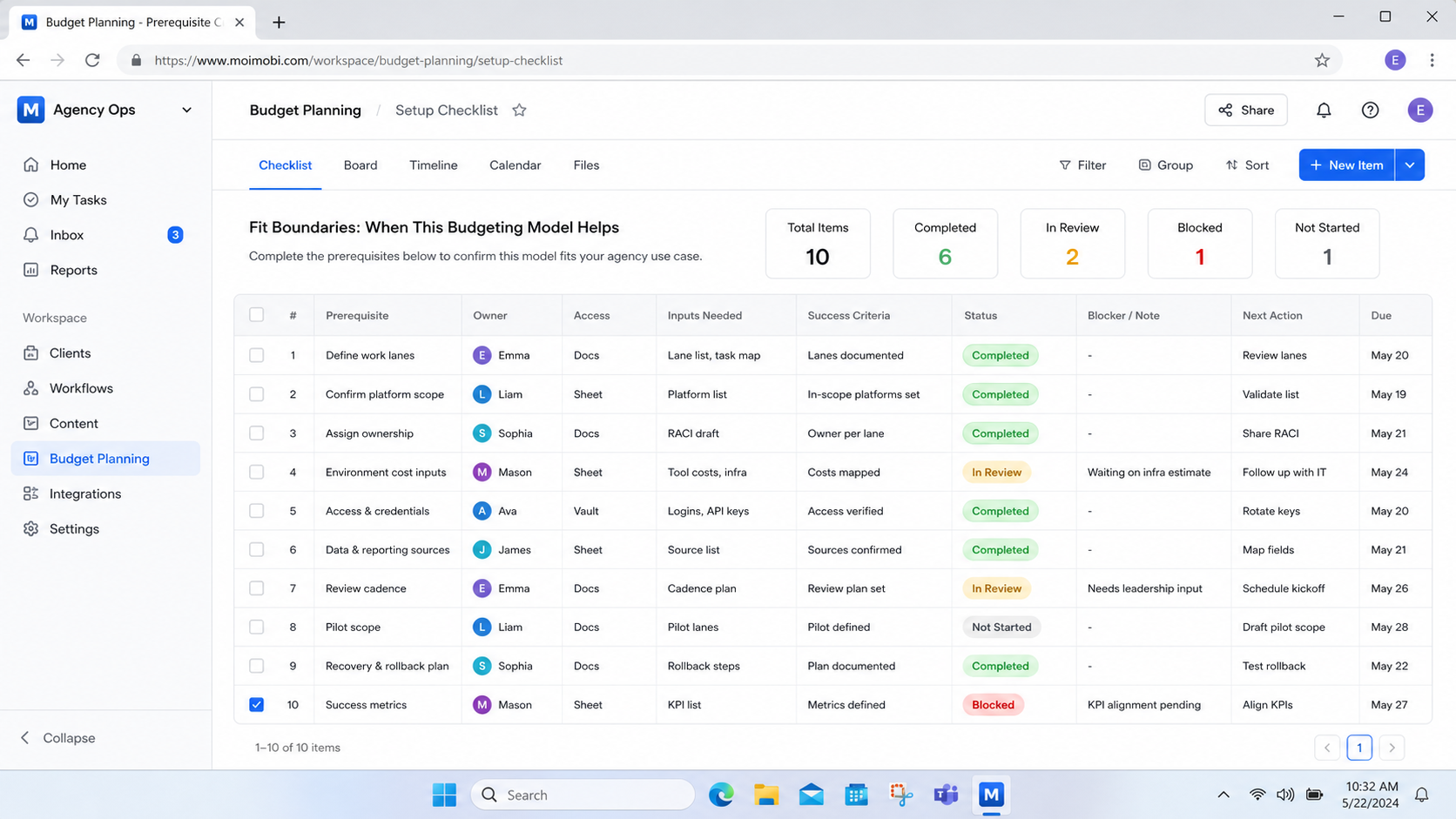
Fit Boundaries: When This Budgeting Model Helps
Agencies managing recurring client workflows across several channels, account groups, or time zones where tasks change hands and outcomes need review.
A one-person, one-off project with no recurring workflow or client handoff. Keep the process lightweight until repetition justifies formal controls.
The model is most useful when an agency can name the work it wants to improve. It is less useful when the goal is only “more automation.” Broad goals hide trade-offs and encourage costs that are hard to connect to a client outcome.
Budget controls should also respect platform rules and client permissions. Automation does not transfer accountability away from the agency. A workflow that cannot explain its owner, purpose, and approval state is not ready to scale.
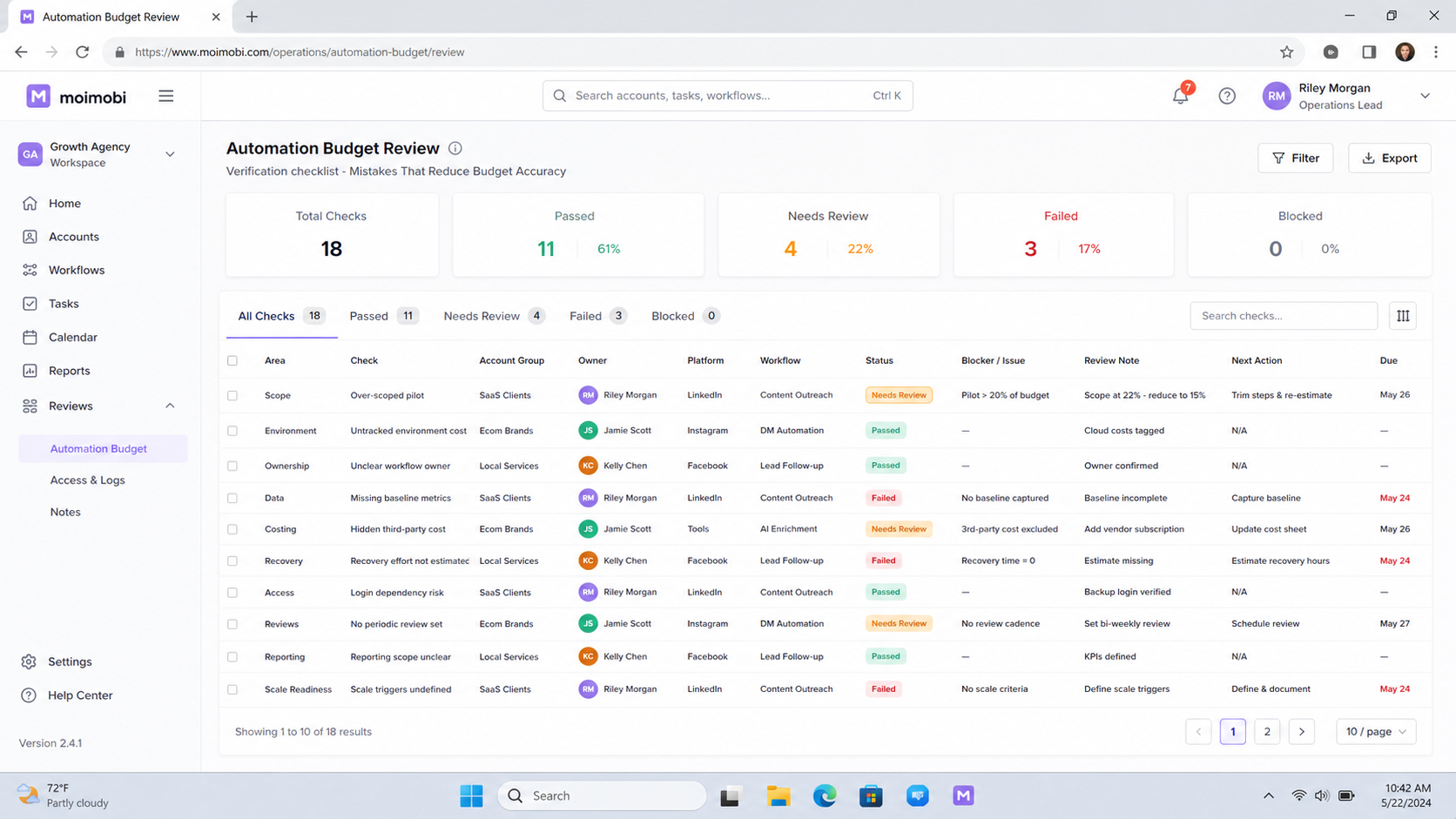
Mistakes That Reduce Budget Accuracy
The first mistake is budgeting devices or software without budgeting review. A process may complete routine steps quickly, yet still require a manager or client to approve changes. Omitting that role makes the projected capacity misleading.
The second mistake is mixing client work in one unnamed lane. When account scope is unclear, teams spend more time reconstructing task history and resolving ownership questions. Separate lanes make the expense and the responsibility visible.
The third mistake is treating a pilot result as a permanent cost. A pilot may have more review time, training, and exception work than a mature process. Keep the pilot assumptions separate, then revise them after the team has observed real handoffs.
Build a Client-Level Cost Worksheet
Use a worksheet that connects each cost to a specific operating decision. Start with the client workflow and list the steps that need an operator, an approver, an execution environment, or a recovery record. The objective is not accounting precision on day one. It is making the scope concrete enough for an agency and client to discuss it honestly.
Split the worksheet into four parts. The first is baseline capacity: the environments, access, and team roles needed every month. The second is variable activity: work that rises with approved task volume, campaign changes, or client requests. The third is setup: training, role mapping, templates, and workflow tests. The fourth is exception work: unresolved approvals, technical faults, missing information, and client changes.
For each line, add an owner and a review date. A cost without an owner usually becomes an unplanned operations burden. A cost without a review date tends to remain in the budget after the original workflow has changed.
Use plain questions during the review:
- Does this cost support a named client task or only a general idea?
- Who can approve a change to this resource or operating lane?
- What evidence shows that the client workflow actually used the capacity?
- What happens to the cost when a campaign pauses or an account lane closes?
This structure makes shared costs easier to discuss. A reporting tool may serve several clients, while a dedicated review or mobile workspace belongs to one lane. The agency can decide how to allocate those expenses under its own commercial model without presenting invented universal benchmarks.
Budget Governance for Agency Owners
Budget governance is the recurring decision process that keeps an automation plan aligned with client work. It is separate from the original cost estimate. A useful governance rhythm checks whether the approved workflow still exists, whether ownership changed, and whether the operating assumptions remain true.
Hold a short review when a new client, platform, account group, or task type is added. Confirm the account boundary, the required environment, the reviewer, the record of completion, and the exception route. That prevents a small expansion from quietly becoming an unmanaged second workflow.
Agency owners should also distinguish utilization from value. A resource being active does not prove that it supports a client outcome. Review task records, approvals, and completed deliverables alongside the cost line. When the work cannot be linked to a valid operating lane, pause the spend and clarify the plan.
The discipline is intentionally simple: one budget line, one operating purpose, one owner, and one review path. It gives the team a way to adjust capacity without turning cost control into an after-the-fact cleanup exercise.
Cross-Platform Automation Budget Controls
Budget controls are small operating checks that prevent cost growth from outrunning process clarity. At a minimum, require a named work lane, a current owner, an approval boundary, and a completion record before capacity is added. This keeps a new platform or device from becoming an untracked expense.
Use a monthly control review to compare the budget with actual task activity. Ask which lanes were active, which exceptions consumed review time, and which cost lines no longer support approved client work. Close, pause, or reassign unused capacity through the same documented process that opened it.
The review should also test client communication. A client-facing manager needs a clear explanation of what the agency is operating, what work is covered, and which changes need approval. That clarity protects both the budget and the workflow from informal scope expansion.
Pilot Rollout, Measurement, and Recovery Checks
Start with one small client workflow for a fixed review period. Measure operational signals rather than vanity metrics: tasks without an owner, approvals requested after work started, incomplete completion records, repeated exceptions, and the time needed for a new operator to resume a paused task.
Set a recovery check for every pilot. After an interruption, ask whether the task record identifies the client, account lane, current owner, approval state, completed action, and next step. If it does not, fix the process before expanding capacity.
For app-based tasks, a client-bound app task lane can support a defined operating lane. The budget should still include the work required to manage that lane, not only the environment itself.
FAQ: Cross-Platform Automation Budget Planning
What should an agency budget first?
Budget the specific client workflow first. Include the operator, reviewer, environment, task record, and recovery path needed to run it.
Should automation costs be charged to each client?
That depends on the agency agreement and the shared nature of the capacity. Keep a clear internal allocation model before presenting client pricing.
How do we estimate exception costs?
Review recent manual work. Identify missing approvals, repeated handoffs, unclear briefs, and recovery tasks. Use those as planning inputs, not as universal averages.
Is a pilot always cheaper than a full rollout?
Not always. A pilot may require extra review and training. Its value is learning which assumptions need adjustment before the process expands.
What should make a team pause expansion?
Pause when ownership is unclear, completion evidence is missing, exceptions repeat, or a client approval boundary is not defined.
Does a budget need exact forecasts?
No. It needs explicit assumptions, a known scope, and a review point where the agency can revise those assumptions.
How often should the budget be reviewed?
Review after the pilot, after a material workflow change, and at a regular operating cadence that fits the agency's client cycle.
Conclusion
For agencies, automation budgeting begins as a workflow decision rather than a purchasing decision. Map the client work, capacity, ownership, approvals, and recovery steps first. Then price the environments and tools that support those lanes.
Use a limited pilot to test the plan. A budget is ready to expand when the agency can show who owns each task, what it costs to operate, and how a paused workflow can be recovered without guesswork.
Document every revision carefully so future budget reviews retain the original operating assumptions.


