
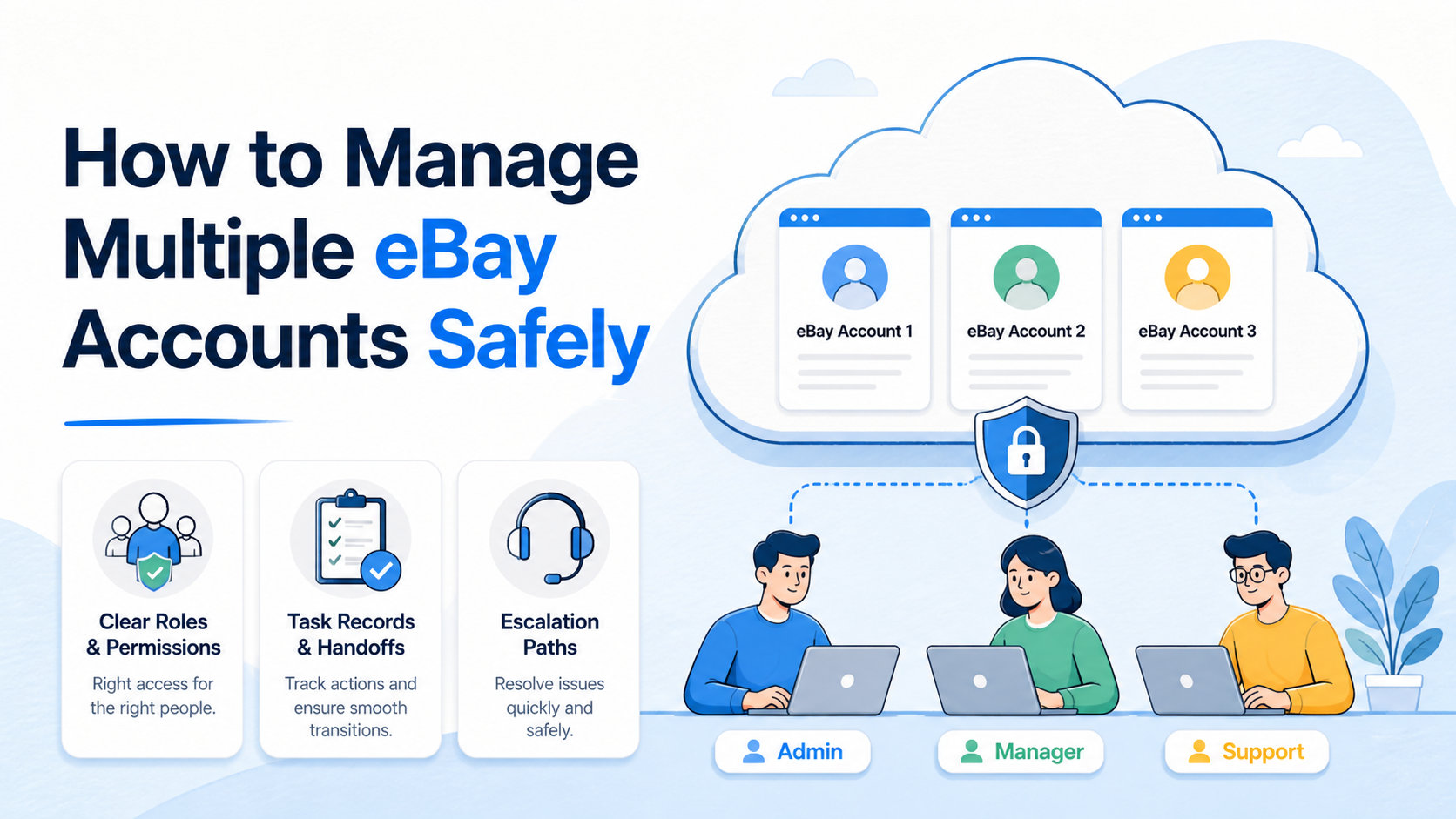
To manage multiple eBay accounts safely, start with a valid business purpose for each account, keep account information accurate, and ensure every account follows eBay's rules. eBay permits multiple accounts for reasons such as separating buying and selling or different product lines, but it prohibits using another account to avoid restrictions, limits, or other policy consequences.
For a team, the practical challenge is not opening more accounts. It is keeping account roles, authorized operators, task history, and customer obligations clear. A simple account register and approval workflow is more durable than a collection of shared logins and private instructions.
This guide focuses on compliant team operations. It does not explain how to conceal account relationships, evade eBay controls, or continue activity through another account after a restriction. When a restriction or policy question occurs, use eBay's stated resolution and appeal processes.
Key takeaways
- Assign each eBay account a documented business role before a team uses it.
- Keep the account owner, permitted operators, and current task visible in one record.
- Do not use an additional account to avoid eBay restrictions or policy consequences.
- Escalate policy, payment, and identity issues instead of attempting workarounds.
Manage Multiple eBay Accounts Safely: Start With Policy
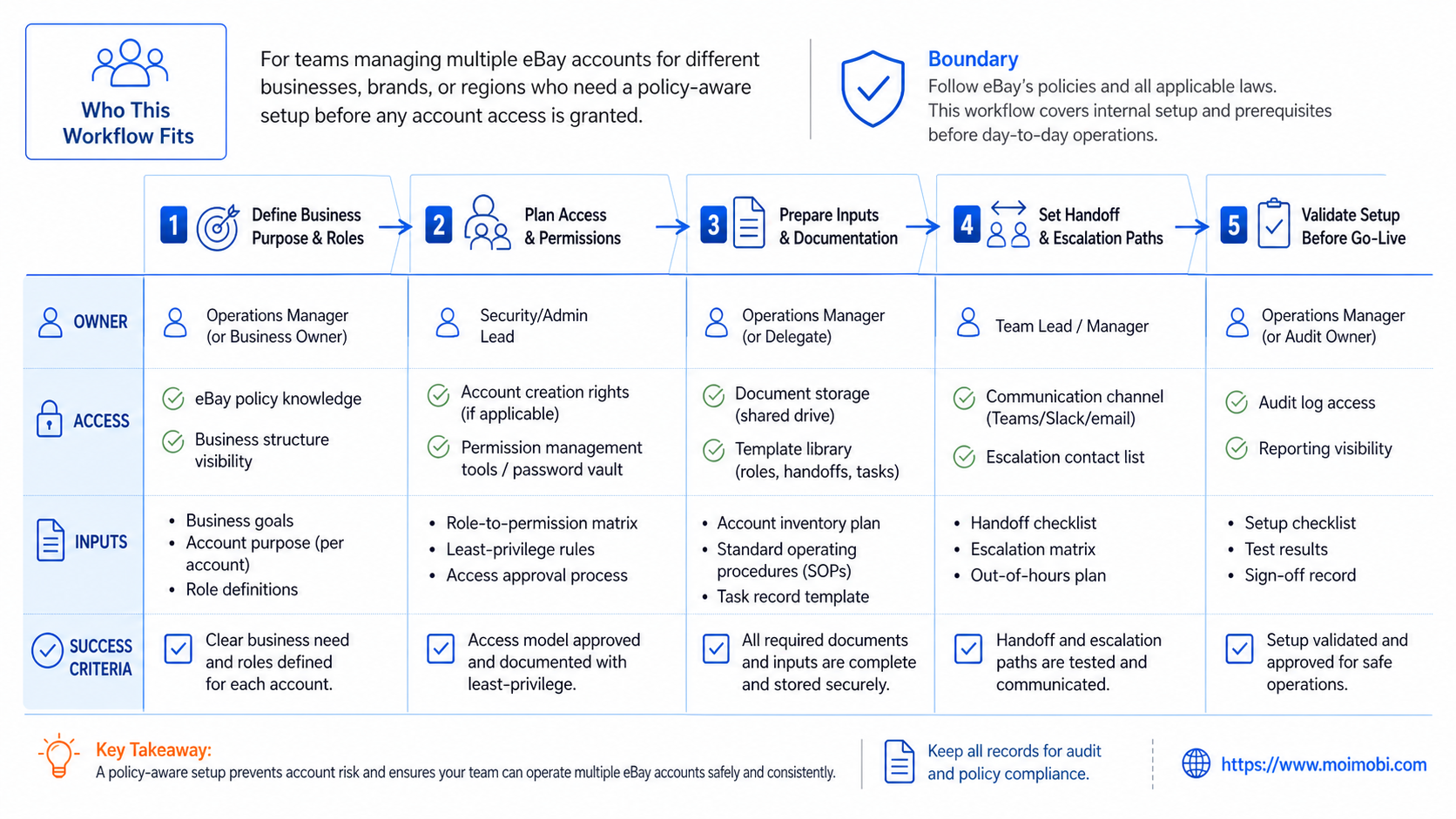
eBay's Multiple account policy says members may have more than one account, including for buying and selling or for different product lines. It also says the buying and selling policies apply to every account and prohibits creating or using accounts to avoid restrictions, limits, or policy consequences.
That policy establishes the operating boundary. A separate account is not a recovery route for an account with unresolved restrictions. If an issue affects an account, the team should resolve it through eBay's established process before continuing related activity.
The policy also means the team needs a reason for each account that is clear enough to explain internally. “Extra account” is not a useful role. “Buyer operations,” “brand A catalog,” or “returns support,” with a named owner and scope, is a usable operating definition.
Build an Account Register Before Delegating Work
Create an account register before multiple people begin account work. The register should not store passwords or sensitive payment information. Its purpose is to record responsibility, role, and the location of approved operating instructions.
| Field | Example purpose | Why the field matters |
|---|---|---|
| Business role | Separate product line or buying workflow | Shows why the account exists |
| Account owner | Named employee or responsible manager | Creates an escalation point |
| Permitted operators | Roles that may complete routine tasks | Prevents informal access sharing |
| Task boundary | Listings, customer messages, returns, or research | Keeps work within a defined scope |
| Escalation rule | Identity, payment, policy, or dispute issue | Stops an operator from improvising a response |
Use the register with a multi-account work queue when a team manages more than one operating lane. The point is not to centralize every judgment. It is to make task ownership and the next action visible during a handoff.
Separate Routine Tasks From Restricted Decisions
Routine work may include checking an approved listing detail, responding with an approved customer-service template, or collecting information for a product update. Those tasks still need a named owner and a record of completion.
Restricted decisions need another path. Examples include a policy notice, account limitation, identity or payment request, disputed transaction, or unclear listing status. An operator should pause the task, preserve the relevant reference, and route it to the account owner or designated reviewer.
eBay's identity policies emphasize accurate account information and adherence to the marketplace's policies. Treat identity, contact, and policy matters as owner-level decisions. Do not turn them into a routine team queue.
- Classify the request. Identify whether it is routine, review-required, or restricted.
- Confirm the account lane. Check the account's role and the assigned operator.
- Perform only the permitted action. Record the task result and any customer-facing reference.
- Pause exceptions. Escalate restrictions, policy notices, identity questions, and payment matters.
- Close the loop. Update the task with the decision and next accountable person.
Use Clear Access and Handoff Controls
Access should be granted by role and removed when the role changes. Avoid group credentials or instructions that leave no evidence of who performed an action. A team needs the ability to review access without exposing unnecessary account data.
For mobile or browser-based operations, keep the workspace assignment attached to the task record. A device-isolated operating lane may help a team maintain a clean boundary between separate work contexts. It does not change eBay's rules or create a basis to evade them.
Handoffs should answer five questions: what account is involved, what task is pending, what has already occurred, what approval exists, and who owns the next decision. If the next person has to search chat history for those answers, the process is incomplete.
The OWASP Logging Cheat Sheet recommends records that support monitoring and investigation while avoiding unnecessary sensitive information. That is a good standard for task and access logs: record the decision and outcome, not secrets.
Manage Multiple eBay Accounts Safely With a Team SOP
An SOP should describe the work that is allowed, not merely the screens an operator can open. Start each account role with a short operating statement. For example: “This account is used by the returns team to process approved customer requests.” The statement defines the business purpose, the responsible role, and the work boundary in one place.
Next, add a task template for each recurring activity. A listing update might need the product reference, requested change, account owner, reviewer, and completion evidence. A customer inquiry might need the message reference, response category, operator, escalation flag, and follow-up date. The template makes incomplete work visible before it becomes a customer problem.
Define stop rules as well. An operator should stop and escalate when a request involves a restriction, payment, identity, account ownership, prohibited activity, or conflicting instructions. A stop rule is not a failure condition. It is a control that keeps a routine workflow from crossing into an owner-level decision without review.
Keep the SOP small enough to be used. Five clear rules are stronger than a long manual that nobody checks. Review the SOP after a real exception, then update the single rule or field that would have made the handoff clearer. This creates a working record of how the team manages marketplace tasks over time.
Review Account Roles Before Adding Capacity
Adding capacity should follow a review of role clarity. Before another person, device, or operating lane is introduced, the team should confirm that the existing account's purpose remains distinct and that its tasks do not overlap with another account's role. Overlap is a process problem even when both accounts were created for legitimate reasons.
Use a simple weekly review. Check whether the account has an active owner, whether outstanding customer work has a next action, whether access reflects current employment or team responsibilities, and whether any exception was handled outside the documented path. Assign one person to own each corrective action.
This review also helps a business notice when its original structure no longer fits. A product line may need a different workflow. A buyer function may need a separate support queue. The decision should be based on business operations and policy compliance, not on an attempt to work around an account limitation.
Common Mistakes to Avoid
The most serious mistake is treating a second account as a way to continue activity when another account faces a restriction. eBay's policy explicitly disallows this. The correct response is to review the notice, resolve the issue through the appropriate eBay process, and document the internal follow-up.
Another mistake is assigning two accounts to the same vague purpose. That creates duplicate listings, unclear customer ownership, and confusion during returns or disputes. Give every account a role that a new team member can understand in one sentence.
Teams also lose control when they make one person responsible for every routine and exceptional decision. Define a reviewer for sensitive tasks. That shortens routine execution while making escalation rules clear.
Who This Workflow Fits
Businesses with separate buying and selling functions, distinct product lines, several client accounts, or shifts that require task handoffs.
Any plan that depends on bypassing restrictions, hiding relationships, manipulating marketplace activity, or using inaccurate account information.
Small teams can start with one owner and one backup for each legitimate account role. Larger teams may add a reviewer, a listing specialist, and a customer-service lane. The structure should grow only when the account register and handoff records remain reliable.
Pilot, Review, and Recovery Checks
Pilot the workflow with one account role and a limited set of routine tasks. Measure whether the team can identify the account owner, task status, and escalation route without asking the prior operator for a recap.
Review weekly for missing owners, tasks completed without an outcome record, policy questions left in routine queues, and access that no longer matches the operator's role. Repeated problems should result in an SOP change, not an unwritten workaround.
For broader mobile task coordination, a mobile workflow control layer can help keep the assigned environment and task record together. The account role and marketplace policy remain the governing constraints.
A Practical Handoff Test for Marketplace Teams
Test the operating process with a real shift handoff. The first operator should complete a routine approved task and leave the record in its normal location. A second qualified operator should then explain the account role, current status, completed action, open question, and next permitted step without requesting a private recap.
When the second operator cannot answer one of those questions, identify the missing field rather than blaming the person. The correction may be as small as adding an owner field, a customer reference, or an escalation status. Re-run the same handoff after the field is added.
This test is also a useful access review. Confirm that the operator who receives the task has the right role for that work and that former team members no longer have active operating access. Record the review result and assign any correction to a named owner.
Use the result to decide whether the team is ready for another account role or another operator. Capacity should follow a functioning workflow. It should not be used to compensate for unclear ownership or policy questions.
FAQ: Managing Multiple eBay Accounts Safely
Can a business have more than one eBay account?
eBay states that members may have multiple accounts for valid uses such as buying and selling or different product lines. All accounts remain subject to eBay's policies.
Can another account be used after a restriction?
No. eBay's multiple-account policy prohibits creating or using accounts to avoid restrictions, limits, or policy consequences.
What should each account record contain?
Record the business role, account owner, permitted operator roles, task boundary, and escalation path. Do not store passwords in a task register.
Who should handle policy notices?
Route policy notices to the account owner or a designated reviewer. Preserve the notice reference and avoid improvising a workaround.
Can several employees work on one account?
The team should first confirm that its access and operating process comply with eBay's rules. Internally, assign roles and retain task accountability.
What is the best way to handle a handoff?
Record the account, current task, completed action, pending decision, and next owner in a durable work record.
What should happen when account information changes?
Update accurate information through the account's approved process and document the internal owner of the change.
Keep the change reference with the task record so later reviews can distinguish an approved update from an unresolved access question.
Should teams review inactive accounts?
Yes. An inactive account can still have a business role, stored obligations, or access assignments. Periodically confirm its purpose, owner, and whether access should remain active.
What makes a customer task ready for handoff?
The record should identify the account, customer reference, completed action, unresolved question, approval state, and next owner. A handoff is incomplete when any of those fields require a private explanation.
How should a team document an account-policy question?
Save the relevant eBay reference, describe the business context briefly, pause the affected task, and assign the question to the account owner or reviewer. The record should show the decision when it is resolved.
Conclusion
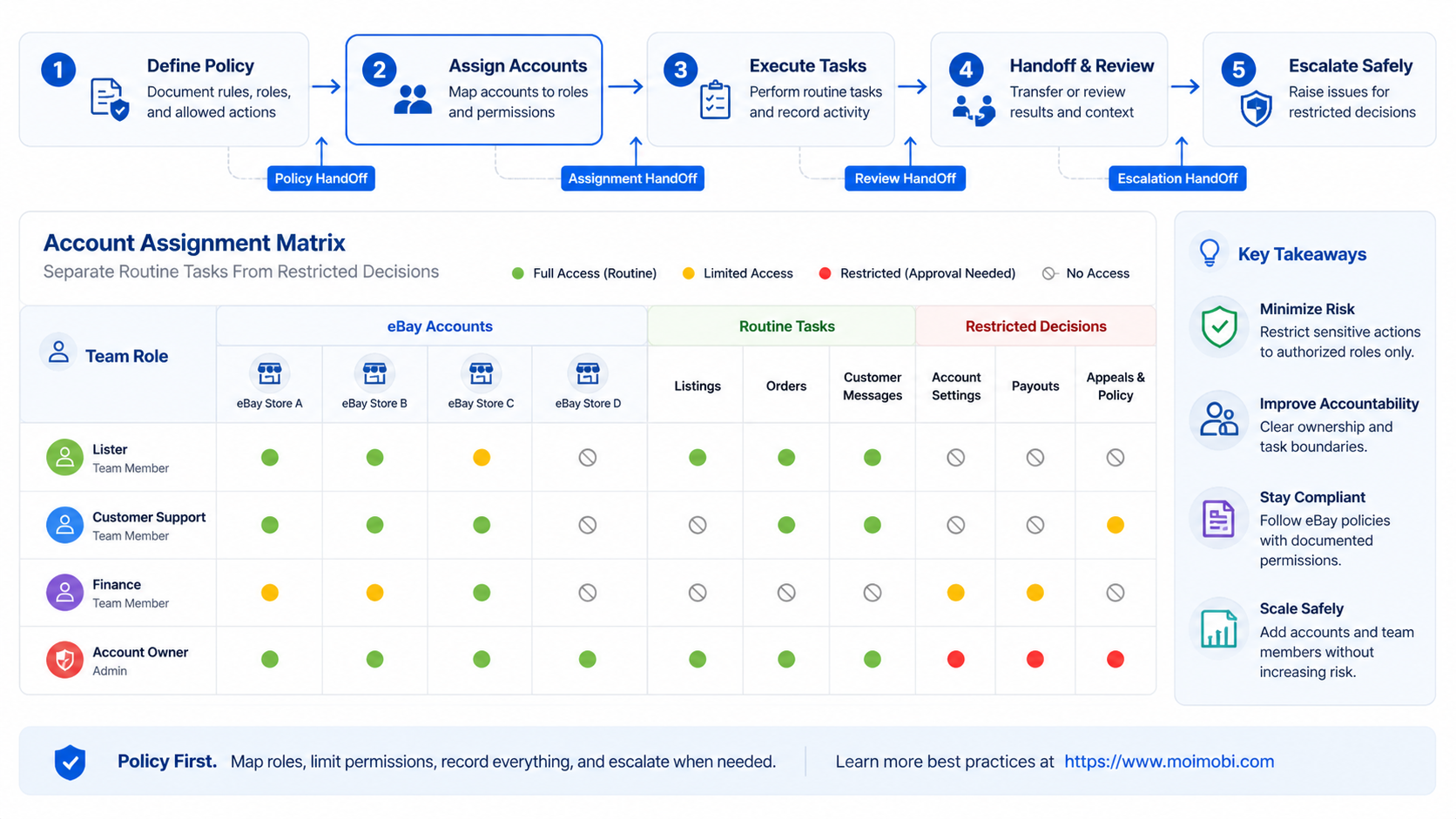
Managing multiple eBay accounts safely means managing legitimate business roles, policy obligations, access, and task history with discipline. Multiple accounts are not a substitute for resolving a restriction or an unclear operational issue.
Before adding another account or another operator, verify the business purpose, account owner, permitted work, task record, and escalation rule. That keeps the team focused on accountable marketplace operations rather than informal workarounds.


