If you are a developer, QA engineer, or automation specialist, you already know that manually clicking through a smartphone interface does not scale. Whether you are running UI tests, scraping data, or deploying AI agents across hundreds of social media accounts, you need programmatic control. You need to replace human fingers with code.
In this complete developer guide, we will break down how to connect to cloud phones via ADB over TCP/IP, how to use infrastructure REST APIs to manage your device fleet, and how to combine both to achieve massive scale in mobile automation.
1. The Difference Between ADB and Cloud Phone REST APIs
A common point of confusion for developers entering the cloud space is the distinction between ADB and the provider's REST API. While both allow you to write scripts, they operate at completely different layers of the technology stack.
What is Cloud Phone ADB?
ADB operates at the OS (Operating System) level. It is a native Android command-line tool. On a physical phone, you connect a USB cable. On a cloud phone, you connect over the internet using TCP/IP. ADB allows you to talk directly to the Android OS running inside the virtual machine. You use ADB to install APKs, push/pull files, read logcats, and simulate screen taps or swipes.
What is a Cloud Phone REST API?
The REST API operates at the Infrastructure level. This is the API provided by the cloud phone platform (the host). The Android OS inside the virtual machine knows nothing about this API. You use the REST API to manage the virtual hardware itself: turning the device on/off, factory resetting it, changing its Proxy IP, or generating a new device fingerprint (IMEI/MAC address).
2. ADB vs. API: When to Use Which?
To build a robust automation architecture, you will likely orchestrate both. Here is a quick reference table showing which tool to use for specific tasks:
For a deep dive into endpoints and authentication, you can review a standard cloud phone API documentation architecture.
3. Connecting to a Cloud Phone via ADB (Step-by-Step)
Because you cannot physically plug a USB cable into a server rack halfway across the world, cloud phone providers expose ADB over TCP/IP. Here is how to establish a secure connection.
Step 1: Obtain the Remote Connection Details
Log into your cloud phone provider's dashboard. Locate the specific device you want to connect to. In the developer settings, you will find a generated IP address, a Port number, and often a secure authentication token. It will look something like this: 192.168.x.x:5555.
Step 2: Connect via Terminal
Open your local terminal (ensure you have Android SDK Platform-Tools installed). Run the following command:
If the connection is successful, the terminal will return: connected to 192.168.10.45:5555.
Step 3: Execute Android Commands
You now have full terminal access to the cloud device just as if it were sitting on your desk. You can run standard UI automation commands:
adb -s 192.168.10.45:5555 install my_app.apk
# Simulate a screen tap at coordinates X=500, Y=1000
adb -s 192.168.10.45:5555 shell input tap 500 1000
# Input text into a text field
adb -s 192.168.10.45:5555 shell input text "Hello%sWorld"
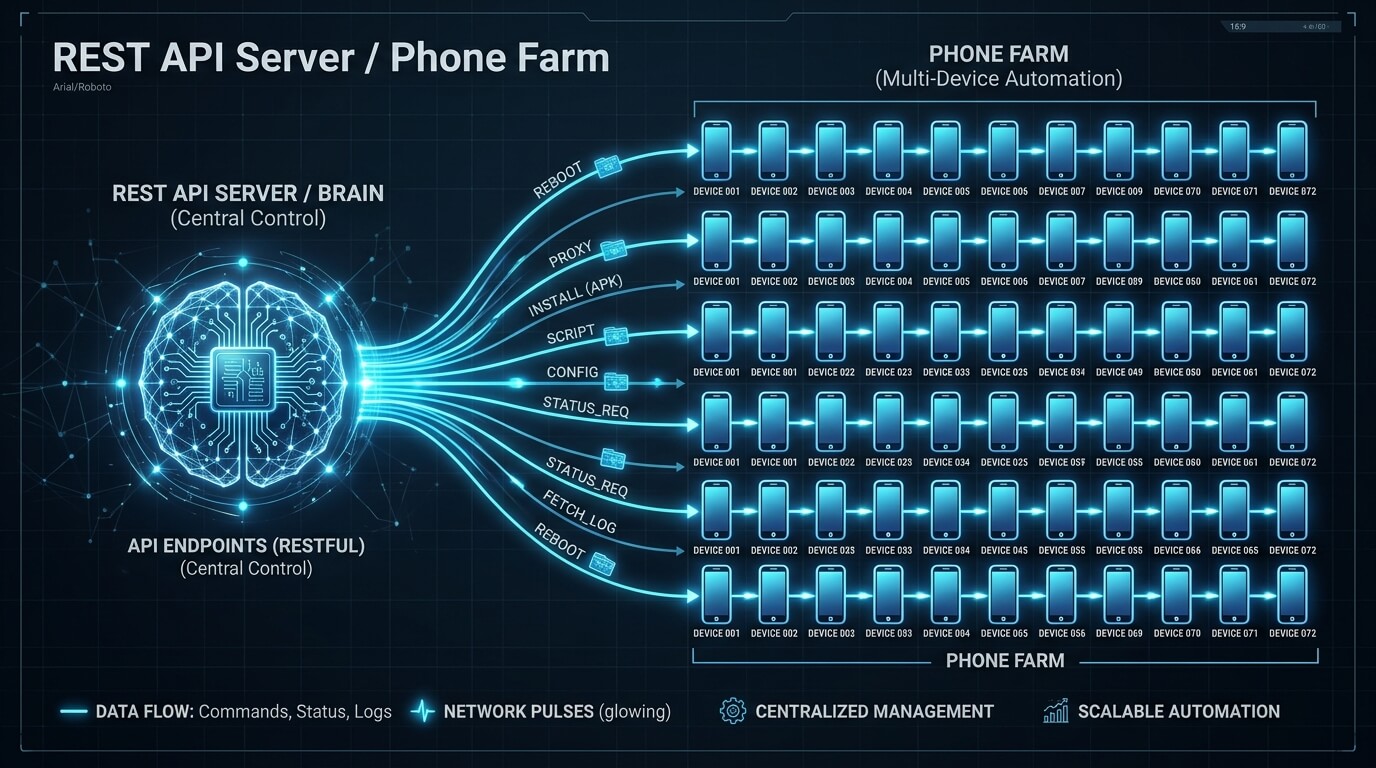
4. Scaling with REST API: Managing a Phone Farm
ADB is fantastic for controlling one device. But what if you are operating a cloud phone farm with 200 devices? You cannot manually type adb connect 200 times.
This is where the platform's REST API becomes the brain of your operation. By writing a simple Python or Node.js script, you can orchestrate your entire infrastructure.
Example Workflow: The Morning Reset
Imagine a scenario where your marketing agency needs to reset 100 devices every morning, assign them new residential proxy IPs, and boot them up to run an automated Instagram engagement loop. Doing this manually in a dashboard would take hours. With a REST API, the workflow looks like this:
- API Call 1 (GET): Retrieve the list and status of all 100 device IDs.
- API Call 2 (POST): Send a command to change the proxy configuration for each device ID to a new geographic location.
- API Call 3 (POST): Send a
/rebootcommand to all devices simultaneously so the new network settings take effect. - Trigger ADB: Once the API confirms the devices are "Online," your script loops through the devices, establishes ADB connections, and triggers your Appium or UIAutomator scripts.
5. Framework Compatibility: Appium, Auto.js, and RPA
The beauty of cloud phones is that they support standard industry frameworks out of the box. Because they run native Android OS, you do not need proprietary coding languages.
Appium & UIAutomator2
Appium is the gold standard for mobile automation. Once you establish an ADB connection to your cloud phone, you simply pass the remote IP and port as the udid in your Appium Desired Capabilities. Appium will install its UIAutomator2 server onto the cloud phone and begin executing your Python/Java test scripts exactly as it would locally.
On-Device Scripting (Auto.js / Tasker)
If you prefer not to maintain a constant TCP/IP connection from your local server, you can push scripts directly onto the device. Using ADB, you can install an APK like Auto.js, push JavaScript files containing mobile RPA templates to the SD card, and trigger them to run entirely locally within the cloud instance. This is highly resilient to network drops.
6. Frequently Asked Questions (FAQ)
Do I need Root access to use ADB?
No, standard ADB commands (like installing apps or simulating taps) do not require Root. However, if your automation script needs to interact with deep system files, modify standard SQLite databases, or inject frameworks like Xposed/LSPosed, you will need a cloud phone provider that allows you to toggle Root (Magisk/SuperSU) via their dashboard.
Is there a rate limit on Cloud Phone APIs?
Yes, enterprise cloud platforms implement rate limiting on their REST APIs (e.g., 60 requests per minute) to prevent DDoS attacks and server overloads. When writing your automation loops, always implement exponential backoff and error handling to manage HTTP 429 (Too Many Requests) responses gracefully.
Can I run multiple ADB commands simultaneously?
Yes, you can run ADB commands against multiple devices simultaneously by opening different threads or using tools like STF (Smartphone Test Farm). Just ensure you use the -s <device_ip:port> flag in every command so ADB knows exactly which virtual device to send the instruction to.
Does using ADB trigger anti-bot detection on TikTok/Facebook?
The act of having ADB enabled is a known risk factor. Sophisticated apps can check if "USB Debugging" is enabled in the developer settings. High-end antidetect cloud phones have features that mask the ADB daemon (adbd) from user-space apps, allowing you to run UIAutomator scripts without the target app realizing it is being remotely controlled.
Conclusion: The Ultimate Developer Toolkit
Transitioning to a programmatic approach using Cloud Phone ADB and APIs unlocks unprecedented scale for any business operation. While standard users may click through a web dashboard to manage three or four devices, developers can leverage these endpoints to control thousands of mobile instances simultaneously.
By using the REST API to manage the infrastructure (networking, hardware spoofing, reboot cycles) and ADB to manage the OS (app installation, UI interaction, scraping), you create an airtight, fully autonomous mobile execution system. Whether your goal is continuous integration testing, large-scale social marketing, or AI agent deployment, mastering these interfaces is your key to true automation.