
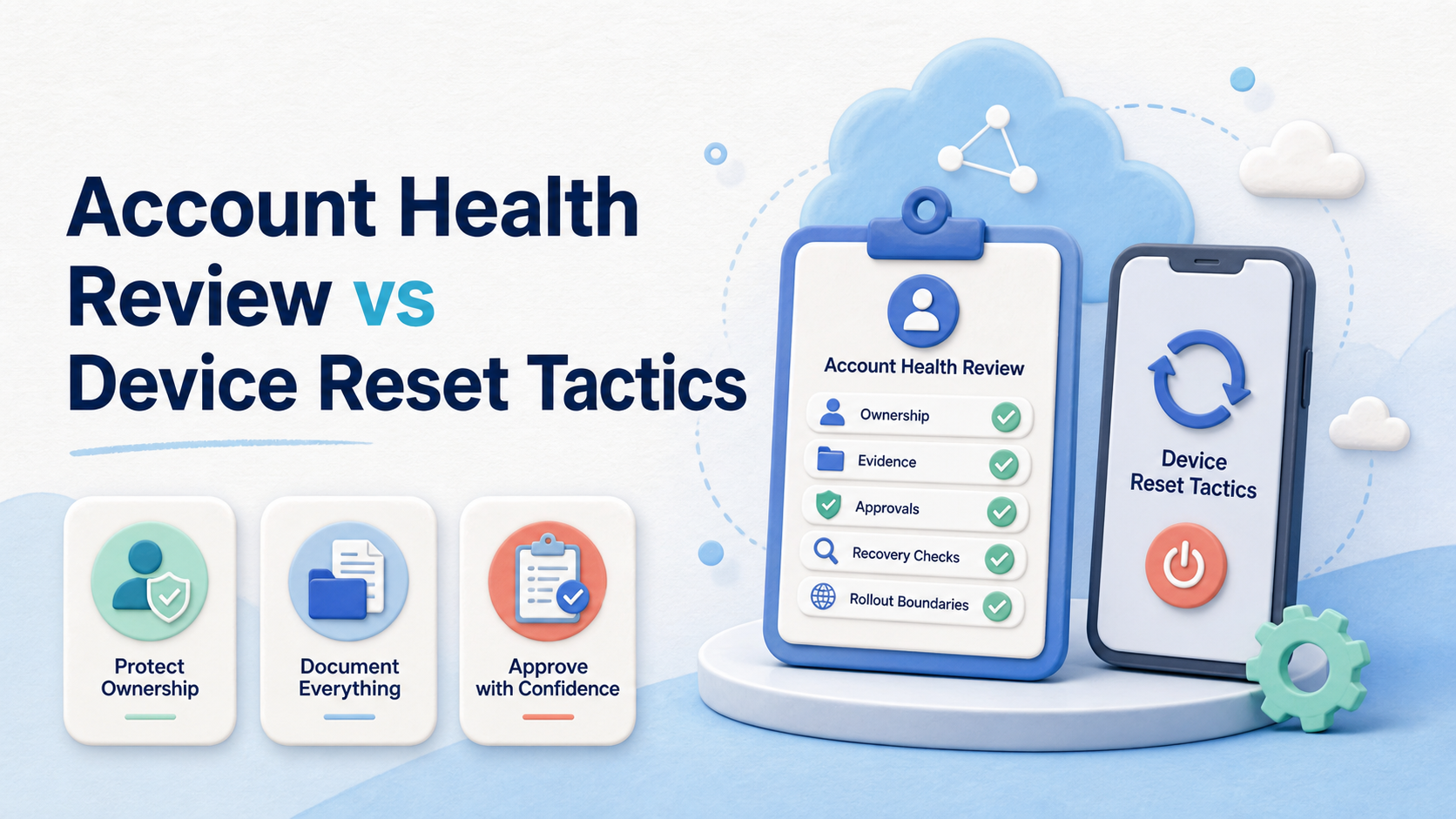
An account health review is a documented check of account ownership, permissions, task history, and unresolved operational issues. A device reset is a controlled troubleshooting or reconfiguration action for an approved environment. For most teams, review should come first because it establishes what is wrong, who owns the decision, and whether a reset is even appropriate.
The two actions are not interchangeable. A review produces evidence and a decision path. A reset changes an environment. Resetting before a review can remove useful local context, repeat a configuration problem, or leave the next operator with no clear explanation of what changed.
Where a cloud phone supports legitimate mobile work, treat it as one part of an accountable execution system. Account health review versus device reset tactics should be evaluated through task scope, authorization, recovery evidence, and the effect on the next handoff. It is not a method for bypassing platform rules or avoiding enforcement.
Key takeaways
- Review the account and task record before changing a mobile environment.
- Use a reset only for a defined troubleshooting, maintenance, or reassignment reason.
- Preserve the before-and-after record so the team can explain the change later.
- Pause unclear issues rather than making repeated environment changes.
What to Compare Before Choosing an Account Health Review or Reset
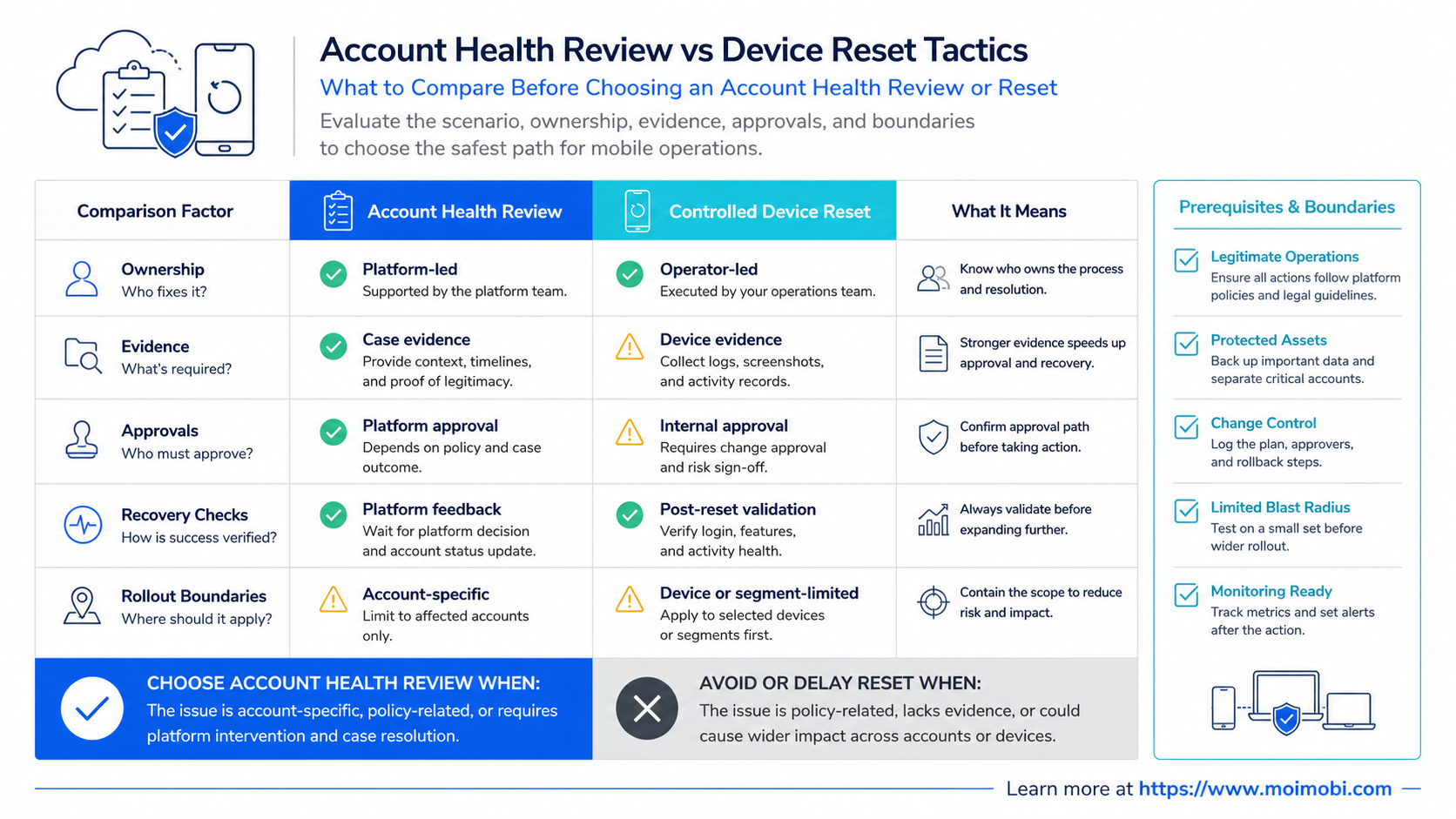
Compare the decision purpose first. An account health review asks whether the work is correctly assigned, permitted, and recoverable. A reset asks whether the environment should be returned to an approved baseline after a confirmed operational issue. The first is a governance check; the second is a technical maintenance action.
Start with the evidence available. If the team does not know the account owner, last approved task, or current permission state, a reset will not solve the underlying problem. It may make later diagnosis harder. If the team has a documented configuration issue and an approved reset procedure, a reset may be a reasonable next step.
| Decision area | Account health review | Controlled device reset |
|---|---|---|
| Primary question | Is the account work correctly owned, authorized, and recorded? | Should the assigned environment be restored or reconfigured? |
| Typical trigger | Missing context, repeated exceptions, access uncertainty, or handoff gaps | Confirmed technical issue, approved maintenance, or planned reassignment |
| Required evidence | Task history, owner, permissions, approval, and unresolved issues | Reset reason, authorization, baseline, and verification result |
| Common failure | Review becomes a checklist with no owner for the follow-up | Reset is used as a reflex before the team understands the issue |
NIST's incident-handling guidance describes the value of preparation, detection, analysis, containment, recovery, and post-incident activity. A mobile operations team can apply the same sequence at a smaller scale: gather context, decide, perform a controlled recovery action, and review the outcome. See NIST SP 800-61 Rev. 2 for the authoritative incident-response framework.
Account Health Review vs Device Reset Tactics: Key Differences
An account health review works at the operational layer. It checks whether the account is mapped to the right team lane, whether the active task is in scope, and whether the next person can see the current status. Its output is a decision: continue, correct access, request approval, pause, or perform a planned maintenance action.
A controlled reset works at the environment layer. It may clear an approved test state, apply a documented configuration, or prepare a workspace for reassignment. Its output is evidence that the environment returned to the expected baseline and that a qualified person verified the change.
The distinction prevents two costly habits. The first is using a device change to hide a process problem. The second is holding a long review when the team has already identified a simple, approved maintenance step. The right order depends on the known facts, but reviews should precede any unclear or consequential reset.
For a team with parallel work lanes, account-level workflow coordination helps keep the review attached to the correct account and task rather than to a generic device note. That context is what makes a later reset understandable.
A Practical Account Health Review Workflow
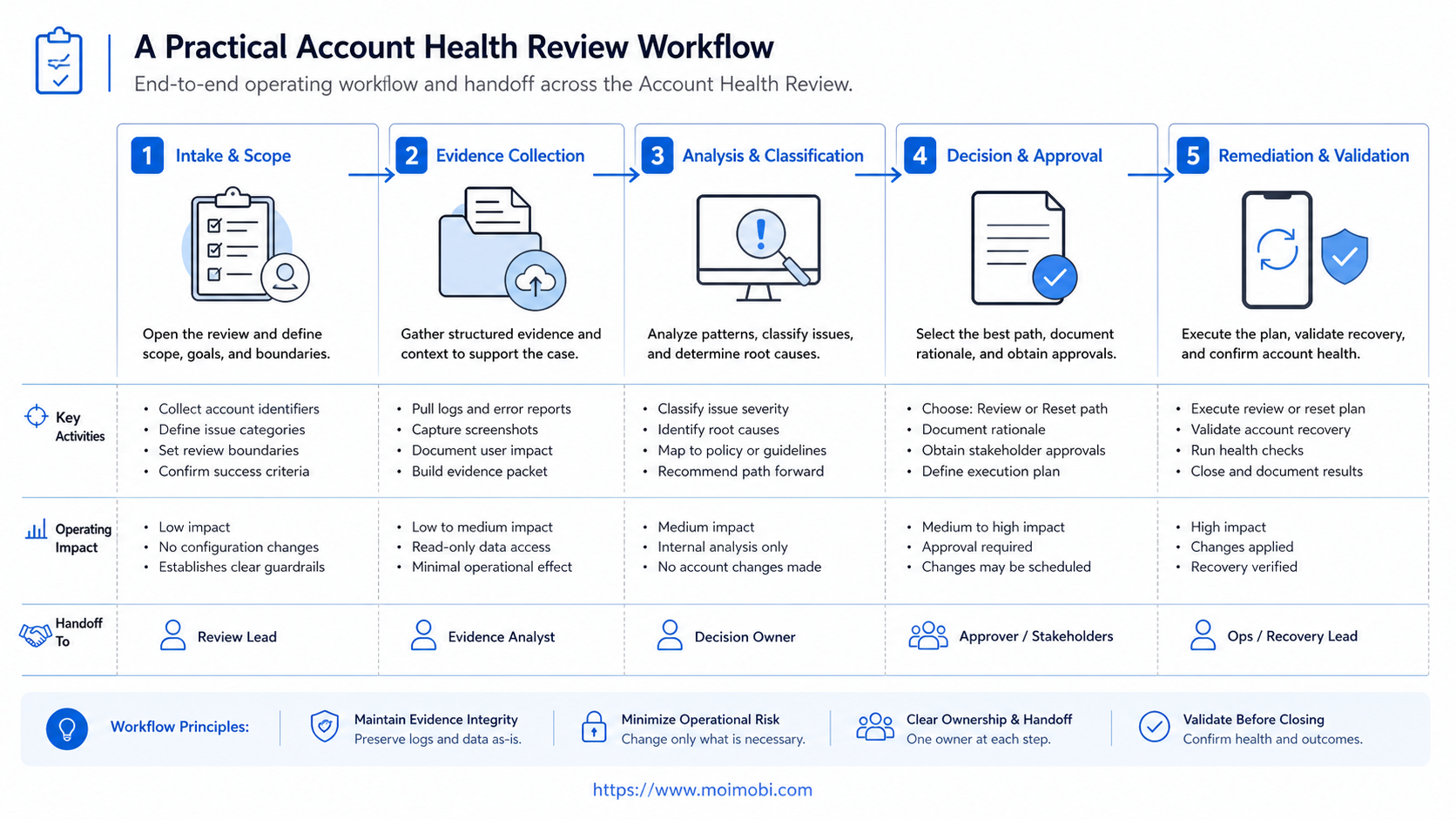
Use a review process that is brief enough to run consistently. The purpose is to make the next decision explicit, not to create a long report for every routine task.
- Identify the operating lane. Record the account, client or campaign scope, and current task owner.
- Read the latest task evidence. Check the last approved action, outcome, pending work, and exception notes.
- Confirm authorization. Verify that the person and environment match the task's allowed action.
- Classify the issue. Separate an access problem, a workflow gap, a technical fault, and a policy question.
- Choose the next action. Continue, pause, request review, correct the configuration, or run an approved reset.
- Record the decision. Save the reason, decision owner, environment reference, and verification requirement.
This workflow is particularly useful when support, content, and operations teams cover the same account at different times. The record should make it clear whether a person is allowed to continue work or must wait for a reviewer. It should not contain passwords, raw credentials, or unnecessary personal information.
The OWASP Logging Cheat Sheet provides another useful principle: records need enough context to support investigation, but logs should avoid exposing sensitive data. Apply that principle to task evidence and reset notes.
When a Controlled Reset Is Appropriate
A reset is appropriate when the team has a documented reason and a defined baseline to verify afterward. Examples include planned reassignment of a mobile workspace, a confirmed application configuration issue, a failed managed update, or a test environment that needs to return to a known state.
The reset should have a named approver. It should state which environment is affected, what data or configuration is expected to change, who will verify the result, and what to do if verification fails. Without those elements, the action is a guess rather than a recovery procedure.
Do not use a reset as a response to a platform restriction, unclear account status, or a missing task record. Those conditions need review and escalation. Repeated resets can also erase the evidence needed to identify the actual workflow or access problem.
For teams that maintain multiple mobile environments, a defined device workspace can make the reset boundary easier to document. The operational rule remains the same: reset only the assigned environment and preserve the decision record.
Operational Costs and Trade-Offs
Account reviews take team time, especially during the first rollout. They require task fields, ownership rules, and a reviewer for exceptions. That cost buys a clearer handoff and reduces the chance that a technical action is taken without context.
Resets can appear faster because they change the environment immediately. Their hidden cost appears when the original issue returns, a client asks what changed, or a new operator must reconstruct the prior state. The team then pays for investigation after the fact.
Measure the choice with operational signals rather than vague claims about safety. Track missing owners, incomplete approval records, resets without a reason code, repeated resets for the same environment, and time required to resume a paused task. These fields reveal where the process is weak.
Android Enterprise treats managed devices as environments with organization-defined management boundaries. That reinforces a practical rule: define the work boundary and desired baseline before making changes. The Android Enterprise documentation explains the official managed-device model.
Decision Record: Review Before Reset
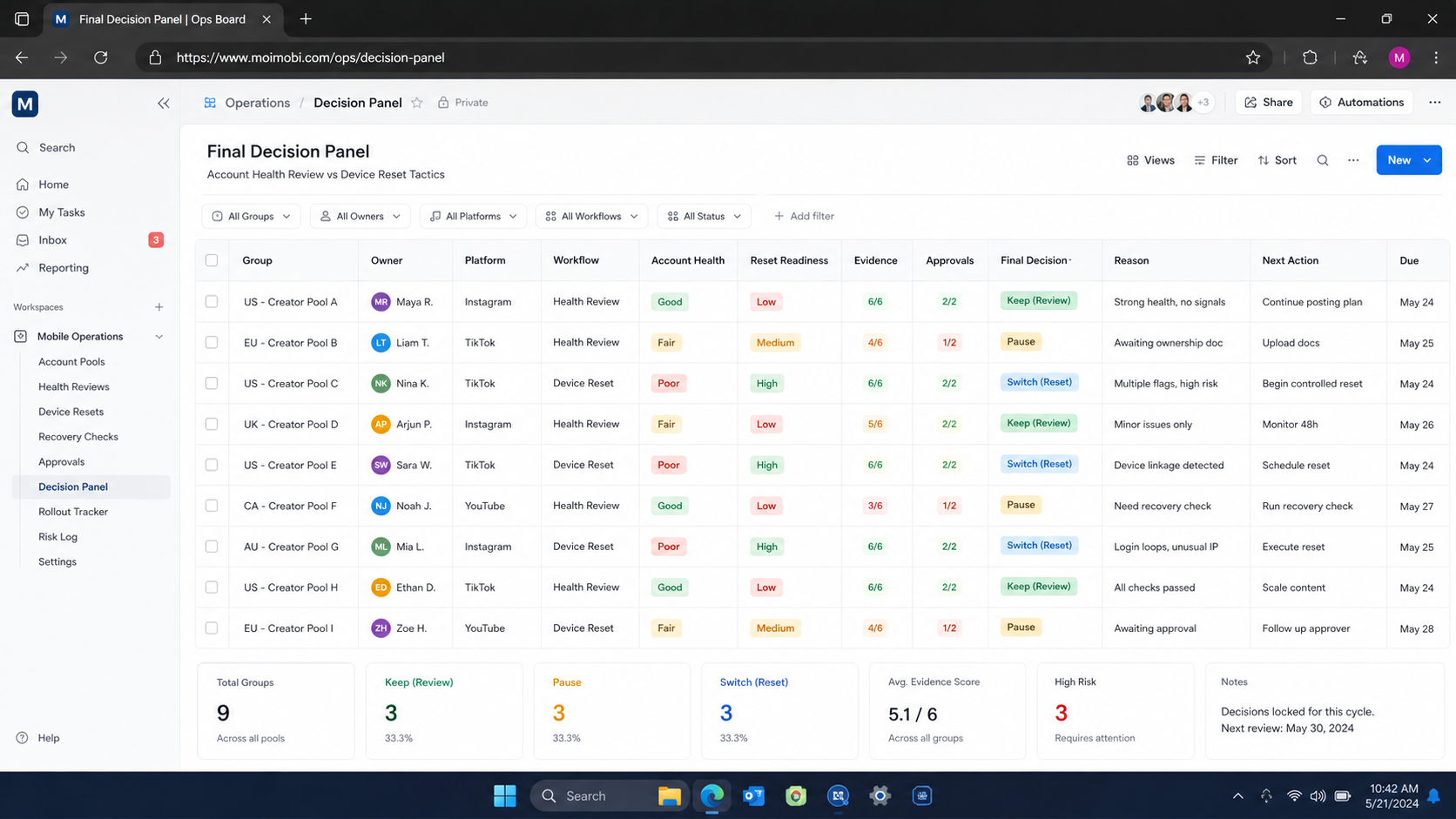
Use a small decision record when a review identifies a possible reset. It prevents technical maintenance from becoming an undocumented operating habit. The record does not need a long narrative. It needs the facts that the next owner must verify.
Include the account lane, device or workspace reference, issue category, last known approved task, decision owner, and the selected action. For resets, add the expected baseline, the person who will verify it, and the stop rule if the expected result does not appear. This creates a practical bridge between account health review and the technical change.
One example is a scheduled mobile application update that leaves an approved workspace unable to complete a routine task. The review confirms the task scope and environment ownership. The approver authorizes a documented reset or reconfiguration. A verifier checks the expected baseline and records whether the original task can resume. The team then knows whether the issue was an update problem, a missing permission, or a workflow gap.
Avoid broad reset categories such as “device issue.” Those labels hide the decision needed for later analysis. Use a clear classification such as application configuration, managed update, planned reassignment, or access escalation. When the same classification recurs, revise the SOP instead of relying on individual memory.
Which Option Fits Different Teams?
Choose this path when work crossed shifts, ownership is uncertain, a task is missing approval evidence, or the issue may involve a process rather than a device.
Choose this path when a documented technical or reassignment reason exists, a baseline is known, and an approver and verifier are assigned.
Small teams can keep the review lightweight. A short form with owner, account, current task, issue class, decision, and follow-up is enough to start. Larger teams may add role permissions, client reporting fields, and recurring review queues.
The wrong fit is a team that uses a reset to avoid writing down why a task stopped. That creates a silent operational history. Instead, link the reset to a task record and make the verification evidence visible to the person who owns the next action.
Pilot and Recovery Checks
Pilot the workflow on one task type for one week. Choose a lane that already produces handoff friction, such as customer-message triage or content approval. Keep the initial review fields simple, then add detail only when a repeated exception demands it.
After each reset, run four recovery checks:
- Does the task record show why the reset was approved?
- Can another operator identify the environment and baseline that were checked?
- Is the original issue resolved, paused, or awaiting a separate reviewer?
- Did the team create an SOP update when the same exception occurred twice?
If the process cannot answer these questions, do not add more environments. Improve the record and decision path first. A mobile operations workflow should make work easier to resume, not easier to obscure.
FAQ: Account Health Review vs Device Reset Tactics
Is an account health review a platform compliance check?
It can include operational compliance checks, but its core purpose is team governance: ownership, task context, authorization, and recovery evidence.
Should every mobile issue trigger a reset?
No. First classify the issue. Missing context or approval needs review, while a confirmed technical problem may justify an approved reset.
What should be recorded before a reset?
Record the environment, reason, approver, expected baseline, verification owner, and the linked task or incident reference.
Can a reset replace a handoff note?
No. A reset changes an environment. A handoff note explains the task, decision, and next action.
How long should a review take?
Routine reviews should be short. The time needed depends on the clarity of the task record and the seriousness of the exception.
Who approves a reset?
The approver should be the person or role responsible for the account lane, device policy, or affected client workflow.
What happens if verification fails after a reset?
Pause further work, preserve the evidence, and route the issue to the owner who can decide the next recovery step.
Conclusion
Account health review and device reset tactics serve different jobs. Review establishes the facts and ownership. A controlled reset restores or reconfigures an approved environment after the team understands why it is needed.
Begin with one documented review lane. Require a reason, approver, and verification result for every reset. That sequence creates an operating history the next teammate can use, while keeping legitimate maintenance separate from unclear account decisions.


