
Key Takeaways
- Cloud phone vs emulator is a workflow decision, not only a device-cost comparison.
- Emulators fit testing, light setup, and controlled development work.
- Cloud phones usually fit WhatsApp operations better when teams need persistent mobile account environments.
- Team review, account ownership, logs, and recovery matter more than raw device count.
- Test one WhatsApp workflow before scaling accounts or mobile environments.
Cloud phone vs emulator means comparing a persistent remote mobile environment with a local or virtual Android testing environment. For WhatsApp operations, a cloud phone is usually the stronger fit when a team needs account continuity, mobile execution, handoff, and repeatable workflows. An emulator can still be useful for testing, training, or light internal checks.
The selection rule is simple. Use an emulator when the goal is controlled testing or low-stakes setup. Use a cloud phone when the workflow depends on persistent app state, account assignment, remote team access, and operational review.
WhatsApp work is not only a technical task. Teams may handle customer messages, lead follow-up, campaign replies, marketplace coordination, or support escalation. Those workflows need clear account ownership and recovery paths. Before choosing, teams should understand what a cloud phone is and how it differs from a local emulator.
The verdict changes only when the task changes. A developer testing a flow can stay with an emulator. A team running daily WhatsApp operations should usually evaluate cloud phones first, then decide whether lighter emulator use still belongs in training or QA.
A Practical Comparison Framework for Cloud Phone vs Emulator
The first comparison axis is environment persistence. An emulator can create a controlled Android-like setup for testing. Android Developers describes the Android Emulator as a way to simulate Android devices on a computer. That is useful for app development and controlled testing, but operations teams often need persistent account workspaces.
The second axis is team access. A local emulator usually sits on one machine. A cloud phone is remote by design, so several authorized team members can access the assigned environment when the workflow requires handoff.
The third axis is account workflow control. WhatsApp operations often need one account, one device lane, one reviewer, and one record of activity. If a task fails, the team needs to know whether the issue came from login state, app state, network setup, human approval, or the task itself.
| Decision Area | Cloud Phone | Emulator | Best Check |
|---|---|---|---|
| Account continuity | Better for persistent mobile account lanes | Better for temporary tests | Can the same account return to the same environment? |
| Team handoff | Remote access supports operations review | Usually tied to one local setup | Can a reviewer inspect the same session? |
| Testing | Useful for real workflow checks | Useful for controlled development tests | Is the goal testing or live operations? |
| Recovery | Can become part of a task log | Often needs manual local inspection | Can failures be explained and resumed? |
For a deeper category-level comparison, teams can also review this cloud phone vs emulator guide. The WhatsApp-specific decision adds one more layer: customer and account workflows need clearer ownership than simple app testing.
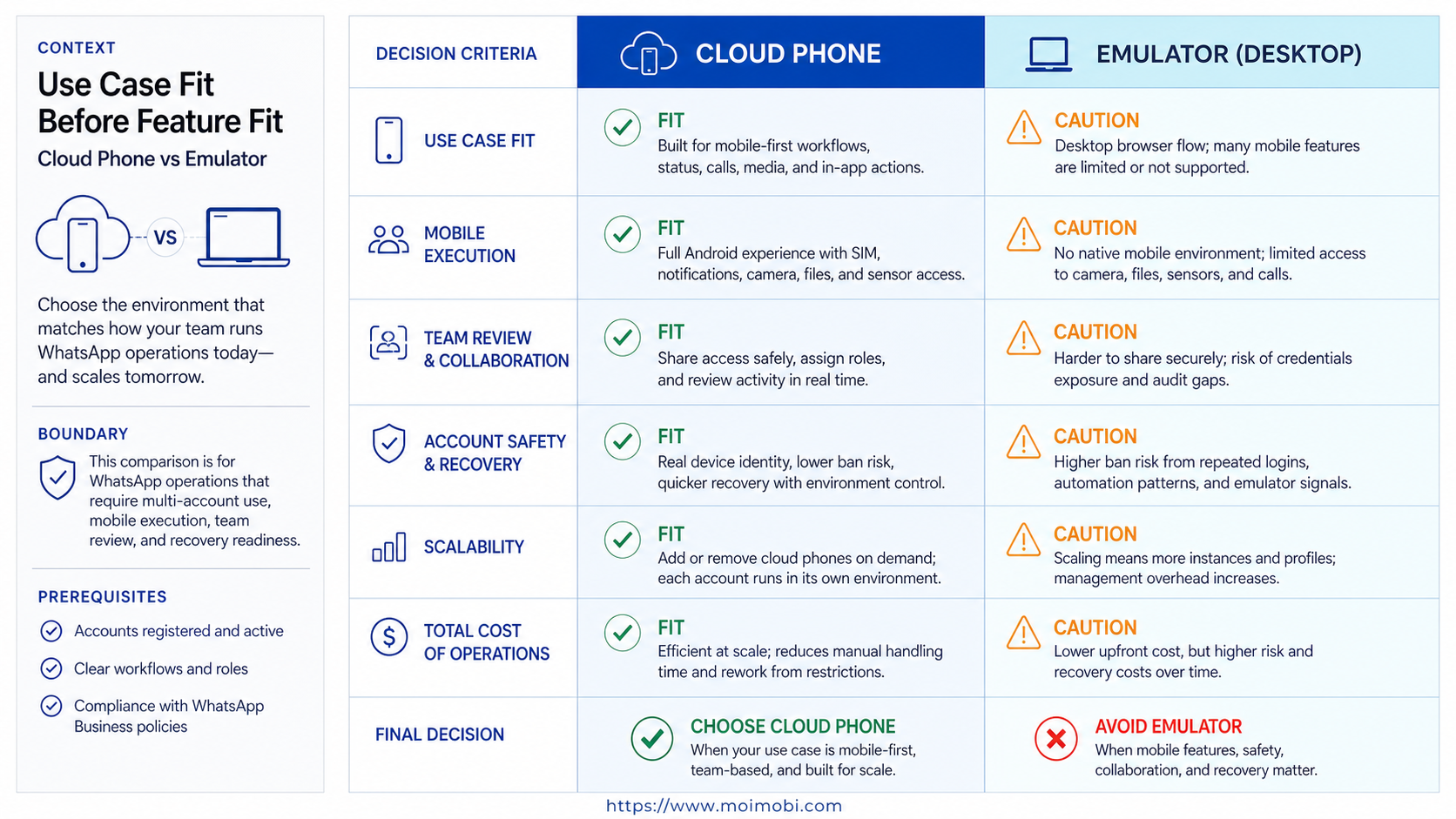
Use Case Fit Before Feature Fit and Cloud Phone vs Emulator
Feature lists can hide the real question. The better question is: what job does the environment need to support? A WhatsApp support account, sales account, or community account usually needs a stable mobile lane. A developer checking UI behavior may only need an emulator.
Cloud phones fit teams that need:
- repeated WhatsApp account checks
- customer reply preparation
- support handoff between operators
- mobile-first account workflows
- persistent Android environments
- review and recovery records
Emulators fit teams that need:
- app behavior testing
- internal demos
- lightweight local experiments
- controlled development scenarios
- temporary training environments
The boundary is practical. If the account is part of a live operations process, evaluate a cloud phone first. If the task is a technical test with no account continuity need, an emulator may be enough.
Meta's WhatsApp Business Platform documentation shows that business messaging is a structured platform with APIs, account setup, templates, and platform-specific rules. Even when a team uses mobile app workflows rather than APIs, the same operational lesson applies: messaging work needs clear process boundaries.
Operational Trade-Offs and Team Workflow
A WhatsApp operations workflow usually has more than one role. One person owns the account. Another reviews reply quality. A third may handle campaign follow-up or escalation. A cloud phone setup can make that environment easier to share and audit when the platform around it supports task logs.
An emulator is simpler when one person controls the whole setup. That simplicity becomes weaker when the team grows. Local machines, local settings, and local session state can make handoff harder.
For teams using AI workers, the difference becomes sharper. An AI worker can draft replies, summarize threads, or prepare follow-up tasks. The execution environment still needs to preserve account state and show what happened. That is why WhatsApp operations often belong inside a broader multi-account management model.
- Assign the account. One WhatsApp account should map to one operating lane.
- Define the task. Separate monitoring, drafting, replying, and escalation.
- Set review rules. Sensitive replies should pause for human approval.
- Record failures. Track login issues, app state changes, and rejected replies.
- Review weekly. Decide whether the workflow should expand, pause, or change.
This process matters more than the device label. A cloud emulator, local emulator, cloud phone, or physical phone can all fail if ownership is unclear. The better setup is the one that keeps workflow responsibility visible.
Setup Cost, Ongoing Cost, and Management Overhead
The cheapest setup is not always the lowest-cost operation. An emulator may be inexpensive to start, especially for testing or training. It may become costly when teams need handoff, repeated account access, or shared review.
A cloud phone usually adds platform and environment cost. In exchange, it can reduce local setup work and make remote operations easier to manage. The real comparison should include reviewer time, failed-task recovery, account confusion, and setup maintenance.
Teams should calculate cost in four buckets:
- setup time
- environment capacity
- human review time
- failed-task recovery
For WhatsApp operations, ongoing management often becomes the main cost. Accounts need owners. Messages need rules. Exceptions need escalation. Reports need enough detail to show whether the workflow is improving.
MoiMobi is positioned around execution infrastructure rather than simple device rental. Its cloud phone layer is most useful when paired with account assignment, mobile automation, and workflow review.
Migration cost also deserves attention. Moving from an emulator to cloud phones is not only a tooling change. The team needs to move account ownership, review rules, escalation paths, and reporting habits into the new environment. A clean migration starts with one account group, not the whole operation.
Keep the emulator for test cases where it still helps. Remove it from live account work if it creates handoff confusion. Mixed setups can work when each tool has a defined job.
Which Option Fits Different Teams Best
Small teams with one WhatsApp account may start with a simpler setup. If the workflow is occasional and one person owns it, an emulator or physical phone can be enough for testing and basic checks.
Growth teams with several WhatsApp accounts should compare cloud phones earlier. The need shifts from "Can we open the app?" to "Can we run this account workflow repeatedly with clean ownership?"
Agencies should prioritize cloud phones when client separation matters. Each client account needs its own workspace, reviewer, and task history. Shared local emulator setups can blur those boundaries.
Engineering teams should keep emulators in the toolkit. Android Emulator remains relevant for controlled app testing. It is not the same decision as running customer-facing WhatsApp operations.
Social and customer engagement teams should choose by operating reality. If the team handles live customer conversations, the platform needs review, assignment, and recovery. If the team only checks UI behavior, an emulator may be enough.
Operations leaders should also separate account value. A test account and a customer-facing account should not use the same decision rule. Higher-value accounts need stronger workspace control, clearer review, and better failure records.
Teams that already use browser dashboards should map browser and mobile work separately. Browser tasks can stay in browser profiles. WhatsApp app tasks should move into a mobile lane when app state and mobile context matter.
Pilot Rollout, Measurement, and Recovery Checks
A pilot should not begin with every account. Start with one WhatsApp workflow and two or three accounts. For example, test message monitoring, draft preparation, and human approval before any direct sending process is expanded.
Measure the pilot with practical metrics:
- task completion rate
- review time per message batch
- login interruption count
- wrong-account or wrong-environment incidents
- rejected draft rate
- recovery time after failure
These metrics show whether the environment improves control. Speed alone is not enough. A fast workflow that creates wrong-account confusion is not ready to scale.
Recovery checks should be explicit. When a task fails, the team should identify whether the cause was app state, account login, device environment, network route, AI instruction, or human review. If the cause cannot be found, do not add more accounts yet.
The pilot ends with a decision. Continue if the workflow is repeatable. Redesign if ownership is unclear. Stop if the environment adds more review work than it removes.
Review notes should be short but specific. Record the account, environment, task, failure point, reviewer decision, and next action. That small record helps the team see whether the environment choice is working or whether the workflow itself needs redesign.
Expansion should happen by account group. Add the next group only when the first group has stable review rules and explainable failures. This keeps scaling tied to operating proof, not vendor capacity.
Frequently Asked Questions
Is a cloud phone better than an emulator for WhatsApp?
For live WhatsApp operations, usually yes. A cloud phone is better suited to persistent mobile account workflows. An emulator is better for testing and temporary setup.
When is an emulator enough?
An emulator is enough when the goal is app testing, training, or a controlled internal experiment. It is weaker for repeated account operations.
Does a cloud phone replace WhatsApp Business APIs?
No. APIs and mobile app workflows serve different needs. Teams should choose based on the workflow, account model, and platform requirements.
Why does account continuity matter?
WhatsApp operations often depend on login state, conversation context, and account ownership. Losing that continuity creates review and recovery work.
Can AI workers use cloud phones for WhatsApp?
They can support parts of the workflow when the platform connects AI tasks to mobile environments. Sensitive actions should still use clear approval rules.
What should agencies compare first?
Agencies should compare client separation, reviewer access, account assignment, logs, and recovery. Device count alone is not enough.
Is a cloud emulator the same as a cloud phone?
Not always. A cloud emulator may simulate Android for testing. A cloud phone is usually positioned as a persistent remote mobile environment for workflows.
How should teams pilot the choice?
Choose one WhatsApp workflow, two or three accounts, one reviewer, and a small metric set. Expand only after failures are explainable.
Conclusion
Cloud phone vs emulator for WhatsApp operations comes down to workflow fit. Choose an emulator for controlled testing. Choose a cloud phone when the team needs persistent mobile account lanes, remote handoff, review, and recovery.
Before scaling, run one pilot. Name the account owner, reviewer, task boundary, success metric, and stop rule. If the environment keeps those pieces clear, it is ready for broader WhatsApp operations.



