
The best no-code browser automation tools 2026 are a category of tools that let business teams automate web tasks without writing scripts while keeping account context, review, and recovery under control.
There is no single best choice for every team. A sales team scraping public lead pages, a support team working inside logged-in dashboards, and an operations team managing many social accounts need different execution models.
For business teams, the decision should start with workflow fit. Look at where the task runs, whether login sessions matter, who owns the account, whether human approval is needed, and how failures are recovered.
Key Takeaways
- The best no-code browser automation tools 2026 depend on task depth, account context, and team governance.
- Browser extensions are useful for lightweight web tasks, but may not fit controlled multi-account operations.
- Desktop RPA tools fit attended workflows and enterprise process automation.
- App automation platforms fit API-connected tools better than fragile browser-only tasks.
- Teams managing many accounts need execution environments, isolation, and clear recovery logs.
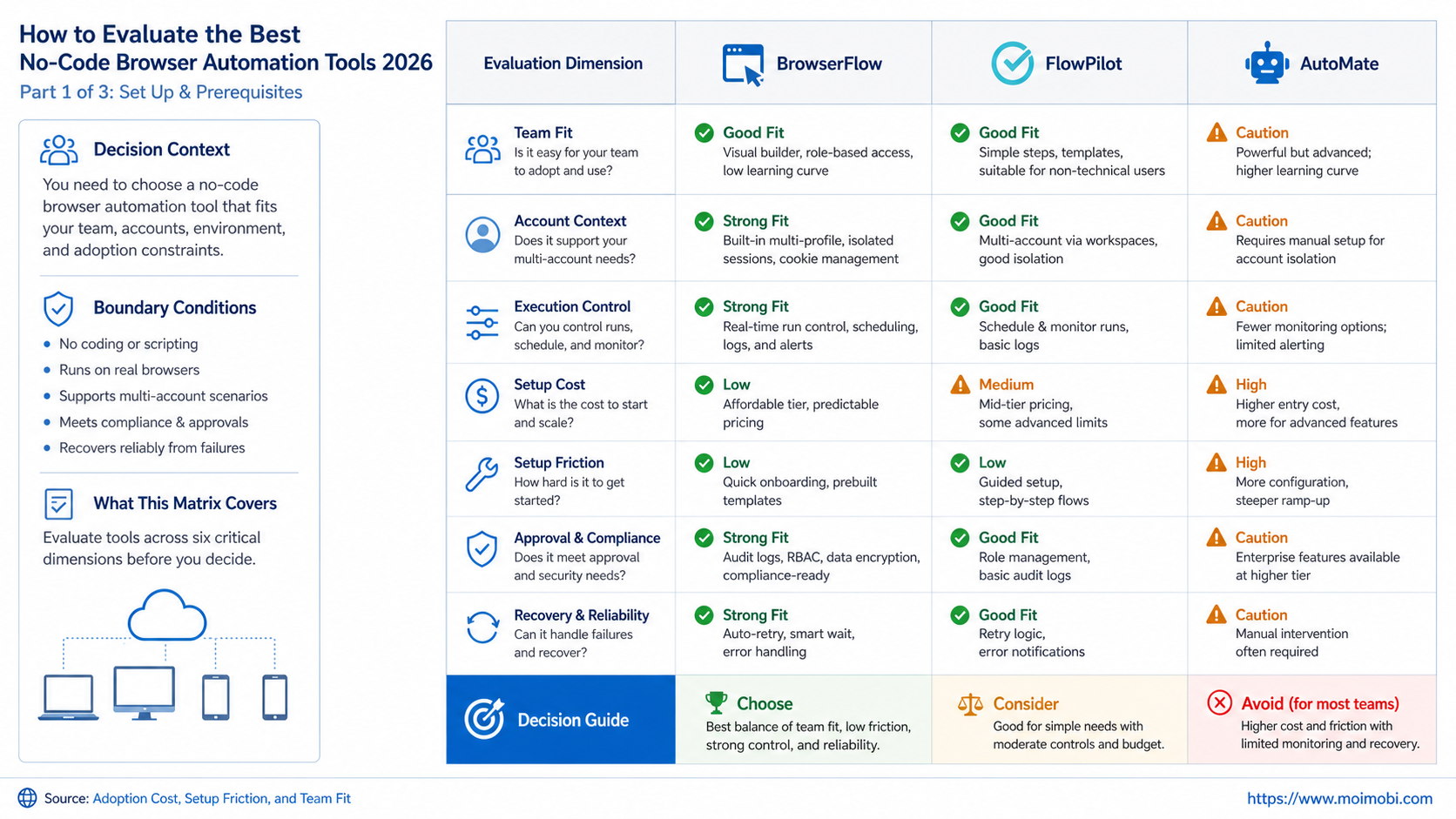
How to Evaluate the Best No-Code Browser Automation Tools 2026
The biggest mistake is comparing feature lists before defining the workflow. Browser automation is not one market. Some tools connect apps. Some record web actions. Some run desktop flows. Some provide controlled browser or mobile workspaces for account-based work.
Use this sequence before picking a tool:
- Define the task. Is it data extraction, form entry, dashboard monitoring, publishing, reply handling, or account maintenance?
- Check login requirements. Decide whether the workflow needs persistent sessions, browser profiles, or manual sign-in.
- Map ownership. Record who owns the account, workflow, approval, and recovery process.
- Measure fragility. Ask how often the target page changes and how the tool recovers from layout changes.
- Set control rules. Decide whether the tool can submit, publish, export, or message without human review.
- Run a pilot. Test the tool on a narrow workflow before adding more accounts or platforms.
Microsoft's Power Automate documentation explains that browser automation actions can interact with webpages and emulate events such as clicks and JavaScript scripts. It also says flows may be built manually or with a recorder. That is a useful example of no-code and low-code browser automation sitting inside a broader workflow system. See Microsoft Learn on automating webpages in Power Automate.
Best No-Code Browser Automation Tools 2026: Comparison Matrix
The practical shortlist is easier to understand by category than by ranking. Each category solves a different operating problem.
| Tool category | Best fit | Watch out for |
|---|---|---|
| App automation platforms | Moving data between supported apps and triggers | Not every logged-in web task has an API path |
| Browser extension automation | Lightweight web scraping, form work, and personal workflows | Page changes and local browser dependency |
| Desktop RPA platforms | Enterprise workflows across desktop apps and websites | Setup, governance, and maintenance overhead |
| [AI browser](https://www.moimobi.com/) execution platforms | Account-based workflows needing profiles, review, and logs | Requires clear task boundaries and oversight |
| Mobile execution platforms | App-side workflows that cannot run only in a browser | Needs device and account environment planning |
Zapier positions itself as an automation platform for workflows, AI agents, and app connections across thousands of apps. That makes it strong when the work can happen through app integrations rather than direct browser manipulation. See Zapier.
Bardeen is commonly used as a browser-first automation tool. Its Chrome Web Store listing describes no-code scraping from many sites and prebuilt workflow templates. That makes it a better fit for browser-adjacent personal or team tasks than for heavy enterprise governance. See the Bardeen Chrome Web Store listing.
UiPath Studio describes support for low-code, code-first, and AI-assisted development for robotic and API-driven workflows. That makes it more suitable for teams prepared to manage a formal automation program. See UiPath Studio.
Capabilities That Actually Change Outcomes
The useful capabilities are not always the loudest features. Business teams should focus on reliability, control, and handoff.
Look for these capabilities:
- persistent browser profiles,
- account and workspace ownership,
- recorder or visual builder,
- task scheduling,
- approval before sensitive actions,
- retry and pause controls,
- failure logs,
- human takeover,
- team permissions,
- integration with existing systems.
W3C WebDriver describes a browser automation standard that lets out-of-process programs remotely instruct browser behavior. That standard matters because many browser automation systems rely on structured browser control, not magic. See the W3C WebDriver specification.
For no-code teams, the important question is whether the tool hides complexity without hiding risk. A visual recorder is helpful. A task log is more important. A workflow that can pause before sending a message or submitting a form is better than one that runs blindly.
Teams evaluating AI browser and cloud phone execution infrastructure should also ask whether the platform connects AI task logic to controlled environments. The tool should know which account is active, what action is allowed, and who approved the workflow.
Adoption Cost, Setup Friction, and Team Fit
The lowest setup cost is not always the lowest operating cost. A browser extension may be quick to start, but it may become expensive if workflows break often or run from unmanaged local machines.
Desktop RPA may take longer to configure, but it can fit teams that already manage formal process automation. App automation platforms may be faster when the work is mostly app-to-app, but they may not handle a login-based dashboard that has no reliable API path.
Use this cost checklist:
- setup time,
- number of users,
- profile or account management,
- error handling,
- approval workflow,
- maintenance burden,
- security review,
- reporting needs,
- platform limits,
- handoff complexity.
For multi-account operations, multi-account management changes the cost model. The team is not only buying automation. It is buying account clarity, workspace boundaries, and fewer manual handoff problems.
If the workflow depends on mobile apps, browser automation alone may not be enough. Teams should understand what a cloud phone is before deciding that every task must run in a browser.
Cost Scorecard for the Best No-Code Browser Automation Tools 2026
Cost should be judged by total workflow ownership, not only subscription price. A cheap tool can become expensive if every run needs manual repair. A more structured tool may cost more upfront but reduce support load for repeated account work.
Use a 1 to 5 score for each field:
- builder effort,
- user training,
- account setup,
- permission review,
- workflow maintenance,
- failure recovery,
- reporting quality,
- escalation control,
- security review,
- handoff effort.
Then compare tools by the weakest field. A tool with a high builder score but a low recovery score may be fine for one-off research. It may be a poor fit for customer replies, content publishing, or daily account operations.
Teams should also count hidden maintenance. Browser workflows may break when a website changes its layout. App integrations may break when permissions change. Desktop RPA may need workstation setup and version control. Execution platforms may require upfront account mapping.
The right tool is the one whose weakest field matches the team's risk tolerance. A solo operator may accept manual repair. A business team with client accounts usually needs stronger logs and ownership.
Which Option Fits Different Operating Scenarios
Small teams with simple app-to-app workflows should usually start with app automation. If a new form submission needs to create a CRM record and notify Slack, a browser automation tool may be unnecessary.
Sales or research teams that collect information from web pages may fit browser extension automation. The task should be narrow, repeatable, and easy to inspect.
Operations teams with many logged-in accounts need stronger controls. Browser profiles, permission rules, task logs, and review gates become more important than a quick recorder.
Strong fit for no-code browser automation
- Repeated web tasks need less manual clicking.
- The team can inspect results before submission.
- Page flows are stable enough for repeat runs.
- Account ownership is mapped before automation starts.
Weak fit
- The page changes daily and breaks selectors.
- The action is high-risk and cannot be reviewed.
- The team has no owner for each account.
- The workflow belongs in an API, not a browser.
For social teams, social media marketing workflows often mix browser dashboards, mobile apps, and human review. A single no-code browser tool may handle part of the workflow, but not every execution surface.
Final Selection Checklist
Pick the tool by the task's failure mode, not only by the demo.
Choose app automation if the workflow can run through supported app triggers and actions. Choose browser extension automation if the work is light, visual, and easy to inspect. Choose desktop RPA if the workflow spans desktop apps, older systems, and formal process ownership.
Choose an execution platform when the workflow depends on accounts, isolated environments, approvals, and records. This is especially relevant for agencies, ecommerce teams, and social teams that repeat account-based work every day.
Before buying, ask:
- Can the tool run inside the right account environment?
- Can a human pause or approve a sensitive step?
- Can the team see why a run failed?
- Can ownership survive staff changes?
- Can the workflow expand without shared logins?
Pilot Rollout, Measurement, and Recovery Checks
Run one pilot before broad rollout. Pick one workflow, three to five users, and a clear success window.
Track these fields:
- task started,
- task completed,
- manual edits needed,
- failed step,
- retry count,
- human takeover,
- approval delay,
- account mismatch,
- time saved estimate,
- operator feedback.
Recovery is the real test. A no-code tool may look good when the page works. The team learns more when a selector breaks, a login expires, or an approval is missing.
After the pilot, sort results into three groups. Keep workflows that ran cleanly. Repair workflows that failed for fixable reasons. Stop workflows that require too much judgment or create unclear accountability.
Migration Notes for Business Teams
Migration should be gradual. Do not move every browser task into a new tool at once. Start with low-risk work where the expected output is easy to verify.
Create an inventory before migration. List the task name, website, account, owner, current manual steps, current failure points, and desired automation outcome. This inventory prevents the team from rebuilding messy manual work inside a prettier no-code interface.
Move tasks in this order:
- Read-only monitoring tasks.
- Data collection tasks with human review.
- Form preparation tasks that do not submit automatically.
- Approval-based publishing or reply workflows.
- Higher-risk workflows only after recovery is proven.
Keep the old workflow available during the pilot. If the new automation fails, the team should still know how to complete the task manually. That fallback protects daily operations while the new system proves itself.
Migration is complete only when ownership moves too. A workflow without an owner becomes abandoned automation. Assign one owner for maintenance, one reviewer for quality, and one escalation contact for failures.
Frequently Asked Questions
1. What are no-code browser automation tools?
They are tools that let teams automate web tasks through visual builders, recorders, templates, or AI instructions instead of writing scripts.
2. What are the best no-code browser automation tools 2026?
The best choice depends on the workflow. Compare app automation, browser extensions, desktop RPA, and account-based execution platforms before choosing.
3. Is Zapier a browser automation tool?
Zapier is mainly an app automation and orchestration platform. It fits app-to-app workflows better than direct logged-in browser control.
4. Is Power Automate good for browser automation?
It can be a strong fit for Windows and enterprise desktop workflows, especially when teams already use Microsoft tools.
5. When should teams avoid browser automation?
Avoid it when an API is available, when the action is too risky to automate, or when the page changes too often.
6. Do no-code tools remove the need for IT?
Not always. Business teams can build faster, but IT or operations still needs to review access, data handling, and reliability.
7. What should agencies prioritize?
Agencies should prioritize account separation, client ownership, approvals, reporting, and recovery records.
8. Where does MoiMobi fit?
MoiMobi fits teams that need browser and mobile execution environments, account isolation, multi-account workflows, and task records.
Conclusion
The best no-code browser automation tools 2026 are not chosen by feature count. They are chosen by workflow fit, account context, control, and recovery.
Start with one task. Decide whether it belongs in app automation, browser automation, desktop RPA, or an execution platform. Then run a pilot that measures completion, failures, approvals, and handoff quality before scaling.
References:



