
Key Takeaways
- The best cloud phone automation platform for a social media team is the one that matches the team's real mobile workflows, account structure, review process, and recovery plan.
- Cloud phones are strongest when work must happen inside mobile apps, not only browser dashboards.
- Browser profile tools can still matter for web login work, content libraries, reporting, and team handoff.
- A good buying process compares execution environments, account isolation, scheduling, approval controls, logs, and support for failed tasks.
- Start with a small pilot before moving a full account pool into any automation platform.
A cloud phone automation platform is a managed mobile execution environment that lets teams run app-based workflows on remote Android devices instead of local phones. For social media teams, the best cloud phone automation platform is not simply the cheapest device panel. It is the platform that gives operators clean account workspaces, controlled task execution, usable logs, and enough human review to keep publishing, replies, and monitoring manageable.
Social media work rarely lives in one place. Teams may prepare content in a browser, approve copy in a spreadsheet, publish inside TikTok or Instagram, reply in mobile inboxes, and track handoff in another system. A useful cloud phone execution environment should support that operating reality instead of pretending every workflow is just a bulk action queue.
The comparison below focuses on social media teams, agencies, cross-border sellers, and growth operators. It does not rank tools by hype. It shows what to evaluate first, where cloud phones fit, where browser tools still help, and how to run a pilot before committing real accounts.
What to Look for in the best cloud phone automation platform
Start the platform review with one practical question: where does the work actually happen? Workflows that require mobile app sessions, mobile notifications, in-app reply boxes, device-level state, or Android app behavior usually need a cloud phone layer rather than a browser-only tool.
Use the first review meeting to map task types, not vendor logos. Social teams usually need four execution zones:
- Mobile app execution for TikTok, Instagram, WhatsApp, Telegram, Facebook, and similar apps.
- Browser execution for dashboards, ad accounts, content calendars, analytics, and web inboxes.
- Account workspace control for assigning one account to one environment, owner, and task history.
- Review and recovery controls for paused tasks, failed logins, content mistakes, and operator handoff.
AWS describes Device Farm as a service for testing and interacting with apps on hosted physical phones and tablets, including remote access and automated testing with Appium endpoints. That does not make AWS Device Farm a social media operations platform, but it proves a useful benchmark: serious remote-device systems are judged by access, automation, logs, reports, and managed environments, not only by screen streaming.
For social media operations, the buying checklist should include these criteria:
- Can each account run in a separated mobile or browser environment?
- Can operators pause, review, and resume tasks?
- Are task logs visible after execution?
- Can teams assign accounts by client, brand, region, or role?
- Does the platform support both manual takeover and automated steps?
- Can the team export or review enough data to investigate failures?
MoiMobi fits this category because it connects cloud phones, mobile automation, browser execution, and account workspaces in one operating model. Teams that already know they need mobile execution can start from the Cloud phone layer, then add workflow automation only where repeatability is clear.
Core Capabilities That Matter Most in a best cloud phone automation platform
Feature volume can hide weak execution. The better question is whether the platform can keep account work understandable when the team scales from a few accounts to dozens or hundreds.
| Capability | What it should prove | Why social teams care |
|---|---|---|
| Mobile environment control | Accounts can run inside assigned Android workspaces. | Mobile-first platforms often require app-side execution. |
| Account isolation | Teams can separate accounts, owners, device state, and task records. | Mixed sessions create operational confusion and harder audits. |
| Task orchestration | Publishing, replying, monitoring, and follow-up can be queued with review points. | Social operations need repeatability, not only remote control. |
| Human takeover | Operators can inspect and intervene before sensitive actions finish. | Comments, DMs, and customer replies still need judgment. |
| Logs and recovery | Failed tasks leave enough data for diagnosis. | Teams need to know what happened before retrying. |
The common mistake is treating cloud phones as a replacement for all browser work. That is rarely true. Browser profile tools can still be useful for web dashboards, account settings, research, and content planning. The cloud phone layer matters most when the final execution step happens inside a mobile app.
Appium's documentation describes mobile automation as an ecosystem with a core server, drivers, clients, and optional plugins. That model is a useful reminder for business teams: automation is not one button. It is a stack of environment access, platform drivers, workflow rules, logs, and human decisions. A social team buying a platform should ask how those layers are handled, even if the team does not write code.
MoiMobi's mobile automation approach is strongest when operators need mobile tasks to become repeatable workflows. Examples include preparing posts, checking account state, opening mobile inboxes, routing replies, monitoring comments, and recording task outcomes.
Pricing, Setup, and Team Fit
The cheapest device count can become expensive if the team still manages everything manually. A low monthly price is not enough if operators spend hours assigning accounts, checking failed tasks, moving screenshots, or rebuilding sessions.
Compare cost in four buckets:
- Environment cost: cloud phones, browser profiles, proxies, storage, and concurrent capacity.
- Operations cost: setup time, training, account assignment, and daily review work.
- Failure cost: blocked tasks, duplicate replies, missed messages, and unclear ownership.
- Scaling cost: how much work changes when the team adds more accounts or clients.
Cloud phone vs physical phone farm decisions usually start here. A physical phone farm gives direct hardware ownership, but it adds procurement, storage, cabling, network setup, device health checks, and manual maintenance. A cloud phone platform reduces local hardware work, but teams still need to validate device availability, app compatibility, routing, login handling, and support response.
GeeLark vs cloud phone, MoreLogin vs cloud phone, and BitBrowser vs cloud phone comparisons should not be reduced to one winner. The real question is execution scope. Browser profiles may fit when the work is mostly browser login. Mobile app posting, mobile inbox handling, or Android-side customer engagement should push cloud phones higher in the review. Teams that need both should compare how well the platform connects browser and mobile environments.
A practical budget review should include these questions:
- How many accounts need active mobile sessions each day?
- How many tasks require human review before completion?
- How many operators need permissions?
- Which workflows must run in parallel?
- Which failures must be recorded for weekly review?
Teams should also avoid vendor claims that sound absolute. Platform behavior changes, app interfaces change, and account health depends on the team's own content, consent, routing, and operating discipline. A platform can improve control, but it cannot replace responsible social media operations.
Best Options for Common Use Cases
Different teams need different execution models. A social media agency managing client accounts needs assignment, review, and audit trails. A cross-border seller may care more about mobile app access, reply speed, and account grouping by market. A creator team may need lightweight publishing and comment monitoring before advanced automation.
Cloud phone first
Best for teams whose core work happens inside mobile apps: posting, inbox checks, comment replies, short-video app monitoring, and account warm-up review.
Browser profile first
Best for web dashboards, account settings, content libraries, analytics, CRM updates, and browser-based customer support workflows.
Combined execution stack
Best for teams that plan in web tools, execute in mobile apps, and need a shared account workspace across operators.
For TikTok and Instagram teams, cloud phones are most useful when content and replies must be checked in the mobile app. For WhatsApp and Telegram support teams, the important question is whether the platform can keep account assignment and customer handoff clear. For Facebook or LinkedIn operations, browser work may still carry a larger share of the process.
Platform rules also shape the decision. TikTok's Content Posting API documentation describes approval, authorization, scopes, and user consent requirements for direct posting workflows. Meta's developer terms and policy pages likewise frame platform access around permissions, data use, and compliance. These official rules do not remove the need for mobile execution, but they do mean teams should design workflows around authorized access, review, and records.
Moimobi is a better fit when a team needs a wider multi-account management system instead of a simple device list. The platform should help teams know which account is assigned where, who owns the next action, and what happened during the last workflow run.
Selection Checklist for the best cloud phone automation platform
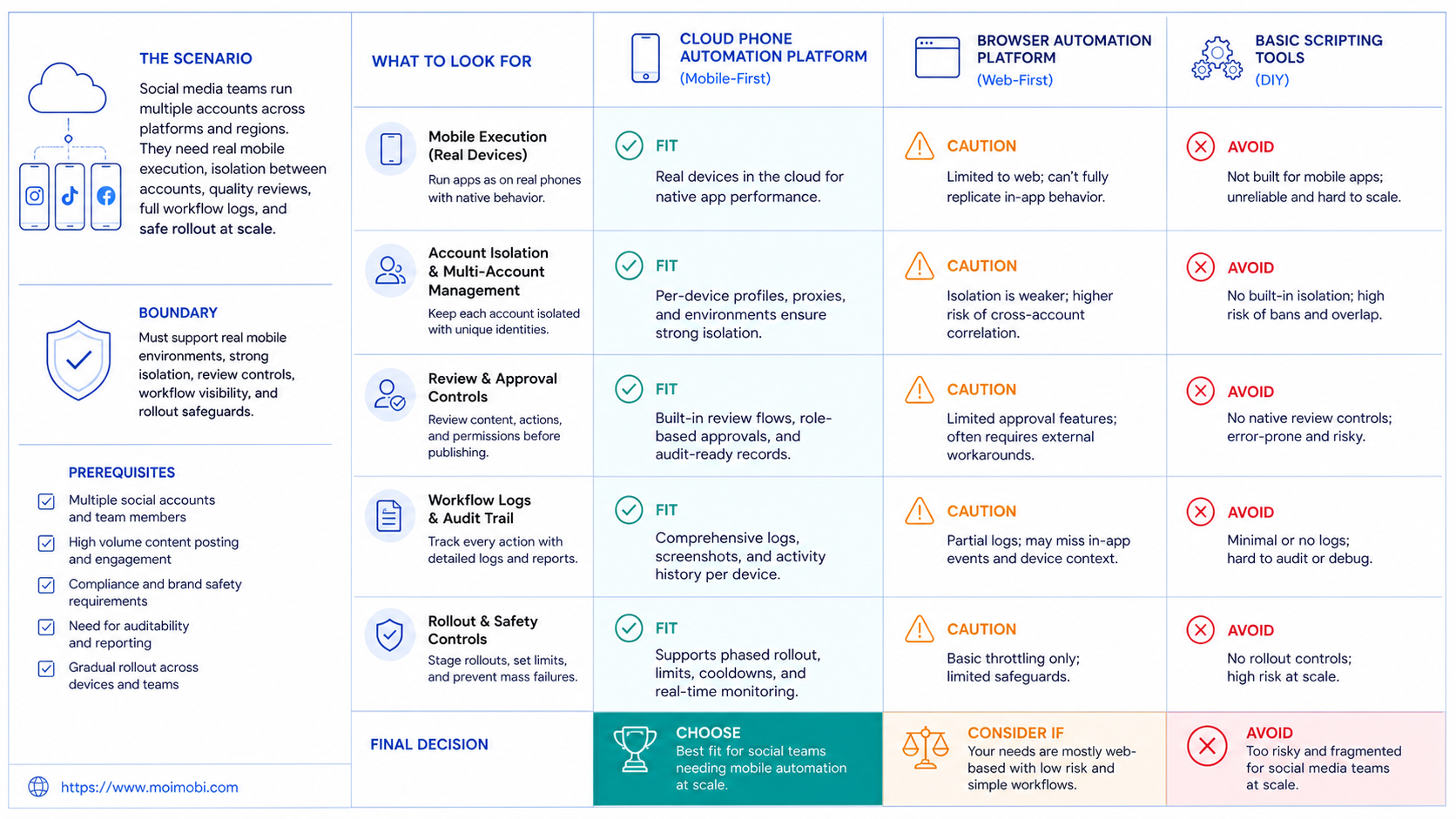
Selection should start with a scorecard, not a feature tour. Give each platform a simple score from 1 to 5 across criteria that match real work. A platform with fewer features can still win if it handles your most frequent workflows with less confusion.
| Decision area | Strong signal | Weak signal |
|---|---|---|
| Execution fit | Matches the mobile apps and browser tools your team uses daily. | Looks powerful in demos but misses a core app workflow. |
| Account model | One account can map to one environment, owner, and task history. | Accounts are only listed as names without operational context. |
| Review control | Approval, pause, retry, and takeover are easy to find. | Tasks run without enough operator visibility. |
| Logs | Failures, screenshots, timestamps, and outcomes are reviewable. | Teams only see success or failure after the fact. |
| Team workflow | Permissions, roles, and client grouping are built into the workspace. | Everyone shares one control panel without clear responsibility. |
Do not choose a platform only because it can open many devices. A social media operation also needs controlled queues, safe handoff, content review, and issue tracking. The right tool makes repeated work easier to supervise, not harder to understand.
For teams that publish, reply, and monitor across platforms, the next review should include the social media marketing workflow. Ask whether the platform supports a weekly operating rhythm: plan content, assign accounts, execute tasks, review exceptions, and improve the next cycle.
Pilot Rollout, Measurement, and Recovery Checks
A pilot protects the team from moving too much work too soon. Start with five to ten accounts, one platform, and one workflow. Good pilot workflows include comment monitoring, content draft review, inbox triage, or scheduled publishing with human approval.
Measure the pilot with operational metrics instead of vanity metrics. Track task completion rate, time saved per account, failed login count, manual takeover count, duplicate work, missed replies, and operator notes. These numbers reveal whether the platform reduces work or only moves work into a new dashboard.
Set stop rules before the pilot begins. Pause the workflow if error rates rise, account ownership becomes unclear, customer replies become inconsistent, or operators cannot explain failed tasks. A serious platform should make recovery visible enough that the team can decide whether to adjust routing, revise SOPs, reduce automation scope, or add review points.
Run the pilot in three passes:
- Manual baseline: record how long the same task takes without automation.
- Assisted execution: use the platform for setup, environment access, and task preparation, while humans approve final actions.
- Repeatable workflow: automate only the steps that were stable in the first two passes.
This approach is slower than a full rollout, but it gives the team evidence. It also keeps the decision tied to real work. A stronger platform survives this pilot with clearer ownership, cleaner logs, and fewer manual coordination gaps.
Frequently Asked Questions
What is the best cloud phone automation platform for social media teams?
Choose the platform that matches your mobile workflows, account structure, and review process. For many social teams, that means cloud phones plus account workspaces, task logs, and human takeover.
When should a team choose cloud phones over browser profiles?
Choose cloud phones when the important work happens inside mobile apps. Choose browser profiles when most work happens in web dashboards, account settings, analytics, or content management tools.
Is a cloud phone better than a physical phone farm?
It depends on the team's operating model. Physical phones give direct hardware control, while cloud phones reduce local device maintenance and make remote team access easier to manage.
How should teams compare GeeLark vs cloud phone platforms?
Compare the workflow, not only the category. Teams that need mobile app execution should inspect device control, app support, logs, and account assignment. Broader account workspace needs require a review of the full operating system around the devices.
How should teams compare MoreLogin or BitBrowser vs cloud phone platforms?
MoreLogin and BitBrowser-style tools are closer to browser profile management. They can be useful for web work, but they do not replace mobile execution when the task must happen in Android apps.
What should be included in a cloud phone automation pilot?
Use one platform, a small account group, one clear workflow, and visible stop rules. Track task success, manual takeover, failed steps, account ownership, and operator review notes.
Can cloud phone automation handle replies and DMs?
It can support reply workflows, but sensitive conversations still need human judgment. Use automation for routing, preparation, reminders, and records before expanding execution scope.
How many internal controls should a social team require?
At minimum, require account assignment, permissions, review gates, task logs, pause controls, and recovery notes. These controls matter more as account count grows.
Does a cloud phone platform replace social media management software?
Not always. Traditional social tools often focus on scheduling, inboxes, and analytics. Cloud phone automation is more about execution environments for mobile app workflows.
Conclusion
For social media teams, the best cloud phone automation platform turns mobile work into a controlled operating system. It should give the team separated environments, clear account ownership, task orchestration, review controls, and enough logs to improve the next run.
Start with the workflow that creates the most manual drag. Map whether it belongs in mobile apps, browser dashboards, or both. Then run a small pilot before moving more accounts. A platform that performs well in that pilot is a better choice than one that only looks strong in a feature list.



