
Key Takeaways
- A fingerprint browser is useful for AI teams only when it supports controlled account workspaces, not just profile creation.
- The best tool depends on whether the team needs browser-only work, mobile execution, or a mixed workflow.
- AI automation needs review controls, task logs, and recovery steps before it should run across many accounts.
- Browser profile isolation reduces operational conflicts, but it does not replace clear account ownership.
- Start with one repeatable workflow and measure failures before expanding profile volume.
A fingerprint browser is a browser environment designed to run separate profiles with distinct browser, session, and workspace settings. For AI teams, the best fingerprint browser tool is not the one with the longest profile settings page. It is the one that lets AI workers operate logged-in browser workflows without mixing accounts, losing context, or hiding failed actions.
AI teams usually reach this category after a basic agent workflow starts to touch real accounts. One worker may research leads in a web app. Another may prepare social replies. A third may monitor competitor pages. Once those tasks involve account sessions, browser state, and team handoff, ordinary automation becomes too loose.
The practical selection rule is direct. Choose a fingerprint browser by testing whether it can act as a reliable AI browser profile workspace: one account, one profile, one role, one traceable workflow. If the tool only creates profiles but cannot support assignment, review, and recovery, it is not enough for AI operations.
How to Evaluate a Fingerprint Browser
A fingerprint browser should be evaluated from the workflow backward. Start with the account, then the task, then the browser environment. That order prevents teams from buying profile volume before they know what the profiles must protect.
Use these checkpoints first:
- Profile persistence: the same account should return to the same profile without losing useful session state.
- Workspace separation: each profile should have clear account ownership and team access rules.
- Proxy and routing control: network setup should be visible enough for operators to review and correct.
- Automation access: AI workers should connect through controlled browser execution, not uncontrolled local scripts.
- Review and recovery: failed steps should create logs that a human can inspect.
Browser fingerprinting is a real web privacy and measurement topic, not only a marketing term. The W3C fingerprinting guidance explains how web platform surfaces can contribute to identification. Mozilla also documents browser fingerprinting as a privacy concern. For operations teams, the lesson is narrower: browser profile settings affect how account workspaces behave and how consistently they can be managed.
Do not treat profile uniqueness as the whole decision. A team still needs account policy, operator permissions, activity records, and stop rules. A fingerprint browser can provide separated workspaces, but it cannot decide which actions an AI worker should be allowed to perform.
| Evaluation Area | What Good Looks Like | What to Avoid |
|---|---|---|
| Account workspace | Each profile maps to a named account and role | Shared profiles used by several unrelated accounts |
| AI execution | Tasks run through controlled browser sessions | Agents launch random disposable sessions |
| Team control | Permissions, review states, and ownership are visible | Everyone uses one admin login |
| Recovery | Logs show failed step, environment, and next action | Failures disappear into a generic error message |
The Capabilities That Actually Change Outcomes in a Fingerprint Browser
The most useful capability is not a long list of fingerprint toggles. It is operational consistency. AI teams need profiles that behave like assigned workspaces, not profile cards that nobody owns.
Persistent browser profiles matter because many browser workflows depend on login state, dashboard preferences, saved filters, and account history. Playwright documentation describes isolated browser contexts as a way to create clean browser sessions for testing. AI operations have a different goal, but the same boundary matters: session separation needs to be deliberate.
Profile assignment is the next capability. A social media account, ecommerce seller account, support dashboard, and lead research account should not share one workspace. Each account needs a named environment, owner, and task category. This is where multi-account management becomes more important than raw automation speed.
Automation control is the third capability. AI workers should be able to open the right profile, perform a known workflow, and stop when the page state changes. The platform should support human takeover for uncertain actions, especially publishing, replying, deleting, exporting, or changing account settings.
Reporting is the fourth capability. A useful tool records what profile ran, what task started, where it stopped, and which operator reviewed it. Without those records, teams cannot separate tool failure from workflow design failure.
Here is a concrete example. A growth team wants one AI worker to collect public lead data, another to prepare reply drafts, and another to monitor account notifications. The profile browser should keep those workflows separate. It should not let a research task accidentally reuse the customer support profile.
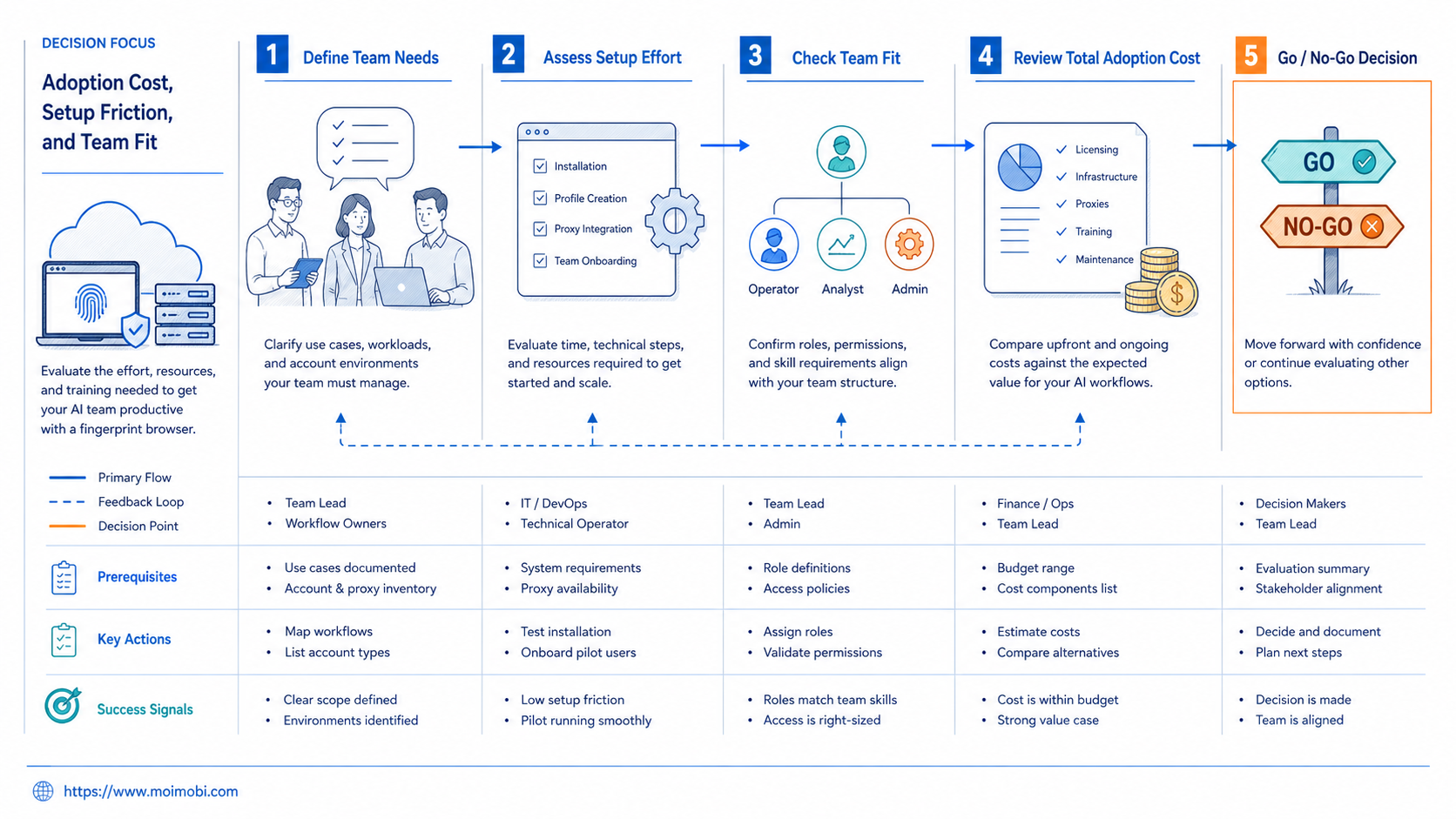
Adoption Cost, Setup Friction, and Team Fit
Adoption cost appears in setup work before it appears on the invoice. A fingerprint browser tool requires profile naming, proxy review, permission design, team training, and task mapping. If those steps are skipped, the team may create more profiles than it can manage.
Good fit teams usually have repeatable browser work. They know which accounts matter, which tasks repeat, and which actions need approval. Agencies, ecommerce operators, social teams, and customer engagement teams often fit this pattern because they already work across several browser-based accounts.
Weak fit teams usually want broad AI autonomy before they have operational rules. If the team cannot define account ownership, acceptable actions, stop conditions, and review flow, a fingerprint browser will not fix the process. It will only add another layer of configuration.
Good Fit
- AI teams running repeated web workflows
- Agencies managing client accounts separately
- Teams needing profile ownership and review logs
- Operations teams combining browser work with human approval
Not a Good Fit
- One-off research tasks with no account state
- Workflows that depend on spammy outreach
- Teams with no account assignment rules
- Groups that only need local testing sessions
The setup decision also changes when work moves from web apps to mobile apps. A fingerprint browser can manage browser-based accounts. It cannot replace mobile execution when the workflow depends on app screens, push notifications, or mobile-only login paths. In that case, teams may need cloud phone environments alongside browser profiles.
This mixed setup is common in social operations. Browser profiles handle dashboards, research, and account admin. Mobile environments handle app-based publishing, replies, and checks. MoiMobi is built around that broader AI execution platform model rather than a single browser-only tool.
Which Option Fits Different Operating Scenarios
The best option depends on the work lane. A browser-only AI team should prioritize stable profiles, browser automation access, and profile-level logs. A mobile-first team should prioritize cloud phones or Android execution. A mixed team should choose a system that keeps both sides connected without merging account state.
For browser-only operations, choose a fingerprint browser when the workflow runs inside web apps. Examples include CRM updates, web research, content scheduling dashboards, ecommerce admin panels, and account checks. The tool should make profile assignment and task history obvious.
For multi-account social operations, choose a browser profile system that pairs well with approval and content review. AI can help draft responses, collect context, and prepare tasks. Operators should still approve sensitive replies and publishing actions. The relevant product path is usually social media marketing, not a generic automation script.
For mobile account workflows, add a mobile execution layer. A browser profile cannot operate every mobile app. Teams that need app-based execution should evaluate cloud phones, Android devices, or a combined browser and mobile workflow.
For regulated or client-sensitive work, avoid tools that hide operational detail. A profile list is not enough. The team needs activity logs, permissions, environment ownership, and task review. That is especially true when AI workers can prepare or execute actions across client accounts.
- Map roles. Name the account owner, reviewer, and AI worker role.
- Assign environments. Connect each account to one browser profile or mobile workspace.
- Define allowed actions. Separate preparation, review, and execution actions.
- Run one pilot task. Use a known workflow before adding more accounts.
- Review failures. Track failed steps, login issues, profile conflicts, and rejected outputs.
Pilot Rollout, Success Metrics, and Recovery Review
A clean pilot starts with one account group and one repeatable workflow. For example, an agency could test competitor monitoring across three client accounts. Each account gets its own profile. One AI worker collects changes. One human reviews the report before any follow-up action.
Measure the pilot with operational metrics, not only speed. Useful metrics include task completion rate, review time, profile conflict count, login interruption count, and rework after completion. These numbers show whether the fingerprint browser is improving control or creating extra supervision work.
Recovery review should happen after every failed run. The team should ask which layer failed: profile setup, proxy route, login state, page change, AI instruction, or human approval. This prevents the common mistake of blaming the AI model when the actual issue is environment design.
Scaling should wait until the pilot shows repeatable behavior. Add more profiles only when the first workflow can be run, reviewed, paused, and resumed without confusion. Profile volume is useful only after process clarity exists.
The pilot should also include a stop rule. Pause expansion when two or more runs fail for the same reason, when reviewers cannot explain rejected actions, or when operators cannot identify which profile produced a result. Those signals mean the workflow needs repair before more automation is added.
Final Selection Checklist
Use a short checklist before choosing a vendor. It keeps the decision grounded in operations instead of feature marketing.
- Can each account map to one persistent browser profile?
- Can the team assign profile ownership and reviewer roles?
- Can AI workers launch the correct profile without manual guessing?
- Can sensitive actions require human approval?
- Can logs show task, account, profile, and failed step?
- Can mobile workflows connect to cloud phones when browser profiles are not enough?
- Can the team run a small pilot before buying large capacity?
Avoid any tool that makes profile creation easy but ownership unclear. That is the main failure mode for AI teams. The first goal is not to create many browser identities. The first goal is to make every account workflow traceable.
One final check is ownership clarity. Before signing off, ask a team member to name the account, profile, worker role, reviewer, and recovery path for a sample task. If that answer takes too long, the tool may be workable, but the operating model is not ready.
Frequently Asked Questions
What is a fingerprint browser?
A fingerprint browser is a browser tool that creates separate profile environments with controlled browser, session, and workspace settings. Teams use it to separate account work.
Why do AI teams need fingerprint browser tools?
AI teams need them when agents work inside logged-in browser accounts. The profile gives each worker a consistent workspace and reduces account mixing.
Is a fingerprint browser the same as an AI browser?
No. A fingerprint browser manages browser profiles and account environments. An AI browser adds AI-driven task execution. Some platforms combine both ideas.
Can a fingerprint browser replace cloud phones?
Not for mobile app workflows. A fingerprint browser fits web tasks. Cloud phones fit Android app tasks, mobile account checks, and app-specific workflows.
What should agencies check first?
Agencies should check client workspace separation, permissions, review states, and reporting. Shared profiles can create avoidable operational confusion.
How many browser profiles should a team start with?
Start with the smallest set that proves the workflow. Three to five profiles are often enough for a pilot, but the exact number depends on account roles.
What is the biggest mistake in selecting a tool?
The biggest mistake is buying profile volume before defining ownership. More profiles will not fix unclear task rules or missing review steps.
How should success be measured?
Measure task completion, review time, profile conflicts, login interruptions, and rework. These metrics show whether the setup is actually improving operations.
Conclusion
The best fingerprint browser tools for AI teams are the ones that turn profiles into accountable workspaces. Profile settings matter, but they are only one layer. The stronger decision criteria are ownership, persistence, review, recovery, and fit with the real workflow.
Start with one repeatable browser task. Assign one account group, one profile set, one AI worker role, and one reviewer. If that pilot runs clearly, expand. If it creates confusion, fix the workflow before adding more profiles or more automation.



