
An AI worker platform is software that lets teams assign repeatable digital tasks to AI workers, then run those tasks inside controlled browser or mobile environments. For growth teams, the point is not only content generation. The bigger decision is whether the platform can help people publish, monitor, research, reply, and report without losing control of accounts, approvals, or task history.
Growth work usually crosses several tools. A campaign may start with research in a web dashboard, move into a content queue, continue inside social apps, and end with a CRM note or weekly report. A simple chatbot cannot own that full path. A practical AI worker platform connects planning with execution, review, and logs.
MoiMobi approaches this as an AI execution platform for teams that need browser and mobile capacity. Fingerprint browsers, cloud phones, and Android devices become the places where work is executed. AI helps prepare the action, while the environment controls where the action happens.
Key Takeaways
- Growth teams need AI workers only after the task, account, reviewer, and success metric are clear.
- Browser profiles are better for web dashboards, while mobile environments fit app-first workflows.
- A small pilot should track completed runs, manual takeovers, rework, and account-specific failures.
- Cloud phones matter when growth work requires remote Android app execution, not only web automation.
The Core Idea Behind AI Worker Platform for growth teams
The useful model is simple: one task, one account context, one review path, and one result record. A growth team should not treat AI workers as a single shared assistant. Shared assistants quickly become confusing when five accounts, three platforms, and two approval rules are involved.
A well-designed platform gives each repeated workflow a defined operating lane. One worker might collect competitor posts every morning. Another might prepare comment reply drafts. A third might check campaign pages and flag broken links. The platform matters because these jobs need access, timing, and audit trails.
Three layers decide whether the setup works:
- Instruction layer: what the worker should do, what it must avoid, and when it should stop.
- Execution layer: the browser profile, cloud phone, Android device, or app environment where the task runs.
- Control layer: approvals, logs, retries, owner assignment, and performance metrics.
The execution layer is the part many teams underestimate. Browser automation has a formal WebDriver standard for remote browser control, and modern frameworks such as Playwright document actionability checks before clicks or form actions. Those details matter because real workflows fail when pages load late, buttons are hidden, or sessions expire. Sources such as the W3C WebDriver specification and Playwright actionability documentation show why execution is a technical system, not just a prompt.
Mobile work adds another layer. Social apps, messaging apps, and mobile-first platforms often require an Android environment. When an article or workflow refers to a cloud phone execution environment, it means a remote mobile device that can run app-based tasks without depending on a teammate's personal phone.
Why Teams Search for This Topic
Growth teams search for AI worker software when manual execution starts limiting campaigns. The first sign is usually not headcount. It is scattered work: account notes in one place, task status in another, and campaign results in a third tool.
Consider a team running three social platforms, one ecommerce store, and a lead research workflow. A marketer may create post ideas. A VA may publish content. A support person may reply to comments. A founder may check weekly numbers. Without a shared execution system, every task becomes a handoff problem.
This kind of platform reduces friction by turning repeated work into assigned workflows. It can prepare captions, gather screenshots, open the correct browser profile, draft replies, and record outcomes. Human operators still decide what should be sent, escalated, or changed.
Search intent also comes from tool fatigue. A growth team may already use schedulers, analytics tools, spreadsheets, CRM systems, and password managers. Another dashboard is not enough. The real question is whether a platform can connect work across accounts and environments while keeping the operator in control.
That is why the platform category overlaps with multi-account management. Growth teams do not only need more automation. They need a way to assign accounts, separate sessions, and understand which worker acted on which account.
A Scenario Map for Growth Teams
A useful rollout starts with a concrete operating scenario. The table below shows how a growth team might map AI workers to jobs without letting every worker touch every account.
| Growth workflow | AI worker role | Execution environment | Human control point | Success metric |
|---|---|---|---|---|
| Competitor monitoring | Collect posts, comments, offers, and landing page changes | Browser profile or mobile app session | Weekly review before campaign changes | Useful findings per week |
| Content publishing prep | Draft captions, match assets, prepare platform-specific notes | Browser dashboard plus cloud phone where app posting is required | Approval before posting | Approved posts without rework |
| Inbox triage | Classify replies, draft responses, tag urgent conversations | Mobile or browser account workspace | Human send decision for sensitive messages | Response time and escalation quality |
| Lead research | Find prospects, collect source URLs, prepare notes | Browser profile with saved login context | Review before outreach | Qualified records added |
The strongest teams keep the first rollout narrow. One account group, one repeatable task, and one reviewer is enough to prove the workflow. Expanding before logs and stop rules are clear usually creates more cleanup work.
Who Benefits Most and In What Situations
Growth teams benefit most when work is repetitive, account-specific, and measurable. The workflow should have a clear start, a clear finish, and a clear record. Vague jobs such as "grow the account" are too broad. A better task is "check new competitor posts each weekday and summarize the top three hooks."
Agencies are a natural fit because client accounts need separation. A worker assigned to one client should not reuse another client's browser session, mobile account, or content library. MoiMobi's device isolation layer supports that structure by keeping account workspaces separated.
Social teams benefit when work moves between web dashboards and mobile apps. A scheduler may handle approved posts, while mobile workers handle app-only checks, comment review, or creator account operations. In those cases, mobile automation is not a side feature. It is part of the execution path.
Lean startups also benefit, but only when they choose a narrow first use case. A founder-led team may start with lead research or daily monitoring rather than full posting automation. The goal is to remove repeatable preparation work first, then add controlled execution after the process is understood.
This approach also suits social media marketing teams that already have content calendars, reply rules, and campaign owners. AI workers are easier to manage when the team already knows what "good work" looks like.
How to Evaluate or Start Using AI Worker Platform for growth teams
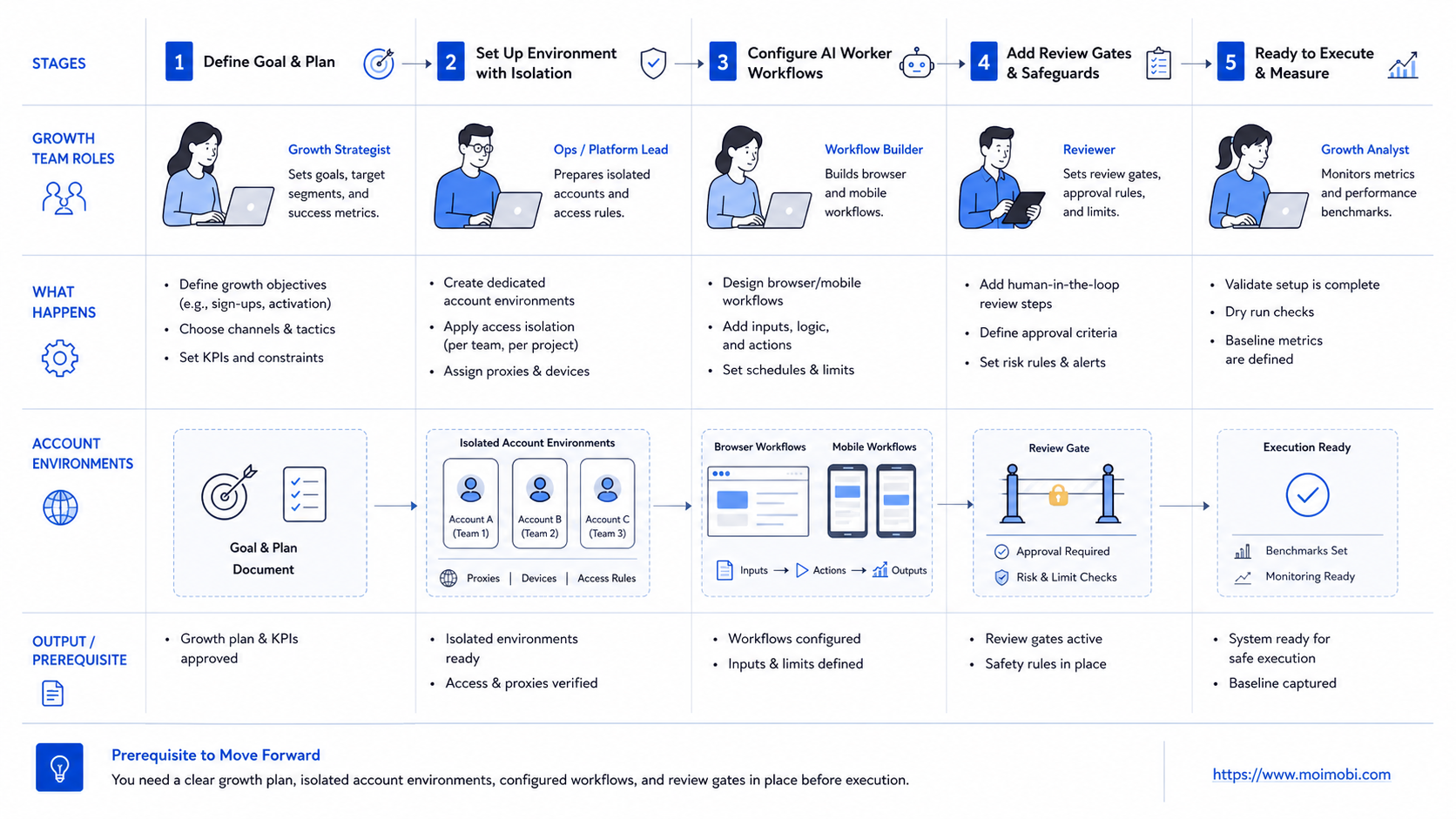
Start with the workflow, not the tool list. A platform looks more useful when the team can point to one repeated job and explain how it is currently done.
-
Choose one repeatable growth workflow. Pick a task that happens at least weekly. Good candidates include competitor checks, post preparation, lead research, inbox triage, and report collection.
-
Define the account environment. Decide whether the task belongs in a browser profile, a mobile app, a cloud phone, or a mixed setup. Do this before writing prompts.
-
Write a stop rule. The worker should stop when login fails, the page changes, the message is sensitive, or the task touches payment, policy, or private customer data.
-
Add a review gate. Human review is especially important for first contact messages, public replies, pricing claims, and customer complaints.
-
Track the result. Use fields such as account, source URL, task type, worker name, reviewer, status, and next action.
-
Run a small pilot. Use a limited account group first. Review failures before adding more accounts or platforms.
-
Measure before expanding. Compare time saved, rework, missed tasks, escalation quality, and account-specific issues.
Reliable logs are not just a reporting detail. OWASP's Logging Cheat Sheet explains that logs support troubleshooting, security monitoring, and accountability. For AI worker operations, that translates into a practical rule: every automated task should leave enough context for a human to understand what happened.
Mistakes That Reduce Results
The first mistake is giving one worker too much scope. A broad worker that researches, writes, publishes, replies, and reports may sound efficient. In practice, it becomes hard to review. Smaller workers with defined roles are easier to audit and improve.
The second mistake is skipping account boundaries. Multiple accounts should not share the same unclear browser or mobile environment. Mixed sessions create operational confusion, especially when a team cannot trace which account performed which action.
The third mistake is treating AI drafts as approved output. AI can prepare captions, replies, and task summaries. A reviewer should still control public messaging, customer-sensitive replies, and brand claims. This is a workflow design issue, not only a model quality issue.
The fourth mistake is ignoring data minimization. A worker should only access the data needed for its task. The NIST Privacy Framework frames privacy as an organizational risk management issue, which fits account operations well. Fewer unnecessary permissions reduce cleanup work when a workflow changes.
The fifth mistake is measuring only completed tasks. A team also needs to review failed runs, retries, manual takeovers, and rework. Those numbers show whether the system is becoming more reliable or only busier.
Good first workflows
- Daily competitor monitoring
- Caption and reply draft preparation
- Lead research with source links
- Campaign report collection
Delay until mature
- Unreviewed public replies
- High-volume cold outreach
- Payment or refund handling
- Policy-sensitive account actions
Success Metrics and Review Loop
A growth team should judge an AI worker platform by operational learning, not by task volume alone. More completed runs can hide weak quality if every result needs manual repair.
Track five metrics during the pilot:
- Completion quality: how many results are usable without major rework.
- Manual takeover rate: how often a human must step in.
- Source traceability: whether every finding links back to a URL, account, or app context.
- Review speed: how quickly approved work moves from draft to action.
- Failure pattern: which account, platform, or step fails most often.
Review these numbers weekly. A good review does not only ask whether the worker saved time. It asks which part of the workflow should become a skill, which rule should become stricter, and which account environment needs adjustment.
The review loop should also produce decisions. Retire workers that create noisy output. Tighten prompts that miss required fields. Move tasks to a different environment when login, app state, or session behavior causes repeated failures.
Mature teams keep a small change log for each worker. The log can record what changed, who approved it, and which metric should improve next. That habit prevents silent drift when a workflow grows from one account group to ten.
Operating Boundaries Before Scaling
Scaling should wait until account ownership is clear. Each worker needs a named owner, a defined account set, and a permission boundary. Without those limits, a failed workflow can become difficult to trace.
The environment map should also be explicit. A browser worker may handle dashboard research, CRM updates, and web-based reporting. A mobile worker may handle app checks, mobile inbox review, and platform-specific publishing preparation. Mixed workflows should explain where the handoff happens.
Use a simple readiness check before adding more accounts:
- The worker has completed several runs without unclear failures.
- The reviewer knows when to approve, edit, pause, or escalate.
- Logs show account, platform, source, status, and next action.
- Sensitive replies and public posts still require human approval.
- The team can explain what changed after the last review cycle.
This boundary check keeps the system from becoming a volume tool. Growth teams should scale repeatable quality first, then add more accounts after the process holds up.
Frequently Asked Questions
What is an AI worker platform?
It is a system for assigning repeatable digital tasks to AI workers and running those tasks inside controlled execution environments.
How is it different from a chatbot?
A chatbot usually answers or drafts. An AI worker platform adds task execution, account context, review flow, and result tracking.
Is AI employees software the same thing?
The terms overlap. AI employees software often emphasizes the role metaphor, while an AI worker platform emphasizes execution, assignment, and operations.
Should growth teams start with browser or mobile workflows?
Start where the repeated work already happens. Use browser profiles for dashboards and web tools. Use mobile environments for app-first workflows.
Can AI workers publish content automatically?
They can prepare and execute parts of publishing workflows, but public posting should usually include clear approval rules.
What is the safest first use case?
Monitoring, research, and draft preparation are usually easier to control than public replies or outreach.
How many AI workers should a small growth team create first?
One or two is enough for a pilot. Each worker should have a narrow task, owner, account context, and review rule.
What should be reviewed before scaling?
Review logs, failed runs, rework, account boundaries, and whether the workflow creates better campaign decisions.
Conclusion
For growth teams, the platform is most useful when it turns repeated online work into controlled execution. The system should connect instructions, account environments, review gates, and result records. Without those pieces, AI work becomes another disconnected tool.
Before adopting one, choose one workflow and map the full path. Identify the account, the environment, the reviewer, the stop rule, and the success metric. Then run a limited pilot and study the logs before expanding to more accounts.
If the workflow needs web dashboards, browser profiles, mobile apps, and cloud phones, evaluate the system as execution infrastructure. That framing keeps the decision grounded in daily operations instead of abstract AI promises.



