
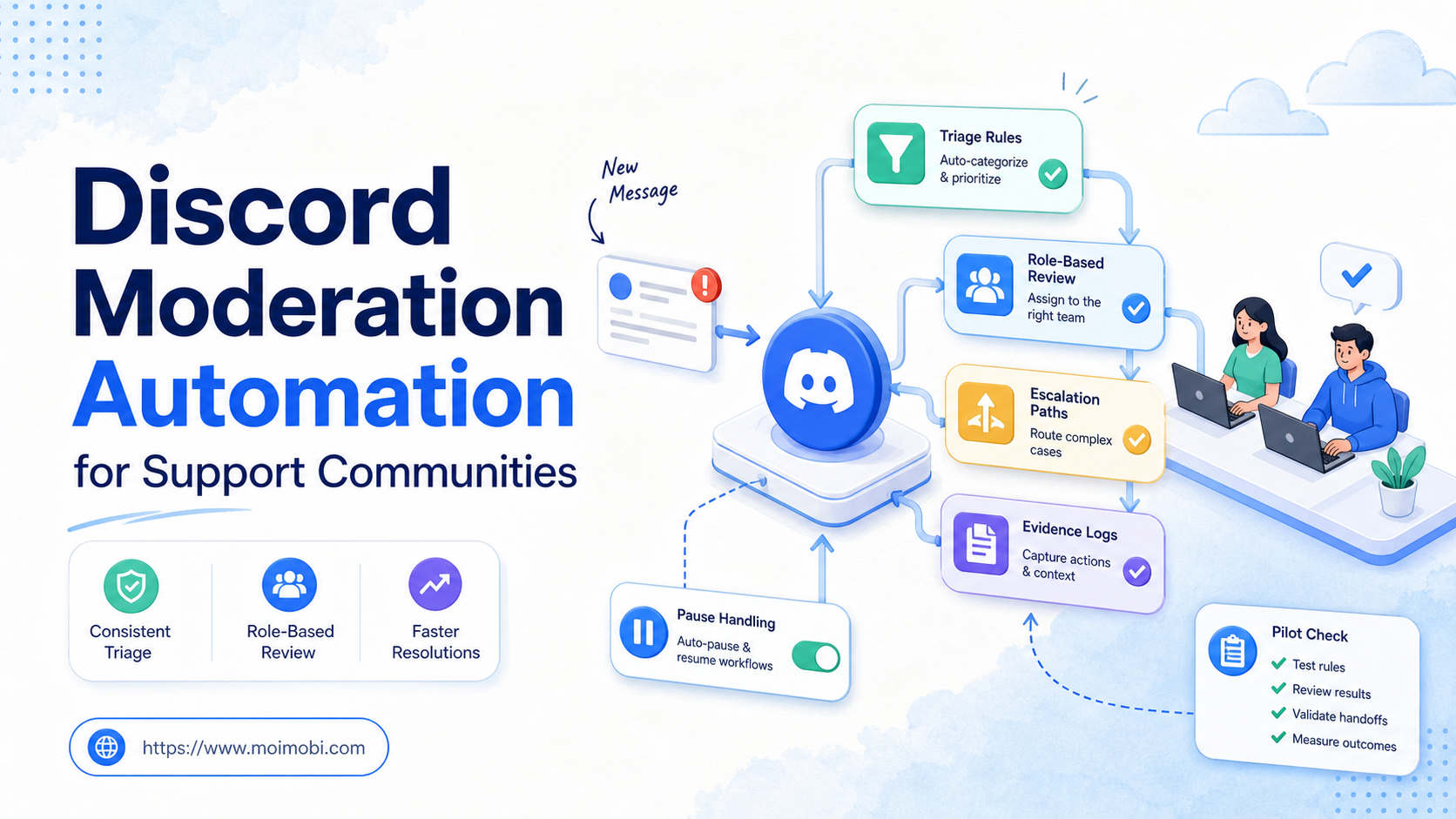
Discord moderation automation is a controlled workflow that helps a support community classify routine signals, route cases, and record decisions before a human takes the action that needs judgment. It is not a substitute for community rules, moderator accountability, or Discord’s own enforcement systems. A good workflow reduces missed reports and unclear handoffs without turning a server into an unattended message machine.
Support communities produce a steady mix of questions, bug reports, account concerns, abusive content, duplicate requests, and product feedback. The operational problem is not simply volume. It is deciding what can be sorted automatically, what must be reviewed by a trained moderator, and what must move into a separate support or safety channel.
Teams should use Discord’s approved developer and bot capabilities where applicable, respect current platform policies, and keep member-facing actions behind appropriate controls. The right goal is faster triage with clear evidence, not automated persuasion, mass messages, or attempts to evade moderation.
Key Takeaways
- Automate classification, routing, and record preparation before automating member-facing decisions.
- Keep community rules, moderator roles, and escalation ownership explicit.
- Use bot or API permissions only for approved server functions and documented tasks.
- Pause when a report is ambiguous, sensitive, or outside the team’s authority.
- Test the workflow with real moderation scenarios before expanding its scope.
What Discord Moderation Automation Should and Should Not Do
The wrong model is “a bot handles moderation.” Moderation includes interpretation, context, and responsibility. A better model is that automation creates a structured queue. It can detect a configured signal, label a case, collect permitted context, notify the assigned role, and preserve a record. A human moderator then decides whether to answer, remove, escalate, or take no action.
Discord’s Community Guidelines set expectations for behavior on the service. Server teams should translate their own permitted use cases into short, visible rules. For example, a workflow may flag a repeated support keyword for review, but it should not claim to make a policy decision that belongs to Discord or a trained moderator.
The boundary is especially important for member-facing actions. A draft response, a routing suggestion, and a reminder to review a queue have different impact from an automated warning, timeout, kick, or message. Treat the latter group as high impact. Require a clear role, an allowed reason, and an auditable decision.
Discord Moderation Automation: Define the Control Matrix
Start with a control matrix rather than an automation list. The matrix names each signal, the allowed system response, the human owner, and the stop rule.
| Signal | Permitted workflow response | Human decision required |
|---|---|---|
| New support question | Route to the product-support queue with channel context | Whether and how to reply |
| Repeated known issue | Attach an approved help resource for moderator review | Whether the resource fits the member's case |
| Possible rule violation | Preserve the report and notify the moderation role | Any warning, removal, or escalation |
| Safety or account concern | Route to the designated private escalation path | All member-facing handling |
| Duplicate report | Link the cases in the internal queue | Whether to merge, close, or respond |
The matrix prevents two common failures. First, it stops a workflow from acting beyond the team’s authority. Second, it gives moderators predictable evidence when they receive a task. They can see the server, channel, message reference, configured signal, prior status, and intended next step without hunting through unrelated systems.
Discord’s Developer Terms of Service and related developer policies should be part of the preflight review for any bot or API integration. The exact permissions and implementation choices may change, so teams should confirm current documentation before deploying a new automation path.
Preflight Checklist for a Support Community
Before connecting a workflow to a live server, complete these checks:
- Write the use case. State the community problem, allowed signals, desired queue, and accountable owner.
- Map server roles. Separate bot permissions, moderator duties, support ownership, and administrator access.
- Set content boundaries. Define what information may enter a task record and what belongs only in a protected support or safety system.
- Choose approval points. Require human review for removals, warnings, member outreach, sensitive support, and changes to server settings.
- Build the stop path. Give every ambiguous, policy-sensitive, or failed task a named owner and a visible state.
- Test with examples. Use sample support, conduct, and escalation cases before reading from live community activity.
Do not use member accounts as automation agents. Use the official bot and developer model where it is allowed and appropriate. Keep the automation’s permissions as narrow as the task requires. A support-triage workflow does not need the same access as a server administrator.
For teams that coordinate browser tasks, dashboards, and mobile reviews, mobile automation can support an assigned review process. The task still needs one accountable case owner and one evidence trail across its steps.
A Practical Discord Moderation Automation Workflow
Consider a support community where members report a recurring product problem. The workflow identifies a configured phrase, creates a private triage item, links the relevant message, and assigns it to the support role. A moderator checks whether the report matches a known issue, needs product investigation, or requires a private support path.
- Receive the signal. A permitted event or member report enters the queue with a channel and message reference.
- Apply a narrow label. Use labels such as “product question,” “possible duplicate,” “conduct review,” or “safety escalation.” Avoid labels that assert guilt or diagnose a member.
- Collect only necessary context. Preserve the direct reference, time, configured rule, and prior case link. Do not copy unrelated chat history into a broad log.
- Assign the role. Route product questions to support, conduct signals to moderators, and sensitive cases to the designated escalation owner.
- Request human judgment. The owner selects the response, escalation, or closure action. The workflow records the decision rather than inventing it.
- Update the case state. Use clear outcomes such as answered, escalated, merged, no action, or unresolved. Each state should have a next owner or closure reason.
- Review recurring patterns. Aggregate themes, not member identities, to improve help content, staffing, or product feedback loops.
This process is deliberately different from automatic engagement. It does not push unsolicited messages or create artificial activity. It organizes requests so the right people can respond with context.
Who Benefits Most and Who Should Wait
- Support communities with published rules and moderator roles
- Teams that already use queues for product or safety issues
- Servers with recurring, well-defined support signals
- Operators who can review exceptions on a schedule
- Communities with no escalation owner
- Unclear rules for member data and moderation evidence
- Teams expecting automation to make final conduct judgments
- Workflows that rely on unsolicited outreach or hidden account activity
Smaller communities can gain value from a simple report-to-queue path. Larger support communities may add issue categories, on-call routing, and weekly pattern review. The control structure remains the same: signals are visible, actions are scoped, and exceptions have an owner.
Teams operating several approved spaces can use multi-account management to clarify workspace ownership. Each community still needs its own moderation rules, permissions, and case taxonomy. A shared dashboard should not erase those local distinctions.
Common Mistakes That Weaken Moderation Workflows
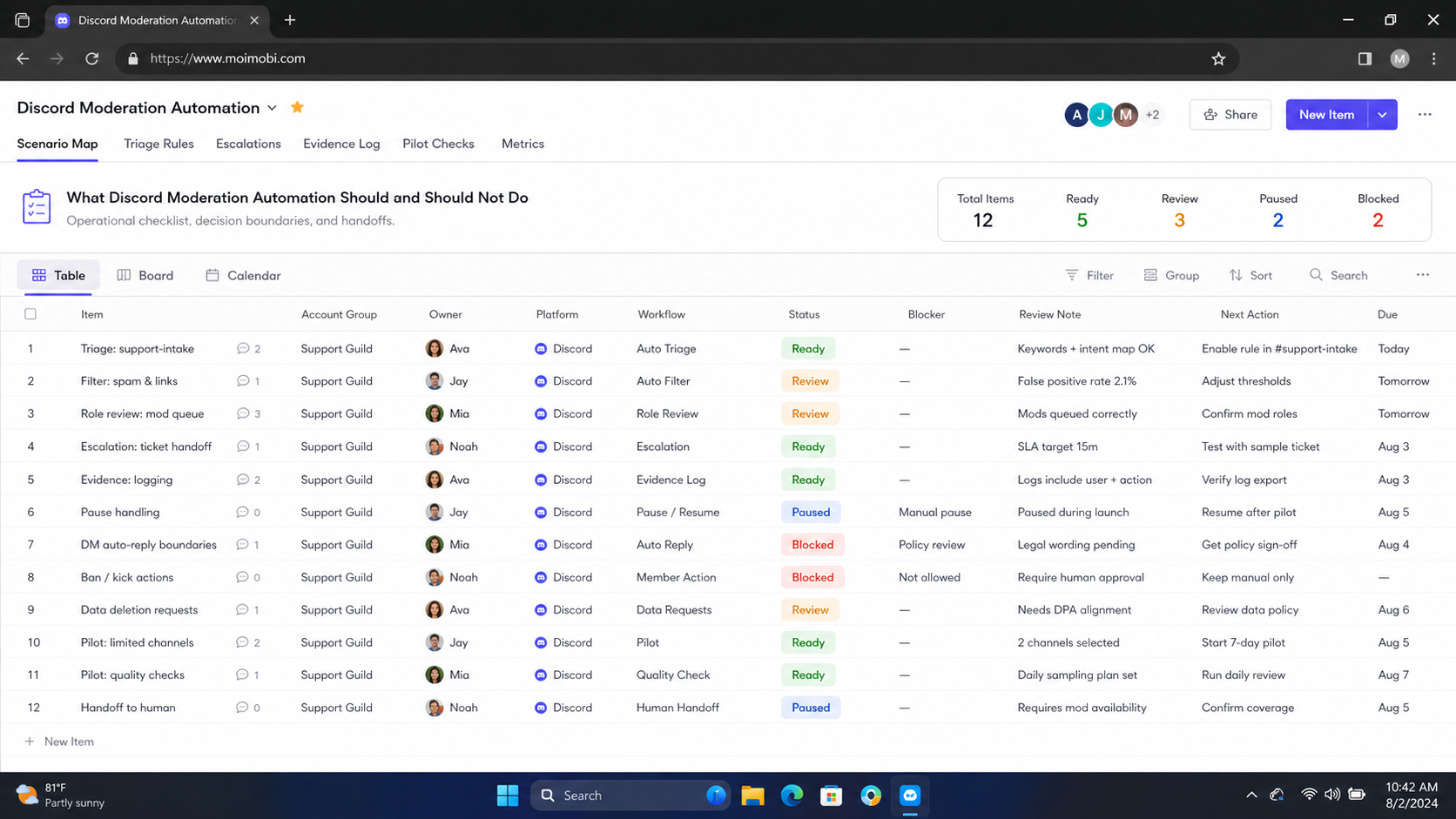
Treating keywords as verdicts. A keyword can identify a queue candidate. It cannot determine intent, urgency, or the right response. Keep labels descriptive and let people make the final judgment.
Giving a bot broad administrator access. Review every permission against the defined task. Broad access expands the consequences of a configuration error and makes later audits harder.
Putting sensitive content into general analytics. Support and moderation records need context, but they do not need unrestricted copies of personal or sensitive information. Keep access and retention proportional to the case.
Hiding pause states. A task that stopped because a rule did not match is useful information. Mark it as paused or needs review. A false “completed” state makes queue quality look better than it is.
Optimizing only for response speed. Fast replies matter, but poor routing, duplicate handling, or unsafe escalation creates more work. Measure whether the right person received enough context to resolve the case.
The OWASP Logging Cheat Sheet offers a useful general principle: log meaningful events and outcomes while protecting sensitive data. For moderation, that means retaining the decision path without turning every conversation into a widely accessible dataset.
Pilot Rollout, Measurement, and Recovery Checks
Begin with one community channel and one category of low-risk support signal. Limit the pilot to a fixed time window and a small moderator group. Before the pilot, write down the manual path: who sees a question, how it gets assigned, what evidence is needed, and how a member receives a response.
During the pilot, measure routing accuracy, first-review time, duplicate rate, unresolved cases, and exception clarity. Routing accuracy asks whether the task reached the correct role. First-review time checks whether the queue improved visibility. Duplicate rate exposes weak labels or repeated triggers. Exception clarity confirms that an unusual case reaches a person with enough information.
Test three recovery conditions on purpose: a missing owner, a malformed event, and a category that does not match. The proper behavior is a visible pause with a reason. It is not a repeated automatic retry or a fallback action against a member.
Device isolation can help keep assigned operations workspaces distinct. It does not change the need for policy-aware decisions, narrow permissions, and a human escalation path.
Verification Checklist Before Expanding
Use the following checks before adding another server, signal type, or action:
- A reviewer can identify why a task entered the queue and which rule created it.
- The assigned role receives enough context to decide without searching unrelated systems.
- The workflow pauses rather than acting when a category, owner, or permission is unclear.
- Member-facing actions require the approval level defined by the team.
- Task logs omit secrets and unnecessary private content.
- The team can distinguish support trends from individual moderation decisions.
- A rollback owner can disable the workflow without losing the case history.
When these checks pass, expand one dimension at a time. Add a new category or channel, then review outcomes. This produces cleaner evidence than changing permissions, labels, and server scope in one release.
Schedule a short operating review after the pilot. Look at the cases that reached the wrong owner, remained unresolved, or needed manual context that the queue did not provide. Update one label, routing rule, or evidence field at a time. This keeps the workflow understandable and gives moderators a chance to validate each change against the community's actual needs.
Share the outcome with moderators in a short change note. Name the new rule, its owner, the observed effect, and the rollback path. Clear communication keeps queue changes from becoming undocumented server behavior.
Frequently Asked Questions
Can Discord moderation automation replace moderators?
No. It can organize signals and evidence. Moderators still interpret context, apply server rules, and handle sensitive member interactions.
Should a bot automatically warn or remove members?
Use automatic member-facing enforcement only when it is explicitly allowed, narrowly defined, and reviewed against current Discord rules. Ambiguous cases should route to a moderator.
What is the best first use case?
Start with routing recurring support questions or member reports into a private review queue. The task has a clear result and can pause safely.
Which permissions should the automation receive?
Grant only the permissions required for the documented task. Recheck the permission set whenever the workflow gains a new action.
How should teams handle sensitive reports?
Route them to a restricted escalation path with a named owner. Keep the general task record minimal and avoid placing sensitive details in broad dashboards.
What proves a pilot worked?
The team can reconstruct a normal case, a paused case, and an escalation. Reviewers receive the correct context without unsafe or duplicate actions.
How often should the workflow be reviewed?
Review it after a policy change, new action, incident, recurring exception, or regular operating checkpoint. Stable workflows still need periodic permission and evidence checks.
Conclusion
Discord moderation automation works best as a disciplined support workflow. First classify and route. Then let the right human role decide the member-facing action. Keep the permissions narrow, store only useful evidence, and treat a pause as a successful control when context is missing.
Before a team expands the system, it should prove three things: the queue routes correctly, exceptions have an owner, and the record explains what happened. Those checks create a safer foundation for support-community operations than a broad, unattended moderation setup.



