

Posting automation for marketing teams is a controlled workflow for preparing channel-ready content, routing it through approvals, publishing only within approved account roles, and recording what happened. It is not a command to send the same message everywhere without review. The useful outcome is a repeatable campaign process that preserves brand, timing, ownership, and evidence.
Multi-platform work becomes difficult when the team treats every channel as a copy-and-paste endpoint. Each platform has its own formats, audience expectations, permissions, and publishing mechanisms. A campaign workflow needs a common brief, but it also needs channel-specific assets and a decision point before publication.
The right question is not “how many posts can we automate?” It is “which repeated publishing steps can be standardized while people still own messaging, policy-sensitive decisions, and exceptions?”
Key Takeaways
- Standardize campaign inputs before scheduling any output.
- Give each account, channel, asset, and approval a named owner.
- Treat a platform-ready post as a distinct asset, not a cloned copy.
- Use review gates for live publishing, regulated claims, customer responses, and changes to campaign scope.
- Measure delivery quality and recovery clarity, not only the number of posts sent.
What Posting Automation for Marketing Teams Covers
A controlled posting workflow has five layers: the campaign brief, the source asset, the channel adaptation, the approval record, and the publishing result. Automation can help move information between those layers. The workflow must preserve each one.
| Workflow layer | Automate or standardize | Keep accountable |
|---|---|---|
| Campaign brief | Templates, required fields, deadlines, and asset references | Objective, audience, claim boundaries, and owner |
| Channel adaptation | Format checklist, naming, routing, and draft assembly | Final copy, creative fit, and channel-specific context |
| Approval | Review queue, reminders, and status tracking | Approval decision, exceptions, and escalation |
| Publishing | Permitted scheduled or API-supported steps | Account role, scope change, and high-impact action review |
| Reporting | Delivery record, task status, and asset link | Interpretation, next experiment, and budget decision |
The structure keeps the campaign understandable after a handoff. A teammate can see what was approved, what changed for a channel, which account was used, and whether delivery completed. That is more useful than a generic “published” label.
Why Multi-Platform Campaigns Need Workflow Controls
Campaign speed is valuable, but speed without a record creates avoidable mistakes. A post may use an outdated asset, miss a required disclosure, go to the wrong account, or appear at the wrong time. Once a campaign spreads across several channels, those errors become harder to find and correct.
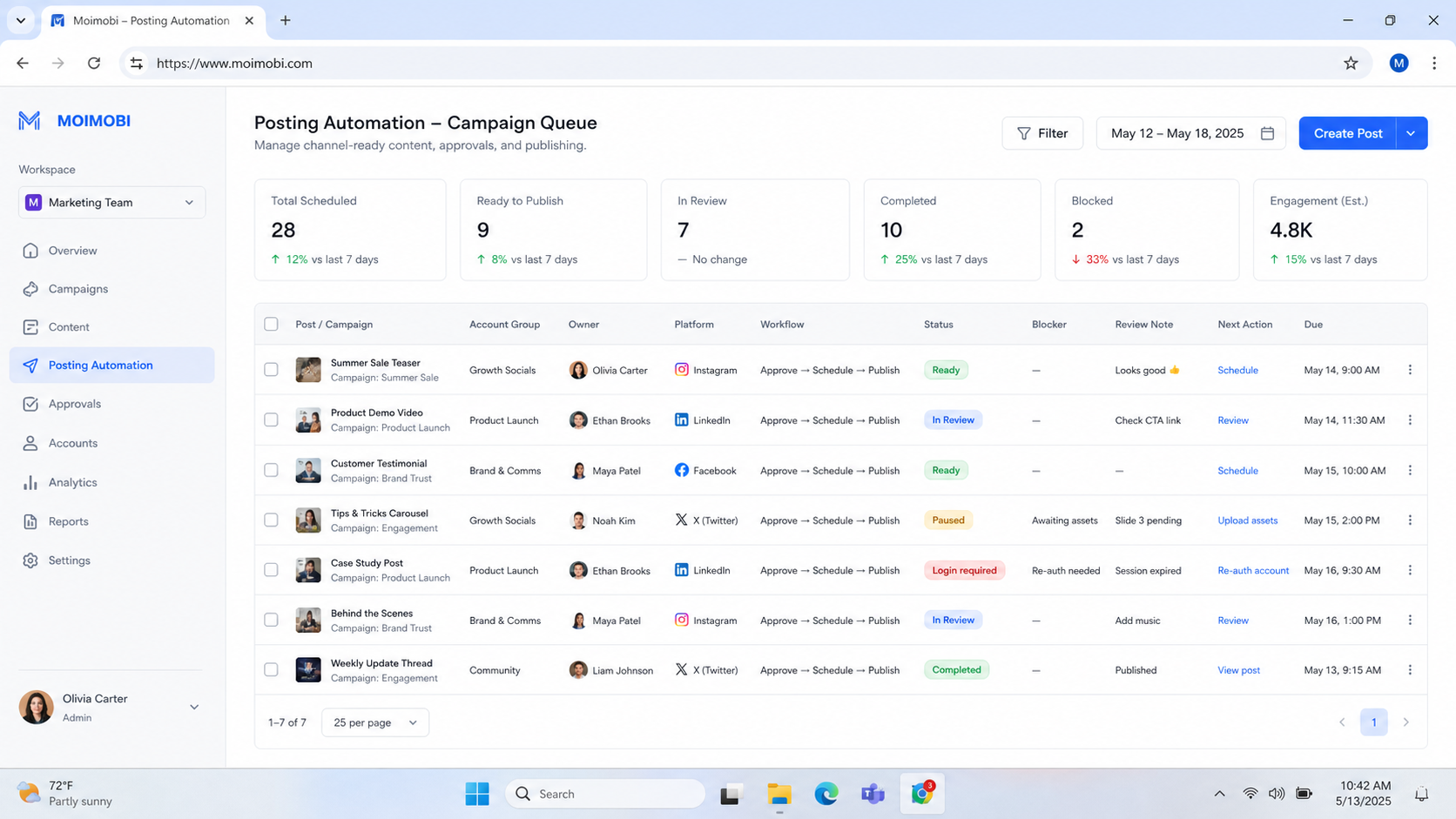
The most reliable control is a shared campaign record with channel-level tasks. The source brief remains the reference. Each platform task points to its adapted asset, account role, approval state, scheduled window, and result. A rejected or paused task remains visible rather than disappearing from the campaign view.
Platform permissions are an external boundary. Meta’s Platform Terms and TikTok’s Content Posting API documentation illustrate why teams should review the current permissions and supported publishing paths for each platform. A workflow should not assume that one channel’s available method applies to another.
Posting Automation for Marketing Teams: Preflight Checklist
Use this checklist before activating a campaign workflow:
- Lock the campaign brief. Name the objective, audience, owner, channels, approved claims, and source assets.
- Create channel tasks. Give every platform its own copy, format, asset reference, account role, and deadline.
- Assign approvals. Specify who can approve creative, legal or policy-sensitive content, and live publishing.
- Confirm account ownership. Map each publishing action to an authorized account workspace and responsible operator.
- Set pause rules. Stop on missing approval, changed asset, wrong account, unclear policy question, or unexpected publishing state.
- Define the delivery evidence. Record the task ID, asset version, account role, timestamp, result, and exception note.
When a campaign needs a mobile review or an approved app-based publishing step, a cloud phone can be an execution environment within the same task record. That environment needs a named workspace owner and a clear connection to the campaign approval. It is not a substitute for editorial judgment.
Build a Multi-Platform Posting Workflow
Begin with one campaign rather than converting the entire calendar. A small launch, a product update, or a recurring educational series gives the team enough repetition to find weak handoffs without adding every channel at once.
- Create one source brief. Include the campaign goal, audience, factual source, main message, approved claims, CTA, owner, and review deadline.
- Split the work by channel. Each channel task should specify the format, visual dimensions, copy length, local context, account role, and target timing.
- Prepare versioned assets. Link the task to the current copy and creative version. Do not rely on file names alone when several edits are moving at once.
- Route the review. Reviewers should see the channel adaptation, not only the original brief. A short-form video caption and a professional network post may require different review criteria.
- Publish through an allowed path. Use platform-supported tools or APIs where available. Pause where access, approval, or the account state does not match the task.
- Write back the result. Record the final asset version, posting time, account role, delivery outcome, and any manual change.
- Review the campaign as a system. Look for repeated approval delays, format gaps, account conflicts, or asset changes that caused rework.
This sequence is deliberately more detailed than a scheduler. Scheduling is one step. The workflow around it prevents the team from confusing a planned post with a reviewed, account-correct, and traceable delivery.
Who Benefits Most and Where Automation Should Stop
- Marketing teams with recurring campaign structures
- Agencies coordinating several approved client accounts
- Teams with content, design, and review handoffs
- Operations that need a record of asset and publishing decisions
- Unapproved customer replies or sensitive conversations
- Claims without a source or owner
- Accounts with unclear authority or shared credentials
- Actions outside the platform's allowed publishing path
Campaign teams benefit when automation removes repeated coordination work. It is less useful when the underlying campaign has no audience definition, asset owner, or review process. In that case, more automation simply distributes uncertainty faster.
Multi-account management supports a campaign process when it clarifies the relationship between a task and its authorized account. The setup must not lead to duplicate posting or several team members editing the same live account without a record.
Common Mistakes in Multi-Platform Posting
Using one asset as the finished post everywhere. A core message can be shared. The final expression should be adapted for the channel, audience context, and format.
Approving a campaign once and assuming every derivative is approved. Material adaptations, new claims, different CTAs, and changed visuals may require another review. Preserve the relationship between the source brief and the final asset.
Hiding failed delivery. A post that did not publish, published to the wrong role, or paused for review needs a clear state. Teams cannot improve a workflow when exceptions vanish.
Letting schedules replace ownership. A calendar creates timing. It does not answer who owns a correction, approval, account issue, or customer response after publication.
Measuring only reach or volume. Delivery metrics matter, but campaign operations also need to measure rework, review time, missed deadlines, exceptions, and recovery time.
The OWASP Logging Cheat Sheet provides a useful operations principle: record meaningful event context while avoiding sensitive information that does not belong in a broad log. A campaign record should help the team diagnose a task, not become an uncontrolled archive.
Posting Automation for Marketing Teams: Change Control
Campaigns change after launch. A product detail is corrected, a legal review changes a phrase, a creative file is replaced, or a platform-specific post needs a new format. Posting automation for marketing teams needs a change path for those normal events. Without one, a team can publish an old approved version while a newer version is waiting in another folder.
Use a short change record for any material update. It does not need to be a heavy ticket. Record the campaign, channel task, asset version, reason for the change, approver, and whether an already scheduled post must be paused. The record gives a reviewer enough context to decide whether the change is editorial, technical, or policy-sensitive.
Keep three states visible: source changed, approval needed, and ready to publish. The states prevent a scheduled delivery from being mistaken for a current approval. They also give the content owner a clear place to resolve an exception instead of asking several teams to check separate calendars.
A useful pilot test is a last-minute asset correction. Change one approved image or CTA after tasks are scheduled, then verify that the affected channels pause, the earlier version remains traceable, and reviewers see the new decision request. This test exposes whether the workflow preserves ownership when the campaign is under time pressure.
Pilot, Measurement, and Recovery Checks
Run the first workflow with one campaign, a limited set of channels, and named reviewers. Record the current manual process before the pilot: how long a handoff takes, how many versions are created, who approves each asset, and where delivery problems appear.
During the pilot, monitor asset completeness, approval turnaround, on-time delivery, rejected tasks, manual corrections, and recovery time. A task may complete technically but still fail operationally if the wrong version was used or the content owner cannot verify the final post.
Test the pause path deliberately. Use an expired approval, changed asset, unassigned account, or unexpected publishing result. The correct outcome is a visible paused task with an owner and next action. Repeated unattended retries can make a simple exception harder to resolve.
Mobile automation can use the same campaign and approval identifiers when the team has an authorized mobile step. Keeping browser and mobile work in one record makes later reporting more accurate.
Verification Checklist Before Scaling
- The campaign brief has a named owner and approved source assets.
- Every platform task has an account role, adapted asset, reviewer, and delivery window.
- The team can reconstruct which version was approved and delivered.
- Paused, rejected, and failed tasks are visible with an assigned next owner.
- The workflow uses only supported publishing paths and authorized access.
- Campaign review includes delivery quality, handoff time, corrections, and exception trends.
If any check is missing, fix the current campaign flow before adding more channels. Scaling a visible, controlled workflow is simpler than repairing a larger set of undocumented posts.
Frequently Asked Questions
Can one workflow publish the same campaign across every platform?
It can coordinate work across channels, but each final asset should be reviewed for the platform, audience, format, and allowed publishing method.
What should be automated first?
Start with brief intake, asset routing, approval reminders, version references, and delivery records. These steps reduce coordination work without making editorial judgment automatic.
Should every post need manual approval?
Approval depth should match the account, claim, campaign risk, and team policy. Low-risk recurring formats may use a defined approval model, while material changes should receive review.
How do teams prevent wrong-account publishing?
Assign an account role to each task, use authorized workspaces, and require the result record to identify the account role that completed the action.
Can automation handle community comments too?
It can route and prepare approved response work. Customer-sensitive, ambiguous, or policy-sensitive comments should have an escalation path and human decision.
What proves a pilot worked?
The team can trace a campaign from brief to delivery, explain exceptions, and show less rework or clearer handoffs than the prior process.
When should a workflow be changed?
Review after a new platform action, policy change, repeated exception, significant campaign adaptation, or recurring approval delay.
Conclusion
Posting automation for marketing teams works when it standardizes the right parts of campaign delivery: briefs, assets, roles, approvals, publishing records, and recovery. The result should make multi-platform work easier to inspect, not merely faster to distribute.
Begin with one campaign and a limited channel set. Confirm that each post has a source, owner, approved version, authorized account role, and visible result. Then expand the workflow where those controls reduce real coordination cost.
Keep the first expansion narrow. Add a single additional channel or a single new campaign format, then repeat the same approval and recovery checks. This gives the team comparable evidence across iterations and prevents the process from becoming a collection of special cases.
Document the decision after each review. A short record of what changed, why it changed, and who approved it keeps future campaign owners from repeating the same investigation.



