
Key Takeaways
- An AI employee platform is useful for monitoring workflows when teams need repeatable checks, escalation rules, and task evidence.
- Monitoring should cover account state, content activity, inbox signals, workflow health, and failure recovery.
- Browser and mobile execution environments matter when monitoring happens inside logged-in dashboards or mobile apps.
- Start with one monitoring lane before expanding to many accounts or platforms.
- Success should be measured by useful alerts, recovery speed, and clear ownership, not raw event volume.
An AI employee platform is a system that connects AI planning with real execution environments, so monitoring workflows can move from passive observation to reviewable action. Operations teams do not need to watch every signal. They need to turn relevant account, content, and workflow changes into owned tasks.
Monitoring workflows are different from dashboards. A dashboard shows status. A monitoring workflow decides what to check, where to check it, when to escalate, and what record to keep. That is why a monitoring setup needs account environments, task logs, and recovery rules, not only charts.
The Core Idea Behind AI Employee Platform for monitoring workflows
For monitoring workflows, an AI employee platform turns repeated checks into structured task loops. The system can open a dashboard, check a status, scan account activity, collect a result, compare it with a rule, and route exceptions to a human owner.
This does not mean the AI worker should decide everything alone. A sensitive account warning, customer complaint, policy notice, payment problem, or platform limitation should pause the workflow. Routine checks, such as "is this account active," "did the post publish," or "does this inbox have new items," are better candidates for repeatable automation.
The operating model has four parts:
- Signal source: account page, social inbox, dashboard, mobile app, or report.
- Execution lane: browser profile, cloud phone, Android device, or API-supported system.
- Decision rule: normal, warning, escalation, or blocked.
- Evidence record: timestamp, account, task ID, screenshot or page state, and next action.
Browser automation standards such as W3C WebDriver describe remote browser control through a defined protocol model. Playwright documentation also emphasizes actionability, waiting, and tracing for browser interactions. Those ideas matter because monitoring workflows often depend on changing page state, logged-in sessions, and repeat checks.
Why Teams Search for This Topic
Teams search for this topic when manual monitoring becomes too slow or too inconsistent. A social media team may need to check mentions, comments, and campaign activity. An e-commerce team may monitor product pages, marketplace inboxes, and order queues. A support team may need to know when an account, post, or message lane requires attention.
The hard part is not gathering more alerts. Too many alerts create noise. The useful result is a small set of monitored signals with clear ownership and a known recovery path.
| Monitoring lane | What to check | AI worker role | Human owner | Success metric |
|---|---|---|---|---|
| Account state | Login, warnings, task readiness, environment health | Check status and flag exceptions | Account operator | Exception handled time |
| Content activity | Published post, missing asset, failed schedule | Confirm task result and capture evidence | Content manager | Publish verification rate |
| Inbox and comments | New messages, high-priority mentions, repeated questions | Group and route items | Support or community lead | Escalation accuracy |
| Workflow health | Failed jobs, stuck tasks, repeated recovery | Summarize failure patterns | Operations manager | Recovery completion rate |
The table shows why monitoring belongs inside execution infrastructure. A task does not end when the system notices a signal. It ends when the right owner receives the right context and the result is recorded.
This is also where an AI employee platform differs from a generic alert tool. The platform should not only tell the team that something changed. It should know which account was checked, which environment produced the signal, what rule matched, and what action should happen next.
For example, a monitoring worker may check whether a scheduled post actually appears, whether a comment queue needs review, and whether a mobile app inbox has new messages. The outcome is not a long report. The outcome is a short task record that says normal, warning, blocked, or needs human.
Who Benefits Most and In What Situations
The best fit is a team that already knows which signals matter. For example, a team managing multiple social accounts may need to watch post status, inbox volume, and account warnings. A team running marketplace operations may monitor product listing status, customer messages, and failed update tasks.
The fit is weaker when the team has no alert priorities. If every event becomes urgent, the AI worker will only create a faster stream of noise. The first step is to define what counts as normal, what needs review, and what should stop a workflow.
Strong fit
- Multiple accounts or platforms need routine checks
- Signals can be grouped into normal, warning, and escalation
- Each alert has an owner and next action
- Teams need evidence for failed or blocked workflows
Weak fit
- No clear monitoring priorities
- No one owns alerts after detection
- Signals are mostly judgment-heavy
- The team does not review failure patterns
Moimobi is relevant when monitoring depends on account-based execution. Teams can combine browser profiles, mobile environments, and task logs instead of treating monitoring as a separate dashboard. This is especially useful for multi-account management, where one alert may belong to a specific account environment.
Account Environments for Monitoring Workflows
Monitoring workflows need clean account environments. A browser profile may monitor a web dashboard. A cloud phone may monitor a mobile-only app. A workflow monitor may check whether a scheduled task completed, failed, or needs human review.
Each monitored account should have a clear environment record:
- Account name and platform.
- Browser profile, cloud phone, or Android device.
- Allowed monitoring checks.
- Escalation owner.
- Normal status definition.
- Failure categories.
- Last check result.
- Recovery action.
This record helps teams avoid mixed context. If a warning appears, the operator should know which account, environment, workflow, and owner are involved. Without that mapping, alerts become isolated screenshots or chat messages.
Mobile-first monitoring also needs practical boundaries. A mobile automation lane can check app-specific states, but it should not replace human review for sensitive account events. It should collect the signal, classify it, and route the case with context.
Team Roles and Monitoring Ownership
Monitoring workflows work better when each role owns a narrow part of the loop. The AI worker checks signals and creates records. The account operator confirms environment health. The content owner reviews publishing or mention issues. The operations manager reviews repeated failures and decides what to change.
This division keeps alerts from becoming everyone’s problem. A useful workflow should answer four ownership questions:
- Who owns the account environment?
- Who owns the monitored signal?
- Who decides whether the signal is urgent?
- Who closes the recovery task?
Without those answers, the team may still miss important events. AI can surface the signal, but ownership decides whether the signal becomes useful work.
Monitoring ownership should also be visible in the system. A task record that says "warning found" is not enough. A stronger record says which account, which workflow, which signal, which owner, and which next action.
How to Evaluate or Start Using AI Employee Platform for monitoring workflows
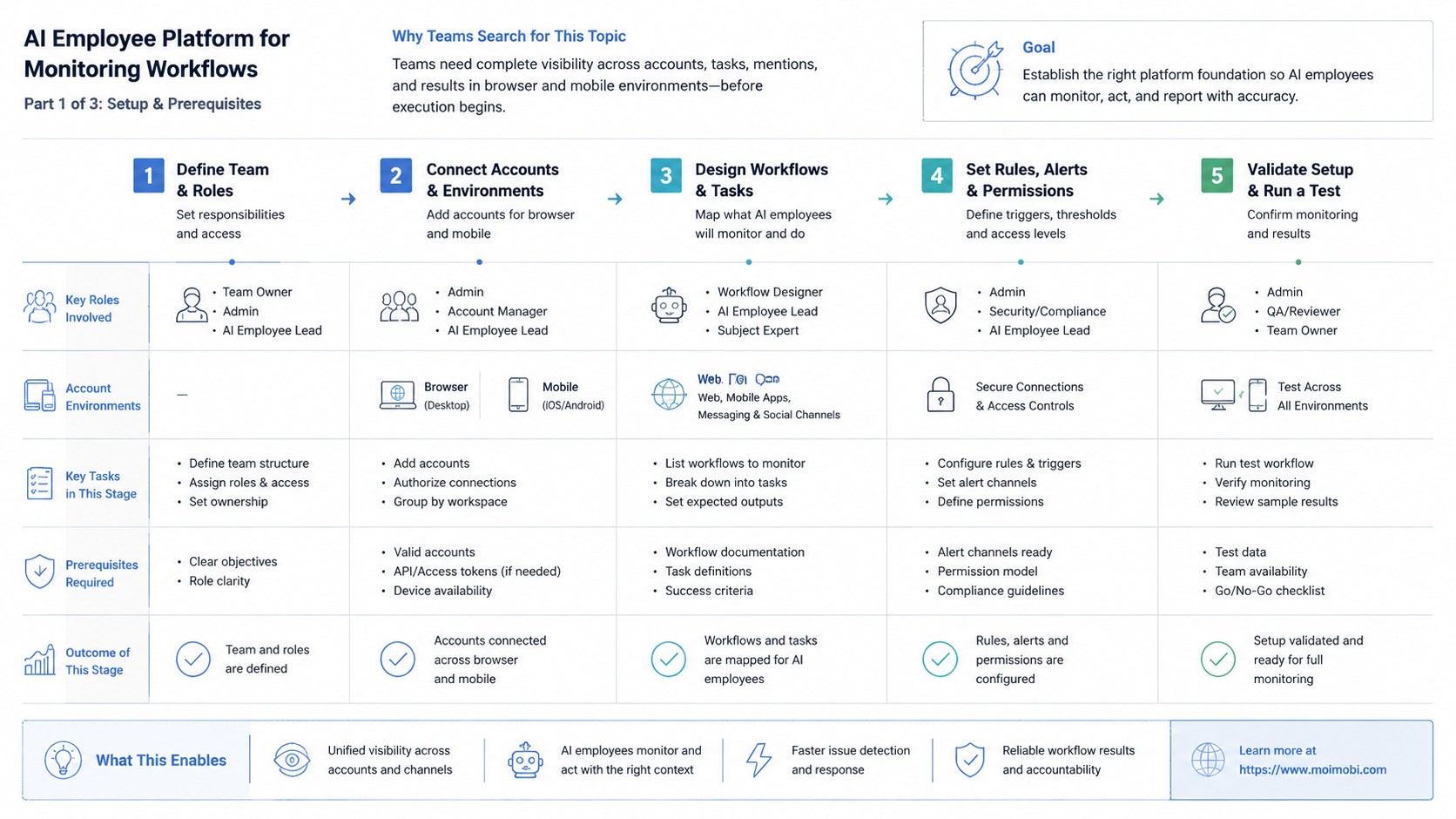
Do not begin by monitoring everything. Begin with one lane where the signal is clear and the response is known. A broad monitoring setup creates more alerts before the team knows how to act.
- Choose one signal lane. Start with account state, post verification, inbox volume, or workflow failures.
- Define normal and abnormal. Write simple rules for success, warning, blocked, and needs human.
- Map environments. Link each account to a browser profile, cloud phone, or Android device.
- Assign owners. Every alert should have a team, role, or person responsible for action.
- Capture evidence. Store task ID, timestamp, status, message, screenshot, or page state where useful.
- Review patterns. Look for repeated failures, noisy alerts, and unclear ownership.
- Expand slowly. Add another account group only after the first lane produces useful decisions.
An AI browser execution platform is useful when monitoring requires logged-in browser sessions. A mobile environment is useful when signals live inside mobile apps. The correct choice follows the workflow, not the vendor category.
Mistakes That Reduce Results
The first mistake is alert inflation. More alerts do not mean better monitoring. A useful alert tells the team what happened, which account is affected, who owns it, and what to do next.
The second mistake is monitoring without recovery. If a task fails every day and nobody reviews the pattern, monitoring is only documentation. The workflow should create a recovery step, not just a record.
The third mistake is mixing accounts in one environment. Shared sessions make it harder to trace which account produced a signal. Separate account workspaces and environment records make monitoring more reliable.
Avoid these failure patterns:
- Alerts with no owner.
- Screenshots without task IDs.
- Checks that cannot distinguish warning from blocked.
- Monitoring rules that ignore account environment.
- Failure categories that are never reviewed.
- Mobile app checks forced through a browser-only workflow.
Monitoring should reduce uncertainty. If it creates more unanswered questions, the workflow needs fewer signals and clearer ownership.
Another mistake is treating all platforms as the same. A web dashboard, mobile app, marketplace inbox, and social feed may expose different signals. A browser profile may be enough for one workflow, while another may need a persistent mobile device. The execution lane should follow the source of the signal.
Teams also underuse negative evidence. A monitoring worker should not only say when something is wrong. It should also record the last time a critical check was normal. That record helps separate a new failure from an old unresolved issue.
Pilot Rollout, Measurement, and Recovery Checks
A monitoring pilot should prove that alerts lead to action. Choose one signal lane, one account group, and one escalation owner. Run the pilot long enough to collect normal days and exception days.
Useful metrics include:
- Alert precision.
- False positive count.
- Time from signal to owner review.
- Recovery completion rate.
- Number of repeated failures.
- Tasks blocked by login, missing assets, or app state.
- Percentage of alerts with complete evidence.
Recovery checks need their own record. A useful recovery record includes the signal source, account environment, last successful check, failure category, owner, and next action. For social media marketing, this can connect monitoring with replies, publishing, and lead follow-up.
Review the pilot by asking three questions. Which alerts were useful? Which alerts wasted time? Which failure categories need a workflow change? If the team cannot answer those questions, do not add more accounts yet.
The first pilot should also define an alert budget. For example, an operations manager may decide that only five alert types are allowed during the first two weeks. This keeps the team focused on quality. More alert types can be added after the team proves that existing alerts lead to action.
A recovery check should end with one of four outcomes: resolved, assigned, blocked, or rule changed. Anything else is too vague. The outcome lets the team compare workflow health over time.
Source and Policy Checks for Monitoring Automation
Monitoring can touch platform accounts, logged-in pages, customer messages, and public content. Official sources should guide the boundaries. Meta Platform Terms explain that access to platform data must follow permitted use. TikTok community rules describe spam, artificial engagement, and misleading behavior as areas platforms police. W3C WebDriver and Playwright documentation show why browser automation needs state-aware execution.
These sources do not prohibit every monitoring workflow. They show why teams need controlled access, clear account ownership, and reviewable behavior. A monitoring system should collect signals and route tasks, not create hidden or unmanaged platform activity.
For practical operations, the safe pattern is simple: monitor only defined signals, use account-specific environments, store evidence, and pause when the workflow reaches a sensitive boundary.
Policy checks are especially important when monitoring public conversations or account state. A system that silently scrapes, floods, or interacts without clear ownership creates operational risk. A better monitoring worker watches defined signals, stores limited evidence, and escalates instead of acting beyond its role.
Frequently Asked Questions
1. Is an AI employee platform the same as a monitoring dashboard?
No. A dashboard displays status. An AI employee platform can turn status changes into assigned tasks, checks, and recovery records.
2. What monitoring workflow should teams start with?
Start with one clear signal, such as post verification, account warnings, inbox volume, or failed workflow tasks.
3. Can AI workers monitor mobile apps?
Yes, when the workflow uses a controlled mobile execution environment. Mobile app checks should still have stop rules and human review paths.
4. Does every monitoring workflow need a cloud phone?
No. Use a cloud phone when the signal exists inside a mobile app or persistent Android environment. Browser dashboards may only need browser profiles.
5. What should trigger human review?
Sensitive account warnings, customer complaints, policy notices, payment problems, or unclear platform states should trigger human review.
6. How should teams measure monitoring quality?
Track alert precision, false positives, recovery completion, owner response time, and repeated failure patterns.
7. Can monitoring workflows reduce manual work?
They can reduce repetitive checks when signals and ownership are clear. They can increase noise when every event becomes an alert.
8. What does a good monitoring record include?
A good record includes account, environment, signal, timestamp, status, owner, evidence, and next action. It should be short enough for review.
9. How should teams evaluate AI employees software?
Look for execution environments, account isolation, task logs, alert routing, recovery records, and review controls.
10. Is monitoring only for social media teams?
No. The same model can support e-commerce, support, marketplace, community, and internal workflow checks when signals are clear.
11. Where does Moimobi fit?
Moimobi fits monitoring workflows that need browser and mobile execution across accounts, platforms, and repeatable operations.
Conclusion
The right sequence is practical: choose one signal, map account environments, define owners, capture evidence, and review recovery patterns. An AI employee platform becomes useful when monitoring produces action, not just more status data.
Before expanding, check whether each alert has a source, account, owner, status, and next action. If those fields are missing, simplify the workflow before adding more accounts.



