
An AI employee platform is an execution system that lets AI workers operate inside real work environments, including web dashboards, browser profiles, cloud phones, and mobile devices. For dashboard operations, the goal is not to replace every operator. The goal is to give repeated checks, updates, alerts, and handoffs a controlled execution layer.
Dashboard work breaks down when too many tools, accounts, and manual checks depend on memory. A support lead may check inbox queues. A growth operator may review ad or social metrics. An e-commerce team may monitor order panels and marketplace dashboards. Each task looks small, but the daily volume creates missed updates, stale reports, and unclear ownership.
A practical AI execution platform changes the operating model. The AI worker receives a task, uses an isolated browser or mobile environment, follows a defined workflow, records what happened, and stops when human review is needed. That makes dashboard operations easier to audit, retry, and improve.
Key Takeaways
- Dashboard operations need execution control alongside AI-generated advice.
- One account, one environment, and one task owner keeps repeated work traceable.
- Browser automation works better with session, selector, timeout, and recovery limits.
- Teams can pilot AI workers on lower-impact monitoring before expanding to updates.
- Success is measured by task completion, exception handling, review quality, and recovery speed.
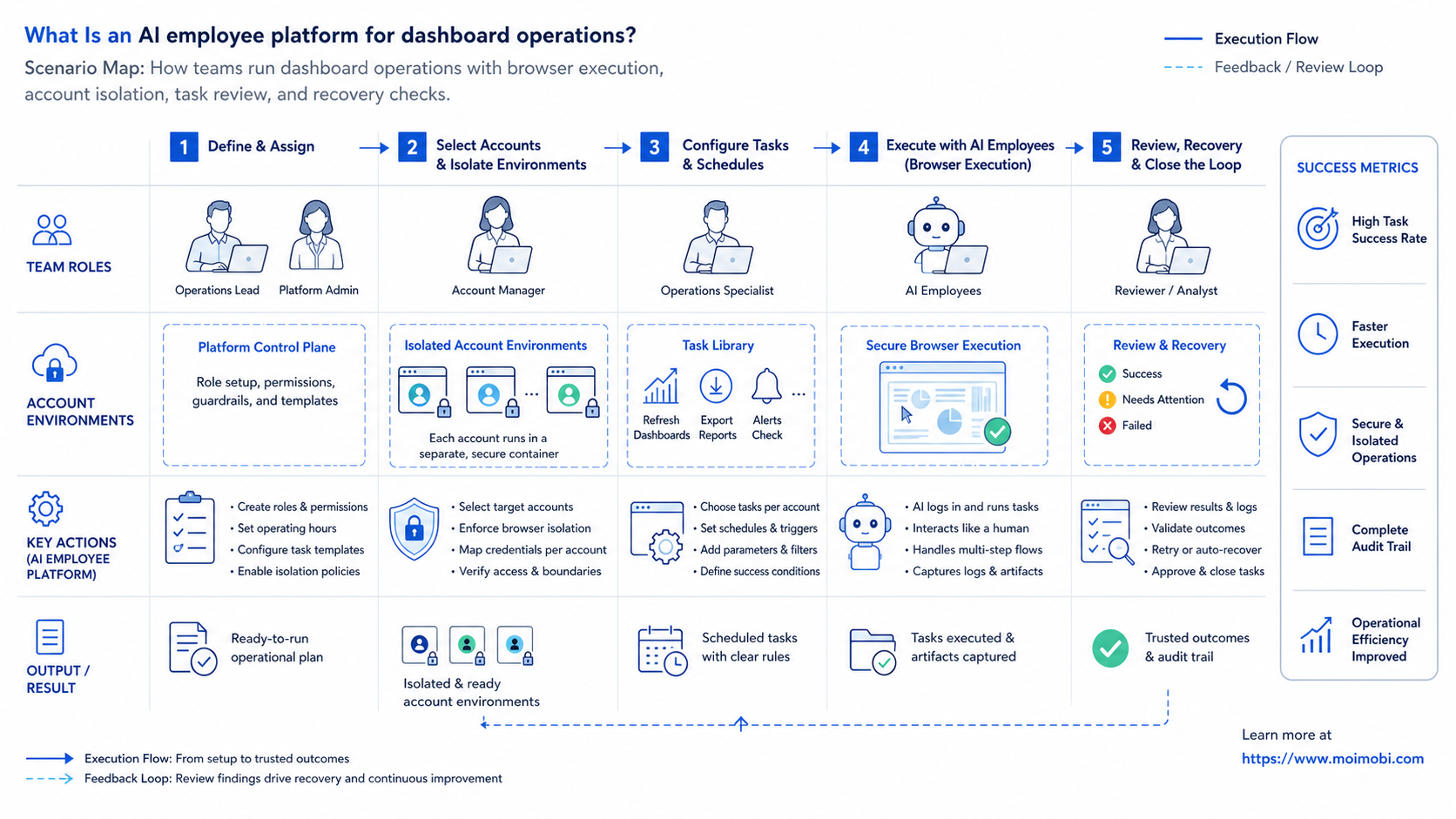
What Is an AI employee platform for dashboard operations?
For dashboard operations, an AI employee platform assigns AI workers to recurring work inside web dashboards and account workspaces. It combines task planning, browser execution, account isolation, human review, and logs into one operating model.
The platform deserves more than a button-click test. Browser control is already a known technical category. The W3C WebDriver specification describes a remote-control interface for inspecting and controlling browsers, and modern automation frameworks build on similar ideas for interaction, timeouts, navigation, and element state. The practical business question is whether a team can turn that control into reliable dashboard workflows.
For operations teams, the framework has three layers:
- Work definition: what the AI worker is allowed to check, update, export, or escalate.
- Execution environment: which browser profile, login session, device, proxy, or mobile context owns the task.
- Review loop: how results, errors, and exceptions are recorded before the next run.
This is where an AI employee platform differs from a simple script. A script usually handles one narrow path. An AI employee needs task context, environment ownership, skill boundaries, and recovery rules. When a dashboard changes, the system needs a defined choice: retry, ask for human help, or stop.
Dashboard operations often sit between browser work and mobile execution. A team may check a SaaS dashboard in a browser, then verify a mobile app inbox on a cloud phone. When cloud phones enter the workflow, the team benefits from understanding the broader cloud phone execution environment instead of treating the phone as a disposable device.
Why an AI employee platform matters for dashboard operations
Dashboard work is repetitive, but it still carries operational consequences. Operators may handle customer messages, sales data, order issues, campaign budgets, or account health signals. A missed filter, wrong account, or stale tab can create a bad report or trigger the wrong follow-up.
An AI employee platform matters because it makes execution visible. The team can see which account was used, which environment ran the task, what the AI worker observed, what changed, and where it stopped. That evidence is useful when a task fails and when a workflow succeeds.
Browser-based dashboards also have technical limits. Playwright documents actionability checks such as visibility, stability, and enabled state before interactions. That matters for AI workers because a dashboard button is not ready just because it appears in a page snapshot. The workflow needs wait rules, verification, and fallback steps.
Consider a support operations dashboard. A human manager may ask for a daily check of unresolved tickets across five accounts. A basic automation may export a report. An AI employee workflow can do more structured work: open the correct profile, check queue counts, identify abnormal categories, prepare a summary, and ask a human before sending a customer-facing response.
The decision changes from “can AI use a dashboard?” to “can the team run dashboard tasks with accountable execution?” That second question is where AI employees software becomes operational infrastructure.
Dashboard Scenario: Roles, Tasks, and Metrics
A concrete operating scenario is the clearest starting point. Imagine a small team that runs social media, e-commerce, and customer engagement dashboards across multiple brands. The team needs daily visibility without asking one person to open every account manually.
In this scenario, dashboard operations include queue review, content status checks, account notes, lead handoff, and exception reporting. The AI worker does not own final business judgment. It handles repeatable observation, preparation, and lower-impact updates under defined rules.
| Role | Dashboard task | AI worker responsibility | Human review point | Success metric |
|---|---|---|---|---|
| Support lead | Inbox queue review | Count unresolved items and flag aging threads | Approve reply priority | Unreviewed queue reduced |
| Growth operator | Campaign dashboard check | Record status changes and unusual drops | Confirm budget or creative action | Issues detected before daily review |
| E-commerce manager | Order and listing panels | Prepare exception list by account | Confirm customer or supplier action | Exception handling time shortened |
| Team admin | Account workspace audit | Check assigned profile, notes, and task status | Resolve ownership conflicts | Duplicate account work reduced |
This mapping prevents the common mistake of treating AI workers as generic dashboard users. Each AI worker needs a role, an account environment, a task boundary, and a measurable output.
Key benefits and use cases
Good early use cases start with repeated dashboard work that already has a human SOP. If a human cannot explain the task in steps, the AI worker will have weak boundaries too.
A practical AI employee platform can support these dashboard operations:
- Monitoring: check dashboards for queue counts, failed tasks, unread messages, stock warnings, or campaign status changes.
- Data entry: update internal notes, status fields, tags, or handoff records after a clear event.
- Reporting: gather numbers from several dashboards and prepare a review summary.
- Escalation: stop when a threshold, login issue, CAPTCHA, policy warning, or ambiguous decision appears.
- Cross-environment checks: compare web dashboard records with mobile app status when the workflow spans browser and phone.
Multi-account teams get an extra benefit from environment separation. A dashboard task tied to one account can run in a dedicated browser profile or mobile workspace. That reduces accidental session mixing and makes the audit trail easier to read.
For web-heavy teams, an AI browser execution platform can connect dashboard work with structured task execution. For teams that manage many accounts, multi-account management becomes the organizing layer around the AI workers.
The benefit is not “AI does everything.” The benefit is that repeated dashboard operations become assignable, observable, and recoverable.
How to get started with an AI employee platform for dashboard operations
Start with one dashboard workflow that is frequent, lower-impact, and easy to verify. Do not start with payments, account settings, bulk deletion, or customer-facing actions without review.
- Choose one dashboard lane. Pick a task such as daily ticket queue review, account status monitoring, or campaign anomaly logging.
- Assign the account environment. Define which browser profile, login session, or mobile environment belongs to the task.
- Write the stop rules. Stop on login failure, unexpected modal, missing data, policy warning, payment screen, or uncertain customer action.
- Define the output. Require a short report, field update, screenshot, or task log entry after each run.
- Add human approval. Keep approval before replies, account changes, budget moves, or irreversible updates.
- Review the first runs. Compare AI output with human observation before expanding scope.
Keep the pass/fail checks simple. Did the AI worker open the right account? Did it read the right dashboard section? Did it record the data in the expected field? Did it stop on an exception instead of guessing?
Logging matters here. OWASP's logging guidance emphasizes that logs support debugging, accountability, and incident understanding when they capture meaningful events. For dashboard operations, that means task start, account, environment, observed status, action taken, error type, and reviewer decision.
Common Mistakes to Avoid
The biggest mistake is giving an AI worker broad dashboard access before the workflow is narrow enough. Broad access creates vague responsibility. It also makes failures hard to diagnose.
Avoid these patterns:
- One worker for every dashboard: separate workflows by role, account, and task type.
- No stop conditions: a worker needs to stop when the page state is unexpected.
- No account environment ownership: shared sessions make audit and recovery harder.
- Blind bulk updates: dashboard updates work better with human review and small batches.
- No evidence capture: task logs need to show what was observed and what changed.
Another mistake is confusing browser automation with business readiness. A tool may interact with a page, but dashboard operations also need authorization, context, field mapping, and recovery. The system needs to show whether a task completed, failed, needed a human, or timed out.
Privacy and access boundaries need attention too. NIST's Privacy Framework is built around identifying, governing, controlling, communicating, and protecting data-related activity. A dashboard AI worker can follow the same operational spirit: limit what it can access, record why it accessed it, and keep sensitive actions reviewable.
Who it fits and when it is a good match
This operating model fits teams that already have dashboard routines that happen daily or weekly. The task needs enough repetition to justify automation and enough structure to verify.
Good fit
- Recurring checks across many accounts
- Dashboard monitoring with clear thresholds
- Internal status updates and handoff notes
- Reports that combine several web tools
- Workflows that can stop for human approval
Weak fit
- One-off tasks with unclear goals
- Sensitive financial or account changes without review
- Dashboards that change layout every day
- Tasks that require private judgment with no SOP
- Teams that cannot review logs or exceptions
Team shape also matters. A founder-led team may start with one AI worker that checks dashboards each morning. An agency may assign one worker per client account group. A support team may split AI workers by inbox, language, or escalation level.
The operating rule stays the same. One worker is easier to manage with one clear environment and one clear job family. That makes the workflow easier to improve.
Pilot Rollout, Measurement, and Recovery Checks
A dashboard operations pilot needs enough time to expose normal variation. A one-day test may prove that the AI worker can open a page. It will not prove that the workflow handles login changes, missing data, slow dashboards, or review handoffs.
Use a two-week pilot with a small scope:
- Run one dashboard workflow each business day.
- Compare AI observations with a human control check.
- Track every stop, retry, and manual correction.
- Keep customer-facing or irreversible actions behind approval.
- Expand after error categories are understood.
Measure the pilot with operational metrics, not vanity metrics. Useful metrics include completed runs, review corrections, exception rate, time saved per run, average recovery time, and repeated failure reasons. If the same error appears several times, improve the workflow before adding more accounts.
Recovery checks need to be explicit. When the AI worker fails, the system needs to show whether the issue was login, navigation, selector change, unavailable data, permission, timeout, or human decision. Without that classification, teams may keep rerunning a broken workflow.
For social media or customer engagement dashboards, the next step may involve social media marketing workflows. For teams with profile and device separation requirements, review device isolation before scaling the number of accounts.
Frequently Asked Questions
1. What does an AI employee do in dashboard operations?
It checks assigned dashboards, records status, prepares summaries, updates approved fields, and escalates exceptions. It does not need to make sensitive business decisions without review.
2. Is an AI employee platform the same as RPA?
Not exactly. RPA often follows fixed scripts. An AI employee platform adds task context, environment ownership, review gates, and recovery logic around browser or mobile execution.
3. Can AI workers update dashboards directly?
Yes, for lower-impact fields or approved workflows. Start with monitoring and internal notes before allowing updates that affect customers, budgets, or accounts.
4. How many dashboards can one AI worker handle?
Start with one workflow family. A single worker can cover several dashboards when the account environment, task goal, and output format remain clear.
5. What can trigger human review?
Human review can trigger on login issues, missing data, customer-facing replies, account warnings, payment screens, permission changes, and any unclear decision.
6. Do dashboard AI workers need separate browser profiles?
For multi-account work, yes. Separate browser profiles or account workspaces make session ownership and audit trails easier to manage.
7. Can the same model handle browser and mobile dashboards?
The AI decision layer may be shared, but execution environments need separate controls. Browser profiles, cloud phones, and Android devices have different runtime constraints.
8. What is a good first dashboard workflow to automate?
Choose a repeated monitoring task with a clear expected output. Daily queue checks, failed-task review, and status summaries are better starting points than bulk updates.
9. How can teams compare AI worker software?
Compare execution environments, account isolation, logging, human review, recovery handling, and integration with existing workflows. Prompt quality is not enough by itself.
Conclusion
AI Employee Platform for dashboard operations earns its value when it turns repeated web work into controlled execution. The platform needs to assign a task, run it inside the right environment, record the result, and stop when a human decision is required.
Before expanding, check four things. The workflow needs a clear owner. The account environment needs separation. The output needs review. The failure path needs visibility. If those conditions are in place, dashboard operations can move from manual repetition to a more reliable AI worker system.



