
YouTube automation software for agencies is software that helps teams organize Shorts production, upload workflows, approval steps, account access, and performance review across multiple client channels. It should not mean mass-posting low-quality videos, inflating engagement, or trying to manipulate YouTube systems.
Agencies managing Shorts channels usually need coordination more than magic. They need repeatable content briefs, asset handoff, review gates, channel access control, mobile or browser execution, and clean reporting. The best setup reduces manual friction while keeping creators, account owners, and reviewers in control.
Key Takeaways
- YouTube automation software for agencies should support workflow control, not spam behavior.
- Shorts workflows need planning, upload, metadata, approval, account access, and review records.
- YouTube's spam policy prohibits behavior that manipulates the platform or floods community spaces with inorganic promotion.
- YouTube Data API can support upload and channel management workflows, but API use must follow YouTube API Services terms and policies.
- Pilot automation on one client or channel group before scaling across many Shorts channels.
The Core Idea Behind YouTube Automation Software for Agencies
The common misunderstanding is that automation means "post more Shorts faster." That is too narrow and risky. Agencies do not only need a posting button. They need an operating system for repeatable video work.
YouTube automation software for agencies should manage the workflow around Shorts, including briefs, drafts, edits, approvals, uploads, scheduling, comment review, and reporting. The automation layer should keep tasks moving and show who owns each step.
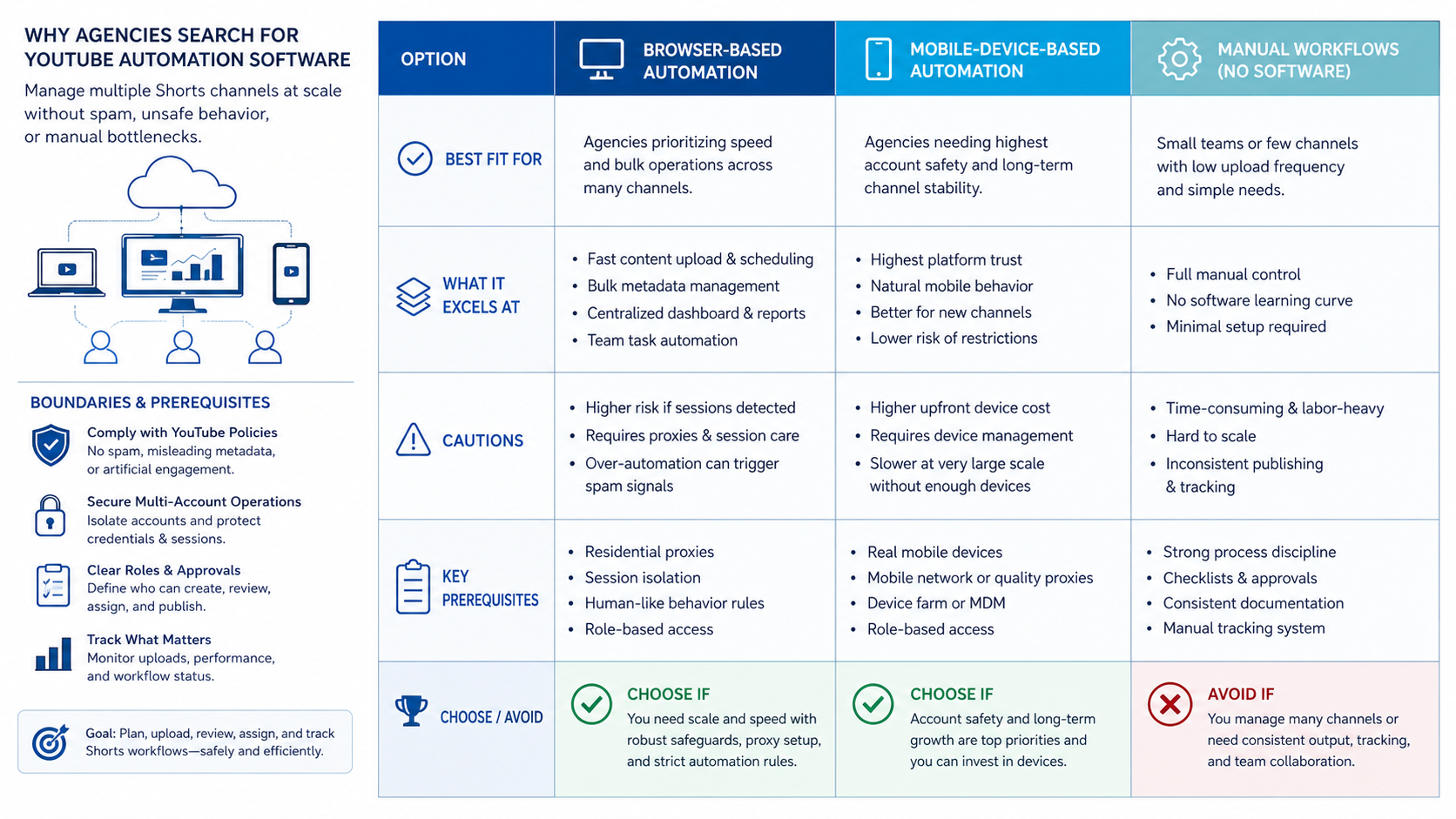
YouTube's own spam policy draws a clear boundary. It does not allow content, metadata, or behavior designed to take advantage of the community, including spam or platform manipulation. That makes quality control and review gates central to any automation plan.
For agency operations, the practical goal is not to remove humans. It is to reduce repeated handoffs. A strategist can approve the brief, an editor can deliver the asset, a channel manager can upload, and an account owner can review performance.
Moimobi's broader AI browser and cloud phone platform fits this operations view. Browser and mobile environments can support execution, while the agency still controls strategy, client approvals, and publishing standards.
Why Agencies Search for YouTube Automation Software for Agencies
Agencies search for this category when manual work starts breaking. A team may manage five Shorts channels with one editor. Then the account list grows, the approval chain becomes messy, and upload details get missed.
The pain usually appears in five areas:
- repeated uploading and metadata entry;
- client approval delays;
- wrong channel or wrong account risk;
- inconsistent Shorts descriptions, tags, playlists, or thumbnails;
- weak reporting after content goes live.
YouTube Data API documentation says the API can add YouTube features to applications, including uploading videos, managing playlists, subscriptions, and channel settings. That makes API-supported workflows possible. Yet YouTube API Services Terms and Developer Policies still govern how those integrations are used.
Shorts also have their own content pattern. YouTube's creator resources describe Shorts as a creative surface and point creators toward tools, trends, and mobile-first creation. Agencies need software that respects that format instead of treating Shorts as another generic video queue.
Decision Matrix: What to Compare First
Use the decision matrix before comparing vendors or building an internal workflow.
| Criteria | What agencies need | Warning sign |
|---|---|---|
| Account control | Separate client channels, owners, roles, and environments. | Everyone shares one login or one browser session. |
| Workflow depth | Brief, asset, approval, upload, review, and reporting stages. | The tool only posts files with no review trail. |
| Policy fit | Supports quality review and avoids spam-like behavior. | Promotes mass posting, fake engagement, or platform manipulation. |
| Execution environment | Works across browser dashboards, mobile apps, and account workspaces. | Cannot separate sessions by client or channel. |
| Measurement | Tracks task completion, channel activity, and workflow exceptions. | Only shows publish count. |
This matrix keeps browser automation pricing in context. A cheap tool is not useful if it creates account confusion, missing approvals, or poor records. Cost should be evaluated against control, not only against monthly seat count.
For multi-client operations, multi-account management should be part of the buying decision. YouTube workflows often sit next to Instagram, TikTok, and other social channels, so account boundaries matter.
Fit and Not-Fit Guidance for Shorts Agencies
- Agencies managing several client Shorts channels.
- Teams with editors, account managers, reviewers, and channel owners.
- Operations that need browser and mobile execution records.
- Teams that already have content quality rules and client approvals.
- Solo creators who only need a simple upload routine.
- Teams trying to publish large volumes without editorial review.
- Workflows built around fake engagement, comment spam, or misleading metadata.
- Agencies without clear client approval or account ownership.
The strongest fit is an agency that already has a real production workflow. Automation then removes repeated coordination work. The weakest fit is an agency looking for a shortcut around content quality, client approvals, or platform rules.
YouTube's transparency reporting also shows that policy enforcement uses automation and human review at scale. Quality, metadata, engagement patterns, and user experience still matter. A workflow that looks efficient internally can still be a bad workflow if it creates repetitive or misleading behavior externally.
How to Evaluate or Start Using YouTube Automation Software for Agencies
Do not start with every channel. Start with one client, one Shorts format, and one repeatable workflow.
- Map the Shorts process. Include brief, script, recording, edit, review, upload, metadata, publish, comment review, and reporting.
- Define account ownership. Decide who can access each channel, approve uploads, and make settings changes.
- Separate environments. Use account-specific browser profiles or mobile workspaces when the team touches several channels.
- Add approval gates. Client-sensitive content, brand claims, and high-volume upload batches should pause for review.
- Choose integration paths. Use official API-supported flows where possible and verify YouTube API terms.
- Track exceptions. Log failed uploads, wrong-account attempts, delayed approvals, and metadata edits.
- Review after two weeks. Keep what reduces mistakes and remove what only increases volume.
A mobile automation layer can help when the team needs app-based checks or mobile-first workflow steps. A browser-based workflow is often enough for dashboards, but Shorts teams may still need mobile review paths.
For client account separation, device isolation helps keep sessions and account workspaces cleaner. The goal is traceability, not aggressive automation.
Operational Layers Agencies Should Separate
Shorts channel management works better when agencies separate five layers.
| Layer | Agency question | Practical control |
|---|---|---|
| Content | What is being published? | Briefs, scripts, asset folders, and client approval |
| Account | Where is it being published? | Channel owner, browser profile, mobile workspace |
| Permission | Who can act? | Role-based access and approval rules |
| Execution | How does the task run? | Upload checklist, queue, retry, and error record |
| Feedback | What happened after publishing? | Performance review, comment review, and next action |
This layered model prevents one tool from owning too much. A YouTube automation tool may handle upload steps. A project system may handle approvals. An execution platform may handle account environments and repeated task flow.
Moimobi is most relevant in the execution layer. It connects browser and mobile environments with repeatable workflows, which is useful when agencies manage several social accounts. For broader campaign operations, the social media marketing use case is the closest internal path.
Mistakes That Reduce Results
The first mistake is confusing automation with content strategy. Automation cannot fix weak hooks, unclear editing, poor retention, or a format that does not fit Shorts viewers.
The second mistake is ignoring policy boundaries. YouTube's spam policy warns against misleading users, manipulating the platform, and flooding community spaces with inorganic promotion. Avoid workflows that encourage repetitive uploads, deceptive metadata, or engagement manipulation.
The third mistake is mixing client sessions. A manager who uploads to the wrong channel creates a client problem, not just an operations problem. Separate browser profiles, mobile workspaces, and access records reduce that risk.
Another mistake is measuring only publish count. Track approval speed, upload accuracy, comment review completion, performance review cadence, and client feedback. More output is not the same as better operations.
Finally, do not leave API compliance to engineers alone. YouTube API Services Terms are business rules as much as technical rules. Product managers, operations leads, and developers need a shared view of what the workflow is allowed to do.
Cost and Migration Considerations
Cost is not only the license price. A Shorts agency should count seats, workspaces, browser profiles, mobile environments, approvals, API work, storage, reporting, and cleanup.
Migration also has a people cost. Editors may already use one project board. Account managers may track approvals in another system. Channel managers may publish from browser sessions or mobile apps. A new automation tool should connect these handoffs instead of forcing every role into a single rigid queue.
Use a short migration path:
- Keep the existing content calendar for two weeks.
- Move only upload preparation and approval tracking into the new workflow.
- Separate channel environments before adding more clients.
- Compare error rate, review delay, and duplicated work against the old process.
- Retire old spreadsheets only after the agency can trace each Short from brief to review.
This staged approach prevents a common failure. Teams often replace the visible tool before they understand the hidden workflow. The better move is to migrate one operational layer at a time.
What Good YouTube Shorts Operations Look Like
A healthy Shorts workflow has clear ownership before the asset reaches YouTube. The strategist owns the content goal. The editor owns the final file. The account manager owns client approval. The channel operator owns upload accuracy. The reporting owner checks what happened after publishing.
The workflow should also preserve context. A Short may belong to a product launch, customer education sequence, creator partnership, or local campaign. That context affects title choices, description text, publish timing, and comment review.
Strong operations usually include a stop rule. If a batch looks repetitive, if metadata is missing, or if the wrong channel environment is active, the upload should pause. Stopping the wrong action is part of automation quality.
Pilot Rollout, Measurement, and Recovery Checks
Run the first pilot on one client or one channel group. Choose a Shorts format that repeats weekly, such as product clips, FAQ answers, creator commentary, or local campaign updates.
Track these pilot metrics:
- number of Shorts moved from brief to upload;
- upload errors or wrong-account attempts;
- approval delay by stage;
- metadata changes after review;
- comments or moderation tasks completed after publishing;
- cases where automation should have stopped.
Add a recovery checklist before scaling:
- Can the team pause a channel workflow quickly?
- Can it revoke access for a contractor or editor?
- Can it identify who uploaded each Short?
- Can it recover from a failed upload without duplicate posting?
- Can it review whether a batch looks repetitive or low quality?
If the answer is unclear, delay the rollout. A smaller process with clear recovery rules is better than a broad workflow that nobody can explain during a client issue.
Frequently Asked Questions
What is YouTube automation software for agencies?
It is software that helps agencies manage planning, upload, approval, account access, and review workflows for YouTube channels.
Can agencies automate YouTube Shorts uploads?
Some upload workflows can use YouTube-supported tools or API paths. The agency still needs approval, metadata review, and policy checks.
Is YouTube Shorts automation risky?
It depends on behavior. Workflow automation is different from spam, fake engagement, or misleading metadata. Stay inside YouTube rules.
Should agencies use the YouTube Data API?
Use it when the workflow needs official API-supported features. Review the API Services Terms and Developer Policies before building.
Where does Moimobi fit?
Moimobi fits when agencies need browser and mobile execution environments, account separation, repeatable task workflows, and team-level records.
Does a scheduler solve this problem?
A scheduler may help with timing. Agencies still need client approvals, account boundaries, upload checks, and post-publish review.
How should agencies compare tools?
Compare account control, workflow depth, policy fit, execution environments, and reporting. Do not compare only price.
What should the first pilot include?
Start with one client, one Shorts format, one approval flow, and one channel group. Measure errors and handoff quality before scaling.
Conclusion
YouTube automation software for agencies should be judged by control, not volume. The right workflow helps teams plan, approve, upload, track, and review Shorts across client channels.
Use this priority order before choosing a tool: first define policy boundaries, then map the agency workflow, then separate account environments, then test with one client. Scale only when the team can prove who did the work, where it ran, and how issues are recovered.



