

X Twitter posting automation is a workflow for preparing, approving, scheduling, and publishing posts on X without turning the account into an uncontrolled bot.
For brand and creator teams, the right question is not "how do we post as much as possible?" The better question is "how do we keep publishing consistent while protecting voice, approvals, platform rules, and account ownership?" Automation should support the publishing process around the account. It should not replace editorial judgment.
X's own automation rules say automated activity is subject to the X Rules and, for API use, the Developer Agreement and Policy. X also documents a Create or Edit Post endpoint in its API. That means automation exists as a formal product path, but teams still need to respect authenticity, spam, and platform integrity rules.
The team decision has two sides. One side is editorial: what should the account say, when, and under whose approval? The other side is operational: which account, environment, operator, and publishing path should be used? A strong workflow answers both before any post goes live.
Key takeaways
- X Twitter posting automation should begin with content workflow design, not tool selection.
- Human approval matters for brand voice, campaign timing, and sensitive topics.
- Official API and policy requirements should guide technical implementation.
- Multi-account teams need separate roles, account workspaces, and review logs.
- MoiMobi fits when publishing work spans browser sessions, mobile apps, and account-level execution.
What Is X Twitter Posting Automation for Brand and Creator Teams?
X Twitter posting automation covers the repeatable parts of publishing. That can include drafting ideas, formatting posts, collecting assets, assigning review, scheduling approved posts, and recording outcomes after publishing.
It should not mean mass posting, repeated replies, artificial engagement, or inauthentic account coordination. X's Authenticity policy says the platform does not allow activity that manipulates the service through inauthentic accounts, behaviors, or content. That is the boundary every brand workflow should respect.
| Workflow layer | Good automation use | Needs human review |
|---|---|---|
| Planning | Collect post ideas and campaign dates | Final topic selection |
| Drafting | Generate first drafts and variants | Brand voice and factual claims |
| Scheduling | Queue approved posts | Timing around news or sensitive events |
| Publishing | Post approved content through a controlled workflow | High-risk campaigns and partner disclosures |
| Review | Track post status and task completion | Performance interpretation and next action |
The simplest model is a controlled publishing pipeline. A creator proposes ideas. A content lead approves copy. An operator schedules or publishes. A reviewer checks the result. Each account keeps its own workspace and task history.
For a solo creator, the pipeline may stay light. The creator may draft, approve, and publish personally, while automation handles reminders and queueing. For a brand team, the same pipeline usually needs separate roles. The person writing the post may not be the person approving a public statement.
Why X Twitter Posting Automation for Brand and Creator Teams Matters
Manual posting breaks down when the team grows. Drafts live in chat. Approval notes disappear. Someone posts from the wrong account. A campaign goes live before the final image is approved. These are operational problems, not creative problems.
Automation helps when it reduces that confusion. A brand team can prepare posts in batches, route them to the right reviewer, and keep a visible record of what was approved. A creator team can keep a lighter workflow for personal voice while still avoiding missed publishing windows.
The myth is that automation only means bot behavior. The workable model is different. Good automation manages preparation, scheduling, environment control, and review. It leaves taste, judgment, claims, and sensitive decisions with people.
For teams that also publish short-form video, the same pattern applies to TikTok posting automation or TikTok video publishing automation. The platform changes, but the operating need stays similar: content queue, account workspace, approval, execution, and feedback.
This is why X workflows should not be designed in isolation from other channels. A product announcement may need an X post, a TikTok video, a support reply plan, and a follow-up thread. If each channel has a different owner and a different approval process, campaign timing becomes fragile.
Key Benefits and Use Cases
The first benefit is consistency. Brands and creators often need regular posting, but regular posting should not mean repetitive content. A workflow can keep the calendar moving while preserving review checkpoints.
The second benefit is account ownership. Multi-account teams need to know which person owns each account, which workspace is assigned, and which posts are ready. That is where multi-account management becomes more useful than a simple queue.
The third benefit is execution control. Some teams publish from web dashboards. Others need mobile review, app checks, or cross-platform execution. A cloud phone can support mobile-side workflows, while a browser workspace supports web publishing and account management.
Common use cases
- Brand campaign calendars with approval before publish.
- Creator content queues with draft variants and final voice review.
- Agency account groups with client-level publishing records.
- Social support teams that publish updates and service notices.
- Cross-platform teams coordinating X and TikTok content.
MoiMobi should not be evaluated as only a scheduler. It is more relevant when posting is part of a broader social media marketing workflow across accounts, browser sessions, mobile environments, and repeatable tasks.
The strongest use case is not pushing more posts. It is reducing missed handoffs. A team can see which post is waiting for review, which post is scheduled, which post failed, and which account needs attention before the next campaign.
How to Get Started with X Twitter Posting Automation for Brand and Creator Teams
Start with the publishing workflow, then choose the tooling. A tool cannot fix unclear roles or weak approval rules.
- Map account ownership. List each X account, owner, backup operator, and reviewer.
- Define allowed automation. Separate drafting, scheduling, publishing, replies, and analytics. Keep sensitive actions reviewed.
- Choose the official path where possible. X's API documentation includes a Create or Edit Post endpoint for authenticated users.
- Create approval states. Use statuses such as draft, reviewed, scheduled, published, blocked, and needs edit.
- Assign environments. Decide which accounts use browser profiles, cloud phones, or both.
- Record each publish event. Keep post copy, account, operator, time, reviewer, and result.
- Review weekly. Check missed posts, rejected drafts, rushed approvals, and account warnings.
This sequence also helps teams compare a TikTok automation tool or TikTok browser automation workflow. The same question applies: does the system improve review and execution, or does it only create more actions?
Add a recovery step before launch. Decide who responds if a post is rejected, if a scheduled post fails, or if the wrong asset is attached. Publishing systems are only useful when they make failures easier to diagnose.
Common Mistakes to Avoid
The first mistake is automating before voice is clear. Brand and creator accounts need point of view. If the account sounds generic, scheduling faster will only make the weakness more visible.
The second mistake is removing approval from sensitive posts. Product claims, partner content, public issues, policy topics, crisis posts, and customer-impacting updates need review. Automation should slow down risky posts, not push them faster.
The third mistake is using one workspace for every account. Shared sessions make it harder to investigate errors. Use device isolation and account-specific browser or mobile workspaces when multiple operators touch multiple accounts.
The fourth mistake is ignoring X's automation and authenticity rules. X's Help Center states that automated activity is still subject to platform rules. Teams should treat official rules as operating constraints, not as legal text nobody reads.
Another mistake is mixing publishing and engagement automation. Publishing approved posts is one workflow. Automated follows, likes, replies, or repeated mentions are different workflows with different platform and brand risks. Keep them separate until the team can review each one clearly.
Preflight checklist
- Every account has an owner and reviewer.
- Every post has a source draft and approval status.
- Partner or paid content has a disclosure review.
- Operators know which environment to use.
- Replies and engagement actions are separated from posting workflows.
- Failed posts and rejected posts are logged.
- Any warning or restriction pauses the account workflow.
Who It Fits and When It Is a Strong Match
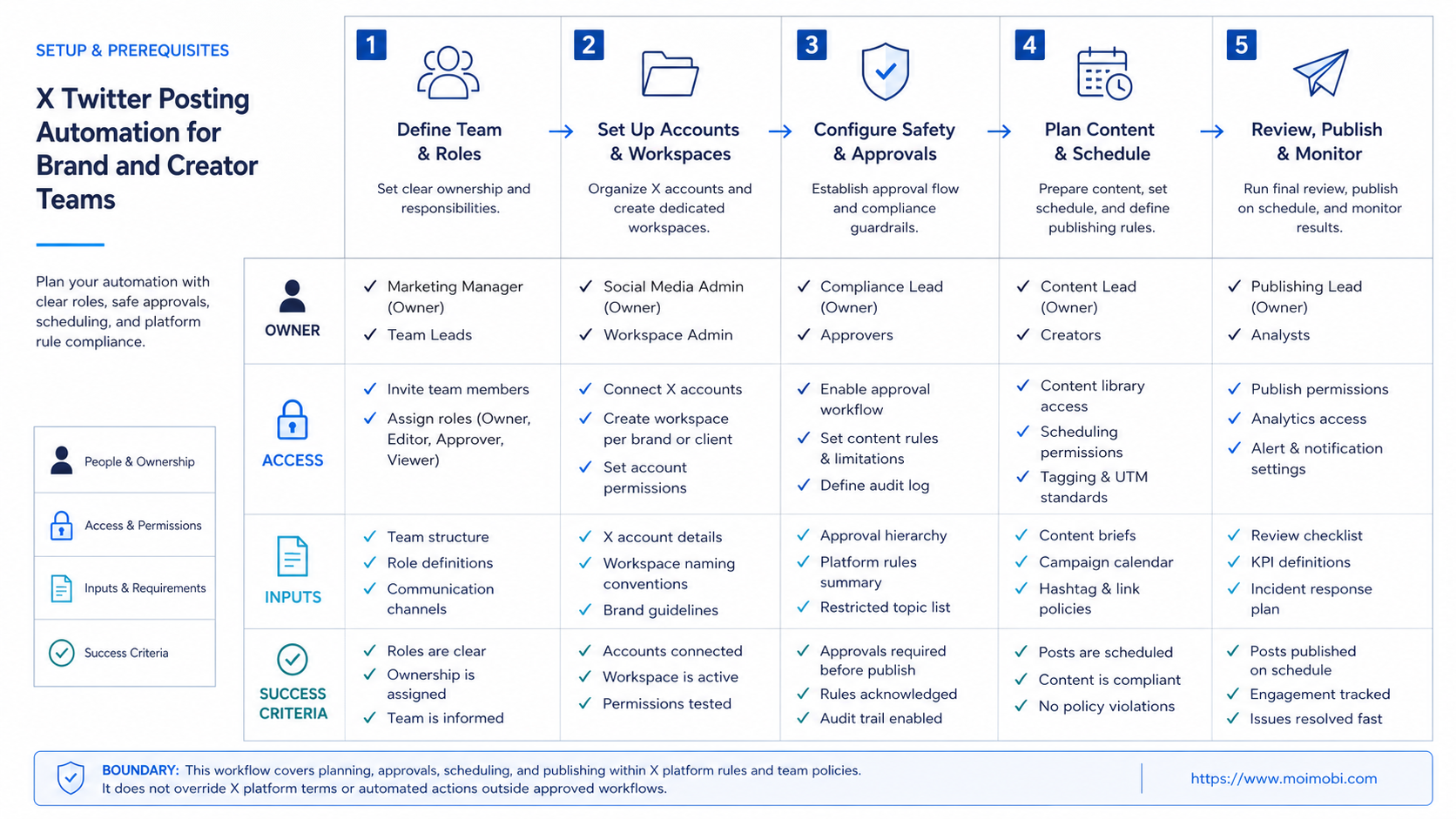
This workflow fits teams that already publish valuable content but struggle with coordination. A brand team may need approvals across marketing, product, and legal. A creator team may need a lightweight process that keeps voice personal while reducing missed posts.
Agencies are a strong fit when each client account needs a separate workspace. The agency can keep client calendars, approvals, assets, and execution records apart. That reduces accidental cross-posting and improves reporting.
This workflow is not a fit for teams that want bulk posting without editorial control. It is also a poor fit for accounts built around spam-like repetition, artificial engagement, or unclear ownership. X's Authenticity policy is directly relevant here because the platform focuses on inauthentic accounts, behaviors, and content.
For teams that publish across X and TikTok, mobile automation can support app-side checks, asset movement, and publishing preparation. Use it only after the content approval process is stable.
The strongest match is a team with repeatable campaigns, multiple contributors, and clear brand standards. The weaker match is a team that has not defined its account voice. If the account strategy is still changing every day, automation should stay limited to drafts, reminders, and review queues.
Pilot Rollout, Measurement, and Recovery Checks
Run a pilot with one brand account or one creator account group. Do not start with every account. The pilot should prove that the workflow improves quality and accountability.
Track five measures:
- approved posts published on time
- drafts rejected before publishing
- posts delayed for review
- environment or account selection errors
- post-publication issues needing follow-up
Review the pilot weekly. Keep the workflow if it reduces missed posts and unclear approvals. Simplify it if operators struggle to find the right account or environment. Pause it if publishing speed starts to outrun review quality.
Recovery matters because publishing mistakes are public. If the wrong post goes live, the team should know who approved it, who published it, which workspace was used, and what correction is needed. That record is more useful than guessing from memory.
Use a simple pass/fail review at the end of the pilot. Pass means approved posts published on time and mistakes were traceable. Fail means posts went live without clear approval, operators used the wrong account, or the team could not explain a publishing error.
MoiMobi can act as an AI browser and cloud phone platform for this kind of workflow. It helps when teams need browser workspaces, cloud phones, account separation, content tasks, and review records in one execution layer.
Frequently Asked Questions
Is X Twitter posting automation allowed?
Automation can exist on X, but it is subject to X Rules and Developer Policy. Teams should use official paths and avoid manipulative behavior.
Should brands automate replies too?
Posting and replies should be separated. Replies carry higher context risk and often need closer human review.
Can creators use automation without losing voice?
Yes, if automation supports drafts, reminders, and scheduling. The creator should still control point of view and final copy.
Is this the same as TikTok posting automation?
No. The workflow pattern is similar, but platform rules, formats, and execution environments differ.
What should be reviewed before publishing?
Review factual claims, brand tone, links, media, disclosure needs, timing, and account selection.
Do cloud phones help with X posting?
They help when mobile app checks, mobile content review, or cross-platform mobile workflows are part of the process.
What should trigger a pause?
Pause when an account receives warnings, when approval is unclear, or when operators repeatedly choose the wrong workspace.
How should agencies organize accounts?
Separate by client, account, platform, reviewer, and publishing environment. Keep task records for every post.
Conclusion
X Twitter posting automation works best as a publishing operations system. It should help teams plan, review, schedule, publish, and recover without weakening account ownership or platform rule awareness.
Before scaling, check four things: account owner, approval state, execution environment, and recovery record. If those basics are clear, automation can reduce publishing chaos. If they are missing, faster posting will only expose the gaps.
The next step is a small account-group pilot. Build the calendar, assign review owners, map environments, and publish only approved posts. Expand after the team can explain every published post without searching through private chat history.
That final check matters. A publishing system is ready to scale only when the team can review the account, post, approver, environment, result, and correction path from one operating record.
Without that record, delay expansion and tighten review.



