
Key Takeaways
- A cloud phone is a remote mobile environment that can be accessed and operated through managed infrastructure.
- The business value comes from workflow control, not from remote access alone.
- Teams should compare cloud phones against emulators, local phones, and process needs before scaling.
- A pilot should test handoff, recovery, routing notes, and platform-policy boundaries.
Introduction.
A cloud phone is a remote mobile device environment that teams can access through the cloud for mobile app workflows. In business use, the important part is not just that the device is remote. The important part is that the environment can be assigned, reviewed, separated, and recovered as part of a team process.
Local phones are simple until the work becomes shared. One person can manage a small set of apps from a desk. A team running many accounts, campaigns, regions, or client workflows needs more structure. Without structure, operators lose time asking who changed a device, which account belongs where, and how to restore a broken state.
MoiMobi positions cloud phones as one layer inside mobile execution infrastructure. A team may combine cloud phone access with device isolation, routing, automation, and review rules. That wider view matters because stable execution depends on more than a remote screen.
This guide uses cautious language because app behavior and platform rules vary. A cloud phone should not be described as removing account risk or bypassing platform obligations. Android behavior is documented through Android Developers, and Google publishes platform-policy guidance through the Google Play Policy Center. These sources do not validate any vendor, but they remind teams to operate inside real platform constraints.
The practical question is simple. Does a cloud phone make the mobile workflow easier to assign, operate, review, and recover? If yes, it may be worth testing. If the workflow is still vague, the team should define the process first.
What Is a Cloud Phone in Business Operations?
The main mistake is treating a cloud phone as a shortcut. A better definition is operational. A cloud phone gives the team a remote mobile lane that can run app work under a defined owner, purpose, and recovery process.
-
It creates a remote mobile lane. The operator does not need the physical handset on a desk. Access can be handled through the cloud environment.
-
It supports repeatable work. The same lane can be used for a defined workflow, such as app activity, account support, or campaign checks.
-
It can support separation. A team can avoid casually mixing unrelated accounts, clients, or workflows in one device context.
-
It needs process rules. The lane still needs ownership, routing notes, app-state notes, and a decision path when recovery is needed.
-
Review the lane. Managers should be able to understand what each lane does and whether the workflow is stable.
A cloud phone is different from a basic remote desktop because the work is mobile-centered. The applications, account contexts, notifications, permissions, and recovery steps are tied to mobile app execution. This is why teams evaluate the full operating model, not only screen access.
It is also different from a generic cloud emulator in many business decisions. A cloud emulator can be useful for development, testing, or light app interaction. A cloud phone is usually evaluated when the workflow needs more mobile-operational control. The right answer depends on the app, the task, the platform rules, and the recovery cost.
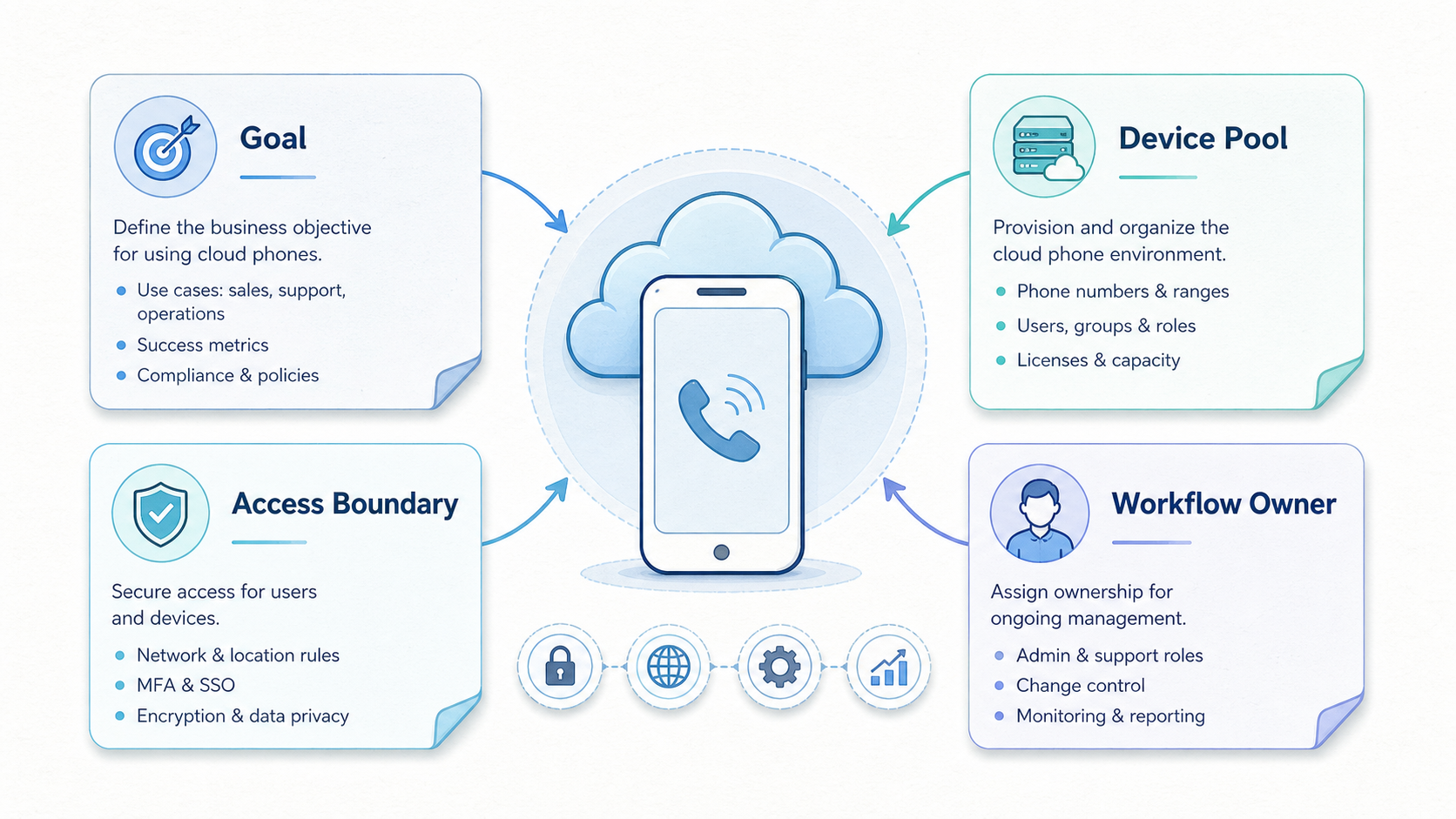
Teams should define the lane before choosing the tool. Write down the app, account type, owner, backup operator, routing requirements, and review cadence. That short note prevents the cloud phone from becoming another unmanaged device.
The business definition also includes what the cloud phone should not do. It should not become a shared junk drawer for every app and account. It should not hide platform-policy questions. Operators still need campaign planning, content review, and human judgment. A well-run lane makes these responsibilities easier to see.
Teams can use a simple lane record. Include purpose, account group, owner, backup, route, app state, last review, and recovery action. The record can be short. It needs to be accurate enough for another operator to continue the work without a long explanation.
Why Cloud Phone Infrastructure Matters
Cloud phone infrastructure matters when mobile work becomes a shared operating responsibility. The device is no longer a private tool. It becomes a lane inside a process that has to survive handoffs, staff changes, app issues, and campaign reviews.
Checkpoint: ownership. A cloud phone lane should have one named owner and one backup. Pass means another operator knows who is responsible. Fail means everyone can open the lane, but no one owns the state.
Checkpoint: purpose. Each lane should map to one workflow or account group. Pass means the team can explain why the lane exists. Fail means the lane contains unrelated apps, accounts, and tasks.
Checkpoint: separation. Teams doing multi-account work should avoid casual context mixing. Pass means clients, campaigns, or account groups are separated when needed. Fail means the team cannot tell which action changed which state.
Checkpoint: routing. Some workflows need stable network notes and a documented access path. Pass means the route is visible in the lane record. Fail means the setup only lives in one operator's memory. MoiMobi's proxy network page is relevant when routing is part of the evaluation.
Checkpoint: recovery. Every lane needs a restoration path. Pass means a backup operator can restore or retire the lane from notes. Fail means every issue turns into a live troubleshooting session.
These checkpoints are useful because cloud phone value is easy to overstate. Remote access looks good in a demo. A repeatable operating model proves itself during the second week, when something breaks and another person has to fix it.
Google's guidance on creating helpful content is about search quality, not mobile devices. The principle still travels well. Infrastructure should support useful, accountable work. The system should not only make low-quality activity easier to produce.
Another checkpoint is reporting. A manager should be able to answer three questions without interrupting every operator. Which lanes are active? Which lanes need attention? Which lanes should be paused or retired? When those answers are visible, the cloud phone setup becomes easier to manage.
The last checkpoint is change control. Operators should know which changes require review. Installing an app, switching account context, changing a route, or resetting a lane may affect later work. A lightweight change note helps the team connect problems to causes.
Key Benefits and Use Cases
The myth is that cloud phones are only for scale. Scale is one reason teams look at them, but the stronger benefit is control. A small team with high coordination cost may need better lanes before it needs more devices.
For social media operations, cloud phones can support cleaner execution paths. A team might assign one lane to a client campaign, another to message checks, and another to review. The value is the handoff. An operator can continue work without asking where the physical phone is or which account state was last changed.
For social media marketing, teams should avoid reckless volume framing. A cloud phone for tiktok automation or cloud phones for whatsapp marketing should be evaluated through platform rules, content quality, review, and recovery. Infrastructure does not replace campaign judgment.
For app-based operations, cloud phones may reduce local hardware friction. Local phones need charging, storage, cable management, inventory control, and physical access. Remote lanes can simplify those routines when the workflow is repeatable and the team documents state changes.
For agencies, the use case is often account separation and client handoff. One client lane should not casually share context with another client lane. A cloud phone can support clearer boundaries when it is paired with naming rules, access permissions, and review notes.
For teams comparing cloud phone vs emulator, the decision should be practical. Use a cloud emulator when the task is simple, temporary, or development-focused. Test cloud phones when the workflow needs remote mobile lanes, ownership, recovery, and team review.
Support teams may use cloud phones differently from marketing teams. A support workflow may care about response consistency and account continuity. A marketing workflow may care about campaign ownership, content review, and client separation. The same device layer can support both, but the lane rules should not be identical.
Product or QA teams may also evaluate cloud phones for app behavior checks. In that context, the goal is not volume. The goal is a repeatable mobile environment that can be opened, reviewed, and reset. Test owners should still confirm whether an emulator, physical phone, or cloud phone best matches the test.
| Use case | Cloud phone value | What to verify |
|---|---|---|
| Social operations | Cleaner account lanes and handoff. | Platform rules and review cadence. |
| Agency work | Client separation and backup access. | Lane ownership and notes. |
| App workflows | Less local hardware friction. | App behavior and recovery. |
| Automation pilots | Repeatable mobile execution lanes. | Manual process before automation. |
How to Evaluate and Start Using a Cloud Phone
Start with a pilot that is small enough to understand. A team does not need a large rollout to learn whether cloud phones fit. It needs one real workflow with a visible owner, measurable output, and a recovery test.
Define the mobile job. Name the app, task, account type, owner, and expected result. A vague goal like "run more mobile accounts" is not enough. The pilot needs a job that can be repeated and reviewed.
Choose the lane boundary. Decide whether each cloud phone belongs to a client, campaign, region, operator, or app. The boundary should make handoff easier. If the boundary is unclear, the lane will become messy.
Document access and routing. Record who can open the lane, who can change settings, and what routing notes matter. If the workflow needs additional separation, review Android antidetect and device isolation requirements.
Test the actual app. Do not rely only on category assumptions. Mobile apps can behave differently across environments. Test the real task, real account type, and real recovery process before expanding.
Run a handoff drill. Ask a backup operator to use the lane from notes only. Watch where the person gets stuck. That gap is the next process improvement.
Measure support load. Count repeated manual fixes, unclear owner questions, missing notes, and recovery time. A pilot that creates too much support work is not ready for scale.
Set stop conditions. Stop conditions may include unclear policy boundaries, repeated app instability, weak recovery notes, or poor campaign ownership. These conditions keep the team from expanding a workflow it does not understand.
The pilot should end with a decision. Expand if the workflow is repeatable and support load is low. Hold if the process works but requires too much manual rescue. Redesign if the same issue appears more than once.
Procurement should use the pilot evidence. Ask vendors about the controls the workflow actually needs: access permissions, isolation, route documentation, recovery support, asset organization, and reporting. A generic feature list is less useful than a direct match against the pilot notes.
Teams should also decide who owns the operating model after purchase. The tool owner may not be the same person as the workflow owner. One person may manage platform settings, while another owns campaign execution. Naming both roles avoids confusion after rollout.
Common Mistakes to Avoid
The first mistake is buying cloud phones before defining the workflow. Remote devices can make a clear process easier to run. They cannot turn an undefined process into a stable operation.
The second mistake is treating cloud phones as a safety promise. No device setup should be described with absolute safety language. Platform behavior, account history, content quality, and operator behavior still matter.
The third mistake is mixing unrelated accounts in one lane. A lane that carries multiple clients, apps, and campaigns becomes difficult to audit. When something breaks, the team cannot tell which change caused the problem.
The fourth mistake is automating too early. Mobile automation is more useful after the manual workflow is clear. Automating a vague workflow can hide the exact problems the team needs to solve.
The fifth mistake is ignoring recovery. A setup can look stable until the owner is unavailable. A backup operator should be able to restore the lane, pause it, or retire it from written notes.
The sixth mistake is measuring only output. More completed actions do not always mean better operations. Track handoff success, failed recovery, missing notes, support time, and review clarity. Those signals show whether the system is becoming easier to manage.
Teams can reduce these mistakes with a weekly review. Ask which lanes completed work, which lanes needed rescue, and which process rule changed. Keep the review short enough that people will actually do it.
Another mistake is keeping stale lanes alive. Old lanes create clutter and confuse operators. A lane should be reset, paused, or retired when its purpose is no longer current. Retirement is part of fleet hygiene, not a failure.
Teams also struggle when exceptions become normal. One urgent workaround is understandable. Repeating that workaround every week means the workflow needs redesign. Track exceptions during the pilot, because they often reveal the real operating cost.
Pilot Fit, Measurement, and Recovery Checks
Cloud phone adoption should include an explicit fit check. Operators should know who benefits, who runs the lane, and what would make the pilot fail. Without that check, the pilot can drift into tool testing without a business decision.
Good fit
- Repeated mobile workflows with shared ownership.
- Account work that needs separation and handoff.
- Agency or team operations with backup access.
- Automation pilots with a documented manual process.
Weak fit
- One-time tasks that a local phone handles cleanly.
- Workflows with unclear account ownership.
- Teams trying to ignore platform rules.
- Projects where recovery cannot be documented.
Measurement should focus on operating quality. Track whether the lane completed the task, whether review was clear, whether recovery notes worked, and whether a backup operator could continue. These metrics are less flashy than volume, but they reveal whether the workflow can scale.
Recovery checks should be real. Break one test lane in a controlled way and ask another operator to restore it. The result shows whether the notes are usable and whether the setup depends too much on one person.
Leaders should also decide when to retire a lane. Some lanes should be reset. Some should be paused. Some should be removed from the workflow. Retirement rules keep old experiments from cluttering the system.
The review loop should stay practical. A weekly scorecard can include completed tasks, failed handoffs, recovery time, missing notes, and policy questions. These categories are enough to show whether the setup is improving. They also give managers a reason to scale slowly when the evidence is mixed.
Recovery should be tested before a real incident. Ask a backup operator to restore one lane from documentation only. If the backup cannot do it, fix the notes or simplify the workflow. This test is uncomfortable, but it is cheaper than discovering the gap during client work.
Frequently Asked Questions
What is a cloud phone?
A cloud phone is a remote mobile environment that teams can access through managed infrastructure. It is used for mobile app workflows that need remote operation, handoff, or review.
Is a cloud phone the same as an emulator?
No. A cloud emulator is often used for virtualized app testing or light interaction. A cloud phone is usually evaluated as a mobile operations lane for team workflows.
When should a business use cloud phones?
Use them when mobile work is repeated, shared, and hard to manage on local devices. They are less useful for rare tasks with low recovery cost.
Can cloud phones support TikTok automation?
They can support mobile execution lanes, but teams must review platform rules, content quality, and workflow design. A cloud phone for tiktok automation should not be treated as permission to ignore limits.
Are cloud phones useful for WhatsApp marketing?
They can help structure access and handoff for messaging workflows. Cloud phones for whatsapp marketing still require platform-aware behavior, clear ownership, and human review.
What should teams test first?
Test one workflow, one lane boundary, backup access, routing notes, and recovery. The first pilot should prove the operating model, not just device access.
How many cloud phones should a pilot use?
Use a small number that exposes real handoff issues. Three to five lanes can be enough for a meaningful first review.
What is the biggest buying mistake?
The biggest mistake is buying capacity before defining the process. Teams should map workflow, ownership, and recovery before choosing fleet size.
Conclusion
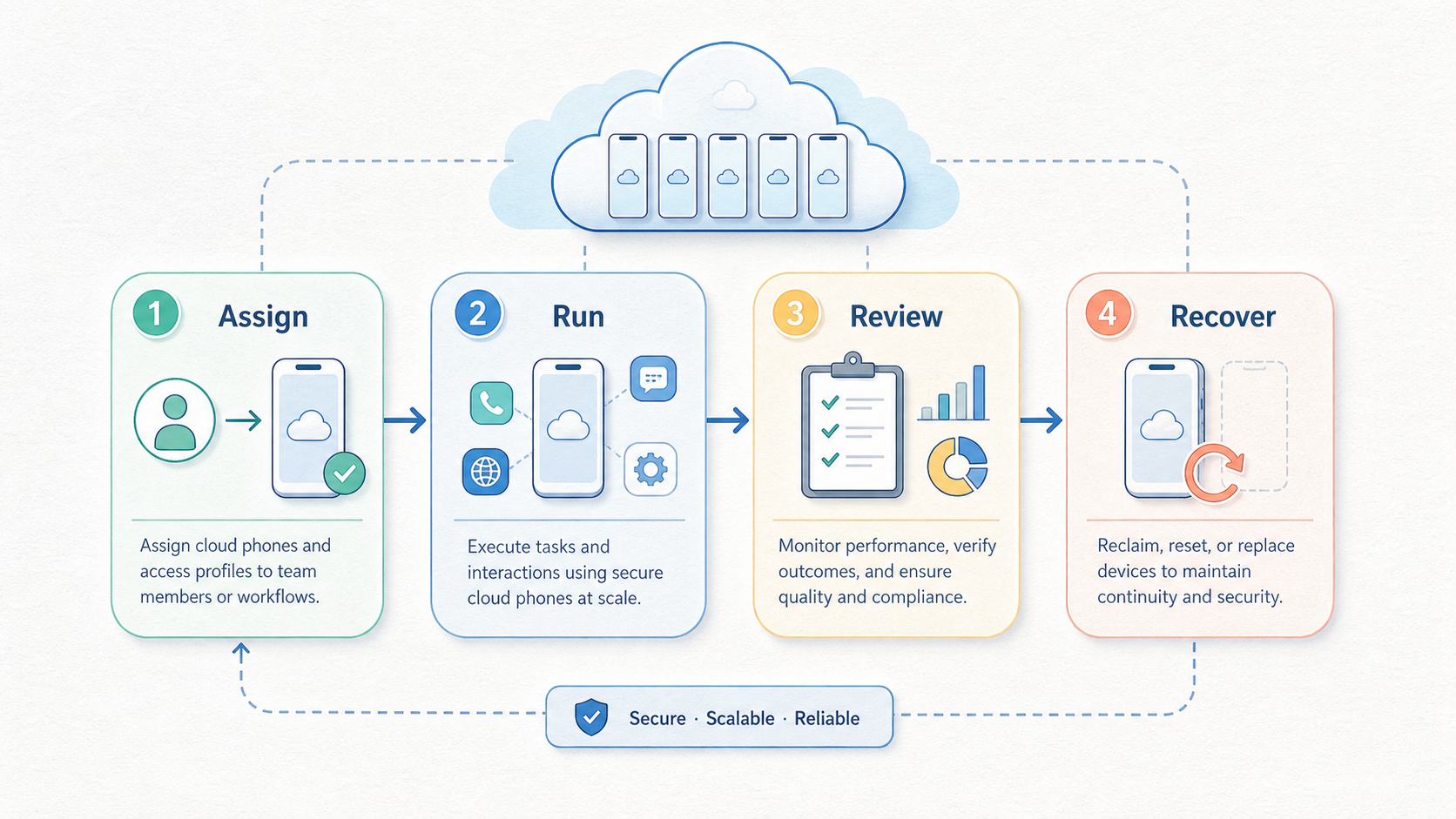
A cloud phone is useful when it gives a team a cleaner way to run mobile work. The real value is not the remote screen. The value is a lane that can be assigned, separated, reviewed, and recovered without relying on one person's memory.
The right evaluation starts with a small pilot. Define the mobile job, choose the lane boundary, document access, test the app, run a handoff drill, and measure support load. Then decide whether the system is ready to expand.
Before acting, check four things. The workflow should have a clear owner. The account context should be separated where needed. The recovery path should be testable. Operators should understand the platform rules behind the work. If those checks are in place, MoiMobi can be evaluated as mobile execution infrastructure instead of a simple cloud phone rental choice.
The next practical move is a one-page pilot map. List the first workflow, lane owner, backup operator, account boundary, routing note, review metric, and recovery test. Then compare that map against MoiMobi's cloud phone, device isolation, routing, and automation capabilities. That keeps the evaluation grounded in the work the team actually needs to run.



