
Key Takeaways
- Cloud phone alternatives should be compared by workflow fit, not only by device access or price
- Business teams need to judge isolation, routing, automation, handoff, logs, support, and recovery together
- A ugphone alternative or vmos alternative may fit one team and fail another if the operating model differs
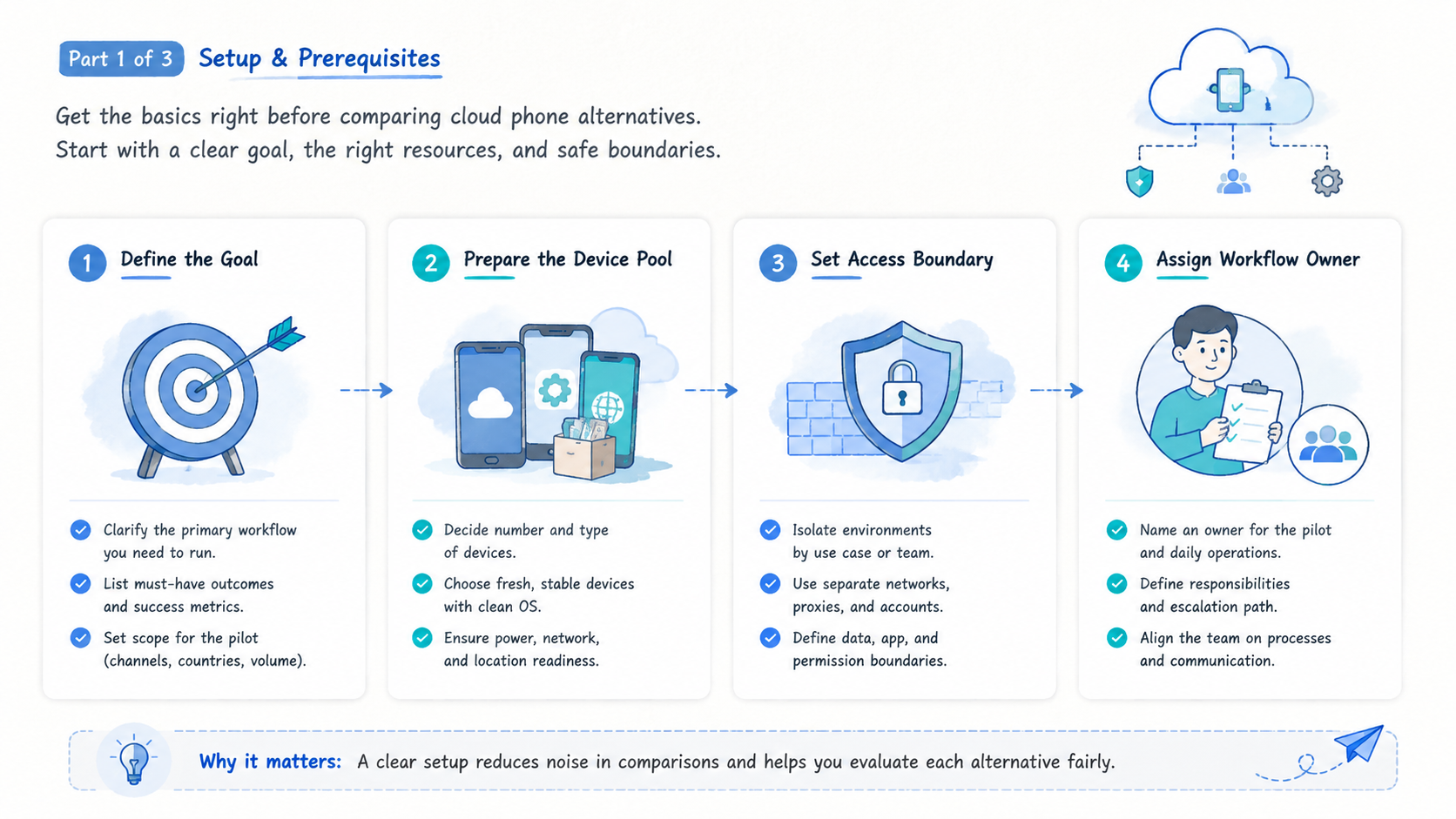
- The first pilot should test one named workflow, one device unit, and one recovery process
- The best option is the one that makes repeated mobile work easier to assign, review, and continue
Cloud phone alternatives are remote Android options that replace or complement a current cloud phone setup for business workflows. They include provider changes, managed device pools, remote Android platforms, and team execution systems.
The right choice depends on the team's work pattern: account operations, QA, mobile automation, app checks, or scaled device management.
The selection rule is direct. Pick the option that supports the workflow with the clearest ownership, device state, isolation, routing, and recovery record. Avoid choosing only the option with the longest feature list.
Check this first.
Let the work filter the demo before anyone compares dashboards, screenshots, or pricing pages.
This prevents a clean sales flow from hiding a messy operating flow.
Business teams compare alternatives when a current setup becomes hard to manage. Devices may be available, but handoff still breaks. Automation may run, but stop reasons may be unclear. A provider may work for one operator and fail when the workflow moves to a team.
That matters.
Start with the work, then compare the tool.
A Practical Comparison Framework for cloud phone alternatives
The common mistake is treating cloud phone alternatives as interchangeable remote Android products. They are not interchangeable once team operations enter the picture. A solo tester may care about access and speed. A business team needs assignment, records, review, and support.
The practical comparison starts with a workflow sentence:
Example workflow sentence: "Our team needs to run [task] across [device unit] with [owner], [route policy], [stop rule], and [recovery owner]."
Fill that sentence before looking at providers. It keeps the comparison tied to the job instead of a generic product tour.
Use this first-pass matrix. Read it by row, not by feature count.
| Decision axis | What to compare | Strong signal | Weak signal |
|---|---|---|---|
| Workflow fit | Named task | Visible path | Generic access |
| Device unit | Assignment | Device maps to lane | Loose notes |
| Isolation | State boundary | Boundary visible | Mixed state |
| Automation | Stop behavior | Stop rule recorded | Blind retry |
| Handoff | Continuation | Next action visible | Private chat |
| Support | Failure tracing | Owner is clear | Informal troubleshooting |
Google Search Central advises creating helpful content for people first: Google Search Central. The same idea applies to buying decisions. Compare what makes team work clearer, not what sounds broad.
Good comparison removes fog.
Migration Risks When Replacing Cloud Phone Alternatives
Switching tools can create new risk when the team moves too quickly. A migration should protect workflow records first. Device access can be rebuilt, but lost account-lane notes, route decisions, and recovery records are harder to reconstruct.
Use a migration checklist before changing providers:
| Migration item | What to preserve | Stop if missing |
|---|---|---|
| Device map | Device ID, owner, account lane, task lane | No owner or lane |
| Route policy | Region, network group, reason, last change | Route reason unknown |
| Task record | Last action, next action, stop reason | No continuation note |
| Automation rule | Trigger, allowed state, stop condition | Unknown retry behavior |
| Review owner | Who checks failures | No recovery owner |
Move one workflow before moving every workflow. A small migration makes errors visible. It also gives the team time to adjust fields, permissions, and review rules before the provider becomes part of daily work.
Avoid migrating unclear profiles. Retire old records that no one owns. Archive the reason so the next comparison does not repeat the same confusion.
Migration is a control test.
Compare Use Case Fit Before Feature Fit and cloud phone alternatives
Feature lists can mislead buyers. Two options may both offer remote Android access, but they may support different operating patterns. A QA team, account operations team, and automation team do not evaluate the same thing.
Use case fit should come first.
- QA and testing: check device availability, app install flow, logs, repeatable test state, and bug evidence
- Account operations: check isolation, account-lane mapping, route policy, handoff fields, and review process
- Automation teams: check triggers, stop rules, scripting control, evidence capture, and recovery notes
- Marketing teams: check task queues, repeatable app actions, operator roles, and reporting needs
- Engineering teams: check API access, device status, logs, and internal-tool integration
For teams that need managed Android capacity, cloud phone evaluation should not stop at whether a device opens. The team should ask what happens after the fifth run, the first failed run, and the first handoff between operators.
A ugphone alternative may be considered when the team needs a different operating layer, not just another login. A vmos alternative may be considered when the work needs a different boundary between local apps, remote environments, and team records. A vmos cloud alternative may be considered when the team needs shared operations rather than individual access.
A strong comparison names the workflow gap in one sentence.
One sentence is enough.
Operational Trade-Offs and Team Workflow
Every option has a trade-off. Local devices give direct physical control, but they are hard to share across teams. Emulators may support development tasks, but they may not match every production workflow. Cloud phone platforms help centralize remote Android work, but they still need process design.
The business question is not "which tool is strongest?" The better question is "which trade-off is easiest for our team to manage?"
Consider a 14-device pilot with two operators and one queue owner. The task is daily app state review across three account lanes. A workable alternative should show who owns each device, which lane it belongs to, what happened last, and what the next operator should do.
That pilot exposes real trade-offs:
- More control may require more setup
- More automation may require stricter stop rules
- More isolation may require clearer device mapping
- More provider support may reduce internal troubleshooting time
- Lower direct cost may increase operator review time
Teams that run many accounts should connect provider choice to multi-account management. Device access alone does not solve account ownership. The environment, operator, account lane, and route policy need a shared record.
Google's SEO Starter Guide recommends making sites easy to understand for users and search engines: Google Search Central SEO Starter Guide. Operations systems need the same clarity. A workflow record should be easy for the next teammate to read.
Keep it readable.
The trade-off that breaks handoff is the wrong trade-off.
Handoff is the test.
Setup Cost, Ongoing Cost, and Management Overhead
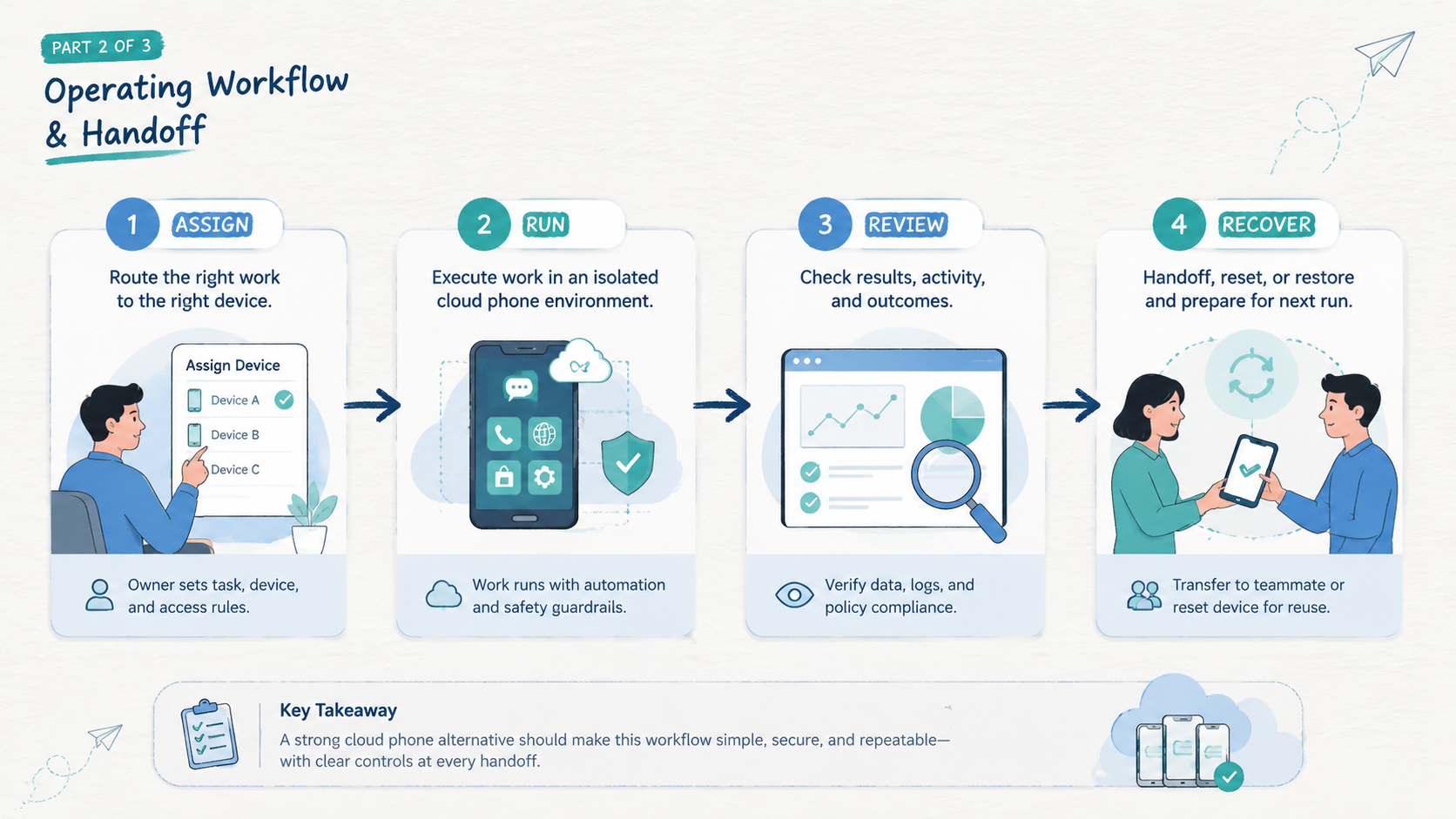
Cost is not only subscription price. Business teams should include setup time, operator time, troubleshooting time, support effort, and rework after failed handoff. Those costs may exceed the visible monthly line item.
Use a simple cost map:
| Cost type | What to include | What to ask |
|---|---|---|
| Setup cost | Device setup, account mapping, route policy, operator roles | How long before one workflow runs cleanly? |
| Ongoing cost | Seats, devices, usage, support, internal review | What does a normal week require? |
| Failure cost | Rework, downtime, lost context, support tickets | How fast can the team explain a stopped task? |
| Change cost | New account lane, new app, new region, new operator | What has to be rebuilt? |
| Management cost | Notes, dashboards, queue fields, reports | Can the next operator continue from the record? |
This map keeps the comparison honest. A low monthly price may still be expensive if every exception becomes a manual investigation. A higher-cost option may still be practical if it reduces review work and makes recovery faster.
For larger device pools, a phone farm model can make cost easier to review. The team can compare device pools, labels, owners, and runbooks instead of isolated device rentals.
Avoid estimating cost from the sales page alone. Run a pilot, measure stopped tasks, and count how often the original operator must explain what happened.
Count the hidden work.
Decision Scorecard for cloud phone alternatives
A scorecard gives the buying team a shared language. It also prevents the loudest feature from winning the decision.
Use five pass/fail checks:
| Check | Pass condition | Fail signal |
|---|---|---|
| Workflow proof | The provider runs one named workflow end to end | Demo stays generic |
| Handoff proof | A second operator can continue from the record | Private explanation is required |
| Recovery proof | Stopped tasks have labels and owners | Failures are hard to classify |
| Isolation proof | Device, route, and account lane are visible | State depends on memory |
| Automation proof | Scripts stop on unknown states | Scripts keep retrying |
Give each option one note per row. Long notes usually mean the team is trying to explain around a gap. Short notes are better: pass, concern, fail, and why.
End the scorecard with one decision sentence. For example: "Option A fits QA because log capture is clear, but Option B fits account operations because lane ownership is clearer." That sentence makes trade-offs visible.
Run the scorecard before a contract discussion. It keeps pricing tied to work quality instead of turning the decision into a generic discount conversation.
The right scorecard is short enough for operators to use.
Which Option Fits Different Teams Best
Good cloud phone alternatives depend on the team shape. A comparison that ignores team shape will produce a shallow answer.
Best for QA and app testing
Select an option that makes device state, build install steps, logs, and test evidence easy to collect. The team should know which device ran which check and where the result lives. Android Developers documents Android platform tooling and developer workflows: Android Developers. Treat those tools as building blocks, not a full business process.
Best for account operations
Use an option with clear environment separation, account-lane notes, route policy, and recovery ownership. Device isolation becomes a selection factor when workflows need clean boundaries between lanes. Memory is not enough to keep lanes separate.
Best for automation teams
Look for an option that can start, stop, and review automation in known states. Mobile automation should work from a stable runbook. Scripts should stop on unknown screens, missing inputs, account warnings, or unclear device state.
Best for routing-sensitive workflows
Prefer an option that lets the team document network decisions. A proxy network should support a known workflow policy, not become a hidden variable. Route changes need a record.
Best for small teams
Pick the simplest option that preserves owner, device, lane, last action, next action, and stop reason. Small teams do not need a heavy process. They need a process that survives a busy day.
Best for managers comparing multiple tools
Build a short list with three fields: workflow fit, recovery clarity, and internal owner. A manager does not need every low-level setting during the first pass. The first pass should identify which option can reduce missed handoffs, unclear stops, and manual rework.
Run the same pilot for every vendor. A fair comparison uses the same task, same device count, same operators, same pass bar, and same review window.
The scan rule is simple: match the option to the failure you need to reduce.
Pilot and Recovery Checks Before Choosing
A pilot should test recovery, not only task success. A clean demo only proves the happy path. Business use needs the stopped path too.
Run a narrow pilot:
- 10 to 15 devices
- 1 named workflow
- 2 operators
- 1 owner for the queue
- 5 required fields
- 7 days of review
Track these fields for every run:
| Field | Why it matters |
|---|---|
| Device ID | Shows where the task ran |
| Account or task lane | Prevents mixed ownership |
| Operator | Identifies who performed the action |
| Last action | Lets another person continue |
| Stop reason | Shows what failed |
| Recovery owner | Makes follow-up explicit |
Set a pass bar before the pilot starts. One practical bar is 90% task completion, zero unclear stops, and recovery notes for every failed run. The number can vary, but the rule should be written before evaluation starts.
If the team cannot explain stopped tasks without the original operator, the alternative is not ready for wider use.
Frequently Asked Questions
What are cloud phone alternatives?
Cloud phone alternatives are remote Android options, device pools, or related execution setups that replace or supplement an existing cloud phone workflow.
What is the best ugphone alternative for business use?
A practical ugphone alternative depends on the workflow gap. Compare device ownership, isolation, automation control, handoff records, and support before selecting a replacement.
Repeat the same pilot.
What is the best vmos alternative for teams?
The strongest vmos alternative is the option that fits the team's mobile workflow and recovery process. Brand similarity matters less than operating fit.
Fit comes first.
Is a vmos cloud alternative different from a cloud phone platform?
It can be. The useful question is whether the option supports shared team workflows, device records, isolation, and review. Avoid judging only by labels.
Should price lead the comparison?
No. Price should be reviewed with setup work, operator time, recovery effort, and support needs. A cheap setup can cost more if handoff fails.
When should a team keep its current option?
Keep it when the current setup supports the workflow, records failures clearly, and lets another operator continue work without private explanation.
What should teams test first?
Test one workflow with clear device ownership, required fields, stop rules, and recovery notes. Keep the first migration narrow.
One workflow is enough for the first pass, especially when the team is changing provider and process at the same time.
How many options should be shortlisted?
Two or three serious options are enough for a useful pilot. A longer list usually creates shallow notes and weak comparison.
Conclusion
Strong cloud phone alternatives for business use are not chosen by brand name alone. Choose by workflow fit first, then compare isolation, automation control, routing policy, handoff, support, and recovery quality.
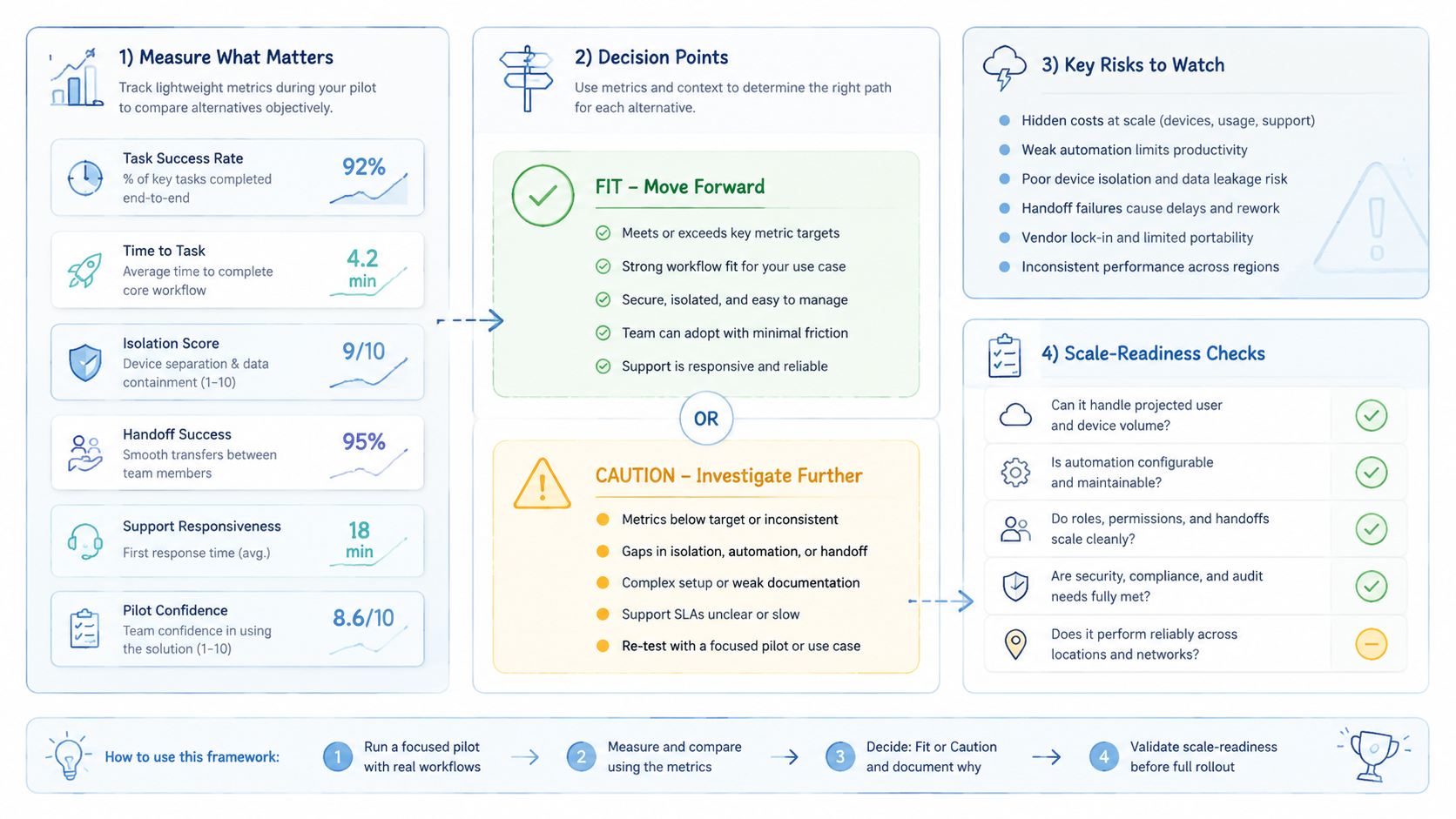
Use this order: define the task, define the device unit, set required fields, test the option, review stopped tasks, and then decide. That order keeps the comparison grounded in real operations instead of vendor claims.
The next step is practical. Pick one workflow your team already runs, write the fields another operator needs, and pilot two or three options for a week. If a stopped task can be explained from the record, the option deserves a deeper evaluation. If not, fix the operating model before scaling.



