
Key Takeaways
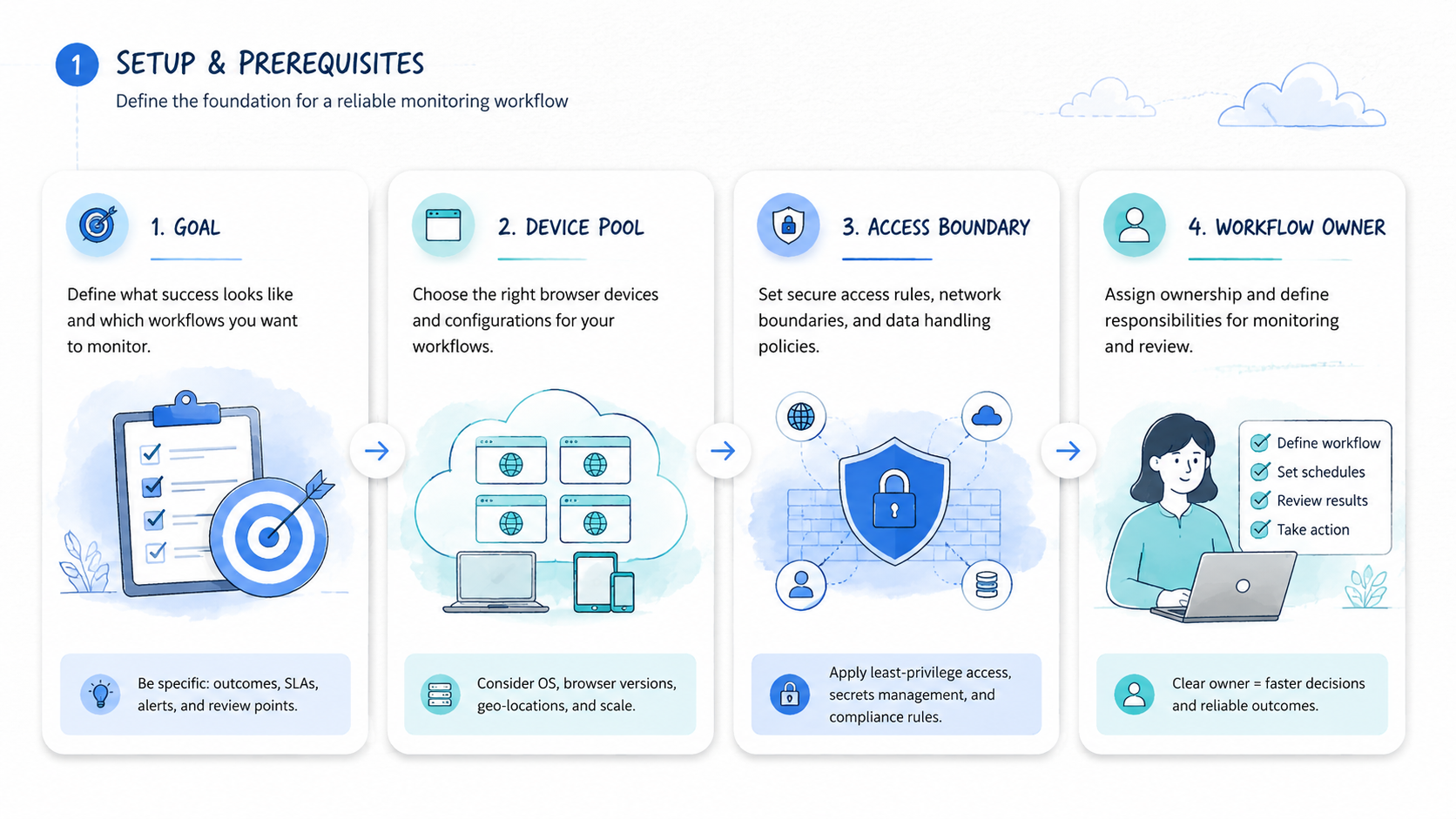
- Browser Use is a browser automation option for AI agents, but monitoring workflows need more than task execution.
- A good alternative should be judged by repeatability, review visibility, recovery paths, session control, and team ownership.
- Browser agents fit exploratory tasks; monitoring workflows usually need stricter schedules, exception queues, and audit records.
- Mobile monitoring may need cloud phones or mobile execution infrastructure, not only a cloud browser.
- Pilot with one workflow before moving alerts, account checks, or customer-facing monitoring into production.
Browser Use is an AI browser automation framework and cloud platform used to run browser-based agent tasks. For monitoring workflows, the best alternative is not simply the tool with more automation features. The better choice gives your team repeatable checks, inspectable outputs, clear ownership, and a recovery path when a run fails.
That is the test.
The selection rule is practical: use Browser Use or a similar browser agent when the workflow is web-first, exploratory, and browser-state driven. Look for another execution layer when the workflow needs scheduled monitoring, mobile app checks, account-pool separation, human review queues, or strict operational records.
Official Browser Use documentation describes AI agents, direct browser control, cloud browser sessions, profiles, and task management for browser automation workflows. That is useful context, but the buying decision should still start from your monitoring process, not from a feature list.
Start with the run, not the brand.
Monitoring is different from one-time automation. A one-time agent task can tolerate some manual inspection. A daily monitoring system needs predictable runs, exception routing, and a person who owns recovery. Google's guidance on creating helpful content is a useful general standard here: useful systems create clarity for users, not just more output.
A Practical Comparison Framework for Browser Use
The common mistake is comparing alternatives only by whether they can open pages, click buttons, and return a result. Monitoring workflows need a broader comparison. They require controlled execution, repeatable schedules, state management, and auditability.
Use this framework before comparing vendors:
| Decision axis | Why it matters | What to inspect |
|---|---|---|
| Task type | Exploratory and fixed checks behave differently | Research task, account check, alert run |
| Session state | Monitoring often depends on login context | Profiles, cookies, workspace ownership |
| Output review | Teams need proof of what happened | Screenshot, log, data row, exception note |
| Recovery | Failed runs need an owner | Retry, pause, escalate, or retire |
| Environment | Browser and mobile workflows differ | Cloud browser, local browser, cloud phone |
The tool can fit browser-first agent execution, especially when the task needs a browser agent execution environment. Another option may fit better when monitoring must run under a stricter operating model. That model may include alert thresholds, human review, device assignment, or workflow status labels.
The right comparison is not "which agent is smartest?" It is "which environment makes failed monitoring runs easy to inspect?" That question prevents teams from buying automation that creates hidden review work.
Use Case Fit Before Feature Fit and Browser Use
Feature fit matters after use case fit. A monitoring workflow has a target, cadence, owner, output, and exception path. Without those five parts, any browser agent will look powerful in a demo and messy in production.
Stop there.
The browser-agent approach may fit when the work is clearly browser-based. Examples include checking a website page, opening an authenticated dashboard, extracting visible fields, or running a guided browser task. Browser Use's cloud documentation describes agent tasks, direct browser control, skills, sessions, and profiles, which align with browser-side execution.
Keep that lane clean.
MoiMobi enters the comparison when the workflow is not purely browser-based. A team may need mobile app checks, cloud phone state, device isolation, or account group separation. MoiMobi's cloud phone page is relevant when checks depend on Android app environments rather than web pages.
Here is a scenario. A growth team wants to monitor account status across web dashboards and mobile apps. A browser agent may handle the web dashboard checks. A cloud phone layer may be better for app-based checks that need mobile state, notifications, or persistent Android access.
The decision should split the workflow into lanes:
- Web dashboard monitoring
- Authenticated browser session checks
- Mobile app status checks
- Exception review and escalation
- Recovery and rerun process
Each lane may need a different environment. A single tool may cover several lanes, but the team should prove that with a pilot instead of assuming it.
Operational Trade-Offs and Team Workflow
Monitoring workflows create operational debt when teams only track successful runs. The hard part is failed runs. A good alternative should make failed runs visible enough for a manager to understand what broke.
Review three trade-offs:
Control vs. flexibility
Open-ended browser agents can help with changing pages and exploratory tasks. Fixed monitoring often benefits from tighter scripts, known selectors, scheduled checks, and explicit stop rules.
Speed vs. auditability
A run that finishes quickly but leaves no inspectable output is weak for team monitoring. The team needs evidence: logs, screenshots, status fields, or structured notes.
Browser state vs. account ownership
Monitoring may depend on profiles, cookies, workspace ownership, or credential handling. Keep ownership explicit. A shared session with no owner creates recovery problems.
Name owners.
MoiMobi's multi-account management use case is relevant when monitoring involves several account groups. Browser monitoring and account operations should share the same ownership model, so the reviewer can see which account group a failed run affects.
Do not let the agent become the owner. The agent runs the task. A person owns the workflow, exceptions, and recovery.
Ownership stays human.
Setup Cost, Ongoing Cost, and Management Overhead
Setup cost is not only subscription price. It includes workflow design, session setup, credential handling, output review, and recovery rules. A cheaper tool can become expensive if every failed run needs manual detective work.
Ongoing cost usually appears in four places:
- Maintenance after site changes
- Review time after exceptions
- Session or profile management
- Operator training and handoff
Alternatives should be compared by total operating load. Ask how many minutes a manager needs to understand a failed run. Ask whether a new operator can see the status without reading private chat. Ask whether the tool can separate test runs from production checks.
Measure plain work.
For mobile monitoring, add device overhead. A cloud browser for AI agents may not cover mobile app state. A cloud phone or mobile execution layer may add setup work, but it can reduce confusion when the monitoring target lives inside an app.
Mobile work has different failure points.
MoiMobi's mobile automation page is relevant when the workflow needs repeatable mobile task execution. Its device isolation page matters when monitoring touches separate account groups.
The practical cost question is simple: what does one failed run cost to understand, recover, and prevent next time?
Which Option Fits Different Teams Best
Different teams need different execution environments. Use the fit map before choosing an alternative.
Browser agent may fit
- Browser-first monitoring tasks
- Authenticated web dashboard checks
- Agent tasks that need live page interaction
- Teams comfortable managing browser sessions
- Workflows with clear browser outputs
Alternative may fit
- Mobile app monitoring
- Account-group separation
- Cloud phone or Android state requirements
- Strict review and recovery ownership
- Monitoring that must survive shift handoff
For a startup operations team, the best option may be the fastest controlled pilot. Use one browser task, one owner, and one exception queue. Avoid building a broad monitoring system before the first workflow is measurable.
Start smaller.
For an agency, separation matters more. Client workflows should not share unclear sessions or device pools. The agency needs account maps, client tags, review queues, and status labels.
For mobile-heavy teams, browser automation may be only one layer. A cloud phone environment may be needed for app checks, mobile notifications, Android state, or device-level workflow records.
For AI agent platform teams, the key question is execution environment. A browser agent execution environment should support browser tasks. An AI agent execution environment for monitoring should also provide logs, result records, recovery ownership, and safe retry rules.
Comparison Checklist for Monitoring Workflow Buyers
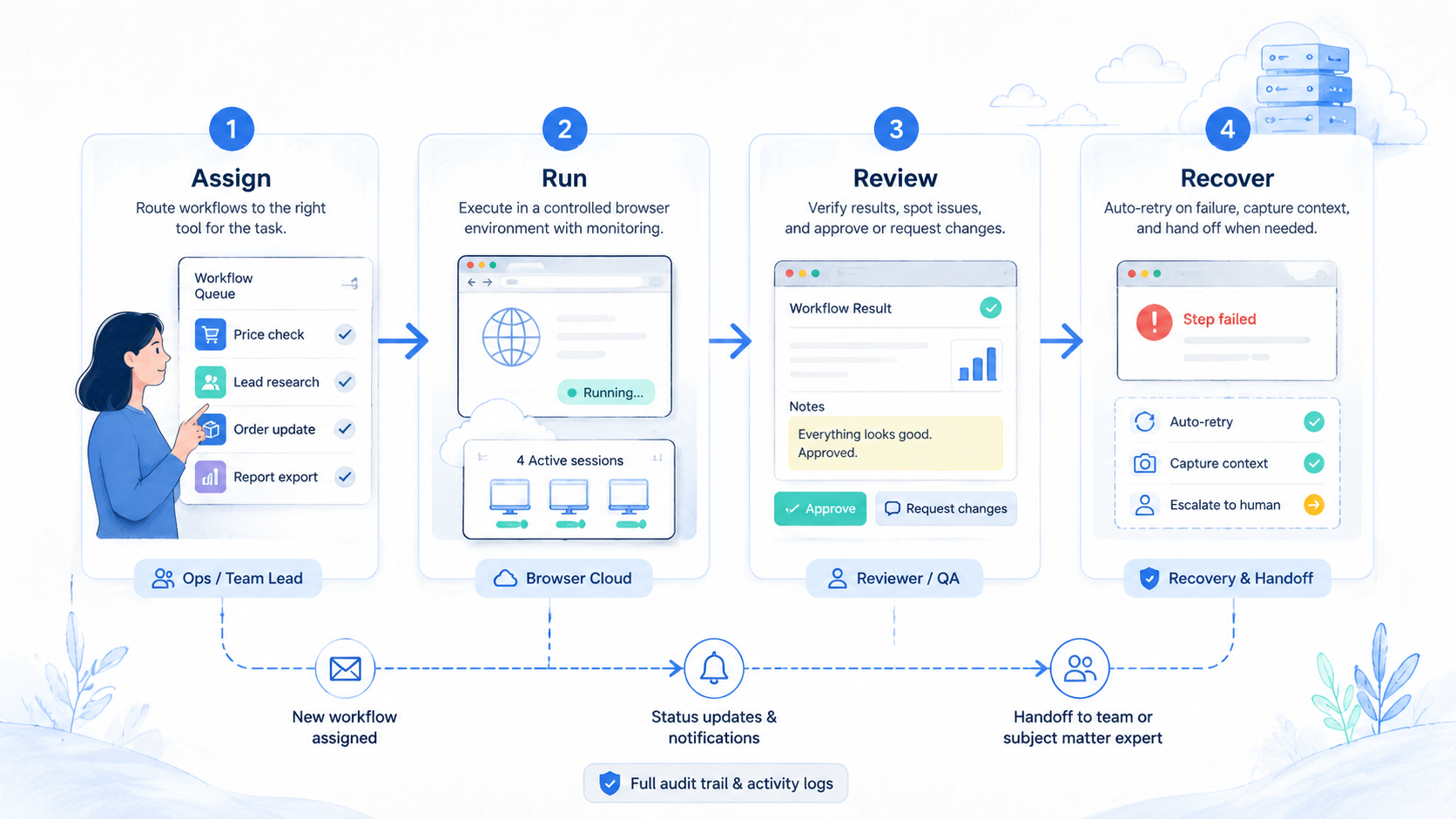
Buying a monitoring stack should start with evidence. A demo can show a successful run, but production monitoring is judged by what happens after the first failure.
Use this checklist before choosing the execution layer:
| Checkpoint | Pass signal | Stop signal |
|---|---|---|
| Target clarity | One page, app, account group, or dashboard is named | The team says "monitor everything" |
| Output proof | Each run leaves a log, screenshot, field, or status note | Only a plain "done" message appears |
| Session ownership | Profiles or devices have named owners | Shared sessions have no accountable owner |
| Exception routing | Failures go to a person or queue | Failures retry without review |
| Recovery action | Retry, pause, escalate, or retire is written | Operators improvise after every failed run |
This checklist also protects the team from overbuying. A simple web-page check may not need a mobile execution layer. A mobile app workflow should not be forced into a browser-only environment just because the browser demo looked smooth.
The final buyer question is operational: can a new reviewer understand yesterday's failed run in less than five minutes? If not, the setup needs stronger records before it needs more automation.
Five minutes is a hard bar.
Use a plain run card for every test:
| Field | Plain value | Owner check |
|---|---|---|
| Run name | Daily page check | Can a new user name it? |
| Run place | Browser, phone, or mixed | Is the right tool clear? |
| Proof | Log, image, row, or note | Can a reviewer see it? |
| Stop rule | Pause on missing page or prompt | Is the next step clear? |
| Owner | One person or queue | Can the team find them? |
Simple fields help. They cut down chat, reduce guesswork, and make handoff easier when the first owner is away.
Use plain words in the team log. Write what ran, what stopped, and who checked it. Add the next step in the same note. A new team member should not need a call to know the state.
Make the run note short:
- Check target
- Pass or fail
- Saved proof
- Reviewer
- Next step
This habit is basic, but it matters. Many monitoring pilots fail because the team cannot tell whether the tool failed, the page changed, the account changed, or the owner missed the alert. A short note keeps the facts in one place.
Browser Use Comparison Questions for Monitoring Teams
Ask comparison questions in the language of daily operations. The team should not only ask whether the browser agent can finish the task. It should ask whether the run can be trusted, reviewed, and recovered.
That changes the buying lens.
Use six plain checks instead: target, session owner, proof, change behavior, reviewer, and mobile fit. Write the answers in one row before the pilot starts.
Short checks beat vague goals.
The last question is easy to miss. Web monitoring and mobile monitoring may look similar in a planning document, but they fail in different ways. A web check may break after a selector changes. A mobile check may pause after an app prompt, device-state issue, or account-group mismatch.
Split lanes.
Use plain labels during the comparison. Mark each workflow as browser, mobile, mixed, or manual review. That one label helps the team avoid forcing every task into the same environment.
For a mixed workflow, separate the lanes before buying. Run web dashboard checks through the browser layer, route app checks through a mobile execution layer, and send both results to the same review queue so managers see one monitoring status view.
One queue helps.
Simple Browser Use Alternative Test Plan
A simple test plan keeps the team honest. Pick one small check that matters, but do not choose the hardest workflow first. The first test should show whether the tool can run, leave proof, and stop clearly.
Use a low-risk target. A public page check, a read-only dashboard view, or a staging account is better than a live customer workflow. The goal is to learn how the system behaves before pressure is high.
Run the same check for one week. Use the same prompt, account, session, and owner, and change nothing else during the test.
Write down three things each day: run status, proof saved, and reviewer action.
This simple log lowers debate. The team can see whether the tool saved time, created more work, or made failure easier to handle.
Browser Use Pilot Rollout, Measurement, and Recovery Checks
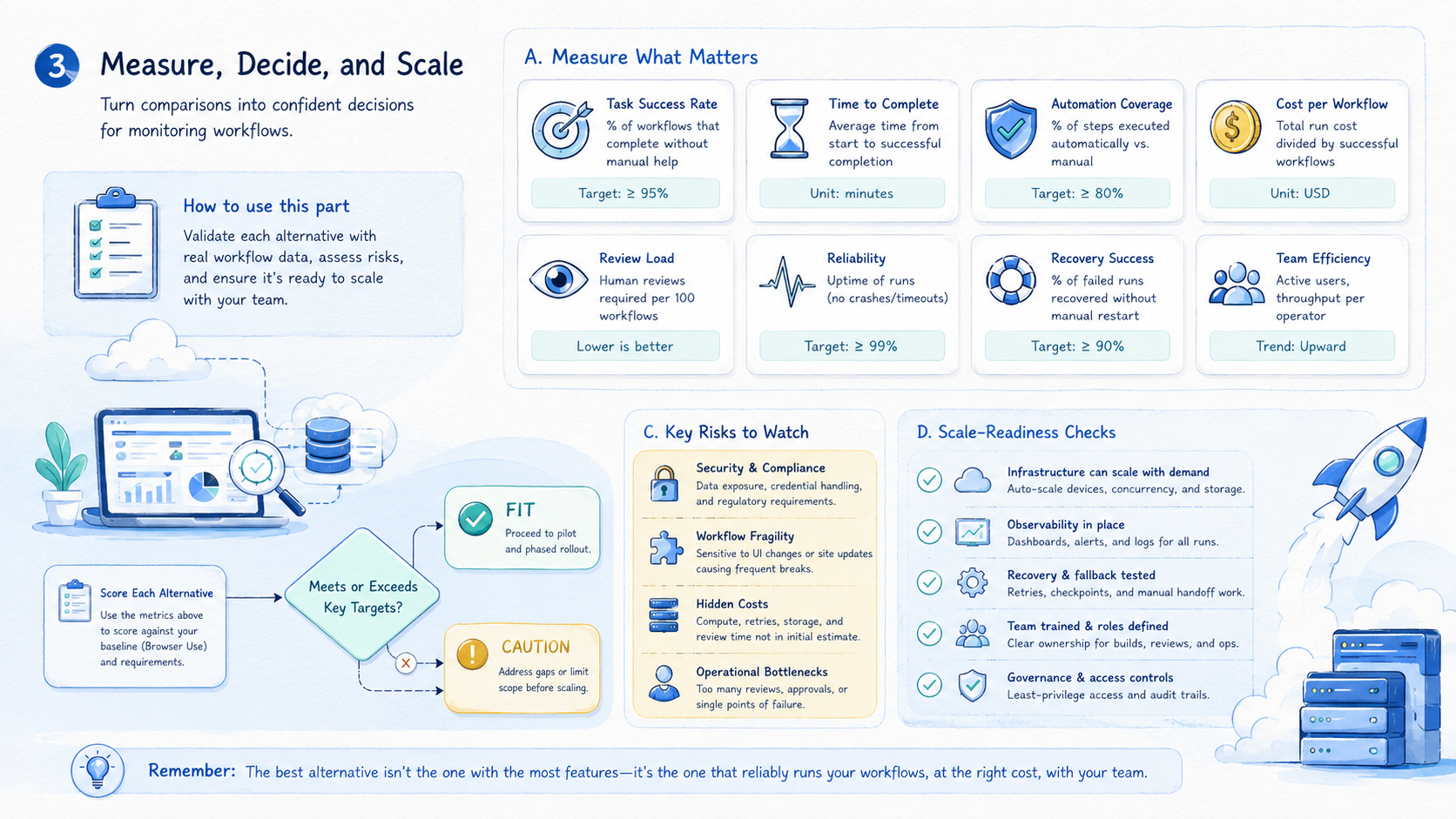
A pilot should prove that monitoring becomes easier to run and review. It should not only prove that an agent can complete a task once.
Start with one workflow:
Use this six-step pilot: choose one target, define the expected output, assign one owner, write stop triggers, run for seven days, and review every exception.
Measure five signals:
| Signal | What to track | Good direction |
|---|---|---|
| Run completion | Did the check finish? | Stable |
| Exception clarity | Can a reviewer see why it failed? | Higher |
| Review time | Minutes to understand result | Lower |
| Recovery speed | Time to retry, pause, or fix | Faster |
| Handoff friction | Messages needed between operators | Lower |
Recovery rules should be written before the pilot. A failed run should not lead to guesswork. The operator should know whether to retry, pause, escalate, or mark the workflow as needs review.
Limit the first pilot. Add either more targets or more operators in week two, not both. One variable at a time keeps the comparison readable because the team can still explain what changed.
Add one recovery drill before expanding. Force one non-critical run into a paused state and walk through the review path. Confirm who receives the alert, what evidence they see, and how the status changes after review.
For web monitoring, the drill may involve a dashboard page that fails to load. For mobile monitoring, it may involve an app prompt on a cloud phone.
The goal is the same in both cases: prove that the recovery process works before the workflow becomes business-critical.
Record the pilot in a short daily log:
- Target checked
- Environment used
- Output captured
- Exception count
- Reviewer decision
- Recovery action
Seven daily rows are enough to show whether the workflow is stable, noisy, or unclear.
Frequently Asked Questions
What is Browser Use?
Browser Use is an AI browser automation framework and platform for browser-based agent tasks. It fits workflows that depend on live browser interaction.
What is a Browser Use alternative for monitoring workflows?
It can be any execution environment that better fits the monitoring job. That may be a stricter browser automation setup, a cloud browser, a mobile layer, or a cloud phone workflow.
When should teams not use it?
Avoid forcing it when the workflow is mobile-first, needs device isolation, or requires strict account-group operations that a browser-only setup does not cover.
What should teams compare first?
Compare task type, session state, output review, recovery rules, and ownership. Features matter after the operating model is clear.
Is a cloud browser enough for AI agents?
Sometimes. A cloud browser can fit web monitoring. Mobile app checks may need cloud phones or a mobile execution layer.
How should a pilot start?
Use one target, one owner, one expected output, and one exception queue. Run it for seven days before expanding to more checks or more reviewers.
What is the biggest monitoring mistake?
The biggest mistake is tracking only successful runs. Failed runs need logs, screenshots, status notes, and recovery ownership.
Where does MoiMobi fit?
MoiMobi fits when monitoring touches mobile workflows, account groups, cloud phones, device isolation, or team handoff beyond browser-only automation.
What should a team document before switching tools?
Document the current target, run cadence, owner, output format, failure types, and recovery rule. Switching tools without this baseline makes comparison subjective.
Conclusion
A Browser Use alternative for monitoring workflows should be chosen by operating fit, not novelty. A browser-first agent may fit web tasks. Another environment may fit better when monitoring requires mobile state, account separation, scheduled review, or recovery ownership.
Use this decision sequence: define the monitoring target, choose the execution environment, write the expected output, assign the owner, and test recovery. If a failed run cannot be understood quickly, the setup is not ready for scale.
Start with one workflow and seven days of evidence. Expand only after the team can see what ran, what failed, who reviewed it, and what changed next.
That evidence is more useful than a broad feature comparison. It shows the real cost of monitoring: not the successful run, but the review and recovery work around every exception.
Make the final choice boring. Pick the tool that makes the next failed run easy to read. Choose the setup that a new teammate can follow without a private call. Use the path that lets the team pause, fix, and restart with a clear note.



