

AI browser automation is software that lets AI agents operate browser sessions, read page context, and complete repeatable web tasks under workflow rules. For growing teams, the best platform is not simply the one with the most agent features. It is the one that keeps account context, review, records, and recovery under control as work volume increases.
A small team can tolerate manual cleanup. A growing team cannot. When 5 people manage social accounts, ecommerce dashboards, support inboxes, and lead lists, browser automation needs operating discipline. The platform must separate workspaces, preserve logged-in sessions, route sensitive steps to humans, and show what happened after each run.
MoiMobi fits this decision as execution infrastructure. A browser workflow may need cloud phones, mobile automation, device isolation, and multi-account management when work spans browser dashboards and mobile-first apps.
Key Takeaways
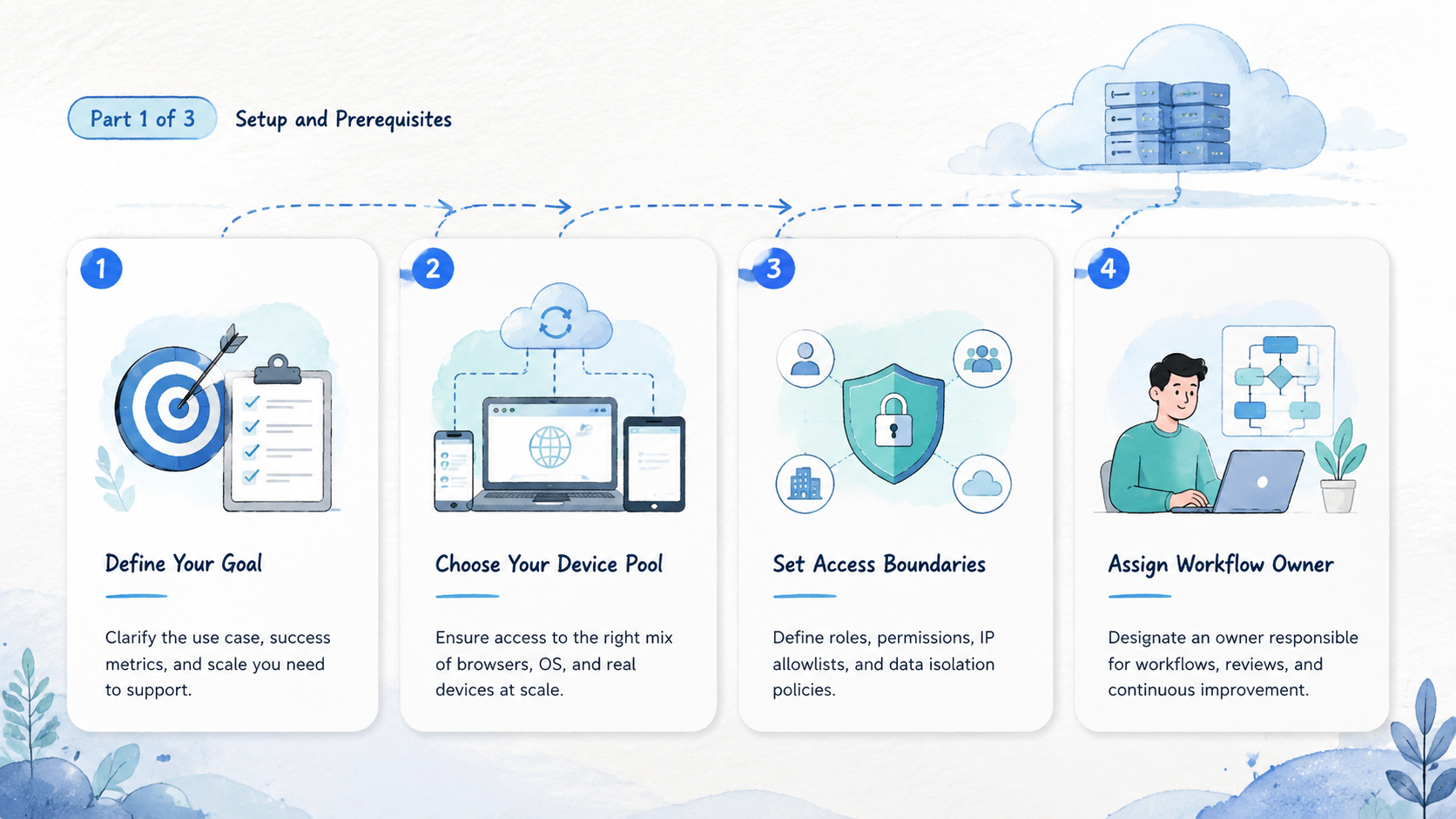
- Evaluate AI browser automation by workflow reliability, not feature volume
- Session control and profile isolation matter before scale
- Human review is required for publishing, account changes, and customer-facing actions
- Browser-only platforms can be enough for web tasks, but mobile-heavy teams need device execution
- A 2-week pilot should measure failures, recovery time, and wrong-context events
How to Evaluate AI Browser Automation Platforms
Start with the mistakes that break operations. Do not choose a platform because a demo agent can click through one page. A growing team needs repeatable browser work across accounts, operators, and review states.
Use this 7-step evaluation path.
-
Define the workflow
Name the task, input source, allowed actions, blocked actions, and output record. A vague prompt is not a workflow. -
Test session persistence
Run the same task across multiple days. If every run needs fresh login work, the platform is not ready for daily operations. -
Separate account environments
Give each client, brand, or account group its own browser profile or workspace. Shared context creates confusion. -
Add review triggers
Publishing, sending messages, changing account settings, and editing customer records should pause for approval. -
Check recovery
Break the workflow on purpose by removing a field, changing a source, or triggering a login prompt. The platform should show the stop reason and the next owner. -
Map mobile steps
Some workflows leave the browser. Social media, messaging, and marketplace work may require a cloud phone or Android device lane, especially when the app is the source of record. -
Measure operator handoff
A second person should understand the current page, task state, last action, and next step. If handoff requires a private chat thread, the platform is not carrying enough operating context.
The Playwright documentation shows how modern browser automation can control browsers for testing and repeatable web actions. AI-led browser work adds interpretation. It still needs discipline around contexts, repeatability, and records.
Capabilities That Change AI Browser Automation Outcomes
The capabilities that matter are operational. Agent reasoning helps, but execution quality decides whether the platform works for teams.
| Capability | Why it matters | Selection signal |
|---|---|---|
| Persistent sessions | Avoids repeated login and lost context | Same task works across days |
| Browser profile isolation | Keeps accounts, clients, and brands separated | One workspace per account lane |
| Human takeover | Lets operators resume a stopped task | Current page and task record are visible |
| Workflow records | Shows what changed and why | Output includes action, source, and status |
| Permissions | Limits what the agent can do | Sensitive actions require approval |
| Mobile execution | Covers app-only steps | Cloud phone or Android lane exists |
Weak platforms look impressive during one-off browsing. Strong platforms help a team run the same task again, audit the result, and recover when the page changes.
The Model Context Protocol documentation describes a general pattern for connecting models to tools. Tool access is useful. It is not an operating system for team workflows.
AI Browser Automation Platform Scorecard
A scorecard turns a vendor comparison into an operating decision. Give each category a score from 1 to 5, then write one sentence explaining the score. The note matters more than the number because it tells the team what to fix.
| Category | What a 5 looks like | Red flag |
|---|---|---|
| Session continuity | A task can resume across days without repeated setup | Every run starts with login repair |
| Profile control | Accounts, clients, and brands have separate lanes | Operators share one general browser |
| Agent boundaries | Allowed and blocked actions are easy to define | The agent has broad access by default |
| Review workflow | A person can approve, edit, or stop sensitive steps | Review happens in chat outside the system |
| Records | Each run shows source, action, output, and next state | The team only sees final output |
| Recovery | Failed tasks have owner, state, and reason | Failed runs disappear or restart blindly |
| Mobile coverage | App-only steps can move into a device lane | Browser work cannot connect to mobile work |
Use the scorecard after a pilot, not before. Sales pages can describe features, but the pilot reveals whether those features fit the team's daily work.
Here is a practical threshold. If session continuity, profile control, and recovery all score below 4, do not scale the workflow yet. Fix the operating base first. Agent quality matters, but a strong agent inside weak operations still creates cleanup.
The same scorecard can compare platform types. A cloud browser may score well for web research. A browser-and-mobile execution platform may score better for teams that also need mobile apps, device state, and account lanes.
Fit and Not-Fit Guide for Growing Teams
Not every team needs the same platform. Fit depends on where the work happens and how much account context matters.
Good fit
- Teams managing repeated browser workflows across accounts
- Agencies that need separate client workspaces
- Social teams that combine web dashboards and mobile apps
- Support teams that need draft, review, and reply workflows
- Ecommerce teams that monitor dashboards and seller tools
Poor fit
- One-off tasks that do not repeat
- Back-end jobs better handled by direct API integration
- Payment, deletion, or account-setting workflows without review
- Teams unwilling to define owners and stop rules
- Workflows that need legal or policy approval before automation
A practical rule: use browser agents when the task needs page context, logged-in state, or operator judgment. Use direct APIs when the data path is stable and authorized. Use scripted automation when the path is fixed and tests can cover it.
MoiMobi is most relevant when browser work is part of broader account operations. A team may research in a browser, check a mobile app, route through a clean network path, and keep account lanes separate. That is different from a simple cloud browser.
Adoption Cost, Setup Friction, and Team Fit
The common misunderstanding is that AI reduces setup to zero. It does not. It changes what setup looks like.
Traditional automation often requires code, selectors, and test maintenance. Agent-led browsing can reduce some scripting work, but teams still need workflow design. The setup shifts from writing every click to defining the task boundary, review path, account lane, and recovery rule.
Consider a growth team managing 20 social accounts. The hard part is not clicking "publish." The hard part is knowing which account is active, which draft is approved, which mobile app state is current, and who owns the next action when something fails.
Adoption friction usually appears in 5 places:
- Login and session stability
- Browser profile setup
- Source data quality
- Human review availability
- Recovery after failed runs
Budget time for those areas. A demo can prove the interface works; a 2-week pilot proves whether the team can trust the workflow.
The Google guidance on helpful content focuses on publishing for people, not automation tooling. The operating lesson still applies: document what people need to decide and act. Automation records should do the same.
AI Browser Automation Vendor Questions
Ask direct questions before a pilot starts. Vague answers usually become operational surprises later.
Use these questions with any vendor:
| Question | What to listen for |
|---|---|
| How does the platform preserve login state across repeated tasks? | A clear session model. |
| Can each account group run in its own profile or workspace? | Separate lanes. |
| What happens when the agent reaches a page it does not understand? | A visible stop state, a human owner, and a record that explains why the run paused. |
| Can the team block sending, publishing, deleting, or account-setting changes? | Permission controls tied to workflow rules and reviewer roles. |
| Where can reviewers see the current page, last action, and stop reason? | Inside the execution record. |
| How does browser work connect to mobile devices when the workflow leaves the web? | A device lane, cloud phone lane, or documented handoff that keeps the task owner visible. |
| What logs are available for audit, handoff, and workflow improvement? | Source, action, output, owner, and next state. |
A strong answer should include a workflow object, not only a model answer. The vendor should be able to show where the task lives, which environment runs it, who owns it, and how a reviewer takes over.
Weak answers sound like "the AI will handle it." Treat that as a warning sign. Agents can adapt to page variation, but they still need clear state, permissions, and recovery rules.
Which Platform Type Fits Different Scenarios
There are several platform types in the market. The right choice depends on workflow scope.
| Scenario | Better platform type | Why |
|---|---|---|
| QA testing and fixed website checks | Scripted browser automation | Stable paths can be tested directly |
| Research across changing pages | AI browser agent | Page context changes often |
| Multi-account social operations | Isolated browser and mobile execution | Account lanes and app steps matter |
| App-only workflows | Cloud phone or Android execution | Browser sessions cannot reach the app |
| Customer reply preparation | AI agent with review queue | Drafts need human approval |
| Team handoff | Workflow execution platform | State and owner must be visible |
Browser-only tools can be enough for web research, form checks, and dashboard monitoring. They become weaker when the work depends on mobile apps, account separation, or team-level review.
Execution platforms solve a broader problem. They connect the agent to the right environment, keep each account lane separate, and give operators a way to pause or take over. That matters for social media marketing, customer engagement, lead research, and ecommerce operations.
AI Browser Automation Pilot Plan and Measurement
Do not start with every account. Start with one narrow workflow and one owner.
- Pick one task: choose research, monitoring, draft preparation, or data update before public publishing.
- Create one lane: assign one browser profile, one account group, one owner, and one reviewer.
- Run 20 tasks: use enough volume to see repeated failures, but not enough to create cleanup debt.
- Review every stop: label login issues, missing sources, wrong-context events, and unclear instructions.
- Decide the next state: expand, revise, or retire the workflow.
Measure 6 signals:
- Completed runs
- Failed runs
- Manual takeover count
- Wrong-context events
- Review time
- Recovery time
The most important metric is not speed. It is trusted completion. If the team cannot explain why a task succeeded or failed, scaling the workflow will make operations harder.
Recovery Rules for Browser Agent Work
Recovery is where many platform choices become obvious. A growing team needs to know what happens after a login prompt, missing source, wrong account, changed page layout, or unclear output.
Use a simple state model:
| State | Meaning | Next action |
|---|---|---|
| Ready | Task can run under current rules | Start or schedule |
| Needs review | Output exists but needs human approval | Reviewer approves or edits |
| Blocked | Agent cannot continue safely | Owner fixes source, login, or rule |
| Wrong context | Account, profile, or page is not expected | Stop and reset the lane |
| Retired | Workflow no longer fits the task | Remove from active queue |
Never let blocked tasks loop forever. Repeated retries create noise and hide the real problem. A clean platform makes failure visible, assigns ownership, and keeps the wrong task from returning to the active queue.
Recovery design also protects team trust. Operators will stop using an automation system if every failure becomes detective work. The platform should show the environment, task, stop reason, and next owner in one place.
Final Selection Checklist
Use this checklist before choosing a platform.
| Check | Pass condition |
|---|---|
| Session continuity | The same task can run across days without repeated setup |
| Environment separation | Accounts, clients, and brands run in separate workspaces |
| Human takeover | A reviewer can see the page, task record, and stop reason |
| Permission control | Sending, publishing, deleting, and settings changes can be blocked |
| Run records | Each run records source, action, output, owner, and next state |
| Mobile reach | App-only steps can move to a cloud phone or Android lane |
| Pilot quality | Wrong-context events stay low and recovery is fast enough for the team |
For growing teams, the best choice is the one that makes work inspectable. A clever agent is not enough. The operating layer must show who owns the work, what environment ran it, what changed, and what happens next.
Frequently Asked Questions
What is the best AI browser automation platform for a growing team?
The best platform is the one that matches the team's workflows. Look for persistent sessions, profile isolation, human review, recovery records, and mobile execution when app steps are part of the job.
Should a team choose AI browser automation or Playwright?
Use Playwright for stable scripted paths, testing, and fixed browser jobs. Use agent-led browsing when page context changes and an operator still needs judgment.
Does browser automation replace mobile automation?
No. Browser work covers web dashboards and sites; mobile automation or cloud phones are needed when work happens inside mobile-first apps.
How should agencies evaluate account isolation?
For agencies, the first test is one workspace per client or account group. The test should confirm session state, ownership, and cross-account boundaries before more client lanes are added.
What should not be automated first?
Avoid payments, account setting changes, deletion, mass messaging, and public publishing. Start smaller.
Research, monitoring, drafts, and reviewed updates are better first workflows.
How long should the pilot run?
A 2-week pilot is usually enough to reveal session issues, unclear instructions, review delays, and recovery gaps. The exact timeline depends on task volume.
What metrics matter most?
Track completed runs, failed runs, wrong-context events, manual takeover, review time, and recovery time. These metrics show whether the workflow is ready for more accounts.
Conclusion
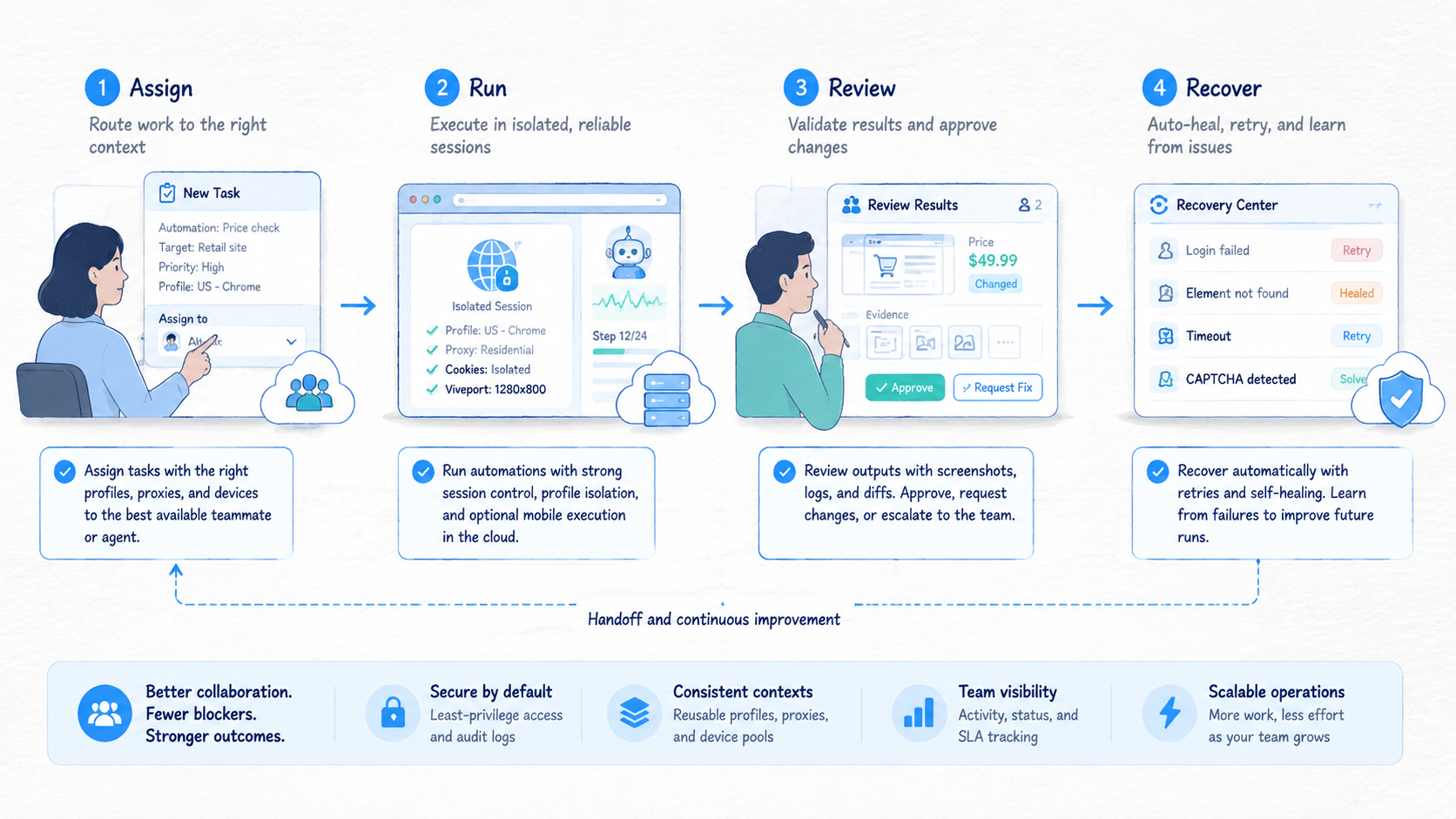
Choose AI browser automation platforms in this order: workflow fit, session control, account isolation, review, recovery, and mobile reach. Agent features matter only after those basics work.
Growing teams should avoid choosing from demos alone. A demo shows that an agent can act. A pilot shows whether the team can trust the system after logins, account lanes, review steps, and failure states appear.
MoiMobi is built for the execution layer behind that decision. Browser work can connect to isolated mobile devices, cloud phones, clean routing, and multi-account operations. The next practical step is to test one account-based workflow, measure the recovery path, and expand only when the record is clean.



