
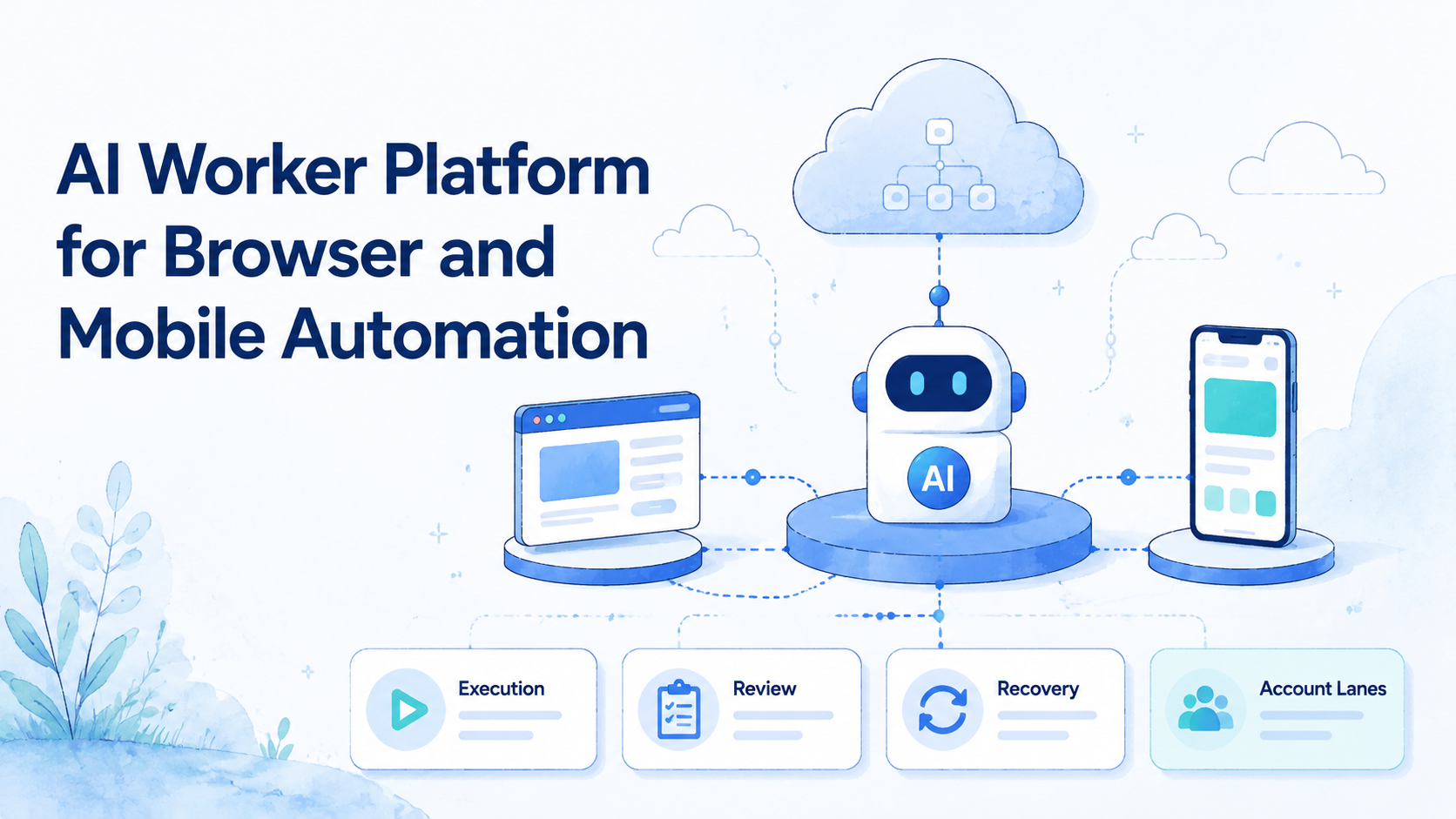
An AI worker platform is a system that lets AI agents execute repeatable work inside controlled environments such as browsers, cloud phones, and Android devices. It is different from a chatbot because the worker is connected to the place where the task actually happens.
For operations teams, the main question is not whether AI can write a response or plan a workflow. The question is whether the team can run that work across real browser sessions, mobile apps, account lanes, review steps, and recovery states without losing control.
MoiMobi fits this category as execution infrastructure. Teams can connect browser workflows with cloud phones, mobile automation, device isolation, and multi-account management when a workflow moves across web dashboards and mobile-first apps.
Key Takeaways
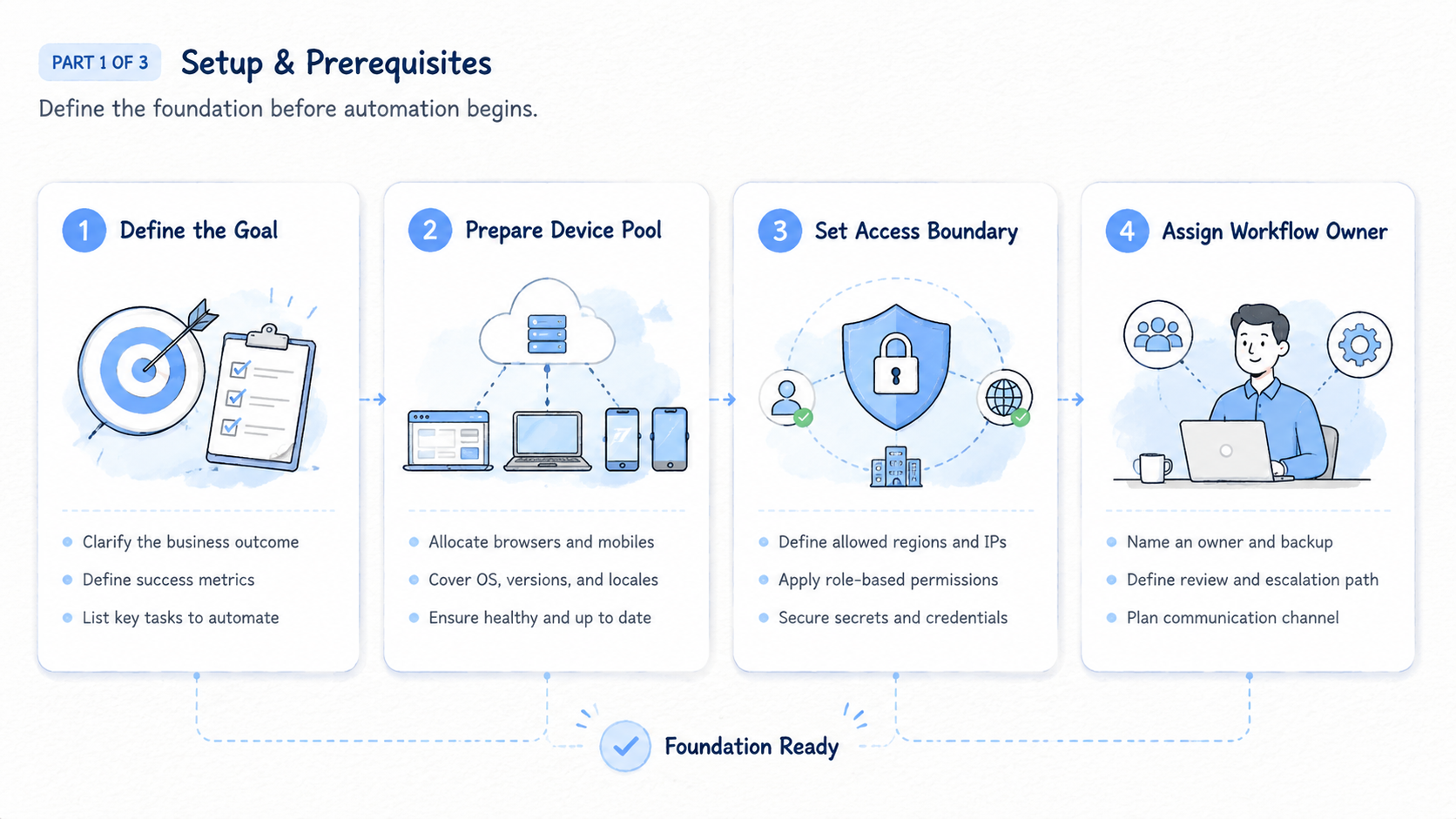
- An AI worker platform should connect AI decisions to real execution environments
- Browser and mobile automation solve different parts of the same workflow
- Account lanes, review rules, and recovery states matter before scale
- The best first workflows are research, monitoring, draft preparation, and reviewed updates
- Teams should measure trusted completion, not only task speed
The Core Idea Behind an AI Worker Platform
The common misunderstanding is that an AI worker is only a better prompt. That view is too narrow. A worker needs a role, an environment, a task rule, and a record of what happened.
Think about a person on an operations team. They do not only think. They open a dashboard, check an account, review source data, update a field, ask for approval, and hand off the next step.
The platform should support the same operating shape.
The platform needs 4 layers:
| Layer | Purpose | Example |
|---|---|---|
| AI layer | Understands instructions and context | Draft reply, classify lead, summarize issue |
| Execution layer | Runs work in browser or mobile environments | Browser profile, cloud phone, Android device |
| Control layer | Defines permissions, review, and stop rules | Block publishing until approval |
| Record layer | Captures source, action, output, and state | Task completed, needs review, blocked |
The Playwright documentation shows how browser automation can control browsers for repeatable web work. Worker platforms may use agent-led decisions instead of fixed scripts, but the work still needs session state, repeatability, and records.
Browser execution is useful for web dashboards, CRM tools, content platforms, and admin portals. Mobile execution is needed when the same workflow depends on apps, device state, or mobile-only account steps.
Why Teams Search for AI Worker Platforms
Teams search for this category because AI output alone does not remove the operational workload. A generated message still needs a channel, a task plan still needs an account, and a research summary still needs a source trail.
Three problems usually drive the search.
First, browser work is still manual. Operators log in, check dashboards, copy data, update fields, and repeat the same steps across accounts. Scripts help when the path is fixed. AI workers help when the page context changes but the task rule stays clear.
Second, mobile work does not fit browser-only automation. Social apps, messaging apps, seller apps, and mobile-first workflows may require an Android environment or cloud phone. A web agent cannot complete an app-only step by itself.
Third, multi-account work needs separation. A team managing clients, brands, regions, or account groups should not run everything in one shared session. Each lane needs its own environment, owner, and state.
The Model Context Protocol documentation describes a broad way to connect models with tools. That pattern matters for developers. Operations teams need another layer on top: who owns the task, where it runs, what it may do, and how failure is handled.
Browser and Mobile Automation Work Together
Browser and mobile automation are not competing ideas. They are different execution lanes.
Use browser automation when the work happens in:
- Web dashboards
- CRM systems
- Admin panels
- Ecommerce back offices
- Content tools
- Lead databases
- Browser-based inboxes
Use mobile automation when the work happens in:
- Android apps
- Mobile-only social platforms
- Messaging apps
- Seller apps
- App-based account checks
- Device-specific workflows
The practical design is one workflow with multiple environments. A worker may research a lead in a browser, update a CRM field, then check a mobile app before preparing a response. The task should still have one owner and one record.
MoiMobi's position is that the execution environment matters. A browser profile handles the web side. A cloud phone or Android device handles app-side work. Clean routing and device separation support account-based operations without pretending every workflow lives on one page.
Who Benefits Most and When
This category fits teams that already have repeated digital operations. The work should be frequent enough to justify setup and structured enough to define stop rules.
Good fit
- Social media teams managing multiple accounts or platforms
- Agencies running repeatable client workflows
- Ecommerce teams using web dashboards and seller apps
- Support teams handling browser inboxes and mobile messages
- Growth teams collecting leads and monitoring competitors
Poor fit
- One-off tasks that do not repeat
- Back-end jobs with a clean API path
- High-risk public actions without review
- Teams with no owner for workflow failures
- Work that requires legal or policy review before automation
A good first workflow has low downside and visible output. Examples include competitor monitoring, source-backed research, draft response preparation, dashboard checks, and reviewed data updates.
Avoid starting with settings changes, payment steps, deletion, bulk messaging, or final publishing because those actions need stronger approval paths. They may become part of a mature workflow later, but they should not be the first test.
How to Evaluate an AI Worker Platform
The biggest evaluation mistake is testing the AI alone. A strong model answer does not prove that the worker can run safely inside a team workflow with accounts, devices, reviewers, and recovery rules.
Use this evaluation path:
-
Define one task
Choose a real repeated workflow. Write the input, output, allowed actions, blocked actions, and review rule. -
Assign one lane
Pick the browser profile, cloud phone, Android device, account group, owner, and reviewer. -
Run the task 20 times
Repeated runs reveal missing sources, login issues, unclear instructions, and wrong-context events. -
Add a stop rule
The worker should pause when source data is missing, account context is wrong, or a page changes. -
Test human takeover
A reviewer should see the current environment, task record, last action, stop reason, and next step. -
Measure recovery
Track how long blocked tasks take to resolve. Clear failure is useful because it shows what the team must fix. -
Decide the next state
Expand, revise, pause, or retire the workflow based on recovery quality. Do not add more accounts until recovery works.
The Google SEO Starter Guide focuses on helping people and search engines understand pages. The same operating idea applies here: clear structure makes action easier, and worker records should be structured enough for a person to understand what happened.
AI Worker Platform Operating Model
A useful platform turns work into lanes. Each lane has an environment, account scope, owner, reviewer, and state.
| Lane field | What it means | Example |
|---|---|---|
| Environment | Where the work runs | Browser profile, cloud phone, Android device |
| Account scope | Which account group belongs to the lane | Client A, region B, brand C |
| Worker role | What the worker is allowed to do | Monitor, draft, update reviewed fields |
| Human owner | Who handles setup and blocked states | Operations lead |
| Reviewer | Who approves sensitive output | Team manager |
| State | Whether the lane is usable | ready, active, needs review, blocked |
This model prevents one worker from becoming a vague automation bucket. It also helps managers understand capacity because 10 clear lanes are easier to operate than one shared environment with hidden tasks.
Account scope should be explicit. A support lane should not silently become a publishing lane, and one client's lane should not run another client's workflow.
Keep the first worker role narrow. A monitoring worker can collect issues, while a drafting worker can prepare replies. A publishing worker needs stricter review and should not be the first pilot.
Role Patterns for Browser and Mobile Workers
Role design is where an AI worker platform becomes practical. A team should not create one worker called "marketing assistant" and let it do everything. That role is too broad to review.
Use role patterns instead:
| Worker role | Environment | Allowed work | Review point |
|---|---|---|---|
| Research worker | Browser profile | Collect sources and update research notes | Reviewer checks source quality |
| Monitoring worker | Browser or cloud phone | Check dashboards, comments, or app states | Owner reviews blocked items |
| Drafting worker | Browser inbox or mobile app | Prepare replies, captions, or updates | Human approves before sending |
| Data update worker | Browser dashboard | Update reviewed fields | Operator checks changed records |
| Mobile check worker | Cloud phone or Android device | Verify app-only state | Mobile owner confirms result |
Each role should have a single output format. Research workers should return sources and notes, monitoring workers should return findings and state labels, and drafting workers should return text plus the context used to write it.
Do not mix roles too early. A worker that researches, drafts, publishes, monitors, and replies is hard to control, while a narrow role creates better records and cleaner review.
Role patterns also make handoff easier. When a task stops, the next person can see whether the issue belongs to source quality, account state, mobile access, or approval. That distinction matters more than having a long list of features.
Execution Scorecard for Browser and Mobile Work
Use a scorecard after the first pilot. Score each area from 1 to 5, then write one short note.
| Area | Strong signal | Weak signal |
|---|---|---|
| Browser session | Repeated runs keep login state | Operators repair login every run |
| Mobile lane | App steps have a cloud phone or Android path | App checks happen outside the record |
| Account isolation | Each account group has a separate lane | Multiple accounts share one session |
| Review control | Sensitive actions pause for approval | Public actions happen without review |
| Recovery | Failed runs show owner and reason | Failed runs restart without explanation |
| Handoff | Another operator can resume work | Context lives in private messages |
| Output quality | Records include source, action, and next state | Only final text is saved |
Do not average away a critical weakness. A low recovery score should block scale, a low isolation score should block multi-account work, and a low review score should block customer-facing actions.
The scorecard is also useful for comparing platform types. Browser-only tools may score well for dashboards; browser-and-mobile execution platforms may score better when work crosses into mobile apps.
Pilot Metrics and Recovery Review
A pilot should measure whether the worker created trusted completion. Speed is useful only after the team trusts the result.
Track these metrics:
| Metric | What it shows |
|---|---|
| Completed runs | Whether the workflow can finish |
| Failed runs | Whether blockers are common |
| Wrong-context events | Whether account lanes are clean |
| Manual takeover count | Whether human review is frequent |
| Review time | Whether approvals slow the workflow |
| Recovery time | Whether failures are easy to resolve |
| Mobile handoff count | Whether browser-only execution is enough |
Recovery review should happen weekly during the pilot. Look at every blocked run. Label the cause: login, source missing, wrong account, changed page, unclear instruction, permission issue, or mobile gap.
One repeated failure is a workflow design problem. Fix the rule, record format, account lane, or environment before scaling. More volume will not repair a weak operating model.
Common Mistakes That Reduce Results
The first mistake is treating the AI worker as a general assistant. Teams get better results when the worker has a narrow role and a clear account lane.
The second mistake is ignoring mobile execution. A browser workflow may look complete until the final step requires a mobile app. If that app step is important, plan the cloud phone or Android lane from the start.
The third mistake is skipping review. Sensitive actions should pause. Customer-facing replies, public publishing, account settings, deletion, and payment steps need a human approval path.
The fourth mistake is measuring clicks instead of outcomes. Activity volume can hide cleanup work, so the better measure is whether manual effort drops without creating unclear task states.
The fifth mistake is scaling before recovery works. If one account lane is hard to recover, 20 lanes will be harder, so fix stop rules and owner handoff first.
Frequently Asked Questions
What is an AI worker platform?
It connects AI agents to execution environments so they can complete repeatable browser, mobile, and account-based workflows under rules.
How is it different from an AI chatbot?
A chatbot mainly answers or generates. A worker platform connects the AI to environments, task records, review, and recovery, so the output can become controlled work.
Why does browser automation matter?
Many business workflows happen in web dashboards, admin panels, CRMs, and browser-based inboxes. A worker needs controlled access to those sessions, plus a record of what changed.
Why does mobile automation matter?
Some workflows happen inside Android apps or mobile-first platforms. A cloud phone or Android lane covers steps that a browser cannot reach, especially for app-based account checks.
What should teams automate first?
Start with research, monitoring, draft preparation, and reviewed updates. Keep final public actions out of scope until review and recovery work.
Does every team need account isolation?
Teams managing multiple brands, clients, regions, or account groups should separate environments because shared context makes mistakes harder to audit.
How should success be measured?
Measure completed runs, failed runs, wrong-context events, manual takeover, review time, and recovery time. Together, these show whether the workflow is reliable enough to expand.
Conclusion
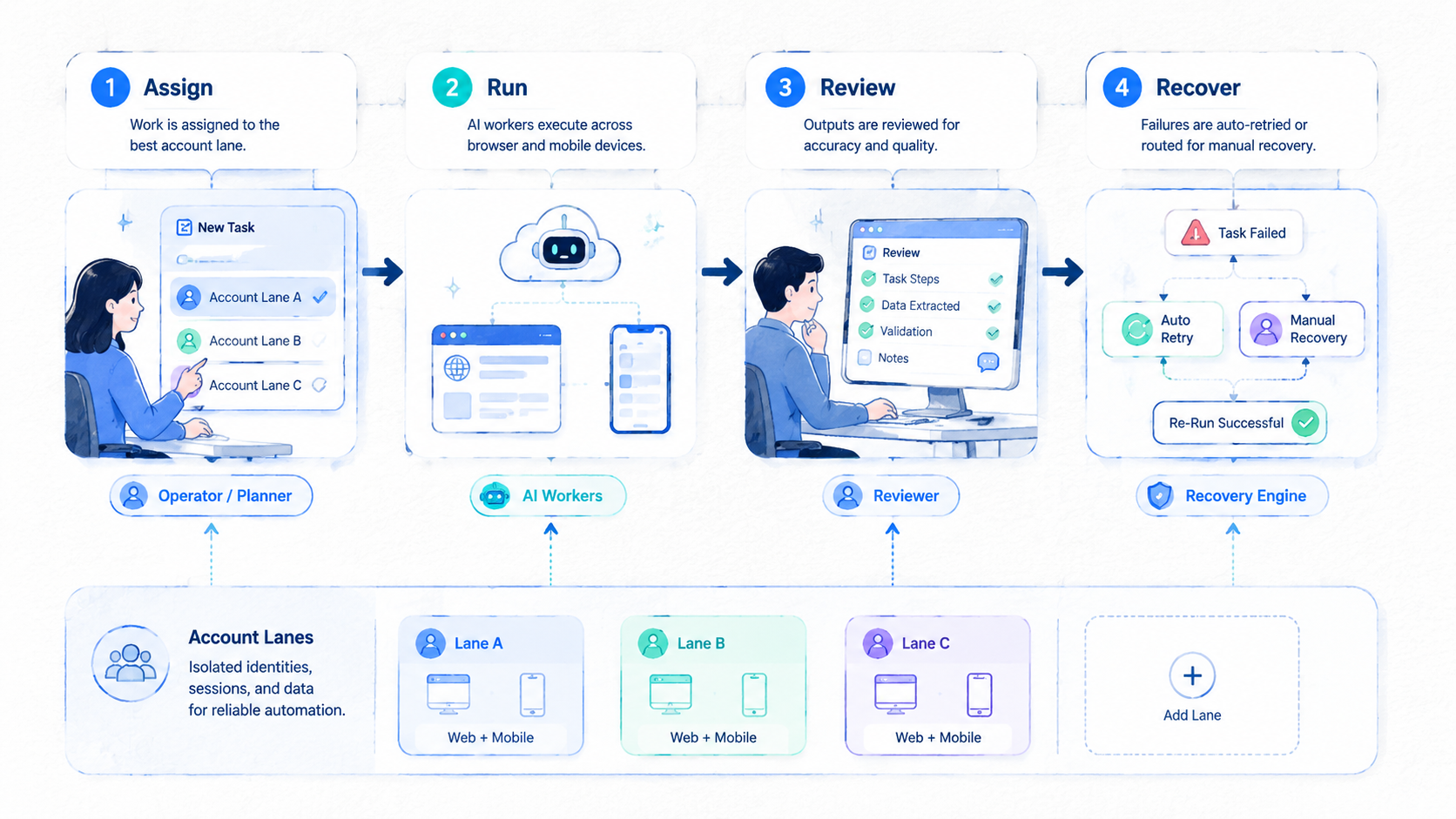
This type of platform becomes valuable when it connects intelligence to controlled execution. The worker needs more than a prompt. It needs a browser or mobile environment, account lane, task rule, review path, and recovery record.
For teams running social media, ecommerce, customer engagement, or growth operations, browser and mobile automation should be designed together. The browser handles web dashboards, while cloud phones and Android devices handle app-side steps. The operating record ties them into one workflow.
The next step is small but concrete: pick one repeatable workflow, one account lane, one owner, and one reviewer. Run 20 tasks, measure failures, and expand only when recovery is clear.



