Key Takeaways
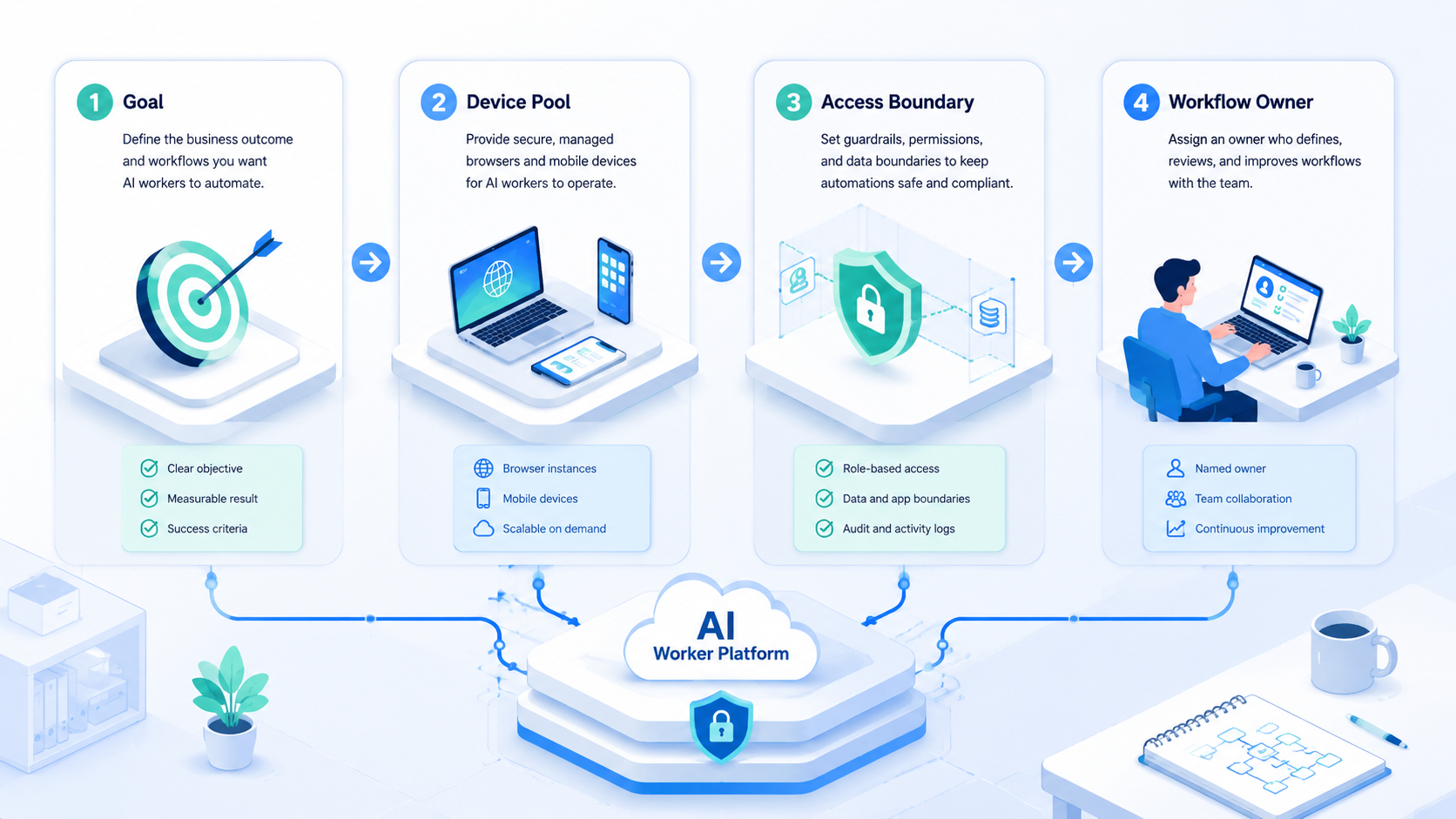
- An AI worker platform helps small teams turn repeated digital tasks into managed workflows.
- The platform should include execution environments, account workspaces, review, and recovery.
- Browser profiles and cloud phones matter when small teams work across web and mobile apps.
- Start with one worker, one account lane, and one task before scaling.
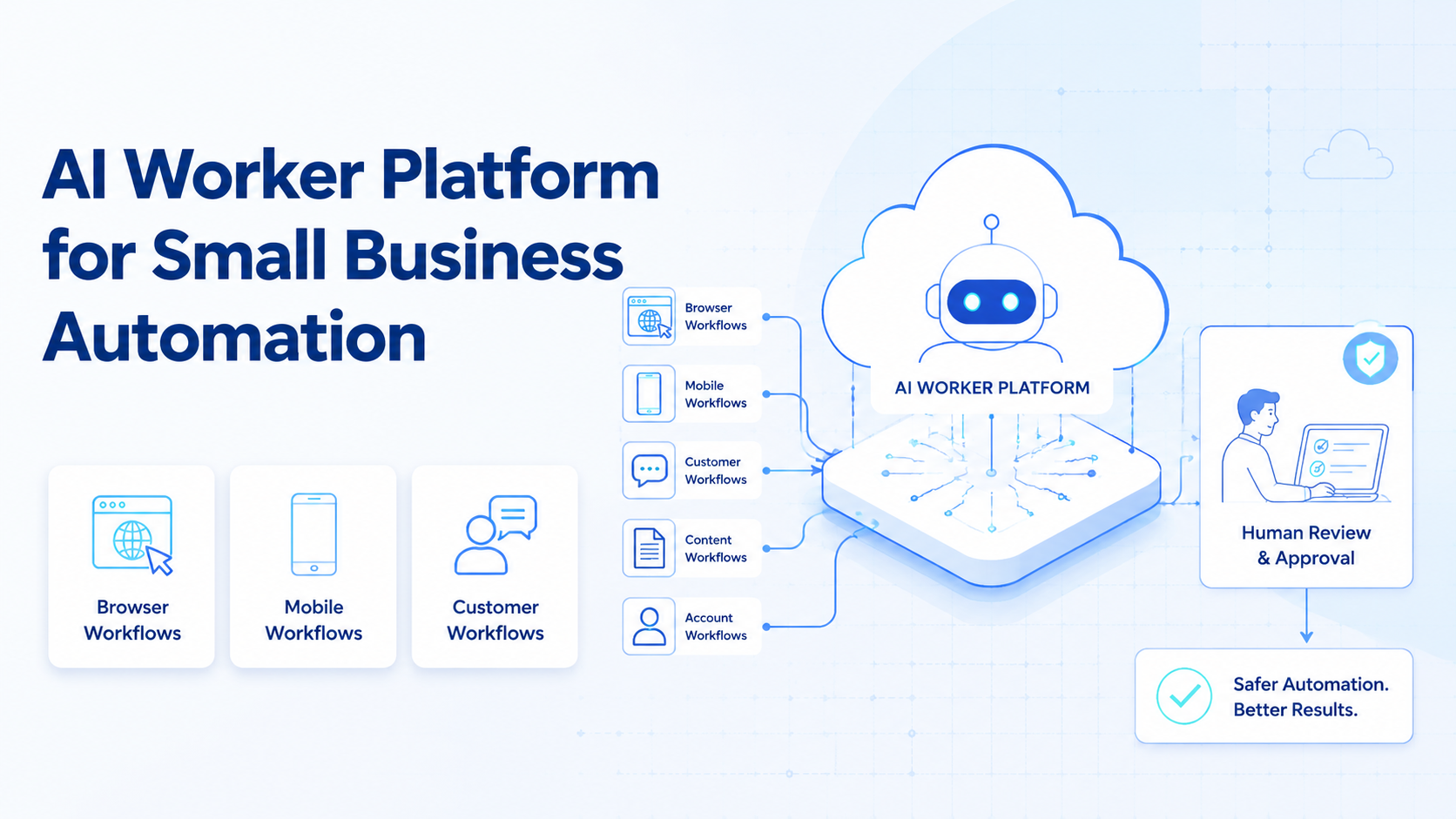
For small businesses, an AI worker platform assigns repeated digital work to AI workers and runs that work inside controlled environments. The value is not only content generation. It is routine work with a clear owner, task rule, account workspace, review step, and result record.
The problem shows up quickly in lean teams. The same person may publish content, check messages, update dashboards, prepare customer replies, collect leads, and report results. AI can help, but only when it connects to the places where work actually happens.
MoiMobi focuses on that execution layer. Teams can connect AI workers to browser automation, cloud phones, mobile automation, and isolated account workspaces.
What an AI Worker Platform Means.
This kind of platform is more than a chatbot. It gives each worker a role, an environment, a task boundary, and a review path.
Use this simple definition:
| Part | What it means |
|---|---|
| Worker role | The job the AI worker owns |
| Execution environment | Browser profile, cloud phone, API, or review queue |
| Account workspace | The account group tied to the task |
| Task rule | What the worker should do |
| Stop rule | When the worker must hand off |
| Evidence | Screenshot, note, draft, or result |
| Review owner | Person who approves or edits the result |
This structure turns AI into a repeatable team resource. Instead of asking a general assistant for help each morning, the team gives a named worker a stable lane of responsibility. The worker is not just answering a question. It is helping complete a specific piece of work.
Google Search Central's guidance on creating helpful content focuses on usefulness for people. The same rule works inside operations. AI worker outputs should help real teammates understand what happened and what to do next.
Keep it useful.
Why Small Businesses Need an AI Worker Platform.
Small businesses usually do not have a large operations team. The same person often handles marketing, support, sales admin, ecommerce checks, and reporting.
This is where an AI worker platform becomes useful. The strongest candidates are tasks that repeat often and leave a visible trail:
- Check customer messages
- Draft replies
- Review comments
- Prepare social posts
- Collect leads
- Update CRM records
- Check marketplace dashboards
- Monitor competitors
- Prepare weekly reports
These tasks are not always hard, but they are frequent. The time cost grows when the team manages several accounts, platforms, and customer channels.
The platform should help small teams reduce repeated manual effort without losing control. That means the AI worker prepares work, saves evidence, and stops when human judgment is needed.
For a founder-led team, the practical benefit is focus. One worker can collect the inbox summary before the owner starts the day, while another prepares a list of posts that need comments reviewed.
A store check can run in a separate lane and report new exceptions. None of these tasks needs a full-time hire at the start, but ignoring them creates missed leads, slow replies, and inconsistent publishing.
AI Worker Platform vs Basic Automation.
Basic automation often runs a fixed script. An AI worker platform adds judgment support, task context, account workspaces, and review.
| Area | Basic automation | AI worker platform |
|---|---|---|
| Task model | Fixed steps | Role-based work |
| Environment | Script session | Named browser or mobile workspace |
| Account mapping | Often manual | Tied to account groups |
| Review | Outside the workflow | Built into the flow |
| Recovery | Operator guesses | Stop rules and owners are visible |
| Best fit | Stable repeated steps | Repeated work with context and review |
The second model fits work that changes slightly each day. A customer message may vary, a comment thread may need context, and a dashboard may show a new state. AI workers can help prepare the response, but the platform must keep the task controlled.
This distinction matters during rollout. Scripts work well when every screen, field, and output is stable. Workers are better when the goal is known but the input changes.
For example, a sales assistant may need to read a profile, find a company page, collect a lead note, and decide whether the lead belongs in a follow-up list. The steps are repeatable, but the input changes every time.
Execution Environments for Small Teams.
Every worker needs a place to work. For small businesses, the most common environments are browser profiles and cloud phones.
| Environment | Best use |
|---|---|
| Browser profile | Web dashboards, CRM tools, admin pages, web inboxes |
| Cloud phone | Mobile apps, app notifications, mobile inboxes |
| Android device | Device-specific app workflows |
| Review queue | Approval, edits, exception handling |
| API connection | Structured systems with stable APIs |
Browser automation tools such as Playwright show how software can operate web pages. The official Playwright documentation is a useful reference for browser-side automation. Small teams still need the workflow layer around that automation.
MoiMobi adds this workflow layer by connecting browser and mobile environments with account ownership and review.
Permissions and Human Review.
Permissions should match the maturity of the workflow. In the first version, the worker should prepare output but avoid final action. This keeps the team in control while it learns where the workflow is reliable.
Use 4 permission levels:
| Level | Worker can do | Human keeps |
|---|---|---|
| Draft only | Read, summarize, prepare text | All external actions |
| Assisted action | Fill drafts and prepare screens | Final click or send |
| Limited execution | Complete low-risk repeated steps | Exceptions and sensitive actions |
| Supervised scale | Run scheduled workflows with evidence | Review, audit, and policy changes |
Most small businesses should stay in the first 2 levels until the workflow has enough examples. Do not rush into full automation. The goal is to remove the repetitive preparation work that slows the team down every day.
Review should also be part of the interface, not a side conversation. A reviewer should see the account, source screen, draft output, reason for the suggestion, and next action. When the reviewer edits the result, that edit becomes useful feedback for the next run.
Account Workspaces and Team Roles.
Lean teams should avoid shared, unclear browser states. Each account group should map to a workspace and owner.
Use a small account map:
| Account group | Environment | AI worker role | Human owner |
|---|---|---|---|
| Main social accounts | Browser profile and cloud phone | Content prep worker | Founder or marketer |
| Customer inbox | Browser profile | Reply draft worker | Support owner |
| Store dashboard | Browser profile | Ecommerce check worker | Store operator |
| Lead research lane | Browser profile | Prospect research worker | Sales owner |
This map keeps work visible. It also helps the team avoid the common problem where one person knows the login, another knows the task, and nobody knows what happened yesterday.
MoiMobi's multi-account management use case supports this account-lane model.
First Workflow to Automate.
The first workflow should be small. Do not start with every task at once.
A good first workflow has 5 traits:
- It repeats daily or weekly
- It uses a known account
- It has a clear output
- It can stop before sensitive action
- A human can review the result quickly
Example workflow:
| Field | Example |
|---|---|
| Worker | Customer reply draft worker |
| Account group | Main social inbox |
| Environment | Browser profile and cloud phone |
| Task | Check messages and prepare reply notes |
| Stop rule | Stop before sending replies |
| Evidence | Screenshot and draft text |
| Reviewer | Support owner |
This workflow saves time without giving up control. The AI worker prepares the work. The human approves the final action.
After the first week, review the workflow with 3 questions:
- Did the worker save time on a task that actually repeats?
- Were the outputs easy to approve or edit?
- Did any stop rule trigger too late or too often?
Weak answers mean the task is still too broad. Start smaller. A reliable workflow is better than a wide workflow that creates cleanup work.
AI Worker Platform for Content Operations.
Content work is a natural starting point for small businesses because it repeats and has clear review points.
A content worker can help with:
- Caption drafts
- Post outlines
- Topic research
- Comment summaries
- Publishing checklists
- Content calendar notes
- Competitor content observations
The worker should not publish directly at first. It should prepare content, collect context, and hand the result to a human reviewer.
A simple content lane:
| Step | Owner |
|---|---|
| Collect topic ideas | AI worker |
| Draft captions | AI worker |
| Review brand fit | Human |
| Prepare platform assets | AI worker |
| Approve final post | Human |
This keeps the workflow practical. It also makes the result easier to improve each week.
Content workers should carry a simple memory of approved patterns. That memory can include accepted hooks, rejected angles, safe claims, brand terms, and examples of strong comments.
The worker does not need to invent a new strategy every time. Reuse wins here. It should build from what the team has already approved.
AI Worker Platform for Customer Replies.
Customer replies are useful but sensitive. A small business should start with draft preparation, not automatic sending.
The worker can:
- Read new messages
- Group similar questions
- Draft suggested replies
- Flag unclear cases
- Save a summary for review
Use clear labels:
- Ready to review
- Needs customer context
- Needs owner decision
- Do not send yet
- Follow up later
These labels keep the inbox manageable. They also help the owner avoid missing customer questions.
For customer replies, the review screen should show the original message and the draft together. A support owner should not need to search through another app to understand why the worker wrote a reply. Messages about refunds, complaints, shipping issues, legal concerns, or account access should stop for human handling.
AI Worker Platform for Ecommerce Tasks.
Ecommerce teams often repeat small checks across web dashboards and mobile apps.
Useful tasks include:
- Order status checks
- Review monitoring
- Product listing updates
- Marketplace message triage
- App notification review
- Competitor price notes
- Weekly store status reports
Some of this work belongs in a browser profile. Some belongs in a cloud phone. Android Enterprise's device management documentation shows how business mobile work depends on controlled device management. Mobile AI work needs the same ownership mindset.
MoiMobi helps route web work to browser environments and app work to cloud phones.
Route by surface.
Small ecommerce teams should be careful with write actions. Product edits, refund responses, inventory changes, and marketplace settings should stay behind approval until the team has tested the workflow on enough examples. The safer starting point is monitoring, triage, and draft preparation.
Review, Recovery, and Stop Rules.
Stop rules matter because one mistake can affect customers, accounts, or money.
Start with 3 result states:
| State | Meaning | Next step |
|---|---|---|
| Done | Task finished and evidence is saved | Reviewer checks result |
| Needs review | Worker prepared a decision | Human approves or edits |
| Blocked | Worker cannot continue | Owner inspects the environment |
Use stop rules for:
- Publishing content
- Sending customer replies
- Changing account settings
- Deleting records
- Touching billing or payment screens
- Handling unclear customer intent
The point is not to slow the team down. The point is to make work repeatable without hiding risk inside the AI worker.
Reporting for Small Business Automation.
A useful report should be short enough to read and clear enough to act on.
Use this format:
| Field | Example |
|---|---|
| Worker | Customer reply draft worker |
| Task | Check social inbox |
| Account group | Main brand accounts |
| Result | 12 messages checked, 4 drafts prepared |
| Evidence | Screenshot and summary |
| Review owner | Support owner |
| Next step | Approve replies |
This tells the team what happened. It also gives the owner a quick way to decide what to do next.
When the same blocked state appears 3 times in a week, pause the workflow and fix the task design.
A 30-Day Rollout Plan.
Value does not require a large automation program. A 30-day rollout is enough to prove whether the platform fits the business.
| Week | Goal | Output |
|---|---|---|
| 1 | Pick one repeated task | Worker role, account lane, stop rule |
| 2 | Run draft-only workflow | Evidence, drafts, reviewer notes |
| 3 | Improve prompts and labels | Fewer edits, clearer blocked cases |
| 4 | Add schedule or second account | Repeatable report and next workflow |
During week 1, document the task as it is done by a person. Do not design from imagination. Watch the real steps, screens, decisions, and exceptions.
During week 2, keep the worker in draft mode. Watch the edits. The purpose is to learn where the worker helps and where the workflow is unclear.
During week 3, adjust the task rules. Add examples of good outputs, forbidden actions, escalation cases, and required evidence.
During week 4, scale only one dimension. Add another account, another schedule, or another similar task. Avoid adding all 3 at once, because mixed changes make failures harder to diagnose.
Metrics That Matter.
The best metrics are simple. Measure less, but measure clearly. A small business should know whether the AI worker platform reduces work without creating hidden risk.
Track:
- Tasks completed
- Drafts approved
- Drafts edited
- Blocked runs
- Time saved
- Missed messages
- Failed account sessions
- Customer issues escalated
Approval rate is often more useful than raw task count. A workflow is not ready when the worker prepares 40 replies and the owner rewrites 35. When 20 replies produce 16 light edits, the task design is improving.
Evidence quality matters too. A result without context is hard to trust. Each completed task should show what account was used, what screen was checked, what output was created, and what changed after review.
Buying Checklist.
When choosing an AI worker platform, small businesses should focus on control and execution.
| Buying question | Strong answer | Weak answer |
|---|---|---|
| How are workers assigned | By role, account, and task | Generic assistant only |
| Where does work run | Browser and mobile environments are visible | Sessions are unclear |
| How is review handled | Approval states and evidence are saved | Review happens in chat |
| How are failures handled | Stop rules and owners exist | Operator guesses |
| How does reporting work | Results show task, account, evidence, next step | Activity logs only |
| How does scaling work | Add workflows after proof | Add workers first |
Ask for a demo with one real task, one account workspace, one blocked state, and one reviewer. That reveals more than a clean marketing demo.
Frequently Asked Questions
These answers focus on small business rollout.
What is an AI worker platform?
It lets a team assign repeatable digital work to AI workers and run it inside controlled browser, mobile, API, or review environments.
How can small businesses use AI workers?
They can use AI workers for reply drafts, content prep, dashboard checks, lead notes, ecommerce monitoring, and weekly reports.
Is an AI worker platform different from a chatbot?
Yes. A chatbot answers questions. An AI worker platform connects AI to roles, accounts, execution environments, review, and task records.
What should small teams automate first?
Start with one repeated task that has a clear output and a safe review step.
Do small businesses need cloud phones?
They need cloud phones when workflows depend on mobile apps, notifications, mobile inboxes, or app-only account screens.
What should stay manual?
Publishing, sending sensitive replies, account settings, deletion, billing, and payment-related steps should require human approval.
How many AI workers should a small business start with?
Start with one worker and one workflow. Prove the lane. Add more after the first workflow is repeatable and easy to review.
How does MoiMobi help?
MoiMobi connects AI workers to browser profiles, cloud phones, Android devices, account isolation, automation, and review workflows.
Conclusion.
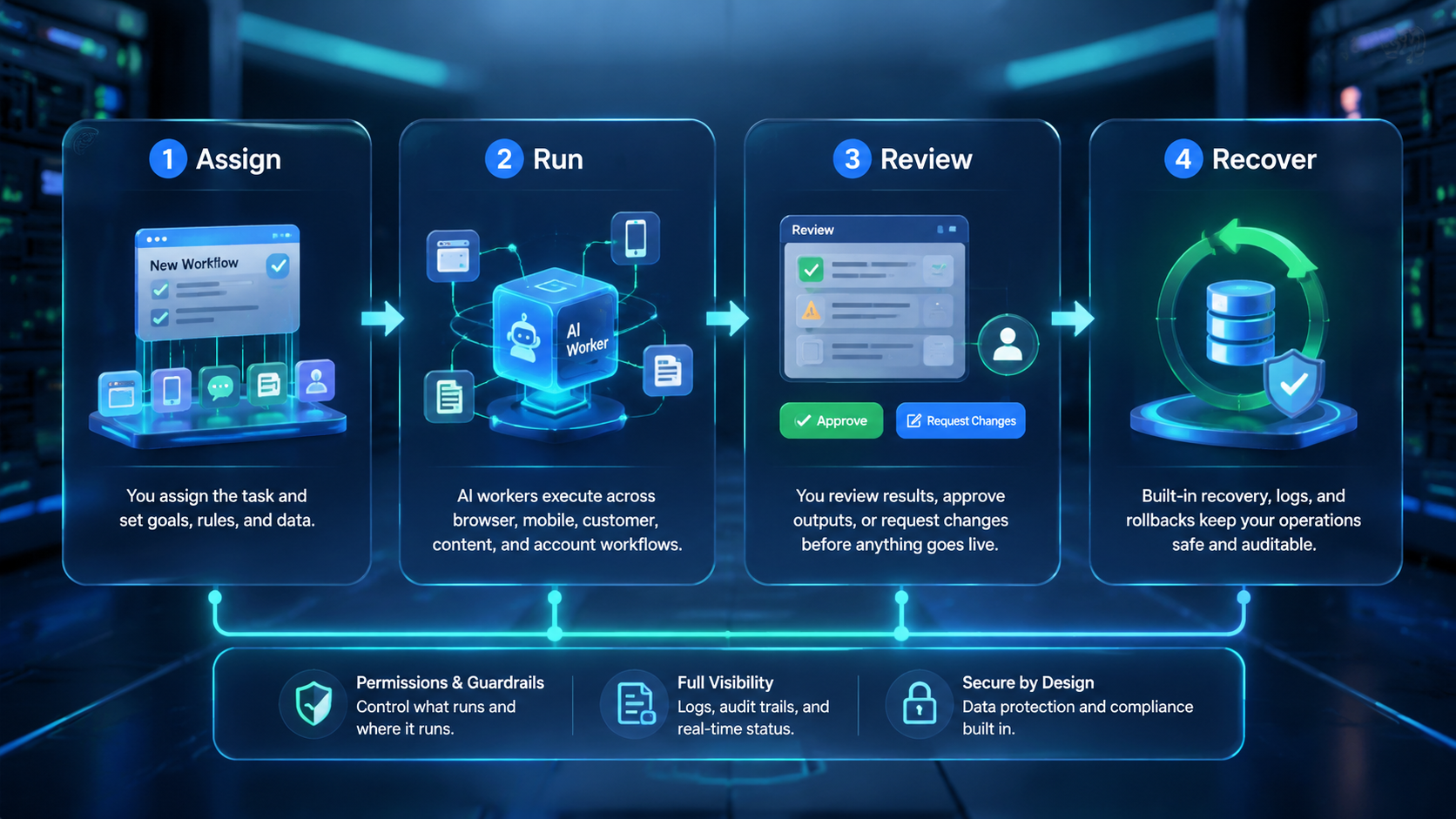
This approach helps small businesses move from AI ideas to real task execution. Each worker gets a role, an account lane, an environment, a stop rule, evidence, and a reviewer.
That structure matters more than having many agents. Small teams need repeatable work they can trust, inspect, and improve.
MoiMobi is built for that practical layer: browser and mobile execution environments for AI workers that help teams publish, reply, monitor, collect, and report without losing control.