
Key Takeaways
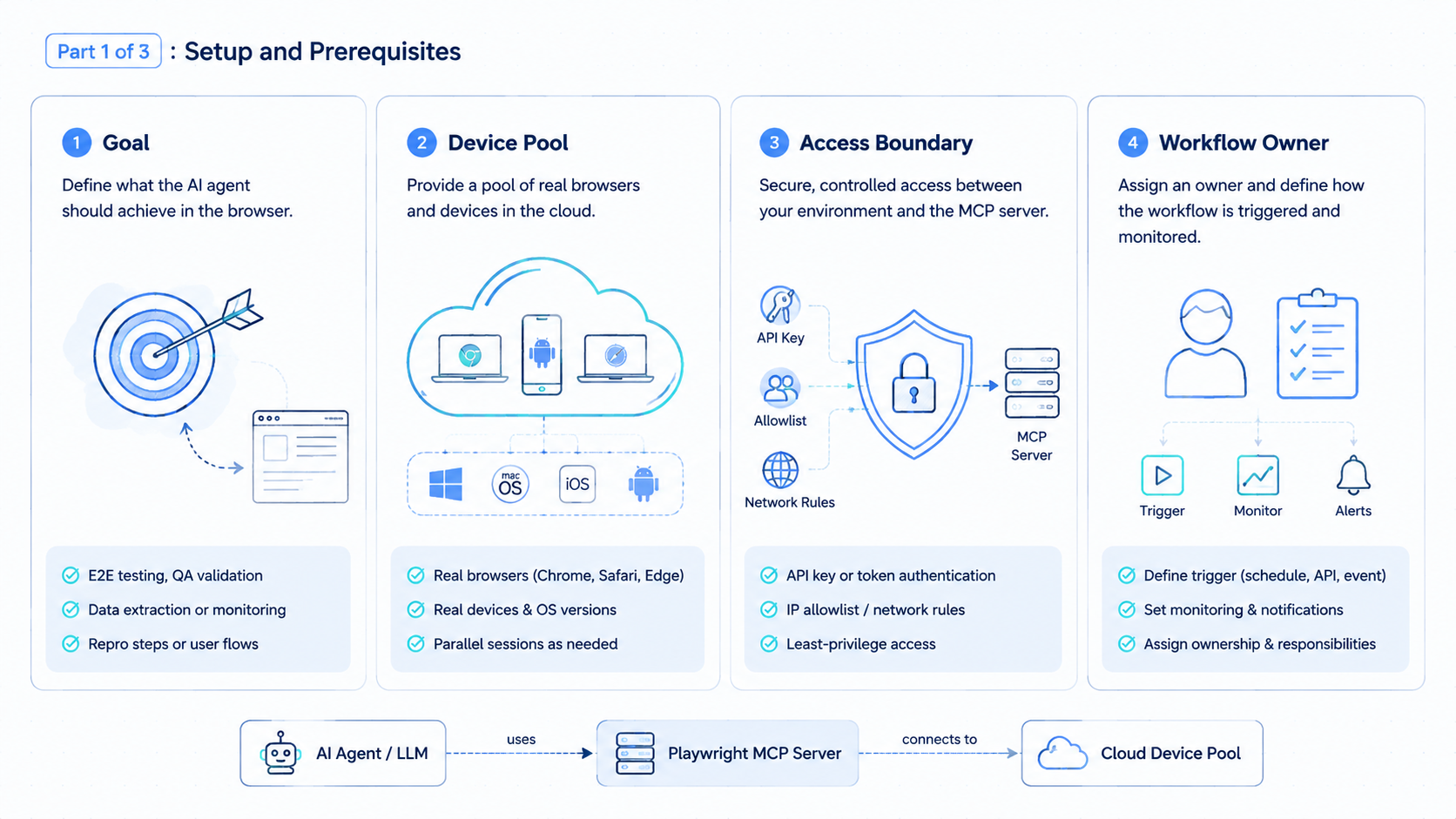
- Playwright MCP connects AI agents to browser automation through the Model Context Protocol.
- It is useful for web testing, browsing, inspection, and browser-based task exploration.
- Production workflows still need session ownership, profile control, review, and recovery.
- MoiMobi extends the idea from browser control to browser and mobile execution environments.
The Playwright MCP server lets an AI client operate a browser through MCP, the Model Context Protocol. The Playwright documentation describes it as a way to provide browser automation capabilities to LLMs, using structured accessibility snapshots instead of relying only on screenshots.
That makes Playwright MCP useful for teams exploring AI browser automation. An agent can navigate pages, inspect state, click buttons, fill forms, and observe what changed. For developers, QA teams, and automation builders, the server gives the AI a browser it can use.
MoiMobi looks at the same problem from the business execution side. The AI browser automation layer matters, but teams also need account isolation, persistent profiles, cloud phones, mobile app execution, and human review. A browser tool is powerful. An execution platform turns that power into repeatable work.
What Playwright MCP Means.
Playwright MCP combines two ideas:
| Term | Practical meaning |
|---|---|
| Playwright | A browser automation framework for Chromium, Firefox, and WebKit |
| MCP | A protocol that lets AI clients call external tools and servers |
| Playwright MCP server | A server that exposes browser automation actions to an AI client |
The official Playwright MCP getting-started guide says the server enables LLMs to interact with web pages through structured accessibility snapshots. That design is important because it gives the AI a text-like view of the page structure, not just a visual image.
In practice, a developer can add the server to an MCP client and let an AI assistant work with a browser. The assistant can inspect the page, choose elements, run actions, and report state.
The result is not a complete business worker by itself. It is a browser control layer. Teams still need to decide what the agent is allowed to do, where sessions live, how failures are handled, and who approves sensitive actions.
Sources for the official setup and capabilities include the Playwright MCP documentation, the Microsoft Playwright MCP repository, and Microsoft Learn's guide to using the Playwright MCP server for Power Platform Playwright samples. For review and publishing discipline, Google's guidance on creating helpful content is a useful external reference because it emphasizes content that helps real people.
How the Playwright MCP Server Works.
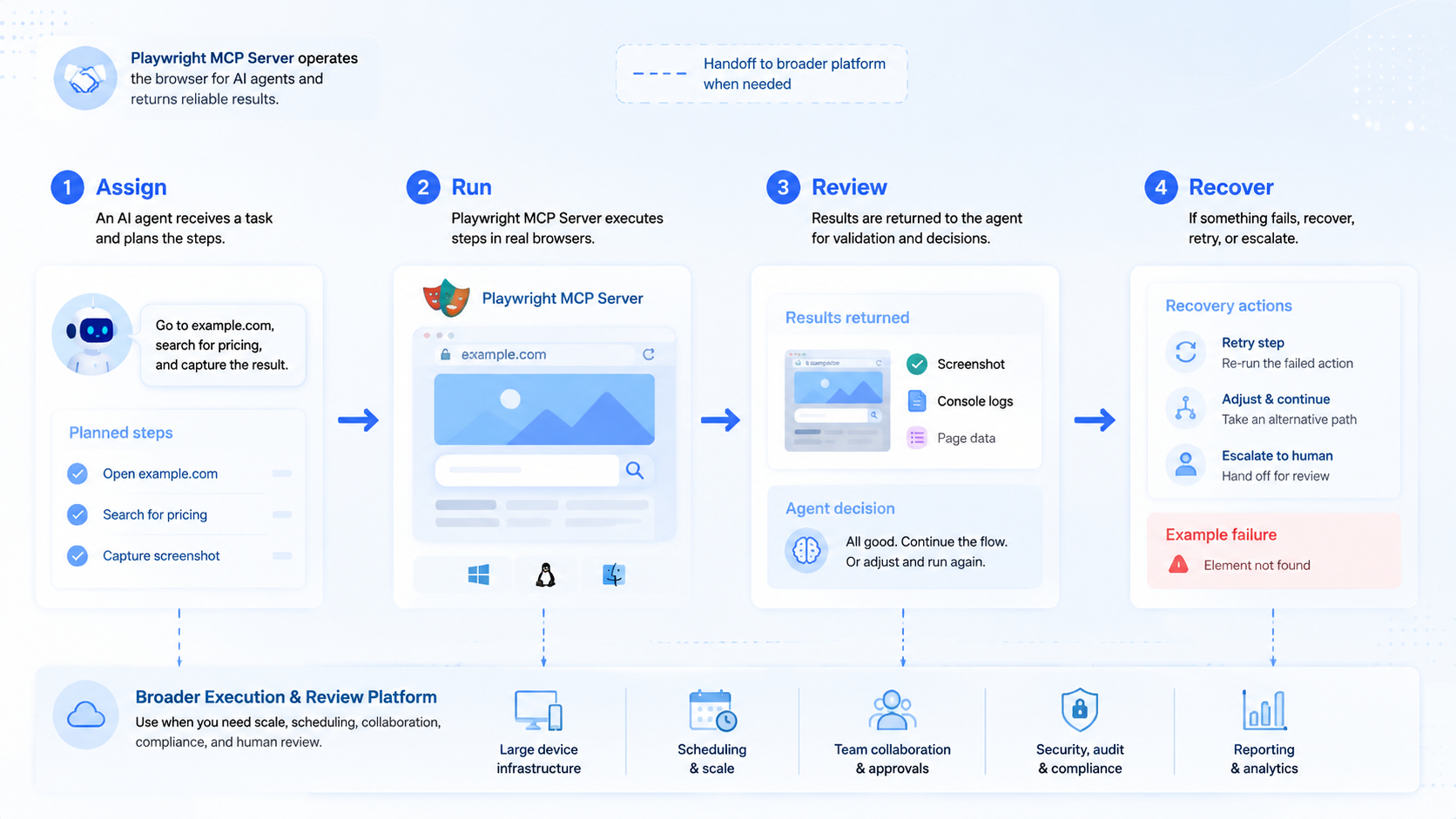
The MCP server sits between an AI client and a browser. The AI client sends tool calls. Playwright then performs browser actions. The page state is returned to the AI in a form it can reason about.
The loop usually looks like this:
| Step | What happens |
|---|---|
| Connect | The AI client starts or connects to the MCP server |
| Observe | The server returns page structure or browser state |
| Decide | The AI chooses the next browser action |
| Act | Playwright clicks, types, navigates, or waits |
| Verify | The AI checks the new state and continues |
This is why Playwright MCP is attractive for browser automation for LLMs. The agent does not need a custom API for every website. Browser actions become the interface.
This also explains the limits. A browser can show the current page, but business workflows need memory, ownership, task state, and review. Without those layers, the agent may complete a demo path but still struggle to become a dependable operator.
What Playwright MCP Is Good For.
This setup is a strong fit when the task is web-based, inspectable, and close to the browser automation layer.
Good uses include:
- Exploring a web application
- Generating test ideas
- Reproducing a browser issue
- Checking a form flow
- Inspecting page state
- Creating a first automation path
- Helping developers understand a UI
- Running low-risk browser tasks
The tool is especially helpful when the target page changes based on state. The agent can observe the current page rather than depending only on a static selector list.
For QA teams, the value is direct. A test writer can ask an agent to open a page, inspect controls, try a flow, and turn what it sees into a draft test case. The draft still needs review, but the exploration step gets faster.
For automation teams, it is a useful prototyping layer. You can test whether a workflow can be expressed through browser actions before building a more durable implementation.
Where Playwright MCP Is Not Enough.
Playwright MCP gives AI agents browser control. It does not automatically provide an operating model for business execution.
That gap matters for real teams:
| Need | Why Playwright MCP alone may not cover it |
|---|---|
| Account isolation | Teams need separated account workspaces |
| Persistent sessions | Workflows may need stable logged-in state |
| Human approval | Sensitive actions need review before execution |
| Multi-account routing | Agencies need account-to-environment mapping |
| Mobile execution | Many social and messaging tasks happen in apps |
| Reporting | Managers need task results and evidence |
| Recovery | Failed runs need owners and next steps |
This is the difference between browser automation and an execution platform. The first lets an AI use a browser. The second helps a team assign work, run it in the right environment, review results, and repeat it.
MoiMobi's multi-account management model starts from that operating problem. Browser automation is one layer. Account workspaces, device isolation, and mobile execution complete the picture for teams that run real online operations.
Playwright MCP vs AI Browser Execution Platform.
The best way to compare the two is by responsibility.
| Layer | Playwright MCP | AI browser execution platform |
|---|---|---|
| Browser control | Strong | Strong |
| Developer workflow | Strong | Useful, but not always the main focus |
| Account workspace | Needs extra design | Core feature |
| Task scheduling | Needs extra tools | Built into the workflow model |
| Human review | Needs extra process | Part of the operating flow |
| Mobile apps | Not the main fit | Supported through cloud phones or Android devices |
| Team reporting | Needs extra storage | Should be visible to managers |
Playwright MCP is excellent when the job is to give an AI browser access. A full AI employee platform has a wider job.
An AI employee needs more than a browser tab. It needs a role, a task, an account environment, memory, a recovery path, and permission boundaries.
That is where MoiMobi fits. A team can use browser automation for web tasks, cloud phones for mobile app tasks, and review workflows for sensitive actions.
Practical Setup Decisions.
Before a team adds Playwright MCP to its workflow, it should make a few decisions.
Start with scope:
- Is this for testing, workflow discovery, or business execution?
- Will the agent touch logged-in accounts?
- Does the task require human approval?
- Does the workflow need persistent sessions?
- Does the task stop at the browser, or continue in a mobile app?
Then define the environment:
| Decision | Example choice |
|---|---|
| Browser mode | Local browser, remote browser, or isolated profile |
| Session policy | Temporary session or persistent account workspace |
| Allowed actions | Browse, read, draft, submit, or stop for review |
| Evidence | Screenshot, state note, test output, or task log |
| Recovery | Retry, stop, handoff, or reset |
Small teams often skip this step and go straight to tool setup. That works for demos, but it breaks down when more accounts, more operators, and more client work appear.
Use the server to learn the workflow. Use an execution platform to run the workflow repeatedly.
For example, a support inbox pilot can be scoped like this:
| Field | Pilot choice |
|---|---|
| Browser profile | Client A support workspace |
| Agent task | Read new messages and draft reply notes |
| Stop rule | Stop before sending any reply |
| Evidence | Message summary, suggested reply, and screenshot |
| Reviewer | Support lead |
| Success signal | Three clean reviewed runs without profile confusion |
For a 2026 rollout, keep the setup test small and measurable:
| Day | Check | Pass signal |
|---|---|---|
| Day 1 | Install and connect the server | The AI client can open one test page |
| Day 2 | Run one form flow | The agent records each state change |
| Day 3 | Add one logged-in profile | The reviewer can identify the account workspace |
| Day 4 | Test one blocked state | The run stops and produces a handoff note |
| Day 5 | Repeat the same flow | A second operator can follow the result |
Microsoft Learn notes that its Playwright MCP sample setup requires Node.js 18 or later. That kind of version check belongs in the first rollout step, before a team adds account work or client workflows.
Playwright MCP for QA and Testing.
Testing is one of the clearest use cases. A QA engineer can use the browser agent to inspect a live UI and generate a test draft.
A practical QA loop can look like this:
- Open the target page
- Ask the agent to inspect visible controls
- Try the happy path
- Try one failure path
- Record expected behavior
- Convert the flow into readable Playwright code
- Review selectors and assertions manually
The human review step matters. AI-generated test paths can be useful, but tests should still be readable and maintainable. A fragile selector can create noise later.
For teams that already use Playwright, MCP can speed up exploration. It should not replace test design discipline.
Use clear names for flows:
- Signup form validation
- Checkout address edit
- Dashboard filter reset
- Account settings save
- Support inbox reply draft
Named flows are easier to review, automate, and rerun.
Playwright MCP for Business Automation.
Business automation is different from QA. The goal is not only to test a page. The goal is to complete a task that has an owner and a result.
Examples include:
- Collecting lead data from a dashboard
- Preparing reply drafts in a support inbox
- Checking ecommerce order status
- Updating a CRM field
- Monitoring competitor pages
- Preparing content in a publishing tool
These workflows need more control than a developer demo.
Use this operating frame:
| Field | Example |
|---|---|
| Owner | Growth operator |
| Account profile | Client A browser workspace |
| Task | Collect new lead records |
| Allowed action | Read and draft notes |
| Stop rule | Stop before submitting forms |
| Evidence | Result note and screenshot |
| Review | Manager checks before next run |
This frame keeps the AI agent inside a business process. It also helps the team decide when Playwright MCP is enough and when a broader execution system is needed.
Browser Profiles and Session Control.
Logged-in work needs session control. A temporary browser may be fine for public pages, but account operations usually need a stable workspace.
Browser profiles help answer:
- Which account is logged in?
- Which workflow should run here?
- Who owns this profile?
- What is the review rule?
- What happens if the session expires?
MoiMobi's browser environment model is built for these questions. It connects AI workers to isolated account workspaces so repeated tasks can run with clearer boundaries.
This does not remove the need for judgment. It makes judgment easier to apply because the environment, task, and owner are visible.
Mobile Limits and Cloud Phone Extension.
This is a browser-side tool. Many real operations also happen inside mobile apps.
Social media, messaging, and marketplace workflows often require:
- Mobile app notifications
- App-only account screens
- Mobile inbox views
- Mobile publishing steps
- Android app state
- Device-level task checks
That is where a cloud phone platform becomes useful. The team can keep browser workflows in browser environments and mobile workflows in remote Android environments.
The clean model is not "browser or phone." It is "right task, right environment." Browser dashboards belong in browser profiles. Mobile app tasks belong in cloud phones or Android devices.
An AI employee platform should help route the task to the right place.
Security and Review Rules.
Browser automation can do real work, so teams need clear permission boundaries.
Use four simple action levels:
| Level | Allowed behavior |
|---|---|
| Read | Browse and collect information |
| Draft | Prepare text, notes, or form values |
| Suggest | Recommend the next action |
| Execute | Complete the action after approval rules are met |
Start with read and draft. Move toward execute only after the workflow is stable, low-risk, and easy to audit.
Sensitive actions should stop for human review:
- Publishing content
- Sending customer replies
- Changing account settings
- Submitting payments
- Updating billing information
- Deleting records
This is not a weakness. That is how AI browser automation becomes usable inside a responsible team process.
Buying and Build Checklist.
If your team is deciding between Playwright MCP, a custom browser automation stack, and an execution platform, use a checklist.
| Question | If yes | If no |
|---|---|---|
| Do you mainly need QA exploration | Playwright MCP may be enough | Look at workflow tools |
| Do you need logged-in account work | Add profile management | Use temporary sessions |
| Do you need mobile apps | Add cloud phones or Android devices | Keep browser-only setup |
| Do non-developers run the workflow | Use a managed execution platform | Developer tooling may work |
| Do actions need approval | Add human review | Keep low-risk automation |
| Do managers need reports | Add task logs and evidence | Manual notes may be enough |
For developer-only testing, Playwright MCP is a strong starting point. For operations teams, the stack usually needs more.
MoiMobi is built for the second case: AI workers, browser profiles, mobile environments, account isolation, workflow automation, and review.
Frequently Asked Questions
These answers focus on practical use by developers, AI teams, and operations teams.
What is Playwright MCP?
Playwright MCP is the Playwright server for the Model Context Protocol. The tool lets AI clients interact with browsers through Playwright-powered automation actions.
What does the Playwright MCP server do?
It gives an AI agent browser automation capabilities such as navigation, page inspection, clicking, typing, and observing page state.
Is Playwright MCP only for testing?
No. Teams can use it for testing, workflow discovery, and browser task exploration. Testing is one of the clearest use cases, but browser-based business workflows can also benefit.
Can Playwright MCP replace an AI browser platform?
Not by itself. It provides browser control. An AI browser platform also needs account workspaces, session control, workflow rules, review, and reporting.
Does Playwright MCP work for mobile apps?
Its main job is browser automation. Mobile app workflows usually need cloud phones, Android devices, or a mobile automation layer.
What should teams automate first?
Start with low-risk browser tasks such as inspection, research, draft preparation, QA exploration, or dashboard checks.
When should humans approve actions?
Humans should approve publishing, customer replies, account changes, billing actions, and other steps that can affect users, money, or account state.
How does MoiMobi relate to Playwright MCP?
MoiMobi focuses on the execution platform layer. It connects AI workers to browser and mobile environments, then adds account isolation, workflow control, and review.
Conclusion.
Playwright MCP creates an important bridge between AI agents and browsers. It gives LLMs a practical way to inspect pages, take browser actions, and explore web workflows with an interface they can reason about.
For developers and QA teams, it can speed up testing and browser exploration. For operations teams, it is one piece of a larger system.
The larger system needs browser profiles, account isolation, mobile execution, human review, task logs, and recovery rules. That is where MoiMobi extends browser automation into an AI employee execution platform.



