Content Type: comparison
Page Role: comparison
Intent Type: commercial_comparison
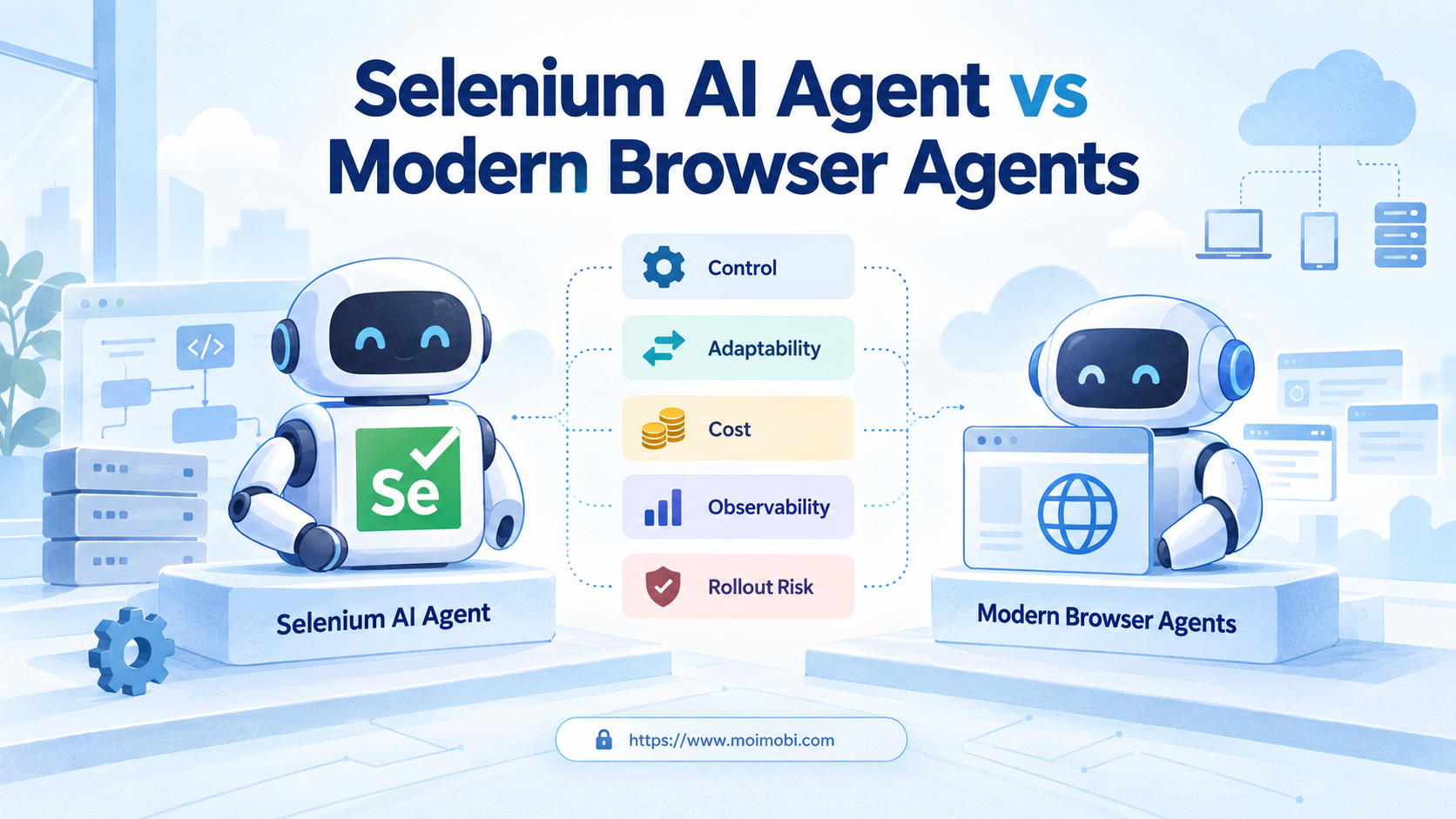
Selenium AI automation is a browser workflow in which an AI planner selects or prepares actions that Selenium WebDriver executes. A modern browser agent usually combines planning, page observation, tool use, memory, and recovery inside a broader runtime. Neither model is universally better.
Choose Selenium-centered execution when the path is known, selectors can be maintained, and every action needs a predictable audit trail. Evaluate a modern browser agent when tasks vary by page state, instructions arrive in natural language, or the next step cannot be fully scripted in advance. For business-critical work, a hybrid model is often the strongest starting point: let an agent interpret the task, then use constrained browser functions for sensitive actions.
The purchase decision is therefore not “old automation versus new AI.” It is a choice about where planning happens, how much variation the runtime may handle, and where the team keeps deterministic controls.
Key Takeaways
- Selenium provides a mature, standards-based browser control layer; adding AI does not remove the need for selectors, waits, state checks, and error handling.
- Modern browser agents add dynamic planning and observation, but teams still need explicit permissions, stop rules, logs, and human takeover.
- Stable, repetitive processes usually favor deterministic functions. Variable research and navigation tasks may justify agent reasoning.
- A pilot should measure successful completion, intervention, recovery, and maintenance effort by task type.
- Use a hybrid architecture when one workflow contains both open-ended navigation and high-impact final actions.
A Practical Comparison Framework for Selenium AI Automation
The common misunderstanding is that adding an LLM turns Selenium into a modern browser agent. It does not. Selenium remains the execution interface. The model may decide what to do, but the team still owns browser sessions, selectors, waits, retries, secrets, and validation.
The W3C WebDriver specification defines a platform-neutral interface for controlling browser behavior. Selenium implements that control model through language bindings and browser drivers. This gives teams a clear boundary: application logic sends commands, WebDriver executes them, and the workflow evaluates the result.
A browser agent moves more responsibility into a planning loop. It observes the current page, selects a tool or action, checks the result, and chooses the next step. That design can handle variation, but it also creates more decisions that must be logged and constrained.
Use four questions before comparing vendors:
- Is the task path known before execution?
- Can success be verified with a clear page state or business record?
- What actions require approval or deterministic code?
- Who investigates a failed run and restores the account state?
These questions separate execution needs from AI novelty. They also prevent a team from buying an agent runtime when a small set of reliable browser functions would be easier to operate.
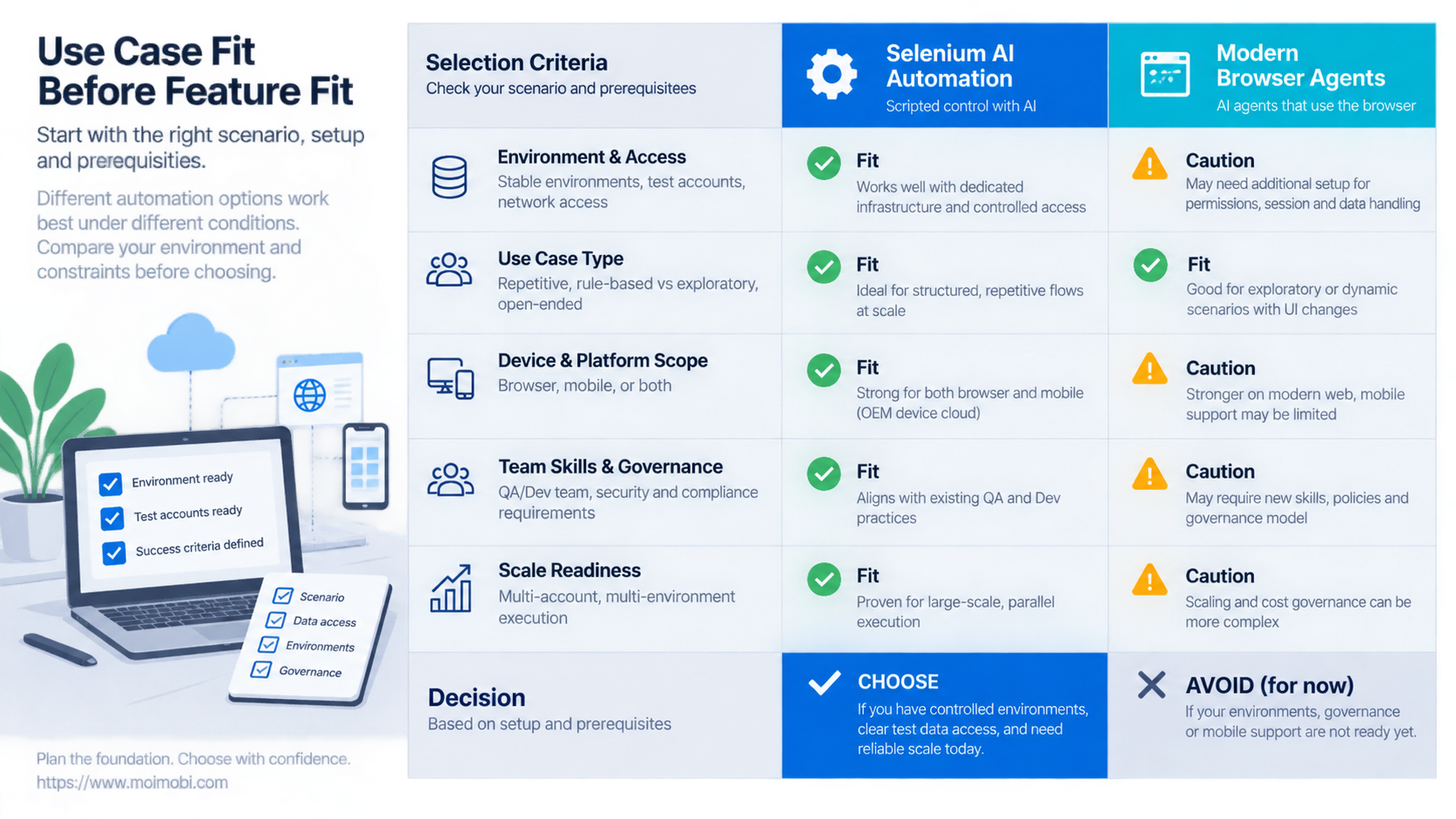
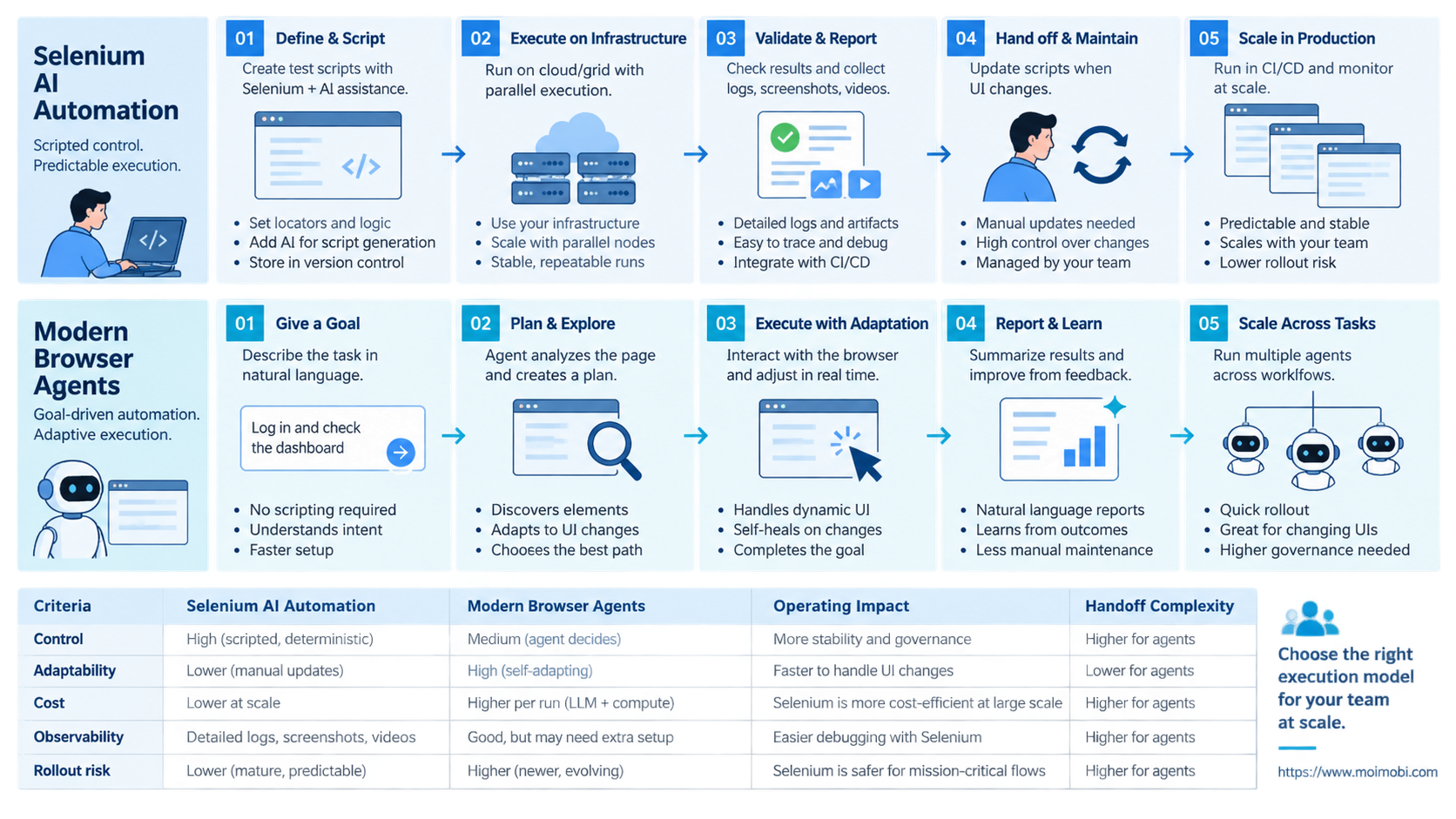
| Decision axis | Selenium with AI planning | Modern browser agent |
|---|---|---|
| Known workflow | Strong fit for defined steps and explicit assertions | May add unnecessary planning overhead |
| Variable page path | Requires branches and maintained recovery logic | Can reason over state when tools expose enough context |
| Action control | Functions and permissions can be narrowly scoped | Needs tool policies, approvals, and stop conditions |
| Debugging | Command, selector, and assertion failures are usually direct | Requires action traces plus planner context and observations |
| Team ownership | Fits engineering-led automation ownership | Fits mixed operations and engineering ownership when governance exists |
Compare Execution Models, Not Marketing Labels
Selenium's official WebDriver documentation describes native browser control that can run locally or remotely. That is an execution foundation, not a complete business workflow. Queueing, account assignment, credentials, approvals, evidence, and incident handling sit around it.
Modern agents also need that surrounding system. A model that can click and type is not automatically a production execution platform. The team still needs an account-to-session map, task-level permissions, bounded retries, and a place to store outcomes.
The difference is where uncertainty is resolved. Selenium code usually resolves uncertainty through explicit branches. An agent may resolve it during the run by examining the page and selecting an available tool. This is useful only when the observation is reliable and the allowed action set is narrow enough to review.
Do not compare systems by demo completion alone. A successful demo may hide manual session setup, broad credentials, or an operator correcting failures off-screen. Compare the full run: task intake, browser allocation, login state, action trace, validation, exception handling, and cleanup.
Use Case Fit Before Feature Fit in Selenium AI Automation
Start with task shape. A feature checklist cannot show whether the runtime fits the work.
Defined transaction: The same fields, navigation path, and success marker appear on every run. Selenium functions are usually easier to test, version, and review. AI can classify inputs or choose a function without controlling every click.
Bounded variation: The path changes among a known set of layouts or states. Either approach can work. Selenium needs maintained branches; an agent needs a constrained tool set and strong completion checks.
Open-ended navigation: The operator gives a goal, and the route depends on page content. A modern browser agent may reduce scripting effort. It should still pause before purchases, messages, permission changes, or irreversible submissions.
High-volume account work: The core problem is often orchestration, not page interpretation. Teams need assignment, isolated sessions, concurrency limits, and recovery. A task-to-account assignment boundary may matter more than the choice of browser library.
One task may contain all four shapes. Research can remain agent-led, data entry can use a tested function, and the final submit action can require human approval. Splitting work by risk is more practical than forcing one execution model across the entire process.
Operational Trade-Offs and Team Workflow
Determinism is valuable when a team must explain exactly what happened. Selenium actions can map to named functions, input fields, and expected assertions. Failures can be tied to a selector, timeout, browser state, or business rule.
Agents add flexibility but widen the diagnostic surface. A useful trace must include the instruction, observed page state, selected tool, arguments, result, retry reason, and final validation. Without that context, “the agent failed” is not actionable.
Locator strategy also matters. Playwright's official locator guidance centers auto-waiting and retryability and recommends user-facing signals such as roles, labels, and text. Those ideas are relevant beyond one framework: brittle DOM paths raise maintenance costs, while semantic targets make deterministic tools more resilient.
Session ownership is a separate layer. Both approaches need a known browser environment, credential scope, proxy policy where applicable, and an accountable operator. Browser session separation controls can reduce accidental session mixing, but they do not validate an agent's decision.
Human takeover should preserve the same session and evidence trail. Opening a new browser to repair the task can lose page state and split the audit history. Design takeover before automating high-impact operations.
Selenium AI Automation Cost and Management Overhead
The cheapest prototype is not necessarily the lowest-cost system. Selenium may require more initial engineering for page models, selectors, assertions, and recovery branches. Once stable, those components can make repeated runs predictable.
A browser agent may reach a varied workflow faster, yet ongoing costs include model calls, observation processing, longer run times, evaluation, and review of uncertain actions. Exact cost depends on the provider, browser runtime, model, task length, and failure rate. Avoid estimates that ignore rework and operator intervention.
Track cost in operational units:
- engineering time to build or modify a workflow;
- browser and infrastructure time per completed task;
- model usage per completed task;
- operator minutes spent reviewing or recovering runs;
- failed actions that leave partial state;
- time needed to explain an incident.
Maintenance ownership is equally important. Selenium-heavy systems usually need developers who understand the application and automation code. Agent runtimes can let operations teams express goals more directly, but engineering still owns tools, policies, observability, and integration boundaries.
A reusable agent execution design should separate instructions from execution permissions. A prompt change must not silently grant a new capability. Tool schemas and approval rules remain versioned controls.
Which Option Fits Different Teams Best
- Workflows follow known paths.
- Engineering owns maintenance.
- Assertions and reproducibility are primary.
- Cross-browser execution is a defined requirement.
- Tasks begin as goals rather than fixed steps.
- Page routes change within controlled boundaries.
- Human review is available for uncertain actions.
- The runtime records observations and decisions.
- Research is variable but submission is sensitive.
- Agents select from approved deterministic tools.
- Existing Selenium assets should be preserved.
- Teams need gradual adoption rather than replacement.
- Success cannot be defined.
- Credentials are shared without ownership.
- No recovery owner exists.
- The workflow conflicts with platform rules.
The hybrid route is not a compromise by default. It creates a clear control boundary. The agent interprets intent and gathers context; a tested function performs a sensitive action; validation confirms the result.
For cross-channel work, connect browser execution through a cross-channel execution handoff only when the task genuinely crosses web and app environments. An assigned cloud phone can provide the mobile environment for Android tasks, but it does not replace browser validation or task permissions. Do not add mobile execution merely to make the architecture look complete.
Pilot Rollout, Measurement, and Recovery Checks
A production pilot should test one task family, one approval model, and a small set of environments. Mixing several workflows makes failures difficult to attribute.
- Define completion. Record the exact page state, output record, or business event that proves success.
- Build a baseline. Run the current deterministic workflow and record completion, intervention, recovery, and maintenance effort.
- Constrain the candidate. Limit domains, tools, credentials, retries, and actions that require approval.
- Replay representative cases. Include expected paths, known layout changes, missing data, expired sessions, and partial failures.
- Review traces. Confirm that an investigator can reconstruct every important action and decision.
- Test takeover and rollback. Interrupt a run, transfer control, restore state, and verify that queued work does not duplicate actions.
Measure completed tasks rather than clicks. A system that performs more actions but needs frequent repair is not more autonomous. Separate planning failure, browser failure, authentication failure, validation failure, and operator rejection.
Stop the pilot when the runtime repeats an irreversible action, crosses an account boundary, loses the evidence trail, or cannot hand control to a person. Those are control failures, not tuning details.
Frequently Asked Questions
Is Selenium an AI agent?
No. Selenium is a browser automation project centered on WebDriver. An AI layer can plan or select Selenium actions, but the agent behavior comes from the surrounding planner, tools, memory, and policies.
Can an LLM make Selenium self-healing?
It can suggest alternative locators or paths, but “self-healing” needs limits. Validate replacements against page meaning, expected state, and allowed actions before reusing them.
Are modern browser agents more reliable than Selenium?
Reliability depends on the task. Defined workflows may be easier to stabilize with deterministic code. Variable tasks may benefit from agent planning but require stronger observation and recovery controls.
Should a team replace its Selenium suite?
Not automatically. Existing page objects, assertions, and test data can become approved tools inside a hybrid architecture. Replace components only when the operational gain exceeds migration risk.
Which option is easier for non-developers?
Natural-language task intake can be easier to start. Production ownership still requires technical work around permissions, tool definitions, logs, integrations, and incident response.
How should teams compare operating cost?
Measure infrastructure, model use, engineering maintenance, operator review, and recovery per completed task. Do not compare only license price or model tokens.
What actions should require human approval?
Start with messages, purchases, permission changes, deletion, publication, and any action that affects another account or customer. Adjust the list to the business impact of the workflow.
Can browser agents run across many accounts?
They can be orchestrated across assigned sessions, but scale requires account ownership, isolation, queue controls, concurrency limits, and evidence. Agent reasoning does not replace those controls.
Conclusion
Choose the execution model in this order: task shape, success verification, action risk, recovery, then implementation cost. Selenium AI automation is a strong fit when teams need tested actions and explicit control. Modern browser agents fit goals that require bounded interpretation during execution.
Do not treat the decision as a full-platform replacement. Pilot one workflow, preserve deterministic functions where they work, and give the agent only the tools required for the task. Before expanding, confirm that the team can reconstruct a run, interrupt it, recover state, and prevent duplicate action. If those checks fail, improve the operating system before adding more autonomy.