

Can I have two Facebook accounts? Not two separate personal accounts for yourself under Facebook's published rule. Its current multiple-account guidance says maintaining more than one personal account violates its Community Standards. Before changing anything, identify whether you mean another account, an existing additional profile or a business Page. The right output is a permitted account arrangement, not another successful login.
The distinction matters when personal use and client work share a computer. A second browser window may separate a work session, but it does not decide which Facebook identity is allowed. Start with the identity and purpose; choose the device afterward.
Key Takeaways
- Separate personal accounts and additional profiles are different objects.
- Facebook no longer allows creation of new additional profiles; existing ones remain unaffected.
- Use the Page route for a business presence, rather than inventing another personal identity.
- A separate device or workspace is not platform permission.
- Review existing access before removing an account or changing ownership.
Can I have two Facebook accounts, or two profiles?
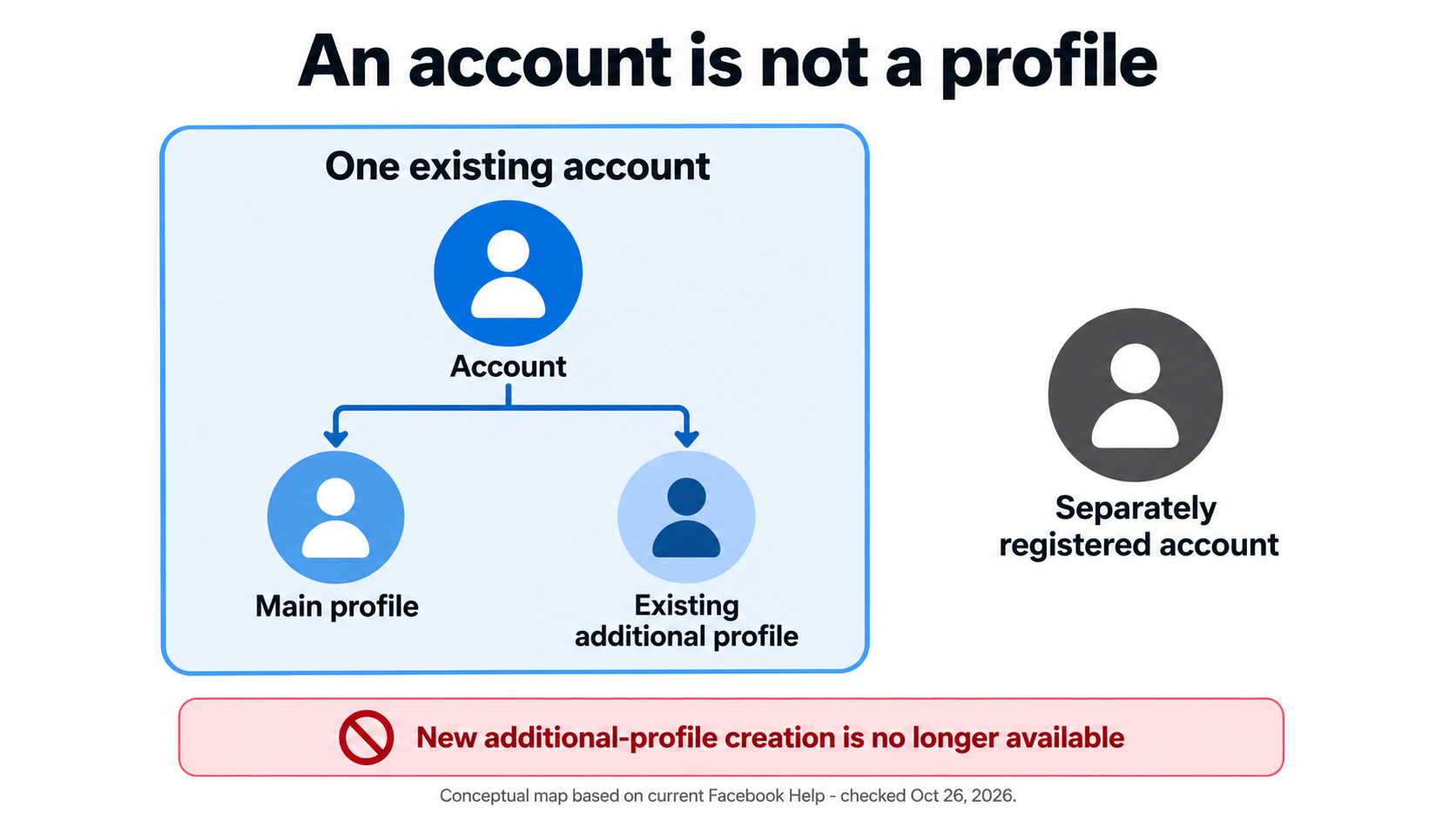
Facebook's additional-profile help now says new additional profiles cannot be created. Existing additional profiles have not been affected. They use the existing account login and can have separate friends lists and Feeds. A separately registered account is not one of those additional profiles.
That changes the advice in older setup tutorials. Do not follow a historical “create another profile” walkthrough as if it describes today's available option. This guidance was checked on October 26, 2026. The help article does not state when creation stopped, so a shutdown date is not assumed here.
| What you mean | What to check | What not to infer |
|---|---|---|
| Two independent personal accounts for one person | The personal-account rule | Another email address creates an exception |
| An additional profile you already have | Its connection to the existing account | It is an independent recovery identity |
| A presence for a business or brand | The Page route and authorized access | The brand needs a fictional personal account |
| Two different people sharing a computer | Each person's own identity and session | One shared machine means one shared account |
Count people, accounts and business assets separately. Two displayed names alone do not establish which arrangement you have.
Prepare an account review before changing access
Prepare the profile links, account owner and purpose of each presence. For business work, list the Pages and their responsible owners. Ask the owner to review their own settings; do not request their password. Keep recovery codes and identity documents out of the planning sheet. Without authorized access, inspect only the supplied references and leave ownership unresolved.
Follow this review sequence without creating anything:
- Identify the person. Confirm whose personal identity each login represents. Two colleagues are not the same case as one person registering twice.
- Classify each presence. Record personal account, existing additional profile or Page. Leave uncertain entries unresolved rather than guessing from a display name.
- Match the purpose. Compare a business presence with Facebook's Page guidance. Ask the responsible owner to review the supported access arrangement.
- Inspect dependencies. Note ongoing Page work and recovery ownership before proposing consolidation. Do not delete an identity merely because its display name looks duplicated.
- Record the decision. Keep the chosen arrangement, responsible person and unresolved questions together. Make any later account changes a separate, explicitly approved task.
An agency can use a client identity and asset assignment map to organize that review. The map should distinguish the colleague who signs in from the client asset they may manage. It is not a substitute for Facebook's actual permissions.
Device separation does not settle the policy question
Authentication and session state are different from permission to maintain an account. The OWASP authentication guidance explains authentication as checking claimed identity and session management as maintaining interaction state. Those concepts explain why a working login is not proof that an account arrangement meets platform rules.
A dedicated browser workspace may make the intended session easier for an operator to recognize. Evaluate workspace separation for authorized account work against that limited purpose. Do not present it as permission to create a prohibited duplicate identity or as evidence that Facebook cannot associate activity.
The same boundary applies to a cloud phone used for approved work. Renting another environment changes where work happens, not who owns the account. No device test, restriction rate or account-safety result is reported here.
Can I have two Facebook accounts for client work?

Start with the client's business asset, not a spare identity. Facebook's multiple-account guidance directs businesses toward Pages. Have the owner verify the actual access route. "Use the second account" is not a clear access brief.
Consider a fictional agency case. Maya has her own personal account and helps a client maintain a Page. Another colleague has a separate personal account representing that colleague. The review should inspect each person's authorized relationship to the Page, not merge their identities because both work for one agency.
Contrast that with Maya creating a second personal account under a client-style name. A separate device does not turn that account into the client's Page. Return to the asset owner and correct the access design before scheduling tasks. Do not attempt to solve an identity mismatch with more workspaces.
Verify the result and handle exceptions
The review is complete when the owner can explain each account, profile and business asset without ambiguous labels. Recheck the destination before any real task: is this the intended Page, the main profile or an existing additional profile? An unexpected destination means the task pauses; it is not a cue to try another login until something works.
Use these stop conditions:
- Ownership unclear: leave the entry unresolved and ask the responsible person to review it.
- Duplicate personal accounts found: follow Facebook's consolidation guidance after checking dependencies; do not automate deletion.
- Recovery or identity prompt appears: use the platform's normal process, not a substitute identity.
- Sensitive account detail must change: separate that change from routine content work and obtain the owner's approval.
OWASP recommends reauthentication for sensitive changes and after risk events such as account recovery. That is general security guidance, not Facebook's detection algorithm. Keep recovery secrets out of team notes.
Frequently Asked Questions
Does another email make a second personal account acceptable?
No. Different contact details do not change the published personal-account rule.
Can I create an additional profile now?
The current help page says creation is no longer available. Do not use old creation tutorials as current instructions.
What about additional profiles I already have?
Facebook says existing additional profiles have not been affected. They remain different from separately registered accounts.
Is a business Page another personal account?
No. Treat the business presence and the person authorized to manage it as separate objects.
Can two colleagues use their own identities on one computer?
That is a different question from one person maintaining duplicate accounts. Review ownership, access and the correct session.
Will a separate phone prevent restrictions?
No restriction outcome is established by device separation. Check the account arrangement and permitted activity first.
Should I delete an old duplicate immediately?
Review dependencies and Facebook's consolidation guidance first. Account removal is not a harmless troubleshooting test.
Conclusion
Resolve the identity question before buying another device or copying a setup tutorial. Distinguish separate personal accounts, existing additional profiles and business Pages, then have the owner confirm the arrangement. The next step is an accurate inventory and a supported access decision, not a second registration.


