

Mobile automation turns repeated mobile tasks into controlled workflows that can run, pause, recover, and be reviewed without manual clicking at every step. In a business setting, the useful version is not only a script. It is a workflow system built around device state, account safety, routing, permissions, logs, and team handoff.
MoiMobi's cloud phone workflow automation sits in that practical area. It helps teams use remote Android environments for repeated work while keeping the operating process understandable. The main value is not that a team can press one button and forget about the workflow. The value is that a team can define what should happen, where it should happen, who owns it, and what recovery path exists when something does not behave as expected.
That distinction matters because many mobile teams do not fail from a lack of tools. They fail because the process around the tools is vague. A cloud phone can provide the remote Android device. Device isolation can help keep sessions separated. A proxy network can support more predictable routing. Mobile automation connects those layers into repeatable work.
This guide explains what mobile automation means for business teams. It also covers how cloud phone workflow automation should be designed, where it fits, where it does not fit, and which checks should happen before scale. The focus is operational. The aim is to help a team build a stable workflow instead of a fragile collection of scripts.
Key Takeaways
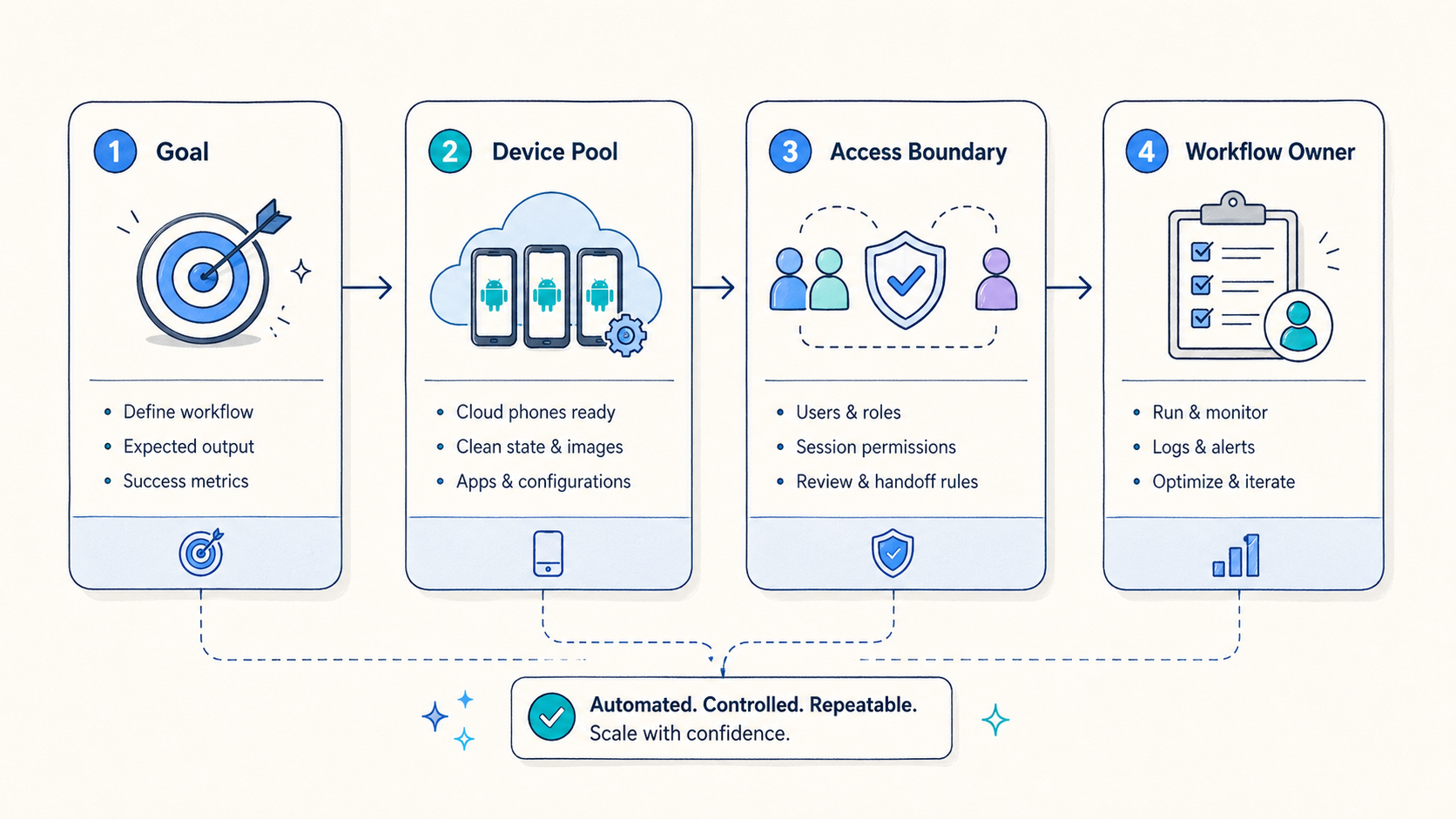
- Mobile automation works best when it is tied to device pools, account boundaries, routing policy, and review logs.
- A cloud phone workflow should define the start state, execution path, failure state, and recovery path before scale.
- The strongest use cases are repeated Android operations, account workflows, QA checks, remote review, and team handoff.
- Safe rollout starts with a narrow pilot, measurable pass or fail rules, and clear ownership.
What Mobile Automation Means for Cloud Phone Teams
At the basic level, mobile automation uses software instructions to complete repeated actions in a mobile environment. In a simple case, this can mean opening an app, checking a screen, entering approved data, waiting for a state change, saving evidence, and closing the session. In a team setting, the workflow also needs rules around who can run it, which device it uses, which account state is allowed, and how the result is reviewed.
That wider definition is important. When the only goal is to automate taps, the system can become risky very quickly. The workflow may run on the wrong device, reuse an account with an unclear state, route traffic through an unexpected network path, or fail silently. A business team needs more than action playback. It needs control.
Cloud phones make mobile automation easier to organize because the Android environment can be reached remotely. Operators do not need every device on a local desk. Reviewers can inspect work from another location. Managers can group devices by task, team, region, account type, or review need. Those benefits become stronger when the team uses a clear operating model.
The core model has four parts:
| Layer | What it controls | Why it matters |
|---|---|---|
| Device layer | Android state, apps, storage, sessions, and reset rules | Keeps the workflow from inheriting unknown state |
| Access layer | Users, roles, permissions, and review rights | Reduces accidental changes and unsafe credential sharing |
| Network layer | Routing policy, region behavior, and proxy assignment | Makes traffic behavior easier to explain and troubleshoot |
| Workflow layer | Steps, triggers, logs, alerts, and recovery actions | Turns repeated work into a process the team can manage |
The workflow layer should never be treated as separate from the other three. A script that works on one clean device may fail when account state changes. A task that works on one route may behave differently when routing shifts. A step that works for one operator may break when a reviewer needs to reproduce it. Mobile automation becomes reliable only when these dependencies are visible.
This is why MoiMobi's related product layers matter. A cloud phone gives the remote environment. Device isolation helps separate working states. Proxy routing helps teams keep network policy consistent. Mobile automation should coordinate those pieces instead of pretending that a single action script solves the whole operating problem.
Official Android developer documentation also reinforces a practical lesson: mobile behavior depends on platform state, app state, permissions, and runtime conditions, not only on instructions. Teams that build automation should keep environment control and testing discipline in mind. Android Developers and Firebase Test Lab are useful references for repeatability and environment checks. The exact toolchain may differ, but the operating principle is the same.
Why Teams Need Mobile Automation Instead of Manual Device Work
Manual mobile work can be acceptable when one person handles one device and one workflow. The problems start when the same work has to be repeated by several people across multiple devices. At that point, people need steady execution, clear review, and fast recovery. Manual habits rarely provide all three.
The first pain is handoff. One operator may know which device is clean, which account was used, and which step failed. The next person may not. If that knowledge stays in chat messages or memory, the team loses time every day. A controlled workflow can reduce this problem by making the state visible and repeatable.
The second pain is inconsistency. A manual task may be performed slightly differently by each operator. Some differences are harmless. Others change the result. A workflow that includes login sequence, app warm-up, routing choice, timing, and reset decisions can drift when it is run by hand. Automation helps the team define a standard path.
The third pain is recovery. Failures are normal. The important question is whether the team knows what failed and how to return to a safe state. A good setup should record enough context to answer basic questions. Reviewers should know which device was used, which step failed, what the device state was, whether routing changed, and whether the account should be reused or quarantined.
The fourth pain is scaling too early. Teams often add more devices before they define the operating rules. More devices can increase output, but they also increase ambiguity. If five devices already produce unclear states, fifty devices will not fix that. The safer path is to introduce rules first and scale second.
For teams using cloud phones, the business case usually appears in five situations:
- A workflow is repeated daily or weekly.
- More than one person needs to run or review the workflow.
- Device state affects the result.
- Network routing or region behavior needs to stay explainable.
- Logs, evidence, or recovery notes are needed after execution.
When those conditions exist, automation can reduce coordination cost. It does not remove the need for judgment. It gives teams a more consistent base for that judgment.
How MoiMobi Cloud Phone Workflow Automation Should Be Structured
A practical mobile automation workflow starts before the first action runs. Leaders should define the device pool, the account boundary, the route, the user role, the acceptable start state, and the expected output. If those decisions are skipped, the workflow may produce activity without producing trust.
The clean structure is usually this:
| Step | Decision | Example check |
|---|---|---|
| 1. Choose the workflow | What repeated task is worth automating? | The task happens often enough to measure |
| 2. Select the device pool | Which cloud phones can run it? | Devices have a known state and reset rule |
| 3. Assign access roles | Who can run, review, or change it? | Operators cannot change routing policy casually |
| 4. Set routing rules | Which proxy or region policy applies? | The route is tied to the workflow, not the operator mood |
| 5. Define the execution path | Which steps happen in order? | Each step has a success and failure condition |
| 6. Capture evidence | What logs or screenshots prove the result? | Reviewers can understand what happened |
| 7. Decide recovery | What happens after failure? | Device reuse is blocked until state is clear |
This structure keeps the automation tied to operations. Without it, automation can become a black box. People may see that a task ran, but not whether the result is safe to reuse.
In MoiMobi, the workflow often begins with a cloud phone group. One group might support account warm-up. Another might support app QA. A third might support remote review. Keeping these groups separate helps teams avoid state contamination. Reporting is also easier because each group has a clear job.
The next layer is device isolation. Automation should avoid mixing unrelated accounts, apps, or histories on the same device state unless the team has a clear reason. A clean isolation policy is easier to review and easier to reset. It also helps operators avoid accidental reuse.
The network layer should be just as deliberate. If a workflow depends on a stable route, the route should be part of the workflow configuration. A common mistake is allowing each operator to choose routing manually. That may feel flexible, but it makes troubleshooting difficult. When results change, the team cannot easily tell whether the cause was the app, device state, account condition, route, or operator behavior.
The execution layer should be narrow at first. A first automation should not try to handle every edge case. It should prove that the core workflow can run, produce evidence, fail visibly, and recover safely. After that, the team can expand.
Where Mobile Automation Fits Best
The best fit appears when a workflow is repeated, structured, and reviewable. It is strongest when the team already knows what the correct process looks like. Automation then helps people run that process with less manual variation.
The most common strong-fit use cases include:
- Repeated Android app checks across cloud phone groups.
- Account workflow preparation where state and handoff matter.
- Remote mobile review by distributed teams.
- App QA paths that need screenshots, logs, or consistent runtime conditions.
- Routine operational tasks that follow a clear sequence.
- Team workflows where managers need status, ownership, and exception reports.
These use cases share one theme. They are not random one-off tasks. They are repeatable processes. That makes them easier to define, measure, and improve.
A medium-fit case is a workflow that still needs human decisions. Automation can prepare the environment, run safe checks, collect evidence, or route exceptions to a reviewer. It should not try to replace judgment where policy, compliance, account safety, or customer context matters.
A weak-fit case is a workflow that the team cannot explain. If nobody can write down the correct device state, account rule, route policy, or recovery path, automation will only make confusion faster. Another weak-fit case is hardware-level debugging. Tasks that depend on physical sensors, cables, local lab equipment, or device-specific hardware behavior may still need local devices.
The boundary is simple:
| Fit level | Best use | Caution |
|---|---|---|
| Strong | Repeated cloud phone workflows with clear rules | Keep logs and recovery checks in place |
| Medium | Workflows with both automation and human review | Avoid pretending automation can make policy decisions |
| Weak | Undefined work, one-off tasks, or physical hardware validation | Define the process or use local devices first |
This boundary protects the team. It also prevents mobile automation from being blamed for problems that actually come from unclear operations.
Designing a Safe Mobile Automation Pilot
A safe pilot should be small, measurable, and reversible. The goal is not to prove maximum scale on day one. The goal is to learn whether the workflow can run with less confusion than manual work.
Start with one workflow. Choose a task that happens often enough to teach the team something but is narrow enough to control. Avoid the most complex workflow first. A difficult workflow can be automated later after the team has learned how to manage device state, routing, evidence, and recovery.
Use one device group. Do not mix unrelated tasks in the same pool during the pilot. One pool should have one clear owner and one clear purpose. That makes results easier to interpret.
Set role boundaries. Operators should run the workflow. Reviewers should inspect results. Admins should change device groups, routing, and reset rules. When everyone can change everything, failures become harder to trace.
Define start and stop conditions. A start condition might include a clean device state, assigned route, approved account, and correct app version. A stop condition might include successful evidence capture, failed step, timeout, route mismatch, or account state issue.
Create a recovery rule before the first run. If a workflow fails, the device should not automatically return to the usable pool unless the team knows the failure is harmless. Many teams lose trust because failed devices keep being reused without review.
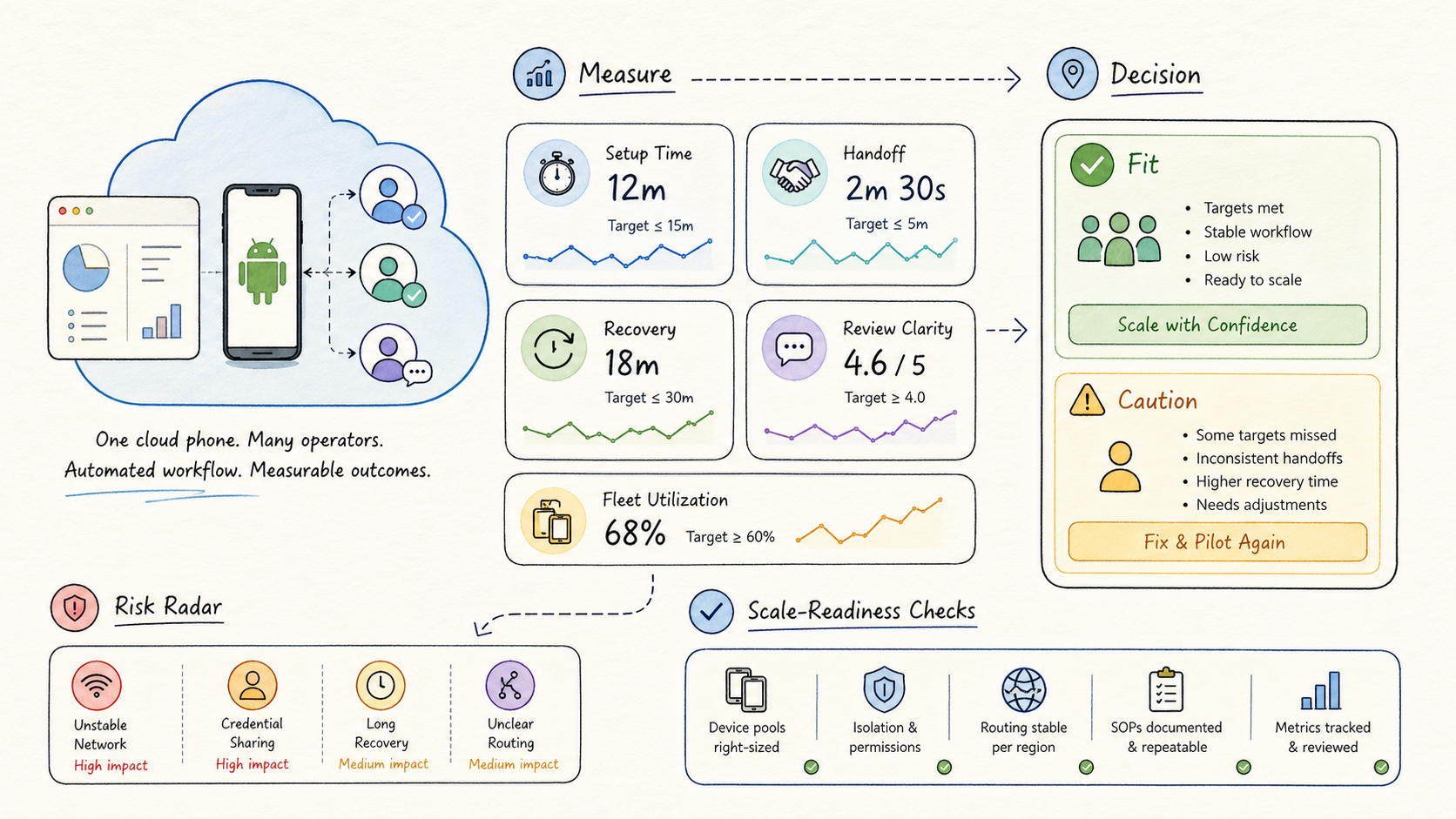
Measure only a few signals at first:
| Metric | Why it matters |
|---|---|
| Setup time | Shows whether the workflow reduces preparation work |
| Handoff time | Shows whether another operator can continue without guessing |
| Failure visibility | Shows whether errors are easy to locate |
| Recovery time | Shows whether the team can return to a safe state |
| Review clarity | Shows whether managers can understand results quickly |
These signals are enough for a pilot. They show whether the workflow is stable, understandable, and useful. More advanced reporting can come later.
The best pilot result is often boring. The workflow starts in the expected state. It runs the expected steps. It records the expected evidence. When something fails, the system explains enough for a person to decide what happens next. That kind of boring is valuable because it can be repeated.
Common Mobile Automation Mistakes
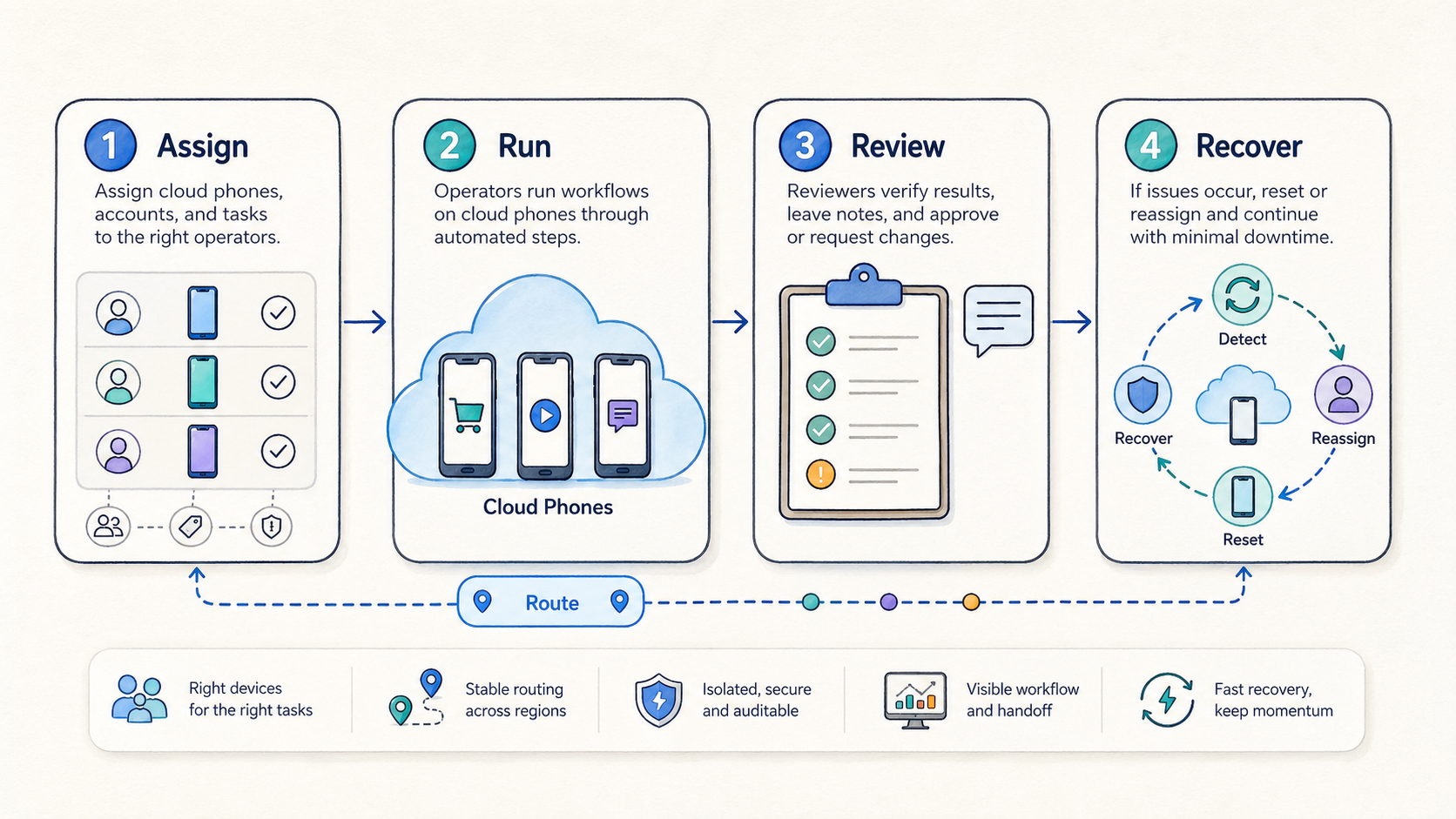
The first mistake is starting with a large workflow. Teams often want to automate the whole process immediately. That creates too many unknowns. A better approach is to automate one stable segment, measure it, and expand after the team understands the failure modes.
The second mistake is ignoring device state. A cloud phone is not only a screen. It has apps, storage, sessions, permissions, histories, and account conditions. Automation that assumes every device is clean can create unreliable results. Reset and quarantine rules are not optional for serious workflows.
The third mistake is letting routing drift. If network behavior matters, route selection should be part of the workflow. Casual route changes can make results hard to explain. A stable proxy policy is especially important when the team is comparing outcomes across runs.
The fourth mistake is using flat permissions. Operators, reviewers, and admins should not all have the same control. Flat access feels fast at first, but it creates hidden risk. A reviewer should not accidentally change the workflow. An operator should not casually alter the pool rule. An admin should have a clear audit trail.
The fifth mistake is weak logging. A workflow that only says "success" or "failed" is not enough. Step-level context is required. The record should show where a failure occurred, what device was involved, which account or route was used, and what recovery action was taken.
The sixth mistake is confusing automation with compliance. Mobile automation can help a team run a process consistently. It does not remove responsibility for platform rules, account policies, or local regulations. Teams should treat automation as an operating layer, not a permission slip.
The seventh mistake is scaling before review. When a pilot cannot explain failures, adding more devices will only multiply unclear results. Scale should follow stable measurement.
How Mobile Automation Connects With Device Isolation and Proxy Routing
This workflow layer is strongest when it works with isolation and routing instead of ignoring them. The automation layer decides what should happen. The isolation layer helps keep the environment clean. The routing layer helps keep network behavior explainable.
Device isolation matters because repeated work creates state. Apps store sessions. Accounts have histories. Permissions change. Files and caches remain. A workflow that runs well once may behave differently after several sessions. Isolation and reset rules help the team decide whether a device is still safe for the next run.
Proxy routing matters because many mobile workflows depend on consistent network behavior. A route can affect access, review, troubleshooting, and repeatability. Operators should know which route a device uses and why. If a workflow changes routes without a clear reason, the team loses one of the controls needed for debugging.
Together, these layers create a more stable operating model:
| Component | Role in mobile automation |
|---|---|
| Cloud phone | Provides the remote Android environment |
| Device isolation | Keeps account and app states separated |
| Proxy network | Makes route behavior more controlled |
| Automation workflow | Runs steps and records results |
| Review process | Confirms whether the output is usable |
This model is practical because it gives teams specific levers. If a run fails, the team can inspect the device state, route, workflow step, and review evidence separately. That is far better than treating every failure as a mystery.
Measuring Whether Mobile Automation Is Working
Good measurement should answer operational questions, not only produce charts. A team needs to know whether automation makes work faster, clearer, safer, and easier to recover.
Useful questions include:
- Can another operator understand the state without asking the original operator?
- Can a reviewer see what happened during the workflow?
- Can the team tell whether a failure came from device state, route, app behavior, or workflow logic?
- Does the process reduce repeated manual steps?
- Does the process avoid unsafe reuse after failure?
- Are reset and quarantine decisions consistent?
The metrics should map to those questions. Setup time, handoff time, failure visibility, recovery time, and review clarity are usually enough for the first stage. Later, the team can add utilization, success rate by workflow, failure concentration, reset frequency, and time saved per run.
One useful reporting pattern is a workflow review card:
| Field | Example value |
|---|---|
| Workflow | App review preparation |
| Device pool | Review pool A |
| Route policy | Region-specific route |
| Start state | Clean device, approved account, app installed |
| Result | Completed with evidence |
| Exception | No exception |
| Recovery action | Not required |
| Reviewer note | Ready for next run |
This kind of card is more useful than a vague success counter. It helps managers understand whether the workflow is reliable and whether the team can scale responsibly.
Practical Rollout Checklist
Before expanding mobile automation, a team should confirm the basics:
- The workflow is written down in plain language.
- The device group has a clear owner.
- Account state and reuse rules are defined.
- Routing policy is tied to the workflow.
- Operator and reviewer roles are separate.
- Failure conditions are visible.
- Recovery steps are documented.
- Evidence capture is consistent.
- Pilot metrics are reviewed.
- Expansion only happens after the review loop is stable.
This checklist is not complicated, but it prevents the most common failure pattern. Teams often automate too fast and then spend more time explaining problems than they saved. A simple checklist keeps the rollout grounded.
For a MoiMobi rollout, the practical next step is to choose one workflow and connect it to the right product layer. For remote Android access, begin with cloud phone infrastructure. If account separation matters, include device isolation. If route consistency matters, include proxy routing. When the task is repeated and measurable, add mobile automation.
A Simple Rule for Daily Use
Keep the first rule plain: one job, one pool, one owner, one route, and one way to stop. This keeps daily work easy to read. A person can see what should run, where it should run, and who should check the result.
Each run should have a clear start and a clear end. The start says the phone is clean, the app is ready, and the route is set. The end says the task passed, failed, or needs a reset. No one should guess.
Small notes also help. Write down the phone group, the account group, the route, the last step, and the next action. These notes do not need to be long. They only need to help the next person pick up the work without asking around.
This plain rule is often what makes scale safer. More phones are useful only when the work stays clear.
Frequently Asked Questions
What is mobile automation?
It is the use of software-controlled steps to complete repeated tasks in a mobile environment. For teams, it should also include device state, access control, routing, evidence, and recovery rules.
How is mobile automation different from a simple script?
A script usually focuses on actions. A business workflow also controls the environment around those actions. That includes cloud phone groups, accounts, proxy routing, permissions, logs, and review.
Why use cloud phones for mobile automation?
Cloud phones give teams remote Android environments that can be grouped, assigned, reviewed, and reused. That makes repeated work easier to manage than local devices when several people are involved.
Does mobile automation remove account or platform risk?
No. Automation can improve consistency and visibility, but teams still need to follow platform rules, account policies, and internal approval processes.
What should a first pilot automate?
Start with one repeated workflow that has clear steps, clear ownership, and measurable results. Avoid the most complex workflow until the team has learned how to handle state and recovery.
What should be measured first?
Measure setup time, handoff time, failure visibility, recovery time, and review clarity. Those metrics show whether the workflow is actually easier to manage.
When should a team avoid mobile automation?
Avoid it when the workflow is undefined, the device state is unclear, or the task depends mainly on physical hardware testing. Define the operating model first.
Conclusion
Automation becomes valuable when it turns repeated mobile work into a controlled operating process. The strongest workflows do not only automate taps. They define the device pool, account boundary, route policy, access role, execution path, evidence capture, and recovery rule.
For MoiMobi teams, the practical model is straightforward. Use cloud phones for remote Android environments. Use device isolation to keep state clean. Use proxy routing to make network behavior explainable. Use mobile automation to run repeated workflows with logs, review, and recovery.
The safest next step is a narrow pilot. Pick one workflow, one device group, one routing policy, and one review loop. Measure whether the workflow reduces confusion and improves handoff. After a stable pilot, expand gradually. If it is not stable, fix the operating model before adding more devices.
That is how mobile automation becomes useful infrastructure instead of another fragile shortcut. It gives teams a repeatable way to run mobile work, understand results, and recover from problems without relying on memory or scattered manual coordination.



