
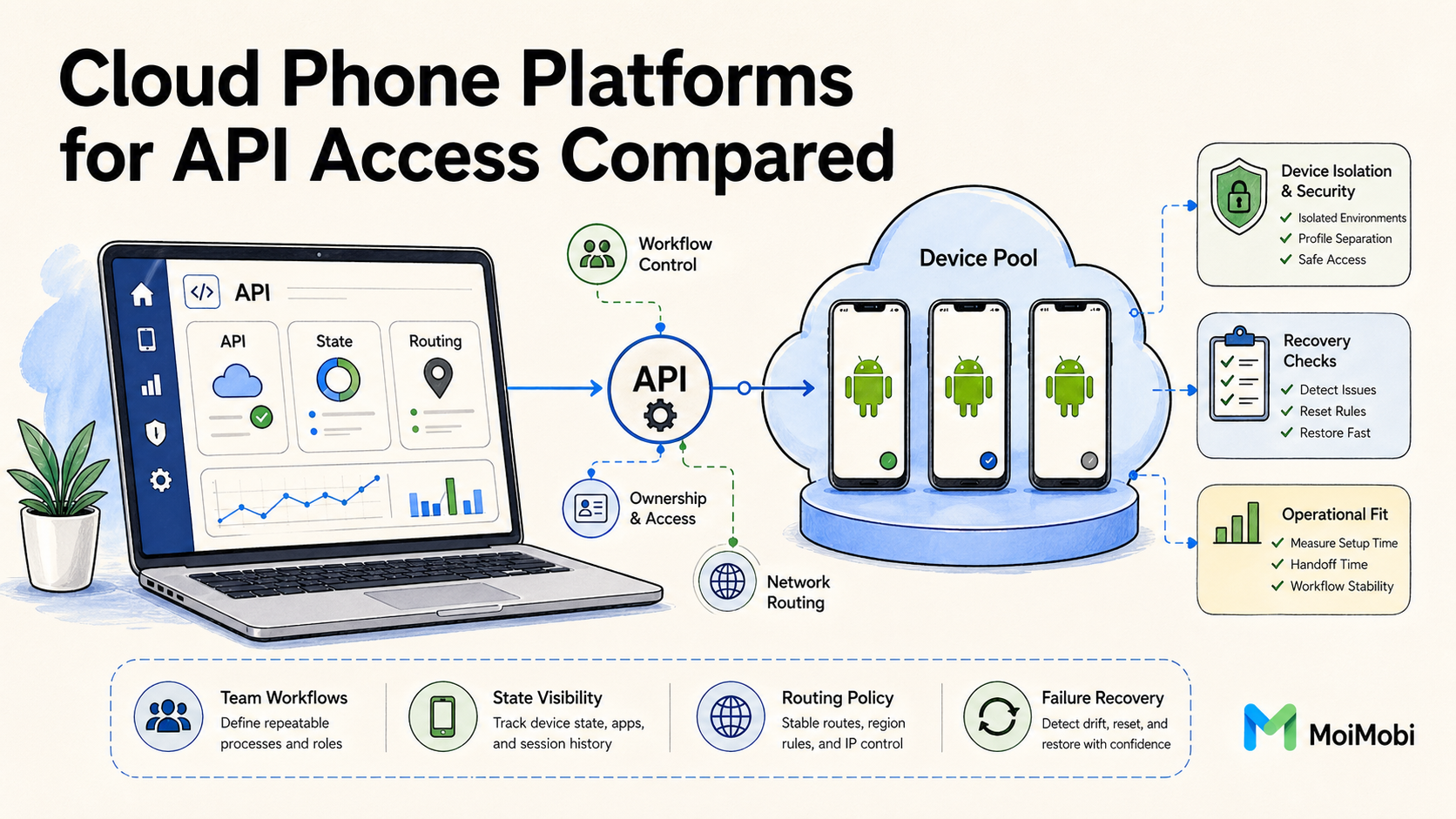
Cloud phone platforms for API access are remote Android infrastructure options that let teams operate, control, and review mobile devices through programmable workflows. The real comparison is not only whether an API exists. The better question is whether the API supports the operating model your team needs.
For a business team, API access can affect device assignment, session control, routing, reset rules, monitoring, and handoff. A weak API may still open a device screen, but it may not help the team recover failed workflows or keep ownership clear. A stronger setup connects remote devices with access control, clean routing, and measurable work states.
A practical cloud phone provider comparison should begin with workflow depth. Teams need to know which platform helps them run repeated mobile work with less manual coordination. They also need to know where API access creates more responsibility, not less.
This guide compares cloud phone platforms through API access, team fit, implementation steps, common mistakes, and pilot checks. It uses cautious language because provider details vary.
When official platform guidance matters, the article points to trusted sources such as Android Developers and Google Search Central. For next-step product context, MoiMobi's cloud phone, mobile automation, device isolation, and proxy network pages are the closest internal references.
Key Takeaways
- API access is useful when it maps to real device operations, not only login or screen viewing.
- A strong evaluation checks device control, routing, access roles, state recovery, and reporting.
- The best fit depends on workflow type, team size, compliance needs, and failure recovery.
- A small pilot should measure handoff time, failed-run recovery, and operator clarity before rollout.
The Core Idea Behind Cloud Phone Platforms for API Access Compared
API access changes a cloud phone platform from a manual remote device tool into part of a team workflow system. The platform can become easier to connect with internal dashboards, task queues, QA flows, and automation runners. It can also become easier to misuse if the team treats API access as a shortcut around process design.
A useful comparison starts with three platform shapes.
First, some tools are screen-first. They focus on opening remote Android devices in a browser or app. API access, if present, may be limited to basic device listing or session actions. This can work for light operations, manual review, and occasional remote access. It is weaker for teams that need programmatic device assignment, lifecycle state, and audit trails.
Second, some platforms are automation-first. They expose device actions, task execution, and integration hooks. These tools may fit QA, repeated app workflows, or batch operations. The risk is that automation depth can hide device-state problems if monitoring and recovery are not planned. Android's own developer documentation emphasizes testing, debugging, and platform behavior as separate concerns, which is a useful reminder that automation and environment quality are not the same thing. A cloud phone provider comparison should include failure handling, not only task speed.
Third, some platforms are infrastructure-first. They combine remote devices with access roles, device grouping, routing policy, and workflow reporting. API access in this model supports operations rather than only scripts. This is often the better model for teams that manage accounts, regions, app states, or repeated handoffs across operators.
| Platform style | API value | Best fit | Watch point |
|---|---|---|---|
| Screen-first | Basic device access and session control | Manual review, light operations, support checks | Limited lifecycle visibility |
| Automation-first | Task execution and repeatable actions | QA paths, batch tests, scripted mobile work | Weak recovery can create hidden drift |
| Infrastructure-first | Device pools, roles, routing, state, and reporting | Team operations, multi-account work, controlled handoff | Requires clear ownership rules |
The core decision is simple. An API that only opens devices may reduce clicking. An API that exposes device groups, state changes, routing assignments, and recovery signals can reduce operational confusion. Those are different outcomes.
Teams should also separate API coverage from API reliability. A long endpoint list does not prove the workflow will be stable. Better signs include predictable responses, clear error states, rate-limit behavior, documentation quality, and a way to trace who or what changed a device. Google Search Central's guidance on helpful content is about web content, not cloud phone APIs, but the same evaluation habit applies: useful systems answer real user needs instead of presenting surface-level features.
Why Teams Search for This Topic and cloud phone provider comparison
Teams usually search for this topic after manual device handling becomes hard to coordinate. A single remote device can be managed by one person. A pool of remote Android devices across several operators needs rules. API access becomes attractive because it promises control, speed, and cleaner handoff.
The practical reason is often queue management. A team may need to assign a device to a workflow, start a session, check status, rotate a route, run an automation step, collect a result, and mark the device ready for reuse. Without API access, many of those steps become chat messages, spreadsheets, or manual clicks. Those habits can work at small volume, but they break down when the same task repeats daily.
A cloud phone provider comparison also matters because API depth changes the shape of internal tooling. One provider may fit a simple dashboard. Another may support deeper task orchestration. A third may work best when humans still control most decisions and APIs only support reporting. None of those choices is automatically wrong. The right answer depends on what the team is trying to stabilize.
Consider a mobile operations team that reviews account workflows. The team does not only need devices. It needs clean device state, predictable routing, role boundaries, and a visible review trail. API access becomes valuable when it helps the team answer direct questions: who owns this device, which workflow is active, what route is assigned, and what should happen after a failed run?
That is also where MoiMobi's positioning matters. A cloud phone is one layer. Many teams also need device isolation, a stable proxy network, and mobile automation that respects operational boundaries. API access should connect those layers without pretending that one endpoint solves every workflow problem.
Who Benefits Most and In What Situations and cloud phone provider comparison
The best fit appears when mobile work is repeated, shared, and measurable. API access helps most when a team already knows the workflow it wants to control. It helps less when the team has not defined device ownership, reset rules, or routing policy.
Three team types usually benefit.
- Operations teams need repeatable mobile execution across people, accounts, or regions. API access can support device assignment, session tracking, and recovery checks.
- QA and testing teams need consistent environments for repeated app paths. APIs can help start devices, run checks, collect evidence, and compare results.
- Growth or marketing teams need controlled execution for multi-account workflows. APIs can support scheduling and review, but they should not be treated as a substitute for platform rules or account governance.
| Fit level | Situation | Practical meaning |
|---|---|---|
| Strong fit | Repeated Android workflows, shared operators, device pools, route policy, and recovery ownership. | API access can become part of the operating layer. |
| Medium fit | Mixed manual and automated work where APIs support reporting, assignment, or limited task execution. | Use narrow controls before deeper automation. |
| Weak fit | One-off tasks, undefined workflows, hardware-specific testing, or teams without ownership rules. | Fix the operating model before adding API control. |
The fit becomes stronger when the team has more than one operator. Shared work creates handoff risk. Someone must know which device is clean, which session is active, and which task owns the next step. API access can make that visible if the provider exposes useful states and logs.
The fit becomes weaker when the workflow depends on physical device handling. Sensor testing, cable debugging, hardware-specific behavior, and local network lab conditions may still require physical devices. A cloud phone platform can support adjacent checks, but it should not replace a local device bench for every hardware-led task.
Another boundary is governance. API access can speed up execution. It cannot make risky workflows acceptable. Teams still need to follow app, platform, and regional rules. Google Play and Android documentation are useful starting points for understanding platform behavior, but each business still owns its own policy decisions.
How to Evaluate or Start Using Cloud Phone Platforms for API Access Compared
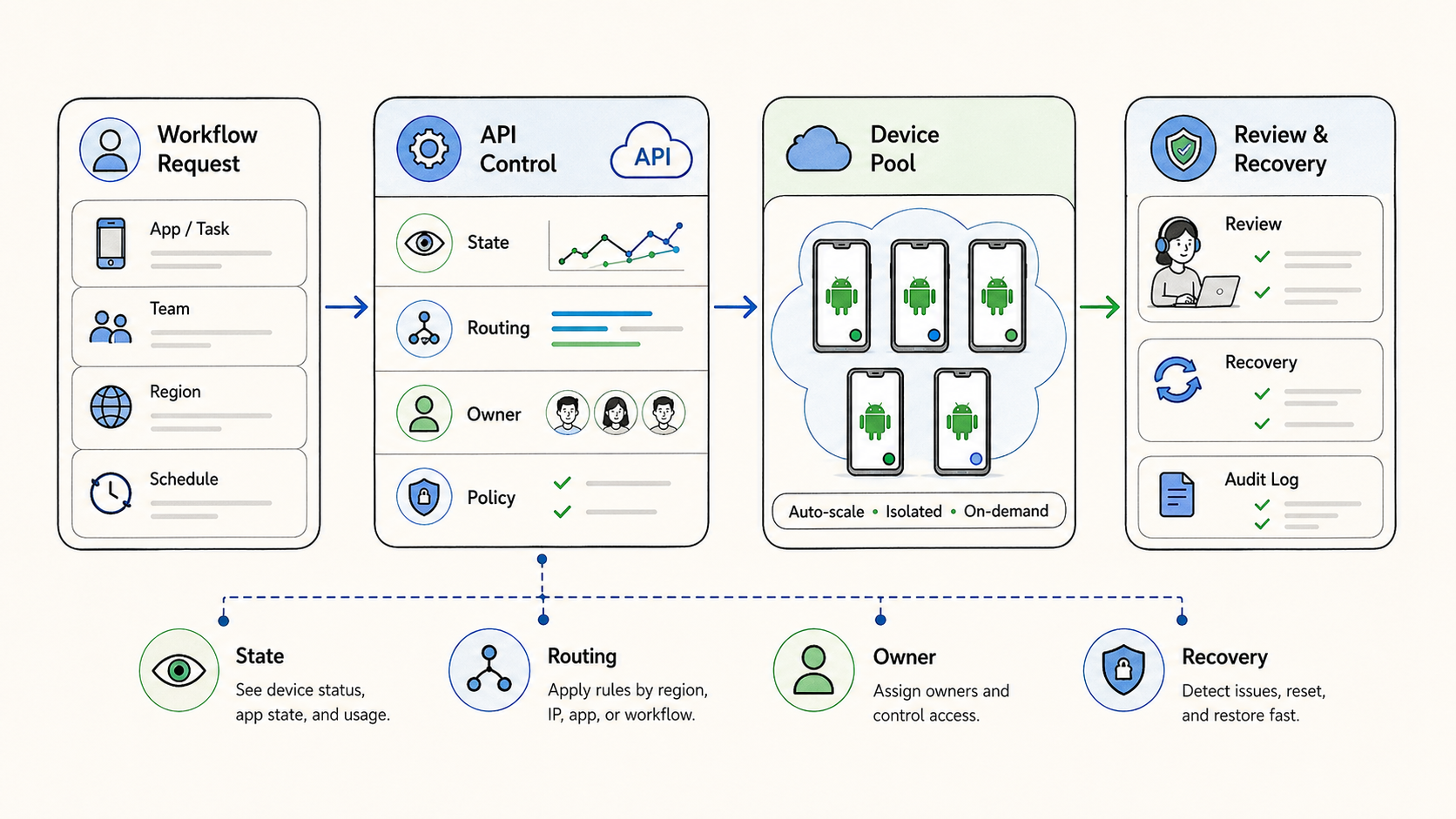
Evaluation should move from workflow to API, not from API list to workflow. The endpoint list matters only after the team knows what the system must do. A provider with fewer but better operational endpoints may fit better than a provider with many shallow actions.
Use this sequence.
-
Define the workflow boundary. Write down the task, operator role, device state, route requirement, and expected result. Do this before reviewing endpoints.
-
Map required device actions. List the actions the API must support, such as device assignment, session start, reboot, reset, status check, or task trigger.
-
Check state visibility. Confirm whether the API exposes usable states. A team needs to know whether a device is available, active, failed, quarantined, or ready for review.
-
Review routing controls. Decide whether routing is fixed, assignable, auditable, and easy to explain. Unclear routing makes debugging harder.
-
Test error behavior. Look at failed responses, timeouts, permission errors, and retry behavior. Reliable failure signals are as important as successful calls.
-
Validate documentation quality. Readable docs reduce integration cost. Android Developers is a useful reference point for how technical documentation should separate concepts, setup, and troubleshooting.
The first integration should be small. A read-only status view or limited device assignment flow is often enough. Avoid giving a new script broad control over every device pool. Smaller scope makes errors easier to isolate.
Security also belongs in the first review. API keys, user roles, and permission boundaries need clear ownership. A shared key in a team chat is not a workflow system. Use role separation where possible, and document who can change device pools, routes, and reset rules.
Internal reporting should be part of the same evaluation. A useful integration records device ID, task ID, operator, route class, state transition, and failure reason. Without those fields, the team may automate actions but still lose the operational story.
Mistakes That Reduce cloud phone provider comparison Results
The most common mistake is comparing platforms by API quantity. A provider with many endpoints can still be difficult to operate if those endpoints do not match the workflow. The better cloud phone provider comparison asks whether the API reduces handoff confusion, recovery time, and manual coordination.
Another mistake is treating API access as automation permission. A team may be able to trigger actions, but that does not mean every action should run automatically. Human review still matters when workflows affect accounts, customer data, or business reputation.
A third mistake is ignoring route policy. Cloud phone workflows often depend on network consistency. An API may start devices yet still leave routing rules unclear. In that case, troubleshooting stays manual. MoiMobi's proxy network context is relevant here because route stability is part of execution infrastructure.
Teams also get into trouble when they skip device lifecycle states. Available, assigned, running, failed, quarantined, reset-required, and ready-for-review are different states. Treating them as one vague status creates operational debt. The API should help the team express those states or connect them to an internal control layer.
Documentation gaps can become production gaps. If a provider does not explain errors, limits, permissions, or expected behavior, the internal team must guess. Guessing may be acceptable in a short test. It is weak infrastructure for daily work.
The last major mistake is skipping measurement. A team may feel faster after adding API access, but speed without evidence can hide instability. Track setup time, handoff time, failed-run recovery, and route-related issues. Those metrics show whether the integration improves the workflow or only makes it move faster. The same evidence also makes the next cloud phone provider comparison more accurate.
Pilot Rollout, Measurement, and Recovery Checks
A safe pilot starts with one workflow, one device pool, and one narrow success metric. The goal is not to prove every possible use case. The goal is to see whether API access makes a repeated workflow easier to run, review, and recover.
Begin with a workflow that already happens often. Daily or weekly tasks teach the team more than rare exceptions. Choose a task with clear inputs, expected output, and an obvious failure state. That gives the pilot a clean pass or fail shape.
The pilot should track four signals.
| Signal | What to measure | Why it matters |
|---|---|---|
| Setup time | Time from task request to usable device session | Shows whether API access reduces manual preparation |
| Handoff clarity | Whether another operator can continue without guessing | Tests whether state and ownership are visible |
| Recovery time | Time to isolate, reset, or replace a failed device | Reveals whether the control layer handles failure |
| Route explainability | Whether the team can identify the intended route class | Reduces debugging noise during repeated work |
Recovery checks deserve special attention. A platform can look strong when every API call succeeds. It becomes operationally useful when failed calls are easy to classify. The team should know whether a failure came from permissions, unavailable devices, route problems, app state, or task logic.
Set pause conditions before the pilot starts. Pause when devices enter unclear states, routes change without explanation, repeated failures cluster in one pool, or operators bypass the API because manual work feels easier. Those signals mean the integration needs repair before scale.
A good pilot ends with a decision record. Keep the record short. Note what worked, what failed, which endpoints mattered, which states were missing, and whether the provider fits the next workflow. That record is more useful than a vague statement that the platform "worked."
Keep the notes plain. Who ran the task? Which phone was used? Which route was set? What failed? Who fixed it? These simple answers help a lead see the real state of the work without reading logs all day.
Plain notes also help new staff. A new team member can see the task path, the phone owner, the route note, and the last fix. That makes handoff less vague. It also makes review less tied to one expert who remembers every past run.
Keep the pilot board easy to read. Use one row for each run. Add the phone name, task name, route note, owner, state, and next step. Use short state names such as ready, in use, failed, paused, or reset. Do not hide this work in a long chat thread.
The board should answer plain daily questions. Which phones can work now? Which phones need a reset? Which task failed twice? Which owner needs to check the result? Fast answers mean the API is helping real work.
Simple rules also help the team say no. A phone that is not clean should not be reused. A missing route note should stop the run. A task that fails again should pause that lane. Work without a named owner should not move forward.
Use one final review meeting before expansion. The meeting should compare the original workflow problem with the actual pilot evidence. API gains in manual assignment without recovery gains point toward state and error handling work. Recovery gains with operator bypass may point toward interface design or narrower permissions. This keeps the rollout grounded in behavior rather than feature enthusiasm.
One useful rule is to expand only one dimension at a time. Add more devices, more workflows, or more operators, but not all three at once. Smaller changes make cause and effect easier to see. They also protect the team from blaming the provider when the real issue is unclear ownership or an overloaded process.
Frequently Asked Questions
What does API access mean in a cloud phone platform?
API access means the platform exposes programmable actions or data. That may include device lists, session control, status checks, task triggers, routing assignments, or reporting fields. The exact scope depends on the provider.
Is API access required for every cloud phone team?
No. Manual teams can work without API access when volume is low. API access becomes more useful when device work is repeated, shared, and hard to coordinate manually.
What should a cloud phone provider comparison check first?
Begin with workflow fit. Check whether the provider supports device pools, state visibility, role control, route policy, and recovery signals. Endpoint count comes later.
Can API access replace mobile automation tools?
Usually not by itself. API access controls the platform layer. Mobile automation controls task execution. Strong teams often need both, with clear boundaries between device control and app workflow logic.
How should teams judge API documentation quality?
Good documentation explains concepts, authentication, endpoint behavior, errors, limits, and examples. It should help engineers and operators understand failure paths, not only successful requests.
Does API access improve account safety?
It can improve control and visibility, but it does not remove account or platform risk. Teams still need responsible workflows, clean routing, device isolation, and policy awareness.
What is a practical first pilot?
Choose one repeated workflow and one device pool. Build a small integration that assigns devices, checks status, records ownership, and reports failures. Expand only after recovery is clear.
When should a team avoid API-led rollout?
Avoid rollout when ownership is unclear, route policy is unstable, or failed devices cannot be isolated. Programmatic control may speed up confusion if the workflow is not ready.
Conclusion
Cloud phone platforms for API access should be compared through operations, not feature noise. A useful API helps teams assign devices, understand state, control routing, review work, and recover from failure. A shallow API may still save clicks, but it may not solve the coordination problem that brought the team to cloud phones in the first place.
The strongest cloud phone provider comparison looks at workflow fit first. Define the task, map required device actions, check state visibility, review routing controls, and test failure behavior. A small pilot should then measure setup time, handoff clarity, recovery time, and route explainability.
For teams evaluating MoiMobi, the next step is to connect the API decision to the broader execution stack. Review the cloud phone layer, then check whether mobile automation, device isolation, and multi-account management match the workflow you need to stabilize. Choose one workflow first. Prove that handoff and recovery improve. Expand only when the operating model stays clear, documented, and easy to review. Keep the owner visible.



