
Account safety is the practice of reducing avoidable account risk through clear device state, controlled access, stable workflow rules, and careful review.
Remote Android infrastructure can support account safety when it is used as part of a disciplined mobile operations system. It does not remove platform rules, account judgment, or workflow risk. The practical value comes from keeping Android environments more organized, reviewable, and easier to recover.
The direct answer is cautious. Remote Android access can help teams separate work, reduce informal device sharing, and create cleaner handoff. It cannot promise that every account will stay healthy. Teams still need policy awareness, operator training, clean routing notes, and a process for pausing risky activity.
For MoiMobi users, the topic connects to more than remote access. The cloud phone layer is only one part of the system. Teams may also need device isolation, proxy network planning, mobile automation, and multi-account management.
Choose the setup with this rule in mind. Messy device sharing, unclear ownership, and hard-to-review workflows are infrastructure problems. Policy violations, poor content, spam behavior, or unsupported tactics are strategy problems. Better infrastructure cannot make the second group acceptable.
Key Takeaways
- Account safety depends on process, not only the device model.
- Remote device pools can help teams separate workflows, assign owners, and review mobile work.
- No device setup should be described as removing platform or account risk.
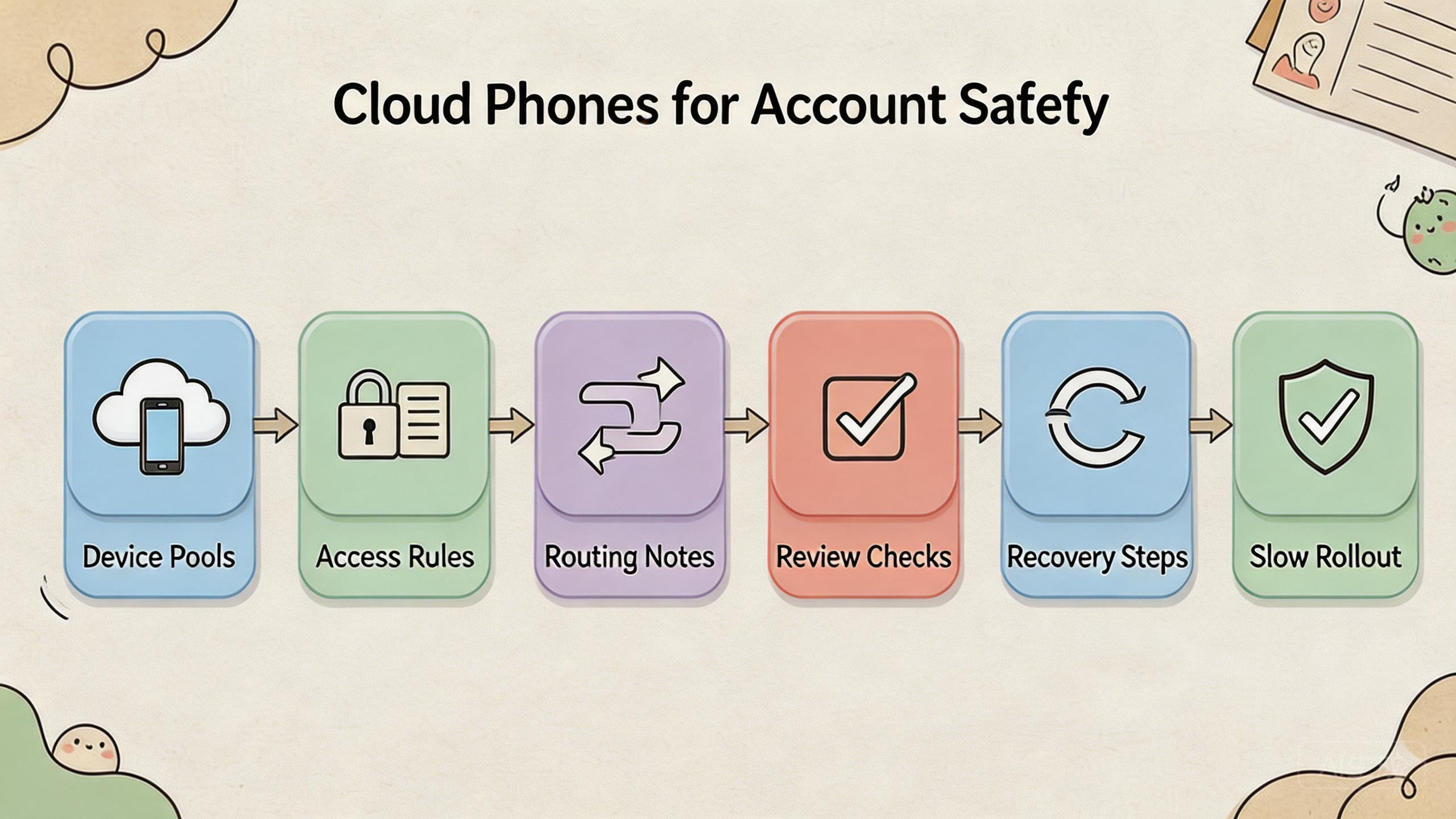
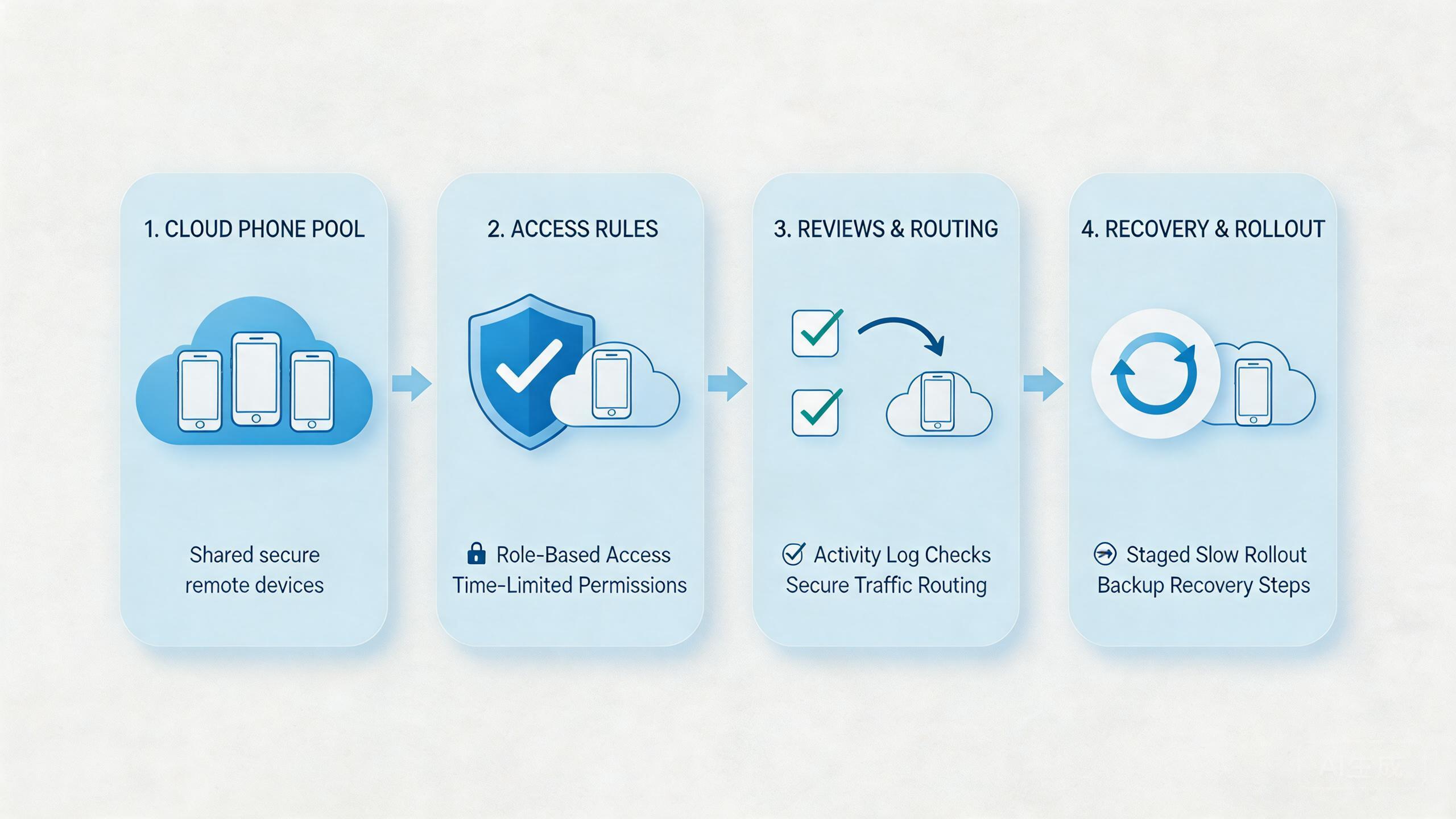
- The strongest setup uses device pools, role rules, routing notes, review checks, and recovery steps.
- Start with one narrow pilot before moving sensitive workflows into a larger remote pool.
The core idea behind account safety in remote workflows
The common myth is that a new device setup can make accounts safe by itself. That is the wrong model. Account safety comes from reducing avoidable mistakes and making risky changes easier to see.
The device layer helps when the team needs better control over where work happens. Instead of sharing physical phones, operators can use named remote Android environments. Reviewers can inspect outcomes without taking over a local device. Managers can define which pool supports which workflow.
This matters because account work often fails through small process gaps. One user changes a device setting. Another user reuses the same environment for a different account group. A route changes without a note. A failed workflow is retried before anyone reviews what happened.
That friction can drop when the setup is clear. A device pool can be tied to a use case. An operator can be assigned to a lane. A reviewer can check the result. A failed lane can be paused before it spreads confusion.
Google Play policies are a reminder that platform rules still apply to app and account behavior (Google Play Policy Center). A cleaner device setup does not excuse bad behavior. It only gives teams a better way to operate within their own rules and the rules of each platform.
A practical distinction helps:
| Misunderstanding | Better operating view |
|---|---|
| A remote phone makes accounts safe. | A managed device lane can make workflows easier to control. |
| Device count solves the problem. | Ownership and review solve more daily issues. |
| Routing alone is enough. | Routing needs notes, consistency, and review. |
| Automation removes risk. | Automation needs limits, logs, and pause rules. |
Account safety improves when the team can answer basic questions quickly. Which account group used this device? Which operator ran the task? Which route was expected? What changed before the issue appeared? What should happen before reuse?
Why teams search for this topic
Teams search for cloud phones and account safety because mobile work becomes harder to manage at scale. One person can often remember which phone belongs to which account. A larger team cannot rely on memory.
Shared device work creates confusion. A physical phone may move between operators. App state may change between shifts. Account groups may get mixed. A reviewer may not know whether a run is clean enough to continue.
Remote teams feel this problem sooner. A manager may need to review work across time zones. A support person may need to inspect an app state without waiting for a device. An agency may need separate lanes for several clients or markets.
The search usually comes from one of four problems:
- Handoff is messy. Operators do not know whether a device is ready.
- Account groups are mixed. Separate workflows share the same state.
- Review is slow. Leads depend on screenshots, chat, or guesswork.
- Recovery is unclear. Failed runs do not have a clean next step.
Managed remote devices can help when these problems are operational. A named remote device pool can give each workflow a clearer home. Role rules can limit who changes setup. Reviewers can inspect the device state without taking over the work.
Google Search Central encourages helpful, reliable content that serves people first (Google Search Central). The same idea applies to operations. A helpful workflow gives people enough context to make a safe next decision.
The hard truth is that infrastructure cannot fix the wrong activity. Risky account work, spam-heavy behavior, or activity outside platform rules will not become sound because the device layer changed. The first step is to define acceptable work before scaling it.
Who benefits most and in what situations
The best-fit teams already have repeated mobile workflows. They are not looking for a shortcut. They need a cleaner way to assign, review, and recover Android work.
Social media teams may benefit when they manage several account lanes. Each lane can have a clear device pool, owner, and review rule. This can reduce confusion during handoff.
Agencies may benefit when client work must stay separate. Separate pools can support separate clients, markets, or workflows. Reviewers can inspect output without mixing account context.
QA and support teams may benefit when they need repeatable app states. Remote access can keep a known workflow available for review. Local devices may still be needed for hardware-specific checks.
Operations teams may benefit when several people need the same mobile environment. A named pool is easier to discuss than a loose pile of devices. A lane with status is easier to manage than a phone that is “probably fine.”
The weaker fit appears when the workflow is unclear. A team that cannot name the expected output should not start with more devices. It should define the work first.
The fit guide is direct:
| Team situation | Cloud phone fit | Reason |
|---|---|---|
| Shared mobile operations | Strong | Device pools and role rules can reduce handoff gaps. |
| Solo casual use | Medium | Remote access may help, but process needs are lighter. |
| Hardware-specific testing | Weak to medium | Physical devices may still be needed. |
| Undefined account work | Weak | A device layer cannot define safe behavior. |
| Agency account lanes | Strong | Separation and review can matter more as work grows. |
MoiMobi fits teams that treat cloud phones as execution infrastructure. The strongest use is not “more screens.” It is a managed way to keep mobile workflows separate, visible, and easier to review.
How to evaluate account safety with remote device pools
Start with one workflow and one account group. Do not move every workflow into a new setup on day one. A narrow pilot shows whether the operating model is clear enough.
Follow this step path:
- Define acceptable work. Write what the account workflow is allowed to do. Also write what it should not do. This keeps the device setup tied to policy and team rules.
- Choose one pool. Assign one remote device pool to one workflow. Avoid mixing unrelated tasks during the pilot.
- Name the owner. Decide who owns device state, account lane status, review, and recovery. Do not leave this to chat memory.
- Record routing assumptions. Write down what network route, market, or region the workflow expects. A route change without a note can make review harder.
- Set access roles. Operators, reviewers, and admins should not all need the same rights. Limit setup changes to the people who own the workflow.
- Review after each run. Check account state, app state, task output, and device readiness. A completed task is not the same as a reviewed task.
- Create pause rules. Decide what triggers a stop. Repeated failures, unclear state, route confusion, or policy concern should pause the lane.
The pilot should measure simple signals:
| Check | Good sign | Warning sign |
|---|---|---|
| Device state | Operators know whether the lane is ready. | People disagree on reuse status. |
| Access | The right user can work without sharing credentials. | Too many users can change setup. |
| Review | The result can be inspected quickly. | Review depends on scattered messages. |
| Recovery | A failed lane has a known next action. | Failure leads to repeated retries. |
| Policy fit | Work stays within defined rules. | Operators improvise around limits. |
Google’s SEO Starter Guide is about website structure, but its basic lesson is useful here too: clear structure helps people understand what to do next (SEO Starter Guide). Mobile operations need the same clarity.
Expand only after the first workflow is boring. Boring means predictable. Operators know what to run. Reviewers know what to check. Owners know when to pause or reset.
Account safety mistakes that reduce results
The first mistake is using safety language too loosely. A team should not describe any device setup as a promise of healthy accounts. Better wording is more accurate: the setup can reduce avoidable workflow errors.
The second mistake is mixing account groups. One shared pool for many unrelated workflows may look efficient. Later it becomes hard to know what caused a problem. Separate lanes make review clearer.
The third mistake is ignoring operator behavior. Device state matters, but human actions matter too. Operators need task limits, review rules, and a way to report unclear results.
The fourth mistake is weak route discipline. A route should be explainable and stable enough for the workflow. Random changes make it harder to learn whether a problem came from the device, the task, or the network path.
The fifth mistake is scaling before review works. More devices create more work when review is slow. First make one lane easy to inspect. Then add another lane.
The sixth mistake is weak recovery. A failed workflow should not be retried forever. Teams need status labels such as ready, paused, under review, reset needed, or retired.
Use a simple recovery ladder:
- Pause the lane.
- Capture what changed.
- Review account and app state.
- Reset or quarantine the device if needed.
- Decide whether the workflow can resume.
This ladder keeps pressure low. It gives operators a path that does not depend on guessing. It also helps managers compare issues across teams.
Pilot metrics and account safety review loops
Measurement should stay simple at first. A team does not need a large dashboard to learn whether the setup is safer to operate. It needs a few signals that show whether people understand the lane.
Measure five pilot signals:
| Metric | What it shows | What to do with it |
|---|---|---|
| Setup clarity | Whether operators know how to start. | Rewrite the runbook if setup requires chat help. |
| Review time | Whether reviewers can inspect results quickly. | Add clearer output checks if review is slow. |
| Reuse confidence | Whether a lane is ready for another run. | Add status labels if people disagree. |
| Recovery time | Whether a failed lane has a clear path. | Define pause and reset rules if recovery drifts. |
| Policy fit | Whether work stays within defined limits. | Stop or redesign workflows that cross limits. |
These metrics are not vanity numbers. They reveal whether the team is becoming more controlled. A workflow that runs fast but cannot be reviewed is not a mature workflow.
Review loops should be short. After each pilot run, the operator records what happened. The reviewer checks the result. The owner decides whether the lane is ready, paused, or reset needed. That small loop is enough for the first stage.
Keep the status words plain:
- Ready means the lane can run again.
- Paused means something needs review.
- Reset needed means the device state is not clean enough.
- Under review means a person must inspect the result.
- Retired means the lane should not be reused for this workflow.
Plain labels help teams avoid vague language. “Looks fine” is not a status. “Ready after review” is clearer. It tells the next operator what happened and what they can do.
Managers should also review patterns, not only single events. Repeated resets may show a weak script. Repeated route confusion may show poor notes. Repeated handoff questions may show that the workflow is not ready to scale.
This is where mobile automation should be handled with care. Automation can repeat a task, but it should not hide state. The safer pattern is to automate narrow steps and keep review visible.
Fit boundaries for account safety work
Fit boundaries protect the team from overusing the tool. A remote phone setup is useful when the main problem is mobile execution control. It is weaker when the main problem is behavior that should not be scaled.
Strong-fit signals include repeated account workflows, shared operators, clear account groups, and a need for remote review. These teams usually benefit from lanes, owners, and recovery rules.
Medium-fit signals include a mix of local and remote work. A team may use local phones for sensitive checks and cloud phones for repeatable app paths. That model can work if each environment has a clear role.
Weak-fit signals should stop the rollout. Operators must know what work is allowed before a lane expands. Review should happen before repeated issues appear. A plan that expects infrastructure to replace policy judgment needs correction.
Use this fit scan before adding more lanes:
- Can the account group be named clearly?
- Can the work be described in one short runbook?
- Can a reviewer judge the result without asking the operator?
- Can a failed lane be paused without blocking unrelated work?
- Can the team explain why cloud phones are better than local devices for this task?
If those answers are clear, the setup may be ready for a larger pilot. If not, keep the pool small. Improve the workflow before increasing scale.
Frequently Asked Questions
Does this setup make accounts safe?
No device setup should be treated as a promise of account health. Remote device pools can support account safety by improving separation, review, and recovery. Platform rules and user behavior still matter.
What is the biggest account safety benefit?
The biggest benefit is usually cleaner workflow control. Teams can assign device pools, limit access, record assumptions, and review results before reuse.
Can this setup reduce account bans?
It is better to avoid that claim. Better device control may reduce some operational mistakes, but account outcomes depend on platform rules, content, behavior, routing, history, and many other factors.
How should a team start?
Begin with one account group, one device pool, and one workflow. Run a short pilot. Review state after each run before expanding.
Is device isolation enough?
Device isolation can be useful, but it is only one control. Teams also need role rules, route notes, operator training, and recovery steps.
Should automation be used for account safety?
Automation can help repeat known tasks, but it should not run without review. Sensitive workflows need pause rules, logs, and human checks.
What should be tracked first?
Track device state, account group, operator, route assumption, review outcome, and recovery action. These records make failures easier to understand.
Where does MoiMobi fit?
MoiMobi fits teams that need cloud phones as part of mobile execution infrastructure. The next step is a risk-aware pilot, not a broad migration.
Conclusion
Account safety starts with operating discipline. Remote device pools can help when they give teams clearer ownership, cleaner handoff, role control, review visibility, and recovery paths.
The priority order should be practical. First, define acceptable work. Second, separate account lanes. Third, control access. Fourth, keep routing assumptions visible. Fifth, review results before reuse. Sixth, pause unclear workflows before they spread.
Do not treat cloud phones as a shortcut around policy or judgment. Treat them as infrastructure for cleaner mobile execution. The value is better control, not certainty.
Before scaling, run one pilot. Pick one account group, one workflow, and one device pool. Track what happens. If operators can run the work, reviewers can inspect the result, and owners can recover from failure, the setup may be ready for more lanes.
If those checks are weak, fix the process before adding more cloud phones. Account safety improves when the team can see, explain, and correct its own workflow.
Keep the final rollout slow. Add one lane, review it, and then decide whether another lane is justified. This pace protects the team from turning a small process gap into a larger account safety problem.
The final owner should be named before scale. One person or role should approve new lanes, review pause reasons, and decide when a lane can return to use. Clear ownership keeps account safety work from drifting back into informal habits.



