
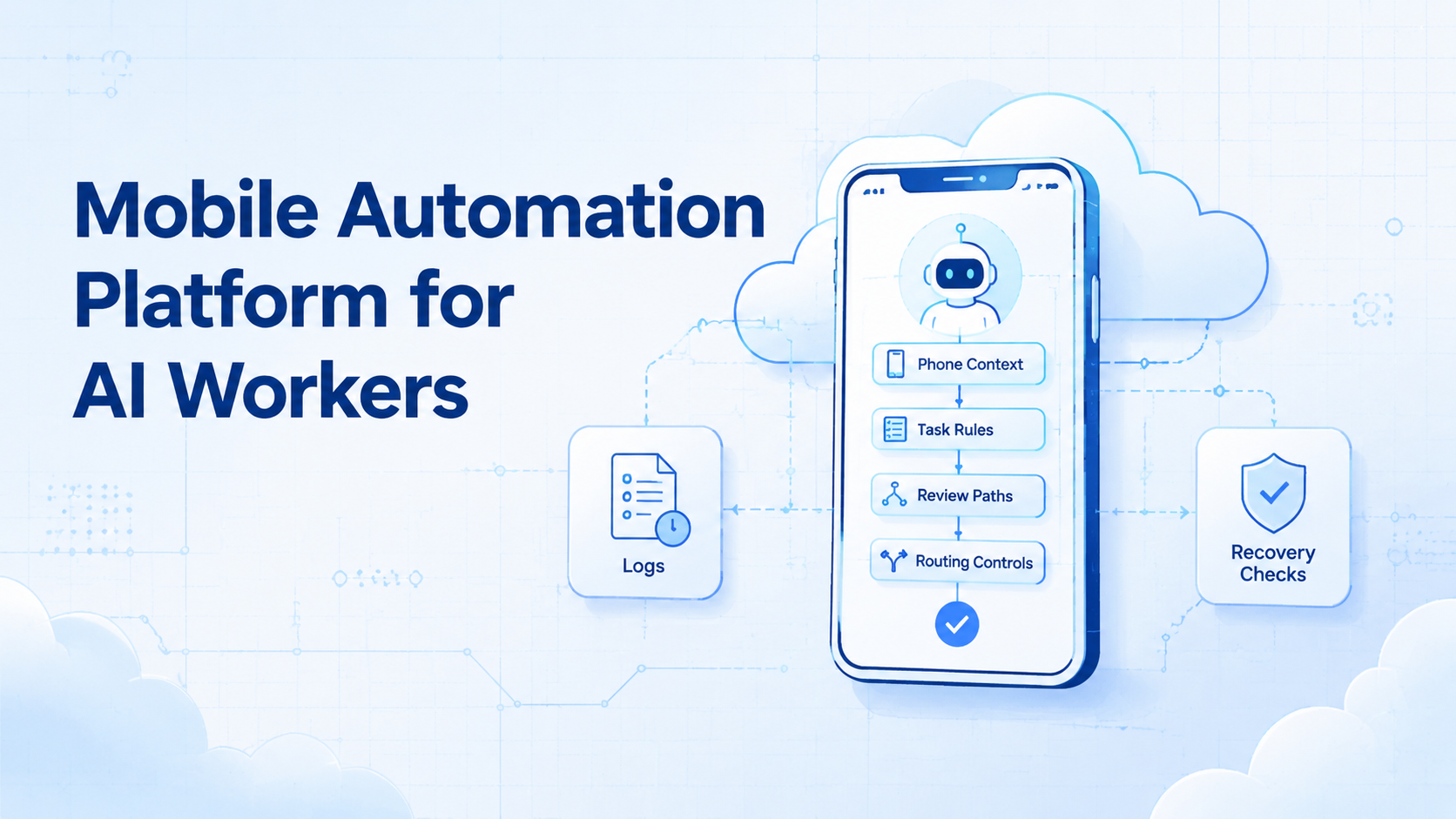
A mobile automation platform is an execution layer that lets AI workers run app-based tasks inside controlled mobile environments. It gives each worker a phone context, task boundary, review path, and recovery record.
Base first.
The decision is not whether AI can click through an app. The real decision is whether the team can control what the AI worker sees, which account it uses, which route it follows, and where the output goes. Without those rules, a successful run can still create the wrong business result.
Scale changes the risk.
Teams usually need this platform when mobile work stops being a single-person task. One operator can hold one phone and remember context. A team running multiple accounts, queues, apps, or shifts needs a shared system that keeps mobile execution visible.
That is the operating problem.
Key Takeaways
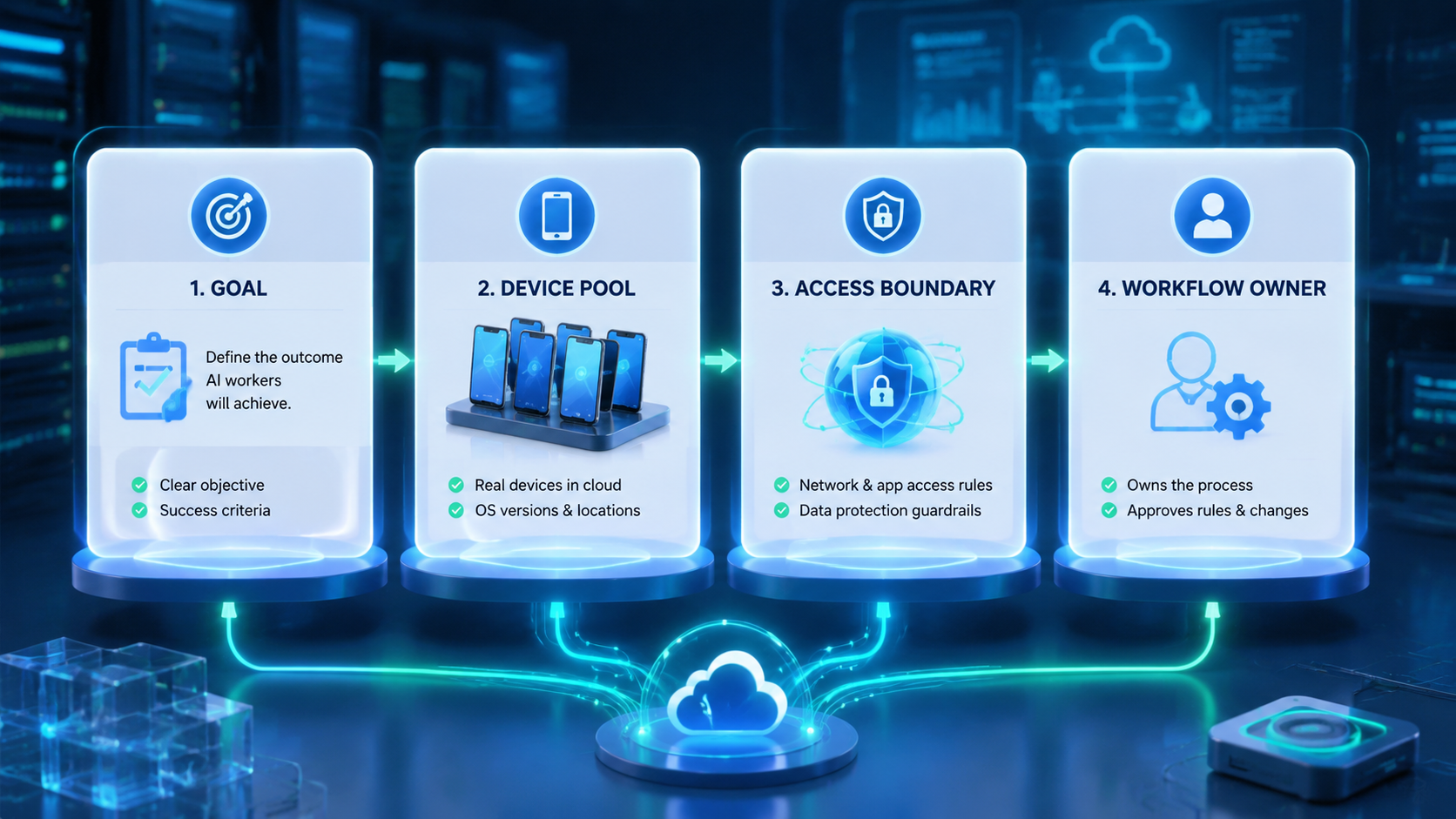
- A mobile automation platform gives AI workers a controlled place to execute mobile tasks.
- Phone context matters.
- The right pilot starts with 1 task queue, 3-5 phone environments, a named reviewer, a stop rule, and a recovery note.
- Teams should measure task completion, review accuracy, failure reasons, route mismatches, handoff gaps, and recovery time before adding volume.
What Is a Mobile Automation Platform for AI Workers?
The platform is not just a macro runner. Too narrow. Think of it as a workflow system for assigning mobile environments, actions, limits, and reviews to human or AI workers.
The phone context is the center. An AI worker needs an app state, login state, route, permissions, and task record before it can act with useful boundaries. If those details drift, the worker may complete a technical step while losing the business context.
MoiMobi's mobile automation capability fits this operating view. The platform is not framed as a magic worker. Execution layer.
Start with 5 fields: worker ID, phone ID, account group, allowed action, and reviewer. Worker ID names the actor. Phone ID names the mobile context. The account group and allowed action limit scope, while the reviewer decides whether the result can move forward.
Make the field list visible.
This model also explains why cloud phone infrastructure matters. AI workers need a persistent mobile surface. A cloud phone for AI agents gives that surface, but the task rules still decide what the worker may do inside it.
Google's helpful content guidance focuses on people-first usefulness. The same principle applies to automation design. The system should solve a real task and make the result easier to inspect.
Why a Mobile Automation Platform for AI Workers Matters
The common mistake is treating AI workers as standalone actors. They are not. They need environments, task records, permissions, and stop rules.
Context carries the work.
Mobile tasks are different from simple back-office data entry. Apps may change screens, request permissions, show account warnings, or hide key state inside a session. An AI worker needs a known phone environment so the team can understand what happened.
This matters in social workflows, ecommerce checks, app QA, marketplace monitoring, and account operations. A worker may open an app, check a message queue, collect screenshots, tag cases, or prepare draft replies for a named reviewer. The hard part is not only the click path. The harder part is knowing which account, queue, route, phone group, output folder, and reviewer were involved.
Review becomes easier when execution has a record. A manager can inspect the phone ID, task ID, account group, route ID, run result, and failure note. A second operator can resume the work without asking the first person to rebuild the setup from memory, screenshots, and chat notes.
External automation tools such as Playwright show why controlled contexts matter for browser automation. Mobile workflows need the same discipline, even though the execution surface is an Android app rather than a browser tab.
Key Benefits and Use Cases
The main benefit is controlled delegation. AI workers can handle repeatable mobile steps while people keep the decisions that need judgment, approval, or account knowledge.
Good fit cases include inbox triage, app status checks, screenshot collection, routine QA, content draft preparation, marketplace monitoring, and reporting tasks. Weak fit cases include unclear policy decisions, sensitive account changes, payments, deletions, and steps where the team cannot define a review rule.
Use this simple map:
- Worker setup: one queue.
- Phone context: keep the app, account group, route, session, task ID, and review folder tied to the task.
- Allowed actions: collect, draft, tag, check, or report.
- Review gate: require a person before publish, payment, deletion, refund language, or account-setting steps.
- Recovery note: record failure type, owner, next action, resume status, and whether the stop rule changed.
This is where device isolation becomes practical. Isolation is not a broad safety promise. It is a boundary that helps a team keep account groups, workflows, and review trails from mixing.
Google Play's developer policy center is a useful reminder that app activity should be checked against the rules of each platform used in the workflow. The system should make review and proof easier, not hide work behind automation.
How to Get Started with a Mobile Automation Platform
Start with one queue. Pick a task that happens often enough to matter, but not one that can damage an account if the first workflow has gaps. App checks, draft creation, screenshot capture, message tagging, and report preparation are good first candidates.
One queue first.
Use a 7-day pilot. Assign 3 phones if the task has separate check, draft, and review stages. Use 5 phones only if the queue already has clear owners, clear labels, and enough volume to justify extra capacity. More capacity before clear logs adds noise.
The first pilot should include these checkpoints:
-
Define task ID, account group, phone ID, route ID, worker ID, reviewer, output folder, and stop condition.
-
Write allowed actions in plain language.
-
Mark every step that needs human review before a reply, publish action, setting change, or deletion can happen.
-
Record success, pause, failure, recovery action, and next owner.
-
Review day 1, day 3, and day 7 before adding more workers.
Make it binary.
Pass means the reviewer can trace the output back to the phone, worker, account, and task record. Fail means the worker used the wrong account, met an unexpected app state, skipped a review gate, or produced an output that cannot be traced.
NIST's security and privacy controls catalog is broader than this topic, but its access control and audit ideas are relevant. Teams do not need to copy a full compliance program. They do need ownership, records, and review.
Common Mistakes to Avoid
The first mistake is giving an AI worker a mobile environment without a task boundary. That turns the phone into a loose tool. The worker should know the app, account group, allowed actions, and stop rule before it starts.
Labels matter.
The second mistake is skipping human review too early. Automation can collect, draft, compare, or tag. Human review should stay close to actions that publish, spend, delete, change account settings, or affect customers directly.
The third mistake is treating routing as a background setting. If the workflow depends on region, account group, or network plan, route ID belongs in the task record. Do not leave it in a private chat or an operator's memory.
Use a stop rule:
- Stop when the account shown in the app does not match the task.
- Stop on a new permission prompt.
- Stop when route, language, account group, or app state does not match the planned workflow.
- Stop before publish, payment, deletion, or account-setting changes.
- Stop when output has no task ID, phone ID, worker ID, route ID, reviewer, and recovery owner.
Plan the pause.
This stop rule protects the workflow from silent drift. It also gives operators a shared language for review. The goal is not to blame the worker; the goal is to find the weak step before it repeats.
Who It Fits and When It Is a Strong Match
The strongest fit is a team that already has repeatable mobile work. The task happens often. The account groups are clear. A reviewer knows what good output looks like.
Fit starts there.
AI workers are a better match when the work has a narrow input and a clear output. For example, "open the app, collect unread counts, tag routine messages, and draft replies" is easier to control than "manage this account." Small tasks make review possible.
Weak fit appears when the team cannot describe allowed actions. If every run needs judgment, negotiation, platform interpretation, or customer-specific decision making, the platform can still help with preparation, but it should not replace the human step.
A marketplace team is a practical example. One worker checks listing status across 3 account groups and saves screenshots to the review folder. Another collects app screenshots. A reviewer approves reply drafts for customer messages that mention refunds, delays, or account status.
Traceability improves.
Each worker uses a named phone group. Each phone group maps to an account set, route rule, app state, and output folder. Each result goes back to a task record. The system stays readable because work is split into bounded queues.
Pilot Rollout, Measurement, and Recovery Checks
A pilot should answer whether AI mobile execution is easier to control than the old process. It should not try to prove every workflow at once.
Limit the scope.
Track 6 fields during the pilot: setup time, completion result, failure reason, route ID, reviewer decision, and recovery time. These fields show whether the platform is helping or just moving confusion into a new tool.
Add one example queue to the pilot notes. A social inbox worker might open 3 account groups, collect unread counts, tag routine messages, and create 5 draft replies for review. The reviewer checks the phone ID, account group, route ID, message category, and draft text before any reply is sent.
Make the pass rule simple.
Pass means each draft maps back to a task record. Fail means the worker cannot prove which account, phone, route, or message produced the draft. Pause the workflow when 2 failures have the same root cause, same account group, same route, or same missing reviewer note.
Use the 7-day review pattern:
- Day 1: check phone and account match.
- Day 3: review repeated failures, unclear stop conditions, route mismatch, missing output labels, and reviewer questions.
- Day 7: decide whether to scale, redesign, pause, or stop the workflow.
Decide from evidence.
Continue the pilot if completion improves and reviewers can trace outputs without extra chats. Redesign it if failures repeat. Stop it if the task requires judgment that cannot be reviewed from the task record.
Use a short weekly scorecard:
- Green: task finished, reviewer approved, and recovery was not needed.
- Yellow: task finished, but the reviewer needed extra context from chat, screenshots, or the original operator.
- Red: task stopped because account, route, app state, or output record did not match.
Scorecard, not vanity. It tells the operator what to fix next.
Green work can scale slowly after 2 clean review cycles. Yellow work needs a clearer task record with better labels, route notes, and owner fields. Red work should not scale until the team fixes the stop condition.
For a second pilot, change only one variable and write that variable at the top of the runbook. Add another phone group, another account group, or another worker, but not all 3 at once. A narrow change makes the next failure easier to explain and keeps the review team from guessing during the next review cycle.
For teams using proxy network controls, routing should be logged with each run. Route data can stay simple. It needs to be visible to the reviewer and tied to the task ID, account group, and run note.
Add a rollout gate before the second queue. Gate 1 is task clarity: the worker must have a task ID, account group, phone ID, route ID, and reviewer. Gate 2 is output clarity: the result must show what changed, what was collected, and what needs review. Gate 3 is recovery clarity: the team must know whether the run can resume, restart, or stop.
The second queue should look similar to the first queue. Do not jump from inbox tagging to account changes. A better next step is screenshot collection, app status checks, or draft sorting because those tasks still have clear review points.
Use 3 rollout questions:
- Which field was missing most often?
- Which step caused the longest recovery time during the 7-day pilot review?
- Which task could a new reviewer inspect without asking the original operator for chat context?
These questions keep the team grounded. The goal is not to prove that AI workers can touch every mobile task. The practical goal is to find the narrow tasks where mobile execution becomes more traceable than the old manual process.
Frequently Asked Questions
Is a mobile automation platform the same as RPA?
Not exactly.
RPA is a broad category. This platform type focuses on app-based mobile execution, phone environments, routing, account boundaries, and review paths.
Can AI workers use cloud phones?
Yes, with limits.
A cloud Android for AI agents can provide the mobile surface. The team still needs task rules, allowed actions, and review gates.
What should the first AI worker task be?
Start narrow.
Choose a task that collects, checks, drafts, or tags. Avoid high-impact actions until the review process is proven across several clean runs.
How many phones should a pilot use?
Use 3 first, not 10, so check, draft, and review stages stay separate during the pilot.
Three phones can separate check, draft, and review stages. Add more only after failures, handoffs, route labels, reviewer notes, and output folders are clear.
What belongs in the task record?
Use core fields.
Include task ID, worker ID, phone ID, account group, route ID, action list, result, failure reason, and reviewer.
When should a run stop?
Stop on mismatch.
Stop when the account, route, app state, permission prompt, or output record does not match the planned task.
Does this replace human operators?
No.
It shifts repeatable mobile steps to controlled workers with phone context, task IDs, route labels, and recovery notes. Humans still define rules, review outputs, handle judgment, and improve the workflow.
How does this support multi-account work?
It adds boundaries.
Each account group can have its own phone context, routing plan, task rules, and review trail instead of sharing a loose device pool.
Conclusion
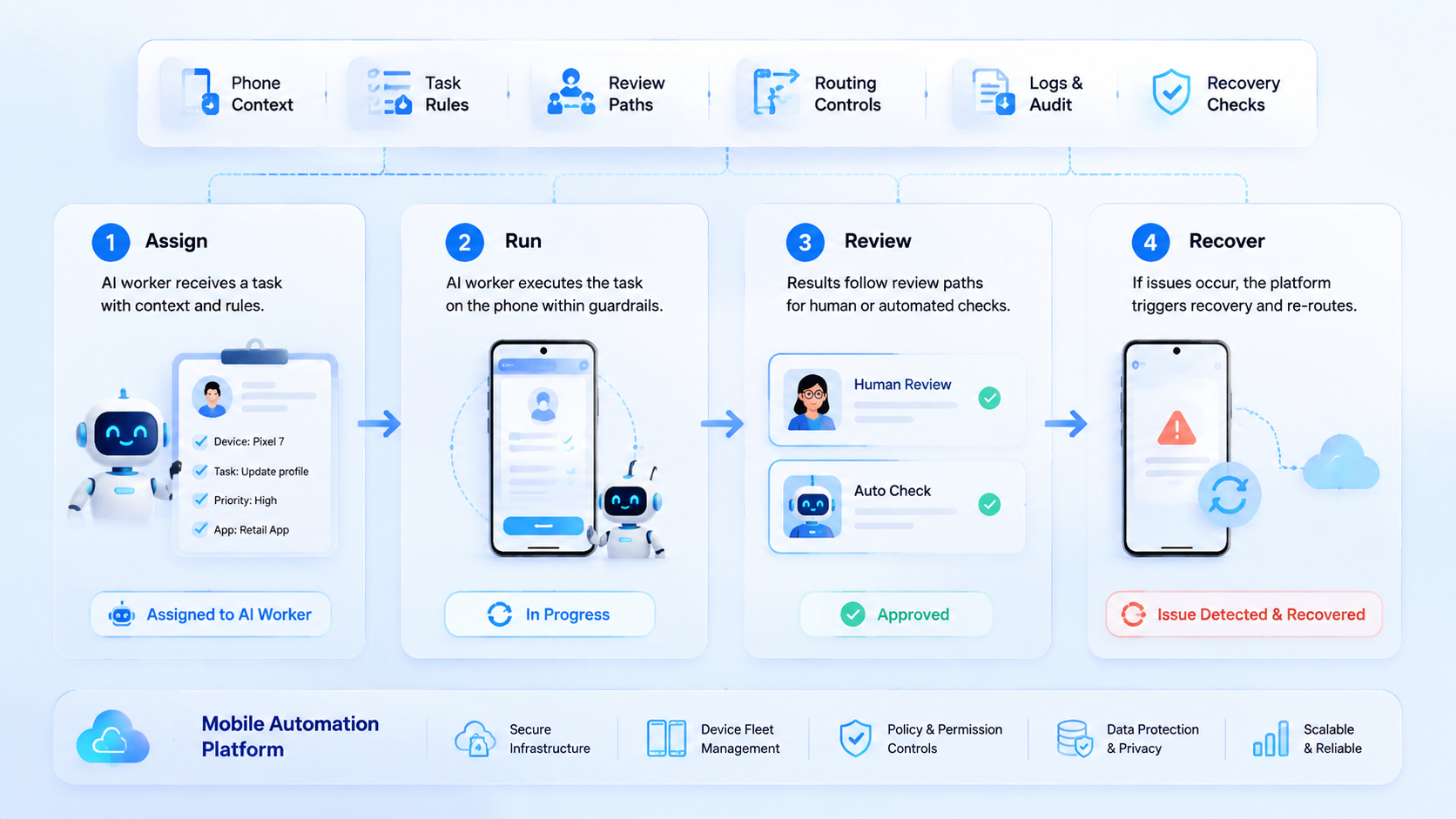
For AI workers, mobile automation is useful when mobile tasks need more than scripts. It gives workers a controlled phone context, but the real value comes from task boundaries, routing records, review gates, and recovery notes.
The next step is a narrow pilot. Pick 1 queue, assign 3 phones, define allowed actions, record failures, and review results on day 1, day 3, and day 7. If the team can trace every output without asking for missing context, the workflow is ready for careful expansion.
Before that expansion, write a one-page runbook. Name the worker, phone group, account set, route rule, output folder, reviewer, and stop condition. Add one example task that shows what a good run looks like.
Then test the handoff. Ask a second reviewer to inspect the last 5 runs without help from the original operator. If the reviewer understands the result, the record is strong. If not, fix the labels before adding more workers.



