
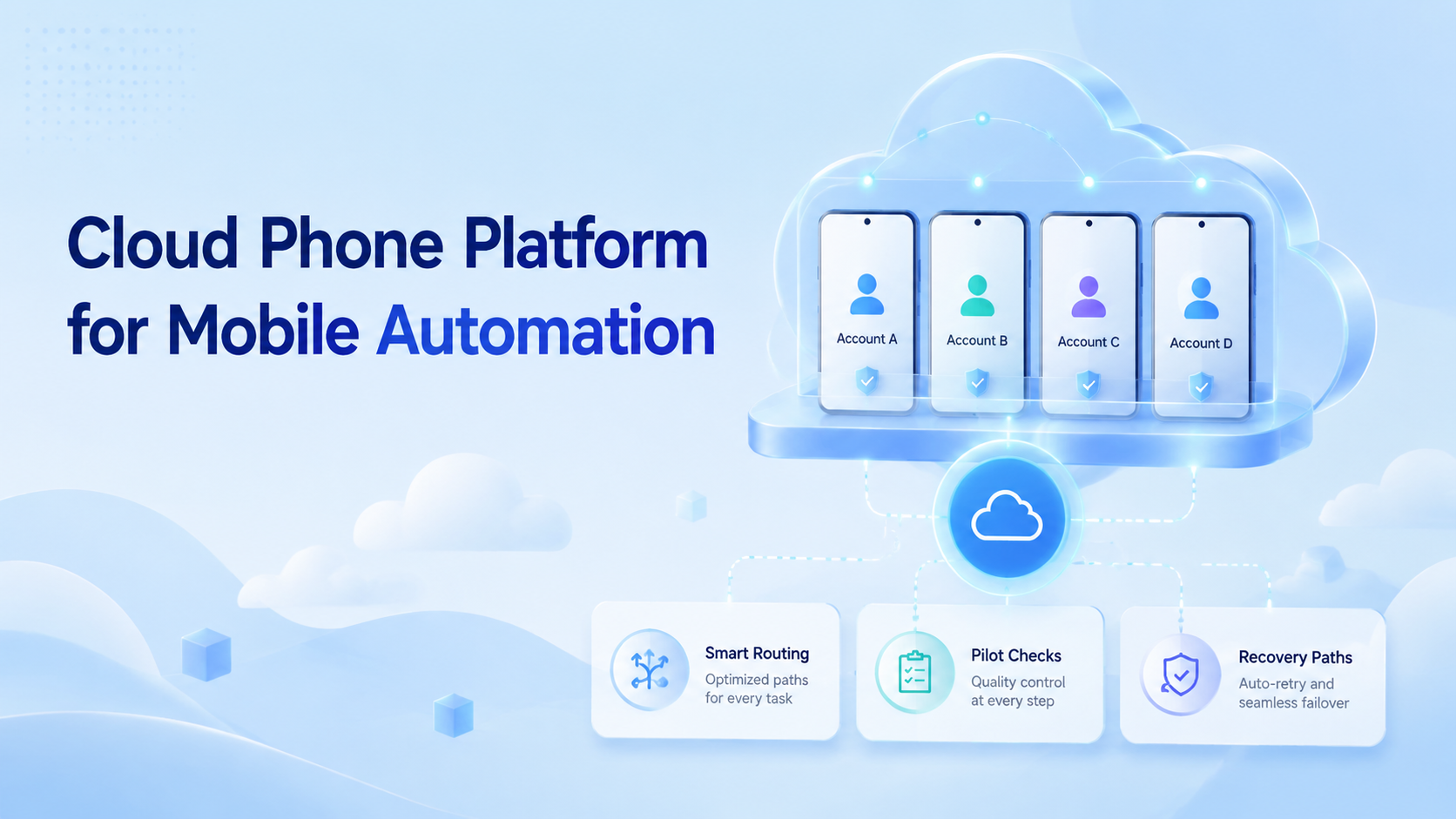
A cloud phone platform is an infrastructure layer that lets teams run persistent Android environments for mobile workflows without depending on local handsets. It gives operators, automation systems, and reviewers a controlled place to execute app-based work.
Base first.
The practical value is not only remote access. Teams use cloud phones when mobile work needs separation, repeatable setup, clean routing, and handoff across roles. A local phone can work for one person. It becomes hard to manage when dozens of accounts, regions, clients, or task queues need consistent execution.
Scale changes the problem.
Mobile automation also needs an operating boundary. Scripts, AI agents, and human operators should know which device context they can use, what actions are allowed, where results are recorded, and when the run should stop. Without those controls, automation can finish a task while creating unclear ownership.
That gap is costly.
Key Takeaways
- A cloud phone platform gives teams persistent Android environments for mobile execution, review, and handoff.
- Mobile automation needs device context, routing rules, task limits, logs, and recovery checks.
- The strongest fit is team-scale work where local phones are hard to assign, audit, or reuse.
- A pilot should measure setup time, failure reasons, task completion, review quality, and recovery speed before rollout.
What Is a Cloud Phone Platform for Mobile Automation?
The common misunderstanding is that a cloud phone platform is just a remote Android screen. Too narrow. A screen is only the interface. Real team use also needs persistent environments, access control, routing choices, and repeatable workflows.
Access alone is thin.
For mobile automation, the device context matters as much as the automation logic. A workflow may need a specific app state, account login, language setting, permission state, or review path. If those details reset or mix across tasks, the automation result becomes hard to trust.
Context carries the work.
MoiMobi frames the cloud phone as part of a wider execution system. The phone environment is where mobile tasks happen. The surrounding workflow decides who can use it, what the task should do, and how the result moves back to the team.
This distinction helps teams avoid a weak setup. Renting a remote phone may solve access. It does not automatically solve assignment, isolation, recovery, or reporting. Before work starts, a workable system should answer ownership, account, routing, review, and stop-rule questions in the same task record.
Ask these first.
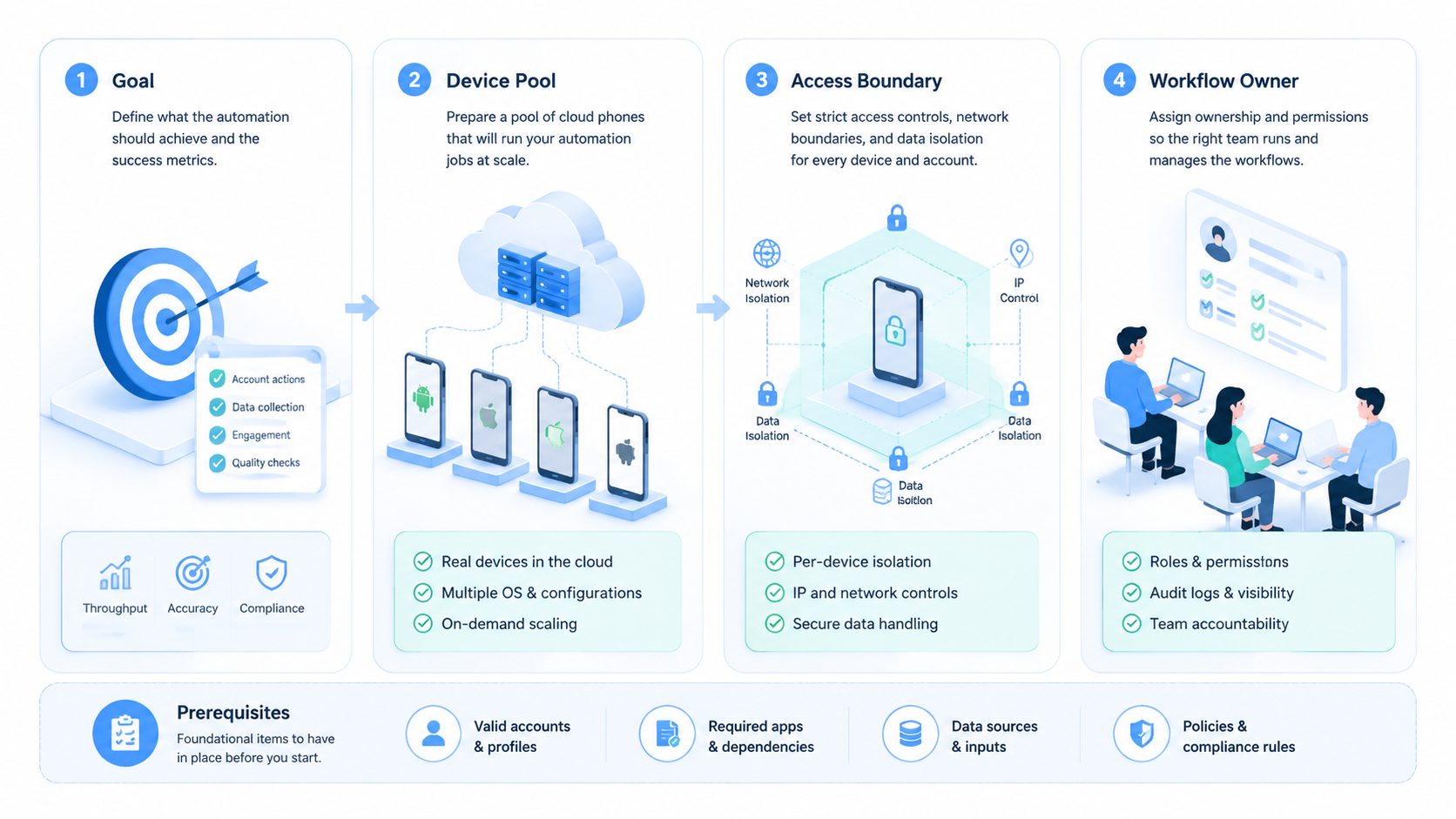
Start with five fields: workflow owner, account set, route plan, reviewer, and stop rule. The owner prevents random reuse. The account set keeps context separated, while the route plan tells operators how the run should connect. The reviewer and stop rule keep completed work from bypassing quality control.
Google's helpful content guidance emphasizes people-first usefulness and clear purpose. For an operations system, the same discipline applies internally: the tool should serve a real workflow, not create another dashboard to manage.
Why a Cloud Phone Platform for Mobile Automation Matters
Mobile work often starts as a simple habit. One operator uses one phone, one account, and one checklist. That model breaks when the team adds more accounts, more regions, more approvals, or AI-assisted execution.
Then the mess appears.
Shared execution changes the operating model. Instead of asking each operator to maintain a local device, the team can assign cloud Android environments to workflows. That makes it easier to separate account groups, review task history, and hand off work when a person changes role or shift.
Handoff becomes visible.
This matters most when mobile steps are part of a larger business process. A social media workflow may include content review, app publishing, comment checks, and reporting. An ecommerce workflow may include store checks, competitor monitoring, customer message triage, and screenshot capture across store accounts, language settings, and support queues. A QA workflow may need repeated app checks across versions and settings.
This setup does not replace judgment. It gives judgment a cleaner place to operate. During review, a manager can ask whether the right phone, account, route, checklist, task owner, and stop rule were used.
Operators can see which environment belongs to a task. AI agents can be limited to the phone assigned to that workflow. Those boundaries make review easier after the run.
Boundaries help review.
External automation tools such as Playwright show how browser tasks can be scripted with controlled contexts. Mobile operations need a comparable discipline around device contexts. The exact tooling differs, but the operating principle is similar: controlled environments make execution easier to inspect.
For mobile apps, platform rules also matter. Google Play's developer policy center is a useful reminder that app activity, account behavior, and content handling should be reviewed against the rules of each platform used in the workflow. A cloud phone setup should make that review easier, not hide it.
Key Benefits and Use Cases
The main benefit is not speed by itself. Speed without boundaries creates rework. The value appears when mobile execution becomes repeatable, assignable, and reviewable.
Speed comes later.
Common use cases include multi-account operations, app-based marketing workflows, mobile QA, marketplace checks, social account maintenance, and task queues for human or AI workers. This model is especially relevant when the same workflow must run across many accounts while keeping environments separate.
Separation is the point.
MoiMobi's mobile automation capability fits this need because automation is treated as execution, not only scripting. Teams can connect the mobile environment to a workflow, then decide which tasks are safe to automate and which require human review.
Useful benefits usually fall into four groups:
- Persistent setup: Apps, sessions, and workflow settings can stay with the assigned environment.
- Cleaner handoff: Same context.
- Parallel capacity: Teams can run more mobile tasks without a pile of physical phones, while managers still see which phone served which queue.
- Better recovery: Phone, task, account, route, and failed step stay linked.
There are limits. A platform cannot make a bad task approved, fix unclear policies, or remove the need for rule review. Teams still need platform-specific guidance, approval paths, and careful handling of sensitive account actions. The Google Search Central SEO starter guide is about search, but its basic lesson applies broadly: clear structure helps people and systems understand what belongs where.
Use a simple run card for each task group:
| Field | Plain rule |
|---|---|
| Phone name | Use a name tied to the team, app, and task |
| Task ID | Match the work queue or ticket ID |
| Account group | Keep one clear account set per phone |
| Route | Note the planned route before work starts |
| Human check | Mark the step that needs review |
| End state | Done, paused, failed, or sent back |
This card keeps the phone from becoming a loose asset. It also gives a new team member enough context to review past runs without asking the first operator to explain the whole setup.
Keep it plain.
How to Get Started with a Cloud Phone Platform for Mobile Automation
Start with the workflow, not the device list. A team that buys capacity before mapping work often ends up with unused phones, duplicated setups, and unclear ownership. A simple first pilot should prove that the platform improves execution quality.
Map work first.
Use these checkpoints before scaling:
- Define the workflow. Name the task, owner, account group, allowed actions, review output, and stop conditions.
- Assign phone environments. Link each cloud phone to one workflow or account group instead of treating all phones as a shared pool.
- Set routing rules. Decide which tasks need specific network routing and which can use a default route.
- Separate human and automated actions. Mark which steps can run automatically and which steps need human approval.
- Record outcomes. Track success, failure reason, review status, and recovery action for every pilot run.
The pass condition should be operational, not cosmetic. A pilot is not successful because the phone opened or the script ran once. It is successful when the team can repeat the task, review the result, explain failures, and recover without guessing.
This is the bar.
Keep the first rollout small. Choose one workflow with real volume but limited downside. For example, start with app checks, content draft review, screenshot collection, message triage, or reporting tasks before moving into actions that change account settings or publish content.
Small is safer.
Here is a concrete pilot shape. Use 3 cloud phones for a weekly marketplace inbox triage workflow: 1 phone for account checks, 1 for draft replies, and 1 for review screenshots. The task record should include task ID, store account, phone ID, route ID, app version, operator, reviewer, message category, proposed reply, final action, and failure reason.
The automation step can open the app, collect unread message counts, tag routine messages, and prepare draft replies. A human reviewer approves any reply that mentions refunds, account status, shipping disputes, or pricing.
Set pass and fail rules before the first run. Pass means the reviewer can trace every draft reply back to 4 fields: phone ID, account, message, and operator note. Fail means the account is unclear, the app shows a new warning, the route does not match the task plan, or the result cannot be tied to a task ID. This rule is simple enough for both operators and AI workers to follow.
Make it binary.
Run the pilot for 7 days before adding volume. Review day 1 for setup gaps, day 3 for repeated failures, and day 7 for rollout fit. If 2 or more failure types repeat, fix the workflow before adding more phones.
Do not scale noise.
NIST's security and privacy controls catalog is broad, but its emphasis on access control, audit, and configuration management is relevant to team operations. Even when a team is not building a regulated system, the same ideas support cleaner execution.
Common Mistakes to Avoid
One common mistake is treating every cloud phone as interchangeable. That creates hidden context mixing. A phone assigned to one client, brand, region, or account group should not be reused casually for another workflow without a reset and review.
Labels matter.
Another weak pattern is automating before the manual workflow is stable. Automation repeats instructions. It does not repair unclear ownership, missing approvals, or weak stop rules. When an operator cannot explain the approved manual path, an AI agent cloud phone workflow will likely fail in harder-to-debug ways.
Stabilize first.
Recovery is the mistake teams notice last. Mobile tasks can fail because of app changes, login prompts, network issues, permission dialogs, data mismatch, or human approval gaps. A team needs a recovery path that says who checks the issue and what gets recorded.
Plan the pause.
Use this stop-rule list during early pilots:
- Stop when the account shown on screen does not match the task record.
- Stop on a new permission prompt.
- Stop when the route, region, language, account group, or app state does not match the workflow.
- Stop before publishing, payment, deletion, or account-setting steps without approval from the named reviewer.
- Stop when the output lacks a task ID, phone ID, reviewer name, and recovery note.
This is where device isolation becomes an operating concern. Isolation is not a magic safety claim. It is a practical boundary that helps teams reduce context mixing and review each environment more clearly.
Who It Fits and When It Is a Strong Match
The right fit is repeated mobile work across accounts, apps, regions, or clients. The value grows when local phones are hard to assign, when handoff is messy, or when review requires the same environment that performed the work.
Fit starts there.
AI-assisted operations add another fit case. A cloud phone for AI agents gives the agent an execution surface, but the team still needs rules around account scope, permissions, and review. Agents should not decide their own operating context.
Set the lane.
- Multi-account mobile workflows
- Distributed operators and reviewers
- App-based tasks that need persistent setup
- Teams that need task logs and recovery checks
- One person using one personal phone
- Short tests with no account context
- Workflows with unclear policy approval
- Teams expecting automation to replace review
The decision point is simple. Occasional remote access may not justify a platform rollout. Persistent mobile environments connected to task ownership, routing, review, and automation are a stronger reason to use platform infrastructure.
Choose by workflow.
A practical example is a marketplace operations team. Listings first, with the app, account, queue name, route, screenshot folder, and reviewer all named in the task record. One queue checks product listings in a mobile app.
Another queue responds to routine messages from customers, flags refund terms, and adds notes for the reviewer. A reviewer approves edge cases.
Separate cloud phones keep those queues from sharing account state. The task record keeps the review trail readable.
Traceability improves.
Pilot Rollout, Measurement, and Recovery Checks
A pilot should prove that mobile execution becomes easier to control. It should not aim to test every feature at once. Pick one workflow, define success, and keep enough records to make a rollout decision.
Keep the scope tight.
Track five measurements during the first two weeks:
| Measurement | What to look for |
|---|---|
| Setup time | How long it takes to prepare a phone for the task |
| Completion rate | How many tasks finish without manual rescue |
| Failure reason | Whether failures come from app state, route, login, data, or instructions |
| Review accuracy | Whether reviewers can trace the task without asking the operator |
| Recovery time | How long it takes to pause, inspect, correct, and resume |
The recovery loop matters because it exposes weak process design. When every failed task needs a chat thread and a screen recording to explain what happened, the platform is not yet integrated into operations. The team may need clearer task IDs, better labels, or stricter ownership rules.
Fix the record.
For teams using proxy network controls, the pilot should also record which route was assigned and whether the route matched the workflow plan. Do not turn routing into an afterthought. Treat it as part of the execution record.
Finish the pilot with a decision review. Keep the workflow if it saves operator time and improves traceability across the full task record. Redesign it if failures repeat. Stop it if the task has too much rule ambiguity or requires judgment that cannot be reviewed consistently.
Decide from evidence.
Use a short review note at the end of each pilot week:
- Which task type had the cleanest completion path?
- Which failure reason appeared more than twice?
- Which phone assignment was unclear during handoff?
- Which automation step needed human review most often during the 7-day pilot?
- Which recovery action should become a standard operating step for the next run and owner?
Keep the note plain. A short list with task ID, phone ID, owner, result, and next fix is enough for early review. Long reports slow the team down before the workflow is stable.
Frequently Asked Questions
Is a cloud phone platform the same as an emulator?
Not exactly.
No. An emulator usually focuses on running a virtual device for local testing or development. A cloud phone platform is used as shared execution infrastructure for mobile workflows, accounts, routing, and team handoff.
Can a cloud phone platform run AI agent workflows?
Yes, with limits.
It can support AI agent workflows when the agent has a defined task, account scope, device context, and review path. The platform should not give the agent unlimited freedom to choose actions.
How many cloud phones should a team start with?
One queue first.
Use the smallest number needed for one real pilot workflow, then record each failure reason before adding more phones. Measure completion, review quality, and recovery time before adding more phones.
What tasks should stay manual?
Review before action.
Keep high-impact actions manual until the team has clear approvals. Publishing, payments, account settings, deletion, and sensitive customer actions usually need stricter review.
Does routing matter for mobile automation?
Yes.
Yes, when the workflow depends on region, account group, or network plan. Routing should be documented with the task, route ID, account group, and reviewer note instead of handled informally.
What is the role of logs?
Logs prove context.
Logs connect the phone, task, account, operator, automation run, result, and reviewer. They turn mobile execution into a process the team can inspect.
When should a team stop a pilot?
Stop on confusion.
Stop when failures cannot be explained, reviewers cannot trace outputs, or operators keep bypassing the defined workflow. Those signals show that the operating model needs repair.
How does this connect to multi-account work?
It sets boundaries.
Multi-account work needs separation and ownership. A cloud phone platform helps assign each environment to a task group instead of mixing account work on personal devices.
Conclusion
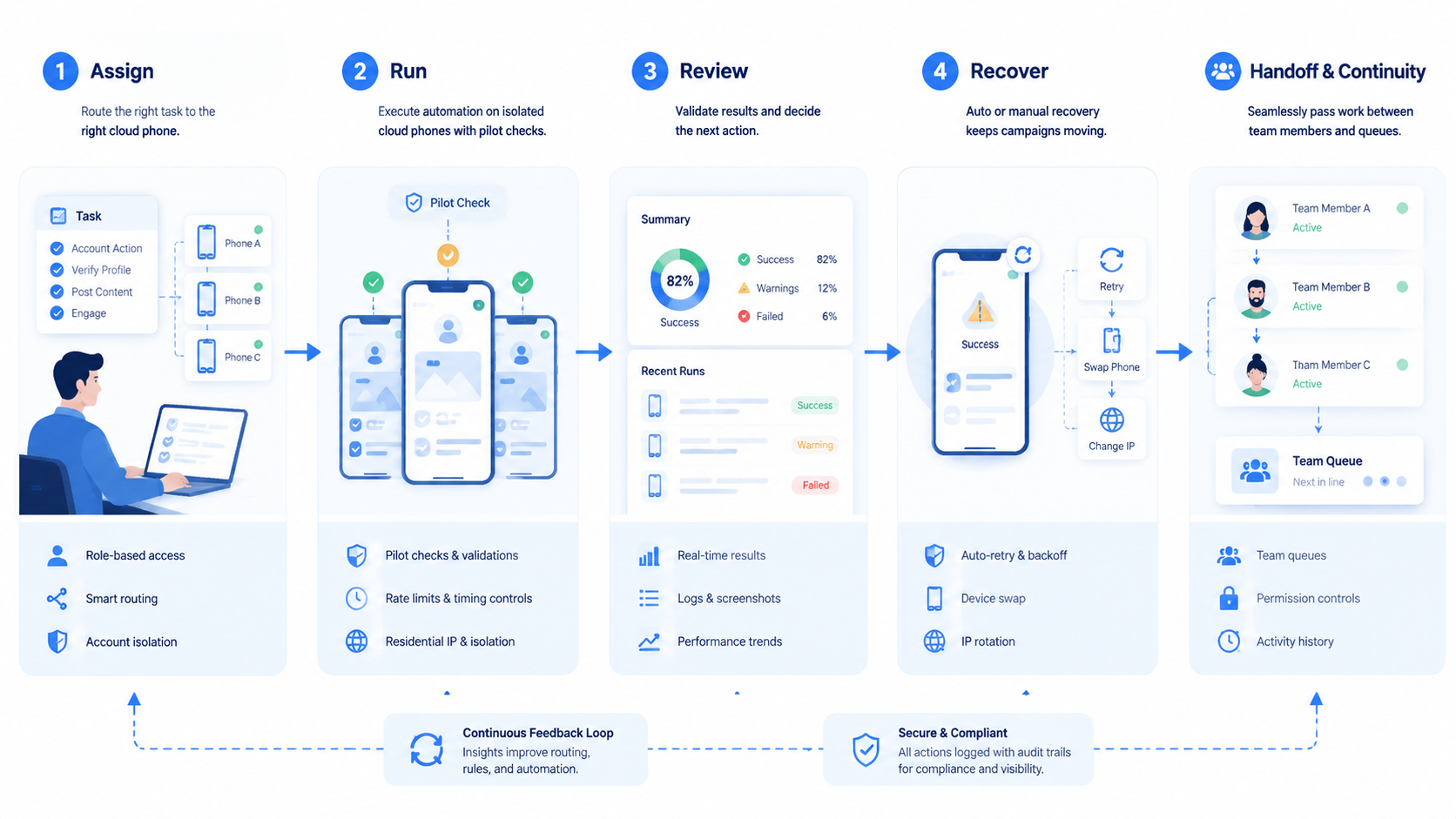
A cloud phone platform for mobile automation is useful when mobile work becomes a team operation. It gives teams a persistent Android execution layer, but the real value comes from the surrounding controls: ownership, routing, task scope, review, and recovery.
The best rollout path is narrow. Choose one workflow, assign phones clearly, separate automated and manual actions, record failure reasons, and review results before scaling. This keeps the platform connected to work that actually happens.
Before committing to a larger rollout, check 3 things in the review note and link each answer to a task record. Can the team explain which phone belongs to which workflow? Can a reviewer trace every result without asking for missing context?
The final check is recovery. Does the process show why a run failed? If those answers are clear, the team has a stronger base for mobile automation.



