
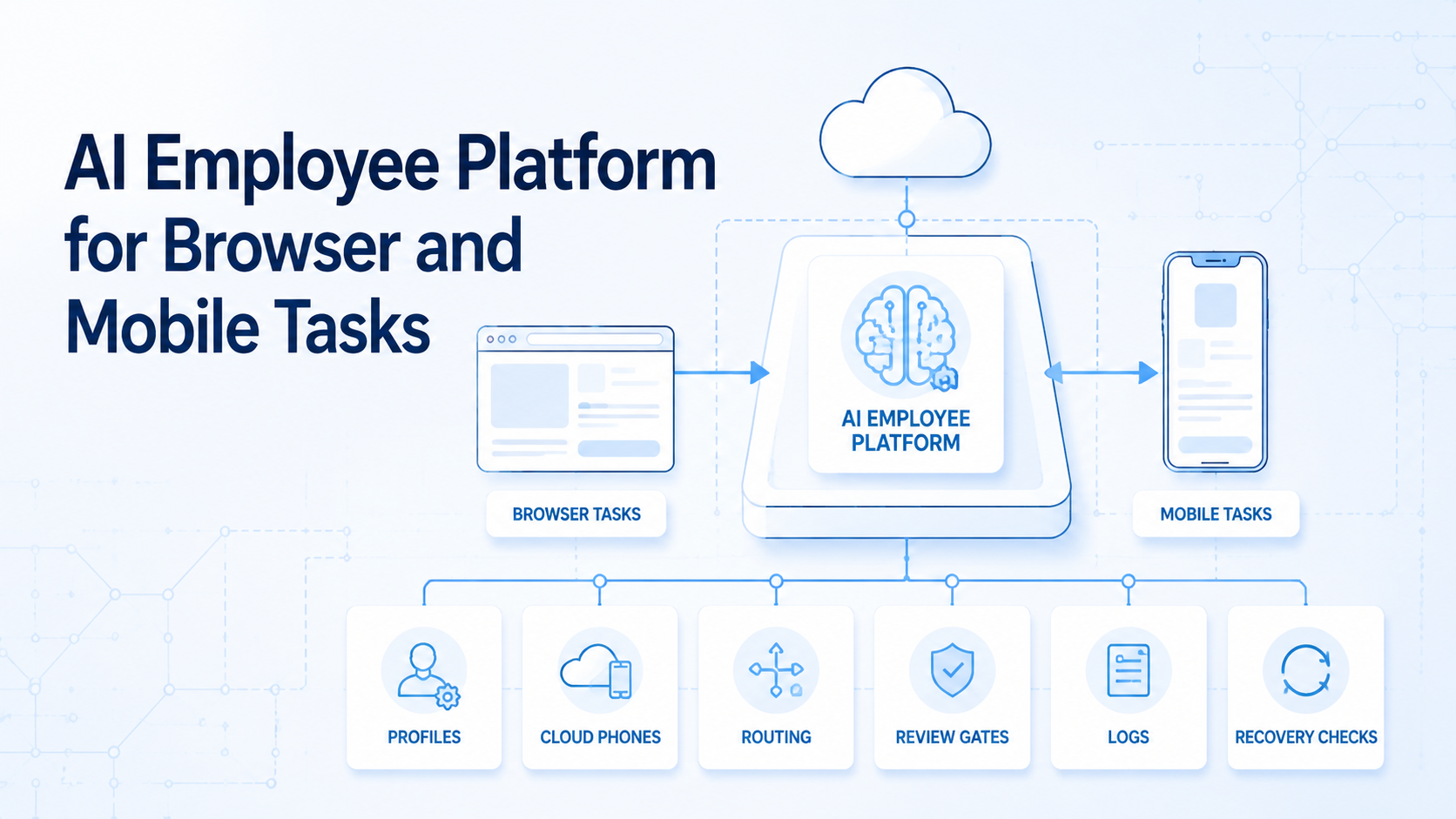
An AI employee platform is an execution system that lets digital workers complete bounded browser and mobile tasks under team rules. It gives each worker a task record, account context, environment, review gate, and recovery path.
Base first.
The decision is not whether an AI worker can click buttons. The real decision is whether a team can control which browser profile, which mobile phone, which account group, and which output folder the worker uses. Without that control, automation can look successful while the business result remains hard to trust.
Browser and mobile work also need different surfaces. A browser task may need a profile, session, permission set, and site list. A mobile task may need a cloud phone, app state, route, account group, and screenshot folder.
Same worker, different context.
Key Takeaways
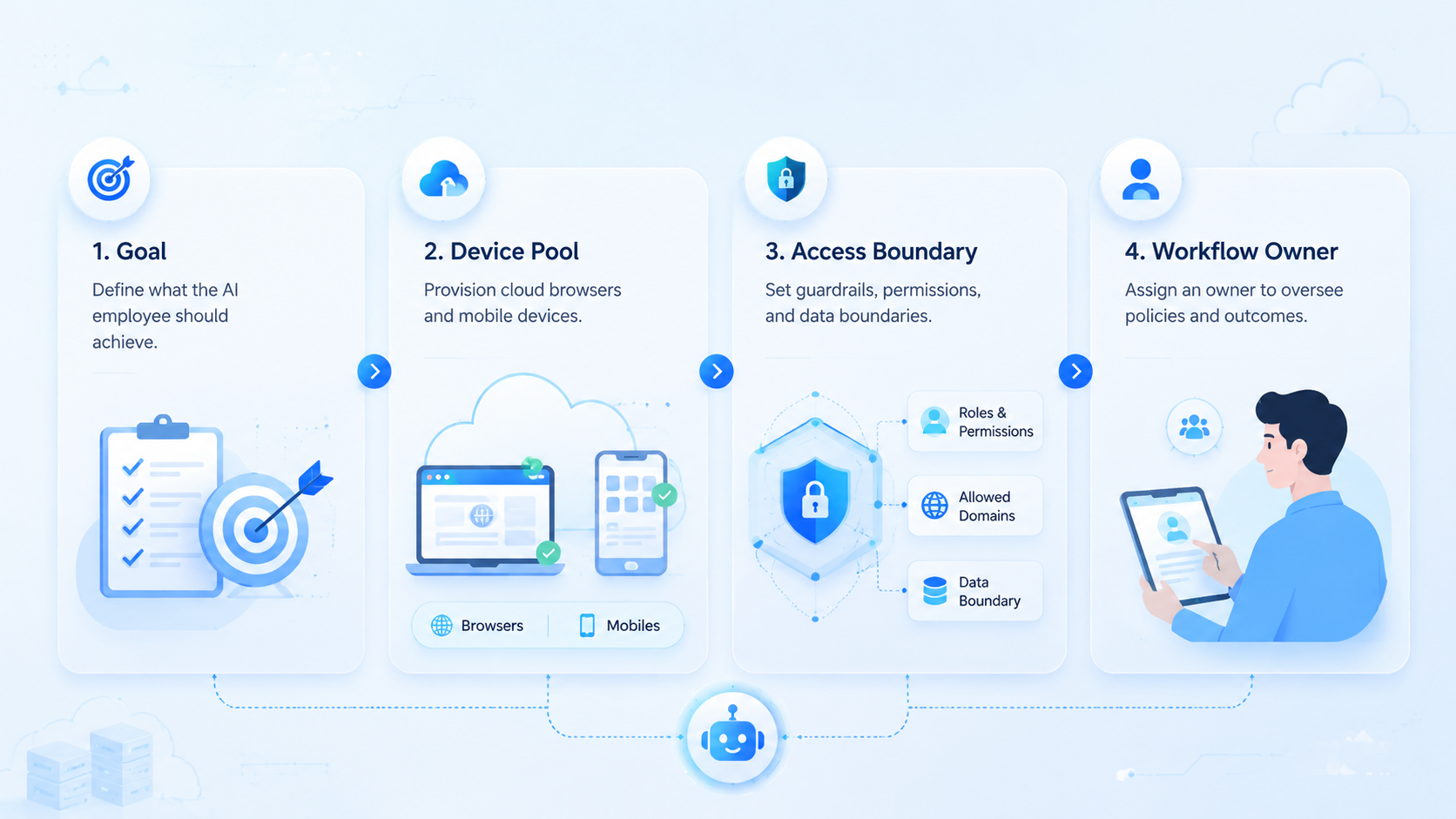
- An AI employee platform gives digital workers controlled environments for browser and mobile execution.
- Teams need profile assignment, cloud phone mapping, task IDs, route labels, review gates, and recovery notes.
- A first pilot should use 1 queue, 3-5 environments, and a named reviewer.
- The platform fits repeatable work with clear inputs, clear stop rules, and outputs that a reviewer can inspect.
What Is an AI Employee Platform?
The platform is not a generic chatbot. Too narrow. It is an operating layer for assigning digital workers to structured tasks across browser and mobile environments.
The environment matters. A worker may need a browser profile for web dashboards, a cloud phone for app-based work, a route plan, and a review folder. If those pieces are not tied to the task, the team cannot inspect the result cleanly.
Start with 6 fields: worker ID, task ID, browser profile, phone ID, account group, and reviewer. Worker ID names the actor. Task ID names the job. The profile and phone ID name the execution surfaces, while the reviewer decides whether the output can move forward.
Make the field list visible.
MoiMobi should be understood as execution infrastructure, not only a rental tool. Its mobile automation layer gives teams a way to connect cloud phone environments with repeatable mobile workflows. Browser tasks can use the same operating logic.
Google's helpful content guidance is written for web content, but the principle transfers well. Useful systems make purpose, context, environment, reviewer, output, and recovery path clear to the people who rely on them.
Why an AI Employee Platform Matters for Browser and Mobile Work
The common mistake is treating AI employees as independent decision makers. They are not. They need assigned environments, allowed actions, output rules, and stop conditions.
Context carries the work.
Browser tasks and mobile tasks fail in different ways. A browser profile can use the wrong login, wrong client workspace, or wrong permissions. A mobile task can open the wrong app account.
This matters in agency operations, ecommerce checks, social media work, app QA, marketplace monitoring, and reporting. A worker may collect web metrics, open a mobile app, tag routine messages, prepare drafts, or capture proof for a reviewer. The harder part is knowing which account, profile, phone, route, output folder, review note, AI employee platform queue, and reviewer were involved.
Review becomes easier when execution has a record. A manager can inspect the worker ID, task ID, profile ID, phone ID, account group, run result, and failure note. A second operator can resume the work without rebuilding the context from memory.
External automation tools such as Playwright show why controlled browser contexts matter. A browser and mobile AI employee platform extends that idea into operating rules across both surfaces, including profile choice, phone choice, and review ownership.
Key Benefits and Use Cases
The main benefit is controlled delegation. AI employees can handle repeatable browser and mobile steps while people keep decisions that need judgment, approval, or customer knowledge.
Good fit cases include report collection, browser dashboard checks, app status checks, screenshot capture, message tagging, draft preparation, and marketplace monitoring. Weak fit cases include account policy interpretation, payments, deletions, sensitive settings, and customer-specific exceptions.
Use this operating map:
- Browser context: profile.
- Mobile context: phone ID, app state, route ID, account group, screenshot folder, and reviewer note.
- Allowed actions: collect or draft.
- Review gate: human review before risky actions, with the AI employee platform run ID visible.
- Recovery note: record failure type, next owner, resume status, changed stop rule, reviewer comment, and what should happen next.
This is where device isolation is practical. Isolation is not a broad safety promise. It is a boundary that helps teams keep account groups, phone environments, and review trails from mixing.
Google Play's developer policy center is a useful reminder that app activity should be checked against each platform's rules. The system should make review easier, not hide work behind automation.
How to Get Started with an AI Employee Platform
Start with one queue. Pick a task that appears often enough to matter, but not one that can damage an account if the first run is messy. Reporting, screenshot collection, draft sorting, message tagging, and app status checks are safer first candidates.
One queue first.
Use a 7-day pilot. Assign 3 environments if the task has separate collect, draft, and review stages. Use 5 only when account groups, reviewers, output folders, stop rules, handoff owners, and recovery labels are already clear.
The first pilot should include these checkpoints:
-
Define task ID, worker ID, browser profile, phone ID, account group, route ID, reviewer, and output folder.
-
Write allowed browser actions and mobile actions in plain language for the AI employee platform pilot and attach them to the queue runbook.
-
Mark every step that needs human review before reply, publish, payment, deletion, or settings changes.
-
Record success, pause, failure, recovery action, next owner, and whether the run can resume.
-
Review day 1, day 3, and day 7 before adding more workers.
Make it binary.
Pass means the reviewer can trace the result back to the worker, profile, phone, account, and task record. Fail means the worker used the wrong context, skipped a review gate, or produced output without a clear source.
NIST's security and privacy controls catalog is broader than this topic, but its access control and audit ideas are relevant. Teams need ownership, records, and review before they scale execution.
Common Mistakes to Avoid
The first mistake is assigning a worker without assigning an environment. A digital worker should not choose its own browser profile or mobile phone. The runbook should decide that before the run starts.
Labels matter.
The second mistake is using the same review rule for every task. A reporting task can be reviewed after completion. A publishing task should stop before the final action and wait for a reviewer note that names the profile, phone, and output folder. A reply draft needs human approval.
The third mistake is treating browser and mobile logs as separate worlds. If one workflow crosses both surfaces, the same task ID should connect browser output, mobile output, screenshots, and reviewer notes.
Use a stop rule:
- Stop when the browser profile or phone ID does not match the task.
- Stop on a new permission prompt, login warning, or unexpected app state.
- Stop on unclear account group.
- Stop before publish, payment, deletion, refund wording, account-setting changes, or customer-facing replies.
- Stop when the result lacks task ID, worker ID, profile ID, phone ID, and reviewer.
Plan the pause.
This stop rule turns failure into a review signal. It tells the team whether the issue came from the task design, environment mapping, worker instruction, or review process.
Who It Fits and When It Is a Strong Match
The strongest fit is a team that already has repeatable browser and mobile work. The task happens often. The accounts are known. A reviewer can describe a good output.
Fit starts there.
AI employees work best when the task has a narrow input and a clear output. "Collect these dashboard values and compare them with 3 app screenshots" is easier to control than "manage this client." Small jobs make review possible.
Weak fit appears when every run needs judgment. If the task requires negotiation, customer-specific decisions, or policy interpretation, the platform can prepare materials, but a person should still own the decision.
A social operations team is a practical example. One worker checks browser dashboards for 3 client accounts. Another uses a cloud phone for app screenshots. A reviewer approves drafts and flags exceptions before content leaves the queue.
Traceability improves.
Each worker maps to a named environment. Each environment maps to an account group, output folder, route label, and reviewer. The task record keeps browser and mobile work in the same review trail.
Pilot Rollout, Measurement, and Recovery Checks
A pilot should show whether AI execution is easier to control than the old process. It should not prove every workflow at once.
Limit the scope.
Track 6 fields: setup time, completion result, failure reason, profile ID, phone ID, and reviewer decision. These fields show whether the platform is improving execution or just moving confusion into another tool.
Add a concrete pilot. Use 3 workers: one for browser dashboard checks, one for mobile screenshots, and one for draft preparation. Run the queue for 7 days. Review day 1 for setup gaps, day 3 for repeated failures, and day 7 for rollout fit.
Decide from evidence.
Continue if reviewers can trace outputs without extra chats. Redesign if failures repeat. Stop if the task needs judgment that cannot be reviewed from the task record.
For teams using proxy network controls, routing should be logged with each mobile run. Route data can stay simple. It should be visible to the reviewer and tied to the task ID.
Use 3 rollout questions:
- Which context field was missing most often?
- Which step caused the longest recovery time?
- Which task could a new reviewer inspect without asking the original operator?
The practical goal is narrow. Find the tasks where browser and mobile execution becomes more traceable than the old manual process.
Add one handoff test before scaling. Ask a second reviewer to inspect the last 5 runs without help from the original operator. The reviewer should see the worker ID, profile ID, phone ID, account group, route ID, output folder, result, and failure note.
A reviewer who understands the run from the record alone is seeing a strong workflow. When screenshots from chat, private notes, or operator memory are required, the workflow is not ready. Fix the labels before adding more workers.
For a browser task, the handoff test should show which profile opened which dashboard and where the output was saved. For a mobile task, it should show which cloud phone opened which app account and where the screenshot or draft was reviewed.
This test is small, but it catches the common gap. AI employees create value only when their work can move across people, shifts, and review queues without losing context.
Before rollout, write a one-page runbook. Name the worker, browser profile, cloud phone, account group, route rule, output folder, reviewer, and stop condition. Add one good example and one stopped example so operators can see the difference.
Then test a new reviewer. Give that reviewer the last 5 task records and no extra chat history. A clear explanation from the reviewer means the operating record is strong. When the reviewer cannot connect profile, phone, route, and output, fix the fields before adding more tasks.
That final check also raises the AI employee platform keyword in a natural place: the platform is only useful when the task record survives handoff. When the record does not survive handoff, the worker is not ready for more scope.
Add a second gate before expansion. Gate 1 is browser clarity: profile ID, site list, login owner, output folder, and allowed actions must be visible. Gate 2 is mobile clarity: phone ID, app account, route ID, screenshot folder, and stop rule must be visible. Gate 3 is review clarity: the reviewer must know what changed, what was collected, and what should pause the next run.
The second queue should look similar to the first. Do not jump from report collection to account changes. A better next step is app screenshot capture, dashboard comparison, or draft sorting because each task has a clear review point.
Use a weekly scorecard:
- Green: task finished, reviewer approved, and recovery was not needed.
- Yellow: task finished, but the reviewer needed extra context from chat, screenshots, private notes, or the original operator.
- Red: task stopped because profile, phone, route, account, or output folder did not match.
This scorecard tells the operator what to fix next. Green work can scale slowly after 2 clean review cycles and one clean handoff test.
Yellow work needs a clearer task record with stronger labels, route notes, owner fields, and output folders. Red work should not scale until the team fixes the stop condition.
For a second pilot, change one variable and write it at the top of the runbook. Add another browser profile, another phone group, or another worker, but not all 3 at once. A narrow change makes the next failure easier to explain and prevents the review team from guessing.
Frequently Asked Questions
Is an AI employee platform the same as workflow automation software?
Not exactly.
Workflow automation moves steps between systems. An AI employee platform focuses on digital workers that execute browser and mobile tasks inside controlled environments.
Can one AI employee handle both browser and mobile work?
Yes, with context.
The worker needs a browser profile for web tasks and a cloud phone for mobile tasks. The task record should connect both.
What should the first task be?
Start narrow.
Choose a task that collects, checks, drafts, tags, or reports. Avoid high-impact actions until review is proven across several clean runs.
How many environments should a pilot use?
Use 3 first, not 10.
Three environments can separate browser collection, mobile capture, and review preparation. Add more after failures, handoffs, route labels, reviewer notes, and output folders are clear.
What belongs in the task record?
Use core fields.
Include task ID, worker ID, profile ID, phone ID, account group, route ID, action list, result, failure reason, and reviewer.
When should a run stop?
Stop on mismatch.
Stop when profile, phone, account, route, app state, or output folder does not match the planned task.
Does this replace human operators?
No.
It shifts repeatable steps to controlled workers with task IDs, profile IDs, phone IDs, and recovery notes. Humans still define rules, review outputs, handle judgment, and improve the workflow.
How does this support multi-account work?
It adds boundaries.
Each account group can have its own browser profile, cloud phone, routing plan, task rules, and review trail.
Conclusion
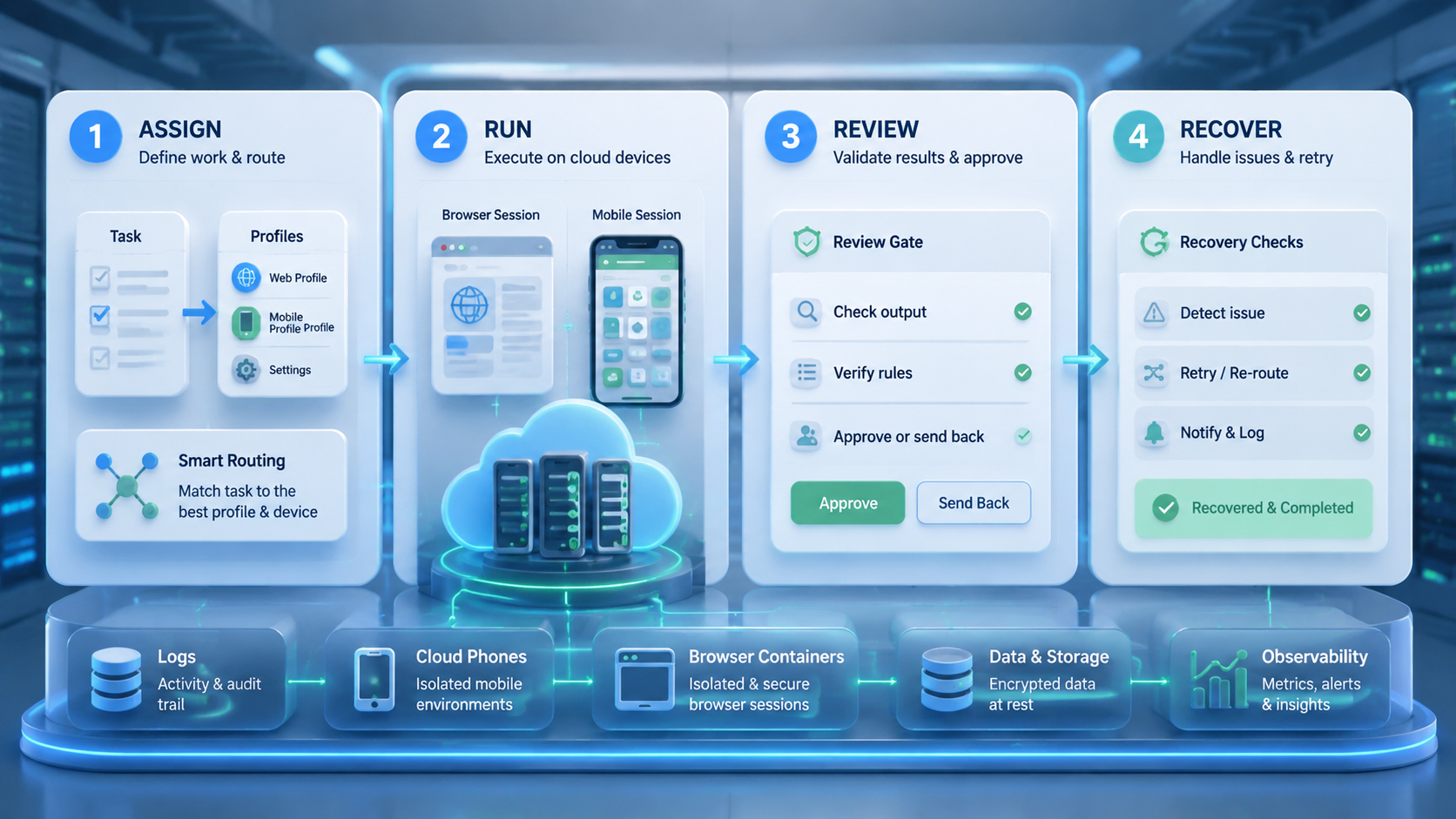
For browser and mobile tasks, an AI employee platform is useful when digital work needs more than prompts. It gives workers execution surfaces, but the real value comes from task boundaries, profile mapping, cloud phone mapping, routing records, review gates, and recovery notes.
The next step is a narrow pilot. Pick 1 queue, assign 3 environments, define allowed browser and mobile actions, record failures, and review results on day 1, day 3, and day 7. When the team can trace every output without asking for missing context, the workflow is ready for careful expansion.



