

Instagram TikTok engagement automation is a workflow for finding comments, classifying intent, drafting replies, routing tasks, and tracking outcomes across social accounts. It should not mean sending the same reply to every person. For operations teams, the value is faster triage with visible human control.
Comment and reply work becomes difficult when a team manages many accounts. A creator team may need to answer product questions. An agency may need to separate client approvals. A support team may need to route complaints away from public threads. Social media marketing becomes more manageable when engagement work has account ownership and task history.
The safe model is simple: automate preparation and routing first, then decide which replies need review. Instagram documentation includes comment management capabilities for professional accounts through its platform APIs. TikTok's public rules also warn against spam-like behavior and fake engagement. That means teams should design automation around context, quality, and review, not around reply volume.
Key takeaways
- Engagement automation should classify and route comments before it sends replies.
- Instagram and TikTok workflows need account context, reviewer roles, and task records.
- AI can draft replies, but sensitive or customer-facing messages should keep human review.
- Mobile environments matter when comments and inbox work happen inside app sessions.
- Teams should pilot one account group and one reply category before scaling.
- MoiMobi fits when engagement workflows need browser profiles, cloud phones, and account isolation.
What Is Instagram TikTok Engagement Automation?
Engagement automation for Instagram and TikTok means turning repeated comment and reply work into a controlled workflow. The workflow can collect comment context, classify the message, suggest a reply, assign the task, and record the final result.
The best version does not hide the conversation from the team. It makes the queue easier to understand. Operators can see which comments are questions, complaints, spam, praise, leads, or items that need escalation.
For example, a cross-border seller may tag comments as sizing question, shipping question, price objection, or support issue. AI can draft a short reply. A human reviewer can approve, edit, or route the task to support.
Why Comment and Reply Work Needs Boundaries
The common misunderstanding is that engagement automation is only about speed. Speed helps only when the reply is relevant, approved, and tied to the correct account.
Platform rules should shape the workflow. Meta's documentation describes comment management capabilities for supported Instagram business use cases, but access depends on permissions and account setup. TikTok's Community Guidelines and platform policies discourage spam, fake engagement, and manipulative behavior. Those boundaries make quality control part of the automation design.
Use automation for low-risk preparation:
- collect comment context;
- identify language and topic;
- group similar questions;
- draft reply options;
- assign comments to an owner;
- record status and next action;
- pause when the comment is sensitive or unclear.
Avoid building workflows that reply blindly. A high-volume queue still needs stop rules for complaints, legal claims, medical claims, pricing disputes, and private information.
Preflight Checklist for Comment and Reply Workflows
Before automating engagement, define what the workflow is allowed to do. This avoids confusion when the queue grows.
| Checkpoint | What to confirm | Stop condition |
|---|---|---|
| Account owner | Each Instagram or TikTok account has a responsible person | No one owns the final reply |
| Reply categories | Questions, leads, complaints, spam, and praise are separated | All comments enter one queue |
| Approval rule | Sensitive replies require review before sending | AI replies are sent without context checks |
| Environment match | The right browser or mobile workspace opens for each account | The operator sees the wrong profile |
| Result record | Status, owner, reply text, and failure reason are saved | The team cannot audit past replies |
This is where multi-account management matters. Engagement work is not just a message queue. Account-based work needs assignment and records.
How to Get Started With Instagram TikTok Engagement Automation
Start with one comment type. Product questions are usually easier than complaints because they can use approved information. Do not begin with every possible conversation.
Use this workflow:
- Collect comments into a queue. Keep account, post, comment, language, and timestamp together.
- Classify intent. Separate questions, leads, support issues, spam, and risky comments.
- Draft reply options. Use short replies based on approved product or support notes.
- Apply review rules. Let routine replies move faster, but hold sensitive replies for a person.
- Open the right environment. Use the assigned browser profile or cloud phone workspace.
- Record the result. Store sent, edited, skipped, escalated, blocked, or failed.
- Review failures weekly. Find repeated issues in account access, reply quality, or routing.
This workflow also helps teams comparing n8n automations, comment APIs, or GitHub scripts. The useful system is not only the trigger. The reviewable path from comment to outcome matters more.
Instagram TikTok Engagement Automation vs Comment Bots
Instagram TikTok engagement automation should not be judged by how many comments it can answer. A comment bot usually focuses on automatic output. A workflow focuses on intake, classification, approval, execution, and evidence.
The difference shows up during messy conversations. A user may ask a simple product question. Another user may complain about shipping. A third may ask for a refund, mention private information, or make a claim that needs legal review. Those comments should not receive the same answer.
Use this decision rule:
- low-risk repeated questions can receive draft suggestions quickly;
- lead-related comments should move to a sales or support owner;
- complaints should be escalated before public replies;
- private data should move away from public comment threads;
- spam or abusive comments should be handled under the team's moderation policy.
This model also protects team time. Operators stop reading the same low-risk comments manually, while reviewers still control the replies that can affect trust, support, or compliance.
Reply Library Fields for Safer Automation
A reply workflow needs approved source material. Without a reply library, AI guesses from incomplete context. That creates extra review work and weakens the system.
At minimum, build a reply library with these fields:
| Field | Purpose | Example |
|---|---|---|
| Topic | Groups repeated questions | shipping, price, size, support |
| Approved answer | Gives AI a safe source | Shipping times vary by region |
| Account note | Adds brand or region context | US account uses English only |
| Escalation rule | Tells the system when to stop | Refund requests go to support |
| Tone note | Keeps replies on brand | short, helpful, no slang |
| Reviewer | Names the owner | support_lead |
| Last reviewed | Shows whether the answer is current | 2026-06-20 |
These fields make automation easier to audit. A manager can see whether a reply came from approved material or from a one-off draft. A reviewer can update one field instead of rewriting every future answer.
The same structure works across Instagram and TikTok. The interface may differ, but the operating record should stay consistent: account, comment, category, suggested reply, reviewer, final reply, and result.
Fit and Not-Fit Guidance
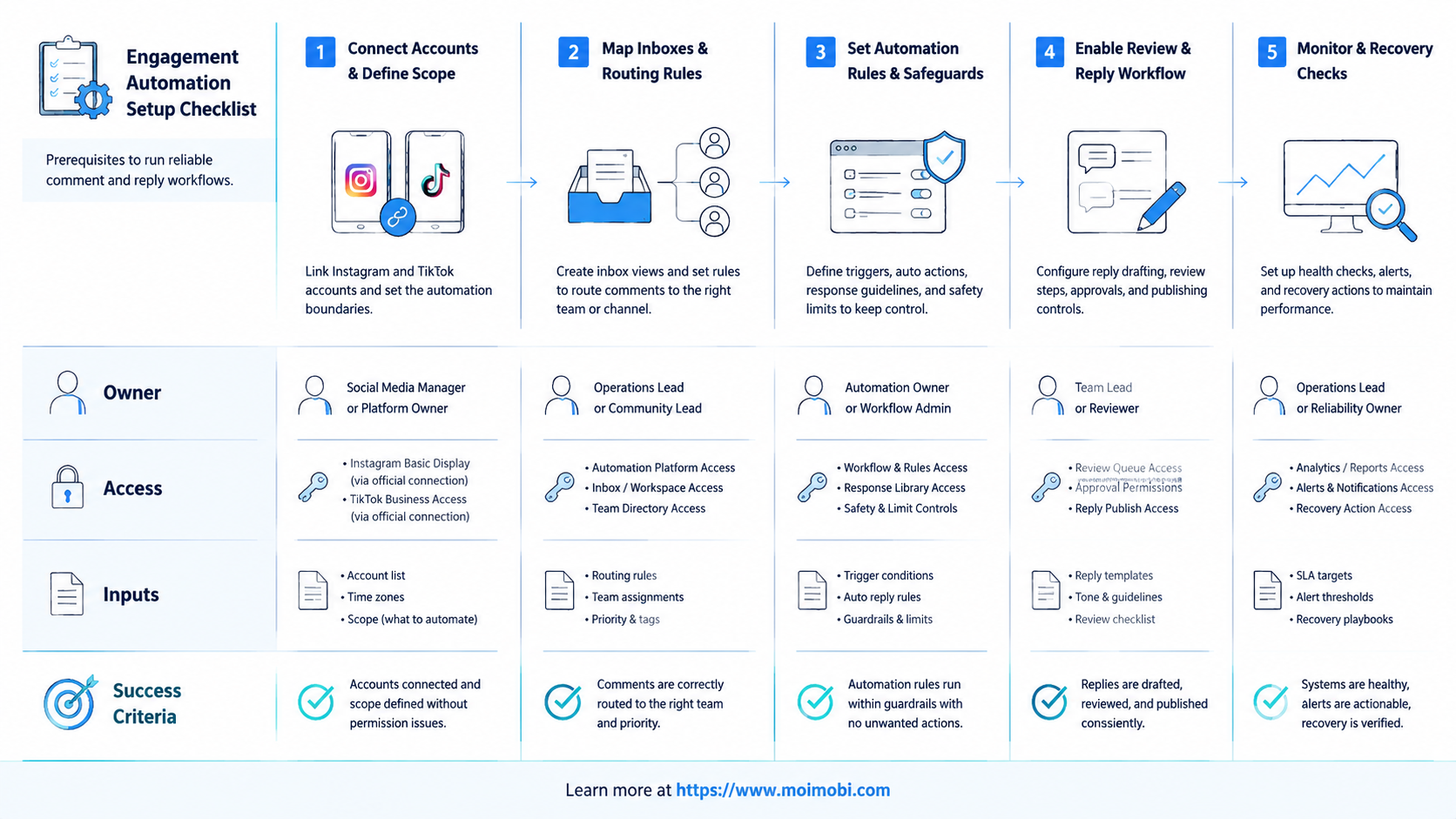
The workflow fits teams that already receive enough comments to need triage. Agencies, e-commerce sellers, creator teams, and customer support groups are common examples.
Low comment volume is a weak fit. Missing approved answers are another weak signal. Automation cannot invent brand policy, support rules, or escalation judgment.
Many comments, repeated question types, clear owners, approved reply notes, and measurable response goals.
Low volume, no reviewer, no approved answers, or a goal to generate generic replies at scale.
For teams that also handle mobile app notifications, mobile automation can connect the queue to app-specific execution. The browser may help with dashboards, while mobile workspaces handle app-only steps.
Account Environment Mapping for Reply Workflows
Reply workflows need clean account mapping because the same operator may support several brands or regions. A task queue alone does not prove that the right account is open. The execution environment has to match the account that owns the comment.
A practical map should connect four things:
- the social account;
- the browser profile or mobile workspace;
- the teammate allowed to act;
- the review rule for that account.
This map prevents simple but costly mistakes. A reply may be correct for Brand A but wrong for Brand B. A support answer may be approved for one region but not another. A creator account may use a casual tone, while a store account may need a service tone.
Teams should also record environment failures separately from reply failures. A wrong profile points to account mapping. An expired mobile app session points to execution access. A rejected answer points to content quality. Separating these failure types makes the workflow easier to improve and keeps the next training step specific.
MoiMobi is useful here because browser and mobile environments can be treated as account workspaces, not just remote screens. That gives teams a clearer way to connect comment queues with execution.
Common Mistakes to Avoid
Generic replies are the first mistake. A user asking about price, size, shipping, or support should not receive the same vague answer.
Skipping escalation is another mistake. Complaints, refunds, health claims, legal concerns, and personal information should move to a person or support channel.
Environment confusion creates avoidable errors. A teammate may draft the right reply but open the wrong account. Device isolation and separated workspaces reduce that kind of operational confusion.
The last mistake is measuring only reply count. A higher reply count is not useful if replies are irrelevant or hard to audit. Track quality, review delay, escalations, and failure reasons.
Pilot Rollout, Measurement, and Recovery Checks
The first pilot should focus on one comment category and one account group. Product questions, availability questions, and simple lead capture are good starting points.
Measure these signals:
| Metric | What it shows | Useful target |
|---|---|---|
| Classification accuracy | Whether comments enter the right queue | Misrouted comments are easy to spot |
| Review edit rate | Whether reply drafts match brand standards | Edits become smaller over time |
| Escalation quality | Whether sensitive items move to humans | Risky comments are not auto-sent |
| Account mismatch | Whether work opens in the right environment | No unexplained profile switches |
| Recovery time | Whether failures can be inspected | A person can continue from the saved state |
Recovery rules should be written before the pilot. Pause the workflow when the comment contains private data, policy-sensitive claims, unclear language, or an account mismatch. A reply workflow should slow down when context is weak.
Scale only the categories that pass review. If product questions work but complaints fail, keep complaints manual. If reply drafts need heavy edits, improve the source notes before adding more accounts.
Frequently Asked Questions
What is Instagram TikTok engagement automation?
It classifies comments, drafts replies, routes tasks, and tracks outcomes across Instagram and TikTok accounts.
Can AI reply to every comment automatically?
It can draft many replies, but sending every reply automatically is usually a poor operating model. Sensitive items should keep human review.
Is comment automation allowed?
Rules depend on platform, permissions, and behavior. Teams should use official APIs where available and avoid spam-like or manipulative activity.
What should be automated first?
Start with classification, drafting, assignment, and status capture. Move sending actions into automation only after review rules are proven.
Does this require cloud phones?
Cloud phones help when reply work happens in mobile apps or needs account-specific mobile environments.
How many accounts should the pilot include?
Start with a small account group, such as three to five related profiles. That is enough to test routing and review.
What metrics matter most?
Track classification accuracy, review edits, response time, escalation quality, account mismatch, and recovery time.
Where does MoiMobi fit?
MoiMobi fits teams that need account-isolated browser and mobile environments for repeatable social engagement workflows.
Conclusion
Instagram TikTok engagement automation works best when it improves triage, review, and accountability. The goal is not to flood comments with generic replies. The goal is to help the right teammate answer the right comment from the right account environment.
Before scaling, map one comment workflow. Define the account group, categories, approved reply notes, review rule, execution environment, and failure path. A pilot with good routing, clear records, and controlled recovery can expand to more accounts and comment types. A pilot with repeated account or review errors should stay small until the cause is fixed and the team can verify the next run cleanly with real comment samples and reviewer notes.



