Content Type: guide
Page Role: longtail
Intent Type: informational
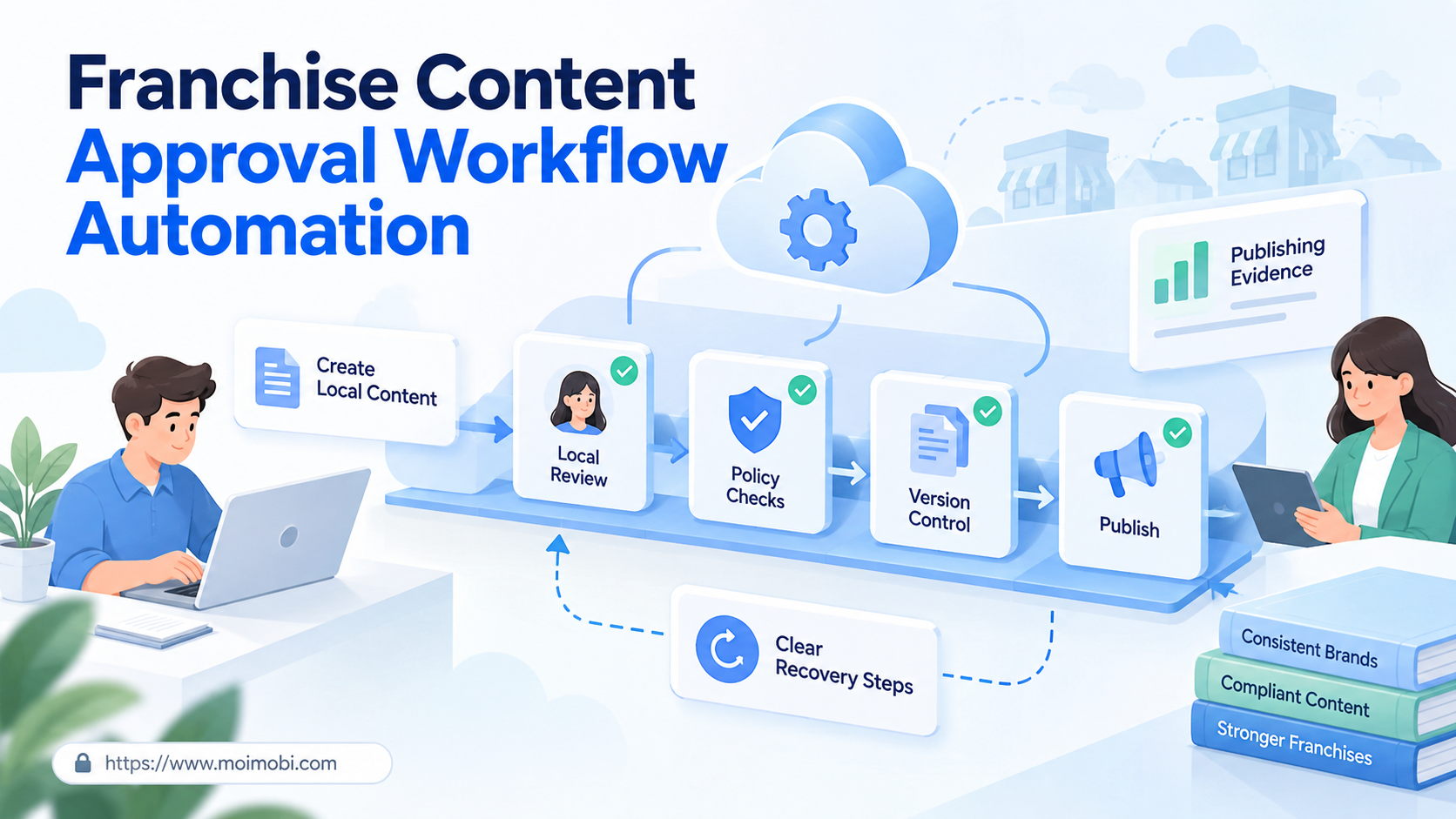
Franchise content approval workflow automation is a controlled process for moving local marketing content from request to review, approval, publishing, and evidence. It gives franchise locations room to adapt a message while keeping brand, legal, offer, account, and timing rules visible.
The best workflow does not send every post to headquarters. That creates delay and teaches local teams to work around the system. It also should not let every location publish from shared folders without checks. A workable model classifies risk, routes only the right decisions to reviewers, and preserves the final approved version.
For franchise operators, the real product is predictable coordination. Headquarters defines reusable rules. Local teams provide market facts. Reviewers handle exceptions. Approved tasks then move to the correct account and execution environment with a record of who changed what.
Key Takeaways
- Separate brand rules, local facts, and platform requirements before designing approvals.
- Use risk tiers so routine local content does not wait in the same queue as claims, promotions, or crisis posts.
- Bind every approved asset to a location, account, final version, publish window, and owner.
- Treat edits after approval as a new version that requires a clear decision.
- Measure cycle quality, rework, wrong-account prevention, and recovery instead of approval volume alone.
What Is a Franchise Content Approval Workflow?
A franchise content approval workflow is a state-based operating system for distributed marketing. It connects the content brief, local market details, required disclosures, reviewer decisions, approved asset, destination account, and publishing result. Email can notify people, but email alone does not provide a dependable workflow state.
The franchise model creates a built-in tension. Local operators know their customers, schedules, stock, events, and community language. Headquarters owns brand positioning, reusable claims, campaign structure, and often the rules for paid or organic promotion. The FTC's consumer guide to franchising notes that franchisors commonly control parts of operations to maintain uniformity. Content governance is one practical expression of that relationship, but the exact contract and legal duties vary by network.
A useful record answers six questions at any time:
| Workflow question | Required field | Why it matters |
|---|---|---|
| Who requested the content? | Location, requester, owner | Establishes responsibility |
| What may change locally? | Locked and editable fields | Prevents accidental brand edits |
| What needs review? | Risk tier and triggered rules | Routes the right reviewer |
| Which version is approved? | Version ID and approval event | Stops stale drafts from publishing |
| Where will it publish? | Platform, account, region, time | Prevents destination errors |
| What actually happened? | Publish ID, result, evidence | Supports recovery and audit |
The process should distinguish a template from a task. A template contains approved structure, assets, disclosure slots, and editable zones. A task is one location's use of that template for a specific account and date. This distinction allows the brand team to improve the reusable system without silently changing work already approved.
Why Franchise Content Approval Workflow Automation Matters
Distributed content fails at handoffs more often than at writing. A location may use an old logo, enter the wrong offer date, select another store's account, or publish a draft that was edited after approval. None of these problems is solved by generating more copy. They require ownership, versioning, routing, and evidence.
Franchise disclosure and marketing obligations are not identical, yet both reward disciplined document control. The FTC Franchise Rule requires a disclosure document with 23 specified categories of information for prospective franchisees. A social approval workflow is not a substitute for that legal process. The operational lesson is narrower: material business information needs named ownership, current versions, clear delivery, and retrievable records.
Social endorsements add another review layer. The FTC's 2023 updated Endorsement Guides announcement addresses social media, clear disclosures, reviews, and advertiser responsibilities. A franchise campaign involving creators, incentives, customer reviews, or employee posts therefore needs a disclosure checkpoint instead of relying on a generic caption template.
Automation matters because a network has repeated decisions. The system can check required fields, compare dates, verify selected accounts, detect unapproved edits, and route an exception. A person still owns judgment about claims, local law, reputation, and unusual customer context.
Design the Approval Model Before Choosing Tools
Start with decision rights. Software cannot resolve an unclear relationship between headquarters, regional managers, agencies, and franchisees. Put each content element into one of four classes:
- Locked: logo, product name, approved claim, legal line, or campaign identifier.
- Locally editable: store address, event time, inventory note, community reference, or local call to action.
- Conditionally editable: price, discount, creator disclosure, regional wording, or image crop.
- Prohibited: unsupported claims, expired offers, confidential data, misleading reviews, or another location's assets.
Next, define risk tiers. A low-risk task might reuse an approved evergreen template and change only store hours. A medium-risk task might add local photography or a location-specific offer. A high-risk task may include regulated claims, creator relationships, customer testimonials, crisis language, or paid media. Each tier should have a reviewer, response target, and expiry rule.
Avoid using job title alone as the approval rule. A regional manager may approve a local event date but not a health claim. A brand reviewer may approve visual treatment but not franchise contract language. Route by decision type, location, jurisdiction, and content risk.
Preflight Checklist for a Franchise Content Approval Workflow
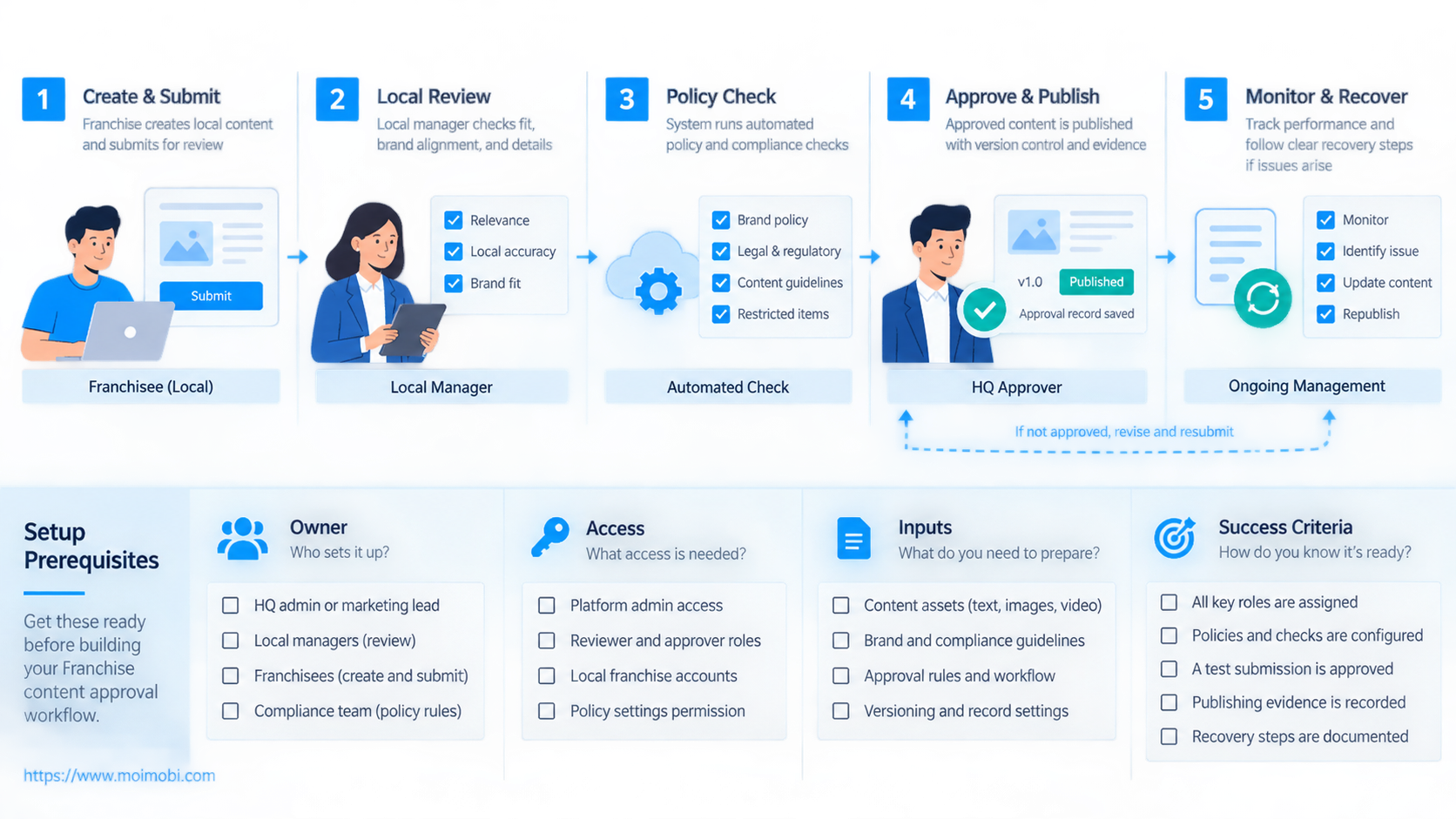
Before automating a single publish action, confirm the operating inputs:
- every location has a stable ID, region, timezone, and active status;
- each social account belongs to one location or a documented shared scope;
- campaign templates identify locked and editable fields;
- approved logos, fonts, images, and disclosure language have owners;
- offer dates and local facts have an authoritative source;
- reviewers have defined decision rights and backup coverage;
- high-risk topics have legal or specialist escalation paths;
- the system records versions, comments, decisions, and publish results;
- operators can pause one location without stopping the entire network;
- removed staff and closed locations lose access promptly.
Account mapping deserves special attention. A location-bound multi-account operating model should connect the task to the intended franchise, platform account, owner, and reviewer. Operators should not choose from every account in the network at publish time.
When a platform task requires an Android app, an assigned cloud phone can provide a persistent mobile environment. The environment is only one layer. Approval state, account assignment, credentials, and final-version checks still need separate controls.
How to Automate the Franchise Content Approval Workflow
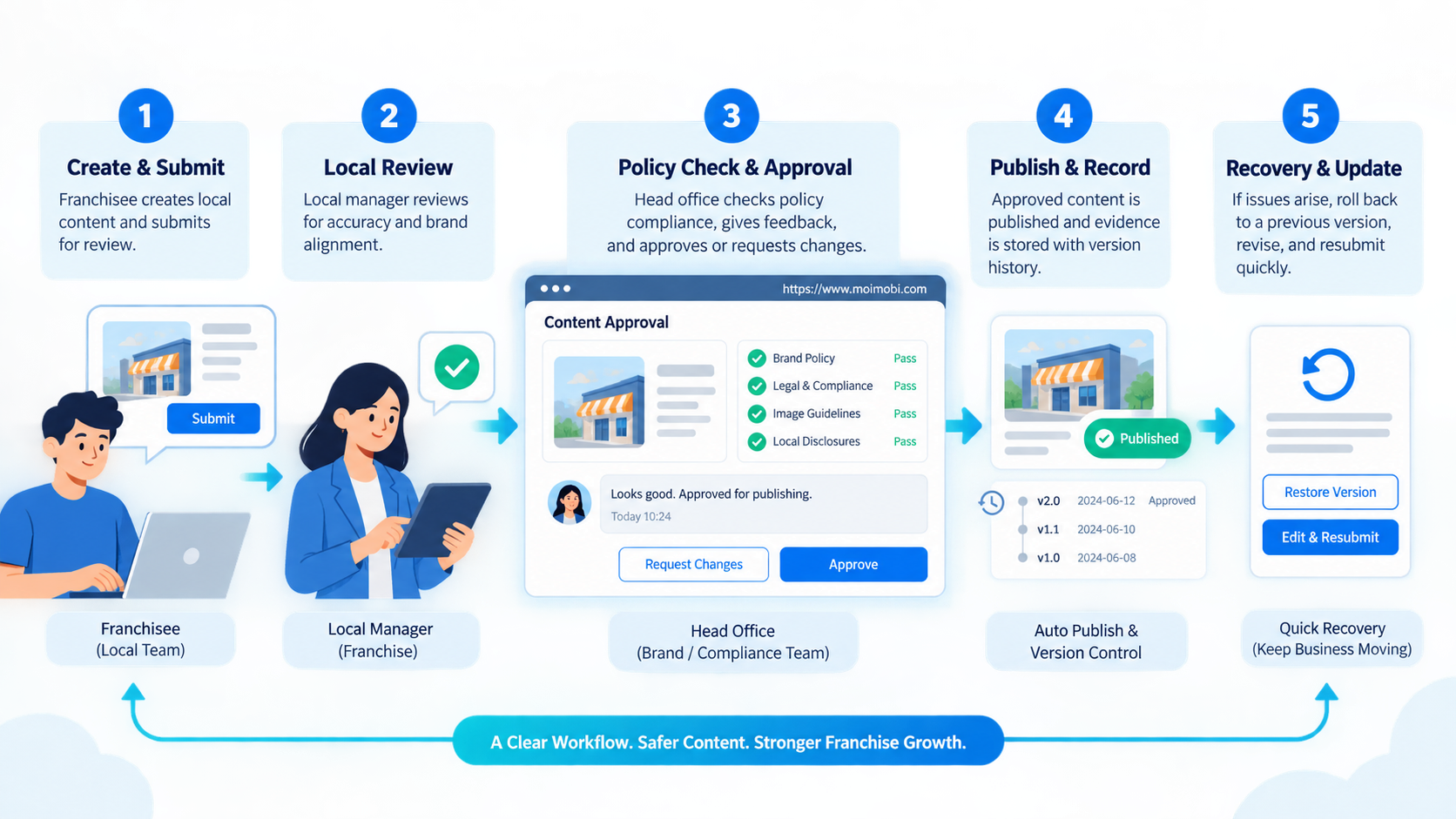
- Create the campaign template. Store the objective, approved assets, locked text, editable fields, required disclosure slots, channels, and active dates.
- Open a location task. Bind the template to one franchise location, local owner, destination accounts, language, timezone, and publish window.
- Collect local inputs. Ask only for fields the location may change. Validate dates, links, addresses, inventory notes, and local images at entry.
- Run deterministic checks. Confirm required fields, campaign dates, file types, account ownership, duplicate tasks, and changes to locked content.
- Assign a risk tier. Use content type, claim category, offer, creator relationship, jurisdiction, and edit scope to choose the approval path.
- Route human review. Send brand, legal, regional, or local facts to the people who own those decisions. Keep comments attached to the version.
- Freeze the approved version. Create an immutable approval event with approver, time, version hash, destination, and expiry.
- Schedule the execution task. Pass only the approved payload to the account assigned to that location. Recheck time, account, and version before action.
- Capture the result. Store the remote post ID, URL, timestamp, account, media checksum, and any platform error.
- Close or recover. Mark success only after remote verification. Route uncertain outcomes and failed tasks without creating a duplicate post.
The publish worker should consume an approved task, not an open-ended instruction. It must reject a task when the approved version differs from the current version, the account mapping changed, the approval expired, or required assets are unavailable. This makes approval a real execution gate rather than a label in a dashboard.
A distributed social campaign execution flow can then connect headquarters planning with local publishing. Keep content creation, approval, and account execution related but separable. A temporary execution failure should not erase the decision history.
Handling Revisions, Expiry, and Emergency Content
Post-approval edits are the most common hidden gap. Define which changes invalidate approval. A punctuation correction may not require full review, while a changed price, claim, image, destination link, disclosure, or location should. Encode those rules instead of leaving each operator to guess.
Approvals also need expiry. A campaign can become stale when the offer ends, inventory changes, a platform policy changes, or headquarters replaces the asset. The system should prevent scheduling outside the approved window. It should also identify queued tasks that reference a retired template.
Emergency content needs a shorter path, not an invisible bypass. Create a named incident workflow with an authorized requester, a designated approver, a limited account scope, and mandatory after-action review. Record why the normal path was shortened. Do not turn “urgent” into a universal permission.
Version history should be readable by nontechnical operators. Show the changed fields, previous value, new value, editor, time, and impact on approval. A raw JSON diff may help engineers, but it is not enough for a regional marketing reviewer.
Common Mistakes to Avoid
Sending everything to headquarters: This produces long queues and low-value review. Lock stable brand elements, validate routine fields automatically, and escalate only decisions that need judgment.
Treating comments as approval: A message saying “looks good” does not identify the final version, destination account, publish window, or scope. Use a structured approval event.
Allowing edits after approval: The publish system must compare the approved version with the execution payload. Otherwise, approval covers a draft that no longer exists.
Sharing one publishing login: Shared access weakens ownership and increases wrong-account errors. Use role-based access and a location-to-account map. For app-side execution, a task-bound mobile automation layer should open only the environment assigned to that task.
Copying the same post everywhere: Local relevance is not created by replacing the city name. Give teams defined fields for local facts and examples while keeping claims and brand assets controlled.
Counting fast approvals as success: A quick approval that creates rework, wrong-account publishing, or missing disclosures is not efficient. Review the full path from request to verified post.
Who It Fits and When It Is a Strong Match
- Many locations publish under one brand.
- Campaigns mix central assets with local facts.
- Account ownership is mapped.
- Review duties can be named.
- The network has few monthly posts.
- Approval rules are still disputed.
- Location and account records are incomplete.
- Most content is exceptional.
- The goal is uncontrolled bulk posting.
- No one owns claims or disclosures.
- Teams share credentials without roles.
- There is no recovery owner.
The strongest fit is a network with repeated campaign patterns and meaningful local variation. Restaurants, retail stores, service franchises, clinics, education centers, and regional dealers may all have that shape. The workflow design still depends on contract terms, sector rules, jurisdictions, and the platforms in use.
Smaller networks can begin with structured forms, versioned templates, and a simple approval queue. Automation becomes valuable when repeated checks and account routing consume time or create avoidable mistakes. Do not buy complexity before the team can state its rules.
Pilot Rollout, Measurement, and Recovery Checks
Pilot one campaign across a small set of representative locations. Include an experienced operator, a new operator, two regions, and at least one exception case. Keep final publishing under human observation until version checks and account routing work consistently.
Measure the workflow by stage:
- request completeness before review;
- automatic check failures by reason;
- time waiting for the correct reviewer;
- approval, revision, and rejection outcomes;
- changes made after first review;
- correct account and location routing;
- publish verification and duplicate prevention;
- expired approvals stopped before execution;
- incidents reconstructed from the event record.
Test recovery on purpose. Remove an asset, expire an approval, change an account mapping, interrupt a publish action, submit the same task twice, and revoke an operator's access. The system should stop at the correct boundary and preserve enough context for a person to continue.
Before expanding, verify these pass conditions:
- reviewers see only decisions they own;
- each approval names one final version;
- tasks cannot publish to an unrelated location account;
- expired or edited approvals are blocked;
- remote results are checked before retry;
- headquarters can pause one campaign or location;
- local teams can see status without bypassing review;
- evidence remains available for campaign review.
Frequently Asked Questions
What should headquarters approve?
Headquarters should approve elements it owns, such as brand claims, visual rules, campaign structure, and shared assets. Local facts should be confirmed by the location or regional owner.
Should every franchise post require approval?
Not necessarily. Use risk tiers. An unchanged approved template may pass automatic checks, while promotions, claims, creator content, and crisis messages need named reviewers.
Can AI approve franchise content?
AI can classify, compare, summarize, and flag missing fields. Human owners should retain judgment for claims, legal issues, reputation, and unusual local context.
How should local edits be controlled?
Mark fields as locked, editable, conditional, or prohibited. Any edit that changes the approved meaning, offer, disclosure, asset, or destination should trigger a new decision.
What is the minimum audit record?
Keep requester, location, account, versions, comments, rule results, approver, approval time, final payload, execution result, and remote post identifier.
How can teams reduce approval delays?
Remove low-value reviews, validate inputs early, route by decision type, set backup approvers, and return precise revision reasons instead of vague rejection notes.
What happens when a post fails to publish?
Preserve the approved task and error. Check the remote platform before retrying. An unknown outcome should move to manual verification, not immediate resubmission.
Does the workflow replace legal review?
No. It routes and records decisions. The organization still determines when qualified legal, compliance, or sector review is required.
Conclusion
Franchise content approval workflow automation works when it reduces ambiguity, not when it merely moves a checklist online. The operating model must define editable fields, risk tiers, decision owners, approved versions, account routing, expiry, execution evidence, and recovery.
Start with one repeatable campaign and a small location group. Map the current decisions, remove unnecessary approvals, then automate checks and routing around the remaining ownership boundaries. Expand only after the team can prove that the right version reaches the right account and that failed tasks can be recovered without duplicate publishing.