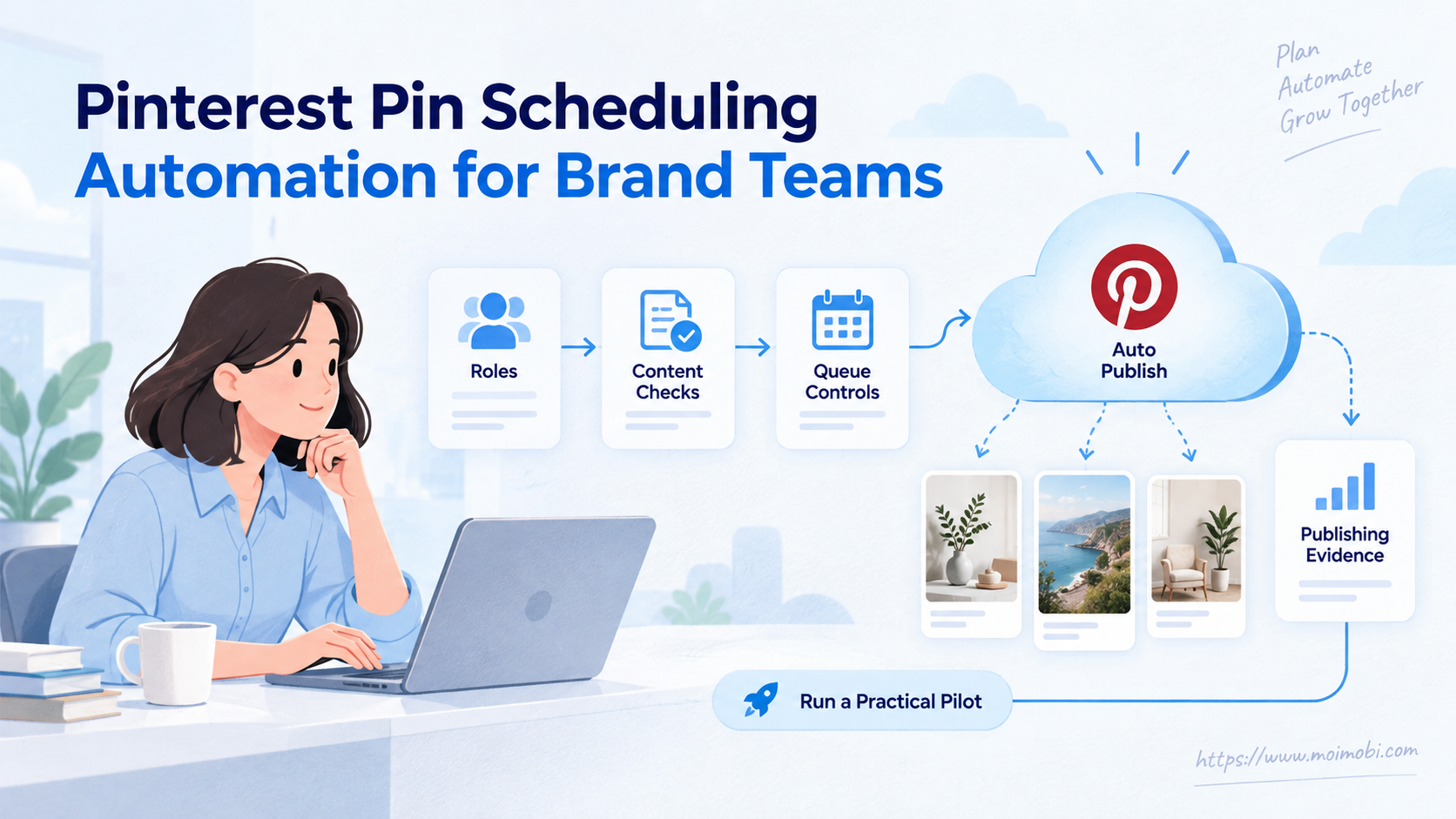
Pinterest pin scheduling automation is a controlled workflow that moves approved creative into a timed publishing queue. For brand teams, the value is not simply posting later. It is keeping each Pin tied to the right board, link, owner, approval, and result record.
Pinterest already offers native scheduling for business accounts. A larger team may also use an approved integration or its own connected application. The right method depends on queue size, review needs, account count, and the evidence required after publishing.
Key Takeaways
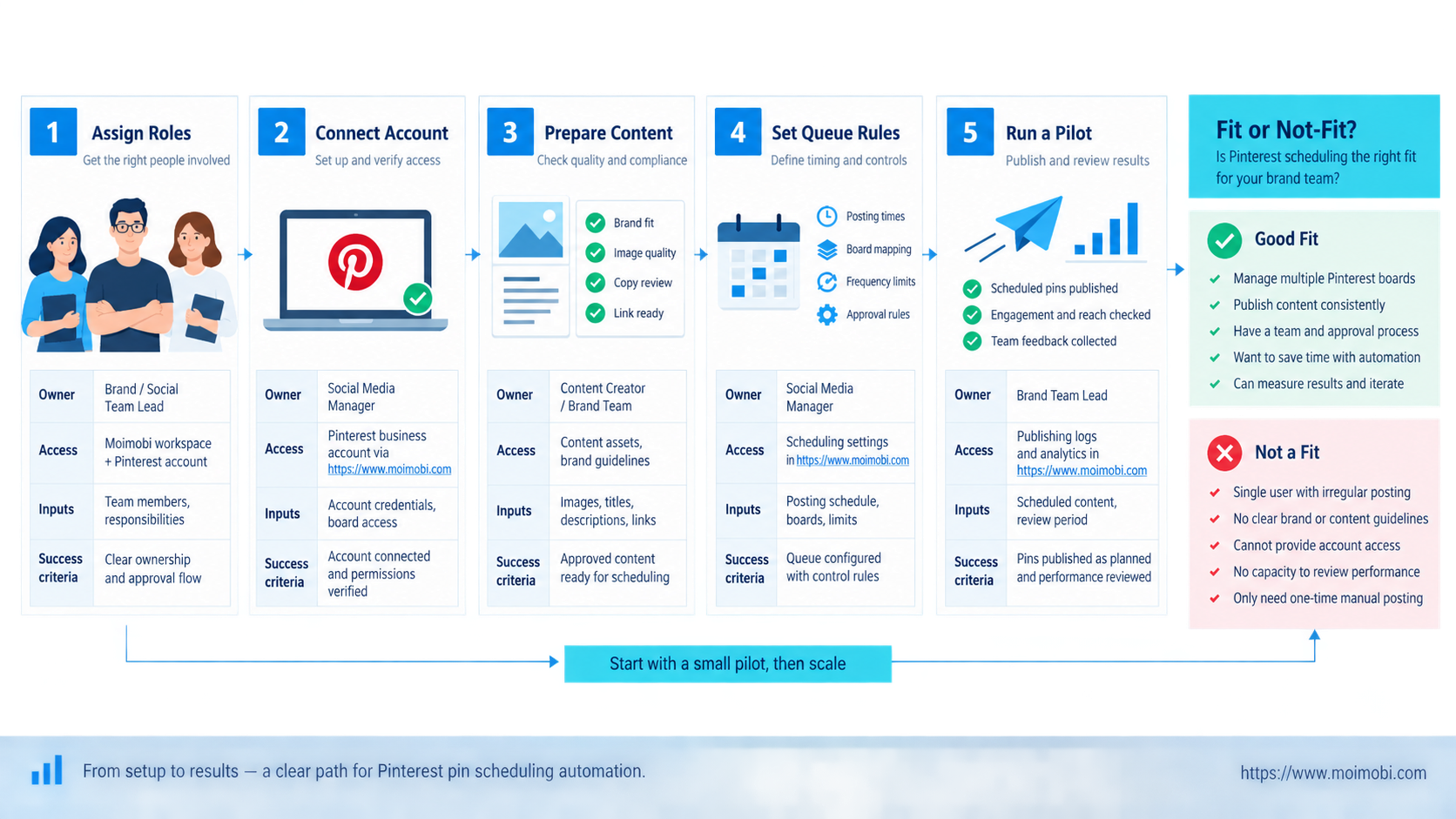
- Use the native scheduler for a small, visible queue.
- Separate content approval from the final publishing action.
- Give each Pin one owner, board, destination URL, and scheduled time.
- Record published, failed, changed, and needs-review outcomes.
- Pilot one board before expanding the workflow across accounts.
How Pinterest Pin Scheduling Automation Works
A reliable queue begins before anyone selects a date. Each item needs an approved image or video, a title, description, destination link, board, campaign label, owner, and intended publish time. Missing fields should stop the item before it reaches the account.
Pinterest's current official scheduling instructions say business accounts can schedule standard Pins in advance. The page currently describes a 30-day window and up to 10 future scheduled Pins. It also says teams can change the date, title, board, description, and link after scheduling, but not the image or video. Teams should recheck the live limits because platform interfaces can change.
That distinction creates two operating lanes. A small queue can stay inside Pinterest's native interface. A larger queue may need an external calendar, approval layer, and status log, while the final action still follows an authorized publishing path.
| Lane | Best fit | Main control | Watch point |
|---|---|---|---|
| Native scheduling | One brand and a short queue | Visible scheduled Pins | Manual handoffs and queue limits |
| Connected workflow | Several reviewers or campaigns | Approval and field validation | Authorization, retries, and result state |
| Mixed process | Creative planning outside Pinterest | One source calendar | Duplicate or stale queue entries |
Pinterest Pin Scheduling Automation Queue Fields
A useful queue record should be specific enough for another operator to publish the Pin without guessing. A calendar cell with a file name and date is not enough. It leaves the account, board, destination, approval state, and current asset version open to interpretation.
Use one row per planned Pin. Keep the creative file outside the row if needed, but store a stable asset reference. A team should be able to answer four questions from the record: what will publish, where will it publish, who approved it, and what happened after release.
| Field group | Required fields | Stop condition |
|---|---|---|
| Identity | Pin ID, campaign, account, board | Account or board is unclear |
| Creative | Asset version, title, description | Asset and approved copy do not match |
| Destination | Final URL, tracking label, landing-page owner | Link fails or redirects unexpectedly |
| Timing | Publish date, time, timezone, campaign window | Timezone or deadline is missing |
| Control | Reviewer, publisher, approval time, release lane | Approval cannot be traced |
| Outcome | Platform reference, final state, checked time | Submission result is unknown |
Version control matters because scheduled media has stricter edit boundaries than draft media. Freeze the approved asset with a version label such as campaign-theme-v03. If the creative changes later, withdraw the scheduled item and create a new reviewed version instead of silently replacing the file in storage.
Link validation needs its own owner. Marketing may approve the message while an ecommerce or web team owns the destination. The queue should record who confirms the final URL, not just who writes the Pin description. This prevents a visually correct Pin from sending users to an expired campaign or the wrong locale.
Preflight Checklist for Brand Teams
Start with ownership. The content lead approves the asset and message. The channel owner confirms the board, link, date, and account. The operator or connected application performs the publish action. One person may hold several roles in a small team, but the decision points should remain visible.
Pinterest documents a Publisher role that can create, edit, organize, and schedule Pins. Review the current Business Manager permissions before granting access. Publisher access is broad, so do not treat it as a narrow approval-only role.
Use this pass/fail check before adding a Pin to the queue:
- Asset: final file approved and correct for the campaign.
- Destination: URL opens, matches the creative, and has tracking where needed.
- Placement: board and account are explicit.
- Timing: timezone and campaign window are recorded.
- Ownership: reviewer and publisher are named.
- Recovery: the team knows who handles a failed or changed item.
Teams coordinating several channels can place this queue inside a broader social media operations workflow. The goal is one controlled handoff, not one more disconnected calendar.
A simple scenario shows why these checks matter. A designer uploads a revised product image after the channel lead has approved the first version. The scheduler sees only the shared folder and selects the newest file. The queue now contains approved copy attached to unreviewed media. A frozen asset reference and a release check stop that mismatch before it reaches Pinterest.
Approval, Access, and Account Handoff
Approval and publishing are different actions. Approval confirms that the creative, copy, board, link, and timing meet the campaign brief. Publishing access permits a person or application to change the live account. Combining both actions is workable for a small team, but the queue should still record when each decision occurred.
Use three access layers where the team size justifies them:
- Contributor: prepares media, copy, links, and board suggestions without releasing the Pin.
- Reviewer: accepts or rejects the complete queue item and records any required change.
- Publisher: schedules only items in an approved state and records the platform result.
Agency handoffs need one additional boundary: client ownership. The record should name the client workspace and account before the operator opens a session. A shared browser tab, copied password, or unnamed device makes it too easy to schedule a valid Pin on the wrong profile.
Keep each account attached to a defined operator context and task record. An account-bound execution context can support that separation when a team manages several client environments. It does not replace Pinterest permissions; it keeps the surrounding operational context from being mixed during handoff.
Pinterest Pin Scheduling Automation: Step-by-Step Workflow
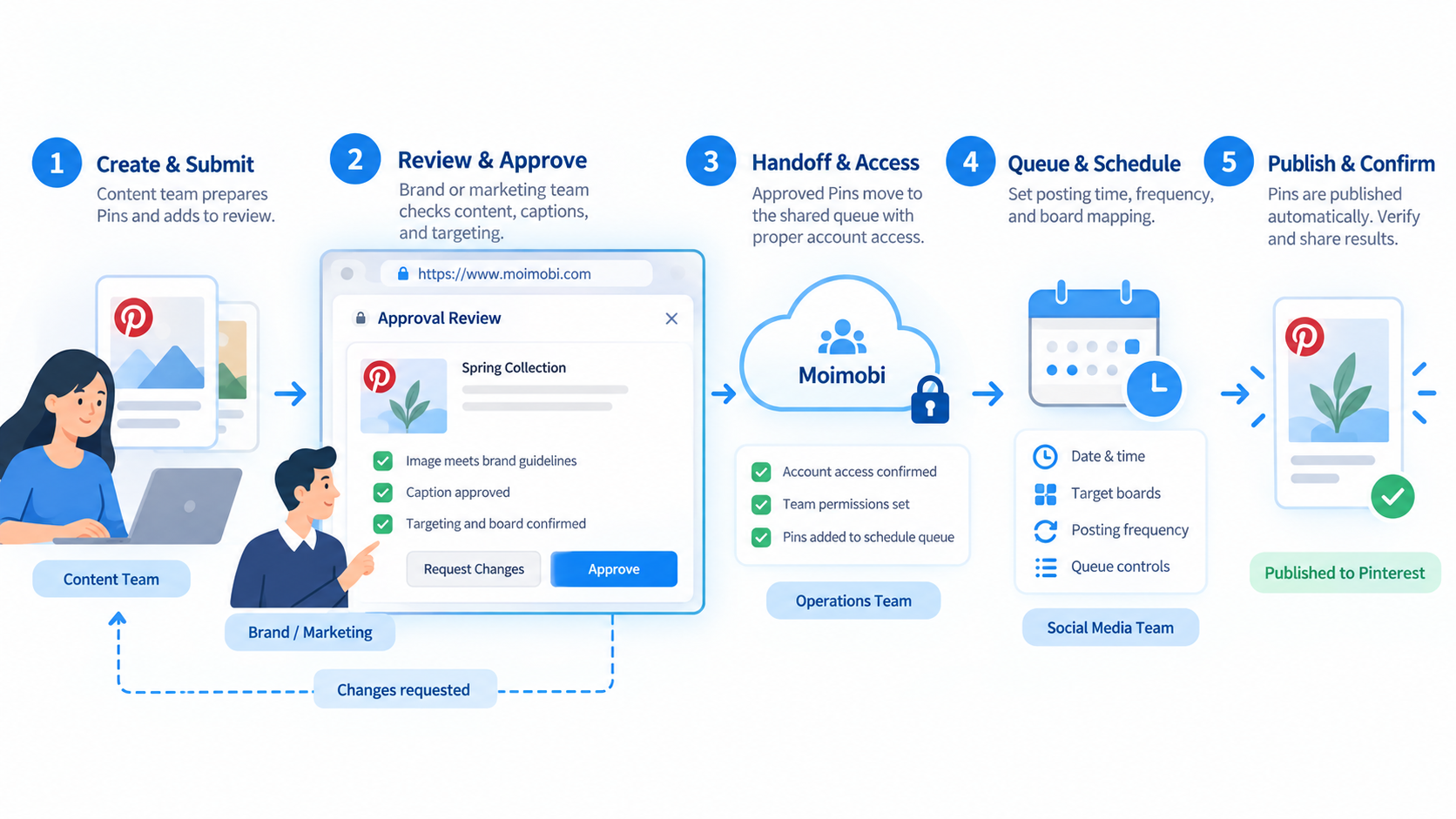
- Intake the content. Add the asset, copy, board, link, campaign, and requested time.
- Validate fields. Reject missing links, unapproved media, duplicate items, or unclear ownership.
- Review the Pin. Check visual, wording, destination, and account context together.
- Approve the release. Lock the approved version and record the reviewer.
- Schedule through the chosen lane. Use Pinterest's native interface or an authorized connected workflow.
- Confirm the queue. Record the scheduled state and platform reference where available.
- Verify after release. Check that the correct Pin appears on the intended board and that the link works.
For custom integrations, Pinterest's developer documentation for boards and Pins describes authenticated endpoints and required read/write scopes. API access does not remove the need for an approval queue or an outcome check. It only changes how the final action is submitted.
The scheduling worker should be idempotent at the queue level. Give each approved item a stable internal ID and record the submitted platform reference. If the request times out, first check the live account and prior response log. Do not create another Pin merely because the client did not receive a clean success response.
Keep release timing separate from worker timing. The release record owns the intended publish time and timezone. The worker owns when it prepares or submits the item. This distinction helps teams explain whether a delay came from approval, queue processing, platform response, or a later publishing state.
For manual scheduling, the same logic still applies. The operator marks the item as “scheduling in progress,” confirms the live scheduled entry, and then records “scheduled.” A second operator should not take the same row while that check is open.
Fit and Not-Fit Boundaries
This workflow fits teams with recurring campaigns, several reviewers, multiple boards, or a need to show who approved each release. It also fits agencies that must keep client calendars and account access separate. A client-separated publishing structure can help define those boundaries before automation starts.
It is not a good fit for publishing unfinished creative, recycling the same item without review, or hiding unclear account ownership behind a bulk action. A solo operator with a few Pins may be better served by Pinterest's native scheduler and a simple content sheet.
Choose the operating lane with a short decision rule:
- Use native scheduling when one operator can see and reconcile the entire future queue.
- Add an approval layer when creative and channel ownership belong to different people.
- Add a connected publishing workflow when account volume and release frequency make manual transfer the main source of errors.
- Keep a manual final action when the campaign is unusual, the account needs close review, or the integration cannot return a clear result.
Automation is not the default answer. The smallest process that preserves ownership, accuracy, and recovery is usually the better starting point.
Mistakes That Break the Queue
The first mistake is scheduling before approval. A later copy change can leave the queued asset out of sync. Freeze one approved version before the publishing step.
The second mistake is treating “submitted” as “published.” Keep distinct states: draft, approved, scheduled, published, failed, changed, and needs review. Do not retry an uncertain submission until the team checks whether the Pin already exists.
The third mistake is sharing one broad login across the team. Use named access and review permissions. For browser-based account work, keep account context, operator ownership, and task records together without claiming to replace Pinterest's own authorization model.
The fourth mistake is letting the content calendar become the execution log. A calendar shows intent, while an execution record shows what the platform accepted and what an operator verified. Preserve both. Otherwise, a moved calendar item can erase the history needed to explain a missed release.
The fifth mistake is applying one retry rule to every failure. A rejected link can be corrected and resubmitted. A timeout after submission needs investigation because the Pin may already exist. An expired authorization token requires reauthentication, not repeated content creation. Map each failure class to one next action.
Pilot, Measurement, and Recovery Checks
Pilot one board for two weeks or one complete campaign cycle. Use enough Pins to test intake, approval, scheduling, a copy change, and one deliberate stop. Do not expand until the team can reconcile the planning queue with the live account.
Measure operational accuracy before reach. Track approved-to-scheduled time, queue changes, publishing failures, duplicate attempts, broken links, and items that require manual review. Engagement metrics matter later, but they cannot repair a weak release process.
The pilot passes when every scheduled item has an owner, the live Pin matches the approved version, failed items stay visible, and the team can stop or reschedule work without losing context.
Use a compact recovery runbook during the pilot:
- Freeze the affected queue row so no second operator submits it.
- Check the live profile, target board, and scheduled area.
- Compare the live item with the internal queue ID and approved asset.
- Record the observed state as published, scheduled, absent, duplicated, or unclear.
- Choose edit, delete, reschedule, recreate, or manual review based on that observation.
- Close the incident only after the planning record and live account agree.
Review the pilot by failure type, not only by total volume. One duplicate submission exposes a different control gap from five late approvals. Assign a corrective owner and a due date for each recurring failure. The workflow is ready to expand when the same errors stop reappearing and operators can explain every unresolved item.
For teams planning broader automation, connect these release states to mobile workflow controls only where app-side work is genuinely required. Pinterest scheduling itself may remain browser or API based. The architecture should follow the task surface instead of forcing every channel into one execution method.
Frequently Asked Questions
What does Pinterest's native Pin scheduler support?
Yes. Pinterest documents native scheduling for business accounts. Check the current help page for limits and supported Pin types.
How does a brand know it needs external workflow automation?
Consider it when approvals, several campaigns, multiple accounts, or detailed status records exceed what a short native queue can manage.
Which parts of a scheduled Pin can a team edit?
Pinterest currently allows changes to several metadata fields. Its help page says the scheduled image or video cannot be changed.
Who should receive Publisher access?
No. Separate content review from publishing access when possible. Grant platform permissions according to the work a person must perform.
How can an API publish Pins for a connected account?
Pinterest provides authenticated Pin and board endpoints. An application still needs approval, valid scopes, token handling, and result verification.
How should a team handle a scheduling error?
Pause that queue item, check the live account, record the observed state, and decide whether to edit, reschedule, or recreate it.
Which metric should a pilot use first?
Start with release accuracy: correct account, board, asset, link, time, and final state. Add performance metrics after the process is dependable.
Conclusion
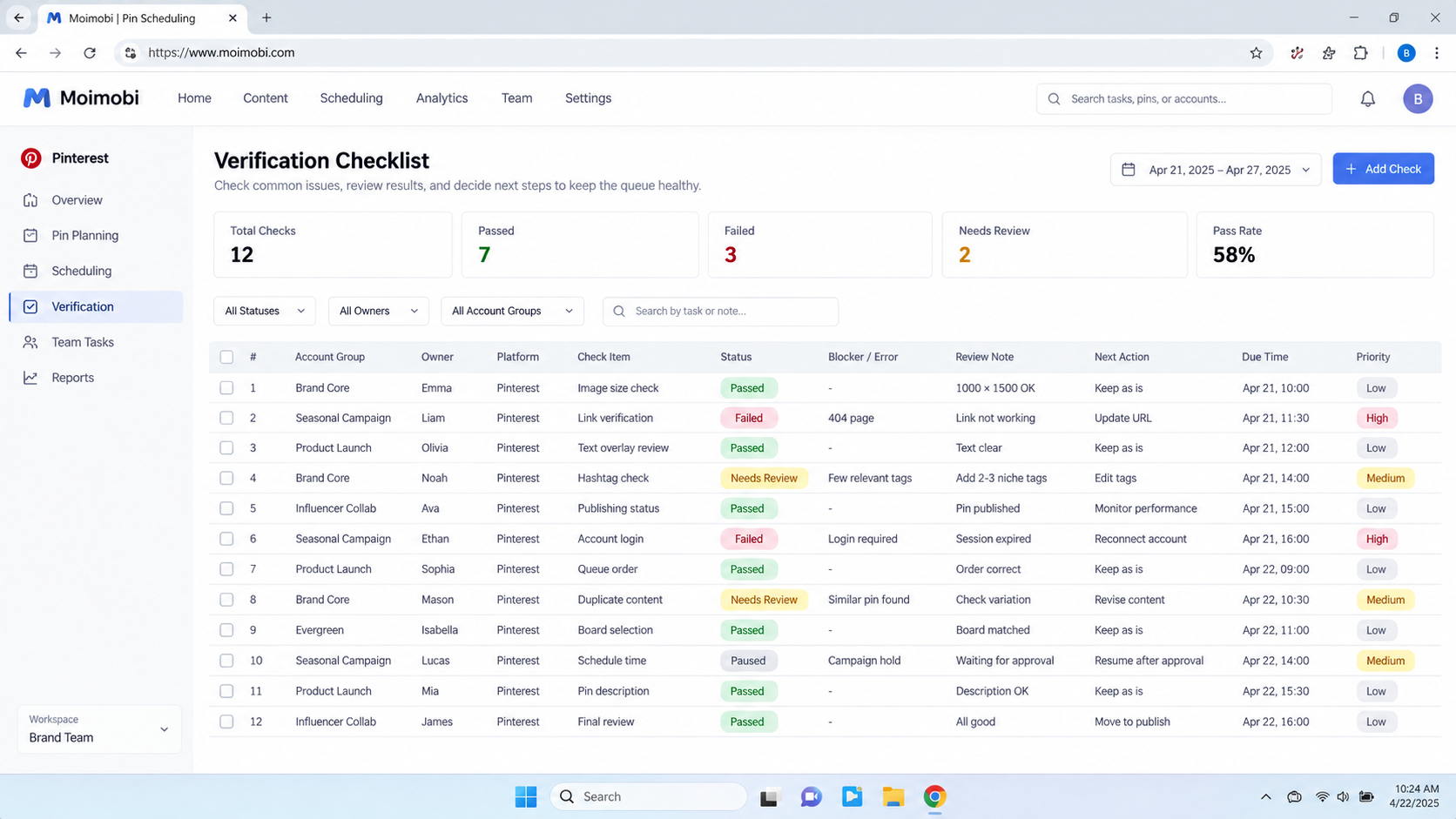
Pinterest pin scheduling automation works best as a release-control system. First define ownership and required fields. Next separate review from publishing. Then schedule through the simplest authorized lane that fits the queue.
Before scaling, reconcile one pilot board from planning record to live Pin. Expand only when the team can verify every item, surface failures, and recover without duplicate publishing.