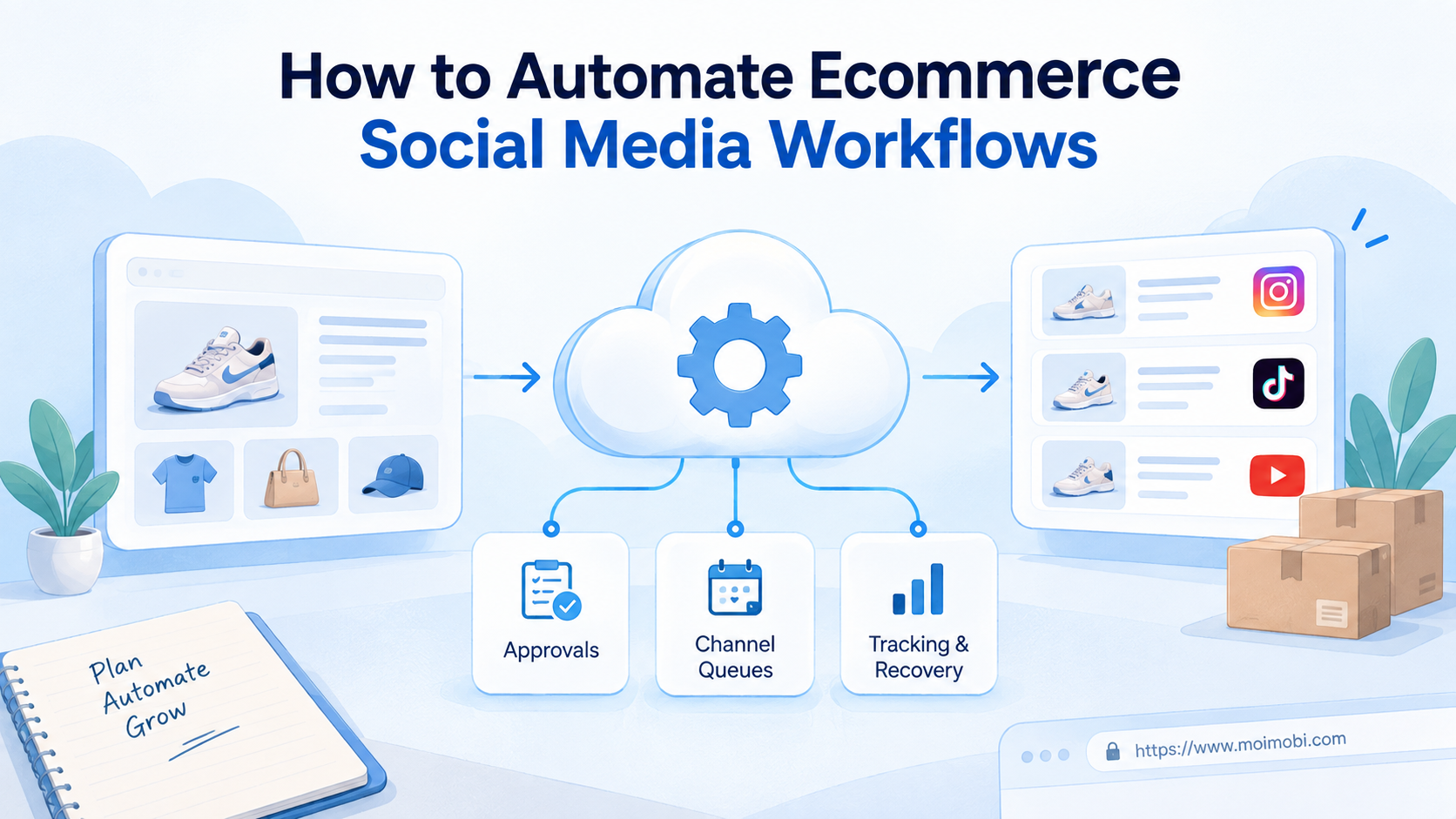
Ecommerce social media workflow automation is a controlled system that moves product data, content, approvals, publishing tasks, customer responses, and performance records between responsible teams. Learning how to automate ecommerce social media starts with one rule: keep the store as the source of product truth, then automate only the handoffs that have clear inputs, owners, and stop conditions.
The goal is not to make every account post by itself. A dependable workflow reduces copy-and-paste work while preserving human decisions around offers, claims, pricing, customer issues, and brand voice. It should also show what ran, where it ran, who approved it, and what needs recovery.
Key Takeaways
- Start with product data and campaign ownership, not a scheduling tool.
- Separate content approval from account execution.
- Give each channel a defined queue, environment, and responsible operator.
- Record evidence for each publishing or response task.
- Pilot one product group and one channel before expanding.
What You Need Before You Automate Ecommerce Social Media
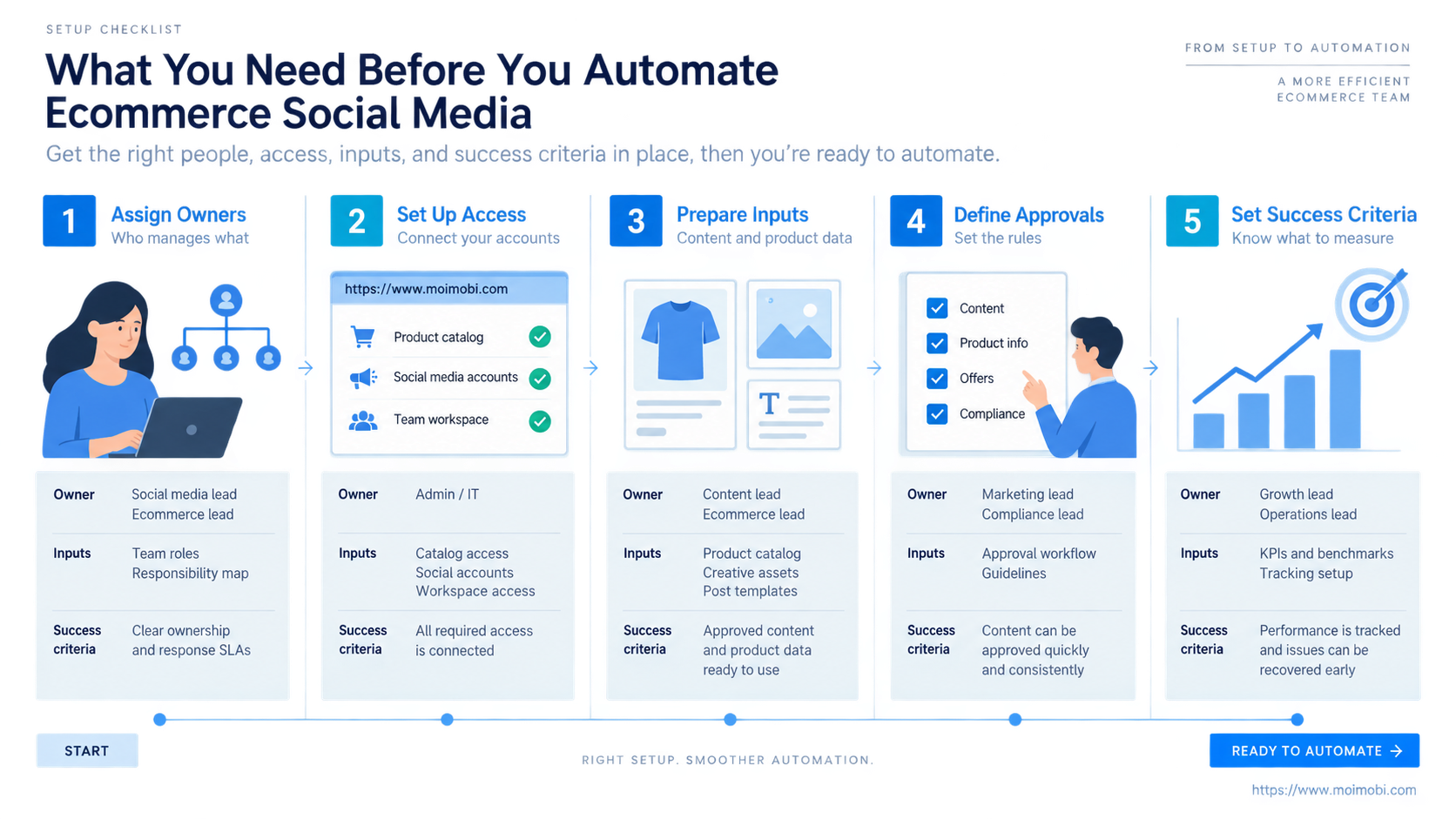
The common mistake is treating social automation as a posting calendar. A calendar is only one output. Teams deciding how to automate ecommerce social media also need accurate products, usable media, approved claims, channel permissions, account ownership, and a destination for customer questions.
Use the store or product information system as the source of truth. Product IDs, titles, prices, availability, links, and images should not be retyped in every social tool. Shopify, for example, documents campaigns as a way to group and track email, social posts, and paid activities around one goal in its marketing setup guidance. The broader lesson is to use one campaign identity across channels, even when execution happens in different tools.
Complete this preflight checklist before building any trigger:
- Product owner: names the approved product set and handles pricing or inventory changes.
- Content owner: controls captions, images, videos, claims, and local variants.
- Channel owner: holds the required account role and accepts publishing responsibility.
- Customer owner: receives comments, direct messages, returns, and order questions.
- Data owner: defines campaign IDs, links, attribution fields, and reporting cadence.
- Stop owner: can pause a queue when product data, permissions, or account behavior is abnormal.
The account environment matters as much as the content. Teams operating several brands or regions should define a separate workspace and task owner for each account. Moimobi's store-to-account assignment blueprint is relevant when a team needs account-to-environment assignment, controlled handoffs, and reviewable task history.
How to Automate Ecommerce Social Media Workflows Step by Step
Do not begin with every platform and every SKU. Start with one repeatable campaign, such as a weekly product launch or an approved restock announcement. The following sequence keeps the workflow small enough to inspect.
- Define the event. Choose a trigger such as product approval, restock confirmation, campaign start, or a reviewed content request.
- Create a campaign record. Store the campaign ID, product set, target region, channel list, owner, due time, and status.
- Build the content package. Prepare approved copy, media, destination link, disclosure text, and channel-specific variants.
- Run an approval gate. Check product accuracy, claims, creative rights, destination links, and account assignment before tasks enter an execution queue.
- Dispatch channel tasks. Route each approved item to its assigned account environment instead of letting operators choose accounts ad hoc.
- Capture execution evidence. Record task time, account, final copy, media reference, result, and any returned platform message.
- Route engagement. Send comments, inquiries, and exceptions to a queue with a named response owner and escalation rule.
- Close the loop. Join task results with campaign links, store activity, customer outcomes, and failure reasons.
This sequence supports both API-connected channels and tasks that still require a browser or mobile app. Moimobi can provide a controlled mobile commerce task control surface for assigned app-side work, approvals, and task records. It should not be represented as an unrestricted replacement for each platform's official publishing or commerce interface.
How to Automate Ecommerce Social Media Without Mixing Catalog and Creative Work
Catalog synchronization and creative production solve different problems. The catalog carries product identity and commercial facts. Creative work translates that information into a channel-specific message. A plan for how to automate ecommerce social media should keep those objects separate instead of combining them in one editable spreadsheet.
Shopify's official Facebook and Instagram by Meta documentation describes synchronizing products to a Meta catalog for Facebook and Instagram commerce features. That is an example of an official catalog connection. Content approval, account execution, community replies, and operational evidence still require their own workflow.
| Workflow object | System of record | Automation job | Human checkpoint |
|---|---|---|---|
| Product facts | Store or PIM | Sync approved fields | Price, stock, and policy review |
| Campaign brief | Campaign workspace | Create tasks and deadlines | Goal and audience approval |
| Creative package | Content library | Route variants to channels | Claims, rights, and brand review |
| Account task | Execution queue | Assign environment and operator | Final publish or send approval |
| Customer response | Inbox or CRM | Triage and assign | Price, complaint, and order decisions |
| Outcome record | Analytics store | Collect status and campaign fields | Weekly interpretation and next action |
Use stable product IDs throughout the chain. The campaign task should refer to the product ID and approved snapshot rather than copying editable commercial data into the caption. If a price or availability field changes before publishing, the task should return to review instead of silently using stale content.
How to Automate Ecommerce Social Media Across Accounts and Permissions
More accounts create more ownership questions. Any team planning how to automate ecommerce social media must know which store, brand, region, catalog, page, and operator belong together. Shared passwords and an undifferentiated publishing queue hide those relationships.
TikTok explains that Business Center catalogs can hold product information, support product sets, be shared with members or partners, and work across ad accounts in its catalog management documentation. The practical design lesson is to model catalogs, accounts, and permissions as separate assets. Access to one asset should not imply unlimited access to every campaign or account.
Assign these fields to every execution task:
| Field | Purpose | Stop condition |
|---|---|---|
| Store and product set | Prevents cross-brand product mistakes | Product set is missing or stale |
| Social account | Fixes the target before execution | Account is unassigned or unavailable |
| Environment | Keeps the session tied to the account | Environment does not match assignment |
| Operator or worker | Establishes responsibility | No active owner |
| Approval version | Prevents old creative from running | Approval hash or timestamp differs |
| Due window | Controls campaign timing | Window has expired |
| Evidence requirement | Defines proof of completion | Result cannot be captured |
For teams that use browser and mobile surfaces, an account-specific execution boundary can help keep account workspaces and task ownership distinct. Isolation does not replace platform permissions or operating discipline. It gives the team a clearer execution boundary.
Best Practices for How to Automate Ecommerce Social Media
The right implementation depends on the channel, but four constraints appear in nearly every ecommerce workflow.
Use approval before dispatch. Generate drafts and content variants early, but do not schedule an unreviewed claim or offer. The approval object should identify the exact copy, media, product set, and destination.
Design idempotent tasks. A retry should not create a second post, message, or promotion without a check. Before repeating an action, the workflow should inspect its last result and any available platform record.
Separate automatic and assisted steps. Data synchronization, task creation, assignment, reminders, and status collection are good automation candidates. A new claim, refund dispute, sensitive reply, or unexpected platform dialog should route to a person.
Store structured outcomes. Avoid a single success flag. Use statuses such as approved, queued, running, published, needs_review, failed, and canceled, plus a reason and evidence reference.
The social commerce operations workflow should connect content preparation, account execution, engagement handling, and reporting. It should not reduce the process to a high-volume posting counter.
Common Mistakes and Troubleshooting
Use a simple framework: source, permission, execution, and evidence. A failure usually belongs to one of those layers.
- Stale product data: stop the task, refresh the product snapshot, and request approval again.
- Wrong account assignment: remove the item from the queue and inspect the account-to-environment map.
- Expired permission: restore access through the platform's approved process before retrying.
- Duplicate execution: check the last task result and platform record before creating a replacement task.
- Missing media rights: hold the creative package until ownership or usage permission is documented.
- Unclear customer handoff: assign a response owner and deadline before enabling automated triage.
- Silent partial failure: record the last completed step, returned message, and next recovery action.
- Metrics without campaign identity: add consistent campaign and product IDs before interpreting results.
Avoid building recovery as “run the whole workflow again.” Recovery should resume from the last verified checkpoint. A catalog sync error needs a data correction, while a failed app-side task may need a fresh environment check or human takeover.
Who This Workflow Fits and When It Does Not
Automation is a strong fit when a team already repeats the same product-to-content process and can name each owner. It is especially useful for several stores, brands, regions, accounts, or customer queues that must follow the same approval rules.
- Stable product IDs and approved feeds
- Repeated campaign formats
- Named channel and response owners
- Defined approval and pause rules
- Need for cross-account task evidence
- Product facts change without ownership
- Every campaign is improvised
- Passwords and accounts are shared informally
- No one reviews claims or replies
- Success is measured only by post volume
A small seller with one channel may need only a store integration, a content calendar, and a response checklist. A larger operation gains more from orchestration when account assignment, approvals, execution surfaces, and reporting have become difficult to coordinate manually.
Pilot Rollout, Measurement, and Recovery Checks
Run a limited pilot with one store, one product group, one campaign pattern, and one or two social accounts. Keep the pilot long enough to include preparation, approval, execution, engagement, and reporting. Do not expand because the first post completed successfully.
Track operational measures before commercial outcomes:
- percentage of tasks with a valid product snapshot;
- approval turnaround time;
- queued tasks completed within their due window;
- duplicate or wrong-account incidents;
- tasks requiring human takeover;
- customer inquiries assigned within the agreed window;
- failed tasks with a documented reason and recovery action;
- campaign records that connect execution to a store outcome.
Use a pass/fail review at the end of the pilot. Pass only when ownership is clear, evidence is complete, and failures can be recovered without rerunning unrelated steps. If the workflow misses those conditions, reduce scope and repair the data or permission model first.
Frequently Asked Questions
1. What should an ecommerce social media workflow automate first?
Start with data validation, task creation, ownership, approval routing, reminders, and result recording. These steps are repetitive and easier to inspect than fully autonomous publishing or customer conversations.
2. Do I need the same automation for every social platform?
No. Keep a shared campaign and product model, then use channel-specific execution steps. Permissions, content formats, commerce features, and available interfaces differ by platform.
3. Can AI write and publish every product post automatically?
AI can prepare drafts and variants, but teams should review product facts, claims, discounts, rights, and brand fit. Publishing should use an approved artifact rather than a newly generated version.
4. How do I prevent the wrong account from publishing a campaign?
Bind each task to a store, social account, environment, and owner before it enters the queue. Stop execution when any assignment is missing or inconsistent.
5. How should customer comments and direct messages enter the workflow?
Capture the source account, product, campaign, message type, urgency, and assigned responder. Escalate order, payment, complaint, and policy questions instead of sending an unreviewed reply.
6. Is this approach suitable for marketplace sellers?
It can be, when the marketplace remains the source of commercial truth and the social workflow respects its permissions and policies. Do not copy stale inventory or pricing into an independent automation layer.
7. How much does ecommerce social media automation cost?
Cost depends on channel count, account count, content volume, required execution environments, integrations, approval effort, monitoring, and recovery work. Measure labor saved and error reduction during a pilot before scaling.
8. What are the risks and stop conditions for this workflow?
Stop on missing approval, stale product data, expired access, account mismatch, duplicate risk, unexpected dialogs, unsupported actions, or missing evidence. Route the task to a named reviewer with its last verified state.
Conclusion
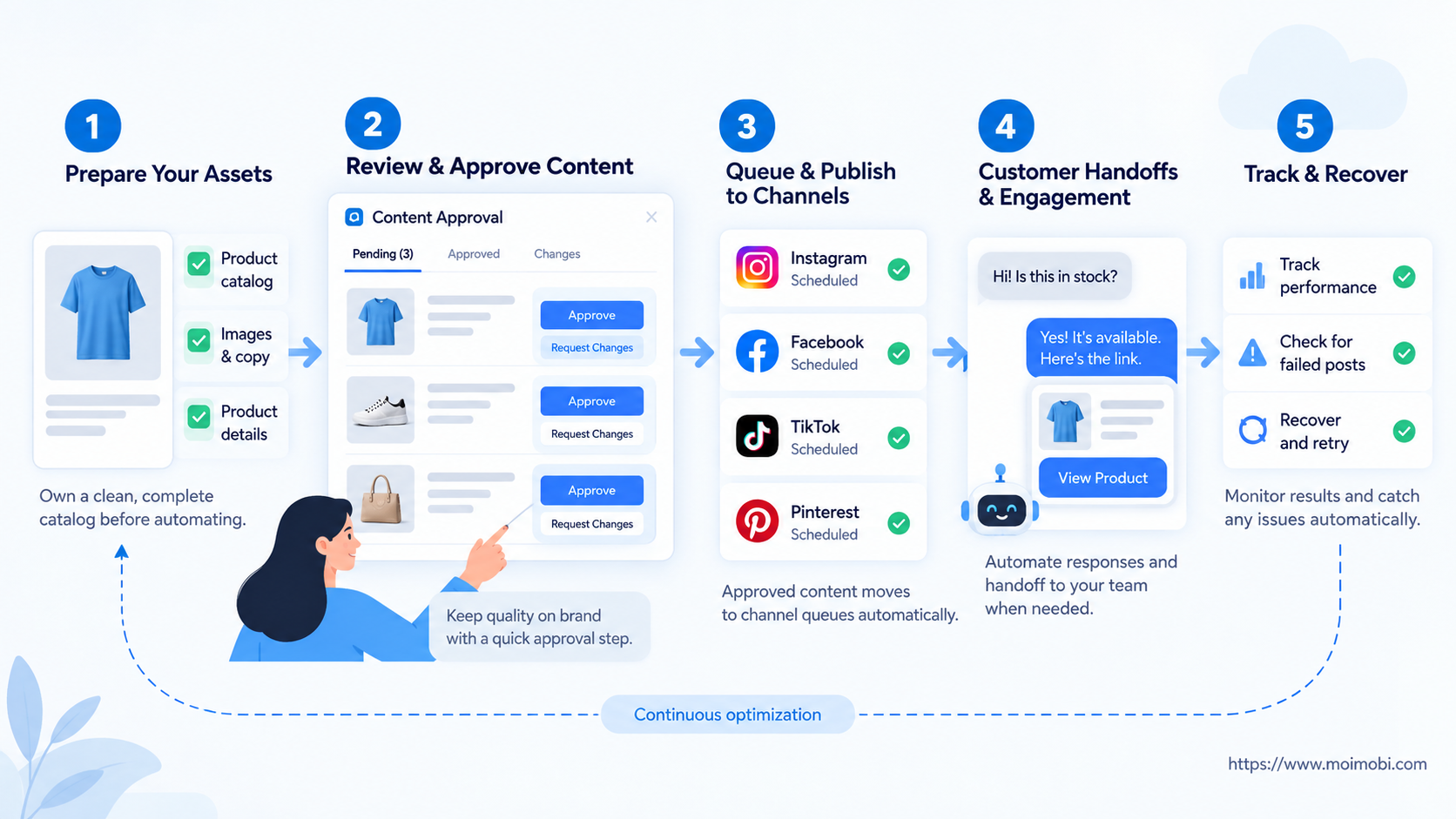
The practical answer to how to automate ecommerce social media is product truth first, ownership second, approval third, controlled execution fourth, and measurement last. That sequence makes automation inspectable and easier to recover.
Begin with one campaign pattern and a small product set. Confirm that every task has an owner, an assigned account environment, an approved artifact, and a result record. Expand only after the team can explain both successful runs and failed runs without reconstructing events from memory.