A Skyvern alternative is a platform or architecture chosen when a team needs a different browser control model, native mobile app execution, or one operating layer across both. Skyvern remains a strong category fit for AI-assisted browser work. Replacing it only makes sense when the missing execution surface or governance model affects the actual workflow.
The first decision is therefore not “Which tool has more AI?” It is “Where must the task run?” A browser-only workflow, a responsive mobile website, and a native Android or iOS app need different control layers. A combined platform must also preserve account context, approvals, task state, and recovery across those layers.
Key Takeaways
- Keep Skyvern on the shortlist for browser-first tasks that benefit from AI actions and Playwright control.
- Do not treat mobile browser emulation as native mobile app automation.
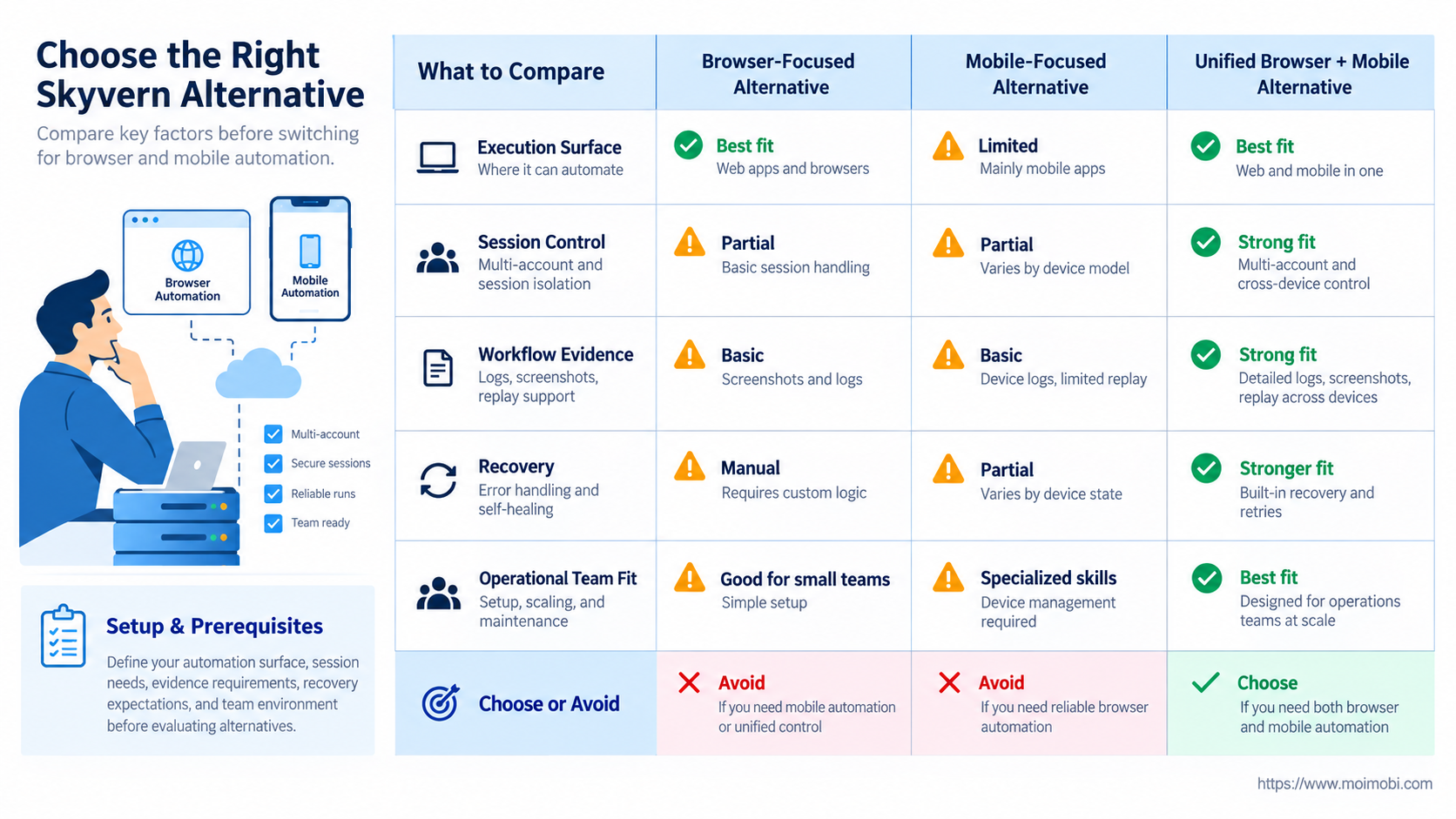
- Compare session ownership, evidence, human takeover, retries, and result states before feature counts.
- A hybrid architecture may fit better than replacing every browser workflow.
- Pilot one browser lane and one mobile lane before standardizing the stack.
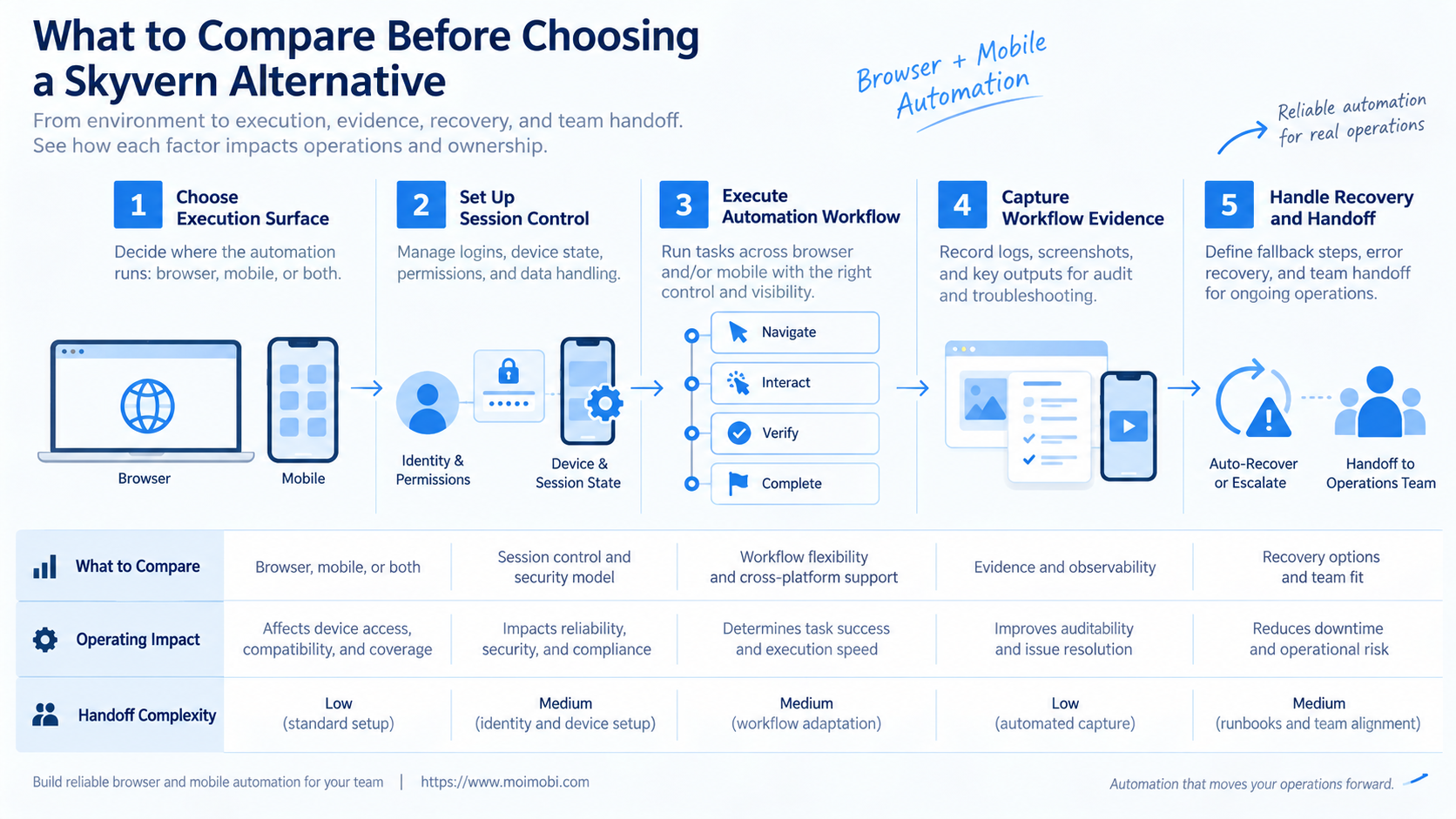
What to Compare Before Choosing a Skyvern Alternative
Start with the execution surface. Skyvern's official browser automation guide describes a cloud Chromium browser, a Playwright-compatible page with AI methods, and code-first workflows in Python or TypeScript. That is a clear browser automation model. It does not, by itself, establish control over a native mobile application.
Map each task to one of four surfaces:
- Desktop web: full websites, admin tools, forms, and browser downloads.
- Mobile web: responsive websites running in a mobile-sized browser viewport.
- Native app: Android or iOS interfaces that require device-level app control.
- Cross-surface workflow: a task that starts on the web and continues inside an app.
The distinction matters because emulating a phone-sized browser does not expose native app navigation, permissions, notifications, or device settings. Teams that ignore this boundary often discover it only after building the first half of a workflow.
Next, define the operating unit. Is one run attached to a temporary browser, a persistent account profile, a cloud phone, or a business task that can cross environments? The answer controls how sessions, credentials, logs, and handoffs should be stored. A Skyvern alternative should make that unit explicit before execution begins.
Skyvern Alternative Comparison Matrix
| Option | Best fit | Operational strength | Main limitation |
|---|---|---|---|
| Skyvern | AI-assisted browser workflows | Cloud browser plus Playwright and AI actions | Native app execution needs another layer |
| Playwright stack | Deterministic browser automation | Direct code control and browser contexts | More workflow logic remains with the team |
| Appium stack | Native or hybrid mobile app control | Driver ecosystem for mobile platforms | Device and driver operations add overhead |
| Unified execution platform | Browser and mobile business workflows | Shared ownership, queue, and evidence model | Needs clear boundaries between execution engines |
| Hybrid architecture | Teams with mature browser automation | Retains working browser lanes and adds mobile selectively | Cross-system handoff must be designed |
Playwright documents browser contexts as isolated, clean-slate environments with separate session state. Review the BrowserContext isolation model when comparing profile behavior. This model supports browser state separation, but it should not be confused with a persistent remote mobile device.
Appium covers a different layer. Its official documentation describes a driver-based ecosystem for UI automation across Android, iOS, and other app platforms. That makes it a useful mobile automation baseline, although teams still need devices, drivers, application state, and their own workflow governance.
Key Differences in Browser and Mobile Execution
The largest difference is not the prompt interface. The controlled object defines the architecture. Browser tools control pages, tabs, storage, downloads, and web requests. Mobile tools control applications, device sessions, operating-system prompts, and app-specific navigation.
Session life also changes the design. A temporary browser run may start clean and close after a task. An account-based workflow may require a persistent profile with known ownership. A mobile lane may need the same installed app, login state, device settings, and assigned route across many runs.
Result evidence must match the surface. Browser evidence may include extracted fields, downloaded files, page URLs, screenshots, and action logs. Mobile evidence may include app state, device screenshots, task checkpoints, and a final observed outcome. A shared task record should point to the evidence without pretending every engine produces the same artifact.
Human takeover is another separator. Operators need to know which browser or device to open, what state the task reached, and whether an external action may already have occurred. “Result unknown” must be a first-class state. Blindly replaying a submit, post, or send action can duplicate business work.
Features, Workflow, and Trade-Offs
A practical Skyvern alternative should be judged as an operating system for tasks, not a list of automation methods. Begin with inputs, execution, review, and outcomes.
Inputs should identify the account, environment, task type, payload, operator, approval rule, and stop condition. Credentials should remain outside page content and model prompts. The execution engine receives only what the current step requires.
Execution should separate deterministic controls from AI judgment. Stable navigation and known buttons may use fixed automation. Unstructured pages may benefit from AI interpretation. Native apps may require a mobile driver or managed device action. One workflow can coordinate these methods without collapsing them into one opaque agent loop.
Review should support a manual checkpoint before sensitive or irreversible actions. The operator needs the current screenshot, intended action, account identity, and prior steps. A generic “approve” button without that context is weak control.
Outcomes should distinguish completed, failed, stopped, needs review, and unknown. A mobile automation control layer is relevant when app-side work must join the same queue, but the browser engine should remain replaceable rather than hidden inside mobile code.
Operational Cost Beyond Subscription Price
Avoid comparing platform prices before measuring the work each option leaves with the team. A lower service fee can still create higher operating cost if engineers maintain selectors, devices, proxies, session recovery, and custom evidence pipelines. The right Skyvern alternative reduces a measured burden instead of moving it to another team.
Use five cost buckets:
- Build: workflow design, integration, test data, and initial account setup.
- Run: browser or device time, model calls, infrastructure, and concurrency.
- Maintain: page changes, driver upgrades, app updates, and workflow revisions.
- Review: operator approvals, exception handling, and result verification.
- Recover: failed runs, uncertain outcomes, session repair, and duplicated work.
Do not invent a single “cost per task” from a demo. Measure it during a pilot. Include engineering time and operator touch time alongside infrastructure cost. A browser-only platform may win for web extraction, while a unified system may reduce handoff cost in a workflow that genuinely crosses into a mobile app.
The architecture should also expose consumption boundaries. AI interpretation, browser runtime, mobile runtime, storage, and network traffic are different cost drivers. When they are bundled into one number, teams cannot tell which workflow change actually reduced spend.
Which Skyvern Alternative Fits Which Team?
Stay with Skyvern when
- The work is browser-first and fits cloud Chromium.
- The team values AI actions alongside Playwright code.
- Native app steps are absent or handled elsewhere.
- The current workflow already has usable logs and recovery.
Choose a browser framework when
- The flow is stable and deterministic.
- Engineers want direct control over selectors and contexts.
- The team can own hosting, observability, and maintenance.
- AI interpretation adds little to the task.
Add a mobile layer when
- A required step exists only in a native app.
- Installed application state must persist between runs.
- Device assignment and app evidence matter to operators.
- Browser emulation cannot reach the required interface.
Use a unified platform when
- Business tasks move between web and mobile environments.
- Teams need one queue, ownership model, and review trail.
- Human takeover must work across both surfaces.
- Accounts and environments need durable assignment.
Teams running several account environments should also evaluate account-to-environment coordination. The main question is whether task ownership remains clear when different engines touch the same business account.
Fit and Not-Fit Boundaries
A unified browser-and-mobile platform fits operations teams whose workflows truly cross surfaces. Examples include preparing content in a web dashboard and completing an app-only release, or collecting a browser-based task request before an operator reviews the final mobile action.
A unified execution platform is not automatically better for software testing. QA teams may prefer Playwright for web tests and Appium for app tests because those tools expose engineering-focused controls. A business execution platform should not claim to replace every testing framework.
Stable API tasks are another poor fit for UI automation. Use the API for structured reads or writes when the authorization and business rules permit it. Reserve browser and mobile control for interfaces or review steps that cannot be handled reliably through a supported integration.
Finally, avoid migration when the existing Skyvern lane works and mobile needs are isolated. Add a small mobile handoff first. Replacing a functioning browser system creates risk without proving that a unified stack reduces total effort.
Pilot a Skyvern Alternative Before Migration
Select two representative lanes: one browser workflow and one native mobile workflow. Each lane should include a normal run, a permission or login interruption, a human review point, and an uncertain result scenario. This is the smallest useful test of a cross-surface Skyvern alternative.
- Freeze the current workflow. Record inputs, steps, owners, credentials boundary, evidence, and completion rule.
- Capture a baseline. Measure build effort, run time, operator touch time, failures, and recovery work.
- Map execution surfaces. Mark every step as API, browser, mobile web, native app, or human.
- Build the smallest replacement lane. Preserve the current system for rollback.
- Test interruptions. Expire a session, stop a run, change a page, and disconnect a device.
- Verify result states. Confirm that completed, failed, stopped, and unknown outcomes remain distinct.
- Review handoffs. Ensure an operator can open the correct environment with the prior task context.
- Decide by evidence. Expand only if the new lane reduces total effort or enables a required surface.
Use the same account and payload rules in both lanes so the comparison is fair. Do not give the alternative cleaner data, more operator attention, or easier cases than the current system.
The pilot fails if the team cannot explain an uncertain action, if credentials leak into logs, or if a mobile handoff loses ownership. Those are architecture issues, not minor tuning problems. Fix them before adding concurrency.
Frequently Asked Questions
What is the closest type of Skyvern alternative?
The closest option is another AI browser automation platform. A broader alternative adds workflow governance or mobile execution, so it is not a direct feature-for-feature substitute.
Is Playwright a Skyvern replacement?
Playwright can replace the browser control layer for deterministic code-driven tasks. The team must supply AI behavior, hosting, workflow state, and operational controls it still needs.
How does mobile web automation differ from native app automation?
Mobile web automation controls a browser viewport. Native automation controls an installed app and may encounter device permissions, app navigation, and operating-system surfaces.
When should a team add Appium?
Add a mobile driver layer when a required task must run inside a native or hybrid app and the team can manage devices, drivers, and test or execution state.
Does a unified platform remove the need for Playwright or Appium?
Not necessarily. A unified platform may coordinate specialized engines while keeping one task queue, ownership model, approval process, and evidence trail.
How should teams compare pricing?
Compare total cost per verified workflow. Include infrastructure, model usage, maintenance, operator review, failure recovery, and idle capacity.
What is the safest migration pattern?
Run a limited parallel pilot, preserve rollback, and move one workflow lane at a time. Do not migrate every profile or device before recovery paths are proven.
Can Moimobi be evaluated for this use case?
Moimobi can be evaluated where teams need browser and mobile execution concepts under one operational model. Validate the exact required actions in a pilot rather than assuming every web or app step is already supported.
Conclusion
Choose a Skyvern alternative by execution surface first, then by operating model. Keep Skyvern for browser lanes where its cloud browser, Playwright integration, and AI methods fit. Add or select a mobile layer only when the workflow must enter a native app.
For cross-surface operations, test whether one queue, clear environment ownership, human takeover, and evidence states reduce real handoff work. The next step is a two-lane pilot with measured recovery, not a full-stack migration based on a feature list.