Content Type: guide
Page Role: longtail
Intent Type: informational
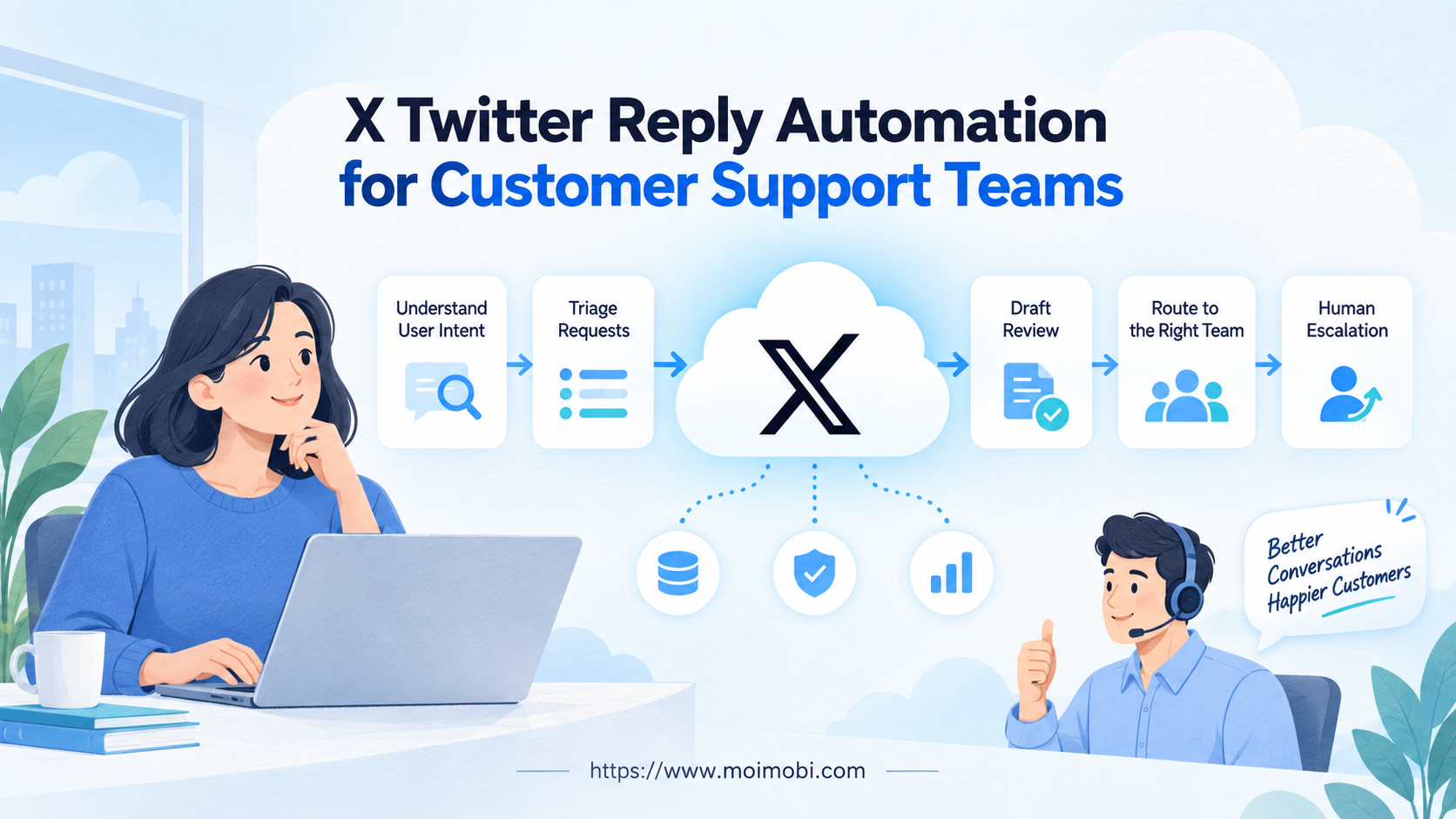
X Twitter reply automation is a support workflow that detects an eligible user interaction, classifies the request, prepares a context-aware response, applies review rules, and records the outcome. It should not mean searching for keywords and sending unsolicited replies to strangers.
For most support teams, the safest starting point is assisted automation. Software can collect mentions, route them, suggest replies, flag sensitive content, and remind agents about service-level goals. A person approves the public response until the organization has confirmed its policy basis, approval requirements, quality controls, and escalation path.
The goal is not maximum reply volume. The goal is a consistent conversation: the correct brand account responds to a user who has shown intent, with accurate information, without exposing private data or repeating a generic message across unrelated posts.
Key Takeaways
- Make user intent and reply eligibility the first workflow gate.
- Use automation for triage, context gathering, drafting, routing, and evidence before automating publication.
- Keep account ownership, brand voice, permissions, and escalation rules explicit.
- Move private account or order details away from public replies.
- Measure correct resolution and safe handoff, not raw response count.
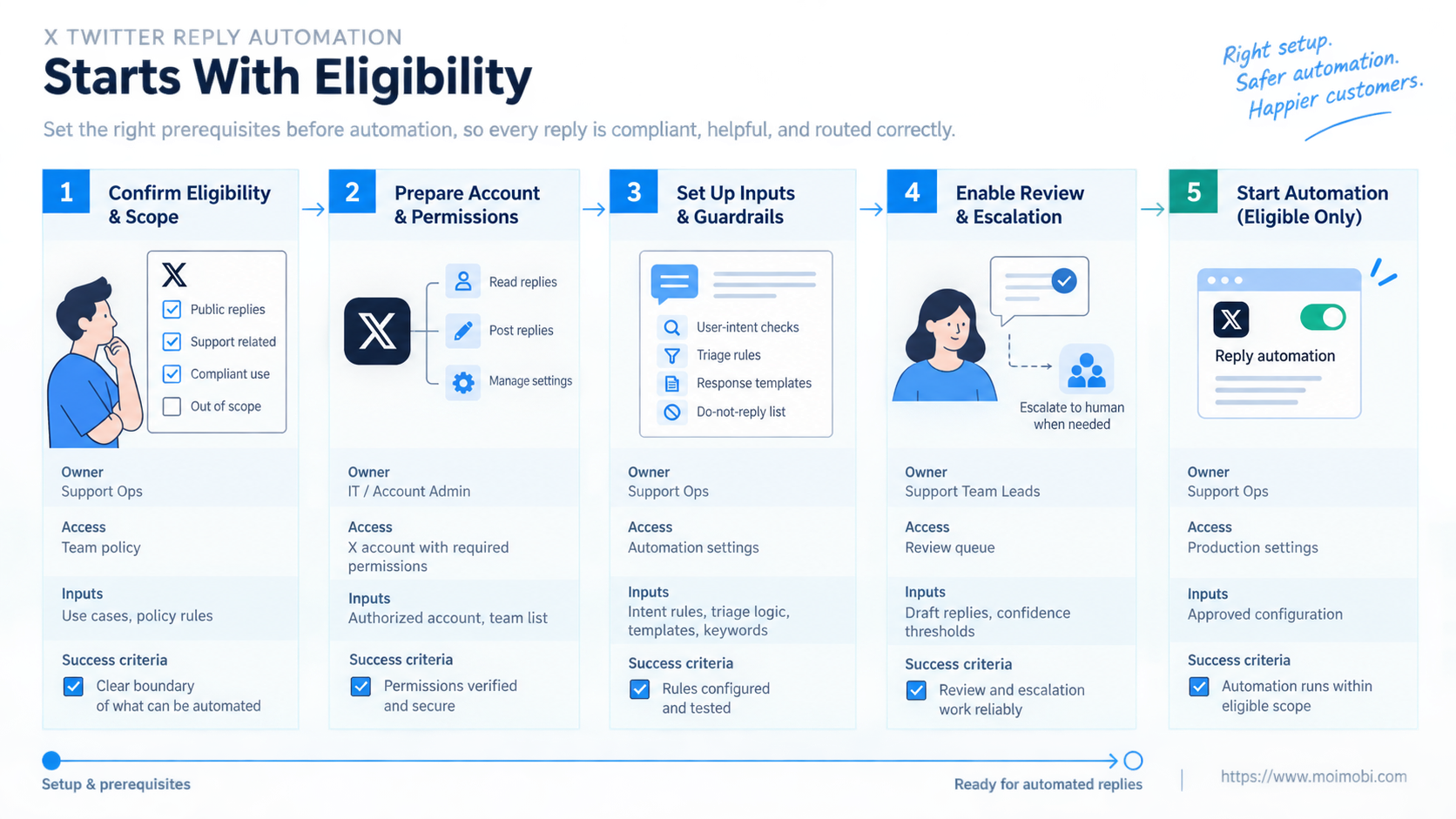
X Twitter Reply Automation Starts With Eligibility
X's official automation rules say automated replies cannot be used to reach many users on an unsolicited basis. The rules provide examples of acceptable user intent, require a clear opt-out path, and limit automated responses in relation to the initiating interaction. They also state that deploying an AI reply bot requires prior written and explicit approval from X.
That makes eligibility a data field, not a vague judgment. Before a reply enters an automated path, record why it qualifies:
| Eligibility signal | Automation treatment | Support action |
|---|---|---|
| User replies to the brand's post with a support request | Eligible for triage; publication depends on policy | Classify and draft a contextual response |
| User mentions the brand seeking assistance | Review intent and content | Route to the correct support queue |
| Keyword search finds an unrelated complaint | Not eligible for unsolicited automated reply | Monitor or send to manual review |
| Existing support conversation continues | Preserve thread and case context | Draft the next relevant answer |
| Post requests private account help | Public acknowledgement only | Move securely to an approved private channel |
Following an account alone does not prove that the user wants an automated reply. Technical ability to post a response is also not consent. The workflow should store the trigger post, conversation ID, eligibility reason, and any opt-out state.
X describes a reply as part of an existing conversation in its conversation guidance. Preserve that relationship. A drafted response should reference the actual question and avoid inserting a generic promotion into a support thread.
Why Support Teams Use X Twitter Reply Automation
Support queues mix several jobs. Agents must detect relevant posts, remove duplicates, identify language, classify intent, find account context, select approved knowledge, draft an answer, request review, publish from the correct account, and record the result. Repetition makes the preparation steps suitable for automation.
Triage is usually the lowest-risk starting point. A classifier can label billing, login, delivery, feature, outage, feedback, abuse, or unknown. Confidence thresholds should route uncertain or sensitive posts to a person rather than forcing a category.
Draft assistance can improve consistency when it retrieves only approved support material. The draft should include the source article or policy used, so the reviewer can verify the answer. It should not invent account status, refund eligibility, outage causes, or timelines.
Account routing matters for multi-brand or regional teams. An account-to-support-queue model should bind each case to the intended X account, language, region, owner, and approval policy. A reply drafted for one brand must not be publishable from another account.
Evidence closes the loop. Store the incoming post, classification, source material, draft versions, reviewer decision, published reply identifier, and final case outcome. This supports coaching and incident review without relying on private spreadsheets.
A workable case record needs more than the post text. Include the source account, destination brand account, conversation identifier, eligibility basis, language, issue class, sensitivity level, assigned queue, owner, review state, response deadline, and last action. Keep the proposed reply separate from the approved reply. That distinction shows whether an agent accepted, edited, or rejected the automated suggestion.
Queue states should describe what can happen next. A compact sequence is captured, eligibility_review, draft_ready, human_review, approved, published, escalated, and closed. Add terminal states for ineligible, opted_out, and cancelled. A task in draft_ready must not be publishable until its review rule is satisfied. State transitions should record the operator, time, reason, and originating system.
Preflight Checklist for X Twitter Reply Automation
Do not connect a publishing action until the team can answer these questions:
- Which user interactions qualify for automated processing?
- Has the organization reviewed the current X automation rules?
- Does the use case require approval from X?
- Which accounts, queues, languages, and issue types are in scope?
- Who owns public replies, private escalation, legal review, and incidents?
- What approved sources may the drafting system use?
- Which topics always require human review?
- How is opt-out recorded and enforced across queues?
- What evidence proves that a reply was accurate and properly routed?
- How will the team pause all outbound actions without losing cases?
The authenticity policy prohibits bulk, duplicative, irrelevant, and unsolicited behavior. X's authenticity rules should therefore become concrete controls: duplicate-text detection, conversation relevance checks, per-case ownership, and a pause rule for unusual patterns.
Credentials should remain outside prompts and draft text. Give the publishing service only the accounts and actions required for its queue. Operators who review content do not automatically need access to account security settings.
How to Build the Support Reply Workflow
- Capture the interaction. Save the post ID, conversation ID, author, receiving account, time, and text needed for support review.
- Check eligibility. Confirm user intent, scope, opt-out state, and policy requirements before any automated reply path continues.
- Classify the case. Assign issue type, language, urgency, sensitivity, and confidence. Route uncertain cases to a person.
- Retrieve approved context. Attach current help content, incident notices, and brand-specific instructions. Do not infer private account facts.
- Create a draft. Keep it relevant to the original post, concise, and free of unnecessary private-data requests.
- Apply review rules. Require a person for sensitive, legal, safety, refund, security, or low-confidence cases.
- Publish through an approved path. Verify the intended account, original post, final text, and current conversation state.
- Record and monitor. Store the reply identifier, reviewer, status, follow-up need, and any user opt-out.
Use a controlled social execution workflow to connect content governance with account operations. The automation should act on a task record, not an unbounded instruction such as “reply to negative posts.”
If the approved workflow genuinely requires a mobile app, an assigned cloud phone may provide the Android environment. X's automation rules specifically warn against non-API website scripting, so the execution design must follow approved platform access and current policy rather than using browser or device control to bypass API requirements.
Fit and Not-Fit Boundaries
- Users initiate support interactions.
- The answer source is approved and current.
- Account ownership and review roles are clear.
- Cases have auditable outcomes.
- Requests vary widely.
- Private data may be involved.
- Brand or legal judgment is common.
- Automation drafts but a person publishes.
- Replies originate from keyword searches alone.
- The goal is unsolicited promotion.
- Multiple accounts repeat similar replies.
- No opt-out or incident owner exists.
Customer support and growth outreach are different workflows. A support team responds to expressed need. It should not turn a complaint or unrelated conversation into a promotional acquisition channel.
Public replies also have a privacy boundary. Acknowledge the request and direct the person to an approved secure channel when identity, account, order, payment, address, or other private details are needed. Never ask for credentials in a public conversation.
Common Mistakes That Reduce Quality
Automating discovery and publication together: A monitoring match is not necessarily an eligible reply. Separate listening, case creation, eligibility, drafting, and publishing.
Using one template across cases: Repeated generic replies ignore context and can resemble spam. Templates should provide structure, while the response addresses the actual question.
Letting the model invent support facts: The system needs approved retrieval sources and a fallback such as “an agent will review this.” Confidence is not evidence.
Losing the original conversation: Store the source post and confirm it still exists before publishing. A response without current context can be inaccurate or intrusive.
Mixing brand accounts: Account selection should come from the case assignment, not from the last open session. A mobile workflow control plane can enforce task-to-environment routing when mobile execution is permitted.
Measuring only speed: Fast replies are harmful when they are irrelevant, duplicate, or sent from the wrong account. Track accuracy, routing, resolution, escalation, and user feedback.
Pilot, Measurement, and Recovery Checks
Begin with one brand account, one language, and a small set of user-initiated support categories. Keep publication under human approval during the pilot. This creates a labeled record of accepted, edited, rejected, and escalated drafts.
Measure the workflow in stages:
- eligible interactions correctly identified;
- cases routed to the right account and queue;
- drafts accepted, edited, rejected, or escalated;
- replies linked to the correct conversation;
- private issues moved to an approved channel;
- opt-outs honored across the system;
- duplicate publication prevented;
- incidents paused and reconstructed from evidence.
Test failure deliberately. Delete or change the source post, expire credentials, remove an approved knowledge item, interrupt publication, and submit the same task twice. The system should stop or recover without sending an unrelated or duplicate response.
Human takeover must keep the original case open. The agent needs the trigger, classification, retrieved sources, draft, and previous review notes. Starting over in a separate inbox breaks the evidence trail.
Run a verification checklist before expanding beyond the pilot:
- Every published reply maps to one eligible source interaction.
- The selected X account matches the case assignment and brand policy.
- Review-required cases cannot bypass the approval state.
- The final response uses current approved support material.
- Duplicate task submission produces no second public reply.
- Opt-out status blocks later automated processing for that user where required.
- A failed publish attempt retains the case, draft, and error details.
- Operators can pause outbound actions without disabling case intake.
Review failed cases by cause rather than combining them into one error count. Separate eligibility failures, routing conflicts, stale knowledge, rejected drafts, permission errors, platform responses, and uncertain publish outcomes. Each class needs a different owner and recovery step. A routing conflict belongs with operations; an inaccurate knowledge item belongs with support content; an uncertain publish outcome requires a remote-state check before retrying.
Pause outbound automation when eligibility cannot be proven, opt-out state is unavailable, account assignment conflicts, source material is stale, or a platform policy change has not been reviewed. Continue collecting cases if appropriate, but keep publication disabled.
Frequently Asked Questions
Is X Twitter reply automation allowed?
It depends on the exact use case and current X rules. User intent, opt-out handling, anti-spam requirements, approved access methods, and any required X approval must be addressed before automated publication.
Can support teams reply automatically to keyword matches?
X's automation rules say automated replies based only on keyword searches are not permitted. Treat search matches as listening signals for manual review, not automatic outreach.
Can AI write reply drafts?
AI can assist with classification and drafting when it uses approved sources and appropriate review. X states that operating an AI automated reply bot requires prior written and explicit approval.
Should every reply require human approval?
Human approval is the practical default during rollout and for sensitive cases. Later controls depend on policy review, demonstrated accuracy, issue type, and platform approval requirements.
How should multiple X accounts be managed?
Bind each case to one brand account, queue, language, owner, and policy. Prevent manual or automated selection of unrelated sessions.
What information should never be requested publicly?
Do not request passwords, payment details, addresses, order data, or other private information in public replies. Move necessary verification to an approved secure channel.
What should the team do when automation fails?
Pause publication, preserve the case state, route it to a named operator, and verify whether any reply was already posted before retrying.
Which metrics matter most?
Use eligibility accuracy, routing accuracy, reviewer acceptance, correct resolution, escalation quality, duplicate prevention, opt-out compliance, and recovery time.
Conclusion
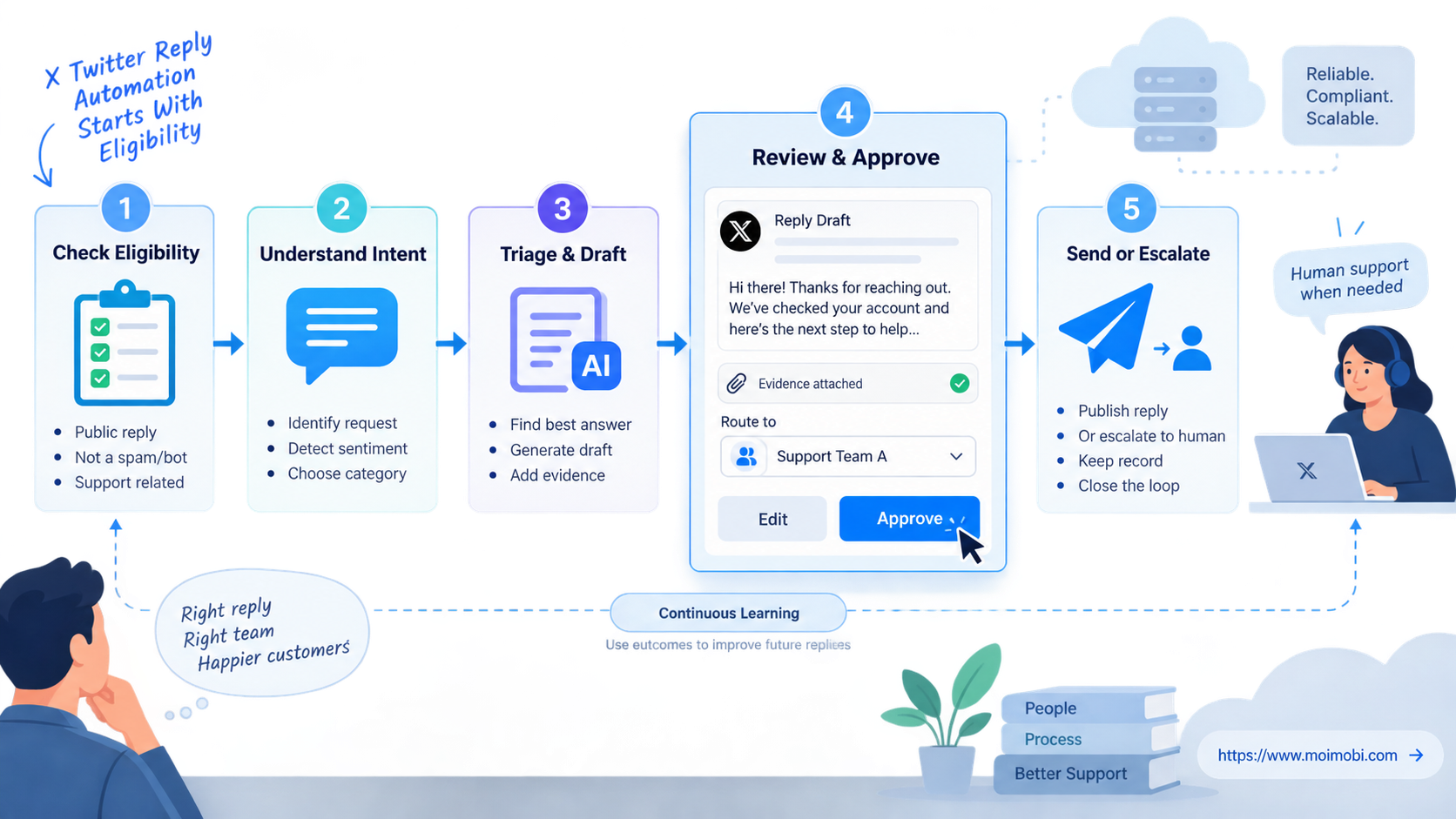
X Twitter reply automation should operate as a controlled customer-support workflow, not a reply-volume engine. Eligibility, conversation context, approved knowledge, account routing, review, privacy, opt-out, and evidence all come before automated publication.
Start with triage and draft assistance. Review current X rules for the planned use case, obtain any required approval, and pilot one narrow support queue. Expand only when the team can prove that replies are requested, relevant, accurate, recoverable, and linked to the correct account and conversation.