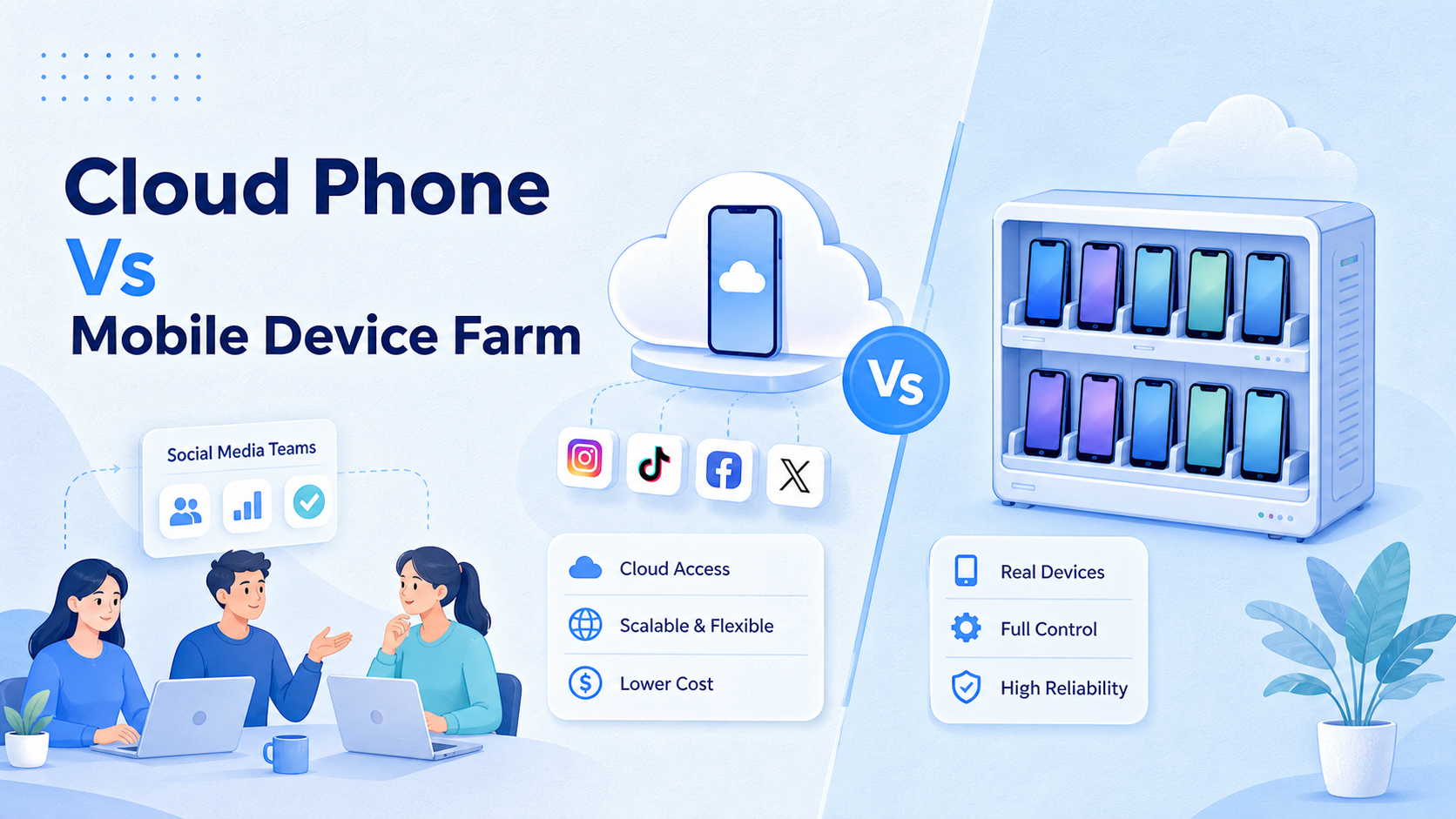
A cloud phone is a remote Android environment that a team can use for app-based account operations. A mobile device farm is a pool of physical or cloud-hosted devices, usually built to test apps across device models, operating systems, and network conditions.
For social media teams, the practical answer is simple. Choose cloud phones when the work is daily account execution, mobile app sessions, publishing, replies, monitoring, and team handoff. Choose a mobile device farm when the work is mobile app QA, compatibility testing, device coverage, and engineering validation.
The comparison matters because both options look similar from far away. Both involve remote mobile devices. Both can reduce the need to hold many phones in an office. The difference is what they are optimized to manage: ongoing account operations or broad device testing.
MoiMobi is built around the first problem. It connects AI, browser profiles, cloud phone environments, Android devices, proxy routing, and workflow automation so teams can run social media and customer engagement tasks with clearer account boundaries.
Key Takeaways
- Cloud phones fit recurring social media operations better than a general mobile device farm.
- Mobile device farms fit app testing, QA, device coverage, and engineering validation.
- Social media teams should compare account isolation, session continuity, task logs, role control, and review steps before comparing device counts.
- A physical phone farm can work, but it adds hardware, storage, charging, maintenance, and local access overhead.
- The best rollout starts with one platform, one account group, and one repeatable workflow before scaling.
A Practical Comparison Framework for cloud phone vs mobile device farm
The right comparison starts with the job. A social media operations team is not just testing whether an app opens on a device. It is assigning accounts, keeping app sessions available, publishing content, replying to customers, checking notifications, and recording task results.
Official device farm products often describe their core use around testing. AWS Device Farm presents the service as a way to test Android, iOS, and web apps on real devices. BrowserStack App Automate and Sauce Labs Real Device Cloud also frame their real device clouds around automated app testing. That is valuable, but it is a different operating model from daily social media account work.
| Decision area | Cloud phone | Mobile device farm |
|---|---|---|
| Main fit | Daily mobile account operations | App QA and device coverage |
| Social media sessions | Designed to keep account workspaces organized | Depends on provider and test workflow |
| Team handoff | Works well when accounts, devices, and tasks are assigned | Usually centered on test runs and engineering access |
| Maintenance | Less physical handling; still needs governance | May require device selection, test scripts, and QA process |
| Best success metric | Tasks completed, replies handled, accounts reviewed | Test pass rate, crash logs, device compatibility |
Compare five constraints first:
- Account continuity: Can the same account keep a predictable mobile workspace?
- Operator control: Can the team assign who may publish, reply, or review?
- Task records: Can the system show what ran, where it ran, and what failed?
- Environment separation: Can accounts avoid shared sessions and mixed workspaces?
- Recovery path: Can a failed task be paused, inspected, reassigned, and retried?
For social media teams, those questions usually matter more than the number of device models available. Device coverage is essential for app testing. Account workflow continuity is essential for operations.
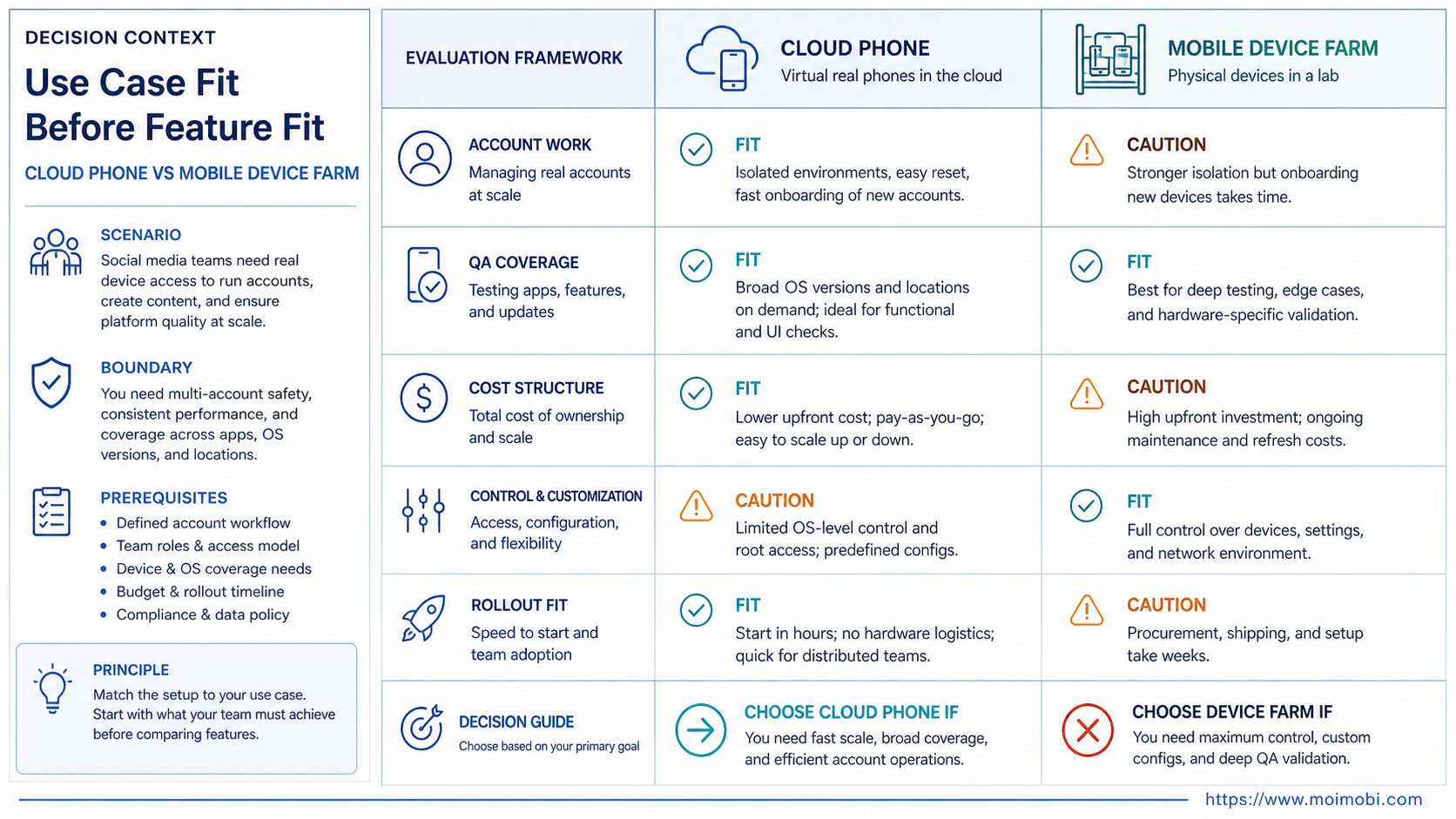
Use Case Fit Before Feature Fit and cloud phone vs mobile device farm
Feature lists can confuse the decision. A device farm may offer many real devices, parallel test runs, logs, and screenshots. Those are strong QA features. They do not automatically solve content queues, inbox ownership, account assignment, or daily operator review.
A cloud phone setup starts closer to the social media workflow. One account or account group can be assigned to a mobile environment. Operators can access the app surface, run defined tasks, and keep activity tied to that workspace. That is why MoiMobi cloud phones are a closer fit when the team needs mobile execution rather than device compatibility testing.
Consider a team managing TikTok, Instagram, WhatsApp, and Telegram accounts. The work includes checking comments, preparing replies, publishing approved content, and recording whether follow-up is needed. A device farm can provide mobile access, but the team still needs an account workspace, role model, and task history. Without those layers, the device count does not create operational control.
A QA team has a different job. It may need to verify how a new app version behaves across multiple screen sizes, Android versions, and real devices. In that case, a mobile device farm is the better mental model. Test breadth matters more than long-running account ownership.
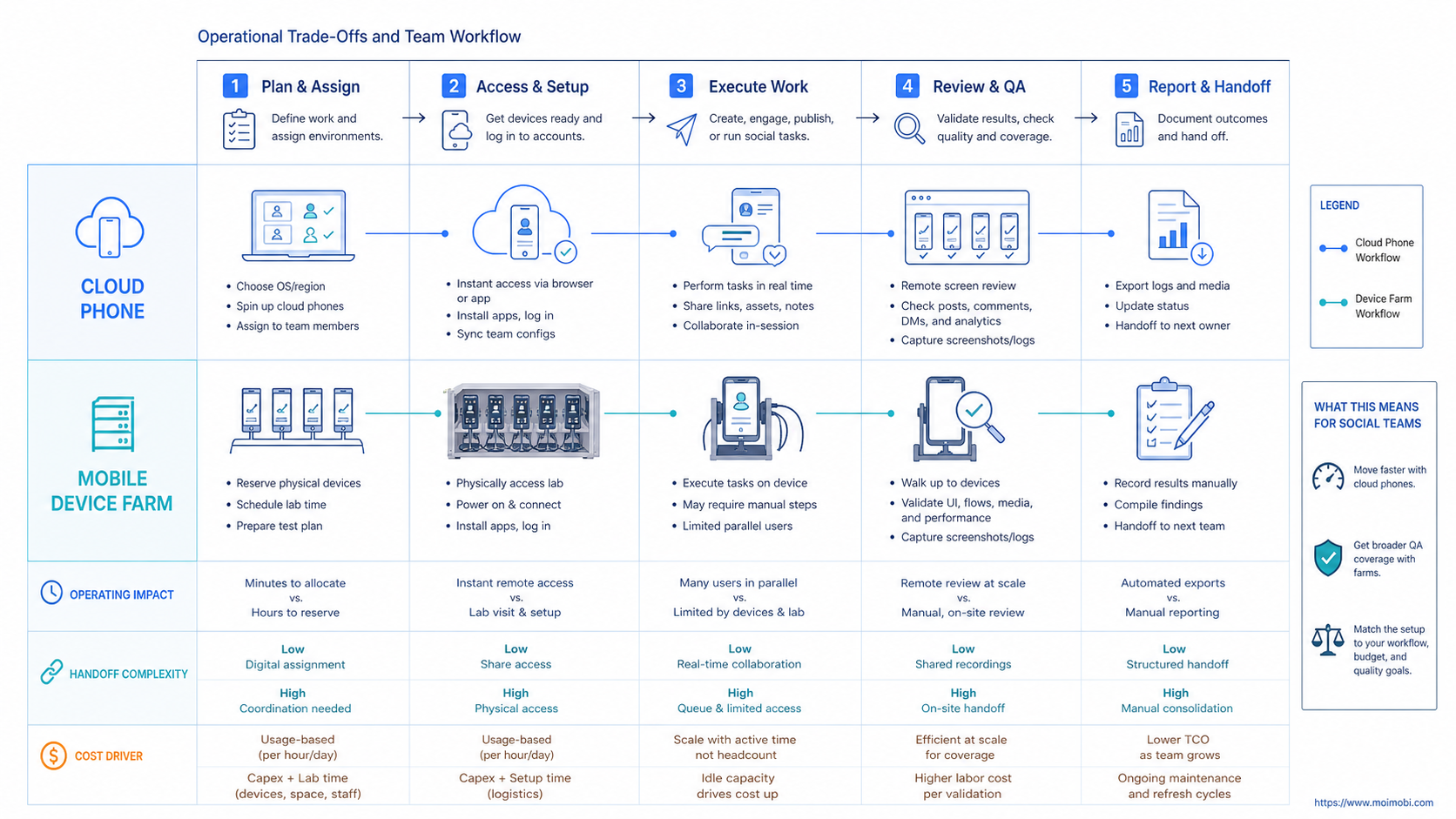
Operational Trade-Offs and Team Workflow
The common misunderstanding is that more devices automatically mean a better social media operation. More devices only help when the team can also control accounts, tasks, permissions, and review rules.
Cloud phones are usually easier to map to social media work. A team can define one environment for a brand account, another for a customer support account, and another for a test workflow. The value comes from the relationship between the account, the device, the route, and the task queue.
Mobile device farms are stronger when the team needs test breadth. They can help engineering teams understand how an app behaves across devices. They are not always designed around persistent human workflows, client handoff, or repeated customer engagement tasks.
Physical phone farms add another layer of overhead. A team has to manage phones, charging, cables, operating system updates, storage, network setup, and access control. A physical setup can be useful for specialized cases, but it becomes messy when operators are remote or accounts need clean assignment.
For mixed teams, MoiMobi treats browser and mobile execution as one operating stack. Browser-based account work can use separated browser environments. Mobile-first tasks can use cloud phones or Android execution environments. The goal is to match the workflow to the right surface, not to force every task into one tool.
Useful handoff fields include:
- Account name and platform.
- Assigned environment.
- Operator and reviewer.
- Task type and status.
- Last successful action.
- Failure reason and next owner.
Those fields make the workflow reviewable. They also stop a team from relying on one operator's memory.
Setup Cost, Ongoing Cost, and Management Overhead
Cost is not only the monthly device price. Social media teams should count setup time, maintenance, operator training, task recovery, account coordination, and reporting effort.
A cloud phone model usually reduces hardware management. The team still needs to define account ownership, access rules, proxy routing, and review steps. A weak setup can still create confusion if every account shares the same task queue.
A mobile device farm may be cost-effective for testing because it gives broad coverage without buying every device. For social media operations, the hidden cost is process translation. The team may need extra systems for content planning, account records, approvals, and customer replies.
A physical phone farm can look cheaper at first. The real cost appears later. Phones need space, power, replacement, updates, troubleshooting, and local handling. Remote teams also need a way to access those devices without breaking workflow ownership.
Use this cost lens:
- Environment cost: device, cloud phone, browser profile, or farm access.
- Management cost: assignment, credentials, sessions, permissions, and logs.
- Failure cost: time lost when a task fails, an account is mixed, or ownership is unclear.
- Review cost: human approval for replies, outreach, posting, and account settings.
The lowest device price is not always the lowest operating cost. The better choice is the one that makes repeated work easier to run and audit.
Which Option Fits Different Teams Best
The best option depends on whether the team is running accounts or testing software. Start with that split before comparing providers such as GeeLark, MoreLogin, BitBrowser, device farms, or a phone farm setup.
Choose cloud phones when:
- The team runs mobile-first social media accounts.
- Operators need persistent app sessions.
- Account work must be assigned by role.
- Tasks include publishing, replying, monitoring, or follow-up.
- Remote team members need controlled access.
- The workflow needs mobile execution logs.
Choose a mobile device farm when:
- The core job is app testing.
- Device model and OS coverage matter most.
- Engineers need automated test runs.
- The team cares about screenshots, logs, crashes, and test status.
- Accounts are temporary test users, not long-running business accounts.
Use a combined model when:
- Marketing teams run accounts, while product teams test apps.
- Social media work spans both web dashboards and mobile apps.
- The team needs mobile automation plus browser-based account management.
- The business needs a controlled account workspace and a separate QA process.
MoiMobi fits the combined operating model because it connects mobile environments with browser profiles and workflow controls. Teams can also use multi-account management pages as the next planning layer when account ownership becomes the main problem.
Rollout Checklist for Social Media Teams
Start small. A broad migration can hide problems because too many accounts, operators, and workflows change at once.
Use a two-week pilot:
- Pick one platform, such as TikTok or Instagram.
- Choose five to ten accounts with similar workflows.
- Assign one environment per account or account group.
- Define three task types: publish, reply, and monitor.
- Require human review for sensitive replies and outreach.
- Record task status, failure reason, and reviewer notes.
- Compare manual time, missed tasks, and recovery time after two weeks.
The pilot should answer one question: does the chosen setup make account operations clearer? If the team still cannot see who owns the account, what ran, and what failed, the device layer is not enough.
Do not start by moving every account into a new tool. Do not use automation to increase sending volume before the review model is clear. Do not evaluate the setup only by how fast it can click. Operational reliability depends on assignment, logs, review, and recovery.
For broader social channels, the next step is to map the device layer to social media marketing workflows. That keeps the comparison tied to business work instead of device inventory.
Frequently Asked Questions
1. What is the main difference between cloud phone vs mobile device farm?
A cloud phone is usually better for ongoing mobile account operations. A mobile device farm is usually better for testing apps across many devices and operating system combinations.
2. Is a cloud phone the same as a physical phone farm?
No. A cloud phone is accessed remotely and managed as a cloud environment. A physical phone farm uses real devices that the team must store, power, update, and maintain.
3. When should a social media team choose a mobile device farm?
Choose a mobile device farm when the job is QA or compatibility testing. It fits teams that need device coverage, test runs, crash logs, and app validation.
4. Does a cloud phone replace browser profile management?
Not usually. Mobile app tasks fit cloud phones. Web dashboards, logged-in browser tools, and some account settings may still fit separated browser profiles.
5. How should teams compare GeeLark vs cloud phone options?
Compare the workflow, not just the device. Check account assignment, session continuity, task logs, review controls, proxy routing, and team permissions.
6. Is MoreLogin vs cloud phone a fair comparison?
It depends on the task. Browser profile tools fit web-based account work. Cloud phones fit mobile app work. Many social teams need both layers.
7. Is BitBrowser vs cloud phone about browser or mobile execution?
Yes. BitBrowser-style tools are closer to browser profile management. Cloud phones are closer to mobile execution. The right choice depends on where the task happens.
8. What should teams track during a pilot?
Track completed tasks, failed tasks, recovery time, account owner, reviewer decision, environment used, and operator notes. These fields show whether the workflow is controllable.
9. Can cloud phones remove all account risk?
No. No tool can remove all platform, policy, or operational risk. A better goal is controlled execution, clear ownership, review steps, and cleaner recovery records.
Conclusion
Cloud phone vs mobile device farm is not a generic device comparison. It is a workflow decision. Social media teams should choose based on whether they need recurring account execution or broad device testing.
Rank the decision in this order:
- Does the work happen in mobile apps, browser dashboards, or both?
- Does each account need its own controlled workspace?
- Can operators, reviewers, and managers see task status?
- Can failed work be paused, diagnosed, and reassigned?
- Does the setup reduce operational overhead rather than only adding devices?
For most social media operations, cloud phones are the better starting point. Device farms remain valuable when product teams need testing coverage. If the same company needs both, keep the workflows separate and connect them through clear account, task, and review records.
References