
Browser profile management is a team process for creating, assigning, controlling, and reviewing separate browser environments for online accounts. It matters when a business runs many accounts, brands, clients, regions, or workflows from shared teams.
Without profile control, online work becomes hard to trace. People may use the wrong account, repeat logins, mix sessions, lose context, or create confusion during handoff. The problem gets worse when AI workers, virtual assistants, agencies, or distributed operators join the workflow.
The goal is not only convenience. A team needs clean ownership, predictable sessions, permission rules, and logs that show who used which profile for which task. The system should also make it clear when a profile should be paused, reassigned, or retired.
Key Takeaways
- Profiles need owners.
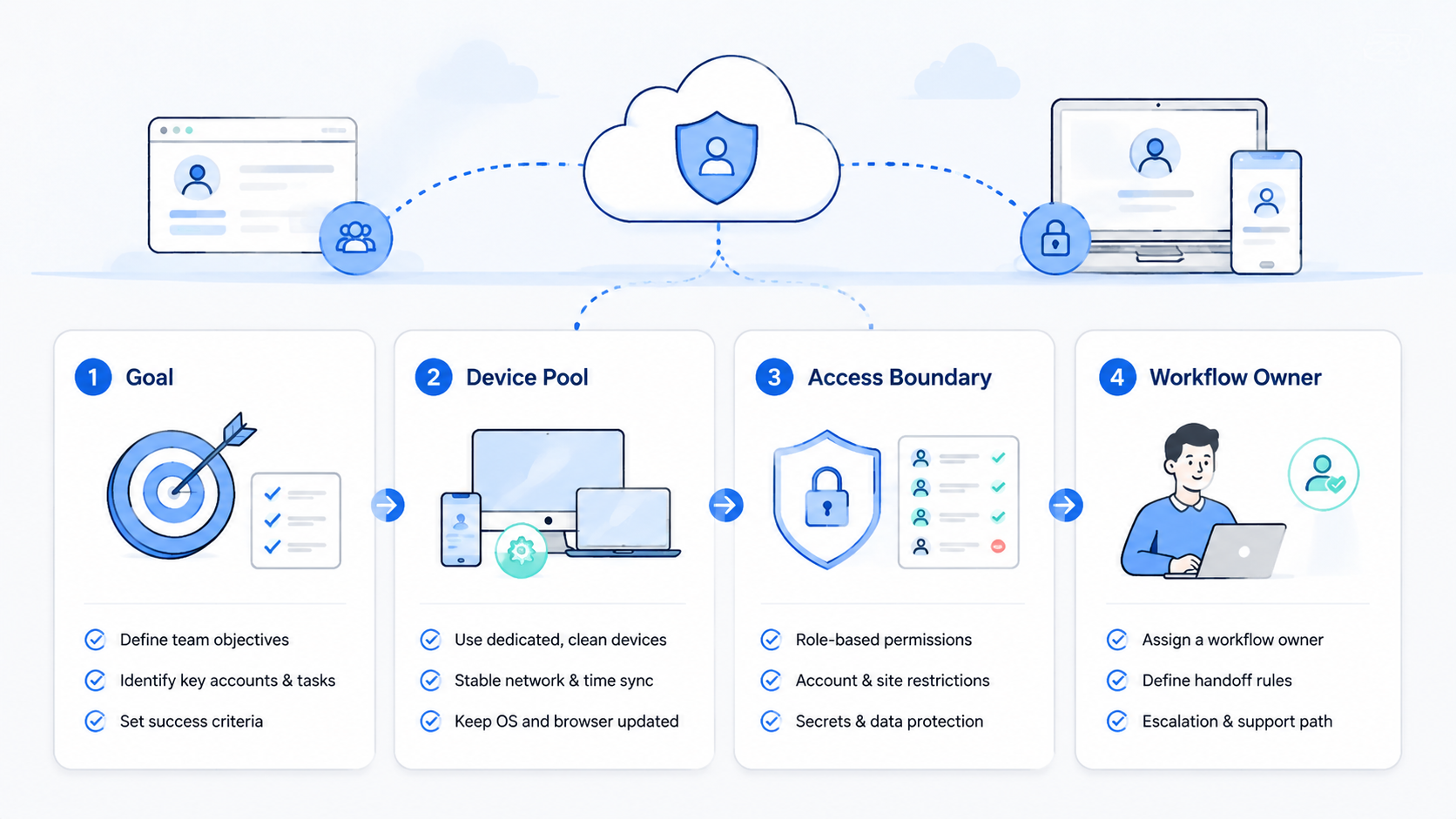
- Teams need profile assignment, permissions, logs, review paths, mobile mappings, cleanup rules, and stop conditions that operators can apply during real work.
- Map mobile steps to cloud phones.
- Good profile management reduces confusion before teams add automation, AI workers, new account groups, external operators, or more client environments.
Why browser profile management matters for teams
This operating practice matters because accounts carry business context. A profile can hold login state, cookies, extensions, bookmarks, saved settings, and workflow history. Unmanaged details create messy operations.
The issue is common in agencies, ecommerce teams, social media teams, QA groups, marketplace operators, and growth teams that share account work across people, clients, and tools.
The pattern is familiar: one person manages several client accounts, another reviews dashboards, and a third publishes approved content. If each person uses personal browsers or shared logins, the team cannot see a clean operating trail.
This is also important for AI-assisted work. A digital worker needs the correct account context before it can complete a browser task. If it uses the wrong profile, even a technically successful run can create the wrong business result.
Browser tools such as Playwright show how controlled browser sessions can be automated. Team profile management adds the operating layer: ownership, rules, review, and traceability.
The difference becomes visible during review. A manager should not have to ask which browser, account, device, or person created a result. The profile record should already answer that question.
Core pieces of a team profile system
A strong profile system should answer six questions before work starts.
| Question | What the team should define |
|---|---|
| Who owns the profile | Team, client, brand, region, or workflow owner |
| What account it uses | Platform account, role, and allowed sites |
| Who can open it | Operator, reviewer, AI worker, or admin |
| What actions are allowed | Read, draft, publish, update, export, or stop |
| Where results go | CRM, sheet, ticket, report, or review queue |
| What gets logged | User, time, task, result, failure reason, reviewer |
These fields keep the profile from becoming a loose browser shortcut. A profile is an operating environment. It should have a purpose, an owner, and a review path.
Separate profiles by risk. A read-only reporting profile does not need the same rules as a publishing profile. A client account should not share a general team profile, and a test account should not be mixed with a live account.
Keep the first version plain. A spreadsheet or admin table with owner, purpose, account, profile, device, and review path is enough to expose gaps before the team buys or builds a larger system.
Browser profile management policy template
A profile policy should be short enough for operators to follow during work. Long policy documents tend to sit unread. A practical policy answers what can happen inside the profile and what must stop.
Use this template:
| Policy field | Example rule |
|---|---|
| Profile purpose | Brand A reporting and approved content checks |
| Owner | Growth operations lead |
| Allowed users | Two operators and one reviewer |
| Allowed actions | Read dashboards, capture screenshots, draft notes |
| Blocked actions | Publish, change budgets, edit account settings |
| Related device | Cloud phone Brand A |
| Output location | Weekly reporting sheet and review ticket |
| Stop condition | Login warning, policy warning, wrong account, unclear data |
The stop condition is the most important field. It turns profile management from a storage habit into an operating control. Operators and AI workers should know when to pause instead of improvising.
Review the policy after the first week. Repeated questions mean the policy is not clear enough, while logs without a reviewer mean the review path is not real yet.
Browser profile management and multi-account teams
Multi-account teams need more than a list of logins. The operating system should keep account context separate while still letting the team work efficiently across owners, devices, and review queues.
MoiMobi's multi-account management use case is relevant for teams that operate many identities, channels, or client environments. Same rule. Every account environment needs a clear boundary.
The boundary should cover:
- Profile name and owner
- Allowed user roles
- Related cloud phone or device
- Proxy or network route when applicable
- Approved workflow list
- Blocked actions
- Review owner
- Retirement rule
Profile retirement is often forgotten. Teams should close or archive profiles when a client leaves, a campaign ends, a test account is replaced, or a worker changes role. Old profiles create clutter and access risk.
How browser profiles connect to mobile workflows
Many workflows do not stay inside a desktop browser. A team may check a web dashboard, then confirm something in a mobile app. Social media, marketplace operations, app QA, content review, and account checks often cross that boundary during ordinary work, not only during edge cases.
When mobile work is part of the task, the browser profile should link to a managed mobile environment. MoiMobi's cloud phone infrastructure can help teams keep mobile app work attached to a controlled operating environment.
The connection should be explicit. A browser profile named for Brand A should not randomly use a personal phone or a shared device. It should map to a known cloud phone, device group, or manual review owner.
Use this mapping:
| Browser profile | Mobile environment | Review path |
|---|---|---|
| Brand account A | Cloud phone A | Brand owner reviews app steps |
| Client account B | Dedicated device B | Account manager approves changes |
| QA test profile | Test phone pool | QA lead reviews failures |
| Social posting profile | Social app device | Publisher approves final post |
This model helps teams avoid split-brain operations. Browser work and mobile work belong to the same workflow, not two disconnected processes.
For AI worker workflows, this mapping is even more important. The worker may complete the browser step correctly but still need a mobile confirmation, app screenshot, or phone-side review. If that mobile environment is not attached to the profile, the team loses the trail.
Permissions and review rules
Profile access should follow the work. A report reviewer may not need publishing rights. An AI worker that collects screenshots should not update live settings. A contractor may need a limited profile for one campaign, not broad access to every account.
A simple permission model can work:
| Role | Profile access |
|---|---|
| Admin | Creates profiles, assigns owners, manages credentials |
| Operator | Runs approved tasks in assigned profiles |
| Reviewer | Opens results and approves sensitive actions |
| AI worker | Uses narrow task profiles with blocked actions |
| Auditor | Reads logs without changing account state |
Review rules should be written before automation starts. Publishing, account setting changes, payment actions, customer messages, and policy-sensitive steps should usually pause for review. Read-only data collection may need lighter approval.
For general governance thinking, the NIST Cybersecurity Framework gives teams a useful way to think about identify, protect, detect, respond, and recover. Profile management fits that same operating logic.
Permission reviews should happen on a schedule. Weekly may be enough during a pilot. Monthly may work after the system is stable. The review should check inactive users, unused profiles, changed account owners, and profiles that now need stronger rules.
Device isolation and profile separation
Browser profiles solve part of the separation problem. Device context may still matter when the workflow includes mobile apps, device-specific checks, or account environments that should stay apart.
MoiMobi's device isolation is relevant when teams need separate execution environments across browser and mobile layers. The aim is not to promise account outcomes. The aim is to keep operating context clean enough for management and review.
A practical separation policy should state:
- Which profiles belong together
- Which profiles must never share devices
- Which workflows require a cloud phone
- Which actions require human review
- Which logs prove the correct environment was used
Clean separation also improves troubleshooting. If a task fails, the team can inspect the profile, device, worker, workflow, and output instead of guessing across personal browsers and shared phones.
Do not treat separation as a one-time setup. Campaigns end, workers change roles, and accounts move between teams. A profile that was correct last month may be wrong today.
Handoff workflow for browser profile management
Handoff is where weak profile systems usually break. One operator finishes a shift, another person takes over, and nobody knows which profile was used, what state it was left in, or whether the task is safe to continue.
A clean handoff needs four fields:
| Handoff field | What to record |
|---|---|
| Current task | What the operator or worker was trying to finish |
| Profile state | Logged in, blocked, warning shown, or review needed |
| Last action | The last meaningful step completed |
| Next owner | Person or team responsible for the next move |
This does not need to be complex. A short note in a ticket can be enough. The key is that the next person should not need to reconstruct the session from memory.
Handoff is also useful for automation. If an AI worker stops because the page changes, the log should give a human enough context to continue. A stop without context is just another form of manual work.
Pilot plan for teams
Start with one workflow and one account group. Do not migrate every account into a profile system on day one.
Use this pilot sequence as a compact runbook:
| Step | Action | Checkpoint |
|---|---|---|
| 1 | Pick one repeated workflow | Dashboard review, content approval, marketplace checks, or app QA |
| 2 | Create a profile inventory | Account, owner, purpose, allowed users, and related device |
| 3 | Set the permission level | Read-only, draft-only, or action-enabled with approval |
| 4 | Run the workflow for one week | Login issues, wrong-profile attempts, review time, corrections |
| 5 | Review the misses | Rules that were unclear or actions that should have paused |
| 6 | Expand slowly | One account group or workflow after the first pattern is stable |
The pilot should produce a profile policy, not only a tool setup. A profile policy helps new operators understand how work should happen before they open an account.
Metrics for browser profile management
Profile management should be measured by control and clarity. Speed is useful, but it is not the only signal.
Track these metrics:
| Metric | Why it matters |
|---|---|
| Wrong-profile attempts | Shows whether assignment rules are clear |
| Login or session failures | Reveals unstable account environments |
| Review time | Shows whether outputs are easy to approve |
| Manual corrections | Identifies workflow gaps |
| Profile reuse rate | Shows whether profiles match real work |
| Archived profiles | Keeps old access from piling up |
Add a weekly cleanup step. Remove unused profiles, update owners, archive finished campaigns, and check whether review logs are complete. Small cleanup habits prevent profile sprawl.
When AI workers are involved, add worker-specific metrics. Track which worker used which profile, what task ran, what output was saved, and why a run stopped. That record makes automation easier to trust.
Use these metrics as operating signals, not vanity numbers. A high profile count is not success. A smaller set of well-owned, active, reviewable profiles is usually easier to manage than a large inventory nobody can explain.
Common mistakes to avoid
The first mistake is treating profiles as personal convenience. Team profiles are shared operating assets with owners, rules, logs, review paths, and cleanup expectations.
The second mistake is using one profile for too many accounts. Broad profiles may feel convenient at first, but they create confusion when the team tries to audit work across clients, workers, and devices.
The third mistake is skipping mobile mapping. If app work happens outside the profile system, the browser trail will not explain the whole workflow.
The fourth mistake is giving AI workers broad access. Start narrow. Expand only when the team trusts the result and review path.
The fifth mistake is never retiring old profiles. Unused profiles should be archived or removed when the account, campaign, or worker role changes.
Frequently Asked Questions
What is browser profile management?
Browser profile management is the process of creating, assigning, controlling, and reviewing separate browser environments for team accounts and workflows.
Why do teams need browser profile management?
Teams need it when several people, clients, brands, regions, accounts, or AI workers share online operations. Profiles keep account context and ownership easier to trace.
Is browser profile management the same as a fingerprint browser?
Not exactly. A fingerprint browser is one tool type. Browser profile management is the operating practice of assigning profiles, permissions, logs, and review rules across a team.
How does this connect to cloud phones?
Cloud phones matter when the workflow includes mobile apps or phone-only account checks. The browser profile should map to the right mobile environment or review owner.
What should a profile include?
A profile should include an owner, purpose, allowed account, allowed users, related device, blocked actions, output destination, and review path.
Should AI workers use browser profiles?
Yes, when they operate browser tasks. The worker should use a narrow profile with clear permissions, blocked actions, and logs that a manager can review.
What should teams automate first?
Start with read-only or draft-preparation tasks inside one account group. Expand after the team understands login issues, wrong-profile attempts, and review effort.
Conclusion
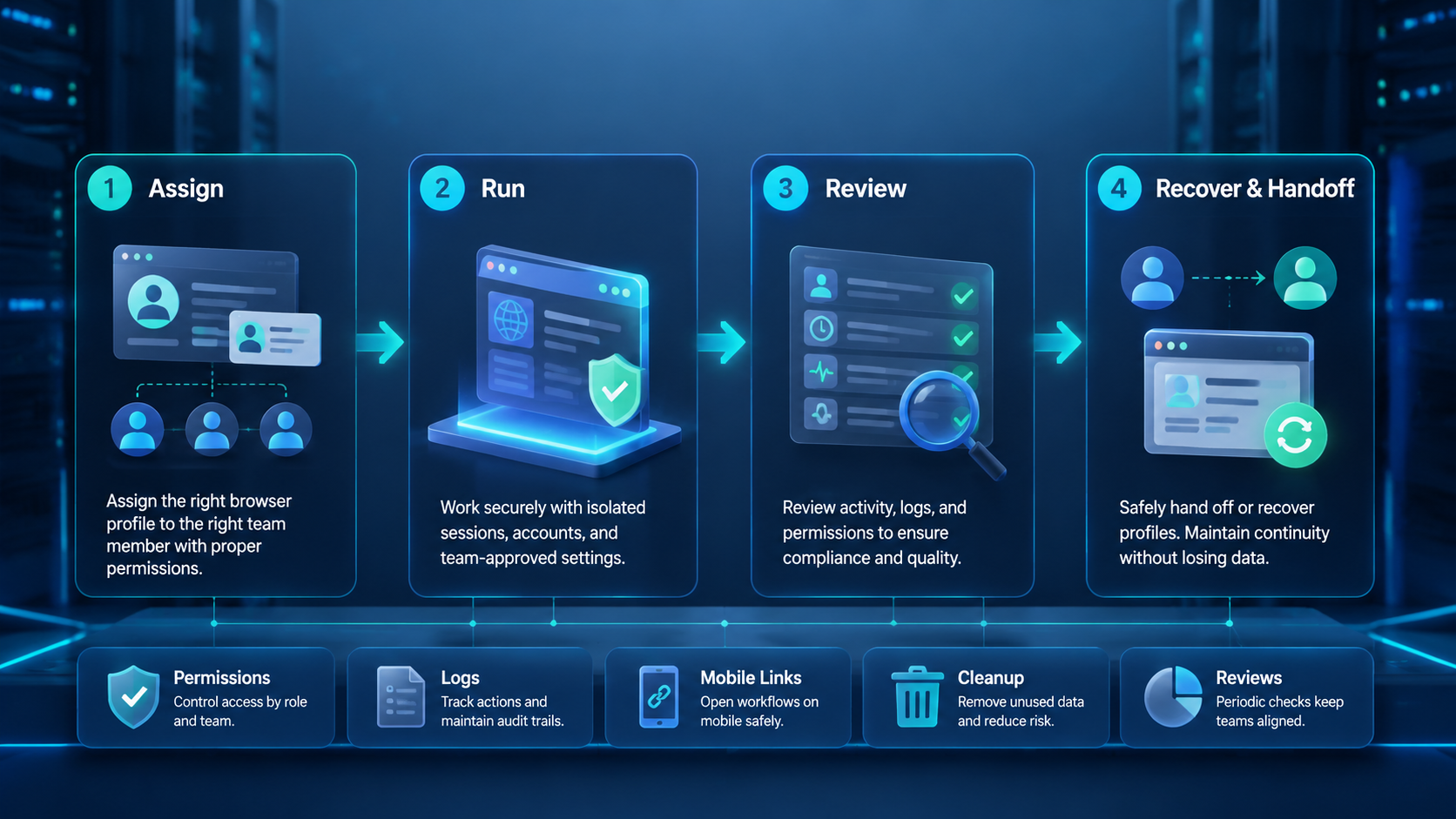
Browser profile management gives teams a cleaner way to operate many accounts, workflows, and digital workers. It turns profiles into controlled work environments instead of loose browser shortcuts.
The practical starting point is simple. Pick one workflow, assign profiles to real owners, define allowed actions, connect mobile steps where needed, and review the logs each week. That gives the team a stable base before it adds more automation.
For teams that already combine browser work, mobile apps, and multi-account operations, profile management should be treated as infrastructure. The better the account environment, the easier it is to scale work without losing control.



