
Key Takeaways
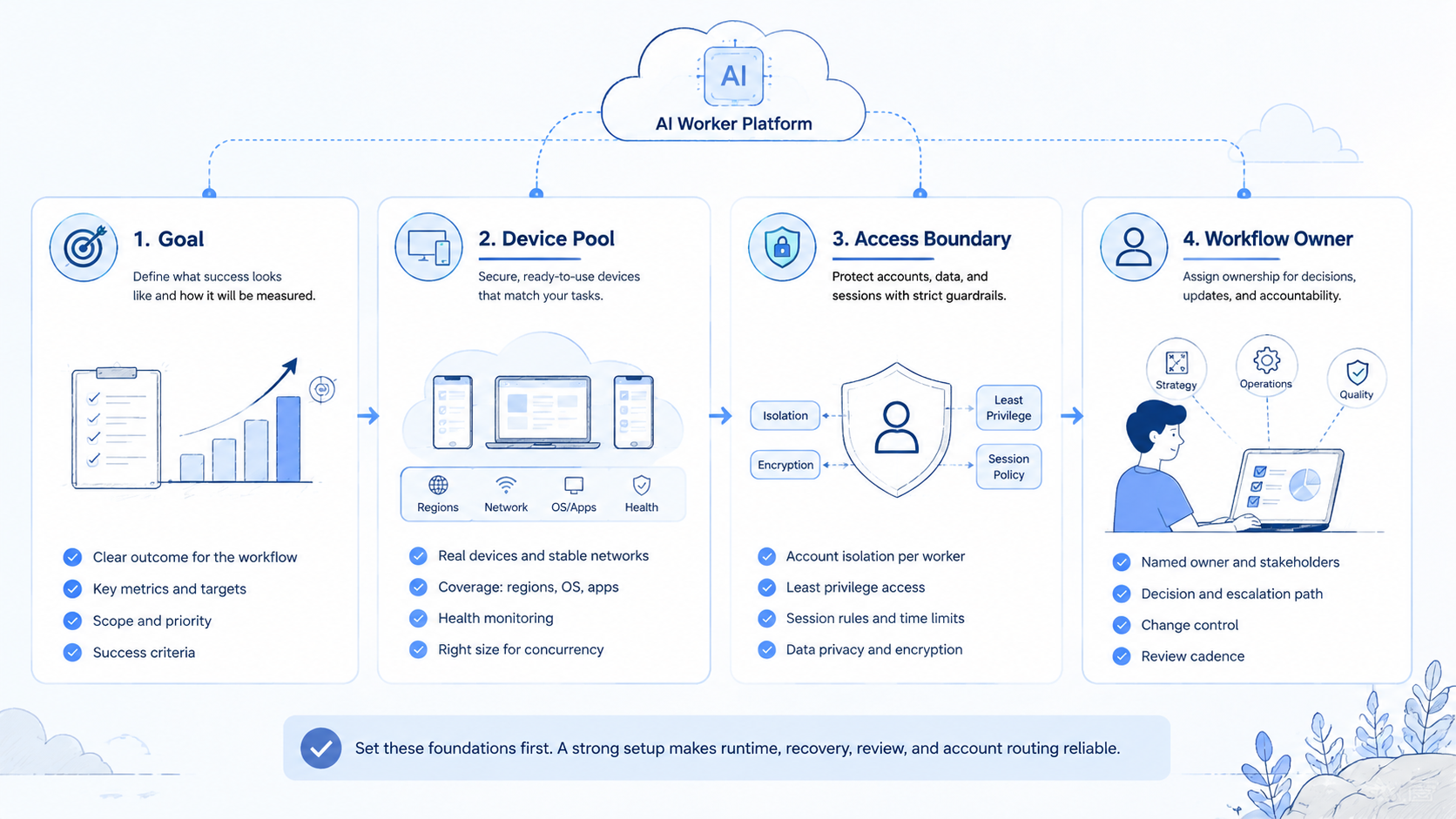
- The right AI worker platform should match the runtime needs of each task.
- Browser and mobile execution should not be mixed without explicit handoff rules.
- A strong platform makes review, logging, and reruns easier to inspect.
- The best evaluation starts with one repeatable workflow, not a broad promise.
How to choose an AI worker platform for browser and mobile tasks starts with a simple rule: select the platform that can run your real workflow in the right environment with clear recovery and review controls. The decision is not just about agent prompts. It is about whether the platform can hold browser tasks, mobile tasks, and human intervention in one readable system.
This question usually appears when one runtime is no longer enough. Browser dashboards may cover forms, research, or web inbox work. Mobile tasks may depend on app-native actions, device state, or mobile-only interfaces.
The technical foundation supports this split. W3C WebDriver defines explicit browser sessions.1 Playwright isolates browser state with contexts.2 Android Enterprise describes managed device workspaces for structured mobile control.3 Those sources show why runtime choice should be part of platform evaluation from the start.
What an AI Worker Platform Must Handle First
Do not start with broad vendor language. Start with the actual operating model.
An AI worker platform should handle:
- task assignment
- browser and mobile runtime selection
- review checkpoints
- retry and recovery rules
- outcome logging
If those controls are missing, the product is closer to a planning layer than a real execution platform.
Step 1: Separate Browser Tasks from Mobile Tasks
The first selection step is task mapping. A worker platform should reflect the real task boundary instead of forcing everything into one runtime.
Browser work often includes:
- dashboards
- forms
- web inboxes
- admin panels
Mobile work often includes:
- app-native inboxes
- device-state-dependent actions
- platform flows that do not behave well in a browser
This is the point where teams often move from a generic AI browser discussion into mobile automation and cloud phone evaluation.
Step 2: Check Whether the AI Worker Platform Controls State Well
State control is usually more important than raw speed. If the platform cannot reopen the same account or task state, the workflow will create manual rescue work later.
Use this checklist:
| Check | Why it matters | Pass sign |
|---|---|---|
| Browser isolation | Prevents session confusion | Clear context boundaries |
| Mobile lane separation | Reduces device-state conflict | Dedicated task routing |
| Review control | Keeps human approval explicit | Visible stop rules |
| Recovery logic | Lowers cleanup cost | Documented rerun path |
Step 3: Verify That the AI Worker Platform Fits the Team Workflow
The right platform for a browser-heavy support team may not fit a mobile-heavy social team. Team shape matters as much as product features.
Use this fit guide:
- Best fit: teams with repeated browser and mobile steps that need shared review rules
- Possible fit: teams moving from manual task switching into structured execution lanes
- Weak fit: teams with one-off tasks and little runtime overlap
Pick the platform that matches the current workflow. Ignore the most ambitious product story until the operating model is clear.
Step 4: Test One Workflow Before You Broaden the Decision
Shortlist the platform through a small pilot, not through feature count.
- Choose one workflow that already repeats.
- Assign the browser and mobile steps clearly.
- Add one review owner for exceptions.
- Run enough cycles to include ordinary failures.
- Log success, retry, blocked, and manual takeover states.
If the workflow leans heavily on device execution, compare the design against cloud phone farm infrastructure and the cloud phone vs emulator comparison. Runtime choice can shape the rest of the platform decision.
Step 5: Verify AI Worker Platform Success Checks Before Buying
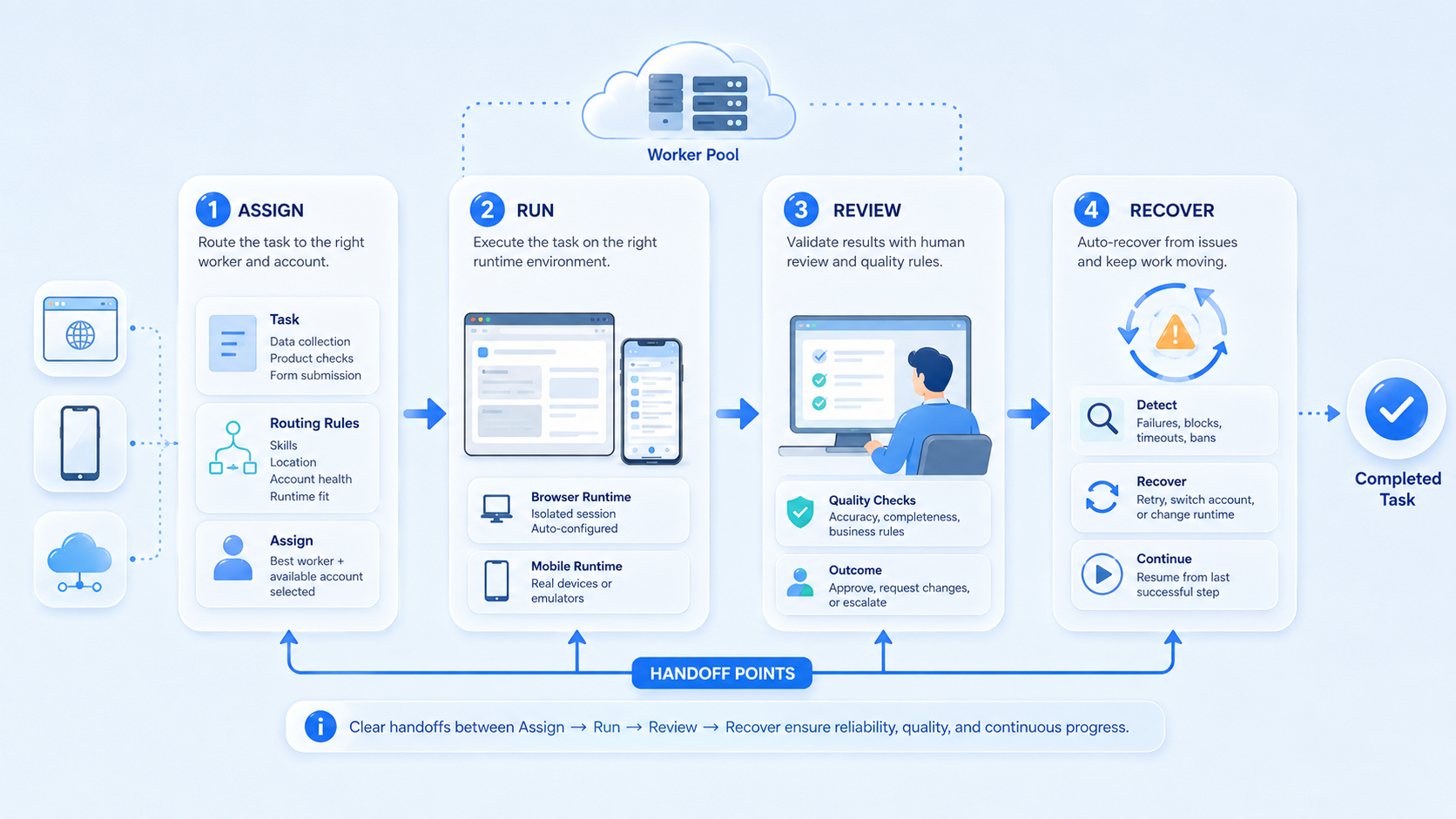
A platform can complete tasks and still be the wrong choice. You need to inspect how it behaves when the workflow breaks.
Use these success checks:
- can the same state reopen cleanly
- can a reviewer take over at the right step
- can the logs explain what happened
- can the team distinguish browser failure from mobile failure quickly
AWS Device Farm and BrowserStack App Automate both emphasize repeatable environments for mobile execution.4 5 The lesson carries over here: reproducibility is part of platform quality.
Step 6: Check Team Fit, Capacity, and AI Worker Platform Rollout Shape
The platform should fit the way your team actually works. A small operations team may need simple lane separation and fast takeover. A larger team may need stricter routing, review ownership, and broader account controls.
Use this team check:
- Best fit: teams with repeated browser and mobile work plus clear review needs
- Possible fit: teams moving from manual task switching into structured execution lanes
- Weak fit: teams with one-off tasks and little runtime overlap
Choose the platform that matches the current workflow and current staffing model. Do not buy for a future structure that does not exist yet.
Common Mistakes and Troubleshooting Checks
Teams usually make the same selection mistakes:
- choosing by headline features instead of workflow fit
- assuming browser tooling can cover every mobile dependency
- treating manual takeover as a failure instead of a planned control
- skipping rerun tests during the pilot
- keeping one vague worker scope across unrelated tasks
The common pattern is simple. Teams test the happy path only, then discover the cleanup cost later.
Pilot Rollout, Measurement, and Recovery Checks
Run one pilot before broad rollout. That pilot should prove that the platform makes reruns, review, and cleanup easier to manage.
Use a compact scorecard:
| Review area | What to inspect | Good sign |
|---|---|---|
| Routing | Did work stay in the assigned lane? | Few manual redirects |
| Review | Did takeover happen at the planned point? | Predictable handoff |
| Recovery | Could the same state reopen cleanly? | Short resume time |
| Cleanup | How much rework followed each run? | Low correction cost |
If one of those areas stays weak, keep evaluating before you scale. Broad rollout usually hides the weakness for a short time and then makes it harder to trace.
Frequently Asked Questions
What matters more, browser support or mobile support?
Neither matters alone. Runtime fit matters more than category labels.
Should every workflow use both runtimes?
No. Use both only when the task actually crosses both surfaces.
What should a first pilot include?
Use one repeatable workflow with clear pass and failure states.
Why does logging matter so much?
Because a platform that cannot explain failures creates extra cleanup.
Is manual takeover a bad sign?
Not by itself. A planned takeover rule is often a strength.
What is the first warning sign?
Frequent reruns without clear root cause are a strong warning sign.
When should the team scale?
Scale after reruns, review, and routing stay stable in the pilot.
Conclusion
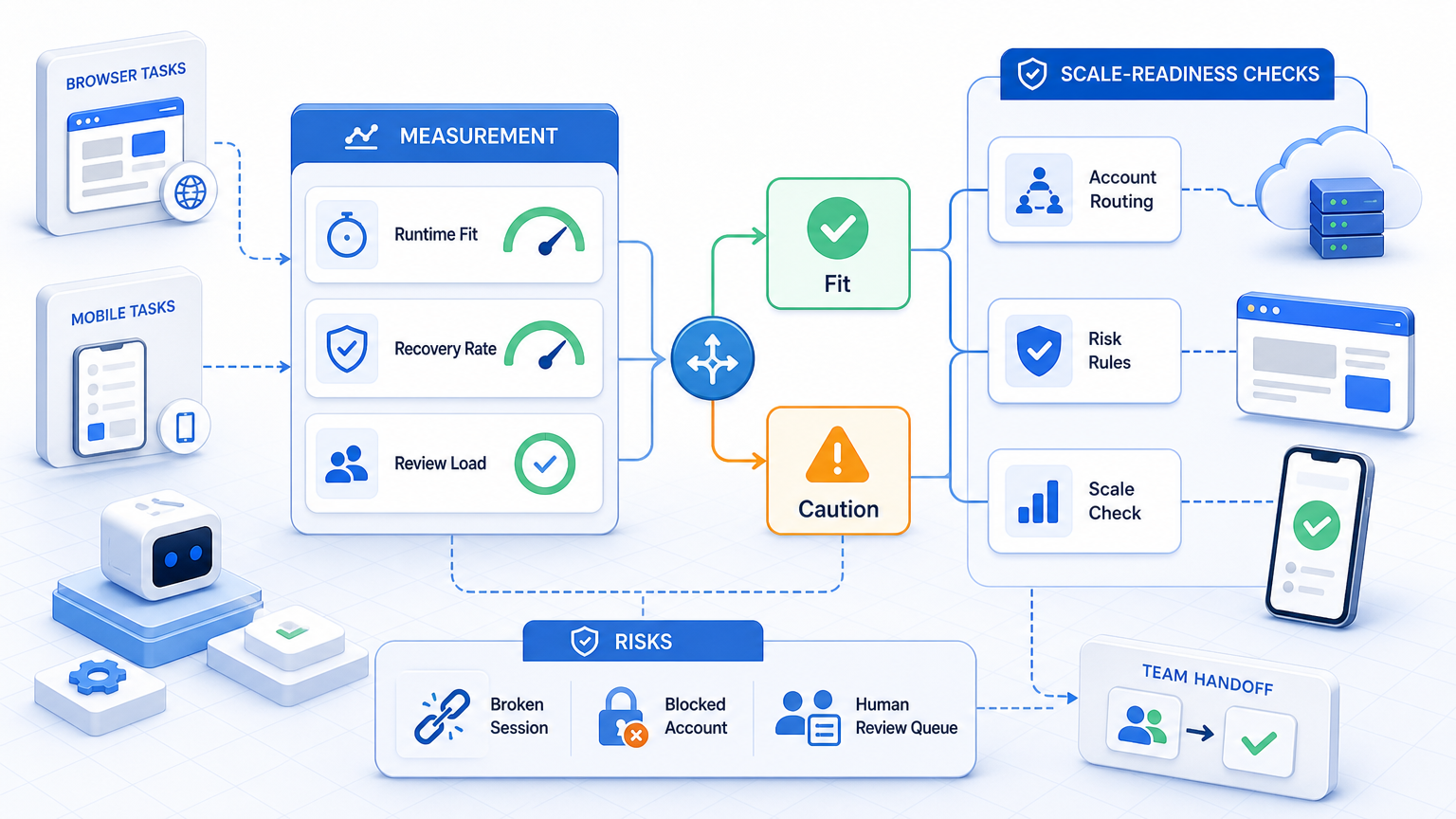
How to choose an AI worker platform for browser and mobile tasks comes down to one discipline: test the platform against the real runtime split in your workflow. The best choice is the one that keeps browser, mobile, and human review legible under normal failure conditions.
Before making the final choice, confirm three things: runtime fit, state control, and recovery clarity. If those are strong, the platform is far more likely to hold up in production work.



