
Key Takeaways
- An AI employee platform helps digital businesses assign repeated online work to AI workers with roles, environments, logs, and review rules.
- The best first workflows are narrow lanes such as account checks, inbox triage, content preparation, lead research, and dashboard monitoring.
- Browser and mobile execution matter when tasks happen inside logged-in dashboards, app sessions, customer accounts, or social workspaces.
- Teams should measure review load, exception rate, account accuracy, workflow completion, and handoff clarity before scaling.
An AI employee platform is an operating system for assigning repeatable digital work to AI workers and tracking how that work gets done. For digital businesses, the key question is not whether AI can write or summarize. The harder question is whether AI can work inside the browser, mobile, account, and customer environments where daily operations actually happen.
Digital businesses usually run across many tools. A team may manage social accounts, ecommerce dashboards, support inboxes, CRM records, payment portals, analytics views, and mobile apps. Without a controlled execution layer, AI output still becomes another item someone must copy, paste, check, and rework.
Moimobi fits this category as an AI execution platform for teams that need browser and mobile task execution. It connects AI-assisted work to account workspaces, isolated environments, task records, and human review. That makes the platform relevant for digital businesses that need execution capacity without losing operational control.
What Is AI Employee Platform for Digital Businesses?
For digital businesses, the platform is a system for turning repeated online tasks into assigned AI worker lanes. Each lane should define the worker role, the tools it can use, the account environment, the output format, the approval rule, and the stop condition.
The common misunderstanding is that an AI employee should act like a full-time generalist. That framing creates vague instructions and weak accountability. A better model is narrower: one AI worker handles one repeatable lane, such as support triage, account monitoring, product listing checks, campaign reporting, or lead enrichment.
This definition matters because digital businesses rarely operate in one tool. A customer reply may require the inbox, order history, account status, and product policy. A campaign check may require a browser dashboard, a spreadsheet, and a social account. A content publishing workflow may require drafts, assets, account permissions, and final approval.
AI employees software should therefore manage more than prompts. It should help teams control task queues, execution environments, permissions, logs, escalation rules, and results. The AI worker prepares or executes defined work. The human operator keeps judgment over sensitive decisions.
Why AI Employee Platform for Digital Businesses Matters
Digital teams often grow operational complexity before they grow headcount. More channels create more accounts. More accounts create more checks. More checks create more handoffs, and handoffs create gaps when there is no shared execution record.
This platform matters when three conditions appear together:
- Repeated work: the task happens every day or every week.
- Environment-specific execution: the task needs a browser profile, mobile session, dashboard, or account workspace.
- Reviewable output: the team can judge whether the result is correct, incomplete, or risky.
This is different from generic automation. A simple script may handle one page or one API call. A digital business often needs a workflow that sees the account context, performs a controlled action, records the result, and stops when human review is required.
Browser automation standards show why structure matters. The W3C WebDriver specification describes browser control through defined commands and state. Playwright documentation also organizes automation around browser contexts and pages. For mobile and managed Android environments, Android Enterprise documentation explains why device state, policy, and work boundaries matter.
Sources:
Scenario Map: Digital Business Tasks and AI Worker Lanes
Digital businesses should map AI workers to work lanes before choosing features. The goal is to find repeatable tasks where preparation, checking, or low-risk execution can move out of manual operator time.
| Business Area | AI Worker Lane | Execution Environment | Review Metric |
|---|---|---|---|
| Customer support | Inbox triage and reply preparation | Support inbox, CRM, order dashboard | Escalation accuracy and correction load |
| Social operations | Publishing checks, comment triage, account monitoring | Browser profile, mobile app, account workspace | Account accuracy and response readiness |
| Ecommerce operations | Listing checks, order notes, review monitoring | Marketplace dashboard, product database, support inbox | Field accuracy and exception rate |
| Growth operations | Lead research, competitor notes, campaign follow-up | Web dashboards, spreadsheets, CRM records | Qualified records and follow-up clarity |
| Reporting | Dashboard collection and weekly status summaries | Analytics tools, spreadsheets, task logs | Completeness and decision usefulness |
The table keeps the discussion grounded. A digital business does not need "AI everywhere" on day one. It needs a few clear worker lanes that reduce repeated handling and create better records.
Key Benefits and Use Cases
The first benefit is operational focus. AI workers can collect context, prepare next actions, and route exceptions before a human reviews the work. That lets the team spend less time opening every dashboard and more time deciding what to change.
The second benefit is account clarity. Digital businesses often run several brands, stores, regions, client accounts, or social identities. Moimobi's multi-account management use case is relevant when teams need separated workspaces and clear account ownership.
The third benefit is execution continuity across web and mobile. Some workflows live in browser dashboards. Others depend on mobile app sessions or Android environments. Moimobi's guide to what is a cloud phone explains the broader cloud phone concept for teams evaluating mobile execution environments.
Common use cases include:
- Support queue preparation: classify messages, collect account context, and draft reply options.
- Social workflow checks: verify drafts, accounts, assets, and comments before publishing or replying.
- Marketplace monitoring: check listings, order status, review changes, and dashboard alerts.
- Lead enrichment: gather company facts, contact signals, and qualification notes.
- Campaign reporting: collect metrics, flag anomalies, and prepare weekly summaries.
- Customer follow-up: create reminders and route unresolved items to the right owner.
Teams with social-heavy operations can connect these lanes to Moimobi's social media marketing use case. Teams with mobile-heavy operations can evaluate mobile automation when app-based execution becomes part of the workflow.
How to Get Started with AI Employee Platform for Digital Businesses
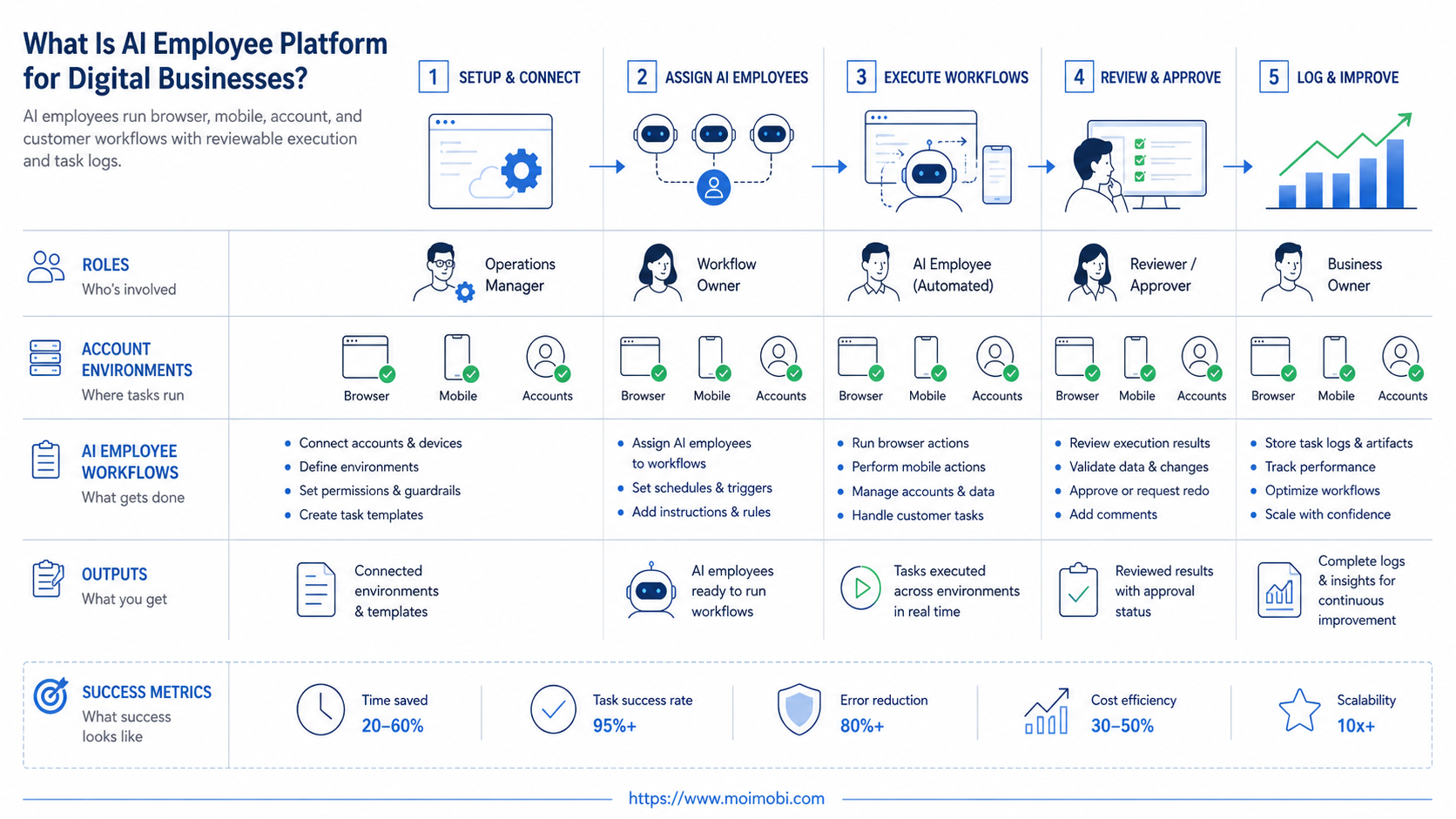
The main risk is starting with a workflow that is too broad. "Handle customer operations" is not a task lane. "Prepare support replies for refund questions and escalate unclear cases" is closer to a usable worker role.
- Select one repeated task lane. Choose a task that happens at least weekly and already has a rough manual process.
- Write the worker brief. Define input sources, allowed actions, output fields, stop rules, and review owner.
- Assign the execution environment. Choose the browser profile, mobile workspace, account group, or dashboard access path.
- Create a task record format. Include task ID, account, source, action taken, result, exception, reviewer, and next step.
- Run in review mode. Let the worker prepare or execute low-risk steps while humans approve sensitive outputs.
- Measure the first week. Review completion rate, corrections, exceptions, and time spent checking results.
- Expand only after evidence. Add another worker lane only when the first one produces clean logs and lower review load.
Browser-heavy teams can evaluate Moimobi as an AI browser execution platform when work happens inside web dashboards, forms, inboxes, and account portals. Teams that require cleaner environment boundaries can also review device isolation for separated browser and mobile workspaces.
A useful task record should be specific enough for another operator to inspect later. Include the account name, environment, source URL or dashboard, input data, action taken, result status, exception reason, reviewer, and next owner. If these fields are missing, the workflow may look automated while still being hard to audit.
Fit Boundaries and Operational Limits
This platform fits digital businesses with repeatable tasks, defined account environments, and reviewable outcomes. Strong candidates include support triage, content preparation, lead research, dashboard checks, customer follow-up, and marketplace monitoring.
It is a weaker fit when the team cannot define the task. If the work depends on unclear strategy, sensitive negotiations, legal judgment, or a changing policy call, the AI worker should prepare context rather than execute the decision.
Use a simple boundary:
- Repeated task with known inputs
- Clear account or workspace
- Output can be reviewed quickly
- Stop rule is easy to explain
- High-stakes customer conflict
- Unclear business policy
- No owner for review
- No reliable account boundary
This boundary keeps automation practical. It also prevents a team from treating AI worker software as a shortcut around operating discipline.
Success Metrics and Review Loop
A digital business should judge the pilot by operational evidence, not by the number of AI tasks created. High activity can still be bad if it produces more corrections and unclear handoffs.
Track these metrics:
- Completion rate: tasks finished according to the lane definition.
- Correction load: how often humans rewrite or redo the result.
- Exception rate: how often the worker stops because the input is unclear.
- Environment accuracy: whether the correct account or workspace was used.
- Handoff clarity: whether the next owner can act from the log.
- Time recovered: the review time compared with the old manual process.
Run a weekly review with a small sample. Inspect five completed tasks, three exceptions, and one failed handoff. Update the worker brief, account assignment, or stop rule based on that review. The goal is a tighter operating loop, not a larger pile of automated activity.
Keep one change log beside the pilot. Record the date, workflow lane, issue found, rule changed, owner, and expected effect. This makes improvement visible and prevents the team from repeating the same correction every week.
Common Mistakes to Avoid
The first mistake is using one AI worker for every function. Digital businesses have different task lanes across support, social, ecommerce, growth, and reporting. A single broad role makes review harder and weakens accountability.
The second mistake is skipping environment design. If one shared session handles several brands, customers, or accounts, the team may struggle to verify what happened. Separate browser profiles, mobile workspaces, or account groups make execution easier to inspect.
Another mistake is measuring output volume only. A worker that drafts 200 replies can still fail if half require heavy correction. Better metrics include approval rate, exception quality, account accuracy, and handoff clarity.
The last mistake is automating sensitive actions too early. Complaints, refunds, pricing exceptions, legal questions, and public controversy need human review. AI can collect context and prepare options, but the owner should decide.
Frequently Asked Questions
What is an AI employee platform for digital businesses?
It is a platform that assigns repeatable digital work to AI workers with roles, account environments, execution records, and review rules.
How is it different from AI employee software?
The terms overlap. A platform usually implies broader workflow control, execution environments, logs, account assignment, and human review. Software may describe a narrower assistant.
What should a digital business automate first?
Start with a repeated, low-risk task. Support triage, account checks, content preparation, lead research, and dashboard monitoring are common first lanes.
Does every workflow need mobile execution?
No. Browser workflows are enough for many dashboards and web apps. Mobile execution matters when the workflow depends on app sessions, Android environments, or mobile-first accounts.
Can AI workers manage multiple accounts?
They can support multi-account work when the platform defines account boundaries, environments, permissions, and review rules. Teams should avoid mixing unrelated accounts in one unclear workspace.
What metrics show whether the pilot works?
Completion rate, correction load, exception rate, account accuracy, review time, and handoff clarity are better signals than task volume alone.
When should humans stay in the loop?
Humans should review sensitive communication, pricing decisions, refunds, legal questions, account changes, and any case where the stop rule is triggered.
How does Moimobi fit this use case?
Moimobi connects AI-assisted workflows to browser and mobile execution environments. It is relevant when digital businesses need account separation, mobile task execution, workflow records, and reviewable operations.
Conclusion
Prioritize the rollout in this order: one repeated task, one account environment, one worker brief, one review owner, and one success metric. That sequence keeps the AI employee platform tied to real operating work.
The next practical step is to pick a workflow that wastes time every week. Define the input, account, environment, output, stop rule, and review metric. If the pilot reduces correction load and creates clear task records, the business has a stronger base for broader AI worker operations.



