
Key Takeaways
- An AI browser for social media is an execution layer, not just a content assistant.
- It fits browser-based publishing, moderation, research, and monitoring better than API-only tools.
- Stable account isolation matters more than raw automation speed.
- Teams should start with one lane, one role, and one review loop before scaling.
An AI browser for social media is a browser execution setup where AI can carry out repeatable web tasks inside controlled sessions. In practice, that means publishing, moderation, dashboard checks, competitor review, and browser-side inbox work can move from manual clicking to managed workflows.
The operational question is not whether AI can click a page. The real question is whether the workflow stays stable once more accounts, more operators, and more repeated tasks enter the lane. Browser isolation is a known pattern in automation. Playwright documents browser contexts as independent sessions, and the W3C WebDriver standard formalizes browser control as a real execution interface. Those sources matter because they frame browser automation as infrastructure, not a one-off macro. See Playwright browser contexts and W3C WebDriver.
For social media teams, the browser is still where many operational tasks happen. TikTok and Instagram workflows often involve web dashboards, business tools, moderation views, reporting surfaces, and browser-side account administration. That is where MoiMobi fits as an execution platform rather than a simple browser bot.
The Core Idea Behind AI Browser Automation for Social Media: A Practical Guide
The core idea is simple. AI plans the task, but the browser session completes it inside a controlled workspace. That sounds obvious, but many teams still treat AI automation as if prompt quality alone decides the result.
What actually changes the outcome is execution structure:
- A browser session must stay tied to the right account workspace.
- The workflow must know where to stop for review.
- The result must go back into a shared operating record.
Without those three pieces, browser automation becomes brittle fast. One reused session, one wrong account handoff, or one untracked posting run can turn a useful workflow into a cleanup job.
This is also why the best next step after content generation is not another writing tool. It is usually a better execution environment. Teams evaluating multi-account management often discover that the real bottleneck is not caption generation. It is repeated browser-side work with poor isolation and weak tracking.
Why Teams Search for This Topic and AI browser for social media
Teams usually search for this topic when manual browser work is already taking too much time. The visible symptoms are simple: publishing queues drift, comment review slows down, and dashboard checks keep depending on one operator who remembers the exact sequence.
Another common trigger is account growth. A workflow that works for two accounts often breaks at ten. A setup that feels manageable at ten often becomes noisy at thirty. The problem is not only scale. The problem is that browser tasks remain session-bound and role-bound.
Social teams also search here because API-only social media tools do not cover everything. Traditional scheduling tools are useful, but browser-side execution still matters for moderation, review, workflow handoff, and mixed dashboard operations. That is why an AI browser and cloud phone platform can be more relevant than a pure scheduler for certain teams.
Who Benefits Most and In What Situations and AI browser for social media
The best fit is a team that already has repeated browser-side tasks and needs better execution discipline.
Best fit
- Teams running browser-based moderation and publishing checks
- Agencies handling many client workspaces
- Operators who need repeatable task handoff across roles
- Growth teams combining research, posting, and monitoring
Not the best fit
- Single-account solo workflows with low repetition
- Teams that only need API scheduling
- One-off posting needs with no review loop
- Setups with no account ownership model
If the workflow still depends on one person remembering where to click next, an AI browser for social media can help. If the team does not yet know which tasks repeat, the better move is to map the process first.
The reader should also separate browser work from mobile-app work. Browser automation is strong for browser dashboards, web inboxes, reporting panels, and moderation screens. App-native workflows may fit a cloud phone or mobile automation lane better.
How to Evaluate or Start Using AI Browser Automation for Social Media: A Practical Guide
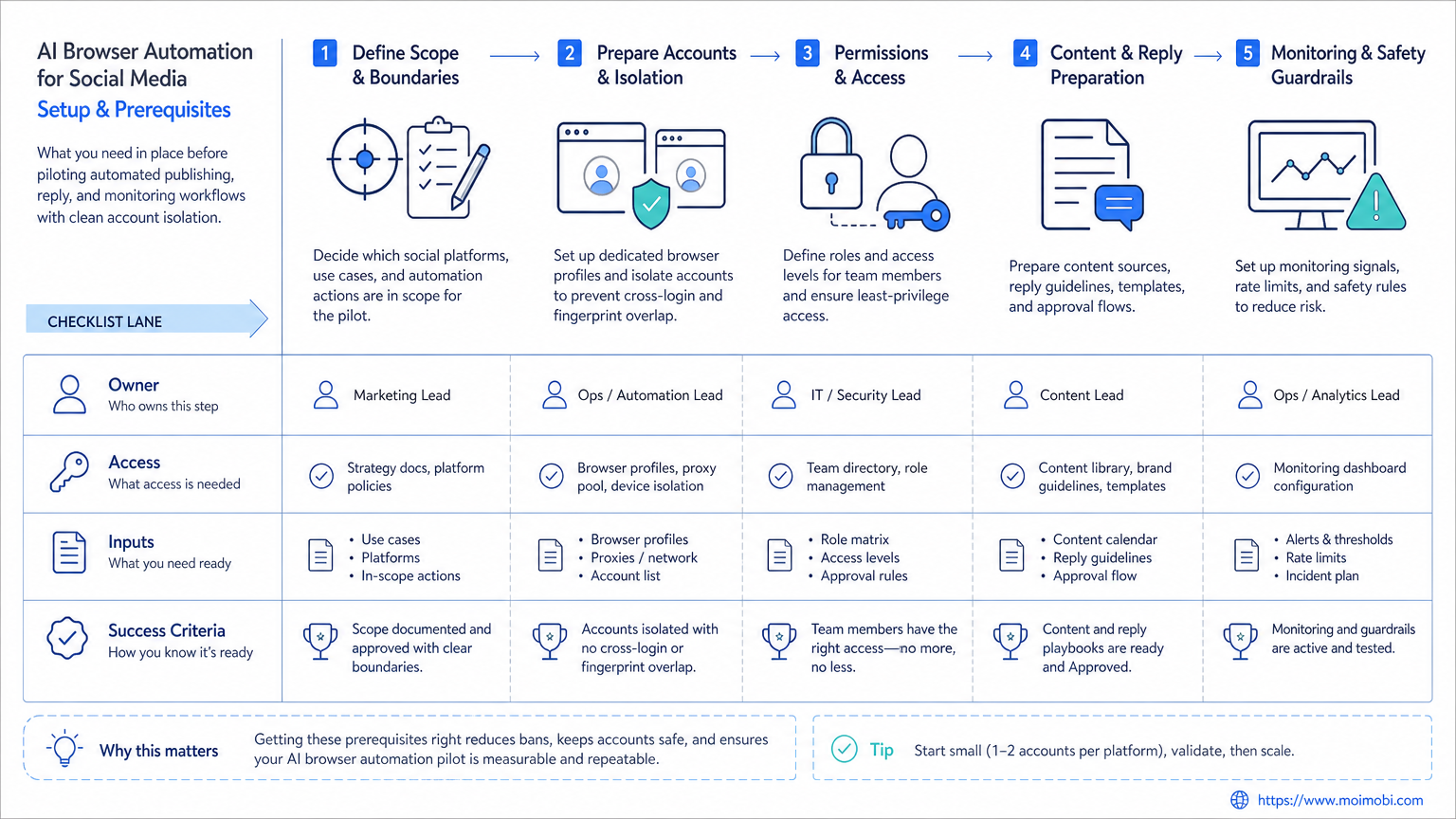
Start with one narrow lane. Do not automate the whole social stack at once.
Pass / fail checkpoints for the first pilot
- Task scope: Can you describe the task in five steps or fewer?
- Account ownership: Does each session map to one account workspace?
- Review stop: Is there a clear point where a human can verify before publish or send?
- Recovery rule: If a page changes or a run fails, does the team know who pauses it?
- Result logging: Is the output written back to a shared queue, sheet, or system?
The first pilot should usually be one of these:
- browser-side comment triage
- social dashboard monitoring
- repetitive publishing preparation
- competitor or trend review
Avoid using the first pilot for the most complex workflow. Browser automation performs better when the path is stable, the handoff is clear, and the recovery rule is already defined.
Mistakes That Reduce Results
The first mistake is using one browser environment for too many accounts. That usually looks efficient at the start. It creates confusion later.
The second mistake is choosing tasks that still require heavy judgment on every step. AI browser automation for social media works best where the decision rule is already narrow. It works worse where every step needs a fresh content strategy decision.
The third mistake is treating the browser as the whole system. The browser lane still needs routing, workspace boundaries, and next-step ownership. That is why some teams combine browser automation with device isolation and social media marketing workflows instead of stopping at the browser layer.
Pilot Rollout, Measurement, and Recovery Checks
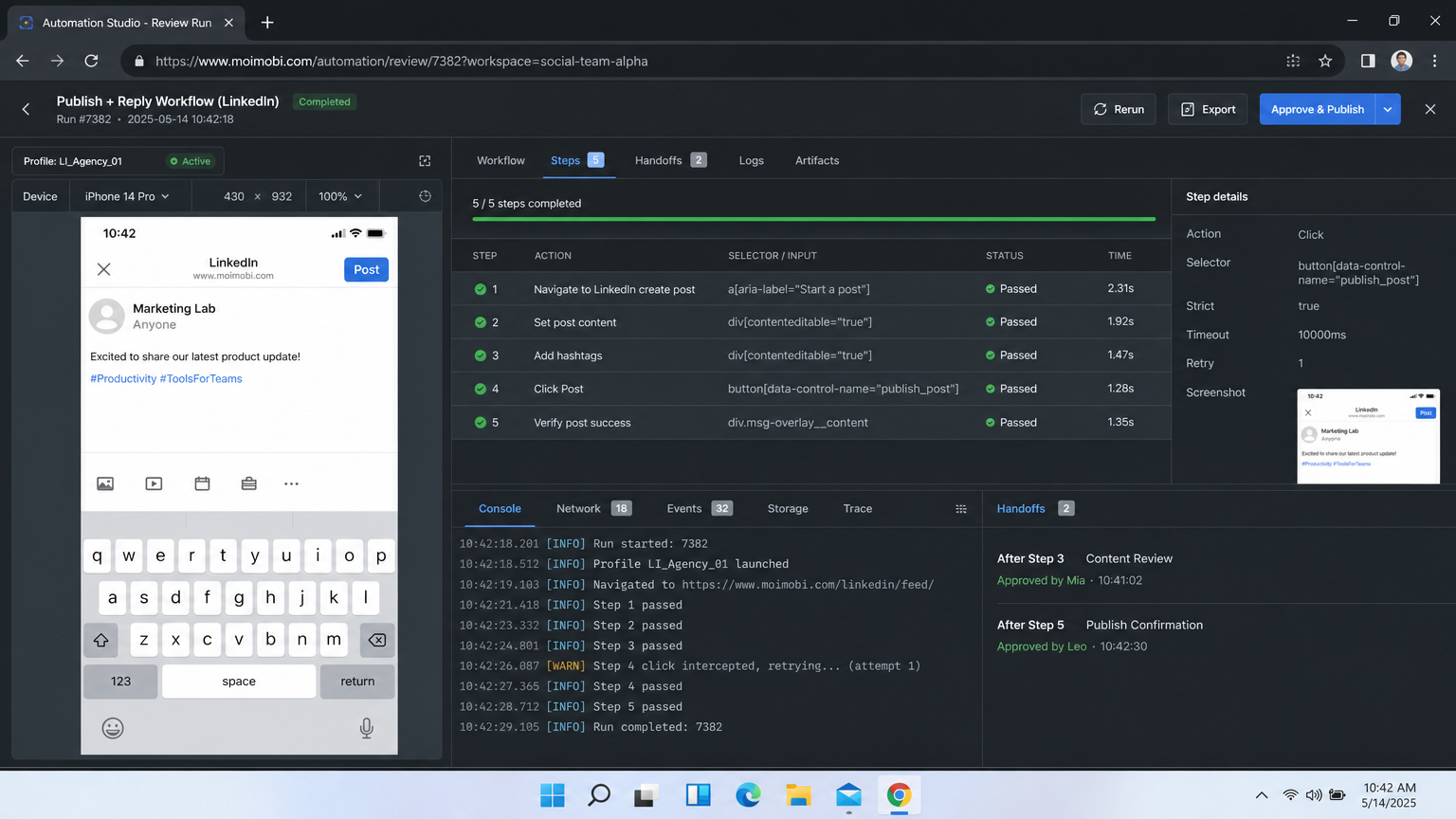
Pilot rollout should be small enough to inspect but real enough to expose failure modes.
For a first rollout, track:
| Metric | What it tells you | Recovery trigger |
|---|---|---|
| Run completion rate | Whether the page flow is stable | Pause if failures cluster around the same step |
| Manual takeover rate | Whether the task is too judgment-heavy | Rewrite the workflow if manual takeover stays high |
| Wrong-workspace incidents | Whether session isolation is weak | Stop scaling until ownership is fixed |
| Review turnaround time | Whether humans can still manage the lane | Reduce volume if queue review slips |
Recovery checks matter because browser interfaces change. Vendor docs also remind teams that execution environments are not static. Chrome DevTools Protocol surfaces evolve, and platform dashboards shift over time. See Chrome DevTools Protocol for the kind of browser control layer teams depend on.
The safest rollout pattern is one lane, one owner, one review queue, and one weekly reset. Expand only after the lane becomes boring.
Design the Work Package Before an AI Browser for Social Media Executes It
The browser should receive a work package, not a vague instruction such as "handle today's social tasks." A usable package names the account workspace, task objective, approved source assets, expected action, review requirement, and the record that proves the work was completed. This turns a browser session into an accountable operating lane instead of a shared screen with an unclear owner.
For example, a publishing-preparation package can say: open the named business workspace, verify the approved media file and caption version, save the draft or route it to approval, then record the outcome and any blocked field. It should not ask an operator or agent to invent the audience, make an unreviewed claim, or choose between campaign directions. Those are business decisions, not browser steps.
The same distinction helps when a task mixes research and execution. A competitor-review workflow can collect public post examples into a review queue, but the team should decide what the examples mean before a new campaign is created. Keeping evidence collection separate from approval prevents a browser automation lane from quietly becoming an unsupervised content strategy system.
Use a compact task card for every recurring lane:
| Field | Why it belongs in the task card |
|---|---|
| Named workspace | Prevents the correct task from running in the wrong account session |
| Source and version | Lets a reviewer identify the approved caption, asset, or data set |
| Permitted action | Sets a clear boundary between preparation, draft creation, and publishing |
| Human checkpoint | Defines when the workflow must pause for an accountable decision |
| Result record | Captures the URL, status, exception, or next action for the team |
This structure is especially valuable for agencies. Client accounts can share a broad operating pattern without sharing credentials, browser sessions, approval rights, or content decisions. The repeatable part is the task card. The account-specific part stays inside its own environment.
Approval Boundaries and Human Takeover Rules
An AI browser for social media should stop when the task reaches a decision that changes a campaign, an account relationship, or a customer conversation. Typical stop points include selecting a new audience setting, publishing an unapproved post, responding to a complaint, changing a permission, and working around an unexpected platform prompt. A pause is not a failure. It is the evidence that the workflow respects its operating boundary.
Platform rules are another reason to make those boundaries explicit. Meta's terms and policies set limits around misuse, spam, and unauthorized collection or automation. Teams should therefore use browser workflows for approved operational work, not repeated unsolicited outreach or behavior designed to bypass platform protections. Keeping the workflow tied to documented account ownership, approved content, and human review is both easier to audit and more sustainable than volume-first automation.
Define takeover with the same clarity as the happy path. When a page layout changes, an authentication prompt appears, or an item lacks approval, the agent or operator should save the current state, note the blocking condition, and assign the task to the right owner. It should not keep retrying indefinitely, switch accounts to force a result, or mark the task complete without a usable record.
One practical rule is to classify failures into three buckets: environment issue, task-package issue, and platform decision. An environment issue goes to the workspace owner. A missing asset or unclear instruction goes back to the requester. A policy, publishing, or customer-impacting choice goes to the accountable reviewer. This avoids the common situation where every failed run is sent to the same technical person even when the problem is actually approval or content.
A 30-Day Pilot Plan for Browser-Based Social Workflows
Days 1 through 7 should focus on observation. List the steps for one recurring task, identify the account workspace, and measure the current manual time without trying to optimize it. The team should also decide which actions remain review-only during the pilot. In most cases, publishing and customer replies deserve a human checkpoint from the start.
During days 8 through 21, run the lane with a small task queue. Review each result at the end of the day. Record where a person took over, whether the task package was complete, and whether the browser session was the intended one. Do not expand volume simply because the first few runs worked. Early success is useful only when it can be repeated with the same controls.
For days 22 through 30, make one change at a time. A team might simplify the task card, add an approval flag, or separate a mobile-app action into a cloud phone workflow. Compare the new version against the original baseline: fewer clarification requests, fewer wrong-workspace incidents, and a clearer result record are stronger signals than raw task count.
At the end of the pilot, decide whether the lane is ready to repeat, needs a narrower scope, or should stay manual. A browser workflow is ready to scale only when a new team member can understand the package, follow the handoff, and explain what happened after the run. That standard protects both account operations and the people responsible for them.
Frequently Asked Questions
What is an AI browser for social media?
It is a browser execution setup where AI can complete repeatable browser-side social workflows inside managed sessions.
Is this the same as a social media scheduler?
No. A scheduler mainly handles posting queues. Browser automation covers browser-side execution work around those queues.
When is browser automation a better fit than API tools?
It is often a better fit when the team depends on browser dashboards, moderation views, and account-side workflows.
Does every social workflow belong in the browser?
No. App-native work may fit cloud phones or mobile execution better.
What should the first pilot be?
Pick a narrow, repeated, low-judgment task such as moderation triage or routine dashboard review.
What is the biggest operational risk?
Usually poor workspace isolation or weak handoff, not the click automation itself.
What should a team evaluate next?
Check whether the browser lane should connect to a resources hub, a cloud phone lane, or a broader multi-account workflow.
Conclusion
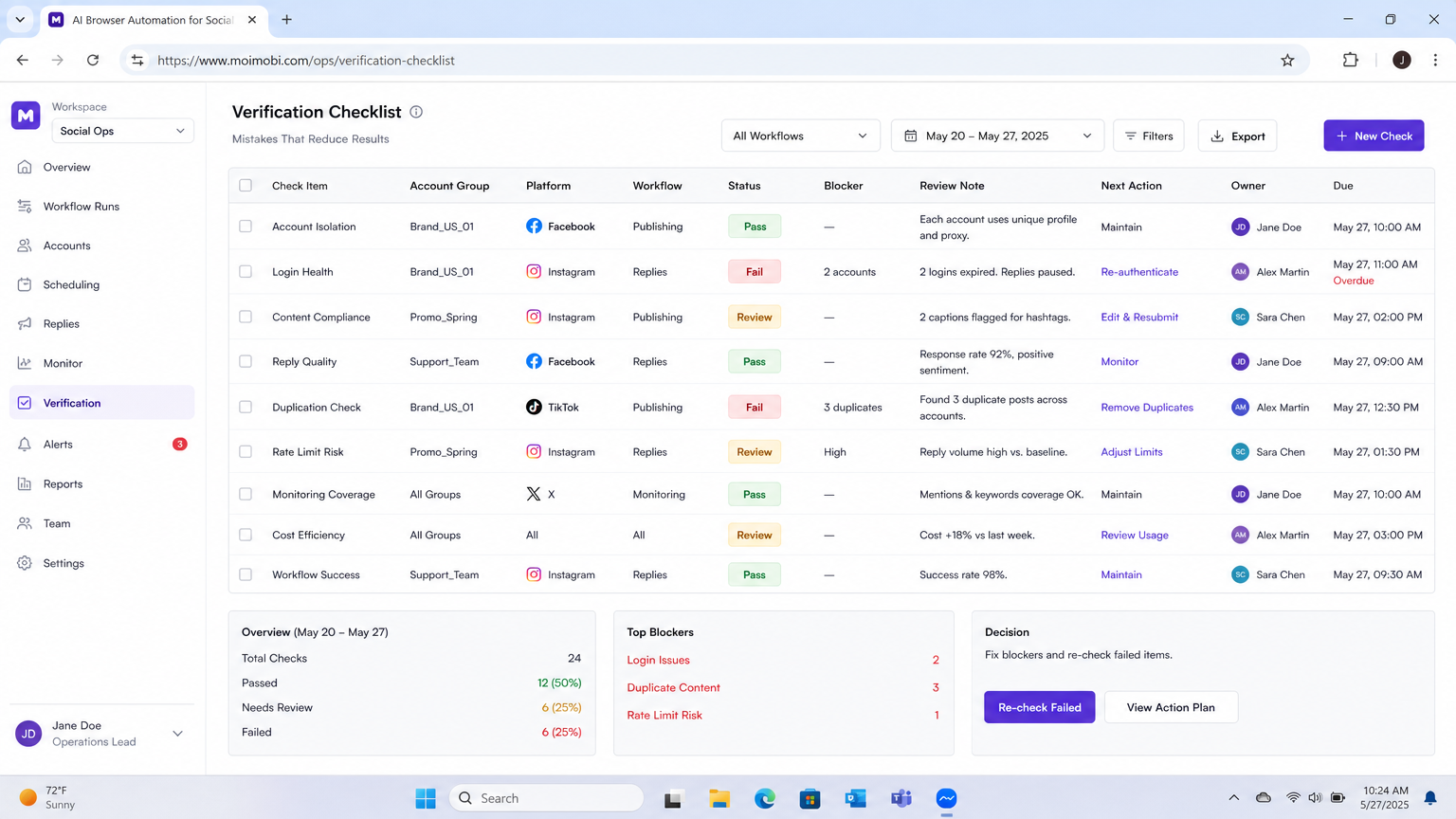
AI browser automation for social media is most useful when a team already knows which browser tasks repeat and which boundaries matter. Start by isolating one stable lane. Measure completion, takeover, and workspace errors. Expand only when the workflow stays controlled under real volume. The right next step is rarely “add more automation.” It is usually “tighten the execution model first.”



