
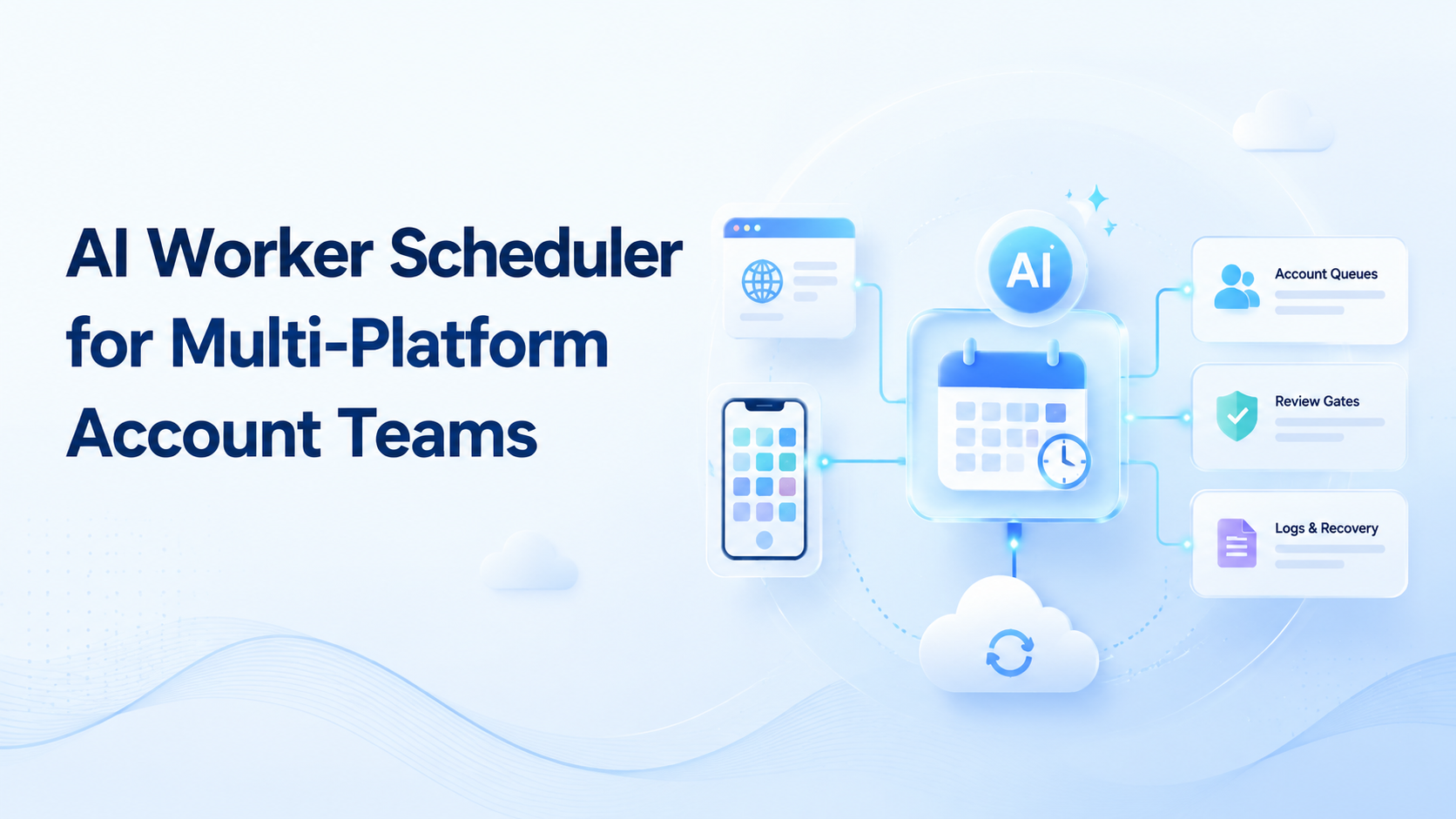
An AI worker scheduler is software that assigns digital tasks to AI workers across accounts, platforms, browsers, mobile environments, and human review queues. It decides what runs next. It also records what happened.
Multi-platform account teams need this layer when work spreads across web dashboards, mobile apps, profile environments, message queues, and approval steps. A person can manage that by hand for a few tasks. The process breaks down when the team adds more accounts, more shifts, or more channels. Stop there before scale.
This control layer should not be a simple calendar. It needs account context, device rules, priority logic, stop conditions, retry limits, and reviewer ownership. A good schedule protects the work from overlap, stale sessions, unclear handoff, and silent failure.
The operating question is practical: can the team see which worker ran which task, under which account, through which environment, and with which review outcome? When the answer is no, the schedule is only a list. It is not execution control.
Key Takeaways
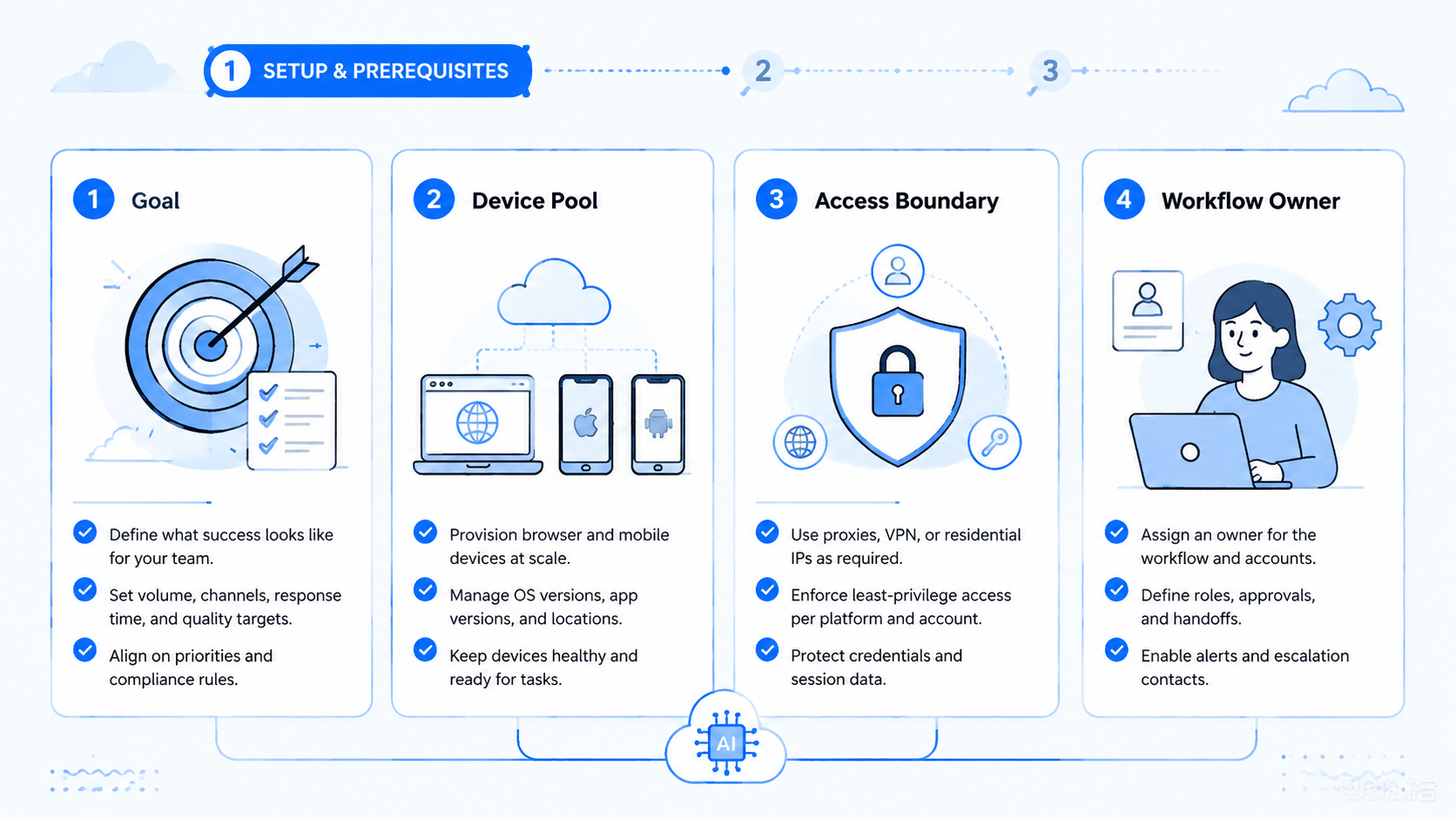
- Scheduler rules assign work across accounts, platforms, devices, and reviewers
- Scheduling must include account boundaries, not only task timing
- Browser tasks and mobile checks should share one run record
- Review gates prevent sensitive actions from becoming silent automation
- Pilots should measure queue health, completion, exceptions, review time, and recovery
What an AI Worker Scheduler Does
The queue turns a pool of tasks into controlled work. It chooses the next item, assigns the right worker, opens the right environment, and tracks the result. In a small team, a spreadsheet may look enough. In a multi-account operation, that spreadsheet soon loses context.
A useful scheduler holds five fields for every run.
| Field | What it controls | Why it matters |
|---|---|---|
| Account | Store, profile, client, or channel owner | Prevents cross-account confusion |
| Environment | Browser profile, cloud phone, app, or proxy route | Keeps execution context clear |
| Task type | QA, posting, support, setup, reporting, or review | Matches work to the right worker |
| Review gate | Human approval or automatic close | Protects sensitive decisions |
| Recovery state | Retry, pause, escalate, or close | Stops vague failure loops |
The scheduling layer is useful because it connects timing with ownership. A queue item should not say only "run account check." It should say which account, which tool, which device, which rule, and which reviewer owns the outcome.
This is where a scheduler differs from a task board. A task board shows work people plan to do. A scheduler controls when a worker may act, where it may act, and what proof must come back.
Why Multi-Platform Account Teams Need Scheduling
Account teams work across surfaces. One task may start in a browser dashboard, continue in a marketplace app, require a social account check, and end with a supervisor review. The handoff is the hard part.
Manual coordination creates hidden costs: operators ask which account is free, reviewers ask why a run stopped, and managers ask whether a worker touched the wrong environment.
These questions are not signs of poor effort. They show that the queue lacks execution data when account, environment, and reviewer ownership are missing. Proof matters.
MoiMobi's multi-account management context is relevant because account ownership needs to travel with every task. The same idea applies to ecommerce, social, support, and agency workflows. A worker should never guess which account, device, or app state belongs to the run.
Google's helpful content guidance focuses on usefulness for people. Ops systems should help. Good scheduling should make the team's work easier to understand, not hide complexity behind a queue.
The strongest signal is recovery quality. A failed task that can be diagnosed from the run record shows that scheduling is working. Teams that need chat history to understand the failure are missing the facts that matter. Fix the record first.
Browser Queues, Mobile Queues, and Cloud Phones
Browser queues are common because many admin tasks live on the web. A worker may open dashboards, read status, prepare records, submit forms, or collect evidence. Browser automation tools such as Playwright show how web actions can be controlled and tested with clear browser primitives.
Mobile queues need different context. App state, device assignment, login sessions, notifications, and account separation matter. A cloud phone gives the team a remote Android environment for mobile work, while keeping access inside an operational system.
Scheduling should connect the two. A browser task may create a mobile check. A mobile result may reopen a browser task. A reviewer may approve the browser result only after the app state is verified.
Use this routing model.
| Queue type | Worker action | Required context | Review point |
|---|---|---|---|
| Browser admin | Read, update, or collect dashboard data | Account, URL, field, and role | Before irreversible change |
| Mobile app check | Verify app state or customer-facing screen | Cloud phone, app, account, and session | Before final approval |
| Cross-platform task | Move from browser to mobile or back | Shared run ID and evidence chain | At handoff boundary |
| Recovery queue | Retry or escalate failed work | Failure reason and last known state | Before rerun |
This model keeps the queue from becoming a pile of unrelated tasks. Each item carries the context needed to run, review, and recover.
Control Rules for an AI Worker Scheduler
Scheduling without controls creates faster confusion. The team needs rules before volume grows.
OWASP's LLM Top 10 is a useful reminder that AI systems with tools need clear boundaries. A worker that can read pages, use tools, and act across accounts should have limits. Those limits should live inside the queue.
Start with six rules.
- One task should map to one account owner
- One account should map to approved environments
- Sensitive actions should pause for review
- Failed runs should receive named reasons
- Retry limits should be explicit
- Queue priority should be visible to operators
Good schedule
- Task, account, device, and reviewer are named
- Retries have limits and reasons
- Mobile handoff stays inside the run record
- Review gates happen before sensitive actions
Poor schedule
- Workers pull vague tasks from a shared list
- Accounts share unclear device history
- Failures go back into the queue without labels
- Review happens after the change is already live
The NIST AI Risk Management Framework frames AI risk as something teams govern, map, measure, and manage. For scheduling, that means the queue should expose risk points while the run is happening. It should not wait for a postmortem.
How to Pilot an AI Worker Scheduler
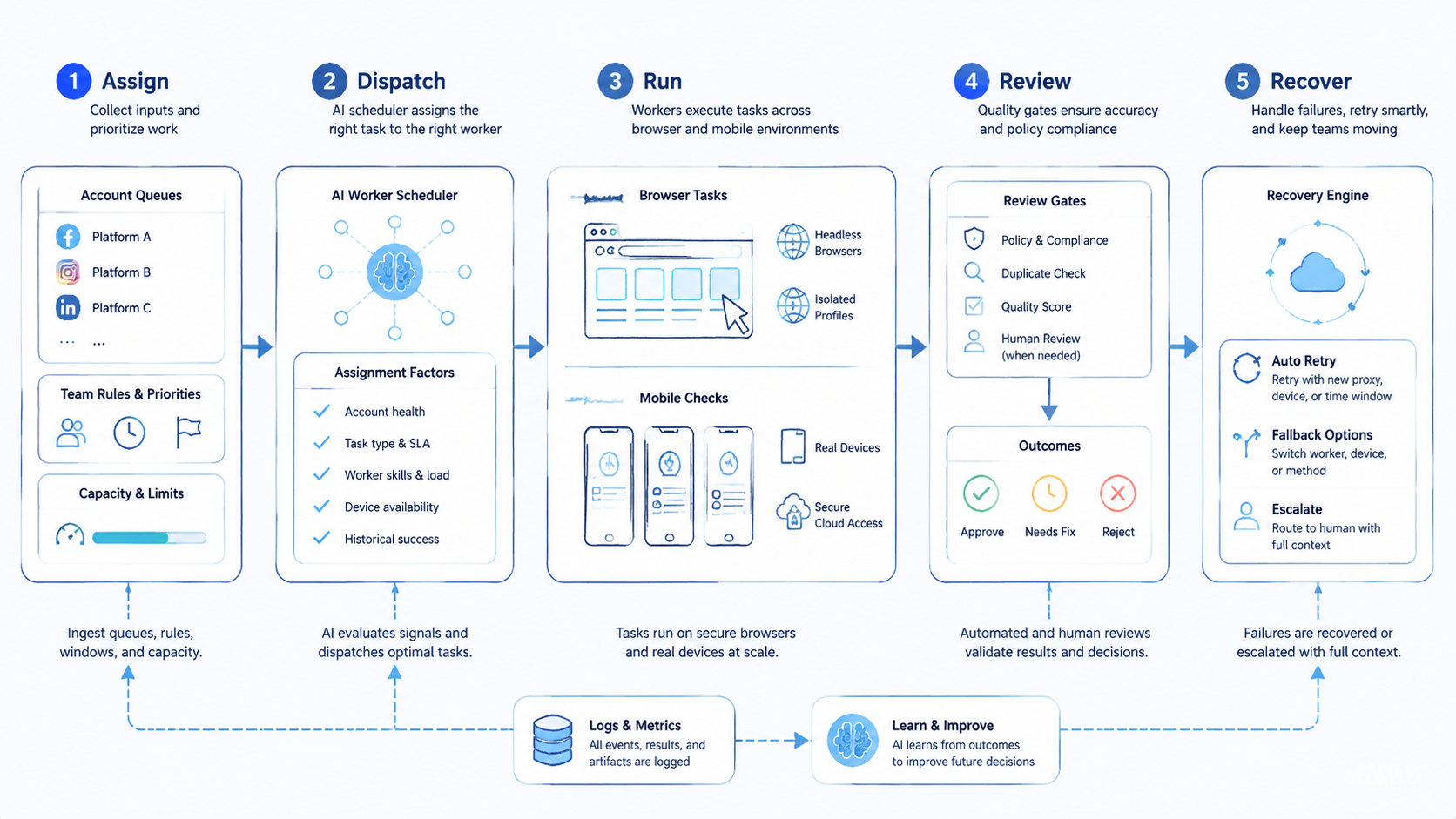
Begin with one workflow and a small account set. A pilot should prove that the scheduler improves handoff and recovery. It does not need to prove every worker can run every task.
Choose a repeatable task. Good examples include account status checks, content QA, app verification, marketplace message triage, report collection, or routine setup review. The task should have a clear input and a clear stop point.
Define the run path before automation begins.
- Name the account group
- Choose the browser or mobile environment
- Set the worker permission
- Add the review gate
- Define the success state
- Define the failure labels
Keep the first run small: one account group, one worker type, one cloud phone if mobile state matters, and one reviewer. That narrow design makes each error easier to read.
Measure queue health, not only speed. A fast scheduler that creates unclear failures is not healthy. A slower scheduler with clean evidence may scale better after two or three repair cycles. Evidence wins.
Metrics, Review Loops, and Recovery
Scheduling should make performance visible. Raw completion is not enough because a task can finish and still create rework. Measure both output and control quality.
| Metric | Healthy sign | Repair signal |
|---|---|---|
| Queue age | Tasks move before context gets stale | Old tasks keep retrying without owner |
| Completion rate | Similar tasks finish with stable evidence | Completion varies by account or device |
| Exception quality | Failures have useful labels | Errors say only "failed" or "unknown" |
| Review time | Reviewers approve from the run record | Reviewers need chat or memory |
| Recovery time | Reruns start from known state | Operators rebuild context by hand |
Review the queue weekly during the pilot. Remove tasks that do not belong and add labels where failures repeat.
Shorten retry loops when reruns waste time. Move human approval earlier if workers reach sensitive screens too often. Keep the loop visible. The review owner should be able to trace the task from queue entry to final state without opening a private message thread.
For larger mobile workloads, a phone farm can provide more device capacity. Capacity should follow control. More devices will not fix vague ownership, missing stop rules, or poor review evidence.
AI Worker Scheduler Readiness Matrix
Use a readiness matrix before expanding the queue. The goal is to find weak control points while the pilot is still small.
| Area | Ready signal | Repair signal | Stop signal |
|---|---|---|---|
| Account map | Each run names account group, owner, and allowed worker | Account names exist but device rules are unclear | Workers choose accounts from memory or chat |
| Environment map | Browser profile, cloud phone, app, and route are tied to one run | Mobile checks happen but evidence is manual | Browser and mobile work cannot be linked |
| Queue priority | Operators know why one task runs before another | Priority exists but managers override it often | Every urgent item jumps the queue |
| Review gate | Approval happens before sensitive changes | Review happens but evidence is incomplete | Reviewers approve from summaries only |
| Retry policy | Retries have count, reason, and owner | Retries work but labels are vague | Failed tasks loop until someone notices |
| Recovery owner | One person owns the next action after failure | Ownership depends on the channel or shift | Nobody can tell who should restart the run |
Green signals mean the team can add a small amount of volume. Repair signals mean the queue needs a rule change. Stop signals mean the workflow should pause before more accounts, workers, or devices are added. Use this as a gate.
This matrix also keeps the schedule grounded in operations. A team may want more automation, but the queue must first prove that it can protect context. Context is the difference between a safe rerun and a blind retry. Keep that distinction clear.
Consider a social account team with three platforms and two reviewers. The morning queue might include profile checks, message triage, app verification, and report collection. Without scheduling rules, the team sees a list of tasks. That list is not enough.
With scheduling rules, each item carries account group, device, route, worker, reviewer, and next action. That extra context is what makes the queue usable after a failed run. It also helps a manager compare failures across account groups, because the same label means the same problem in every queue.
The same pattern applies to ecommerce and support work. A browser dashboard may show a task as complete, while a mobile app still needs proof. The item should not close until both states are attached to the same run record.
Here is a concrete run record model. Start the queue item as account_group: marketplace-east, task_type: message_triage, worker_role: browser_reader, device_id: cloud_phone_07, and reviewer: ops_lead_a. The browser worker opens the seller dashboard and collects unread message count, order ID, buyer name, and issue category. It cannot send a reply.
The mobile check starts only after the dashboard evidence is attached. The cloud phone opens the marketplace app, verifies the same order ID, and captures the app-side message state. If the app shows a payment, refund, or policy prompt, the scheduler assigns the stop label human_review_sensitive_action. No retry runs until a reviewer clears that label.
Recovery also needs concrete labels. Use session_expired for login loss, device_state_mismatch for app-side account drift, missing_required_field for incomplete dashboard data, and reviewer_timeout when approval does not arrive within the pilot window. These labels are simple, but they turn failed runs into repair work instead of guesswork.
Set pilot thresholds before the 2026 rollout cycle begins. A team might pause expansion when reviewer_timeout rises above 15%, when unclear failures exceed 10% of runs, or when a task waits more than 30 minutes for approval. These are internal gates, not universal benchmarks. The point is to write a rule before the queue is busy.
Use short reviewer notes. A useful note might say "mobile app state does not match browser record" or "retry blocked by session_expired label." That wording gives the next operator a concrete fix.
Mistakes to Avoid
The first mistake is scheduling tasks without account ownership. A queue item that lacks account context invites overlap. The worker may run the right task in the wrong environment.
Another mistake is treating retry as a cure. Pause before retry. A retry can fix a short outage or stale session.
It cannot fix a missing permission, unclear SOP, or mobile state mismatch. Retry loops need reasons and limits.
Teams also forget mobile proof. Browser work may show that a dashboard update succeeded, while the mobile app still shows a different result. Mobile customer-facing states need a verification path in the scheduler.
Do not hide review work. Human approval is part of the workflow, not a delay outside it. The run record should show which reviewer owns the decision and how long approval takes. Name the owner.
The quiet failure is queue drift. Teams add tasks, devices, and accounts faster than they update rules. A weekly cleanup prevents the scheduler from becoming another shared inbox. Clean weekly.
Frequently Asked Questions
What is an AI worker scheduler?
A scheduler assigns tasks to AI workers and tracks the account, environment, review gate, and result. It is more than a calendar because it controls execution context. Start there.
Who needs this type of scheduler?
Teams that manage multiple accounts, platforms, devices, or reviewers need it most. The fit is strongest when work crosses browser dashboards and mobile app checks. Keep it narrow.
How is this different from task management software?
Task tools track planned work. A scheduler controls when a worker may act, which environment it may use, and what evidence must return before the task closes. Use that split.
Does a scheduler replace human operators?
No. It reduces coordination work and assigns repeatable runs. Human operators still own sensitive decisions, exception review, policy judgment, and final approval. Keep approval visible.
What should be measured first?
Measure queue age, completion rate, exception quality, review time, and recovery time. These metrics show whether the scheduler improves execution or just moves tasks faster. Speed is secondary.
When do cloud phones matter?
Cloud phones matter when the workflow needs app state, mobile verification, account separation, or remote Android access. They give the scheduler a controlled mobile environment. Check the app.
What is the biggest risk?
The biggest risk is vague context. When a task lacks account, device, environment, and reviewer data, workers may act in the wrong place or create failures that cannot be explained. Context comes first.
How should a team start?
Start with one account group, one task type, one worker, and one reviewer. Run the workflow until failures have clear labels. Then add volume gradually. Scale last.
Conclusion
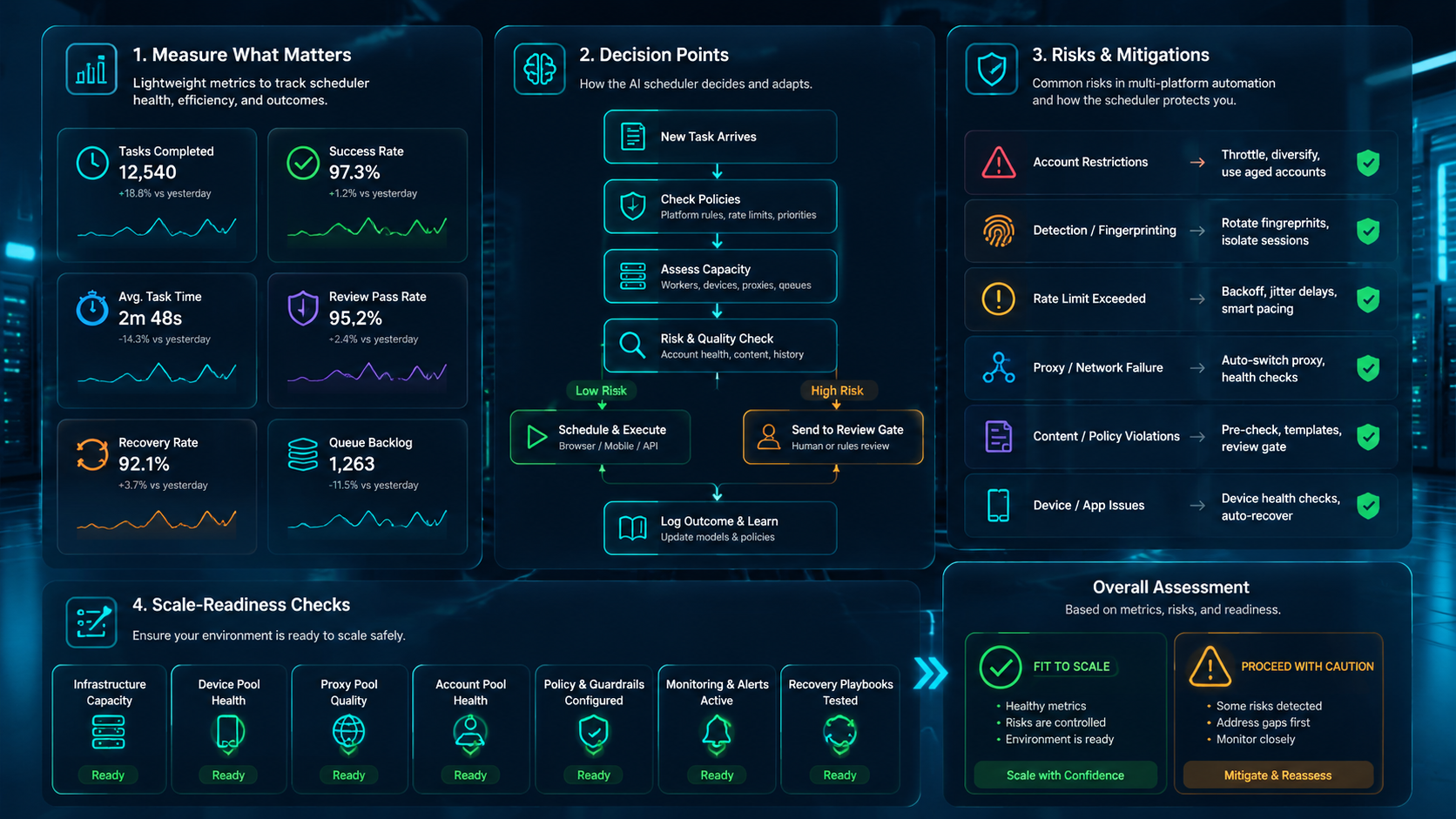
The priority order is account context, environment control, worker assignment, review gate, recovery rule, then scale. Skipping that order turns the scheduler into a faster shared inbox.
This schedule is valuable when multi-platform account teams need repeatable work across browsers, apps, devices, and reviewers. It gives each task a clear owner and a clear run record. That is what makes automation reviewable.
For the next step, choose one workflow that already creates handoff delays. Map the account, environment, worker, reviewer, and stop rules. A queue record that explains each failed run is the signal for a broader pilot.



