
Key Takeaways
- A social media operations platform is an execution system, not just a scheduler.
- Teams need clear routing for publishing, replies, monitoring, and review.
- Browser and mobile runtimes should match the task instead of sharing one loose lane.
- A pilot should measure correction cost and recovery speed before expansion.
AI Social Media Operations Platform for Teams is a system that helps teams run repeated social workflows through controlled browser and mobile environments. The goal is not only to automate posting. The real goal is to keep publishing, inbox work, monitoring, and approval paths clear across multiple accounts.
Most teams reach this topic after simple tools stop fitting the work. One part of the workflow sits in a browser dashboard. Another part sits in a mobile app. A third step needs a human reviewer. Once those parts overlap, execution becomes the bottleneck.
Primary sources explain why structure matters. W3C WebDriver defines browser automation through explicit sessions and commands.1 Playwright uses browser contexts to isolate state.2 Android Enterprise describes managed device workspaces as separate operational environments.3 The practical lesson is simple: clear state boundaries make repeated work easier to run.
The Core Idea Behind AI Social Media Operations Platform for Teams
The common misunderstanding is that a social operations platform is only a publishing calendar with AI text generation on top. That view misses the harder part of the work.
A real platform has to assign the right runtime, reopen the right account state, pause for review when needed, and record what happened after each run. One worker may handle browser publishing checks. Another may handle mobile inbox replies. A reviewer may approve exceptions before the workflow continues.
That is why teams evaluating an AI browser often end up reviewing mobile automation, device isolation, and multi-account management. The platform only works when the execution lane is controlled.
Why Teams Search for This Topic
Social media teams usually search this after shared login habits start creating friction. The problem often appears as missed replies, duplicated checks, or unclear ownership after a failed run.
Another trigger is uneven workflow shape. A browser can cover dashboard checks and scheduling. A phone or cloud device may be needed for app-native inbox work, account verification, or mobile-first platform steps. When those surfaces are mixed without routing rules, cleanup expands faster than output.
For that reason, many teams move from tool-by-tool thinking to operational thinking. They stop asking which posting tool is fastest and start asking which system can hold state, recovery, and review together.
Who Benefits Most and In What Situations
This model fits teams with repeated multi-account work. It is weak for teams that publish occasionally and do not need structured review or recovery.
Teams handling daily publishing, replies, monitoring, and approval across several accounts.
Teams moving from shared logins and manual handoff into clearer role-based operations.
Teams with low posting volume and little repeated workflow structure.
A strong fit signal is rising coordination cost. When the team spends more time checking who ran what than improving the campaign, the platform need is already visible.
How to Evaluate or Start Using AI Social Media Operations Platform for Teams
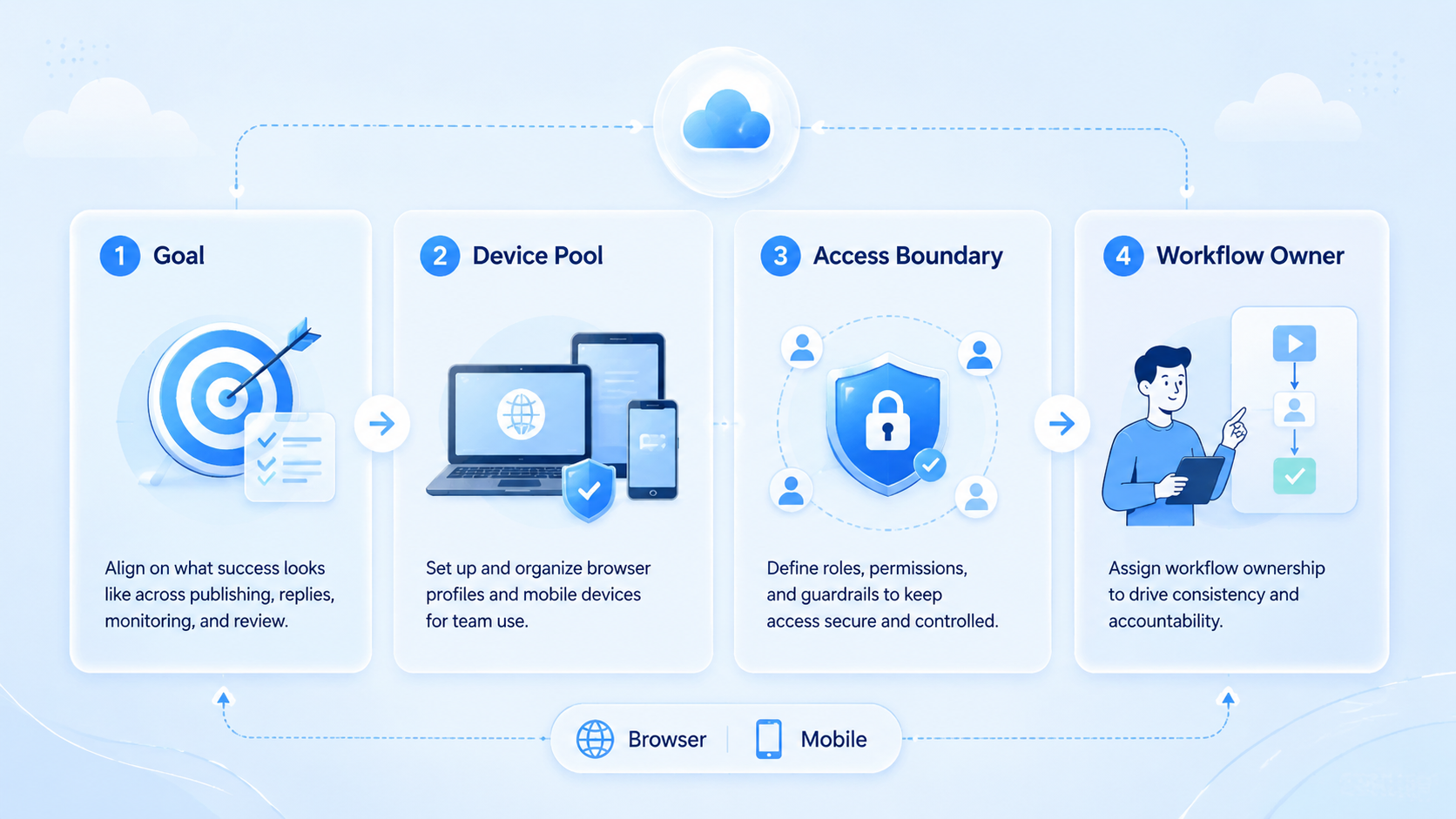
Do not start with every workflow. Start with one narrow lane that repeats every week.
- Pick one workflow. Use a workflow such as scheduled publishing plus reply review.
- Pick the runtime for each step. Keep browser tasks in the browser and app-native tasks in mobile environments.
- Define the account boundary. One worker or lane should own one account set or one queue class.
- Define the stop rule. Mark the exact step where the workflow pauses for review.
- Define the recovery rule. Document what happens after session expiry, missing data, or platform interruption.
AWS Device Farm and BrowserStack App Automate both emphasize reproducible environments for repeated mobile execution.4 5 Social teams do not need test infrastructure for its own sake, but they do need the same discipline: the team must be able to rerun the workflow in a known environment.
Mistakes That Reduce Results in AI Social Media Operations Platform for Teams
The first mistake is treating all social tasks as one queue. Publishing, replies, moderation, and monitoring may share goals, but they do not always share the same runtime or recovery pattern.
Another mistake is scaling account count before the exception path is stable. A team may think the workflow works because the happy path is fast. The real test comes when sessions expire or a reviewer must step in.
Common failure patterns include:
- shared environments across unrelated accounts
- mobile and browser steps switching lanes without logs
- no owner for retries or exceptions
- approval checks that rely on chat messages instead of explicit pause rules
Those are not small process issues. They are signs that the platform is acting like a loose task board instead of an execution layer.
Pilot Rollout, Measurement, and Recovery Checks
The first pilot should prove control, not reach. Choose one account segment, one repeated workflow, and one review owner.
Use a small scorecard:
| Review area | What to inspect | Good sign |
|---|---|---|
| Routing | Did work stay in the assigned runtime and account lane? | Few manual reroutes |
| Review | Did the workflow pause at the planned approval point? | Low surprise escalation |
| Recovery | Could the same state reopen after interruption? | Short resume time |
| Cleanup | How much rework followed each run? | Low correction cost |
If the workflow depends on mobile-first account work, review cloud phone farm infrastructure and the cloud phone vs emulator comparison. Those pages help teams pick execution lanes that match the actual social workload.
Frequently Asked Questions
Is this the same as a social media scheduler?
No. A scheduler handles timing. An operations platform handles timing, execution, review, and recovery.
Does every team need both browser and mobile execution?
No. Use both only when the workflow truly crosses those surfaces.
What should a first pilot include?
Start with one repeated workflow that has clear pass, retry, and review outcomes.
What is the first warning sign?
Frequent manual rescue is a stronger warning sign than low throughput.
Can one worker handle multiple accounts?
Yes, but only when those accounts share one clear process and review model.
Why does state isolation matter here?
Because shared state makes diagnosis slower after failures.
When should the team scale?
Scale only after routing and recovery stay stable for a full pilot cycle.
Conclusion
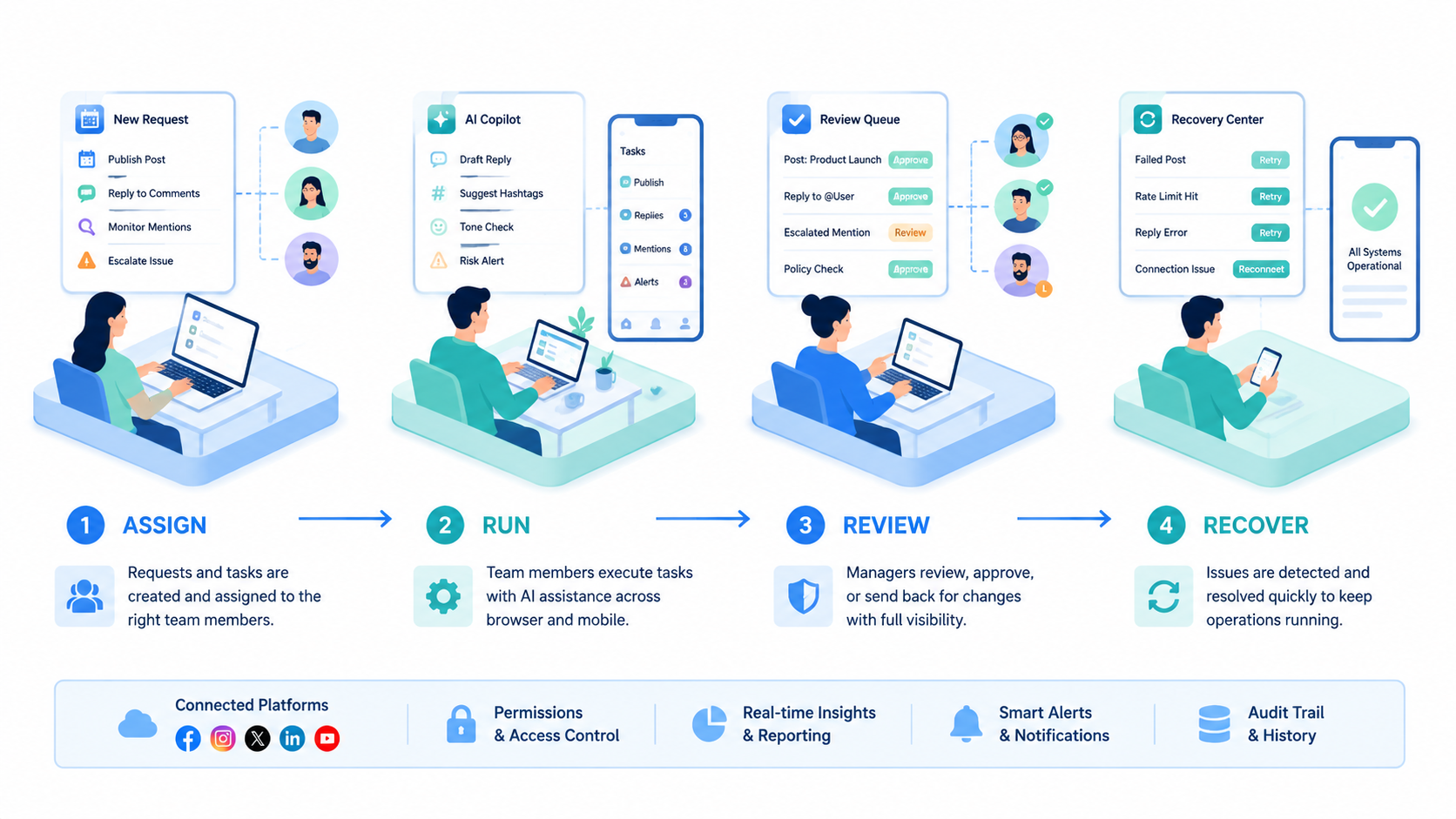
An AI Social Media Operations Platform for Teams is useful when it turns repeated social work into a controlled execution model. The practical gain comes from routing, review, and recovery discipline.
Before expanding, rank the next checks in this order: account boundary, runtime fit, and cleanup cost. If those are stable, the team is ready to scale the workflow.



