
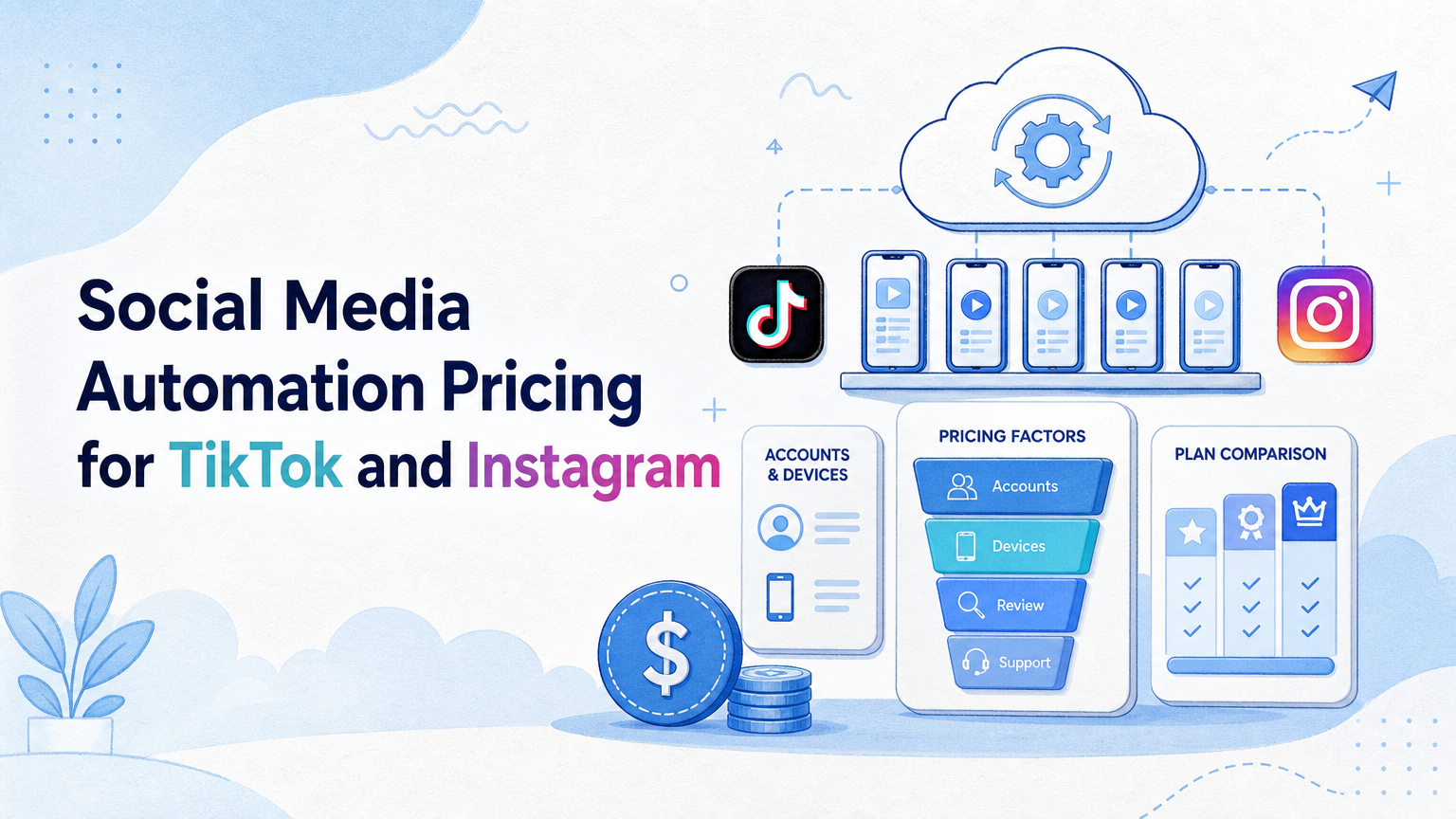
Social media automation pricing for TikTok and Instagram is the cost of running publishing, reply, monitoring, account, and review workflows across the environments those platforms require. The useful question is not only "what is the monthly fee?" It is "what operating capacity does the price actually buy?"
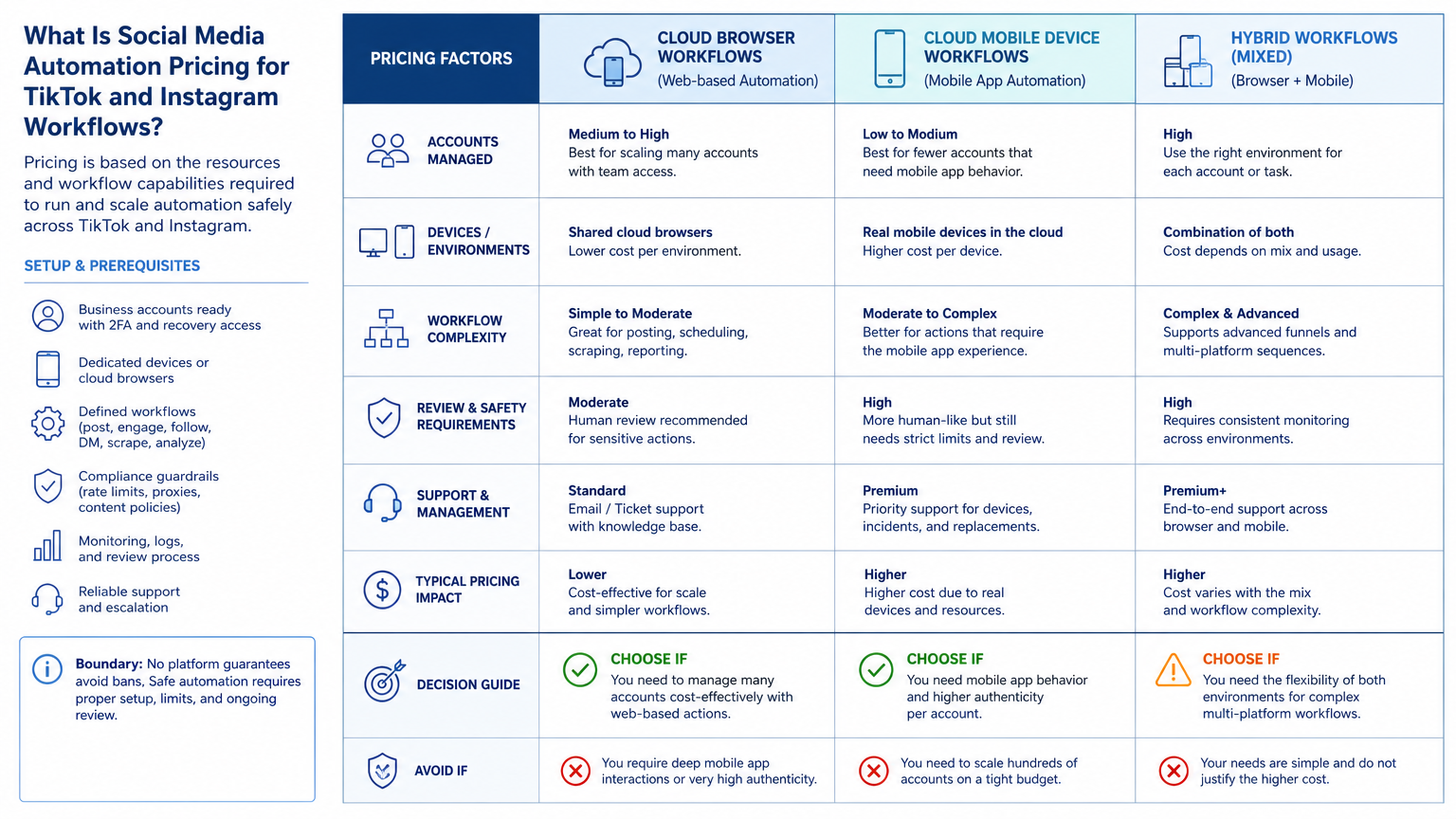
For TikTok and Instagram teams, pricing should be evaluated around account count, execution environment, device needs, approval controls, operator seats, and support. A low monthly price can become expensive if the team still needs manual phones, shared logins, weak review controls, or custom scripts to finish the workflow.
Moimobi should be compared as an execution layer, not just as a scheduler. Teams can use cloud phone infrastructure, browser profiles, and multi-account controls to make repeated social work easier to assign, run, and review.
Key Takeaways
- Pricing should be judged by workflow capacity, not only by the listed subscription price.
- TikTok and Instagram workflows often need mobile execution, account isolation, review gates, and task history.
- API-based publishing, browser work, and app-based execution may carry different costs.
- A pilot should measure completed tasks, corrections, failed runs, and review time before scaling.
- The best plan is usually the one that reduces operational drag without encouraging reckless automation.
What Is Social Media Automation Pricing for TikTok and Instagram Workflows?
This pricing category covers tools that help teams run social media tasks across TikTok and Instagram. It may include content planning, post preparation, publishing, comment checks, inbox review, lead follow-up, and reporting.
The common mistake is treating every platform as a normal scheduling problem. Scheduling is only one cost line. TikTok and Instagram operations also involve account access, content formats, mobile app behavior, approval steps, and account-specific context.
Official platform APIs show why the workflow can be more complex than a simple calendar. TikTok's Content Posting API documentation explains direct posting through registered apps, approved scopes, creator authorization, and audit requirements for broader visibility. Meta's Instagram content publishing documentation also frames publishing around eligible account types, media containers, and API permissions. Those platform rules make pricing partly about workflow control, not just automation volume.
Moimobi's role is different from a traditional scheduler. A scheduler helps plan and send posts. An execution platform helps teams run work inside separated browser and mobile environments. For teams that manage many accounts, that difference changes the cost calculation.
Why Social Media Automation Pricing for TikTok and Instagram Matters
Price matters because social media operations fail at the edges. A team may budget for a tool, then discover it also needs mobile devices, proxies, account workspaces, manual review, or extra operators. Those hidden costs matter more as account count grows.
TikTok and Instagram are also not identical workflows. TikTok operations may depend heavily on mobile-first review, video publishing, creator account context, and fast comment monitoring. Instagram workflows may involve Reels, posts, DMs, profile checks, and content publishing through Meta's platform rules.
The right pricing model should answer these questions:
- How many accounts can the team operate cleanly?
- Which tasks run through official APIs?
- Which tasks need browser or mobile execution?
- Which actions need approval before publishing or replying?
- How much support is needed when sessions, devices, or workflows fail?
Teams using multi-account management should treat pricing as an operating model. The plan should make account ownership clear and keep execution history traceable.
Key Benefits and Use Cases
The main benefit is not "automation" in a broad sense. It is repeatable work with fewer handoff errors. That is where pricing becomes easier to justify.
| Use case | Pricing driver | What to check |
|---|---|---|
| Content publishing | Accounts, formats, review steps | Can drafts, approvals, and posting be separated? |
| Comment monitoring | Frequency and account count | Can operators see pending replies clearly? |
| DM or inbox triage | Human review and response rules | Can sensitive replies be held for approval? |
| Competitor checks | Task volume and reporting | Can findings become repeatable reports? |
| Client operations | Roles, seats, and workspaces | Can each client account remain separate? |
This is why social media marketing teams often need more than a post queue. They need assigned environments, task ownership, and practical recovery steps when an account session breaks.
How to Get Started with Social Media Automation Pricing for TikTok and Instagram Workflows
Start with the workflow map before asking for a quote. A vendor cannot price the real workload if the team cannot name the tasks.
- List each account by platform, brand, region, and owner.
- Separate publishing, reply, monitoring, research, and reporting tasks.
- Mark which tasks require mobile app execution.
- Mark which tasks can run through official APIs or dashboards.
- Define review rules for comments, DMs, and public posts.
- Count operator seats and AI worker roles.
- Run a small pilot before buying for the full account pool.
For TikTok-specific workflows, use the TikTok operations page as the closest internal planning hub. For mobile-heavy workflows, compare the pricing impact of mobile automation and assigned devices early.
The safest buying process is narrow. Pick two to five accounts, one publishing workflow, and one monitoring workflow. Measure the workload before expanding.
Common Mistakes to Avoid
The first mistake is comparing plans by account count alone. Account count matters, but it does not explain workload. Ten quiet accounts may cost less to operate than three accounts with heavy daily replies and review needs.
The second mistake is ignoring execution environments. Some tools price scheduling, but not the mobile or browser environment needed to operate each account. That gap creates manual work outside the tool.
The third mistake is buying automation before defining permissions. A team should know what the system may draft, what it may publish, what it may reply to, and what requires human approval. Otherwise, the tool becomes faster than the team's review process.
Avoid these pricing traps:
- Paying for seats without defining roles.
- Paying for devices without assigning account ownership.
- Paying for automation without measuring failed tasks.
- Paying for content output while replies and monitoring stay manual.
- Choosing the cheapest plan when support and recovery matter.
Who It Fits and When It Is a Strong Match
The pricing question becomes most relevant when the team already feels operational pressure. One creator with one account may not need a full execution stack. A small agency, cross-border seller, or in-house social team usually has a different problem.
The fit is strong when the team manages several accounts, publishes often, checks comments daily, and needs repeatable workflows. It is also strong when operators must keep client accounts separate.
The fit is weaker when the team only needs light scheduling. In that case, a simpler social calendar or standard social media management tool may be enough.
Use this fit check:
Strong fit
- Multiple TikTok or Instagram accounts
- Mobile-first execution requirements
- Daily comments, DMs, or monitoring
- Need for account workspaces and review logs
Weak fit
- One account with occasional posts
- No reply or monitoring workflow
- No team handoff problem
- All work already fits official APIs
Moimobi becomes more relevant when the work needs separated browser and mobile environments. The cloud phone layer covers mobile execution. The device isolation layer supports cleaner account boundaries.
A Decision Framework for Comparing Social Media Automation Pricing
Use a decision framework instead of placing every vendor in a single cheap-to-expensive list. The same listed price can represent very different operating capacity. A calendar product may be sufficient for approved posts. A browser or mobile execution platform may be the better fit when the team also has account workspaces, frequent handoffs, and app-based tasks.
Score each option against the work the team actually performs. Give each dimension a simple 1-to-5 rating, then discuss the evidence behind the rating before multiplying it by account count. The point is not to create a fake precision score. It is to make hidden requirements visible before a purchasing decision.
| Decision dimension | Ask this question | Lower-cost fit | Execution-platform fit |
|---|---|---|---|
| Publishing path | Is approved API scheduling enough? | Low-volume, calendar-led posts | Mixed dashboard, browser, or mobile paths |
| Account environment | Does each account need a named workspace? | One or few low-risk accounts | Many brands, clients, or account owners |
| Review control | Which actions require approval? | Simple post review | Replies, handoffs, exception and audit records |
| Recovery cost | Who resolves a failed run? | Occasional manual correction | Frequent sessions, device, or ownership recovery |
| Reporting need | Can the team explain what happened? | Basic posting history | Task outcomes, exceptions, and account-specific logs |
Start with the publishing path. TikTok's Content Posting API documentation describes authorization, registered applications, and supported posting flows. Instagram's content publishing documentation similarly depends on eligible account and permission conditions. Those official paths can reduce operational work where they fit. They do not automatically cover every review, browser dashboard, or mobile-app step around the publishing process.
Next, price the recovery path. A plan that looks inexpensive can be a poor choice if a failed task must be reconstructed from chat messages, shared device access, and memory. Record the expected owner for a session problem, content correction, approval exception, and platform-side limitation. When the answer is always "someone will figure it out," the real cost is not included in the quote.
Finally, compare the plan against a defined 90-day workload. Estimate the number of accounts, publishing packages, monitored inboxes, review requests, and likely exceptions. Keep the estimate modest. The goal is to learn whether an option can support the next operating phase, not to justify buying capacity that the team cannot yet use.
What a Pricing Proposal Should Make Explicit
A useful proposal separates subscription cost from operational assumptions. Ask whether the quoted plan includes the account environments, user roles, task history, support response, and device or browser capacity that the workflow requires. If a vendor bills one of those elements separately, put it in the same comparison sheet rather than treating it as a later implementation detail.
Also document what is deliberately out of scope. For example, a team may use official APIs for scheduled publishing, a browser workspace for dashboard administration, and a cloud phone only for approved mobile-app tasks. That hybrid model can be less expensive and easier to govern than forcing all work through one product category. It also gives the buyer a clear reason for every component in the budget.
Pilot Rollout, Measurement, and Recovery Checks
Pricing becomes clearer after a pilot. A short pilot can show whether the team is buying useful capacity or just another dashboard.
Do not measure only scheduled posts. Measure the operational loop:
- How many tasks were completed without manual rescue?
- How many replies needed correction?
- How often did a session or device need recovery?
- How long did review take before and after automation?
- Which accounts needed mobile execution instead of browser-only work?
A two-week pilot is usually enough to expose major workflow gaps. Week one should focus on setup, permissions, and task paths. Week two should focus on review time, failures, and repeatability.
Recovery checks are part of the price. A cheaper plan may be fine if failures are rare and easy to fix. A higher plan may make sense if support, logs, and assigned environments reduce daily interruptions.
Use one operating rule: do not scale until the team can explain every failed task. Unknown failures become expensive when multiplied across accounts.
Frequently Asked Questions
What does social media automation pricing usually include?
It may include seats, accounts, workflows, devices, usage, support, and integrations. The exact model depends on the provider.
Should TikTok and Instagram be priced the same?
Not always. The workflows may differ by platform, content format, review process, and mobile execution needs.
Is a scheduler enough for TikTok and Instagram?
A scheduler may be enough for light publishing. It is usually not enough for multi-account replies, monitoring, and mobile execution.
Why do cloud phones affect pricing?
Cloud phones add persistent mobile environments. They matter when the workflow needs app-based execution rather than only browser or API access.
How many accounts should a pilot include?
Start with a small account group. Two to five accounts is often enough to reveal setup, review, and recovery issues.
What is the biggest hidden cost?
The biggest hidden cost is usually manual recovery. Broken sessions, unclear ownership, and weak review rules consume operator time.
Can AI replace human review?
For sensitive public replies, human review is still important. AI can draft, classify, and prepare work, but review rules should stay clear.
What should buyers ask before choosing a plan?
Ask how the plan handles account separation, mobile execution, task logs, failed runs, support, and role permissions.
Conclusion
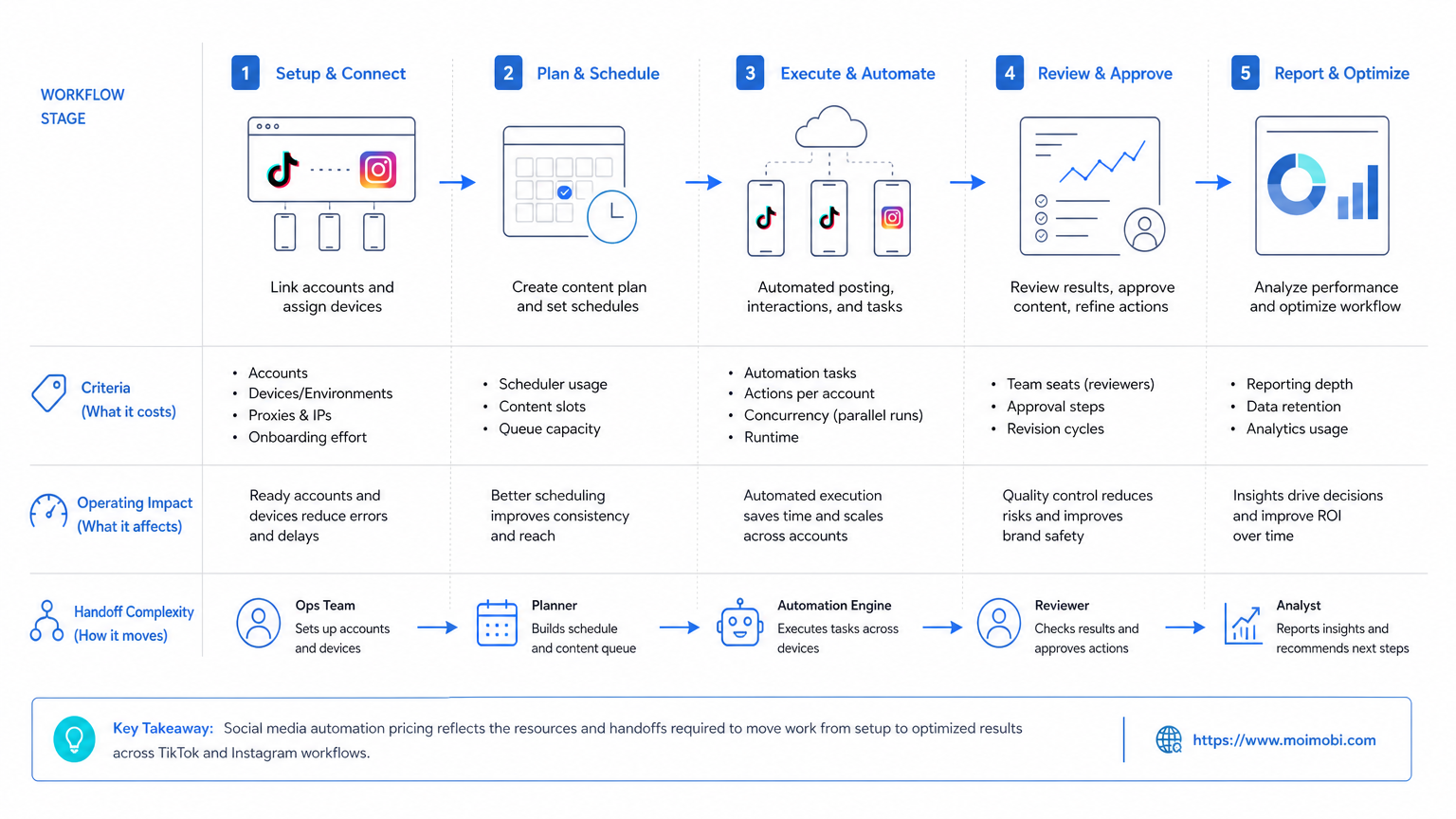
Evaluate social media automation pricing for TikTok and Instagram as operating capacity. The right plan is not simply the cheapest subscription. Instead, choose the plan that supports the number of accounts, workflows, devices, review gates, and recovery needs the team actually has.
Before buying, map the workflow, run a small pilot, and measure completion quality. If the work depends on mobile apps, account isolation, and repeated team handoffs, include those costs in the pricing comparison from the start.



