A Comet browser alternative is a browser or execution stack that gives a team more control over repeatable web and mobile work. The right choice depends on whether the team needs AI-assisted browsing, account-specific workspaces, controlled automation, or a mix of all three.
Comet is a Chromium-based browser with Perplexity AI capabilities and support for most Chrome extensions, according to its official help center. That can make it useful for research and individual browsing tasks. A social media team usually needs a broader decision: where each account runs, who can approve an action, and how a failed task is reviewed. Comet's setup documentation is a useful starting point for understanding its browser-first model.
For multi-account work, an alternative should be judged by operational control rather than by whether it has an AI sidebar. A cloud phone or isolated browser workspace may be more relevant when the work happens in mobile apps, requires separate account lanes, or needs repeatable handoff between operators.
Key Takeaways
- Comet is best evaluated as an AI-enabled browser, not as a complete account-operations system.
- A useful alternative separates research, browser execution, mobile execution, and approval duties.
- Account isolation is an operational control, not a promise about platform outcomes.
- Teams should keep sensitive publishing and customer replies behind human review.
- A short pilot should measure task completion, review time, failures, and recovery quality before expansion.
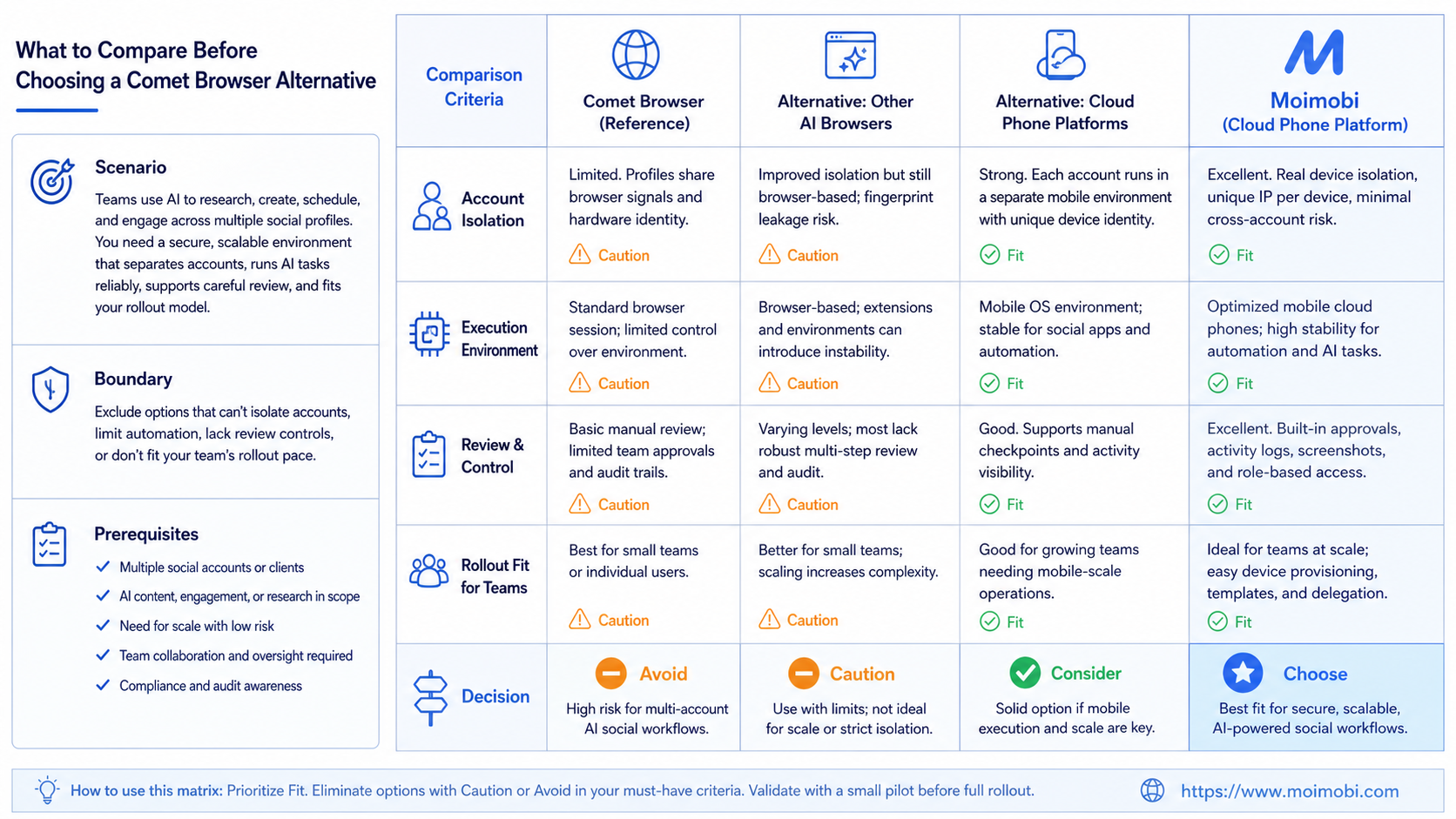
What to Compare Before Choosing a Comet Browser Alternative
Start with the work, not the feature list. A researcher who needs summaries and tab-level assistance has a different requirement from an agency that manages client work across multiple platforms.
The first comparison axis is the execution environment. A general AI browser helps an operator understand and navigate a web page. An operations platform must also define whether the task runs in a persistent browser profile, a mobile device, or an approved API workflow. WebDriver itself is a platform-neutral standard for programmatic browser control, which shows that browser automation is a distinct layer from AI assistance. The W3C WebDriver standard describes the automation interface, not a business approval or account-ownership model.
The second axis is separation. Playwright documents browser contexts as isolated, clean-slate environments with separate cookies and storage. That model is useful for testing and repeatability, but a business team still needs its own rules for account ownership, credentials, reviewers, and task history. Device isolation matters when a team wants clear workspaces rather than a shared browser used by everyone.
The third axis is control after a task starts. Ask whether a workflow can pause, request review, record an exception, and return a useful failure reason. A tool that starts work quickly but leaves no recovery record creates more operational work later.
A fourth axis is the boundary between assistance and authority. An AI browser may suggest a next step, summarize a page, or prepare a draft. It should not silently become the authority for public publishing, customer commitments, or account changes. Teams get a clearer comparison when they list which steps may be assisted, which must be reviewed, and which should never be automated without the platform's authorization.
This makes the evaluation more concrete. A research workflow can tolerate a wrong summary because an operator can verify it. A public post or customer reply has a different cost of error. The alternative that fits is the one whose controls match that cost, rather than the one with the longest feature list.
| Decision area | What to inspect | Why it changes the choice |
|---|---|---|
| Research support | Page summaries, tab context, and extension support | Fits individual browser work and research-heavy tasks |
| Account workspace | Profile separation, ownership, and session handling | Reduces confusion when several accounts or clients are involved |
| Execution channel | Browser, API, or mobile-app environment | Prevents a browser-only tool from being forced into mobile work |
| Review control | Approval gates, pause rules, and logs | Keeps public actions and customer replies accountable |
| Recovery | Failure records, rerun scope, and owner assignment | Makes pilots measurable instead of anecdotal |
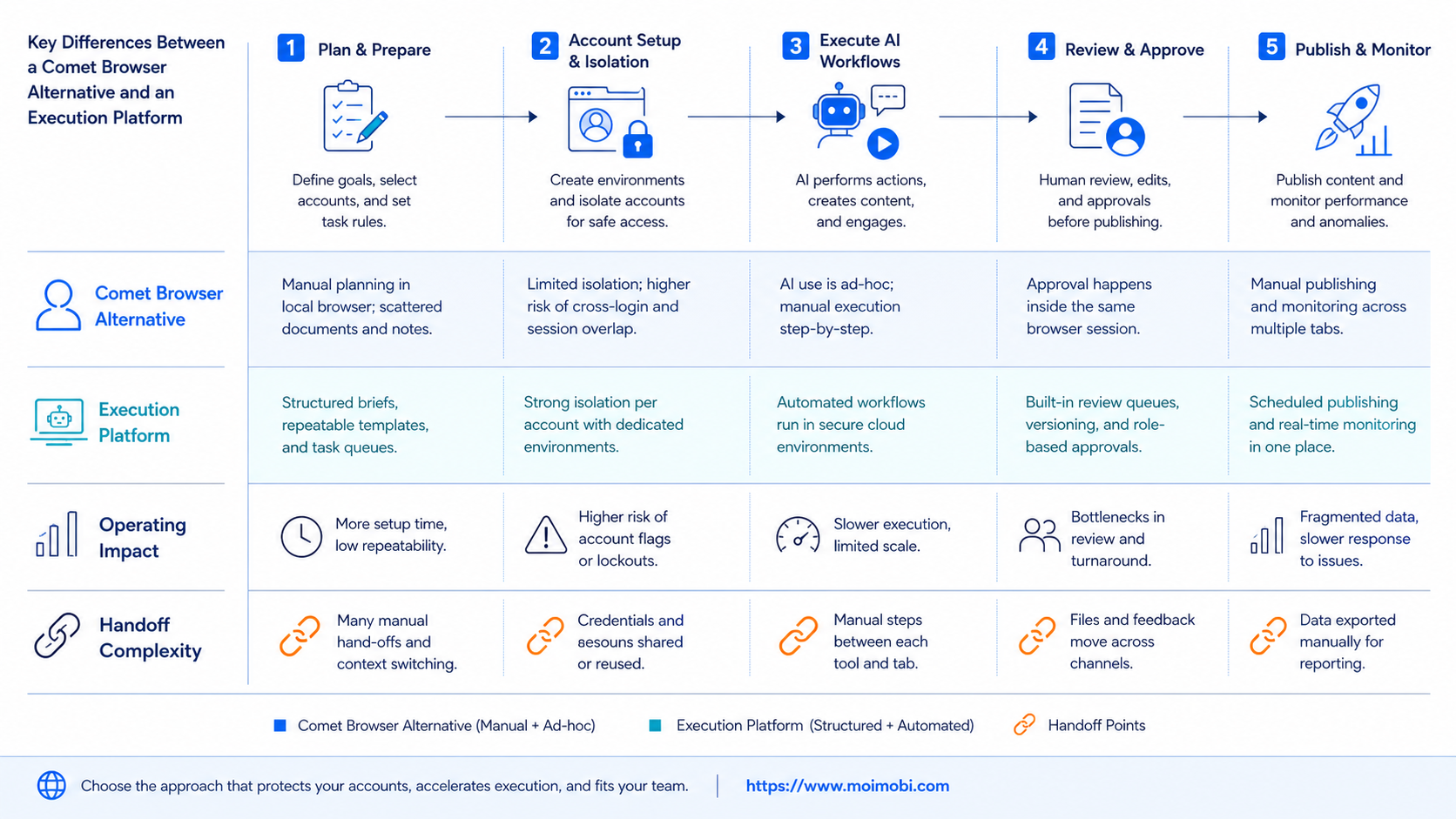
Key Differences Between a Comet Browser Alternative and an Execution Platform
The main difference is not whether a tool uses AI. It is whether the tool has a defined place for the work to run.
An AI browser is usually strongest when one person needs help reading, researching, comparing, or completing a browser task. An execution platform adds the operating layer around that task. It can assign a task to an account environment, separate browser and mobile work, and preserve a record for the next operator.
This distinction becomes clear in social media workflows. Content research may happen in a browser. A native-app review may happen on a mobile device. A customer question may need a human reviewer before any reply is sent. Multi-account management is therefore more than opening several sessions at once. It is a way to define which account, environment, and person owns each action.
Do not treat isolation as a shortcut around platform rules. Instagram's terms state that creating accounts, accessing information, or collecting information in an automated way requires express permission. The same terms also prohibit attempts to circumvent platform controls. Teams should use official APIs where available, limit automation to authorized workflows, and keep human review for actions that need judgment. Instagram's Terms of Use set that boundary directly.
Features, Workflow, and Trade-Offs
The best alternative depends on the bottleneck. A browser-centric workflow may benefit from AI research, structured notes, and a clear browser context. A mobile-first workflow may need a separate device environment and a different recovery path. Trying to make one surface do every job usually adds friction.
For browser automation, isolated contexts can improve reproducibility because storage and session state do not carry over by default. Playwright explains this benefit in its browser-context isolation guide. Production operations need an additional layer: decide which state should persist, who may reuse it, and when a task should stop.
Use this operating split:
- Use an AI browser for research, drafting, information triage, and operator-assisted web work.
- Use a separated browser profile when a task belongs to one specific account or client workflow.
- Use mobile automation when the necessary action genuinely happens inside a mobile app.
- Use human approval for publishing, sensitive replies, billing changes, or any action the team cannot safely reverse.
The trade-off is setup. Defined environments and review rules take more planning than an ad hoc browser session. They also make errors easier to locate: the team can see whether a problem came from content, the account, the environment, or the workflow step.
Pricing and Operational Considerations for a Comet Browser Alternative
The lowest browser price is not always the lowest operating cost. A small team may only need research assistance and a normal browser. A larger team may spend more in manual handoffs, shared credentials, rework, and unclear failures than it spends on the tool itself.
Compare costs in four groups: operator time, environment capacity, review effort, and recovery effort. Do not assume a feature called automation replaces all four. It may reduce one part of the process while leaving the rest manual.
For example, a content team can use an AI browser to prepare a post brief, then route the publishing task to the account owner. That process may be slower than a fully automatic action, but it preserves accountability. A team that needs repeated mobile-app execution should separately evaluate device capacity and social media marketing workflow needs instead of pricing everything as browser seats.
Avoid buying based only on the number of accounts or tabs. Ask how many concurrent tasks need an environment, how many actions require review, and how many failures the team can resolve without an engineer.
Set a pilot budget before comparing subscription tiers. Include one owner, a small account group, review time, and a documented recovery window. That keeps an early trial from becoming an unmeasured operational expense.
Which Option Fits Different Teams
Research-led teams, analysts, and creators who mainly need page understanding, writing assistance, and guided browser work.
Agencies and operations teams that need assigned account environments, browser and mobile task routing, approvals, and recovery records.
Teams without a clear workflow, an accountable owner, or permission to automate the relevant platform action.
A BitBrowser alternative or Ghost Browser alternative search often signals that a buyer is looking for separated browser workspaces. That does not automatically mean the team needs a full mobile stack. Start with the actual route: web dashboard, browser session, official API, or native app.
Choose a narrower browser tool when one operator owns the work and the task stays in the browser. Choose a more complete execution environment when several people, accounts, and channels must work together. The second case benefits from defined roles, review gates, and a task log more than from another generic AI feature.
Pilot Rollout, Measurement, and Recovery Checks
Run a pilot before moving a full account pool. Pick one narrow workflow, such as research-to-draft preparation or a reviewed content-publishing handoff. Do not begin with customer messaging or broad account changes.
- Choose one lane. Name the account group, workflow owner, and approved outcome.
- Define the execution surface. Record whether each step belongs in a browser, an official API, or a mobile app.
- Add a review stop. Require a person to approve public posts, customer replies, and irreversible changes.
- Track four signals. Measure completed tasks, correction time, stopped tasks, and recovery time.
- Review exceptions weekly. Keep the failure reason and next action, not only a success or failure label.
The pilot passes when the team can explain what ran, where it ran, who approved it, and how a failed step was handled. If those answers are unclear, improve the workflow before adding more accounts or automation.
Migration should also be gradual. Export or document the active workflow, assign a single owner for the pilot, and keep the previous process available until the new lane has completed enough reviewed runs. Do not move every account because the first workflow appears successful. A pilot only proves the lane that was tested.
Use a short recovery review after each exception. Record the starting environment, the last completed step, the operator decision, and whether the task can be retried without creating duplicate public activity. That record is more useful than a generic error message because it tells the next operator where to resume or when to stop.
Frequently Asked Questions
Is Comet a browser automation platform?
Comet is presented by Perplexity as a Chromium-based browser with AI capabilities. That does not by itself define a full operations workflow, approval process, or account-management model.
What is the main reason to look for a Comet browser alternative?
Teams usually need a different execution model: persistent account workspaces, browser automation, mobile execution, or stronger team controls.
Is a BitBrowser alternative the same as an AI browser alternative?
Not necessarily. The first search often concerns profile separation and account workspaces. The second may concern AI-assisted browsing. A team can need one, both, or neither.
Can one browser handle social media operations for a team?
It can support research and some web tasks. Teams should still define account ownership, permissions, review, and the channel where each action is authorized.
Should customer replies be fully automated?
Not by default. Use automation for routing, drafts, and task records. Keep a human review point for sensitive, commercial, or ambiguous messages.
How should a team test a new execution tool?
Start with one account group and one reversible workflow. Track completion, correction time, stops, and recovery before expanding.
Does account isolation determine a platform outcome?
No. Isolation helps organize environments and reduce accidental session mixing. It does not override platform rules or replace compliant operating practices.
When does mobile execution matter?
It matters when the required workflow is genuinely native-app based and cannot be completed through an authorized API or normal browser process.
Conclusion
The best Comet browser alternative is not automatically another AI browser. For research and operator-assisted web work, an AI-enabled browser may be enough. For multi-account social media operations, the decision should start with execution environment, account ownership, approval control, and recovery visibility.
Use a small pilot to separate browser work from mobile work, then measure the cost of handoffs and exceptions. Choose the tool stack that makes those decisions clearer. That is a more durable buying rule than comparing AI features alone.
Sources