
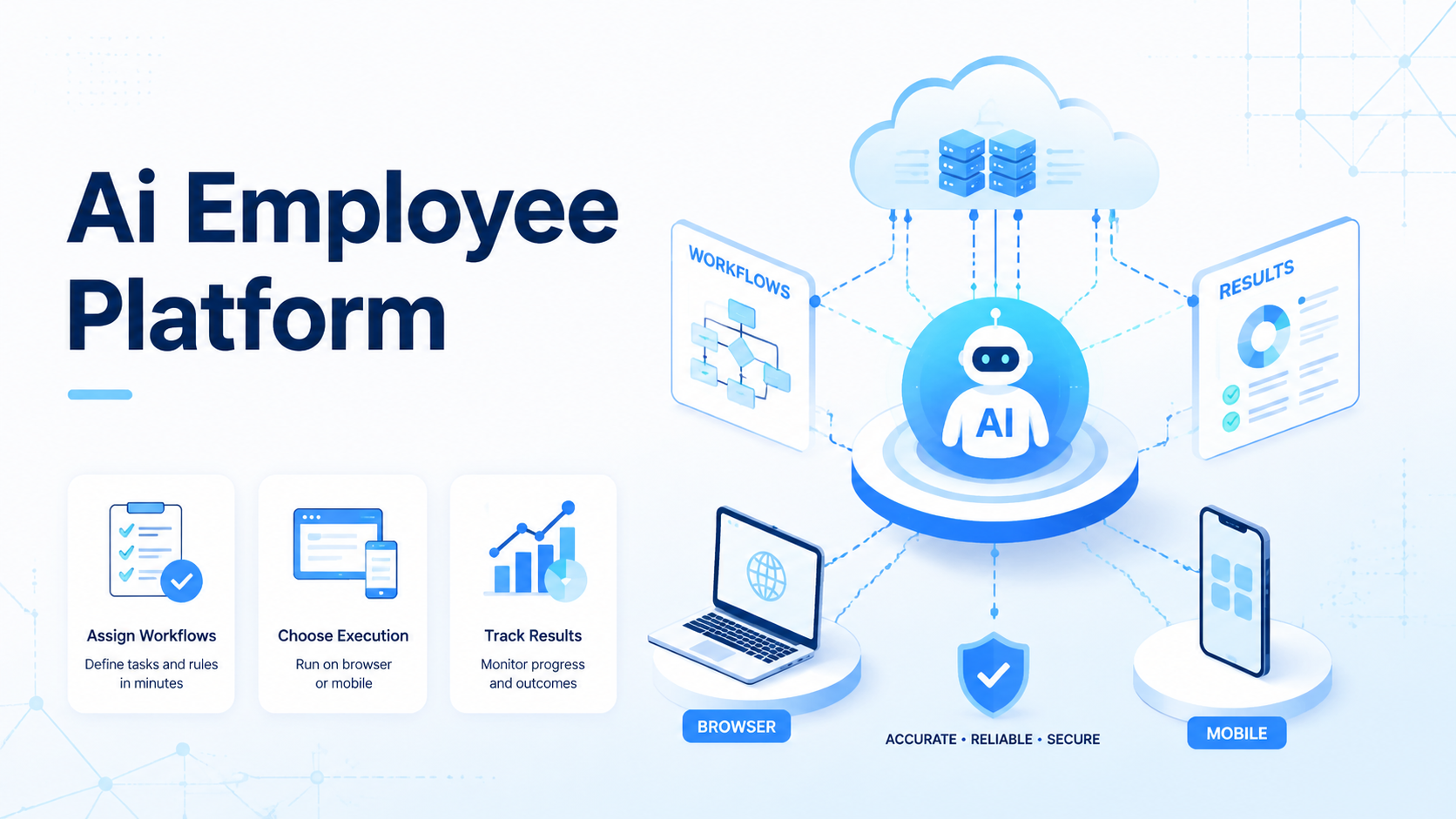
An AI employee platform is software for assigning repeatable online work to AI-driven workers. It keeps task context, account access, execution environments, and review logs under control. It is not just a chatbot that gives advice. The platform should connect instructions to real browser or mobile execution, then leave enough evidence for a person to check the result.
Teams search for this topic when manual online work starts to break down: support teams check dashboards, growth teams prepare lead lists, and operations teams move data between web apps.
Social teams may also manage accounts across platforms. At small scale, people can handle this with checklists and spreadsheets. At team scale, repetitive work needs clearer assignment, cleaner handoff, and better recovery rules.
Scale changes the job. Once several people touch the same accounts and tools, the team needs a shared execution record instead of private memory.
The practical question is not whether AI can click buttons. The real question is whether the team can control where the AI works, which account it uses, what it is allowed to change, and what happens when the task fails. A useful AI employee platform should make those answers visible before the team expands automation.
Visibility comes first.
Key Takeaways
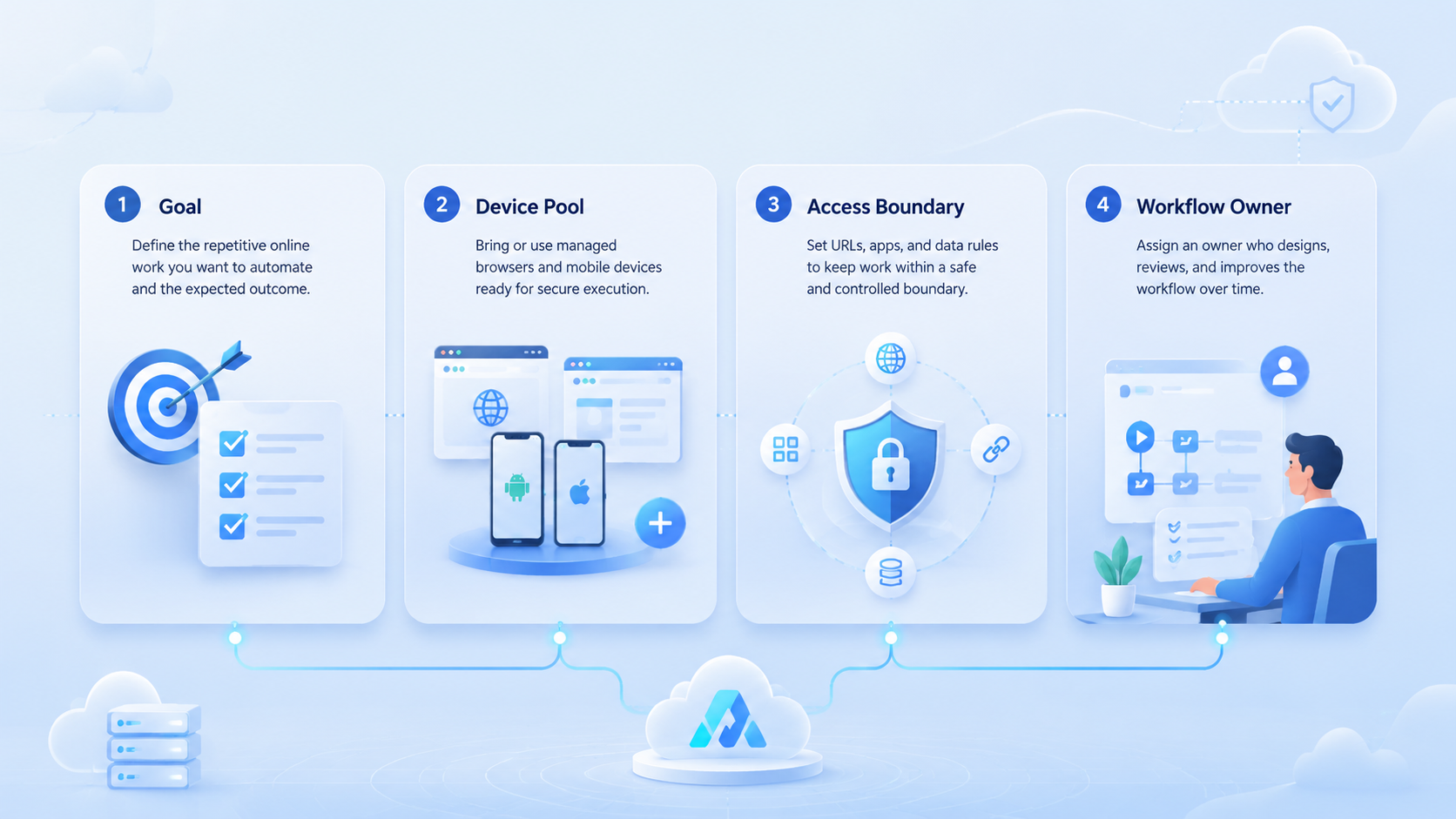
- AI employee platform context: tasks, execution environments, accounts, and review logs
- Repetitive work readiness: clear inputs, steps, outputs, and stop rules
- Execution boundary: browser work, app work, and account-based work
- Pilot measurement: accuracy, context selection, exceptions, and reviewer trust
- Operating principle: support operators instead of hiding work
The Core Idea Behind AI Employee Platform for Teams Managing Repetitive Online Work
The core idea is simple: repeated work should become a managed workflow, not a pile of prompts. An AI employee platform gives each worker a task, an allowed environment, and a result format. The team can then review the work without guessing what happened.
A strong setup has three layers. Task definition states what the AI worker should do, where it starts, what output counts as done, and when it must stop.
Execution gives the worker a browser, mobile device, account space, or app session. Governance records the result, the exception, and the person responsible for review.
That split is useful because each layer fails differently, and each failure needs a different owner.
For web workflows, an ai browser can help because many repetitive tasks happen inside dashboards, web apps, forms, and account portals. The browser cannot be treated as a blank surface. It needs profile context, session boundaries, and clear action limits.
Context is the control surface.
Mobile tasks may need another layer. A cloud phone can support Android app workflows that do not fit a normal desktop browser. In that case, the AI employee platform should route the work to the correct environment instead of forcing every task into one execution method.
Why Teams Search for This Topic
Teams usually look for AI employees software after they hit a coordination problem. The task is not hard once; repetition across people, accounts, time zones, and tools creates the operating load.
A marketing team may check campaign dashboards, a marketplace team may update product fields, and a customer operations team may triage messages before a human replies.
QA teams may repeat the same app flow across device contexts. These jobs are not creative strategy. They are operational loops.
They still need judgment, but the judgment should sit around the workflow rather than inside every repeated click.
The wrong model is to treat the AI employee as an independent worker with unlimited freedom. That creates weak audits. The better model is to treat it as a controlled execution role. It works inside a defined scope, follows a workflow, reports structured output, and stops when the state is unclear.
Freedom is not the goal.
Google Search Central's guidance on helpful content is useful for content-related operations because it pushes teams to focus on user value, not volume alone. The same discipline applies to repetitive online work. Automation should improve useful execution, not only increase activity counts.
Who Benefits Most and In What Situations for an AI Employee Platform
An AI employee platform fits teams that already have repeated online processes. It does not fit every business just because AI is available. The strongest fit appears when people can describe the task in a checklist and still spend too much time doing it by hand.
- Operations teams with daily web app checks.
- Growth teams preparing or cleaning lead data.
- Support teams triaging inboxes and dashboards.
- Agencies managing repeated client account tasks.
- QA teams repeating app flows across environments.
- One-off tasks with no repeatable process.
- High-risk changes without approval steps.
- Projects with unclear account ownership.
- Work that needs deep human judgment every time.
- Teams that only want a generic chatbot.
The fit becomes stronger when account context matters. A team using multi-account management needs to know which worker touched which account, which environment was used, and whether the result belongs to the right workflow.
Account history should stay readable.
The decision can be framed as a workflow maturity check. A task is a better candidate when it already has a known owner, known input, known output, and known exception path. Teams that still debate what the task means every time should define the process before automating it.
For example, “check these five account dashboards every morning and record status changes” is a strong candidate. “Improve our online operations” is not. The first task has a start point, an environment, a result, and a reviewer. The second task is a broad goal that still needs human planning.
Specific work travels better through automation.
Operating Boundaries for AI Employee Platform Rollout
Rollout boundaries prevent a pilot from becoming uncontrolled automation. The team should decide what the AI employee can read, what it can change, what requires approval, and what must stop the run. These decisions are operational controls, not paperwork.
A practical boundary map usually includes five fields:
- Account scope: assigned test accounts in one workspace
- Action scope: read, classify, update status, but do not publish
- Data scope: update status and notes, not billing data
- Review scope: approve before sending replies
- Stop scope: wrong account, missing page, or unclear state
These boundaries also help compare AI employees software. A tool that only executes a prompt may look flexible, but it can be hard to control. A tool that supports account assignment, device context, action limits, and structured logs is easier to run inside a team.
Boundaries should be written before adding more accounts. Otherwise, each new account adds another place where a worker can act in the wrong context. Slow expansion is usually easier to manage than a large rollout that needs cleanup later.
Write the rules first.
How to Evaluate or Start Using AI Employee Platform for Teams Managing Repetitive Online Work
Start with a narrow pilot. The first goal is not maximum automation. The first goal is to prove that one repeatable workflow can run in the right environment and produce a reviewable result.
Use these checkpoints before expanding:
- Define the work unit. The task should have a clear start, output, and stop rule. Avoid broad goals such as “manage the account.”
- Choose the execution layer. Use a browser profile for web dashboards, a mobile environment for app tasks, and a device pool for parallel mobile capacity.
- Map account ownership. Every account should have an owner, allowed environment, and review path.
- Set action boundaries. Decide which actions can run automatically and which need approval.
- Record structured output. Store task status, fields changed, evidence, exception reason, and reviewer notes.
- Test recovery states. Check expired sessions, missing pages, slow apps, wrong accounts, and duplicate records.
For mobile-heavy teams, mobile automation should be evaluated as part of the execution layer, not as a separate toy. Work that depends on app sessions, Android behavior, or device-specific state may need a mobile environment instead of a desktop browser.
The pilot should also include a rollback plan. Some tasks should retry once. Some should stop immediately. Others should hand off to a human.
Software that cannot express these differences will be difficult to run at scale, especially when new account groups, reviewers, and exception types are added later.
Recovery is part of the product evaluation, not a late operational detail.
Mistakes That Reduce Results
The most common mistake is automating before the workflow is stable; a messy manual process usually becomes a messy automated process. The team should first remove unclear ownership, missing fields, and undefined review steps.
Clean the process first.
Another mistake is using one shared environment for everything. Repetitive online work often crosses accounts, apps, and regions, so shared profiles make results harder to audit and failures harder to diagnose.
Teams also overmeasure completion volume. A dashboard full of completed tasks can still hide poor quality. Better metrics include correct account selection, clean handoff, exception clarity, and reviewer confidence.
Volume can mislead.
Device and routing design should not be an afterthought. Device isolation, clean network routing, and a proxy network may all matter when teams separate account spaces and match routing to operating context.
For app-related workflows, policy awareness should be part of the operating process. Google Play's Policy Center is a useful reference for teams working around Android app distribution or app behavior rules. It should not be treated as a substitute for legal or platform-specific review.
How to Compare AI Employee Platform Options
Comparison should start with execution fit. A platform may look strong in a demo, but the real test is whether it can operate inside the team's existing account, browser, mobile, and review structure. A good evaluation uses one real workflow instead of a generic feature checklist.
Demo quality is not operating quality.
Start with the task path. Can the worker open the correct workspace, read the correct page, complete the expected fields, and stop when state changes? Then inspect the environment path. Can the same system route browser tasks, mobile tasks, and account-specific sessions without mixing context?
Teams should also review how evidence is stored. A run log should show the account, environment, task version, output, exception, and reviewer. Without those fields, the team may know that work happened, but not whether the work can be trusted.
Logs should answer operational questions.
Use this scorecard during selection:
| Evaluation area | Strong answer | Weak answer |
|---|---|---|
| Task scope | Clear allowed actions and stop rules | Open-ended prompts only |
| Environment routing | Browser and mobile paths are explicit | Worker chooses context loosely |
| Account handling | Each account maps to a known workspace | Shared sessions or unclear ownership |
| Review evidence | Logs include output and exceptions | Logs only show success or failure |
| Expansion model | Pilot can grow by account or workflow | Rollout requires a full rebuild |
This comparison keeps the buying process grounded. The best AI employee software for one team may be too heavy for another, so the right choice depends on workflow maturity, device needs, account count, and review requirements.
Team Handoff and Ownership Rules
Ownership rules decide whether the platform becomes useful infrastructure or another hidden tool. Each workflow should have a task owner, an environment owner, and a reviewer. These roles can be the same person in a small team, but the responsibility should still be named.
Names reduce ambiguity.
The task owner defines the steps and expected result. The environment owner confirms that browser profiles, cloud phones, sessions, and routing are ready. The reviewer checks output quality and updates the workflow after exceptions.
Clear handoff also reduces rework. When a run stops, the next person should see the account, the last completed step, the failure reason, and the next recommended action. Without that trail, a human operator wastes time rediscovering what the AI worker already saw.
Good handoff saves attention.
Teams can keep the handoff simple at first:
- One owner for the workflow
- One owner for account and environment access
- One reviewer for the first pilot
- One shared place for run notes and exceptions
- One weekly review of repeated failures
This structure gives the AI employee platform a management layer. It also makes expansion safer because new accounts and tasks inherit the same ownership model.
Pilot Measurement and Recovery Review
A useful pilot measures whether the AI employee platform improves control. It should not only report whether the task finished. The reviewer needs to know whether the result can be trusted.
Trust is measurable.
| Review area | Good signal | Stop signal |
|---|---|---|
| Task clarity | The worker follows a defined checklist | The worker interprets broad goals |
| Context accuracy | The correct account and environment are used | The worker switches context without approval |
| Output evidence | The result includes fields, state, or evidence | The result only says “done” |
| Exception handling | Failures name the blocked step | Failures are vague or hidden |
| Human review | A reviewer can approve quickly | A reviewer must replay the whole run |
Recovery review is where many pilots fail. Test the boring cases: login expiry, page changes, app lag, missing buttons, duplicate entries, and blocked actions. Each failure should map to retry, stop, or human handoff.
Boring failures decide reliability.
After the pilot works, expand one variable at a time: add more accounts before adding new task types, and add new task types before changing the execution layer. This keeps failures easier to explain.
Frequently Asked Questions
1. What is an AI employee platform
It is a system for assigning repeatable digital work to AI-driven workers while tracking execution context, output, exceptions, and review evidence.
2. Is AI employee software the same as RPA
Not exactly. RPA usually follows fixed rules, while AI employee software may interpret pages or tasks within a defined operating scope. It still needs boundaries and logs.
3. What tasks should teams start with
Start with tasks that have clear inputs and outputs. Dashboard checks, data cleanup, app checks, and inbox triage are better than vague strategic work.
4. Does every workflow need a cloud phone
No. Browser workflows can run in browser profiles, while mobile app workflows may need cloud phones or isolated Android environments.
5. How should teams judge quality
Judge account accuracy, output evidence, exception clarity, and reviewer trust instead of relying only on task count.
6. What is the biggest rollout risk
The biggest risk is scaling before the workflow is defined, because undefined ownership and missing stop rules create weak automation.
7. Can small teams use an AI employee platform
Yes, when the task repeats often enough to justify setup. A small team should start with one workflow, a small number of accounts, and one named reviewer who can inspect every run during the pilot.
8. How does this connect to AI browser execution
AI browser execution is one way the worker performs web tasks. The platform around it should manage context, permissions, logs, and recovery.
Conclusion
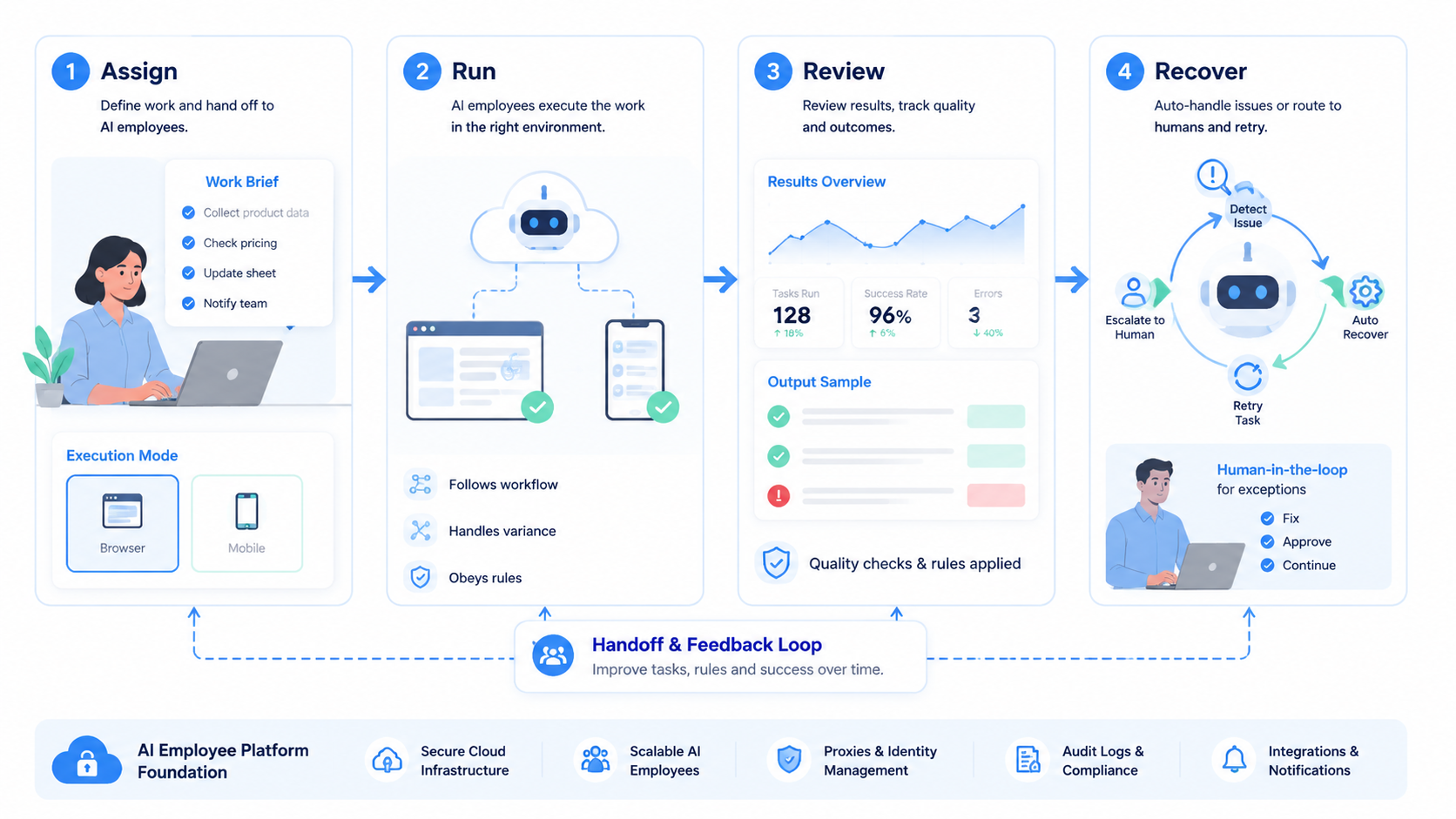
This operating model helps teams turn repetitive online work into controlled execution. It works best when tasks are defined, account context is clear, and humans can review the result without rebuilding the run from scratch.
The next step is a small pilot. Pick one repetitive workflow, one account group, and one execution layer. Define the stop rules, record structured results, and test recovery cases before expanding. A pilot that improves control and review quality gives the team a stronger basis for scaling.



